Fastest WordPress Theme 2026: 9 Lightweight Themes Measured
The same homepage loading in each theme under throttled mobile conditions, played at quarter speed.
GeneratePress was the lightest full-featured free theme in our comparison. Hello Elementor was smaller, but needs a builder to do much. Astra, Neve, Blocksy and Kadence were close enough that their features may matter more than the speed difference. Hosting, images and plugins still have a larger effect on a finished site.
How to read the speed results
Every theme used the same local WordPress site, content and images, with default settings and no plugins, menus or widgets. We measured the homepage and a post on mobile and desktop, rotating the themes across repeated runs and reporting medians.
The video uses the median of seven throttled mobile loads for each theme, played at quarter speed. Lighthouse results use three runs per page and device. This measures the weight and behavior of clean defaults, not a finished-site ranking. Hosting, caching, images and plugins can outweigh the differences shown here.
The Results
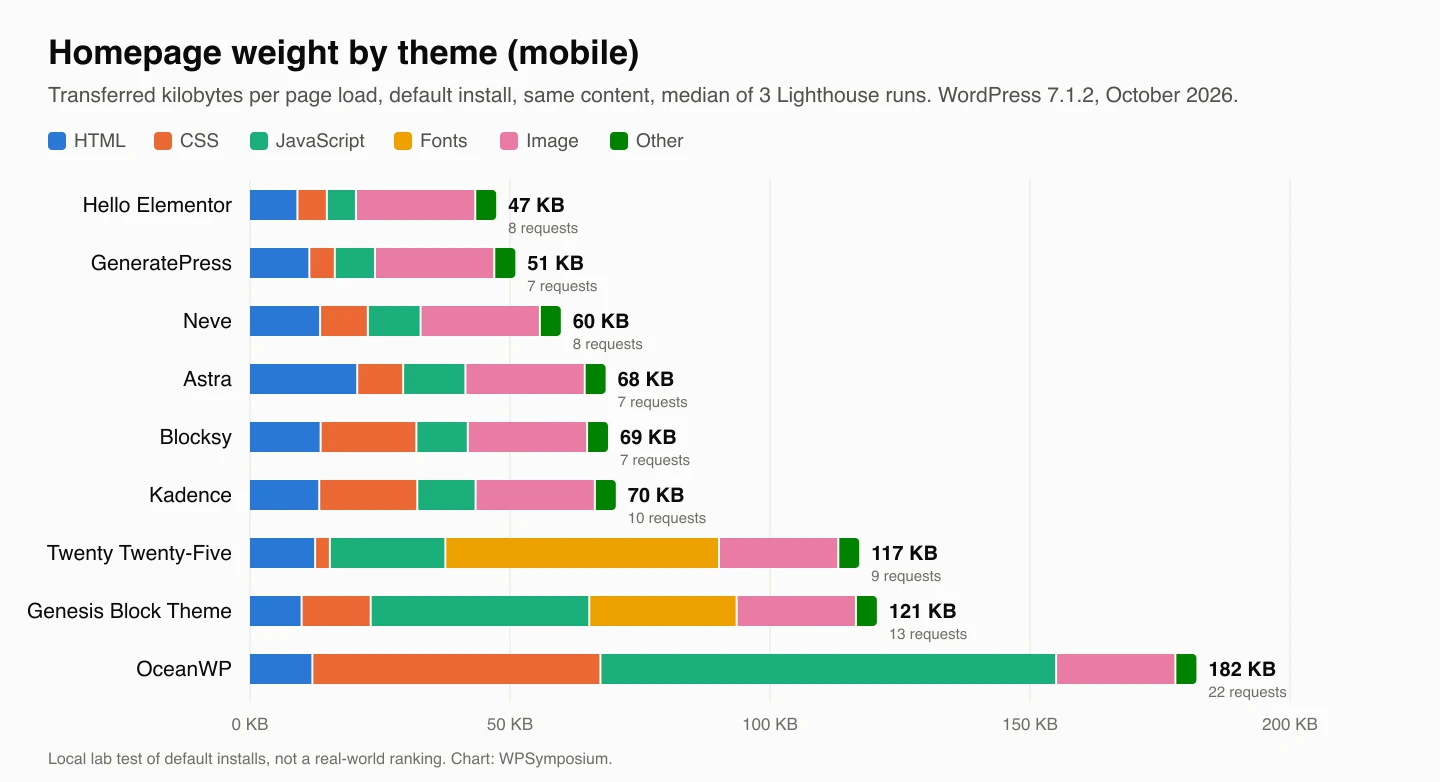
Homepage weight by file type for each theme, mobile Lighthouse runs.
Homepage (mobile)
All sizes are transferred kilobytes (after gzip), median of 3 runs. The image was the same 22.9 KB file on every theme, and about 4 KB of “other” requests (the WordPress site icon) is included in the total.
Hello Elementor’s mobile homepage transferred 47.3 KB across eight requests, followed by GeneratePress at 51.0 KB across seven and Neve at 59.8 KB across eight. Astra and Blocksy both needed seven requests, transferring 68.4 KB and 68.8 KB; Kadence transferred 70.3 KB across ten.
Twenty Twenty-Five transferred 117.2 KB across nine requests, Genesis Block Theme 120.6 KB across 13, and OceanWP 182.0 KB across 22. Their page structures contained 94, 60 and 74 elements respectively, compared with 30 for Hello, 66 for GeneratePress, 116 for Neve, 98 for Astra, 106 for Blocksy and 110 for Kadence.
The largest differences came from scripts, styles and fonts. OceanWP loaded 87.6 KB of JavaScript and 55.4 KB of CSS; Genesis loaded 42.0 KB of JavaScript and 28.3 KB of fonts. Twenty Twenty-Five’s fonts added 52.6 KB. GeneratePress needed only 4.9 KB of CSS and 7.7 KB of JavaScript. None of Hello, GeneratePress, Neve, Astra, Blocksy or Kadence loaded web fonts by default; only Genesis and OceanWP loaded jQuery.
DOM elements is the Lighthouse count of HTML elements on the page; fewer means less work for the browser. Desktop runs used the larger 1024 px copy of the image (48.5 KB), which added the same 25.6 KB to every theme. Everything else was the same on desktop, except that Genesis Block Theme loaded one font file fewer.
Blog post (mobile)
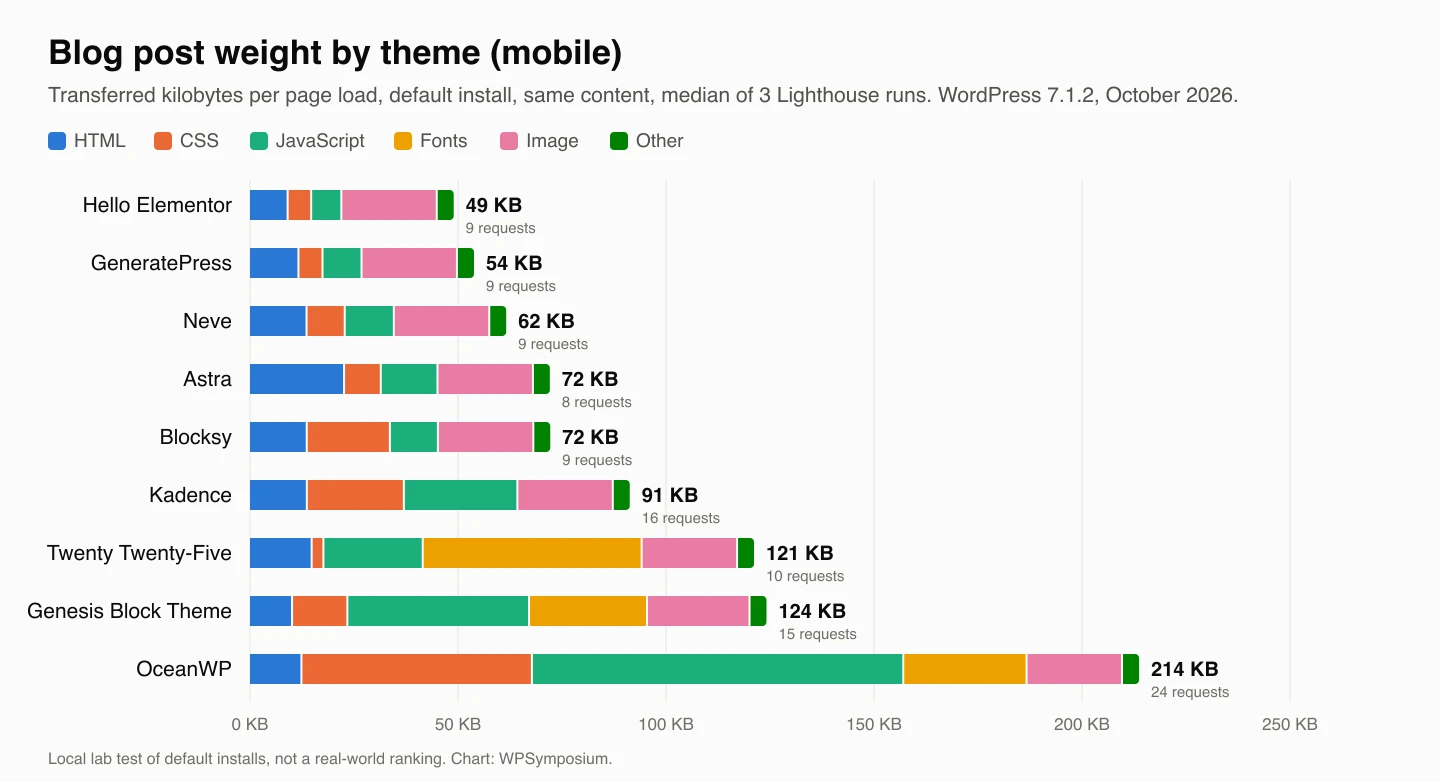
Blog post weight by file type for each theme, mobile Lighthouse runs.
Blog posts stayed close to homepage weight for Hello Elementor, GeneratePress, Neve, Astra and Blocksy. They transferred 49.0, 53.8, 61.6, 72.1 and 72.2 KB respectively, increases of 1.7, 2.8, 1.8, 3.7 and 3.4 KB. Request counts were nine, nine, nine, eight and nine.
Kadence rose by 21.0 KB to 91.3 KB and 16 requests. Twenty Twenty-Five rose by 4.0 KB to 121.2 KB and ten requests; Genesis rose by 3.6 KB to 124.2 KB and 15 requests. OceanWP had the largest increase, adding 31.7 KB for a 213.7 KB post with 24 requests.
Most themes add a few kilobytes on posts for the comment form. Kadence and OceanWP add much more, for reasons covered below.
Lighthouse scores, Core Web Vitals and TTFB
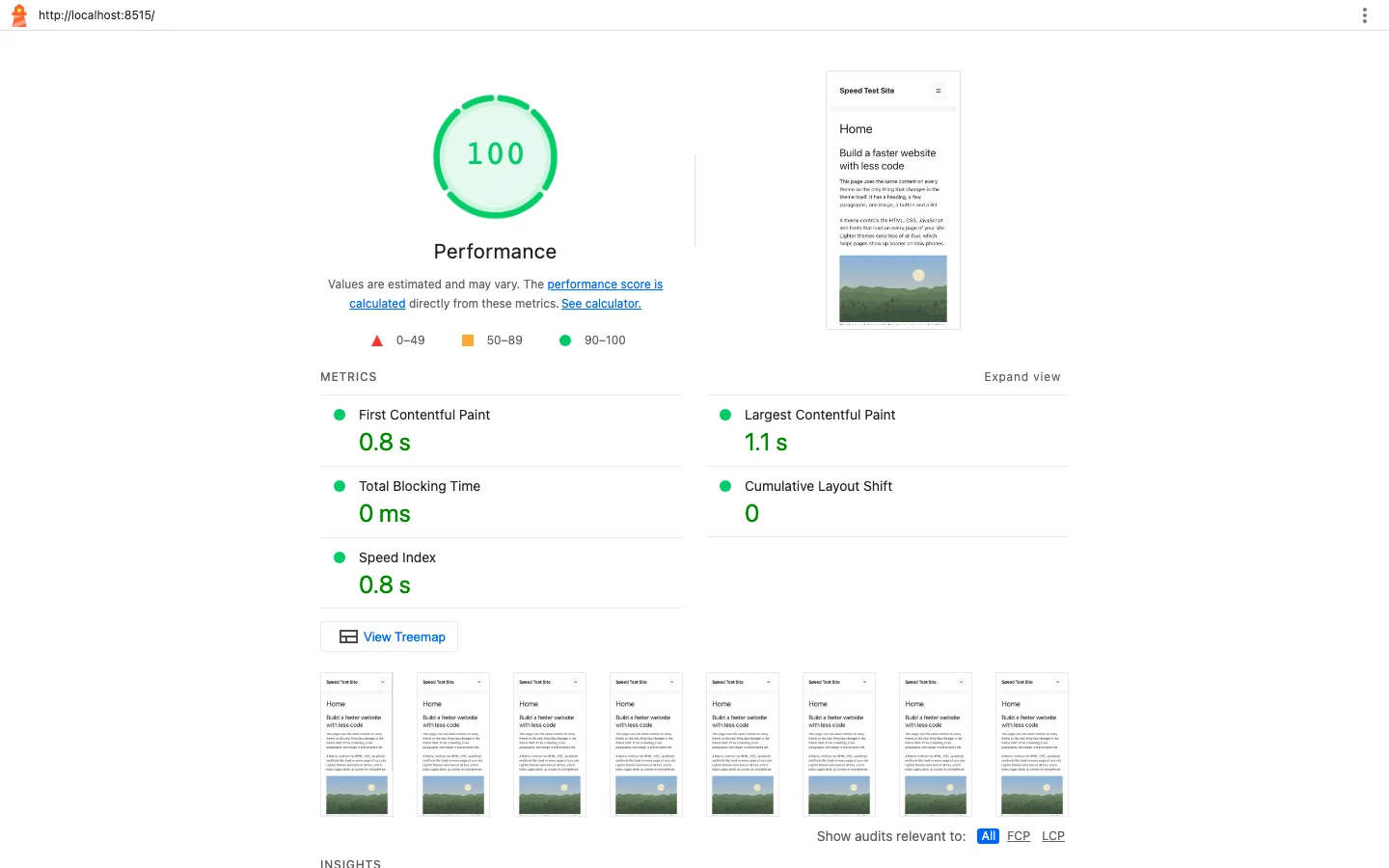
Lighthouse 13.5 mobile report for GeneratePress on the test homepage.
GeneratePress, Hello Elementor, Neve, Astra, Blocksy and Kadence scored 100 on both mobile pages. Their homepage/post largest-content times were 1.06/1.21 seconds, 1.21/1.22, 1.21/1.35, 1.21/1.35, 1.21/1.36 and 1.36/1.52 respectively.
Twenty Twenty-Five and Genesis scored 100 on the homepage and 99 on the post, with largest-content times of 1.65/1.81 seconds and 1.65/1.66. OceanWP scored 99/98 with times of 1.96/2.26 seconds. Desktop homepage times ranged from 0.33 seconds for GeneratePress and Hello to 0.49 for OceanWP; Neve and Twenty Twenty-Five took 0.36, Astra, Blocksy and Kadence 0.37, and Genesis 0.41.
Median server-response times were tightly grouped: GeneratePress 22/23 ms, Hello 20/19, Neve 31/28, Astra 29/23, Blocksy 22/20, Kadence 32/26, Twenty Twenty-Five 33/30, Genesis 21/19 and OceanWP 31/32 for homepage/post. These small local differences should not be treated as production hosting guarantees.
Every theme scored 100 on desktop. Total Blocking Time was 0 ms for all nine, and layout shift (CLS) was 0, apart from tiny values of 0.007 and 0.008 on the OceanWP and Genesis Block Theme posts. LCP (Largest Contentful Paint) is when the biggest thing on screen, here the image or heading, finishes showing.
Local TTFB has no network delay, so it only reflects how long PHP took to build each page: 19 to 33 ms. A 10 ms gap is far too small for a visitor to notice, and any page cache would erase it.
How the homepage loads on a slow phone
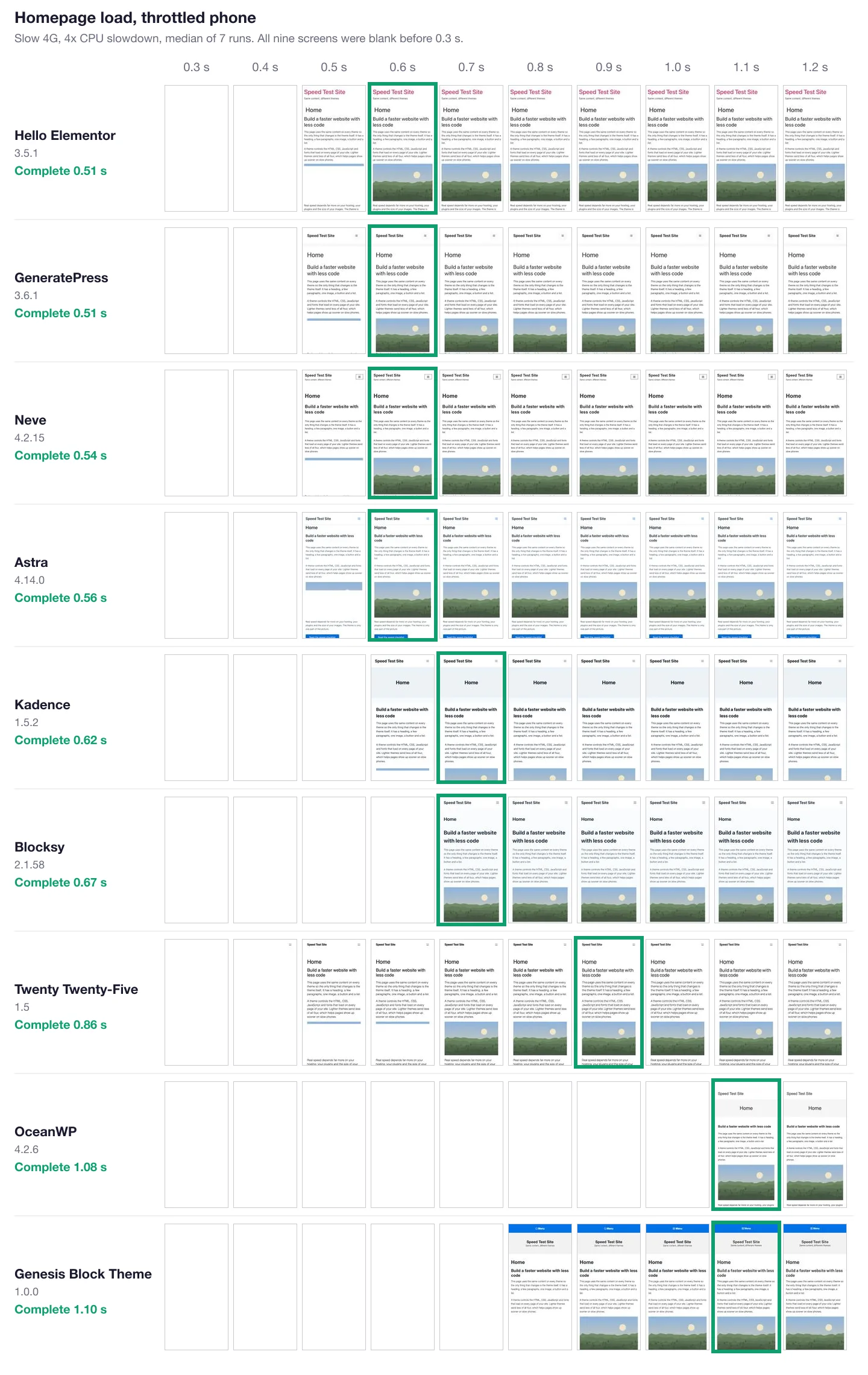
Each theme’s median load out of 7, in 0.1 second steps, on slow 4G with a 4x CPU slowdown and a 412 px wide screen. A green border marks the first frame after the screen stopped changing.
Lighthouse estimates its timings, so the homepage was also recorded loading in a real Chromium browser under the same slow 4G and 4x CPU limits. Hello Elementor, GeneratePress, Neve and Astra finished drawing within 0.05 seconds of each other (0.51 to 0.56 s), with Kadence and Blocksy close behind at 0.62 and 0.67 s. Twenty Twenty-Five showed text first but kept changing until its Manrope font swapped in at 0.86 s, Genesis Block Theme finished at 1.10 s when its fonts arrived, and OceanWP showed nothing at all until 1.06 s. These recorded times are shorter than Lighthouse’s simulated ones because the two model the slow network differently, so compare themes within one set of numbers, not across them.
Theme files and downloads
Hello Elementor contributed 5.7 KB of its own files to the homepage, with a 0.6 MB download and 1.1 MB installed size. GeneratePress contributed 7.0 KB, with a 1.1 MB download and 2.7 MB installed size. Neve contributed 13.7 KB, with 3.8 MB downloaded and 7.7 MB installed; Astra contributed 15.2 KB, with 6.7 MB and 22.5 MB respectively.
Kadence’s own contribution was 24.5 KB, with a 2.1 MB download and 8.4 MB installed size. Blocksy added 28.3 KB, with 3.8 MB and 9.8 MB. None of these six loaded web fonts by default.
Genesis Block Theme added 43.0 KB, including a self-hosted text font and icon font, despite a small 0.35 MB download and 0.5 MB installed size. Twenty Twenty-Five added 52.6 KB of self-hosted Manrope, with an 8.2 MB download and 8.6 MB installed size. OceanWP added 100.2 KB, with a 6.7 MB download and 19.0 MB installed size; its icon assets included Font Awesome CSS and Simple Line Icons on posts.
“Theme’s own files” counts only CSS, JavaScript and fonts loaded from the theme’s folder, not inline CSS or WordPress core files. Download size says little about front-end speed: Astra’s 22.5 MB folder sent less code to visitors than Kadence’s 8.4 MB one.
GeneratePress says on WordPress.org that a fresh install adds less than 10 KB (gzipped) to your page. Our test site agrees: its stylesheet and menu script came to 7.0 KB.
What Makes a Theme Heavy
Four habits separate the light themes from the heavy ones.
- Loading jQuery. OceanWP and Genesis Block Theme both load jQuery plus jQuery Migrate, about 36 KB of JavaScript before the theme’s own code runs. None of the other seven needed it.
- Loading features you are not using. OceanWP loaded Font Awesome, a lightbox, a slider library (Flickity) and a custom select-box script on a page with no icons, galleries, sliders or forms. Kadence loaded a carousel library on every blog post for its related posts section.
- Fonts. Twenty Twenty-Five sends a 52.6 KB variable font file, which is nearly half its page weight. The classic themes default to system fonts, so they send none. No theme loaded fonts from Google’s servers by default, which is good for privacy as well as speed.
- Inline CSS. Astra prints its settings as CSS inside the HTML of every page. That made its HTML the largest in the test (20.8 KB transferred, about 115 KB uncompressed, with roughly 62 KB of that being Astra’s inline CSS). Inline CSS saves a request, but it cannot be cached between pages the way a separate file can.
WordPress core also adds a 5.7 KB emoji script to every theme. Blocksy is the only one of the nine that turns it off by default.
Ranking: the Fastest WordPress Themes in 2026
The order below is by page weight and requests across both test pages, with Lighthouse timings as a tie-breaker. The gaps inside the second group are small enough that a different page could reorder them.
1. GeneratePress: fastest full-featured theme
GeneratePress sent the least code of any theme with a proper header, menu, sidebar layouts and customizer options. It had the fewest requests (7), the smallest CSS of the classic themes (4.9 KB) and the fastest mobile LCP (1.06 s). The free theme is updated less often than some rivals (3.6.1 dates from December 2025). GP Premium costs $59 a year for up to 500 sites, as of October 2026. Check current pricing on the GeneratePress site.
2. Hello Elementor: lightest, with a big catch
Hello Elementor posted the smallest numbers: 47 KB, no theme JavaScript at all, and just 30 DOM elements. But it got there by doing very little. With no menu assigned it showed only the site title and tagline, with no navigation. Hello is meant to be a blank canvas for Elementor, which brings its own CSS and JavaScript. Elementor was not part of this test, so do not read Hello’s result as “Hello plus Elementor is the fastest setup.” Our Hello Elementor review measures Hello with Elementor installed. Our page builder comparison covers what builders add.
3. Neve
Neve came in at 60 KB with 8 requests and no jQuery, the lightest multipurpose theme after GeneratePress. Right after activation, Neve put a “100+ Starter Sites” banner on the dashboard. Neve Pro starts at $69 for the first year and renews at $139, according to Themeisle’s pricing page in October 2026.
4. Astra
Astra loaded only 7 requests, tied for fewest, and no jQuery. Its weight (68 KB) comes mostly from the inline CSS described above. In practice it matched Neve and Blocksy on every Lighthouse timing. Astra Pro is $69 a year or $249 one time, as of October 2026. See the Astra site for current plans.
5. Blocksy
Blocksy matched Astra almost exactly (69 KB, 7 requests) with a different mix: more CSS (18.4 KB), less JavaScript, and no emoji script. It showed no onboarding banner on the dashboard after activation. Blocksy Pro starts at $69 a year or $199 lifetime for one site, as of October 2026.
6. Kadence
Kadence was light on the homepage (70 KB) but jumped to 91 KB and 16 requests on the blog post. That extra weight is the Splide carousel script and styles for its related posts feature, which loaded even though our test site had only one post, so there was nothing related to show. If you do not want related posts, the Customizer’s single post settings have a “Show Related Posts?” switch. Kadence’s paid plans start at $99 a year for the theme and blocks bundle, as of October 2026. See Kadence’s plans.
7. Twenty Twenty-Five (baseline)
The default WordPress theme weighed 117 KB, more than six of the eight classic themes. Most of that is its Manrope font and the Interactivity API script (about 17 KB) that its navigation block loads. It is still very fast, and it is the theme to beat if you want to build everything in the Site Editor.
8. Genesis Block Theme
StudioPress’s free block-editor theme weighed 121 KB, including jQuery and two font files. It also requested a Gravatar image from an outside server on the blog post. The download is version 1.0.0, its readme says it was tested up to WordPress 5.7, and its files are dated April 2021. It worked on WordPress 7.1.2, but it is not actively developed. More on Genesis below.
9. OceanWP
OceanWP was the heaviest by a wide margin: 182 KB and 22 requests on the homepage, 214 KB and 24 requests on the post. It also had the lowest mobile Lighthouse scores in the test (99 on the homepage, 98 on the post). The good news is that OceanWP has its own fix built in.
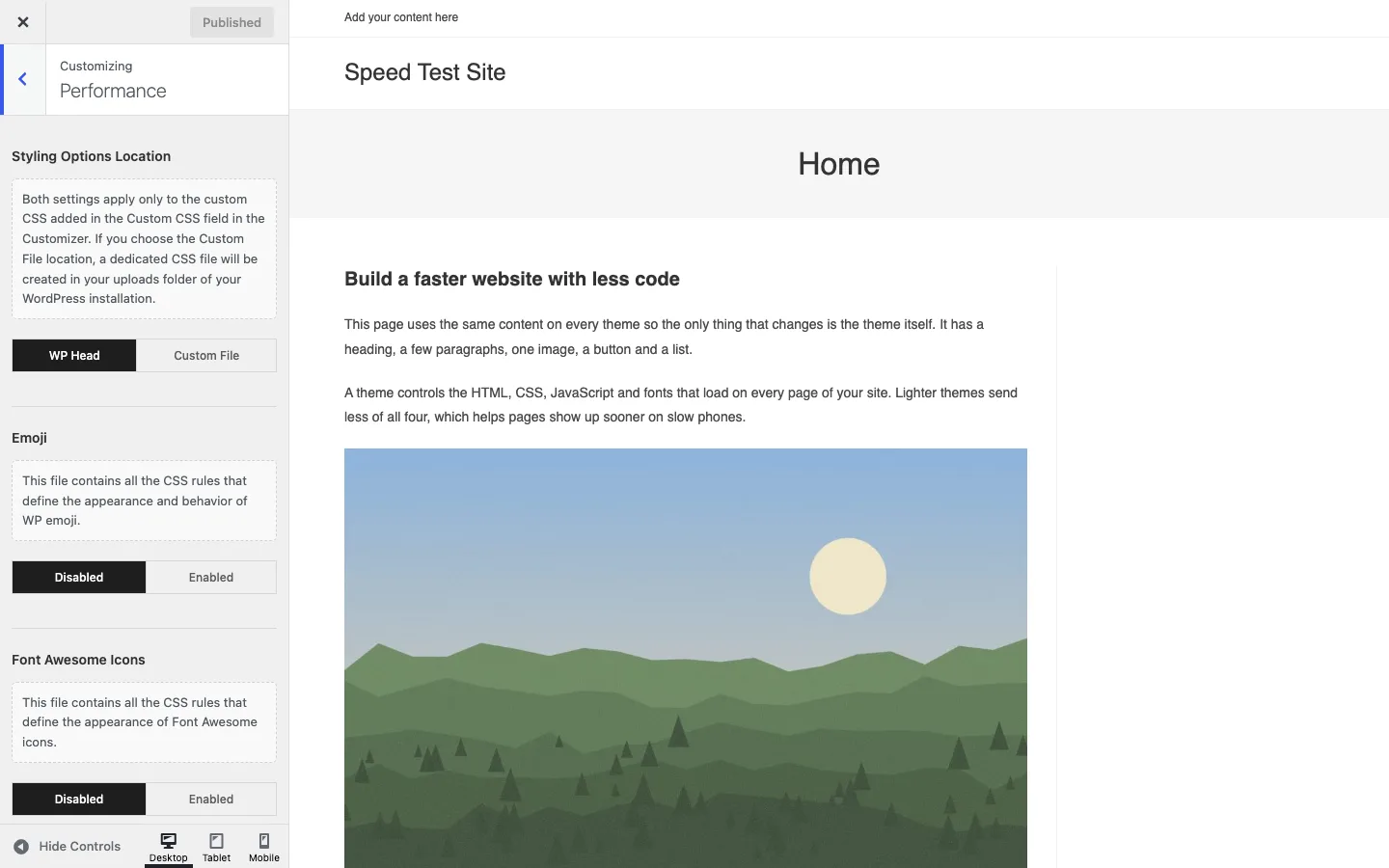
OceanWP’s Performance panel in the Customizer, with the extra assets switched off.
Under Customize > Performance, OceanWP lets you disable emoji, Font Awesome, Simple Line Icons, the lightbox, the scroll effect and its custom select boxes. With all six switched off on our test site, the homepage dropped from 182 KB to 139 KB and from 22 to 15 requests, and the blog post dropped from 214 KB to 141 KB. That still left jQuery and the Flickity slider script loading, so a tuned OceanWP was still nearly three times the weight of GeneratePress. After activation, OceanWP also put a large Setup Wizard banner on the dashboard that pushes its Ocean Extra plugin. Premium plans start at $42 a year for one site, according to OceanWP’s pricing page in October 2026. See OceanWP’s bundles.
Astra vs GeneratePress
Both themes skip jQuery and loaded just 7 requests on our test homepage. GeneratePress is lighter: 51 KB against Astra’s 68 KB on the homepage and 54 KB against 72 KB on the post, with a slightly faster mobile LCP (1.06 s against 1.21 s). Most of Astra’s extra weight is inline CSS.
Where Astra pulls ahead is getting started. Its free Starter Templates library and more visual customizer suit beginners, while GeneratePress is plainer and leans on GP Premium and GenerateBlocks for design work. On price, GP Premium is $59 a year for up to 500 sites, and Astra Pro is $69 a year or $249 one time, as of October 2026.
Winner on speed: GeneratePress. Winner for beginners who want a finished design fast: Astra. Read our GeneratePress review and Astra review for features and support.
OceanWP vs Astra
This one is not close on speed. At default settings OceanWP sent 182 KB and 22 requests against Astra’s 68 KB and 7, and OceanWP loads jQuery while Astra does not. Even with every OceanWP performance switch turned off, its homepage (139 KB, 15 requests) stayed about twice Astra’s weight.
OceanWP’s strengths are elsewhere: a large set of extensions, a WooCommerce-friendly feature set and per-site pricing that starts low at $42 a year. Astra Pro costs $69 a year but works on more sites per license (3 on the add-on plan).
Winner on speed: Astra. Choose OceanWP if you specifically want its extensions and accept the extra weight, and turn on its Performance options.
OceanWP vs GeneratePress
This is the biggest gap in the test. GeneratePress loaded 51 KB in 7 requests; OceanWP loaded 182 KB in 22, and the gap grew to 54 KB against 214 KB on the blog post. GeneratePress’s own files came to 7 KB against OceanWP’s 100 KB, and its simulated mobile LCP was almost a second faster (1.06 s against 1.96 s).
OceanWP’s Performance panel closes part of that gap, but if you are choosing fresh, GeneratePress does the same core job with a fraction of the code. GP Premium is $59 a year for up to 500 sites; OceanWP plans start at $42 a year for one site.
Winner on speed and value for multiple sites: GeneratePress. Choose OceanWP if you want its bundled extensions more than a minimal theme.
GeneratePress vs Genesis
Genesis is not one theme. The Genesis Framework is a parent theme that you pair with a child theme. The framework itself is now free, but the download sits behind a request form on studiopress.com that asks for your details, so it was not part of this test. StudioPress’s Genesis Block Theme is a free public download, so it stood in for the Genesis family here.
On our test site, Genesis Block Theme weighed 121 KB in 13 requests, more than twice GeneratePress’s 51 KB, and it loads jQuery. It also has not been updated since 2021. Genesis Pro, which adds support and all the StudioPress-made child themes, costs $360 a year, as of October 2026. Genesis still makes sense for existing Genesis sites, WP Engine and Flywheel customers (StudioPress says its themes are included free with that hosting) and developers who like its hook system.
Winner for a new site: GeneratePress, which is lighter, still maintained and much cheaper. Our Genesis theme review covers the framework in depth, and you can find StudioPress’s current offer on the Genesis page.
The Theme Is Only Part of Your Speed
The gap between GeneratePress and Kadence on our homepage was about 19 KB. A single unoptimized phone photo can be several megabytes, and a slow host can add a second before the first byte arrives. So once you have picked any theme from the top six, your time is better spent on:
- Hosting with page caching. A good host does more for real-world speed than any theme. Our managed WordPress hosting comparison is a good place to start.
- Images. Resize and compress them before or after upload. See our roundup of image optimizer plugins, or our Smush review for a simple free option with lazy load.
- Fewer, lighter plugins. Page builders, sliders and social widgets often add more weight than the theme. If you need one, our page builder guide compares the main options.
Before switching themes on a live site, try the new one on a staging copy with your own content. Our list of the best WordPress staging plugins shows how.
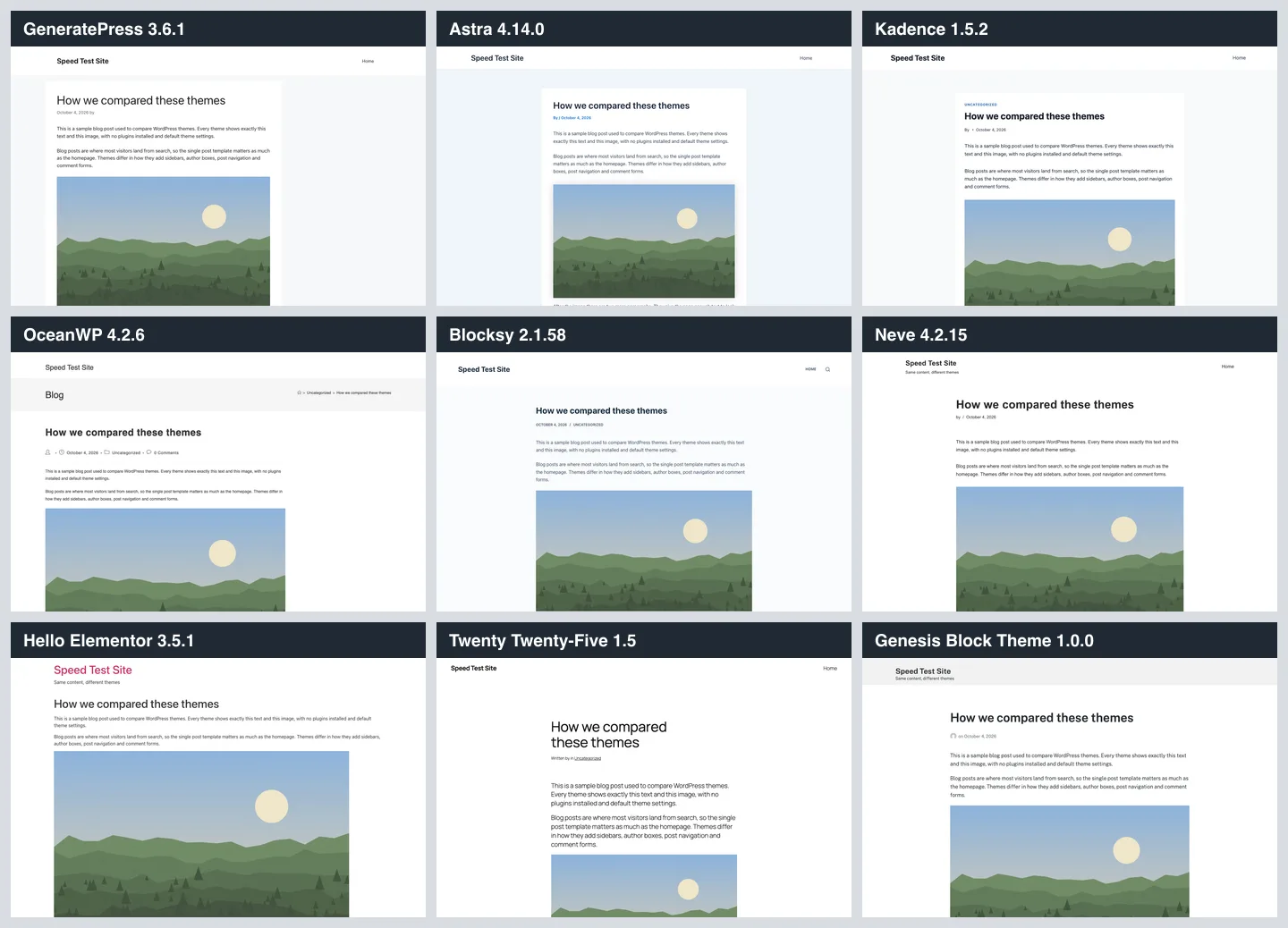
The test blog post on all nine themes at default settings.