Smush Review: Is the Pro Upgrade Worth It?
Smush is easy to use, but the free and paid versions offer very different value. Free Basic compression made modest savings and skipped large photos. Pro reduced our test library substantially and added WebP and AVIF. It is most appealing for image-heavy sites or people who will use the wider WPMU DEV suite.
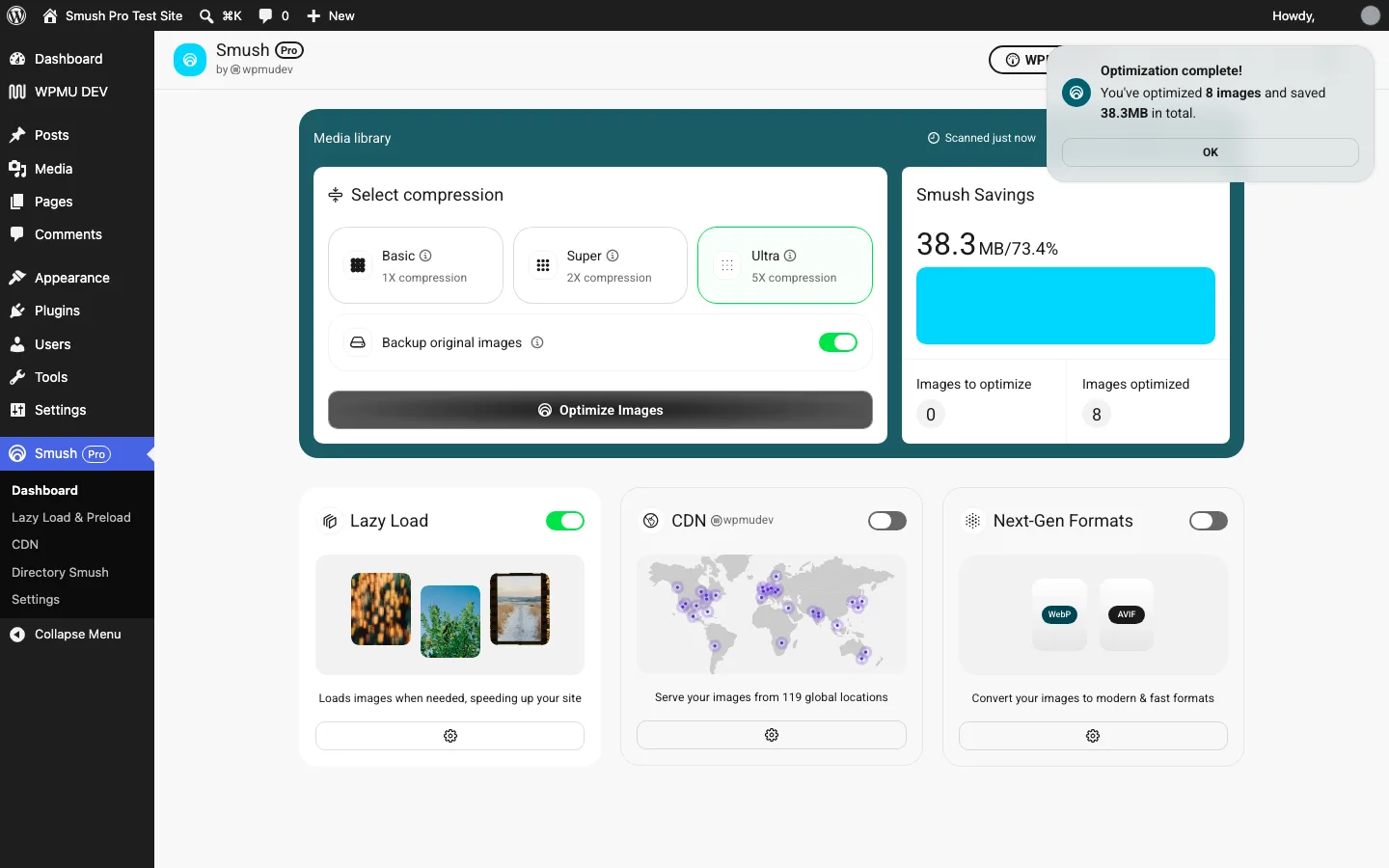
The Smush Pro dashboard after an Ultra compression run on our test images.
What Is Smush?
Smush is an image optimization plugin from WPMU DEV. It first appeared on WordPress.org in 2008 and now has more than a million active installs. It does three main jobs:
- Compression. It shrinks image files on WPMU DEV’s servers, so it puts little load on your hosting.
- Lazy load. It delays loading images until a visitor scrolls near them.
- Delivery (Pro). Smush Pro converts images to WebP or AVIF (newer formats that are usually much smaller than JPEG or PNG), preloads the main image, and can serve images from WPMU DEV’s CDN (a network of servers around the world).
Smush Pro is a separate plugin that looks and works like the free one. It is not on WordPress.org. You install it from the WPMU DEV Dashboard, and the Pro features are unlocked there.
Getting Smush Pro: The WPMU DEV Dashboard
Smush Pro installs through the WPMU DEV Dashboard after connecting your account. The membership includes other Pro plugins as well, which improves its value if you will use them. No separate Smush license key was needed.
Setting Up Smush: The Wizard
The free setup wizard selected Super compression, automatic optimization, lazy loading and optimization of originals. Super requires a free WPMU DEV account; switching to Basic let us continue without one.
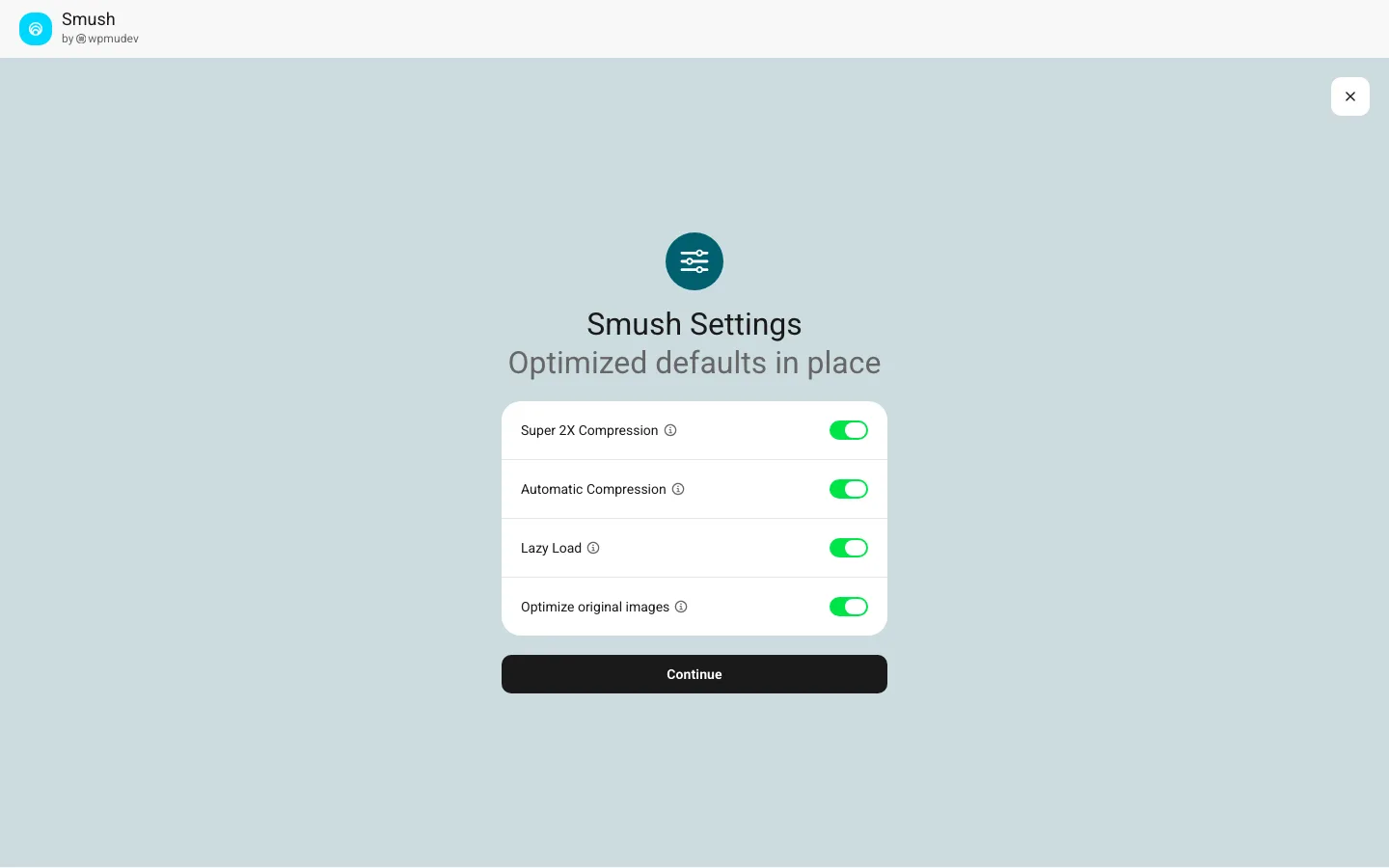
The free Smush setup wizard’s default settings on a fresh install.
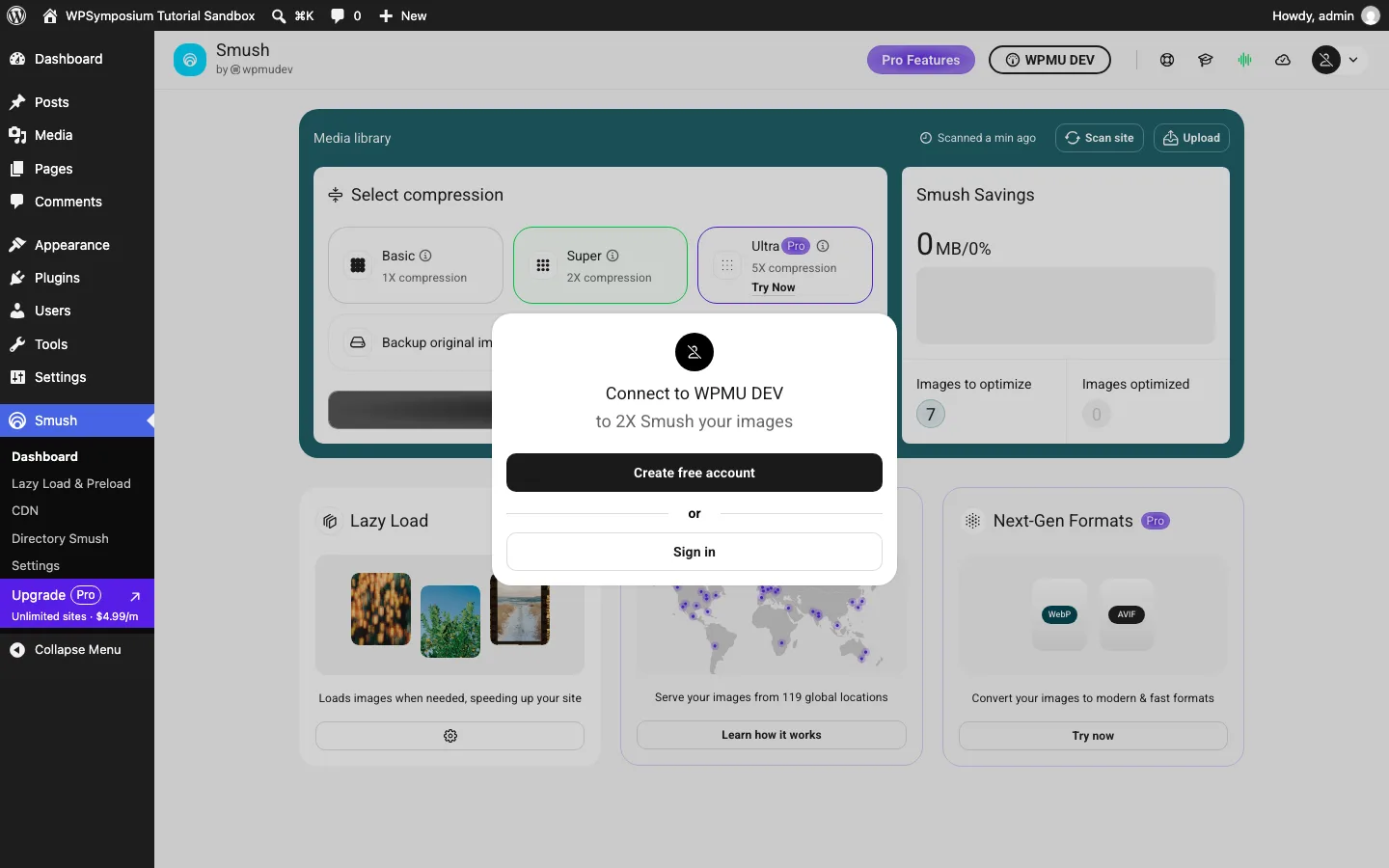
Clicking Optimize with the default Super setting and no account, on a test install.
Pro selected Ultra compression instead. Its “Lazy Load & Preload” setup switch only enabled lazy loading in our test, so Preload still needed enabling separately.
Our Free Test: Bulk Smush Results
Free Basic made modest savings. On the eight-image set later used for Pro, it reduced the whole library by 3.4%. It skipped both photos over 5 MB, including their smaller WordPress copies, and left one PNG photo unchanged.
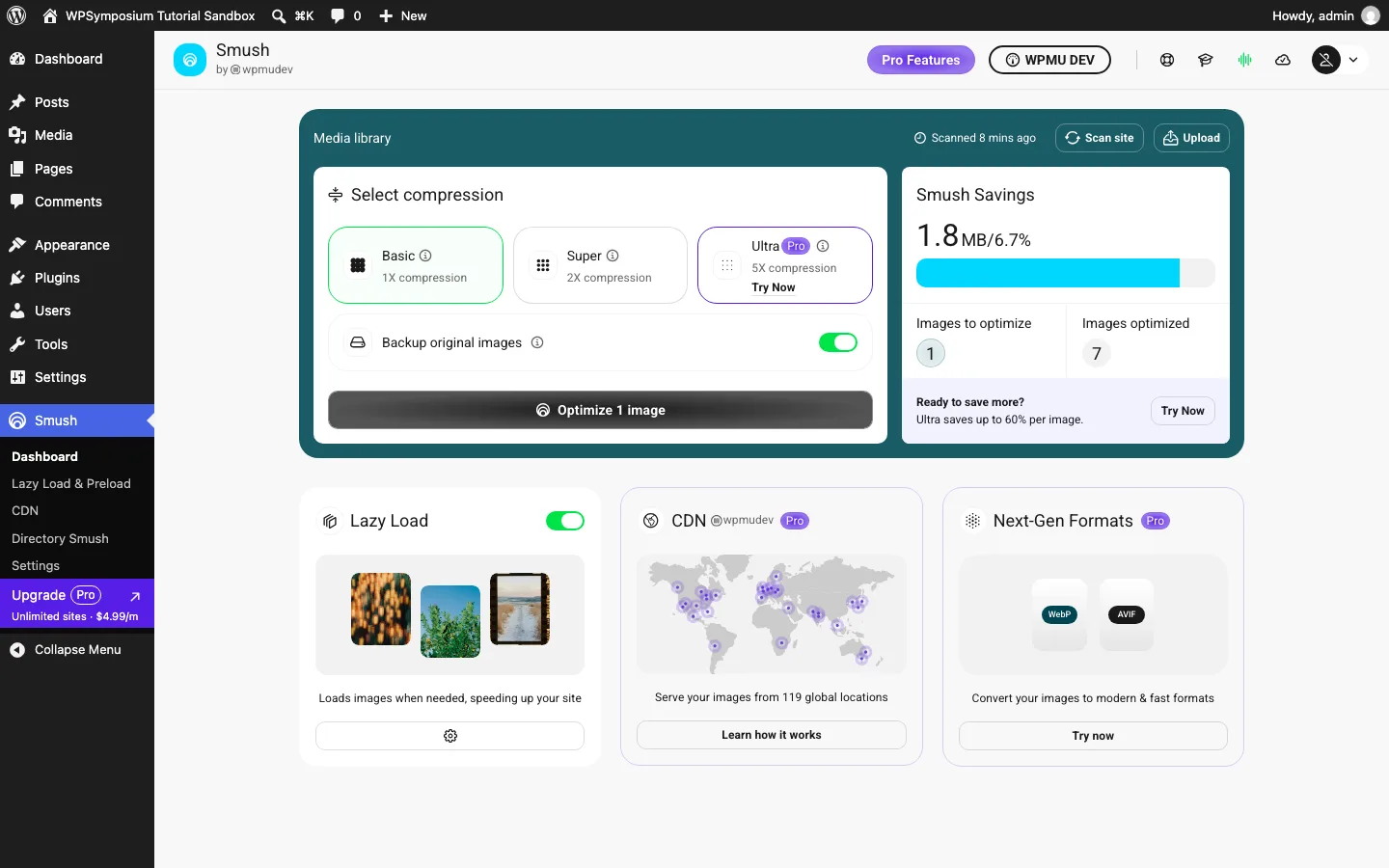
The free Smush dashboard after a Basic bulk run and one later upload.
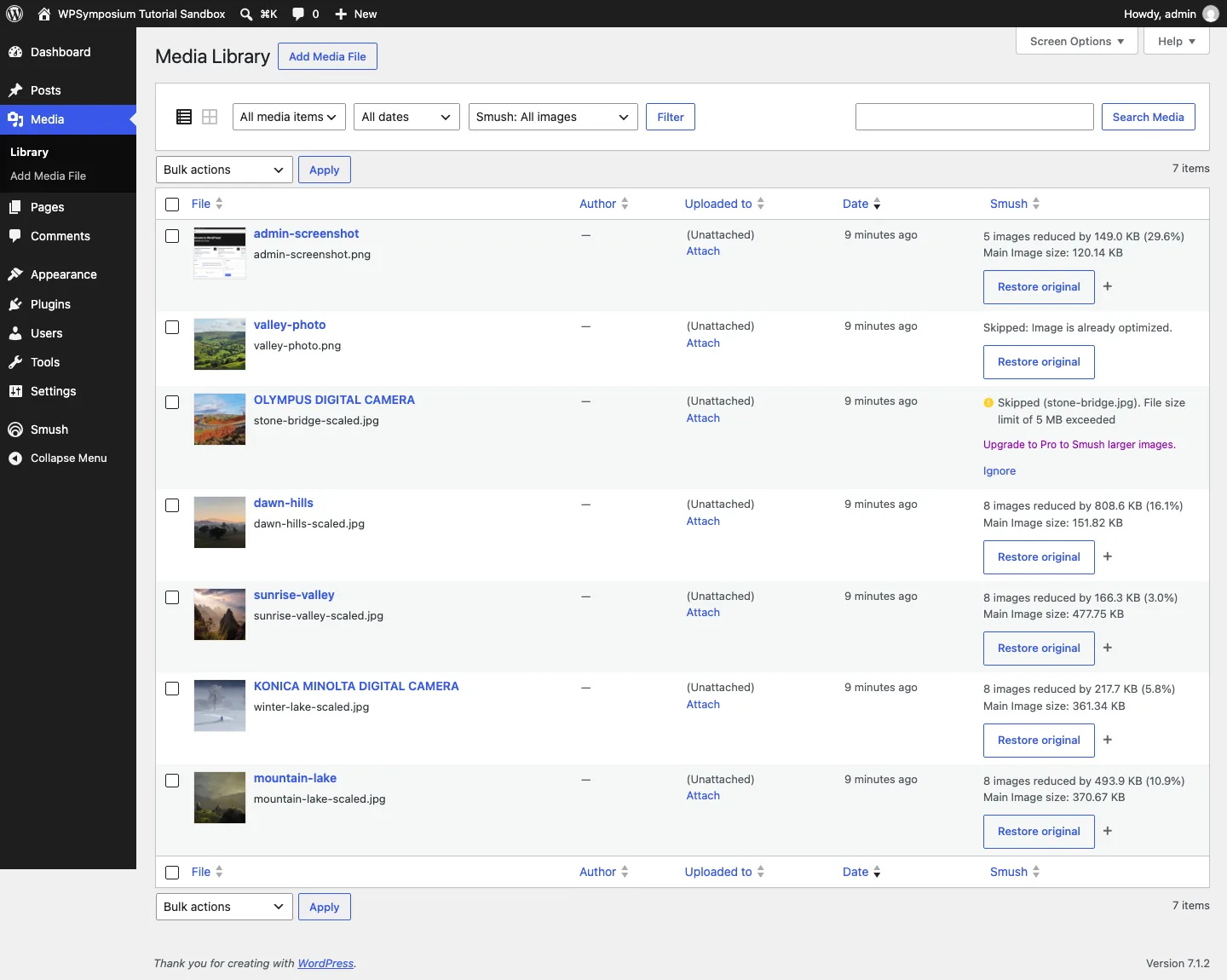
Per-image Smush results in the Media Library after a Basic bulk run on a test install.
Results depended on the image. A screenshot compressed well, while ordinary photos saved much less. The JPEG pixels stayed identical in Basic mode, and automatic compression also worked on a new upload.
Backups are enabled by default and can make your uploads folder larger despite compression. Keep them if you need restoration, but account for their storage use.
Metadata needs care
Smush removed camera and GPS metadata from processed images, but skipped files retained theirs. Removing an embedded color profile also made a wide-gamut photo look duller, even with lossless compression; convert such photos to sRGB first or keep their metadata.
Backup files remained publicly accessible at predictable addresses on our test host and still contained GPS metadata. Protect those backups if location privacy matters.
Basic, Super and Ultra Compression
Smush has three compression levels. “Lossless” keeps every pixel. “Lossy” throws away some image data that is hard to see, and saves much more. WPMU DEV’s documentation describes the levels like this:
Basic is lossless and works without an account. Super uses lossy compression and needs a free WPMU DEV account. Ultra is the stronger lossy option included with Pro. The names describe progressively more aggressive settings, not a fixed saving that every image will achieve.
With Smush Pro we ran all three levels on the same eight images and their 51 smaller copies, 59 files and 54.6 MB in all. Between runs we used Smush’s “Restore all images” and checked that every file matched the original again. We ran Super with Pro. With free Smush it needs a free account, which we did not create.
Across all 59 files, Basic reduced the 54.6 MB library to 50.9 MB, a saving of 6.8%. Super brought it down to 18.6 MB, or 66%, and Ultra to 14.5 MB, or 73.4%. Pro also handled the 14.8 MB photo that exceeded the free plugin’s limit.
These library totals include the smaller image copies WordPress creates, not just the original uploads.
What stood out:
- Ultra is not five times Super. Ultra saved 73.4% against Super’s 66.0%. Image by image, Ultra’s JPEGs were 13% to 47% smaller than Super’s. That is a real gain, but nothing like the “5X” on the button.
- PNGs stop at Super. Super and Ultra made byte-identical PNG files. Both cut PNGs down to a small color palette: our screenshot went from 2,866 colors to 18, and our PNG photo from 243,025 colors to 132.
- Big files were no problem. Pro processed the 8.7 MB and 14.8 MB photos at every level, with all their smaller copies.
- Each run took about two minutes. From the click to “8 of 8” took 132 seconds at Basic, 108 at Super and 130 at Ultra, including a short scan Smush runs first after you change the level. No image failed.
- Pro Basic is the same as free Basic, as described above, apart from the PNG photo that free Smush skipped.
How Super and Ultra Look
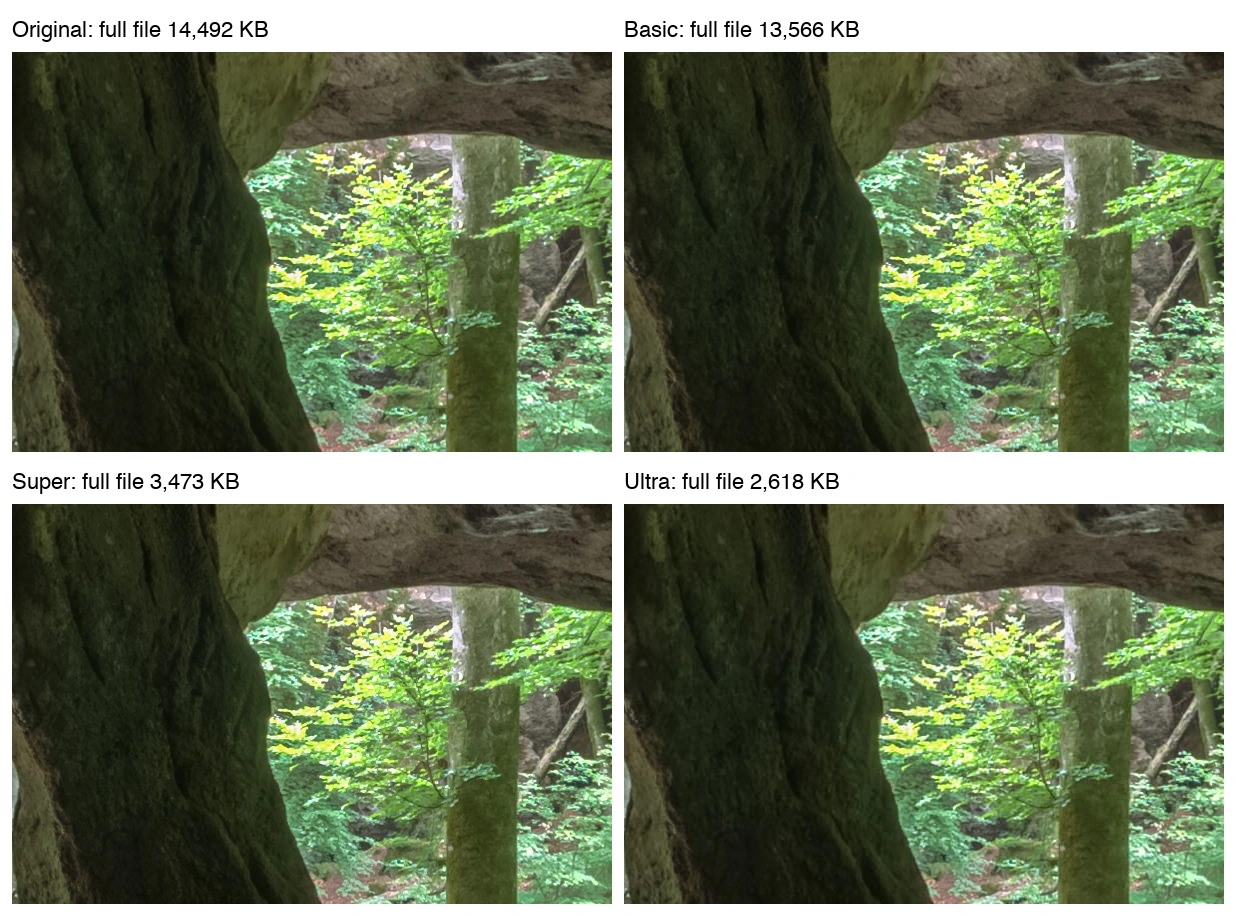
The same 600 x 400 px crop of our test photo after each Smush Pro level. Sizes in the labels are in KB of 1,024 bytes.
We compared 100% crops of each level with the original. On the rock and leaves above, we could not reliably tell Super or Ultra from the original at normal size. Enlarged three times, fine leaf edges were slightly softer at Super and a little softer again at Ultra. Basic was pixel-identical. Text in our screenshot looked the same at every level, and only at six times zoom did the letter edges show fewer shades of grey.
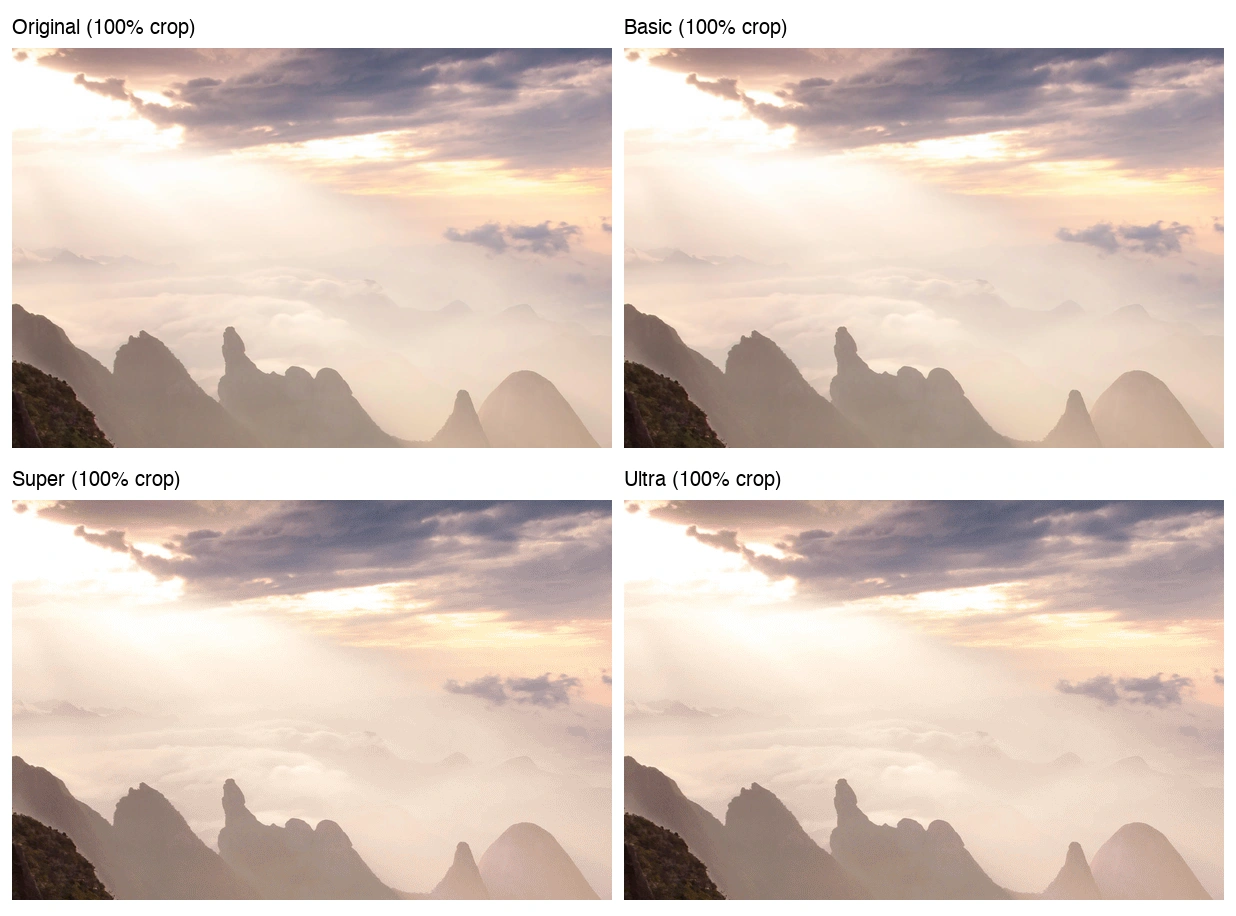
A PNG photo at 100% before and after each compression level. Super and Ultra cut it to 132 colors.
The clearest loss was the PNG photo. With only 132 colors left, Super and Ultra added visible grain and a few colored specks to the smooth mist and sky. If you have photos saved as PNG, save them as JPEG instead, or try Smush’s PNG to JPEG option, which we did not test.
For the technically minded: our JPEG originals were saved at about quality 99. Super re-encoded them at roughly quality 82 and Ultra at roughly 67. Both also store color at half resolution (4:2:0 chroma subsampling), which is normal for web JPEGs.
What the Savings Mean for Your Pages
The headline library saving is not the same as the saving on a real page. The smaller copies WordPress serves can behave differently.
The seven large copies served on our page saved 11% with Basic, 51% with Super and 58% with Ultra. The larger scaled copies told a different story: Basic and Super both saved about 5.5%, while Ultra saved about 26%. Which image sizes your site actually serves matters as much as the headline library saving.
Super saved no more than Basic on the 2,560 px copies in our test. Only Ultra shrank them much. So free Smush’s teaser, “Ultra saves up to 60% per image”, is close to what we saw on the sizes pages really load.
Backups cost space at first. With backups on, Smush keeps one copy of each full-size original. After the Basic run our uploads folder held 92.7 MB, 70% more than before. After Ultra, the compressed files plus backups came to 56.3 MB, only 3% more than the untouched library.
Images Over 5 MB
Free Smush checks the size of the full-size original. If it is over 5 MB, it skips the whole image, including small thumbnails and the “scaled” copy most themes display. In both free tests, that left our largest photos untouched, metadata and all.
Smush Pro had no trouble. At Ultra, the 14.8 MB photo became 2.68 MB and all its sizes together were 73.6% smaller. The 8.7 MB photo became 1.99 MB. WPMU DEV’s own plugin text gives Pro’s limit as 256 MB per image. We only tested up to 14.8 MB.
Compression on upload also worked with Pro. A new 1.27 MB JPEG we uploaded with Ultra selected came out 47% smaller, though it took about two minutes before the Media Library showed “7 images reduced by 868.2 KB (34.8%)”.
Backups, Restore and Failed Images
Smush’s restore did what it promised. Settings > Tools > “Restore all images” asks you to confirm, then took about 15 seconds for our eight images. All eight originals came back byte for byte, and Smush deleted the backups. The “Restore original” button on a single image in the Media Library took about a second.
Two details matter:
- Smaller sizes are rebuilt, not restored. Smush only backs up the full-size file. On restore it makes the thumbnails again from the original. On our site the 51 rebuilt sizes came out 6% bigger than the first set, about 0.8 MB more in all, and kept the camera data, because the web server’s image library kept metadata that the first one had dropped. That is harmless, but do not expect a perfect undo of every file.
- A missing backup can go unnoticed. We made the uploads folder read-only while leaving the image files writable. Smush compressed the image but could not save its backup, and still reported success. The “Restore original” button then said “No backup image available. Enable Back up original images to restore them in the future.”, although backups were on.
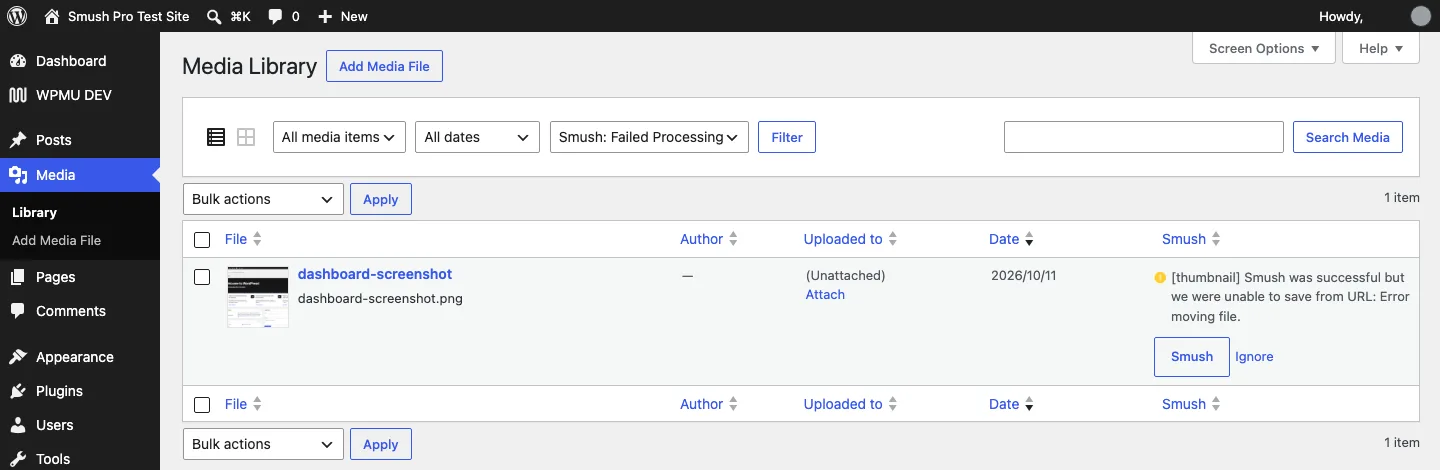
Smush Pro’s failed-images list after we made one image’s files read-only on our test site.
When we made the image files themselves read-only, Smush did flag it. The run ended with “1 image failed to be optimized” and a “Check failed images” button, which opens the Media Library filtered to failed images with the reason. After we fixed the permissions, one click redid the image in 14 seconds. The Activity Log on the Smush dashboard recorded neither problem, only “Bulk Optimization completed.” If your hosting uses unusual file permissions, check that .bak files appear after a first run.
WebP and AVIF
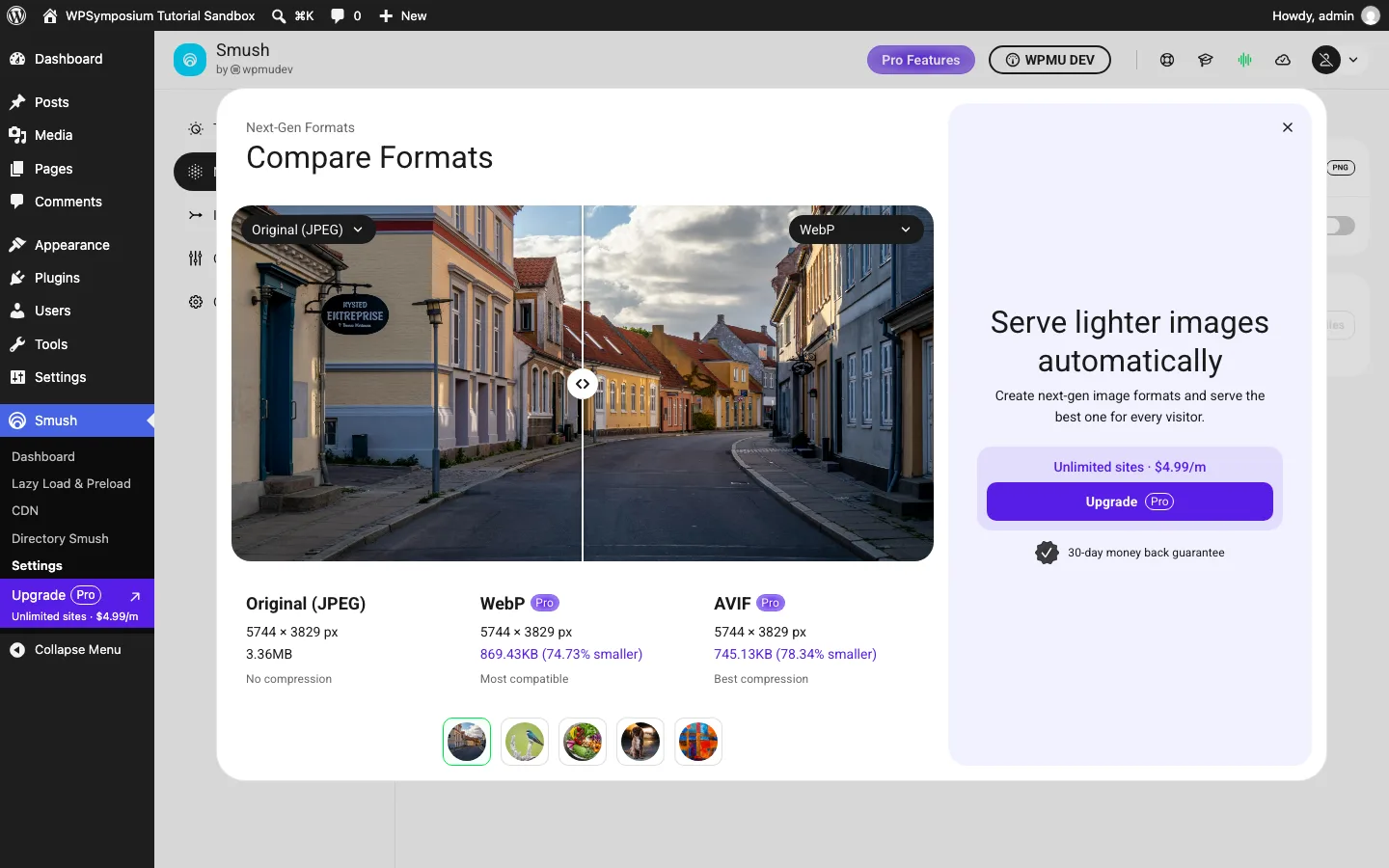
The Next-Gen Formats “Try now” pop-up in the free version on a test install.
WebP and AVIF are newer image formats that are usually much smaller than JPEG or PNG. In the free version, the Next-Gen Formats settings are grayed out with a “Pro” badge. Clicking “Try now” opened a comparison pop-up with WPMU DEV’s own sample photo, showing a WebP version 74.73% smaller and an AVIF version 78.34% smaller than a 3.36 MB JPEG. After our free bulk run there were no WebP or AVIF files anywhere on the site. EWWW, ShortPixel and Imagify all include WebP in their free versions, so this is the main gap in free Smush.
What Smush Pro Made
Pro generated separate WebP and AVIF copies while keeping the original formats for browsers that need them. We ran both conversions after Ultra compression:
After Ultra compression, WebP reduced the full set by another 24%, and AVIF by about 44%. On the fully scrolled test page, image transfer fell from 729 KB to 624 KB with WebP and 370 KB with AVIF. The AVIF gain was especially large for the PNGs; JPEG photos alone improved by about 39% across all sizes. The WebP run took roughly four minutes, and AVIF about seven.
AVIF was the clear winner here, especially for PNGs.
What the Page Actually Serves
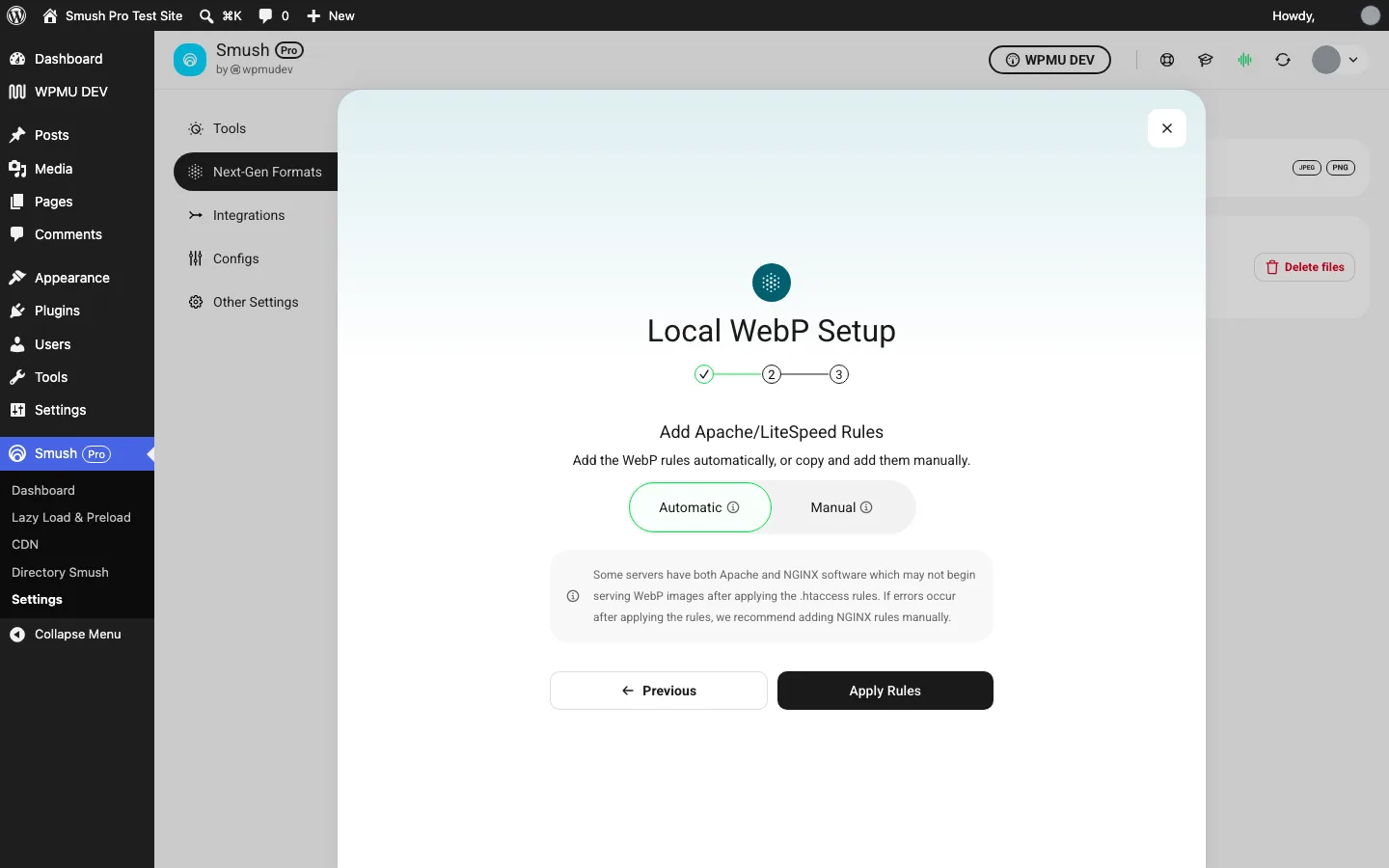
Smush Pro’s Server Configuration wizard for WebP on our Apache test site.
- Direct Conversion rewrites the image addresses in your page’s HTML to point at the .webp or .avif files. It adds no extra HTML tags and needs no server setup. Chromium, the open-source browser behind Chrome, received WebP, and later AVIF, for all seven photos on our test page, and none were broken.
- Server Configuration (WebP only) opens a three-step wizard. It offers “Automatic” for Apache and LiteSpeed servers. On our Apache site, “Automatic” wrote rules into two .htaccess files, which are Apache’s folder-level settings files. The HTML then keeps the .jpg addresses, and the server sends WebP to browsers that ask for it and JPEG to others. Our test page got the same WebP bytes as with Direct Conversion. On NGINX, another common web server, the wizard shows rules you must add to the server config yourself. We could only read those, and the wizard warns that hosts running both Apache and NGINX may need them too. Until the wizard is finished, the page serves plain JPEGs.
- AVIF offers only Direct Conversion. Switching from WebP to AVIF turned WebP off at once, so the page served plain JPEGs for about eight minutes, until the AVIF run finished. An optional fallback script for browsers without AVIF support adds JPEG addresses to each image. We did not test it in such a browser.
Some rough edges:
- Each WebP or AVIF bulk run also recompressed our already-Ultra JPEGs once more. The WebP run made them 0.35% smaller and slightly further from the originals, and the AVIF run took off another 0.09%. Small, but not something you ask for when you turn on WebP.
- Turning Next-Gen off left its rules in both .htaccess files and a small test image in uploads. The “Delete files” button does remove the generated WebP or AVIF files.
- After the AVIF run, the dashboard’s savings figure read 49.3 MB/57.8%. It added up compression savings, the old WebP files (although WebP was off) and AVIF, so read the per-image numbers instead.
Lazy Load and Preload
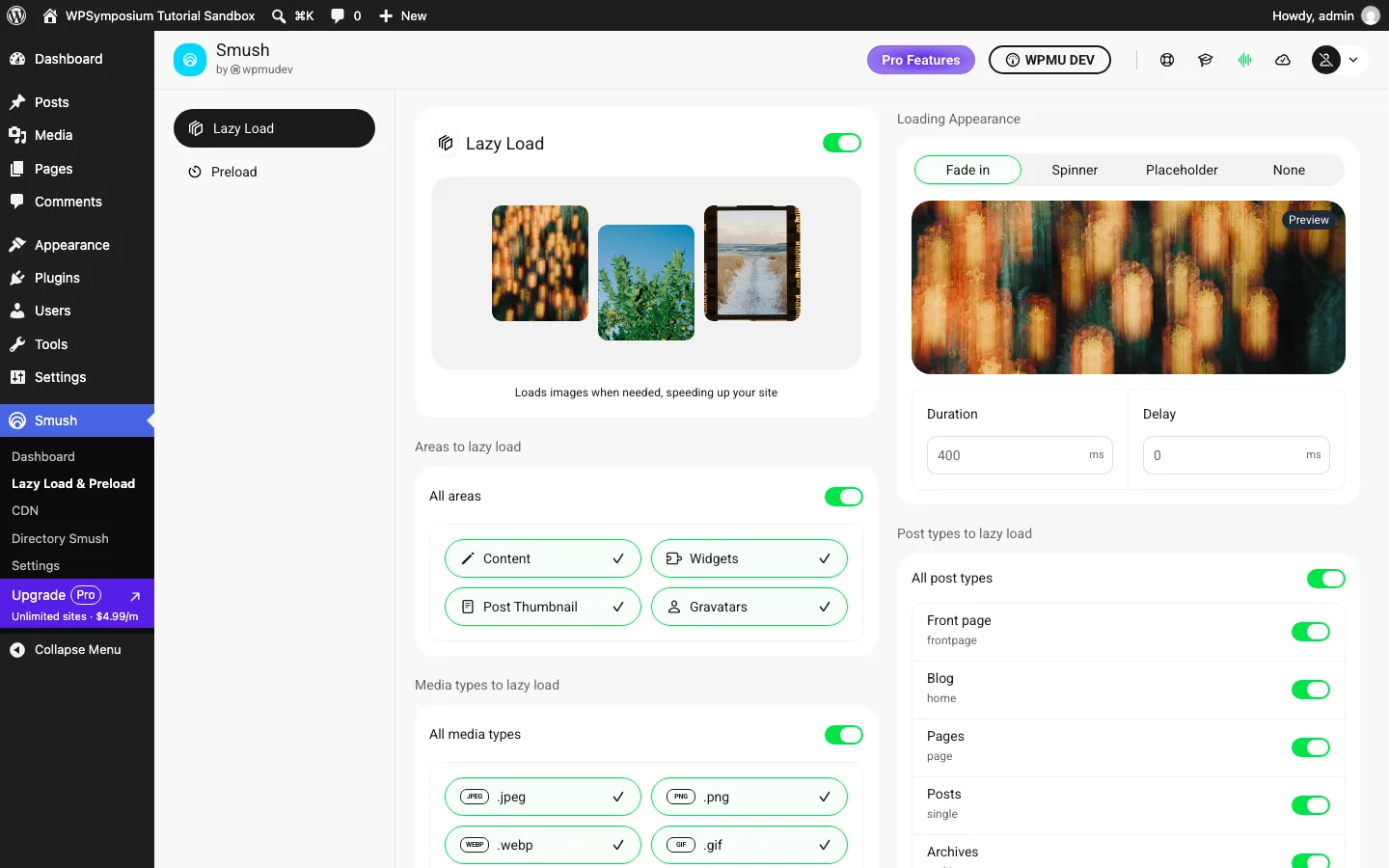
Smush’s Lazy Load settings in the free version on a test install.
Lazy load is the best part of free Smush. You can choose which areas (content, widgets, featured images, Gravatars), file types (including iframes and YouTube or Vimeo previews) and post types it covers, pick a fade-in, spinner or placeholder effect, and exclude URLs or CSS classes. The free wizard turns it on. If you skip the wizard, it stays off.
On October 4 we built a test post with six photos and opened it in a browser window 1,440 x 900 px. Only 2 of the 6 images loaded at first. The other 4 loaded as we scrolled down. Smush also left the first image, which WordPress marks as high priority, out of lazy loading, so the top of the page was not delayed.
Two things to know:
- Smush’s lazy load depends on JavaScript. The “NoScript fallback” option was off by default on our test site, so visitors with JavaScript turned off would not see lazy-loaded images unless you switch it on.
- WordPress already lazy loads images on its own, and on our Pro test page the two behaved differently. Smush loads only the first photo straight away, while WordPress loads the first three. That made the main image appear sooner with Smush (1.22 seconds against 1.52 with the same Ultra files). But Smush drops a WordPress hint that lets the browser pick a size to fit the column, so in our 645 px column Chromium downloaded the 1,024 px copies instead of the 768 px ones. The fully scrolled page weighed 826 KB with Smush’s lazy load against 589 KB with WordPress’s. Pro’s Automatic Resizing (Settings > Tools) fixes this. With it on, Chromium picked the 768 px files again. In version 4.3.4 it works with Smush’s lazy load and does not need the CDN.
Preload (Pro)
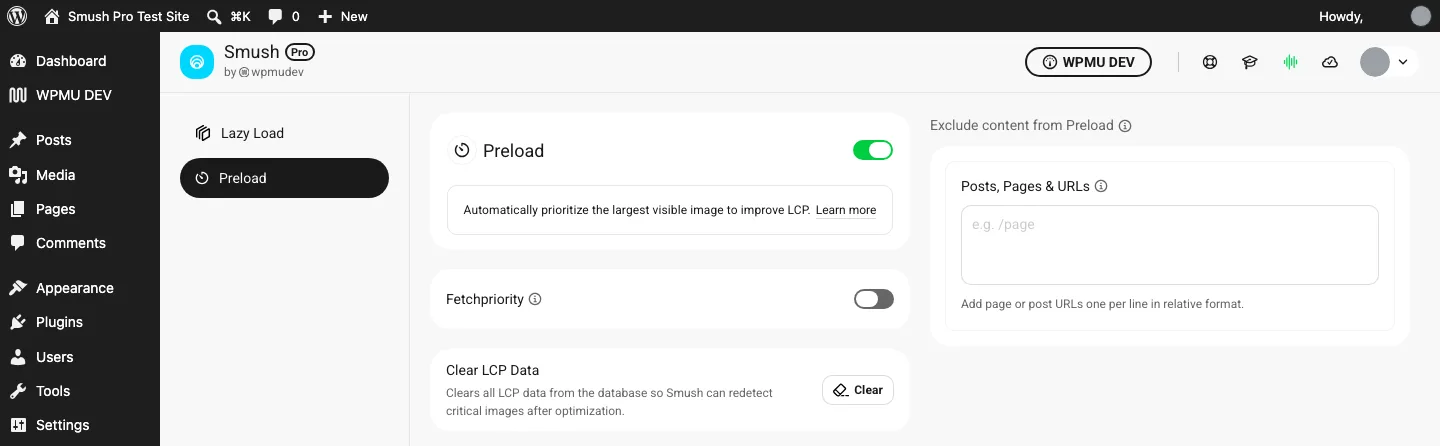
Smush Pro’s Preload settings on our test site.
Preload tells the browser to fetch the largest image near the top of the page first. That image usually decides Largest Contentful Paint (LCP), Google’s measure of when the main content of a page appears.
Smush learns which image that is from your visitors. With Preload on, it adds an 11.5 KB script (about 4.6 KB over the network) to every page. The script waits until a visitor clicks, taps or presses a key, then reports the largest image. A visit with no interaction sent nothing. Once Smush has that data, it adds a preload tag at the top of the page for later visitors. On our test page the tag pointed at the AVIF file in five sizes, with “fetchpriority=high”, a hint that tells the browser to fetch it first.
With AVIF and Smush’s lazy load, Preload cut LCP from 0.94 to 0.82 seconds. Page load time did not change, and the first view grew by 5 KB, the size of the script.
Things to watch:
- Our sandbox runs on port 8740. Smush saved its data under the page address with the port and looked it up without it, so no tag appeared until we copied the data across with WP-CLI, WordPress’s command-line tool. Sites on normal web ports should not have this problem, but it means we only saw the tag work after that step.
- Logged-in admins never got the tag, and their first photo was lazy loaded. Check the page as a logged-out visitor.
- “Clear LCP Data” said “LCP data cleared”, but the data stayed in the database. Smush only marked it as out of date.
Page Speed Before and After (Local Lab Test)
We timed a test page with seven of our photos at WordPress’s “large” size, first before any optimizer and then with each Pro setup. We used Chromium in a 1,440 x 900 window, logged out, with the cache off and the connection slowed to 1.6 Mbps and 150 ms of delay, and took the median of three runs. “First view” is what loads before scrolling. “Fully scrolled” adds everything that loads as you scroll to the bottom. Here a KB is 1,024 bytes sent over the network.
This is a local lab test, rather than a measurement from real visitors. WordPress also received a maintenance update between the baseline and optimized runs, so the comparison does not isolate Smush completely.
The unoptimized page showed its main content after 1.91 seconds and transferred about 1.2 MB once fully scrolled. Ultra compression brought that to 1.52 seconds and 589 KB with WordPress lazy loading. With Smush lazy loading, WebP reached 0.97 seconds and AVIF 0.94 seconds.
Adding Preload and Automatic Resizing to AVIF improved the result to 0.79 seconds and about 350 KB fully scrolled. Those gains came from several settings together, so they should not be attributed to compression alone.
What the numbers show:
- Ultra compression alone, keeping WordPress’s own lazy load, made the fully scrolled page 51% lighter and LCP 20% faster.
- Smush’s lazy load made the first view faster but the full page heavier, for the reason explained above.
- AVIF did much more than WebP on this page: 467 KB fully scrolled against 722 KB.
- The best setup was 59% faster on LCP and 71% lighter fully scrolled than the page with no optimizer.
All the optimized setups here use Pro features. We did not time the page with free Basic. It skipped the two big photos and the PNG photo, so it saved under 1% on the seven files our test page loads, against 11% for Pro’s Basic.
The Smush CDN (Pro)
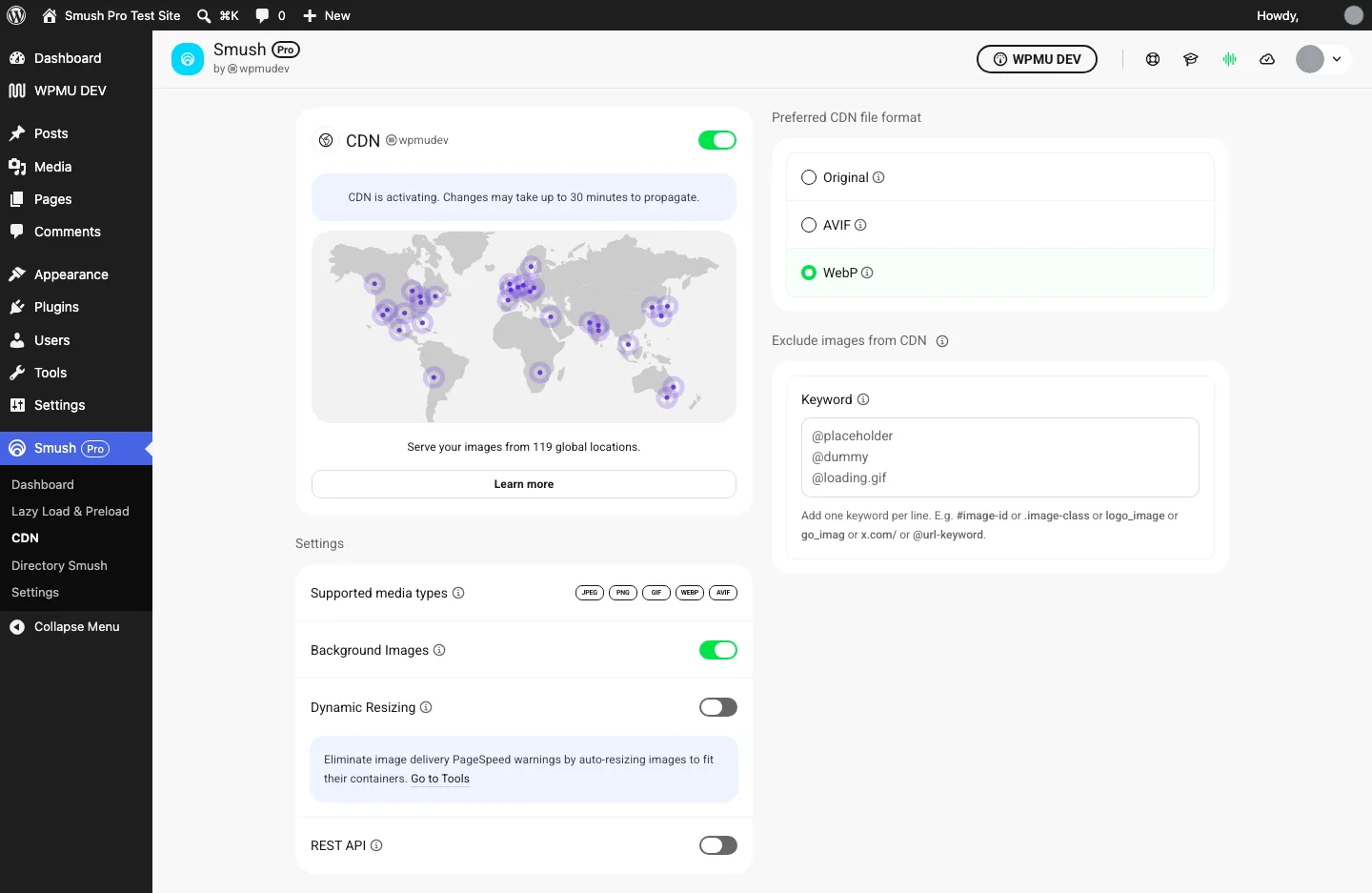
The Smush CDN right after we switched it on. It could not reach our local test site.
Smush Pro includes WPMU DEV’s CDN, which serves your images from 119 locations around the world. Its settings let it convert images to WebP or AVIF itself, resize them on the fly (“Dynamic Resizing”), handle background images and exclude images by keyword. The 1, 3 and 10-site plans include 50 GB of CDN traffic, and Premium includes unlimited.
The CDN fetches your original images from your site’s public address, so your site must be reachable from the internet. Ours ran on localhost, so we could test the switch but not real delivery.
Here is what happened. The screen said “CDN is activating. Changes may take up to 30 minutes to propagate.” From that moment our page dropped its AVIF files and served plain JPEGs, although the CDN was not serving anything yet. Turning the CDN on also overrides the Next-Gen Formats settings, as the screen warns. When we checked 19 minutes later it was active, and every image address on the page pointed at a WPMU DEV CDN address. All seven images then broke, because the CDN sent each request back to our sandbox’s local address over HTTPS, which our sandbox does not serve. That is expected for a local site. Turning the CDN off brought the AVIF files back at once.
If you try the CDN on a live site, switch it on at a quiet time, because visitors get unconverted images while it activates.
Directory Smush
Directory Smush compresses images outside the Media Library, such as theme or gallery folders. You pick a folder from a tree, where wp-admin and wp-includes are locked, choose a level and click “Optimize file(s)”. We ran it on folders of copies of our eight originals:
- Free: Basic only for us, with the 5 MB limit. It took about 30 seconds, saved 3.8% and skipped both big photos, which also kept their metadata.
- Pro: Ultra was preselected. It processed all eight files, big photos included, in about three minutes, and made them 82.4% smaller. Each file came out byte-identical to the Media Library’s Ultra version of the same photo.
Directory Smush makes no backups, so there is nothing to restore. It also only runs while the page stays open (“Please do not leave this page while Directory Smush is running”). Copy the folder first.
Incorrect Image Size Detection Is Gone
Older Smush reviews describe a setting that outlines images bigger than the space they are shown in. Smush 4 no longer has it, in free or Pro. There is no setting, the plugin code has none of its old text, and a test page with a 2,560 px image shown at 200 px got no Smush outline or notice, whether we viewed it logged in or not. The script that used to do this job now powers Preload. The closest replacement is Pro’s Automatic Resizing, or checking image sizes yourself in your browser’s developer tools.
NextGEN Gallery and WooCommerce
We tested both with free Smush.
NextGEN Gallery does not work with free Smush. The Smush Integrations tab lists only Gutenberg, WPBakery, Gravity Forms and Amazon S3 (Pro), with no NextGEN entry, and NextGEN’s gallery screen has no Smush column or bulk action. Smush did not compress the three images we uploaded to a NextGEN gallery. NextGEN resized the photos to its own 1,800 x 1,200 limit, and its files kept their EXIF data. The workaround is Directory Smush on the gallery folder in wp-content/gallery. That saved 15.9% and removed EXIF, but you have to run it again after every new upload. We did not test NextGEN with Pro. Smush 4 has the same NextGEN setting in the free and Pro code, but we found no code in either that compresses NextGEN gallery images.
WooCommerce worked well. Smush listed WooCommerce’s three image sizes in its settings, all switched on. A product image we uploaded in the product editor was compressed on upload: “11 images reduced by 302.9 KB (5.0%)”. WooCommerce’s own sizes shrank by 26% to 82%, mostly because Smush removed the metadata, and the GPS data was gone from all 11 files. The product and shop pages loaded the compressed files. We did not test WooCommerce with Pro.
Other Free Features
- Resize large images is off by default. With WordPress’s “scaled” copies left on, setting a 1,920 px limit only changed the scaled copy. The 5,605 px original stayed on disk. With “Disable scaled images” also on, Smush resized the original itself: our 4.73 MB photo became 107 KB at 1,920 px wide, and only the backup kept the full size. WordPress’s larger copies, such as a 2,048 px one, stayed even with a lower limit.
- PNG to JPEG conversion is available but off by default. We did not test it.
- Email notification was on by default and emails the admin when a bulk run finishes.
Take a backup before you run any bulk tool on a live site. Our WordPress backup plugin guide covers free options, or you can try Smush on a copy made with one of the best WordPress staging plugins.
Upsells and Annoyances
On our October 4 free test site, Smush added no notices to the WordPress dashboard, Plugins page or Posts screen. Inside Smush, the prompts never stop. After the bulk run, its dashboard showed six upgrade spots. They were a “Pro Features” button, the Ultra tile, a “Ready to save more?” card, the CDN and Next-Gen Formats cards, and an “Upgrade” menu link. An “Enjoying Smush?” pop-up also asked for a five-star review, in both free tests. The in-plugin upgrade links advertise “Unlimited sites · $4.99/m”. That is the price of WPMU DEV’s Premium plan for the first three months. After that it is $9.99 a month.
Smush Pro is the opposite. With Pro active we checked 15 screens, including every Smush page, the Media Library, the WordPress dashboard and the Plugins page. We found no upgrade buttons, prices, locked features, rating requests or admin notices, and no Upgrade menu item. The only “Pro” badge is the label next to the Smush name. What is left is a “WPMU DEV” button in the Smush header that links to WPMU DEV’s Hub (its site management dashboard), a logo link to the Smush Pro product page, the usual Docs and Support links on the Plugins page, and two tips that point to other Smush features. No rating pop-up appeared after three bulk runs. The WPMU DEV Dashboard itself showed two locked items on our plan, White Label and The Hub Client.
Smush Free vs Smush Pro
Free includes Basic and account-based Super compression, lazy loading, resizing, backups and restore, with no monthly image cap. Its five-megabyte limit is the major constraint. Pro raises that limit, adds Ultra, WebP and AVIF, Preload, Automatic Resizing and a CDN, and removes the in-plugin upsells. We tested a 14.8 MB file successfully; the advertised Pro limit is 256 MB.
Smush Pro Pricing
Smush Pro is not sold on its own. You get it as part of a WPMU DEV plan, which also includes the company’s other Pro plugins, among them Hummingbird (caching), Forminator Pro (forms), Hustle (pop-ups), Defender (security), SmartCrawl (SEO), Snapshot (backups), Shipper (migrations), Beehive (analytics) and Branda (white label). WPMU DEV’s pricing page says this directly: buying a plugin gets you the full Pro suite for 1, 3 or 10 sites. Prices as of October 16, 2026, unchanged since our first check on October 4:
WPMU DEV’s annual plans cost $50 for one site, $75 for three sites or $100 for ten sites. Those plans include the Pro plugin suite, 50 GB of CDN transfer, backup storage and support. Premium covers unlimited sites for $9.99 a month, with an introductory $4.99 rate for the first three months, plus broader CDN, backup and client tools.
All plans have a 30-day money-back guarantee, and WPMU DEV says you can cancel any time.
For one site, $50 a year is fair if you will use AVIF, the big-file support or several of the bundled plugins. For compression alone you can pay less: ShortPixel’s one-time credit packs start at $19.99, and EWWW’s free version already includes WebP.
Smush vs ShortPixel vs EWWW vs Imagify
These are the three alternatives searchers most often compare with Smush. Details are from each plugin’s WordPress.org listing and pricing page, October 2026. Our image optimizer roundup covers ten plugins, with test results for the ones that run without an account.
The free alternatives make different tradeoffs. EWWW can compress on your own server without an account and offers free WebP. ShortPixel and Imagify require accounts, but offer WebP and AVIF on their limited free plans. ShortPixel uses image credits; Imagify limits the amount of image data processed. Smush has no monthly image cap, but reserves those modern formats for Pro.
At the prices checked, ShortPixel offered one-time credits from $19.99 or unlimited processing from $9.99 a month. EWWW’s paid service started at $8 a month or $80 a year, and Imagify at $5.99 a month, reduced with annual billing.
ShortPixel offers lossy, glossy and lossless compression plus free WebP and AVIF, but needs an account, and the free plan covers 100 images a month.
EWWW Image Optimizer is the best free alternative. It compresses on your own server with no account and no limit, and WebP and lazy load are free. It needs a compatible server.
Imagify, from the team behind WP Rocket, includes WebP and AVIF free, but its 20 MB a month (about 200 images, says the vendor) suits small sites.
Smush wins on ease of use, no-account setup and free lazy load. Free, it loses on WebP and the 5 MB limit. Pro closes both gaps, adds a CDN and has no upsells, but it costs more than ShortPixel’s credit packs if compression is all you need.