Blocksy Review: A Free Theme You Can Grow With
Blocksy Review 2026: Free Theme and Header Builder Tested
Blocksy Pro Review 2026: Layouts and Shop Extra Tested
Blocksy gives most blogs and small business sites enough to start for free, including a proper header builder and useful shop settings. Pro adds more control over layouts, menus and store features. For a WooCommerce store, Business is the meaningful upgrade; the cheaper Personal plan leaves out the shop extras.
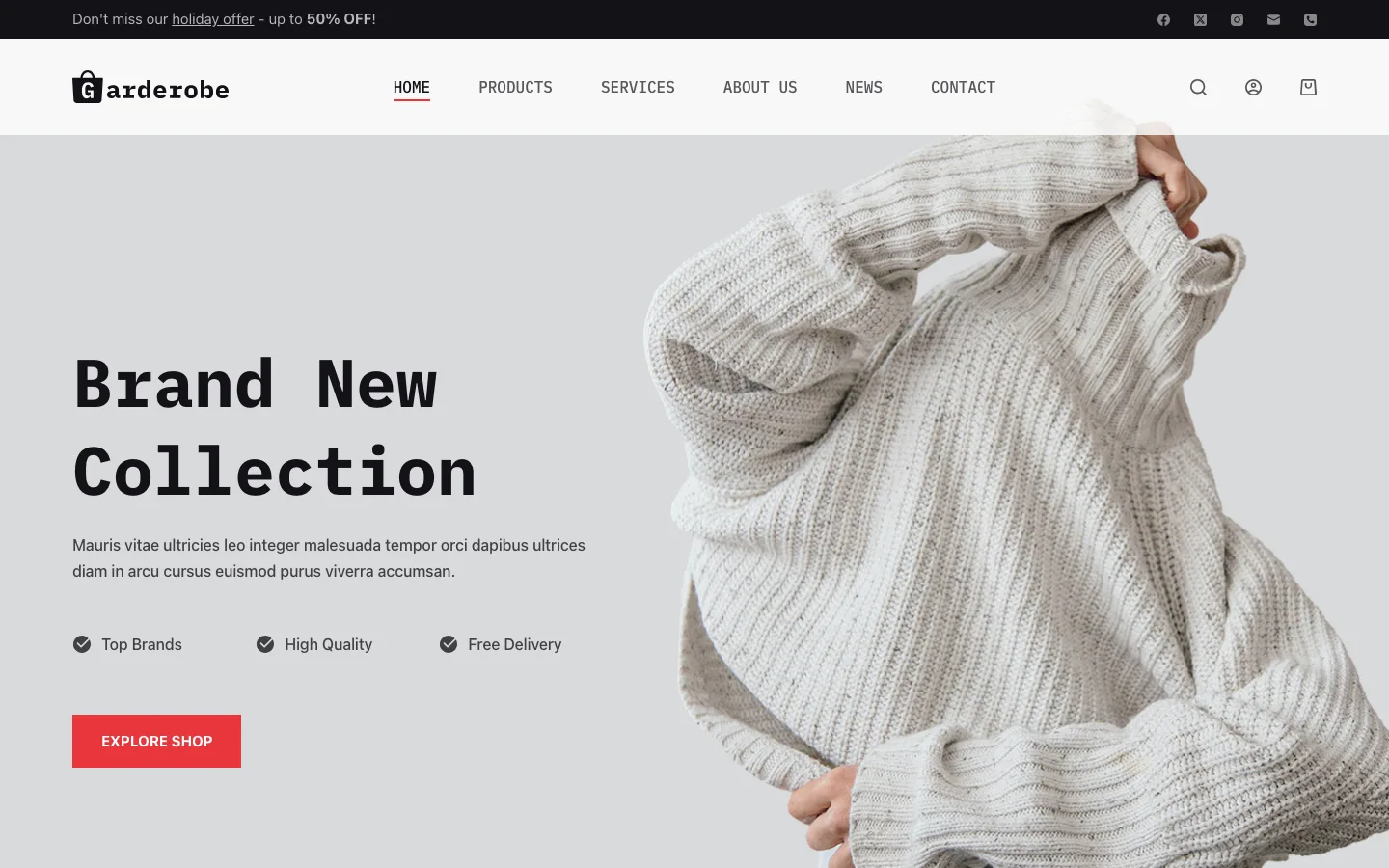
The free Garderobe shop starter site.
What Is Blocksy?
Blocksy is a free WordPress theme made by Creative Themes. It first appeared on WordPress.org in 2019 and now has more than 300,000 active installs. It is a classic theme, so you style the header, footer, colors and layouts in the WordPress Customizer at Appearance > Customize, not in the Site Editor. You build page content with the block editor, Elementor or another page builder.
Blocksy comes in three parts, which confuses many first-time users:
- The Blocksy theme. Free on WordPress.org. It handles the layout, header, footer, colors, typography, blog and shop settings.
- Blocksy Companion. A free plugin, also on WordPress.org. It adds the starter site importer, the free extensions, the sticky header and the Blocksy blocks.
- Blocksy Pro. A paid plugin called Blocksy Companion (Premium). It replaces the free Companion plugin, and you keep the same theme and settings.
Installing Blocksy
We installed the theme and the Companion plugin from WordPress.org. After activation the dashboard showed no Blocksy banner, no “rate us” notice and no forced setup wizard. A new Blocksy menu item opens a dashboard with five tabs: Home, Starter Sites, Extensions, Useful Plugins and Changelog.
The Home tab is a set of shortcuts into the Customizer. It still has one sloppy detail: the Typography and Posts cards reuse the Footer card’s text, “Set the footer type, number of columns, spacing and colors.” It is harmless, but it looks unfinished.
Starter Sites
The library offered 45 starter sites, including 32 free designs. All supported the block editor, with Elementor versions for most and Brizy for a few older sites. Search and filters made it easy to find a suitable design.
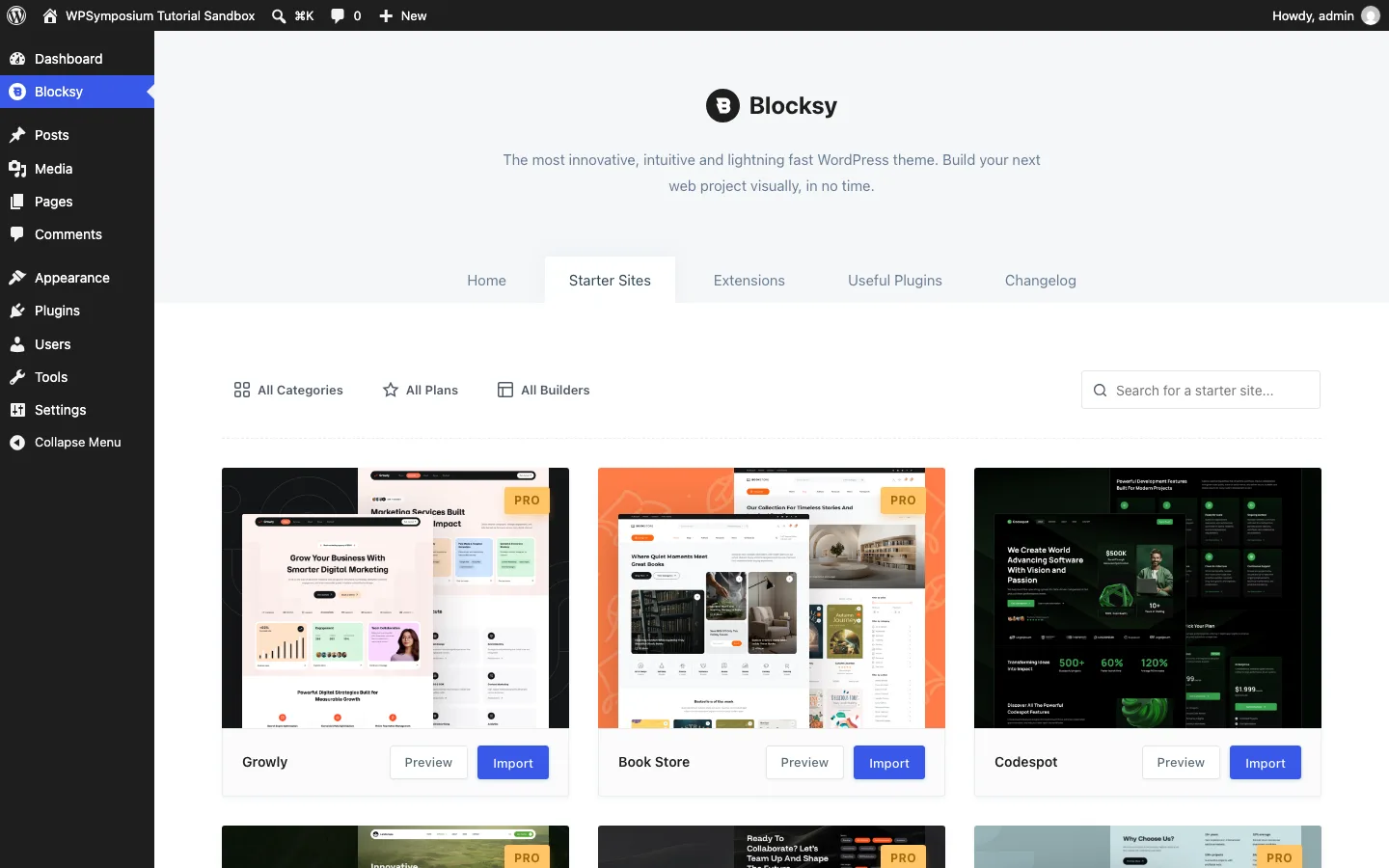
The Starter Sites tab in the Blocksy dashboard.
The free Garderobe shop imported in under a minute. It also installed Stackable, WPForms Lite and WooCommerce, so check the plugin list rather than accepting everything automatically.
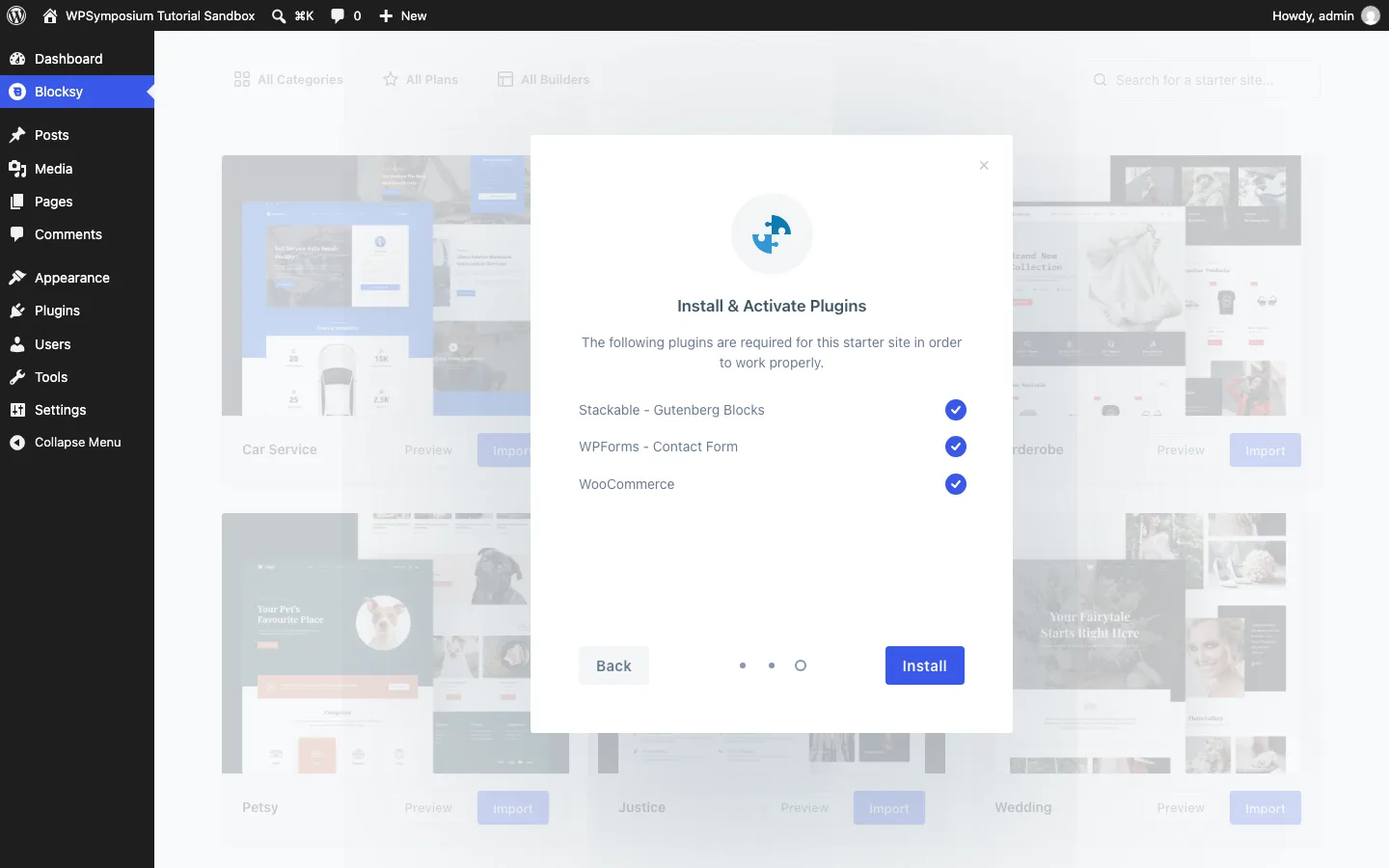
Step three of the Garderobe import: the plugins the starter site will install.
After import, the shop was still in WooCommerce’s coming-soon mode, several store pages were duplicated and a plugin tour covered the preview. The footer also linked to a wishlist that needs Pro. These were manageable cleanup tasks.
The Remove option successfully undid the starter content and disabled its added plugins while leaving our own content alone.
The Header and Footer Builder
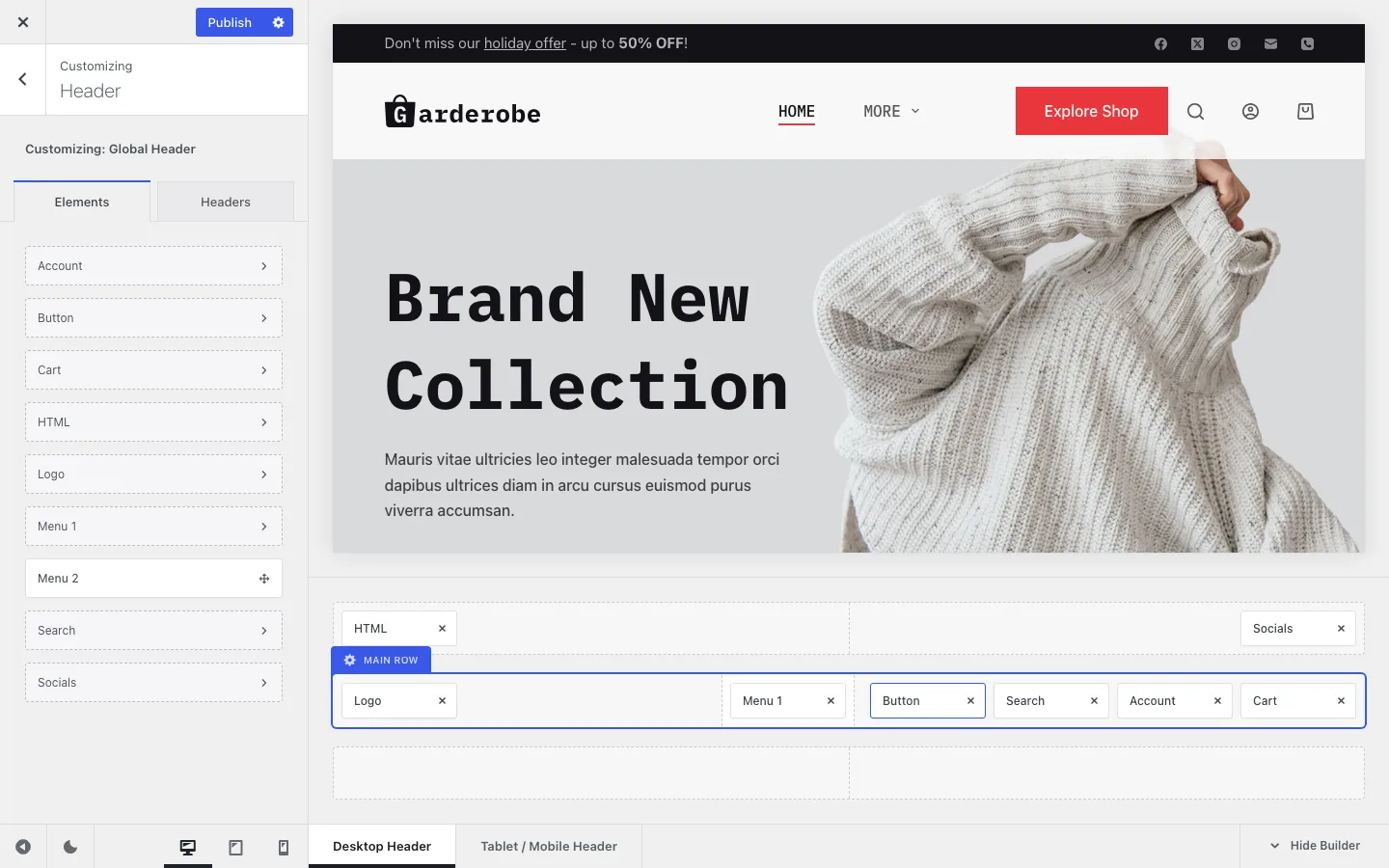
The free header builder after we dragged the Button element into the main row.
The header builder is the best part of the free version. Open Customize > Header and a builder panel slides up under the live preview. The header has a top, main and bottom row, each split into areas, with separate layouts for desktop and for tablet and mobile.
We dragged the Button element from the left panel into the main row. The button appeared in the preview at once. The menu did not have room any more, so Blocksy folded the extra menu items into a “More” dropdown on its own instead of wrapping onto two lines. Clicking any element opens its settings for colors, spacing, font and visibility per device.
On the desktop header, the free version listed nine elements: Account (login and register links), Button, Cart, HTML, Logo, Menu 1, Menu 2, Search and Socials. The sticky header is free too. The Garderobe header stuck to the top on scroll, and its script comes from the free Companion plugin, so keep Companion installed. The transparent header is a switch in the header’s own settings.
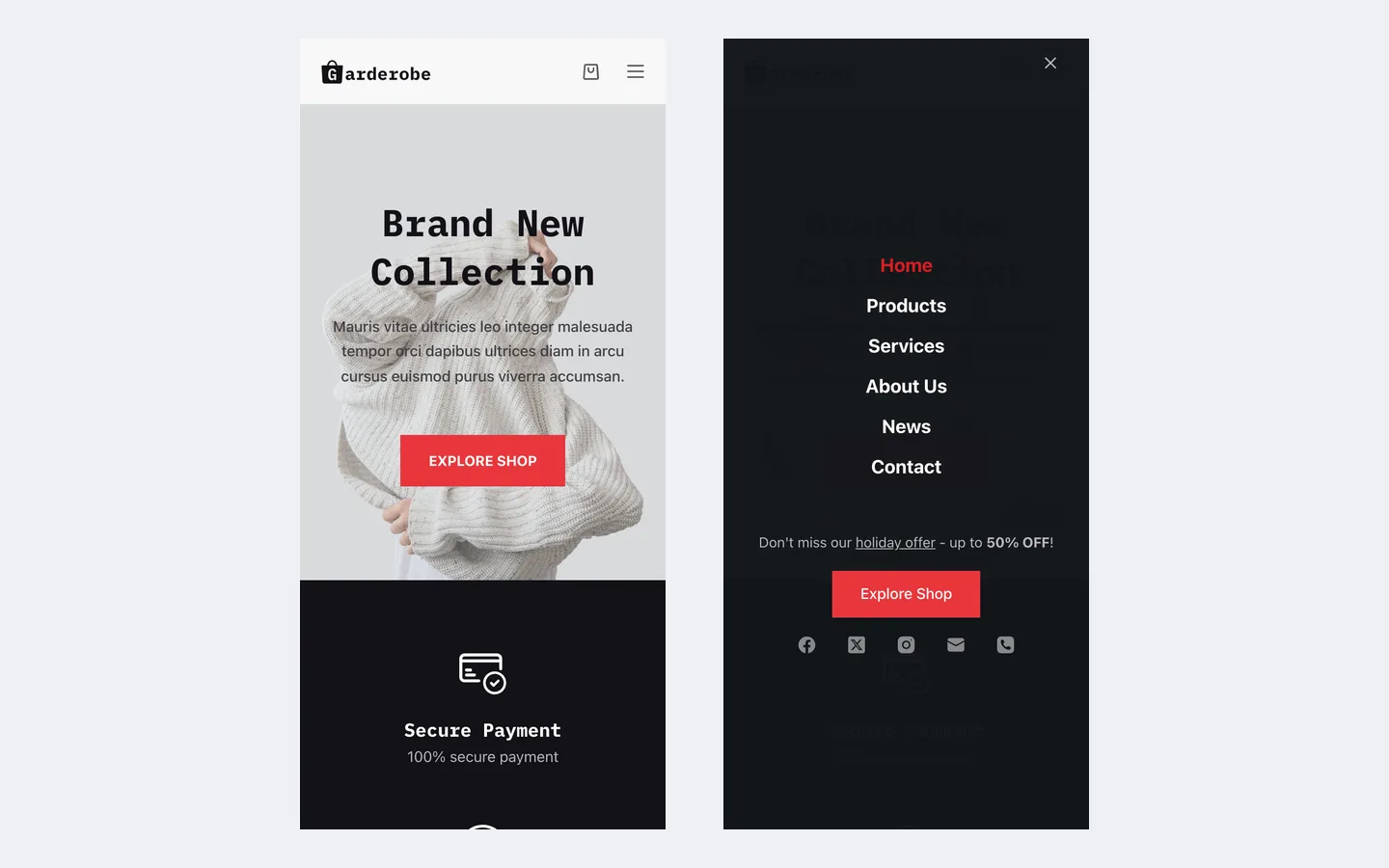
The tablet and mobile header and its off-canvas menu at 390 pixels wide.
The mobile header is built separately in the Tablet / Mobile Header tab. Garderobe’s mobile version shows the logo, cart and a menu icon that opens a full-screen off-canvas panel. It looked right on a 390 pixel wide phone screen.
The footer builder works the same way, with up to six widget areas, a footer menu, social icons and a copyright line on the free version.
The Customizer
Blocksy splits its Customizer into General Options (header, footer, sidebar, colors, typography, performance), Post Types (blog, single post, categories, pages, author and search pages) and WooCommerce. On our install the Customizer took about five seconds to open.
The General section holds more than most free themes offer:
- Layout: maximum site width, content spacing and edge spacing, and widths for narrow and wide blocks.
- Buttons, form elements and entry content styling.
- Breadcrumbs with separator, home item and label options.
- Visitor Engagement: a Google Analytics 4 field, Schema.org markup (on by default; you can turn it off if your SEO plugin handles it) and OpenGraph tags (off by default).
- Scroll to top button and a website frame.
- Manage Options: export, import and reset all theme settings, handy for moving a design from a staging site.
- Performance: output the theme’s dynamic CSS as a cached file or inline, turn off the WordPress emoji script, and lazy load images.
Colors and typography
The global palette has eight colors. Change one and every heading, button and link that uses it updates. The same eight colors showed up in the block editor’s color picker as Color 1 to Color 8, so your page content stays on brand.
Typography lets you set the base font, each heading level, buttons, quotes, pullquotes, code and captions, with Google Fonts included for free. On the free version those Google fonts load from Google’s servers: Garderobe’s IBM Plex Mono headings came from fonts.gstatic.com. Serving them from your own server needs the Pro Local Google Fonts extension, covered below.
Blog and archive layouts
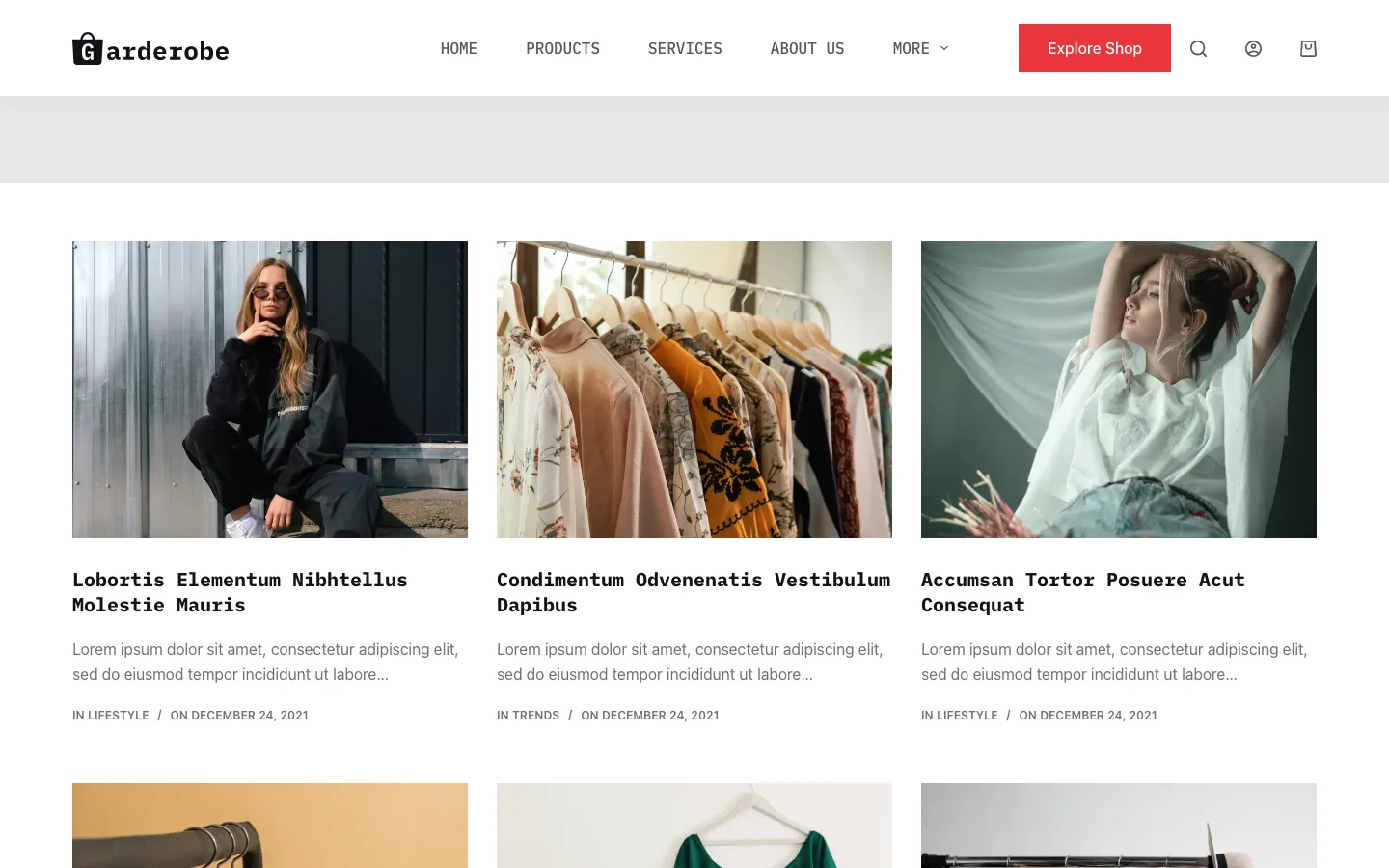
The blog page in Blocksy’s Grid layout.
The blog page has five structures: Simple, Classic, Grid, Enhanced Grid and Gutenberg, and three card styles: simple, boxed and cover. We switched between them and the page changed in a second. One warning: the cover style puts text on top of the featured image, and with Garderobe’s dark heading colors the titles were hard to read, so plan to change the card colors if you use it.
Single posts have switches for the featured image, tags, share box, author box, post navigation, related posts and comments. We turned on the author box, share box and related posts and all three appeared under the post. The page also had a “skip to content” link for keyboard users.
Page-level settings in the block editor
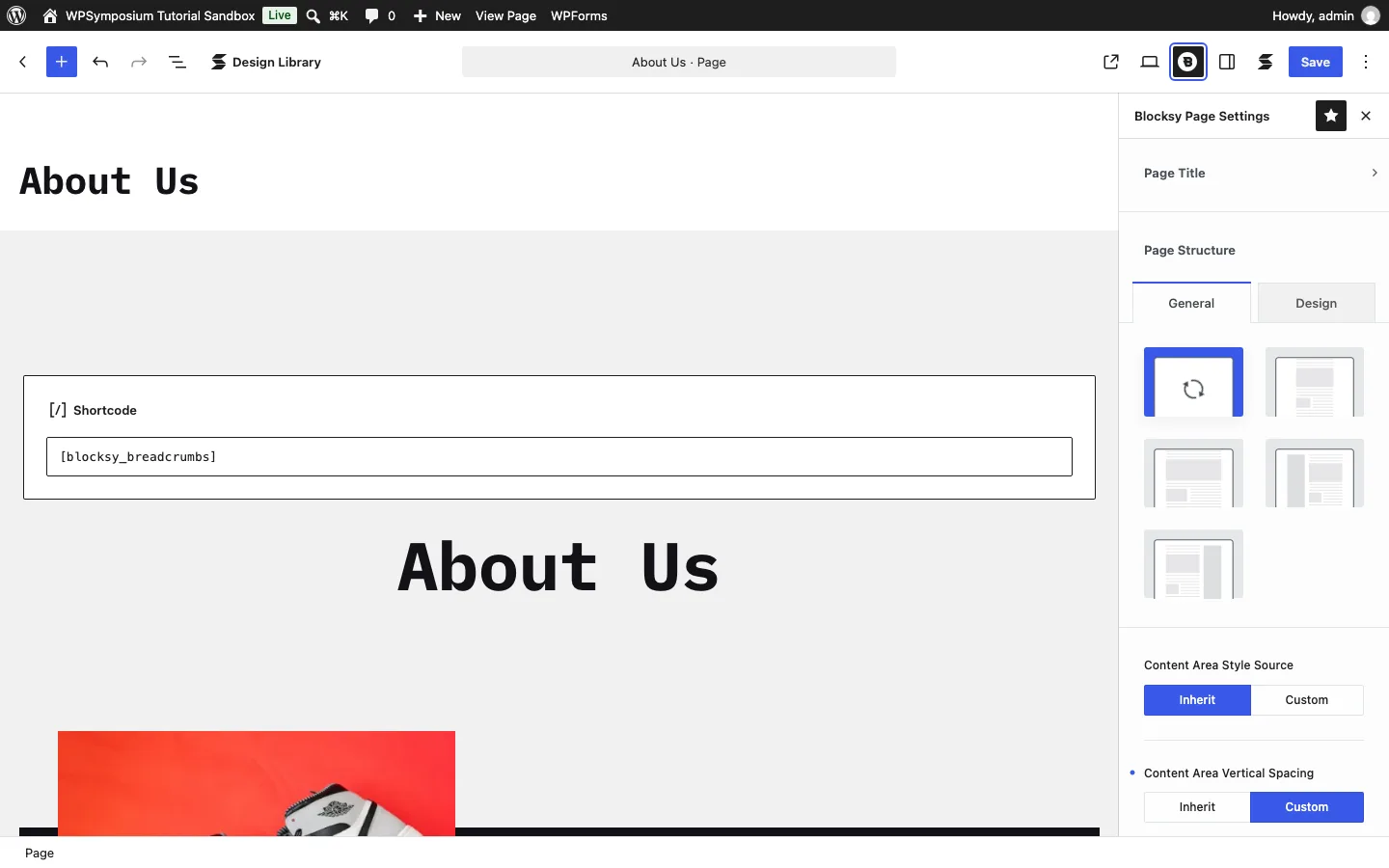
The Blocksy Page Settings panel in the block editor.
Each page and post gets a Blocksy Page Settings panel in the editor’s top bar. You can change the title area, the layout (with or without sidebar, narrow or wide), the content area style and spacing, and hide the featured image, share box, header or footer on that page only. That is how you make a landing page without a menu.
Blocksy also adds its own blocks: Breadcrumbs, Advanced Posts, Advanced Taxonomies, About Me, Contact Info, Socials, Share Box, Dynamic Data and Advanced Search. These are site-building blocks, not a full design block library like Kadence Blocks. The starter sites lean on Stackable or Greenshift for their layouts.
Free Extensions
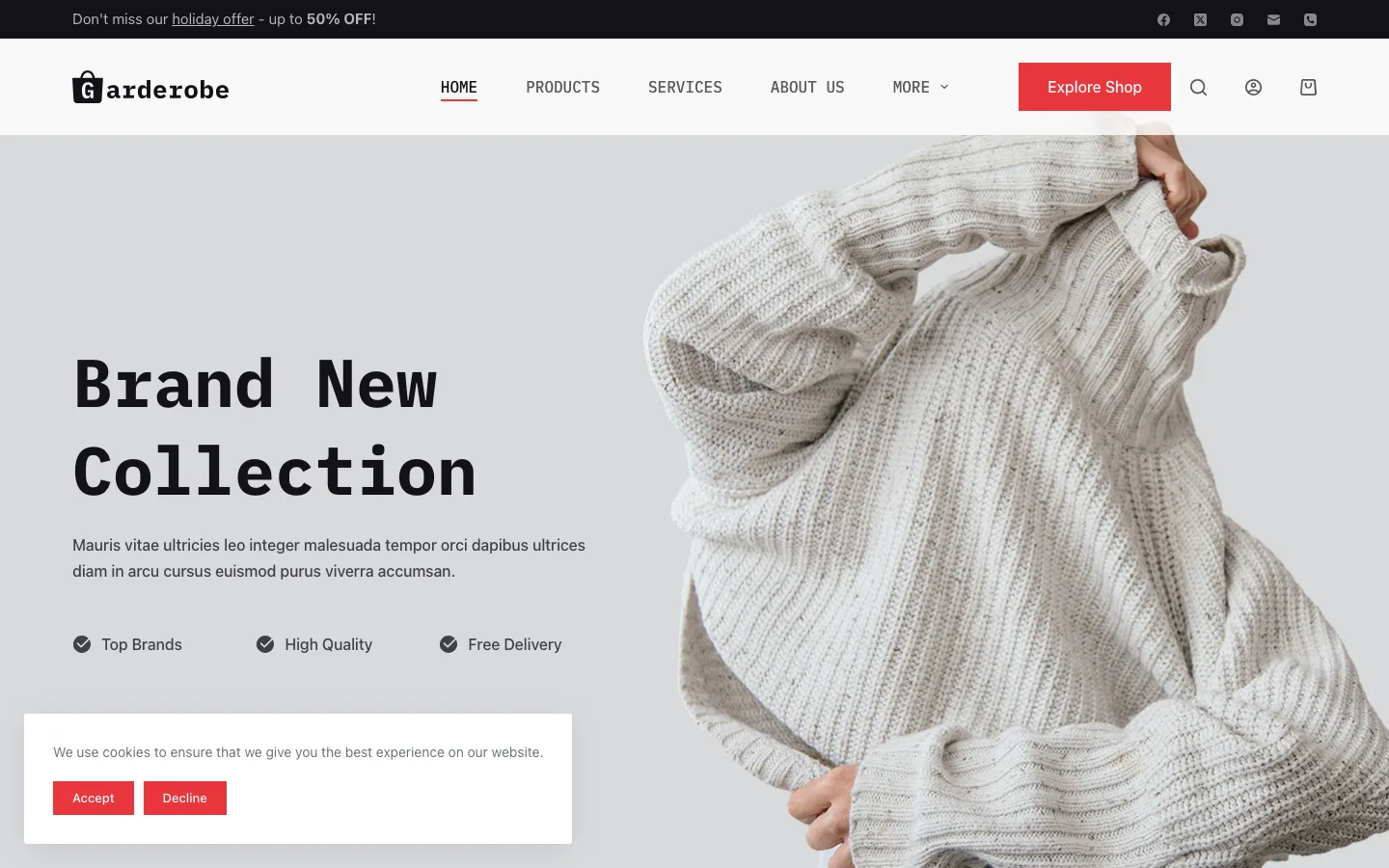
The free Cookies Consent banner on our test site.
The Extensions tab lists four free extensions you switch on as needed: Cookies Consent, Newsletter Subscribe, Product Reviews and Trending Posts. The other eleven are Pro and clearly marked; we saw no pop-ups pushing the upgrade. Beyond that tab, the only upsells we noticed were a “View Pro Features” button at the top of the Customizer and the PRO badges on starter sites.
The cookie banner does more than show a message. We entered a test Google Analytics 4 ID and loaded the homepage as a new visitor: the Google tag did not load at all until we clicked Accept, and then it did. That is the behavior privacy rules expect, and many themes do not offer it for free.
WooCommerce on the Free Version
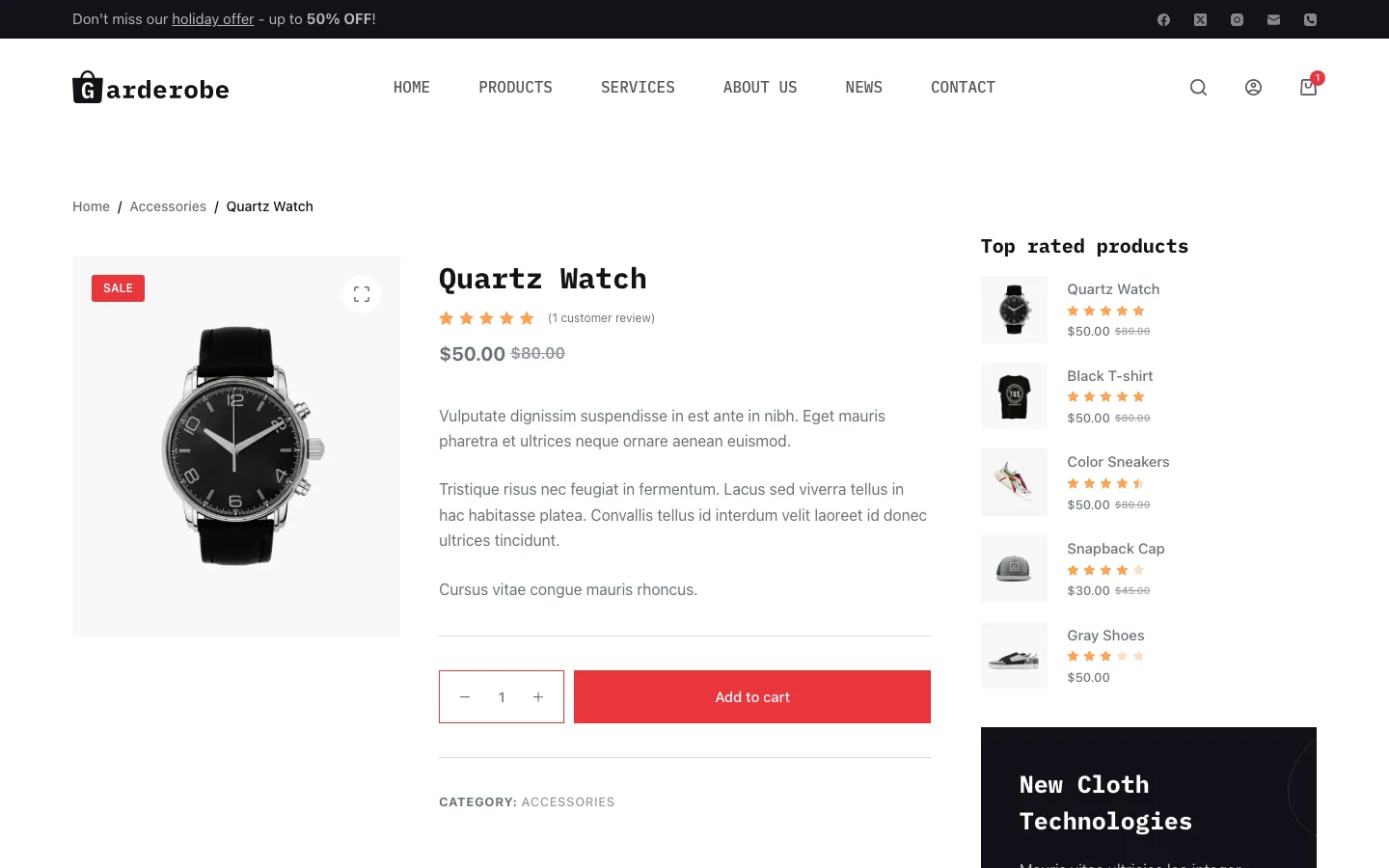
A product page from the Garderobe starter site on the free version.
The free theme already handles a normal store well. On the shop page, Add to cart worked without a page reload and the header cart count updated straight away. On the product page the gallery and summary stay in view as you scroll. The WooCommerce part of the Customizer covers messages, star ratings, the quantity box, sale badges, the cart, checkout and account pages, the store notice, shop columns and rows, card options, the product gallery, product tabs and related products.
The extras that stores usually want next, such as quick view, wishlists, swatches and filters, are in the Pro Shop Extra extension.
How Heavy Is a Blocksy Site?
On its own, Blocksy is light. In our speed test of nine free themes, a bare Blocksy homepage weighed 69 KB in 7 requests with no jQuery, almost the same as Astra, and scored 100 in Lighthouse. It was also the only theme of the nine that turns off the WordPress emoji script by default.
A shop starter site is heavier, because it adds images, fonts and plugins. We measured the imported Garderobe homepage logged out, at 1440 x 900 with the browser cache off:
The imported Garderobe home page transferred about 946 KB across 58 requests. Images accounted for 728 KB, with the rest spread across styles, scripts, fonts and the page itself. That makes the starter site’s images a much larger part of its weight than Blocksy’s core files.
Blocksy’s own share is small: its main stylesheet was 17.6 KB and its main script 9.9 KB. Most of the JavaScript, including jQuery, came from WooCommerce and WPForms, not the theme. All images loaded from our own site.
We also ran Lighthouse once on this homepage. This was on a local Docker sandbox with no caching or CDN, with the cookie banner showing, so treat it as a rough guide, not a hosting result. Desktop scored 98 for performance. Mobile scored 74, held back by a 5.0 second Largest Contentful Paint: the big hero photo in a Stackable image block, plus stylesheets that block rendering. A lighter hero image, page caching and good managed WordPress hosting would do more for that score than changing themes.
Blocksy Pro, Hands-On
Installing and activating Pro
Blocksy Pro is a separate plugin zip from your Creative Themes account. We switched off the free Companion plugin and installed and activated Pro in its place. Until the license is activated, the Blocksy dashboard is replaced by a license key screen and the Pro features do not run. After activation the dashboard showed a PRO badge and a new Content Blocks menu, and the Customizer gained an Extensions section. All our free settings and content stayed in place.
Our review license is the Business plan, billed yearly.
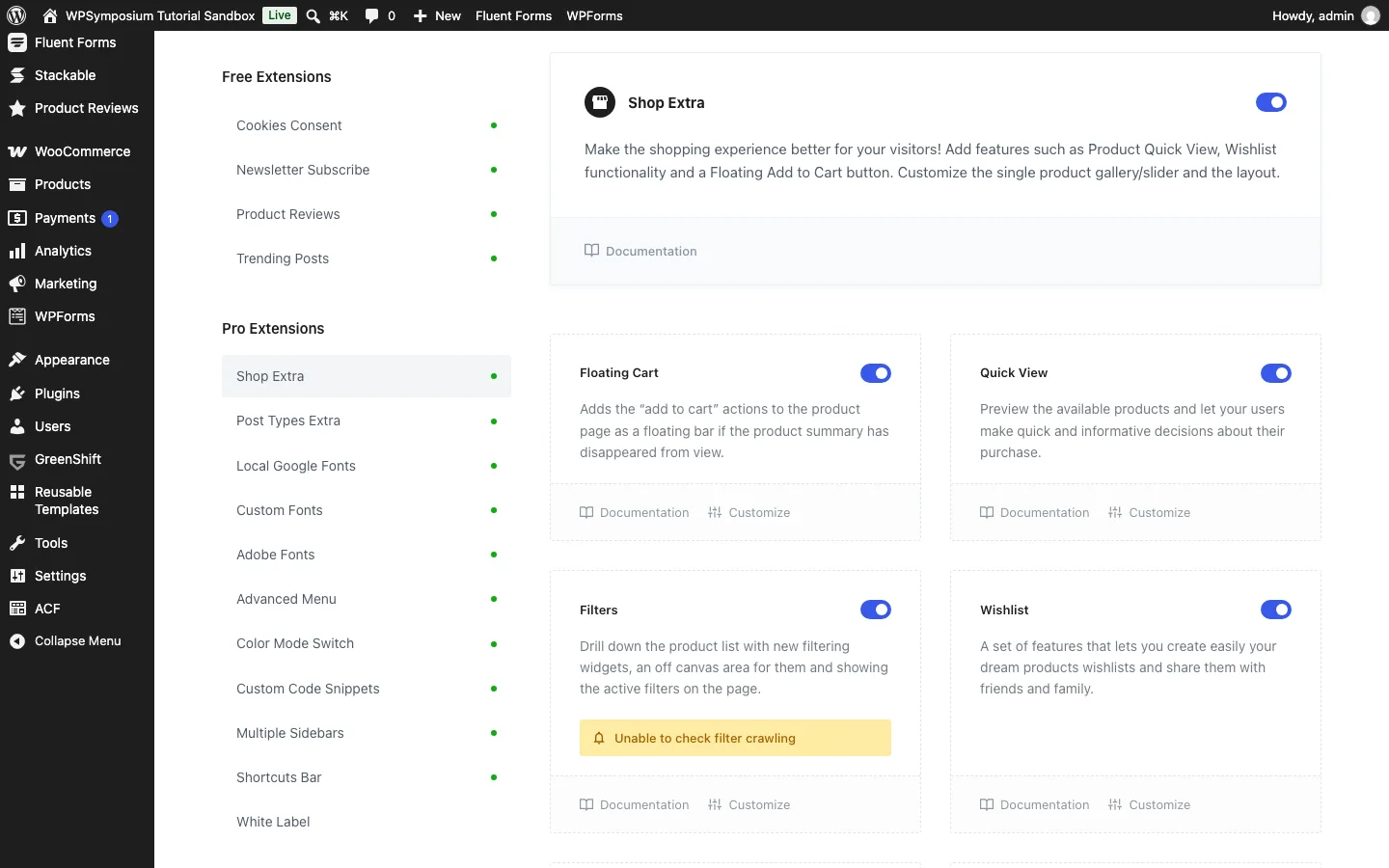
The Pro extensions list, with Shop Extra and its features switched on.
The Extensions tab lists the eleven Pro extensions: Shop Extra, Post Types Extra, Local Google Fonts, Custom Fonts, Adobe Fonts, Advanced Menu, Color Mode Switch, Custom Code Snippets, Multiple Sidebars, Shortcuts Bar and White Label. Two of them, Shop Extra and Post Types Extra, have their own feature switches inside. Turning on the extension alone is not enough; you also switch on the features you want.
White Label needs the Agency plan
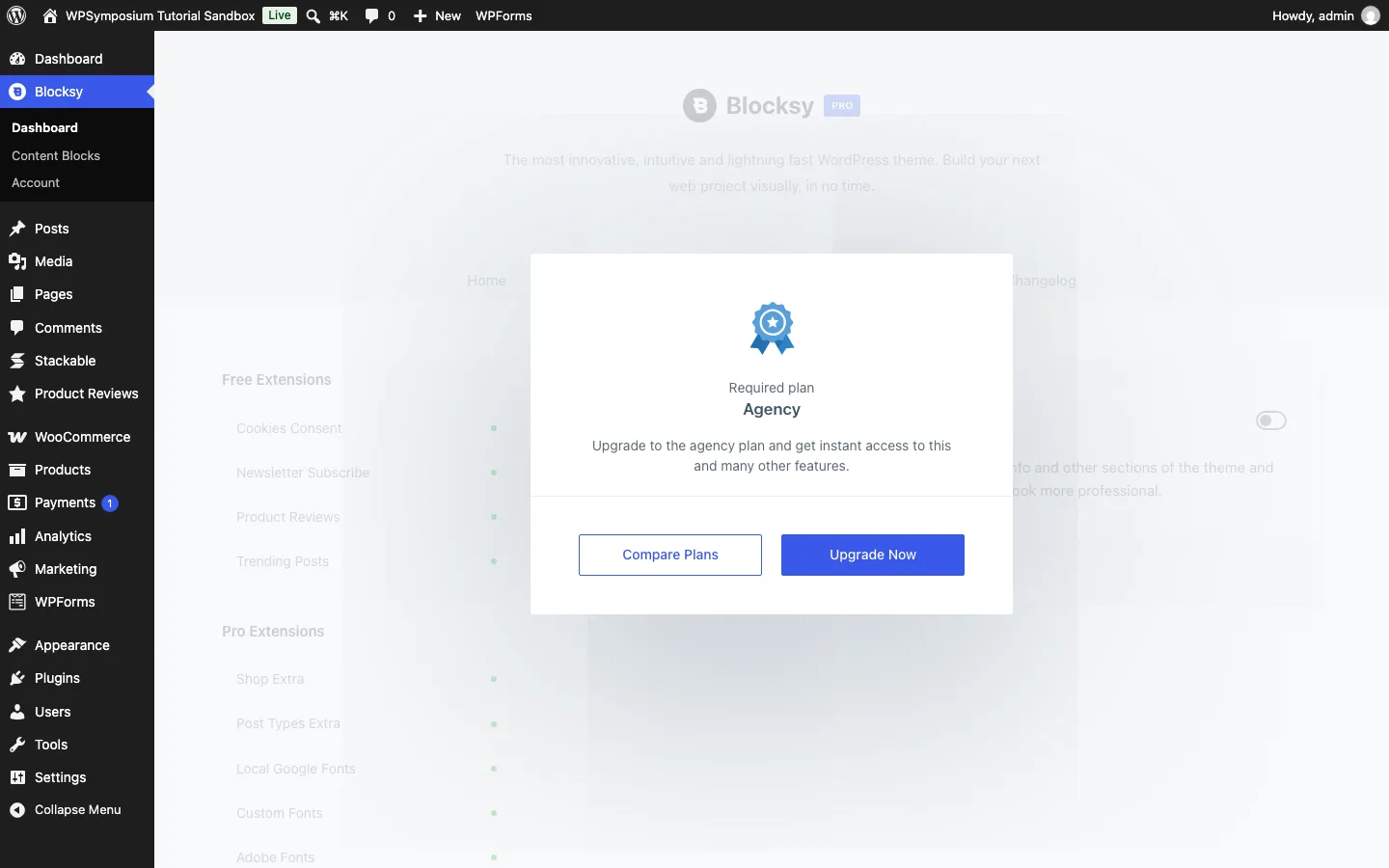
Trying to switch on White Label with a Business license.
When we tried to switch on White Label, Blocksy showed a “Required plan: Agency” pop-up. So the Business plan includes everything except white labelling, which matches the pricing page.
Conditional headers and footers
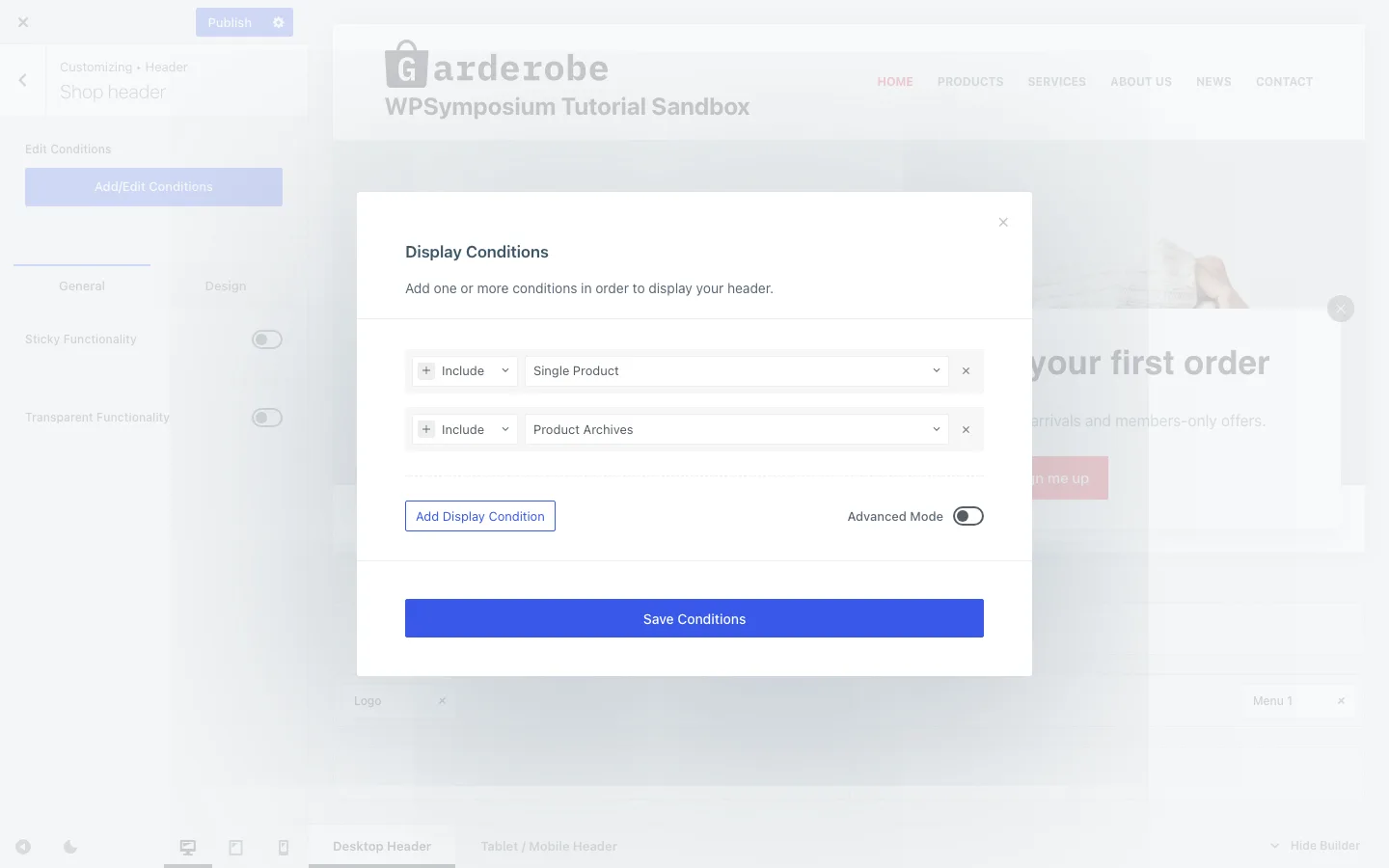
Display conditions for our second header, used only on shop pages.
With Pro, the Headers tab in the header builder gets a “Create new header” button. We created a “Shop header”, set it to show on single products and product archives, and gave it a simpler layout with a cart that shows the cart total. On the frontend, product and shop pages used the new header and the rest of the site kept the original one.
The rule list is long. Besides pages, posts and shop pages, you can target user roles, logged-in or logged-out visitors, date ranges, recurring days, the request URL, the referring site, a cookie, the site language and product categories, tags or brands. An Advanced Mode switch lets you combine rules. Footers work the same way, with a “Create new footer” button.
One tip: a new header starts from Blocksy’s defaults, not from your current header, unless you pick a header in the “Copy elements & styles from” box when you create it.
Pro also adds header elements: Color Switch, Contacts, Content Block, Divider, a third menu, a Search Box, a Trigger for a desktop off-canvas panel and a Widget Area, plus Wishlist and Compare once those shop features are on. Several elements, such as Button, HTML, Contacts and Divider, can be duplicated, so you can have two buttons or two HTML blocks.
Content Blocks: hooks, popups and templates
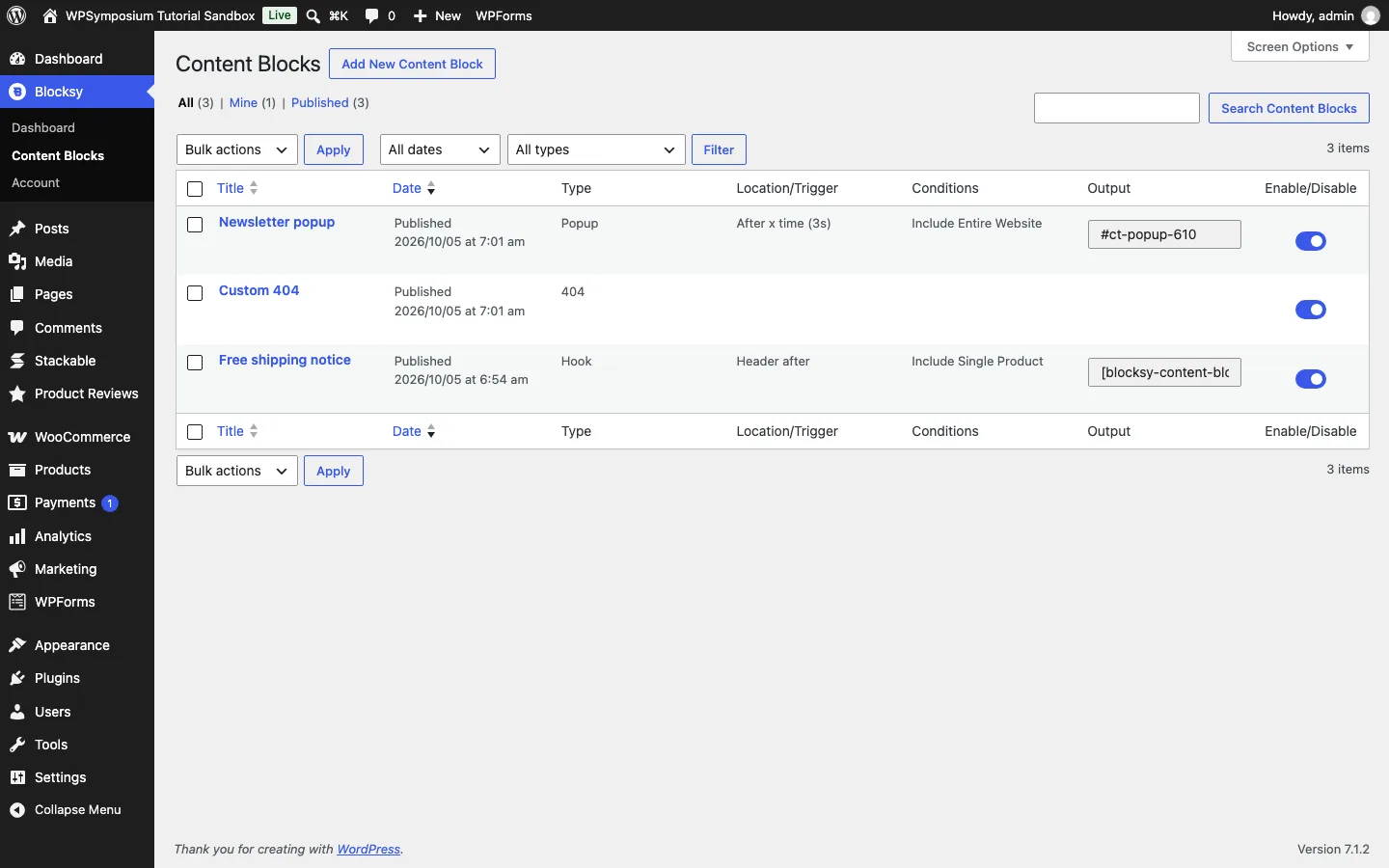
The three Content Blocks we built, with their type, location and conditions.
Content Blocks are block editor layouts that Blocksy places for you. There are nine types: Custom Content/Hooks, Popup, 404 Page, Header, Footer, Archive, Single, Nothing Found and Maintenance. We built three:
- A hook. A red “Free shipping on orders over $50” bar placed after the header, with the condition “Single Product”. It showed on every product page and nowhere else. The location list has about 200 spots, from the page head and sidebar to dozens of WooCommerce cart, checkout and account positions.
- A popup. A newsletter sign-up box set to open after 3 seconds on the whole site. It appeared on schedule and closed with its X. Other triggers include scrolling, scrolling to an element, clicking an element, page load, inactivity, a number of pages viewed and exit intent, and you can control when it shows again.
- A custom 404 page. Our “This page went out of stock” template replaced the theme’s 404 page straight away.
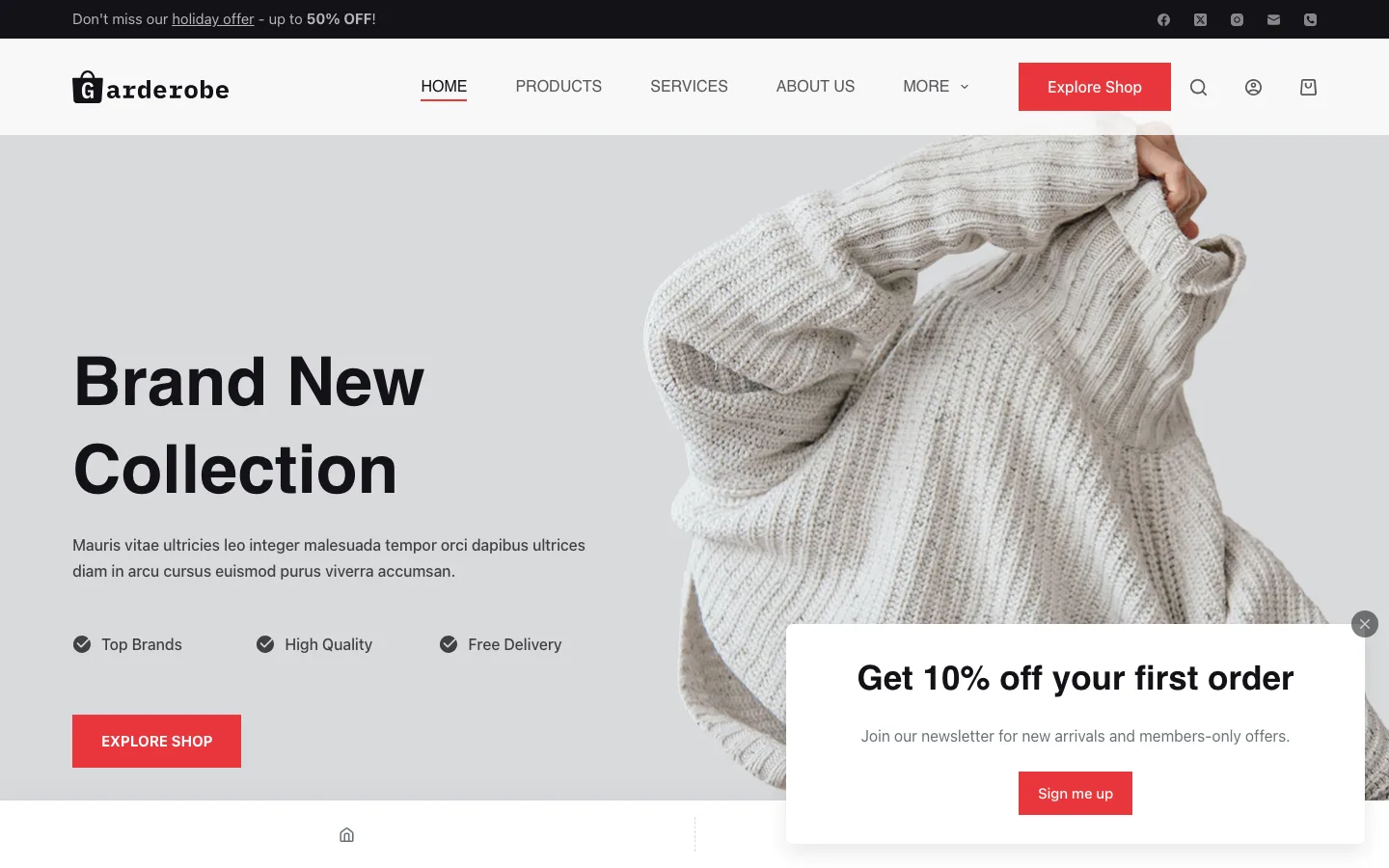
Our newsletter popup, opened by the “after 3 seconds” trigger.
Content Blocks replace a separate hooks plugin and a basic popup plugin for most sites. They are also how the Pro starter sites build their heroes, footers and menus.
Mega menu (Advanced Menu)
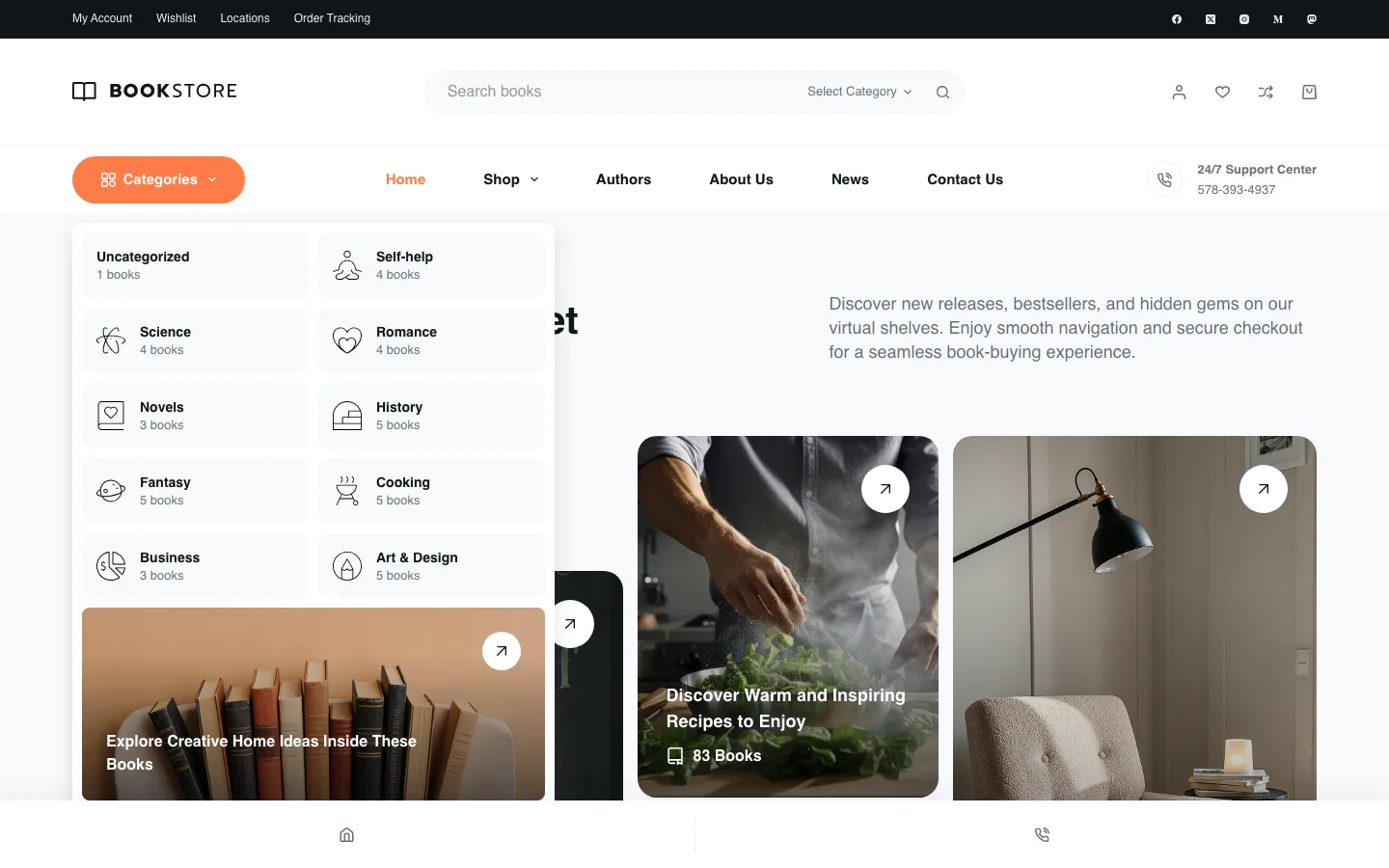
A mega menu with a Content Block inside it, from the Pro Book Store starter site.
The Advanced Menu extension adds a Menu Item Settings button to every item in Appearance > Menus. We turned on the mega menu for our Products item, and its sub-items spread into four columns across the full header width. You can choose one to six columns, set the dropdown width, load the content with AJAX, and add labels, icons and badges to items. For richer menus you can place a Content Block inside the dropdown, which is what the Book Store starter site does with its category grid.
Shop Extra for WooCommerce
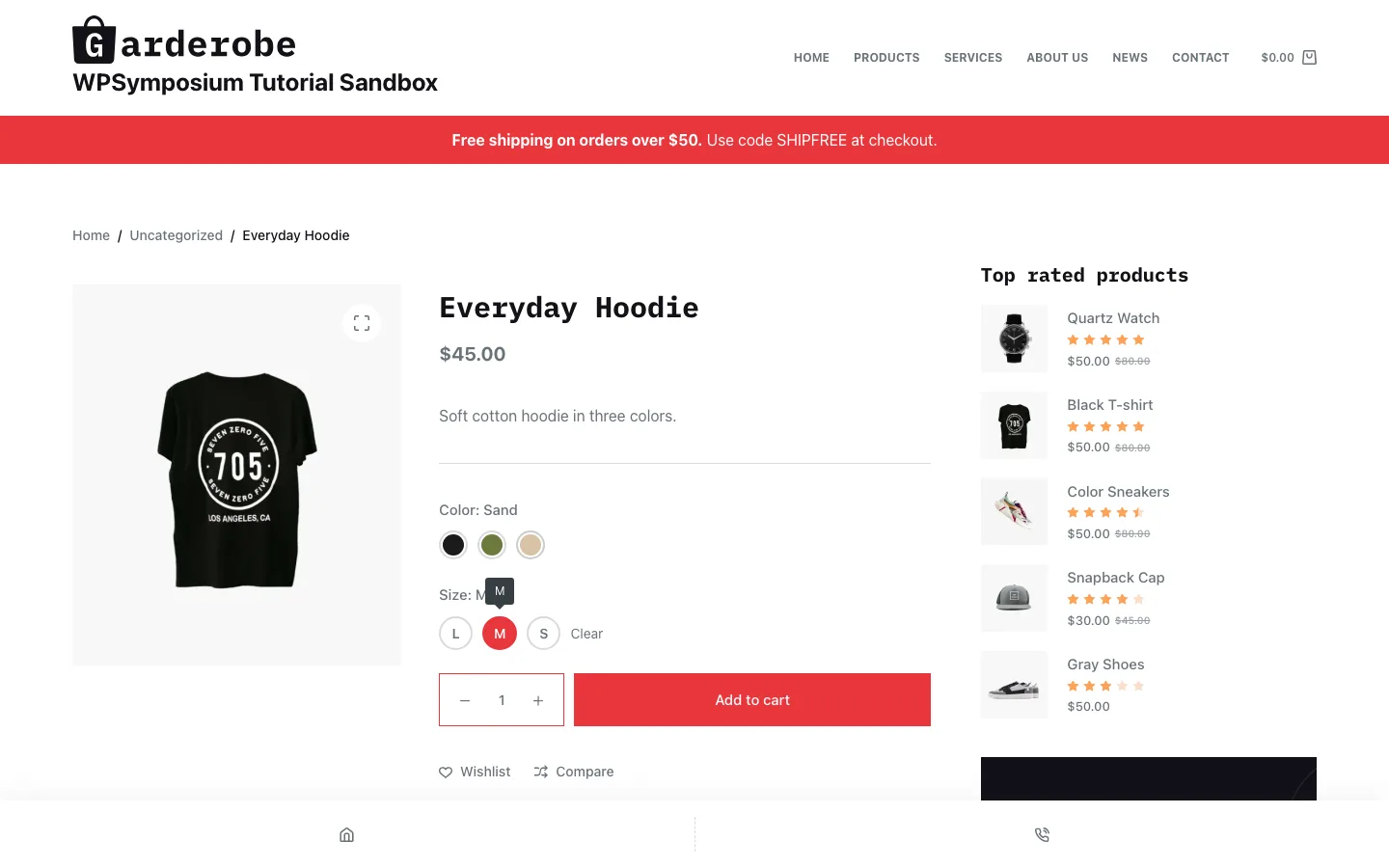
Color and size swatches, wishlist and compare links, our hook bar and the conditional shop header on one product page.
Shop Extra is the biggest reason to buy Business. On our install it listed 21 features: floating cart, quick view, filters, wishlist, compare, variation swatches, product brands, custom tabs, size guide, custom thank you pages, advanced reviews, a free shipping bar, an advanced gallery, a product share box, search by SKU, affiliate product links, stock scarcity, an added-to-cart popup, a product waitlist, suggested products and a cart reserved timer. We turned them all on and tried the main ones:
- Variation swatches. We made a hoodie with color and size options, set the Color attribute’s type to Color and Size to Button in Products > Attributes, and picked a color for each term. The dropdowns became round color swatches and size buttons.
- Quick view opened a product in a pop-up from the shop page, with Add to cart, Wishlist and Compare.
- Wishlist and compare buttons appeared on each shop card, and the hearts filled in when we clicked them.
- Floating cart. On the product page, a bar with the product name and an Add to cart button slid in at the top once we scrolled past the summary.
- Added-to-cart popup confirmed the item with its price and View cart and Continue shopping buttons.
- Cart reserved timer showed “Hurry up! Your selected items are in high demand” and a 10 minute countdown on the cart page.
The free shipping bar did not appear in our quick test, even after we added a free shipping rule in WooCommerce. We did not dig into its settings, so we cannot say whether it needs more setup.
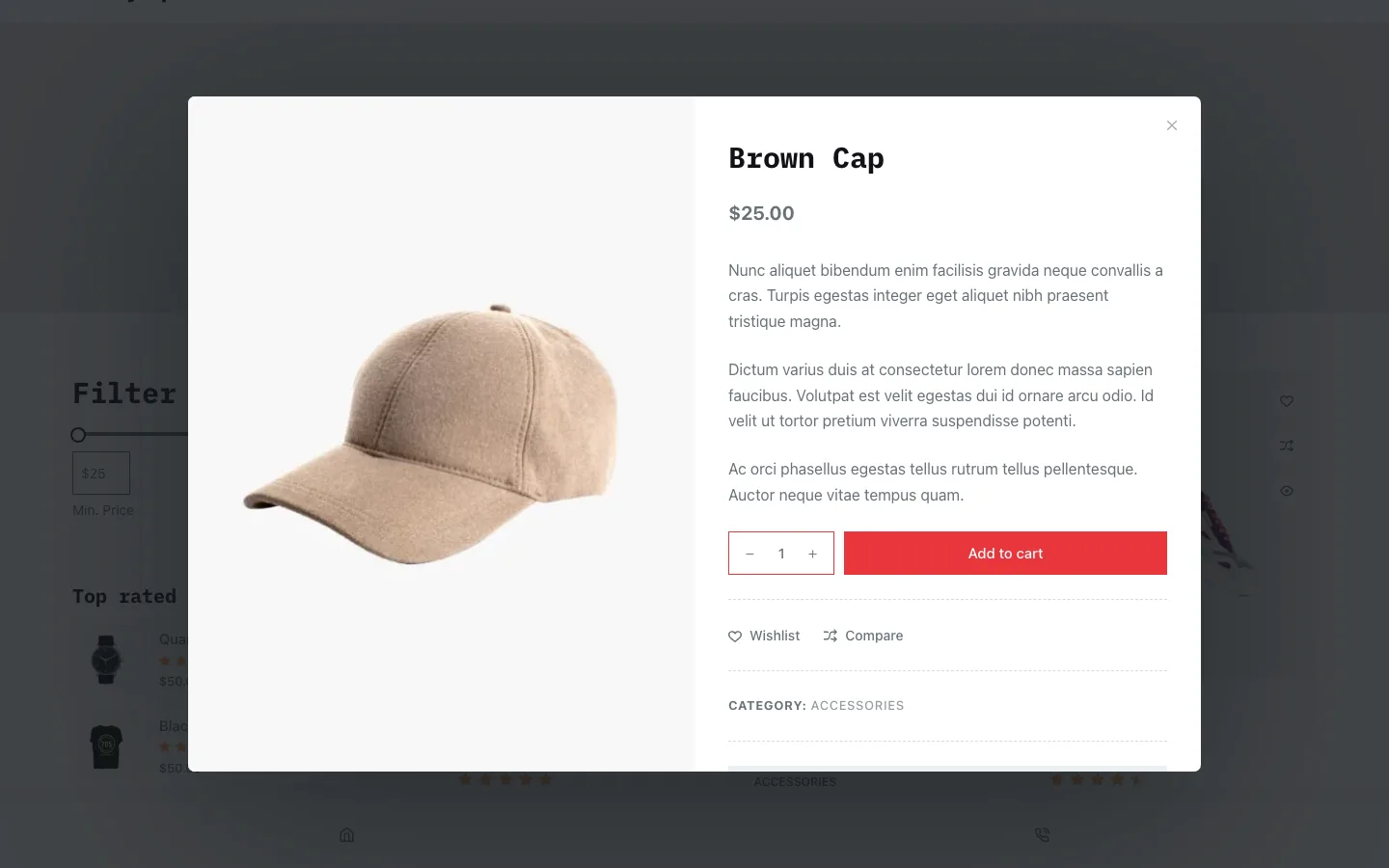
Quick view from the shop page.
Together these replace several separate WooCommerce plugins. Each feature has its own switch, so you only load what you use.
Fonts: local, custom and Adobe
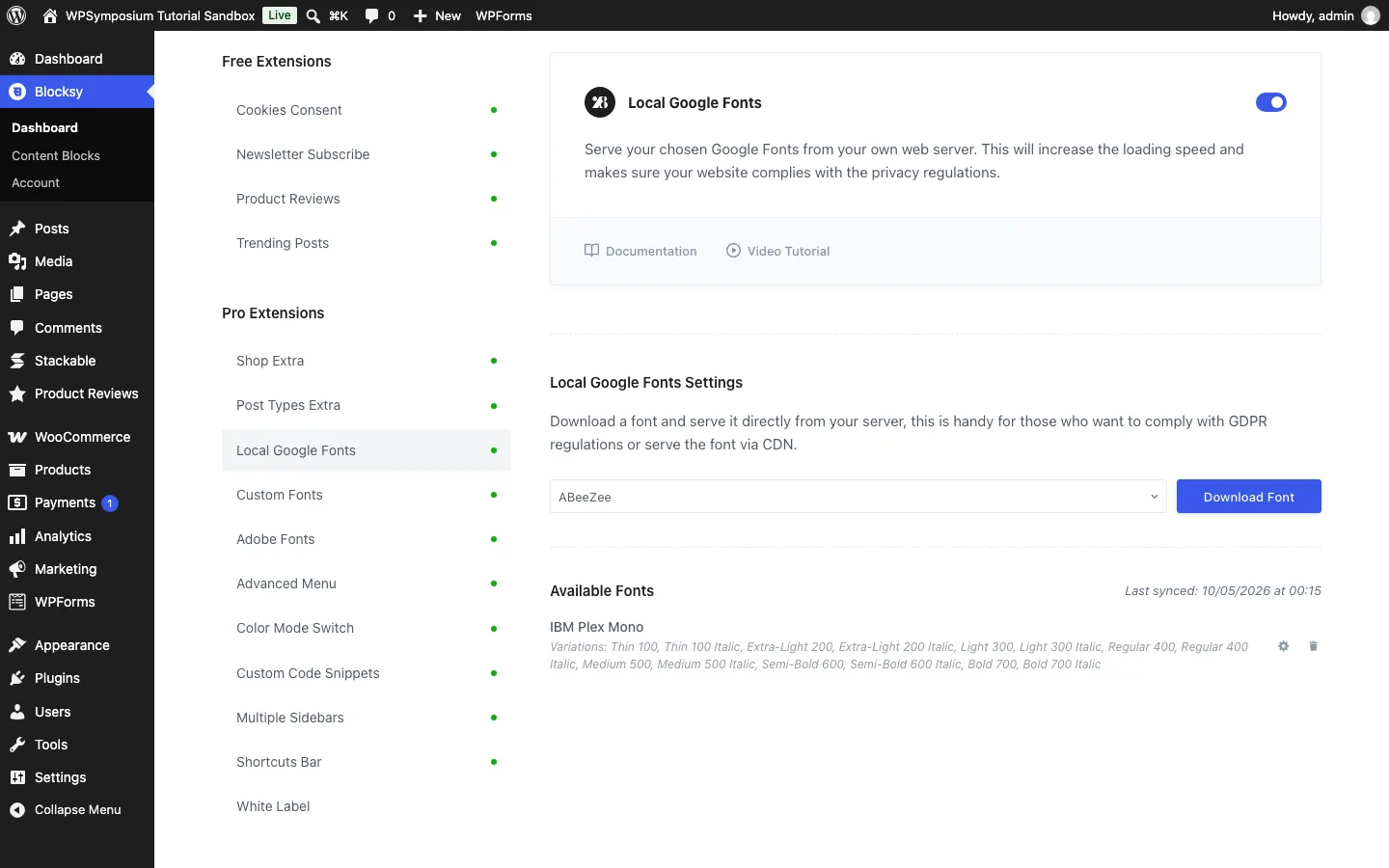
Local Google Fonts after we downloaded IBM Plex Mono to our own server.
Local Google Fonts serves Google fonts from your own server, which helps with speed and with privacy rules in the EU. It has one trap. The moment we switched it on, Blocksy stopped loading the font from Google, but it did not download a local copy by itself. Our headings fell back to a plain system font until we picked IBM Plex Mono in the extension’s settings and clicked Download Font. After that the page loaded three font files from our own site and made no requests to Google at all. So switch it on, then download every font your design uses straight away. Also check the font picker before you click Download Font: the button grabs whatever font is selected, which is the first font in the list until you change it.
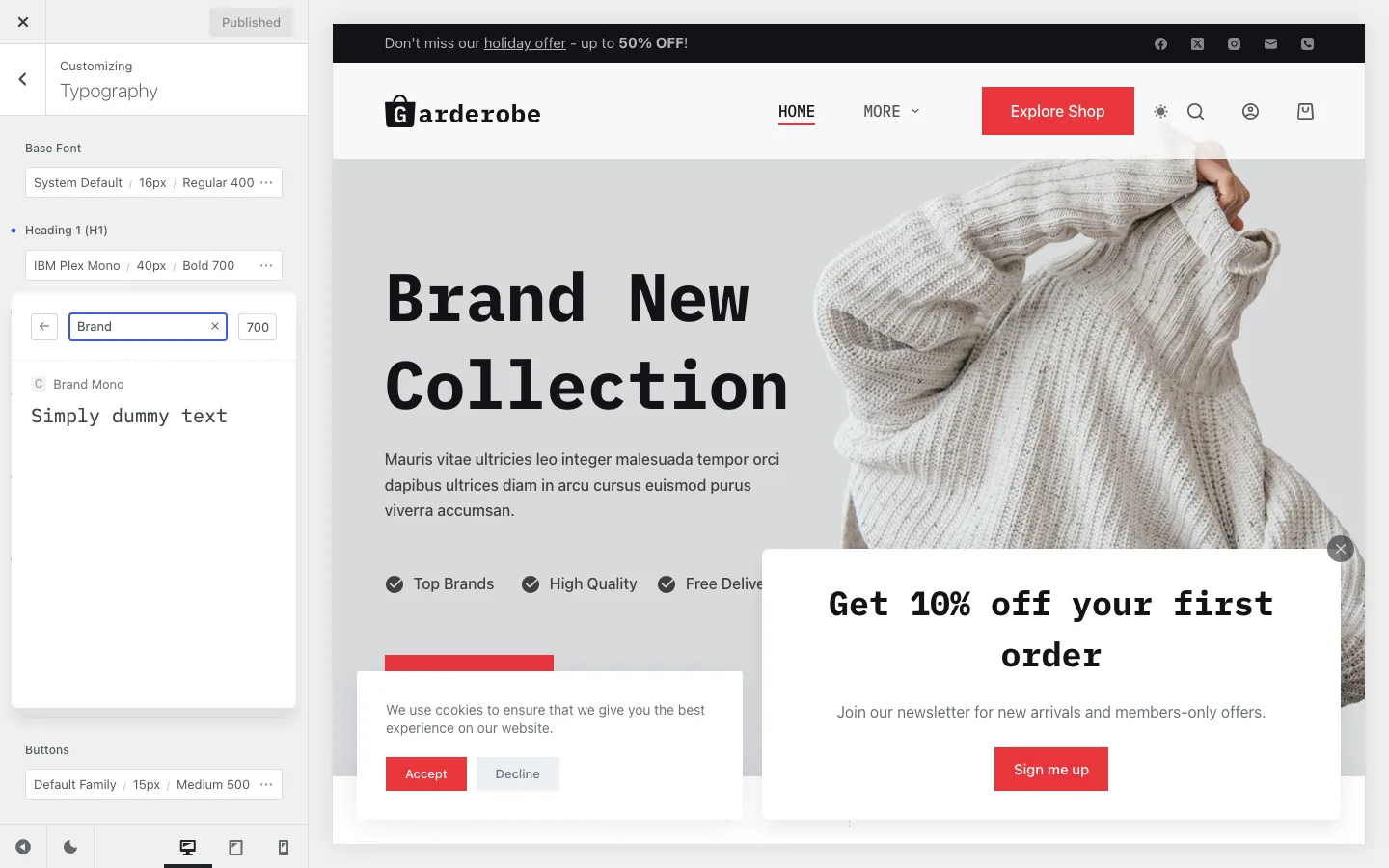
Our uploaded font in the Customizer font picker.
Custom Fonts accepts .woff2 or .ttf files as a simple font, a variable font, or a “modern font stack” of system fonts. We uploaded a .woff2 file as “Brand Mono”, and it showed up in every typography setting with a C badge for custom.
Adobe Fonts connects an Adobe Fonts project by its Project ID. We do not have an Adobe Fonts account, so we did not test it beyond seeing the settings screen.
Dark mode (Color Mode Switch)
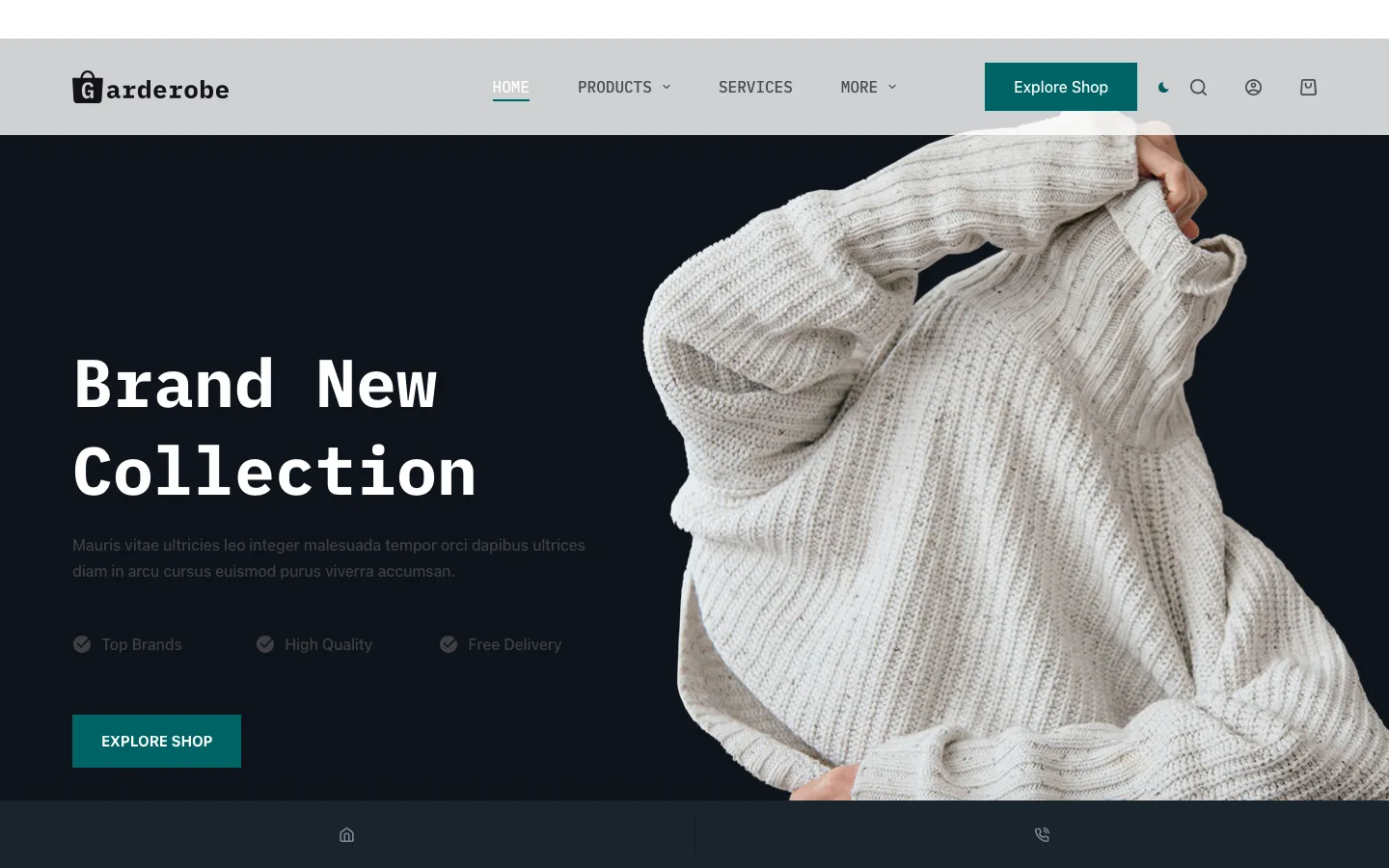
Dark mode after clicking our Color Switch header element.
The Color Mode Switch extension adds a Color Switch element for the header. We dragged it in next to the search icon, and clicking it on the site switched to a dark color scheme. It worked on every page, but the defaults need work: the red brand color turned teal, and the black Garderobe logo nearly disappeared on the dark background. Set your own dark palette and a light version of your logo before you turn it on.
The other Pro extensions
- Post Types Extra. After switching on its Read Time feature, blog cards showed “Read time 3 mins” and posts got a reading progress bar at the top. It also has dynamic data from custom fields, post filters and per-category colors and images.
- Custom Code Snippets. We added a snippet to the global header field and it printed on every page. Each page also gets its own snippet fields in Blocksy Page Settings.
- Multiple Sidebars. A “Create Sidebar/Widget Area” box appears in Appearance > Widgets. We created a sidebar there; each one has a gear icon for its display conditions.
- Shortcuts Bar. A bar of icon shortcuts at the bottom of the screen, meant for phones. On our install it also showed on desktop by default, so set its visibility to mobile only if that is what you want.
- Newsletter Subscribe with Pro active offered nine email services: Mailchimp, MailerLite, Brevo, Campaign Monitor, Kit, ActiveCampaign, EmailOctopus, Klaviyo and Sendy.
Pro starter sites
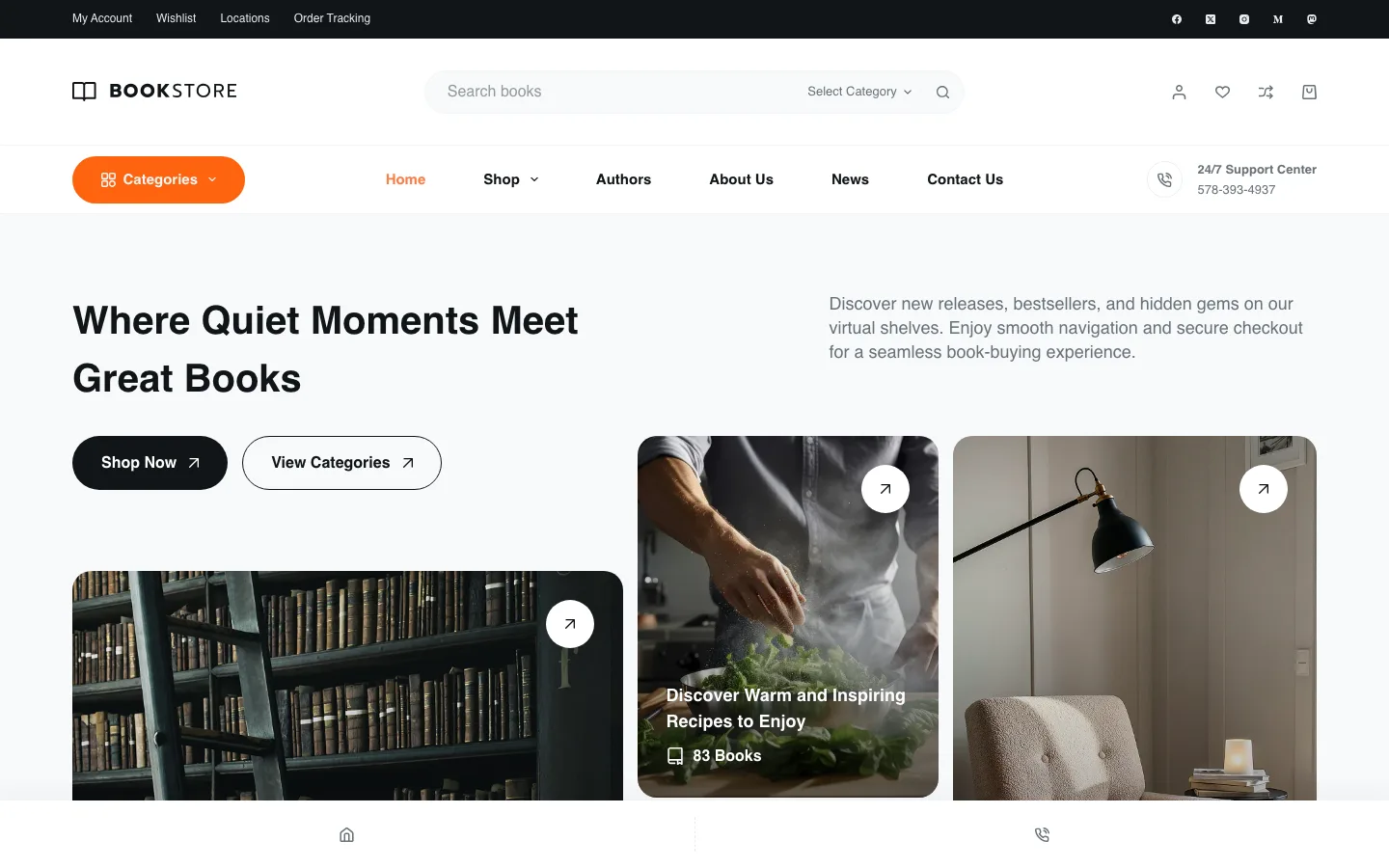
The Pro Book Store starter site after a clean import.
With the Business license, the Pro starter sites unlocked. We imported Book Store, a Business-plan design. The first import took about a minute and a half, including installing Advanced Custom Fields, Greenshift and Fluent Forms. It created 34 products, 17 pages, 9 posts, 105 media files and 7 Content Blocks: an exit-intent popup, page heroes, the category mega menu and the footer. With Local Google Fonts switched on, its homepage loaded nothing from outside our site.
If you import a second starter site on top of the first without ticking Clean Install, the menus and settings mix and the header breaks. We did that by mistake. Removing the starter site and importing again with Clean Install fixed it.
Blocksy Free vs Pro
The free version is unusually complete. Here is what changes when you pay, based on what we saw in the plugin and on Creative Themes’ pricing page in October 2026:
Free already includes the header and footer builder, sticky and transparent headers, global styling and useful store settings. Every paid plan adds conditional headers and footers, Content Blocks, mega menus, custom fonts and other design tools. Business is the important step up for stores: it adds Shop Extra, Post Types Extra and access to all Pro starter sites. Agency adds white labeling and unlimited sites.
The catch is the Personal plan. It covers the site-building tools but not Shop Extra, Post Types Extra or most Pro starter sites. If you run a WooCommerce store, Business is the real starting point.
Blocksy Pro Pricing
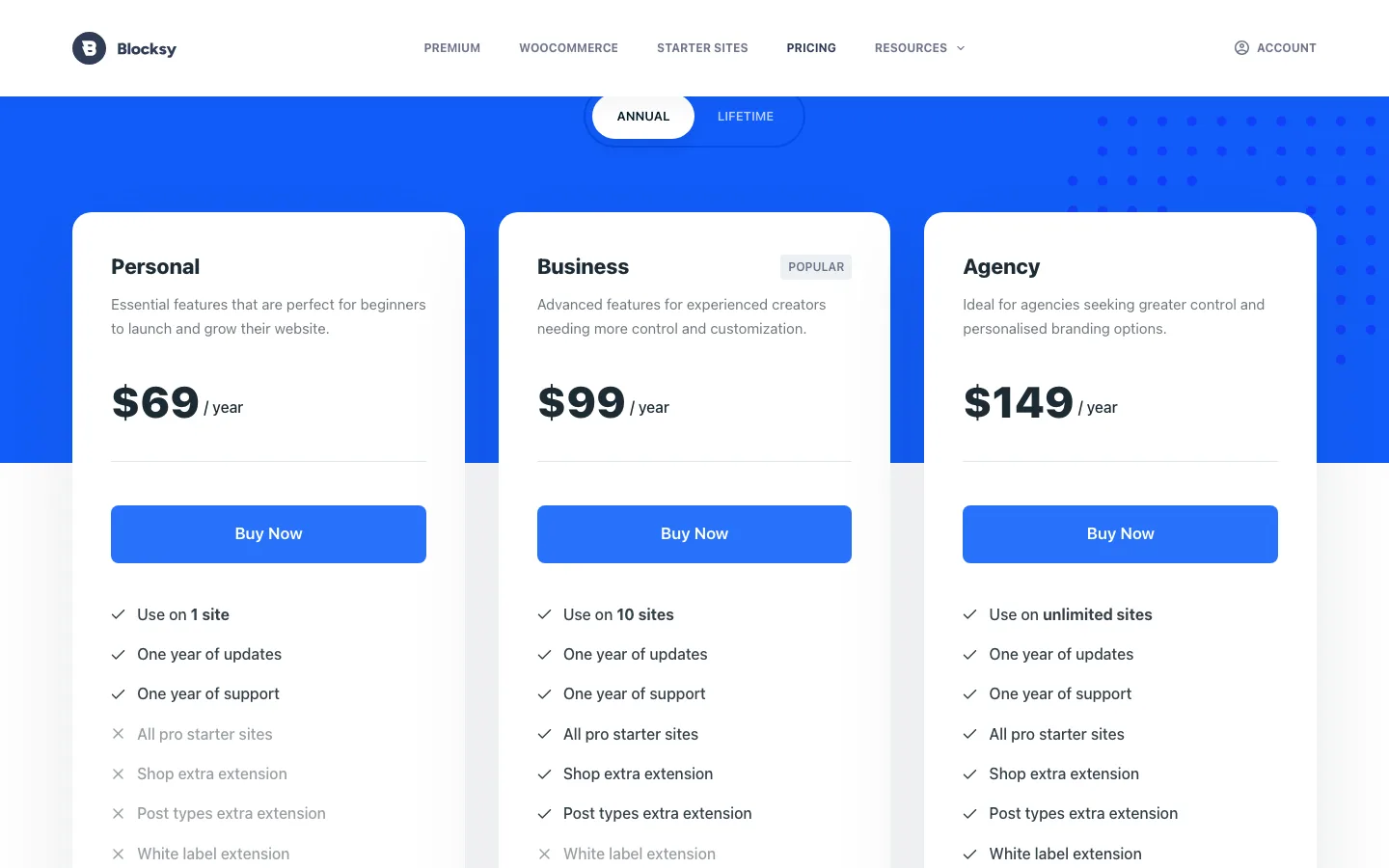
Blocksy Pro annual plans on the Creative Themes pricing page.
Personal covers one site for $69 a year or $199 once. Business covers ten sites for $99 a year or $299 once. Agency covers unlimited sites for $149 a year or $499 once.
Prices as listed on Creative Themes’ Blocksy pricing page on October 5, 2026. A few details from that page:
- One price. The page shows a single annual price for each plan, with no separate first-year discount.
- Lifetime plans include lifetime updates and support. A lifetime plan costs about three years of the annual price.
- If you stop paying, your site keeps working. You lose updates, new features, premium starter sites and support.
- Refunds can be requested within 14 days of the purchase date.
Compared with rivals, Blocksy Pro is fairly priced. Astra Pro also costs $69 a year but covers 3 sites, GP Premium is $59 a year for unlimited sites, and Kadence’s cheapest paid plan is $99 a year (prices from our reviews, October 2026).
What We Could Not Test
To be clear about the limits of this review:
- Support. We did not contact Creative Themes support, so we cannot judge response times.
- Long-term use. We used Blocksy for two days on a test site, not for months on a live one.
- Elementor and Brizy. We built everything with the block editor. The importer offered Elementor versions of 42 starter sites, but we did not try them.
- Adobe Fonts, because we have no Adobe Fonts account.
- Translation and right-to-left languages. Blocksy says it is translation ready, and its changelog mentions right-to-left fixes, but we did not build a translated site.
- Real-world speed. Our Lighthouse run was on a local sandbox; the bare theme numbers come from our separate benchmark.
Blocksy vs Astra, Kadence, GeneratePress, OceanWP and Neve
These are the free themes people compare most. Weights come from our lightweight theme benchmark; prices and installs are as of October 2026.
Our bare-theme benchmark put Blocksy, Astra and Kadence close together, at about 68 to 70 KB. GeneratePress was lighter at 51 KB, but lacks their free drag-and-drop header builders. The lowest paid plans were $69 a year for Blocksy on one site, $69 for Astra on three sites, $99 for Kadence and $59 for GeneratePress on unlimited sites. Blocksy and Astra offered lifetime purchases; Kadence no longer offered them to new buyers.
Blocksy vs Astra. The most searched match-up. Both are light and both have a free header builder. Blocksy gives more away for free, including a sticky header, CSS saved as a file and the emoji script turned off. Astra has the bigger user base, many more starter templates, and a Pro license that covers 3 sites instead of 1. Pick Blocksy if you will stay on the free version or want Pro’s shop features. Pick Astra if you want the largest template library.
Blocksy vs Kadence. Kadence pairs its theme with the Kadence Blocks plugin, a real design block library, and has a strong free header builder too. Its paid plans start higher. Blocksy is the cheaper way to get Pro theme and shop features. Kadence makes more sense if you want its blocks and patterns as part of the deal.
Blocksy vs GeneratePress. GeneratePress is the lightest of the group and the best value for agencies, since GP Premium has no small site limit. But it has no visual header builder in the free version. Choose Blocksy for visual design work out of the box. Choose GeneratePress if you care most about minimal code and build many sites.
Blocksy vs OceanWP. OceanWP was the heaviest theme in our benchmark at 182 KB in 22 requests, and one of only two that loaded jQuery by default. That is more than twice Blocksy’s weight. Blocksy is the more modern and lighter choice for a new site. OceanWP mainly suits people who already know its extension system.
Blocksy vs Neve. Neve came in at 60 KB in our benchmark, a little lighter than Blocksy. We have not reviewed it in depth yet. Neve is worth a look if you want something similar from a different developer.
If you plan to build every page in Elementor, also read our Hello Elementor review.