Astra Review: A Flexible Starting Point for WordPress
Astra is an easy theme to recommend for a flexible WordPress site. The free version includes useful header, styling and shop controls, and works with the block editor or Elementor. Pro is more relevant when you need sticky headers, mega menus or custom templates.
We tested the free theme. Pro features and pricing are described from Brainstorm Force’s documentation.
What Is the Astra Theme?
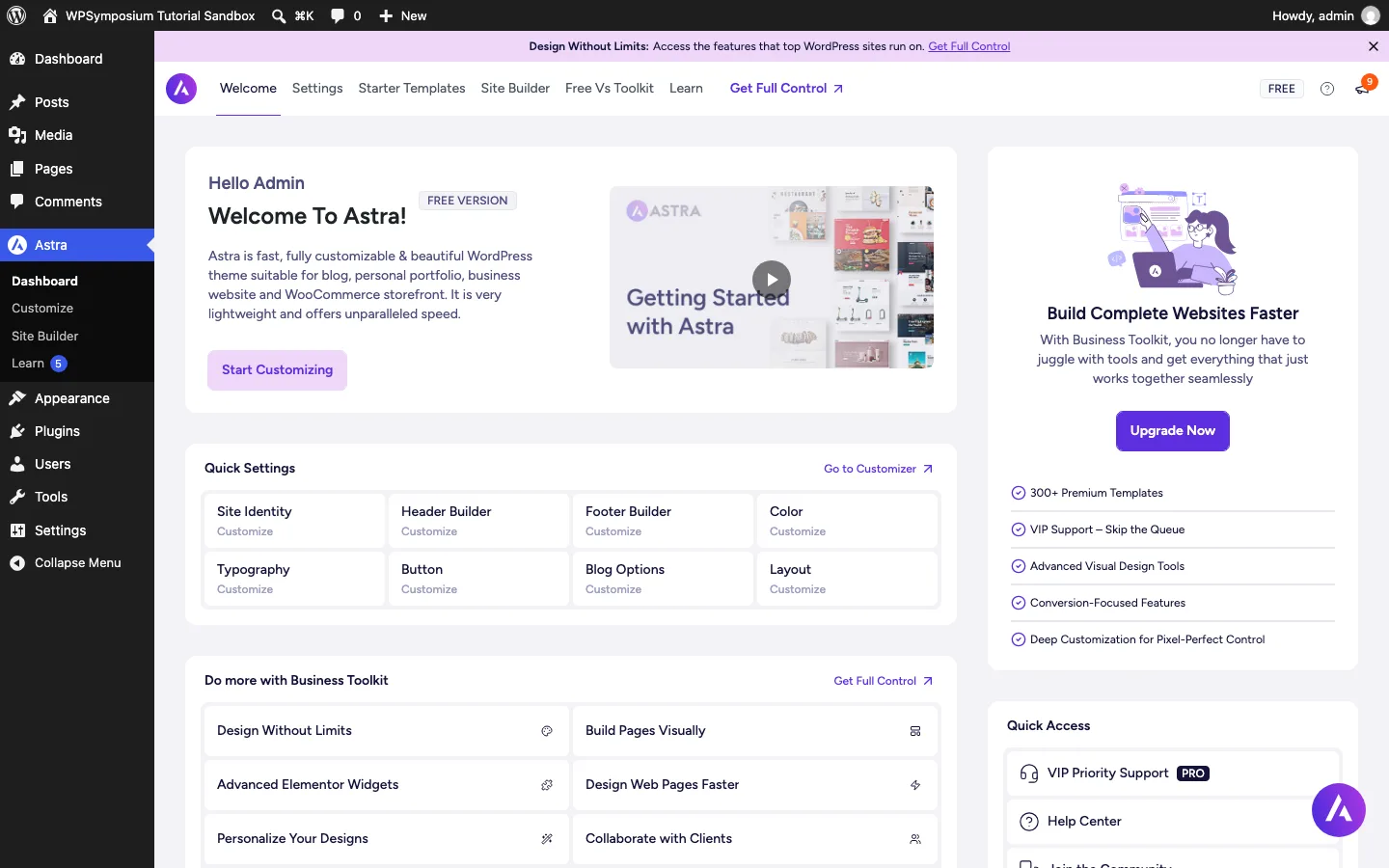
The Astra dashboard on a fresh install of the free theme.
Astra is a WordPress theme made by Brainstorm Force, a company that has built WordPress products since 2009. Its other products include Spectra (a block editor plugin that started life as Ultimate Addons for Gutenberg), Ultimate Addons for Elementor and Beaver Builder, CartFlows, Schema Pro, SureForms and the Starter Templates plugin.
Astra launched in 2017. The idea was a theme that stays light by default and lets you add features only when you need them. It is a classic theme, which means you design the site in the WordPress Customizer (Appearance > Customize) instead of the Site Editor that block themes use. If you want a block theme from the same company, Brainstorm Force also makes Spectra One, which is far less popular (8,000+ active installs on WordPress.org).
The base theme is free on WordPress.org. Astra Pro is a separate plugin that you install on top of the free theme to unlock more options (upload it under Plugins, not Themes; see how to install a WordPress theme). You never switch themes to upgrade, so your settings carry over.
Astra is one of the most installed themes in the WordPress.org directory. WordPress.org shows “1+ million” active installs, which is the highest bracket it displays, and counts more than 26 million downloads in total.
Installing Astra
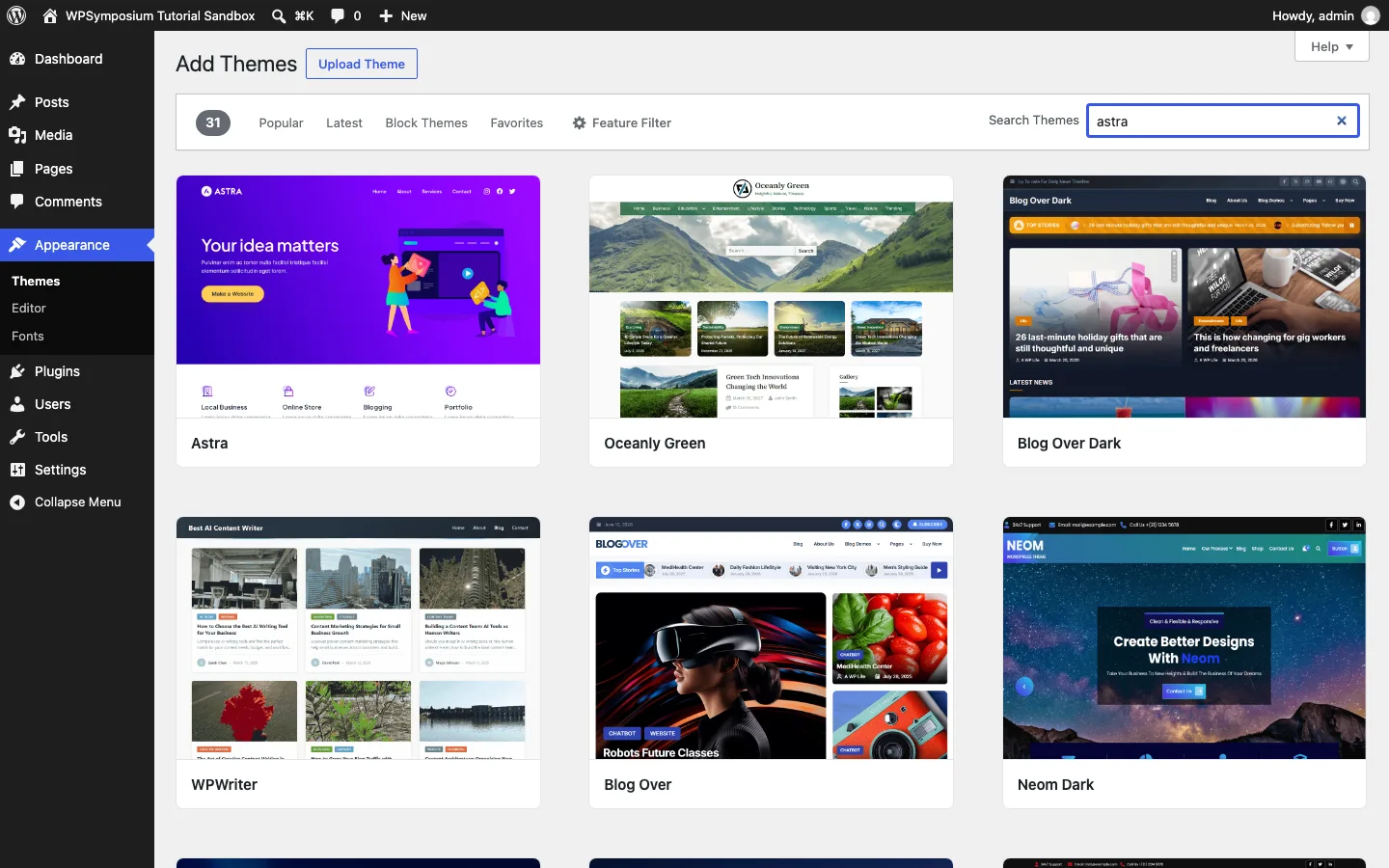
Astra is the first result when you search “astra” under Appearance > Themes > Add Themes.
Because Astra is in the WordPress.org directory, you install it like any free theme: go to Appearance > Themes > Add New Theme, search for “Astra”, click Install, then Activate. There is no zip file to download and no license key.
After activation, an Astra menu appears in the admin sidebar with links to the Astra dashboard, the Customizer, the Site Builder and Starter Templates. The dashboard has tabs for Welcome, Settings, Starter Templates, Site Builder, WooCommerce (once WooCommerce is active), Free Vs Toolkit and Learn. On our test install, a purple “Design Without Limits” upgrade banner sat at the top of every Astra screen. You can close it, and Astra > Settings > General has a switch to turn upgrade notices off.
The Free Demo Homepage You Get Without Any Plugin
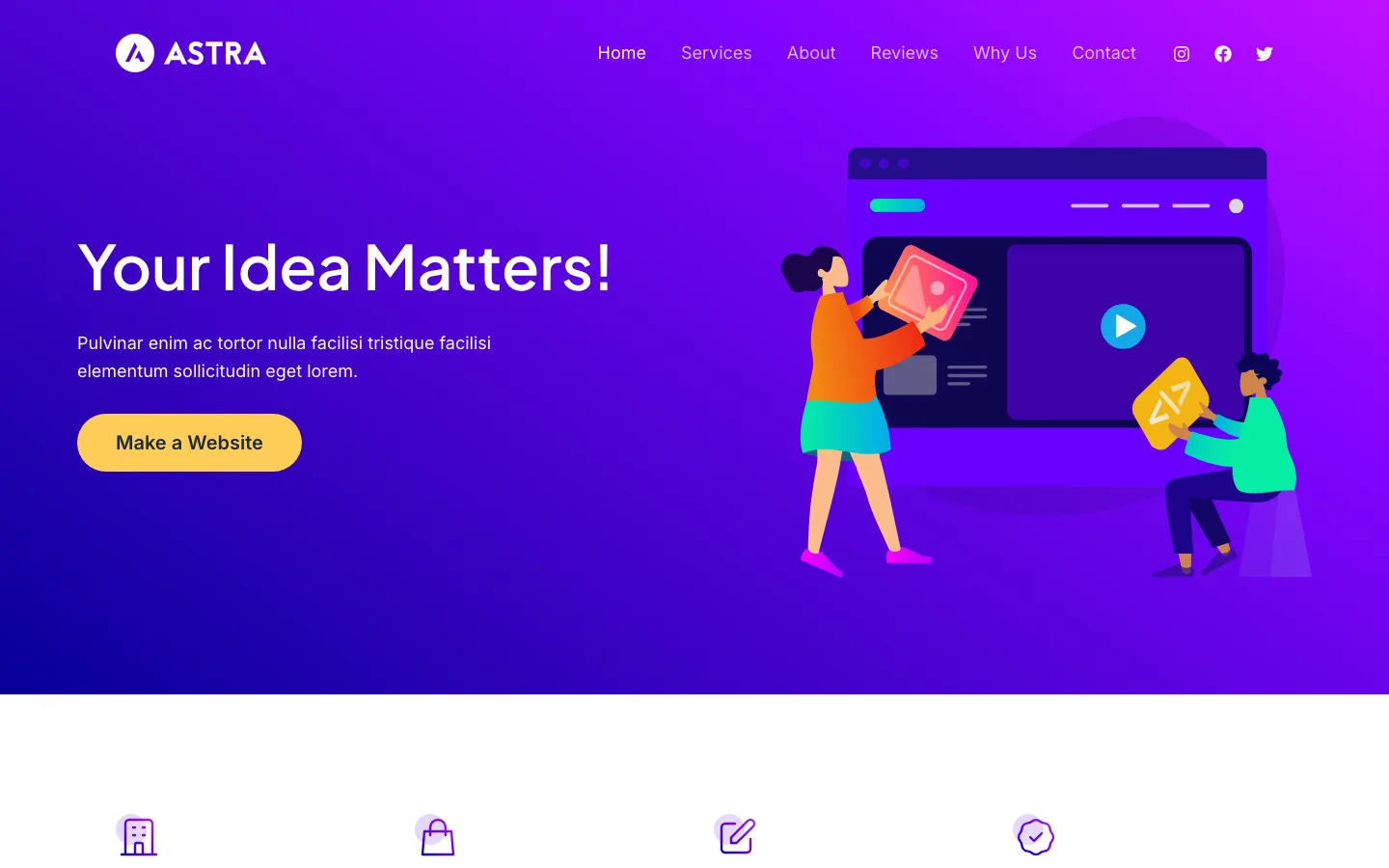
Astra’s built-in demo homepage, published from the Customizer on a fresh install of Astra. No extra plugin was needed.
Most reviews skip this. On a brand new WordPress site, opening the Customizer with Astra active shows a ready-made homepage in the preview: a hero section, four feature boxes, three service cards, an about section, a testimonial, a “Why Choose Us” row and a call to action, plus a menu and social icons. It uses a WordPress feature called starter content, which only appears on fresh sites.
Nothing is saved until you click Publish. When we did, Astra created a “Home” page, set it as the front page and kept the header and menu. That gives you a finished-looking homepage in one click without installing the Starter Templates plugin or any page builder. The page is built with normal blocks, so you edit it in the block editor. The text is placeholder copy, so plan to rewrite it.
Starter Templates
Starter Templates imports a full site, an individual page or a section. It supports the block editor and Elementor, with a mix of free and premium designs. The classic importer worked without an account; the AI route needs a ZipWP account.
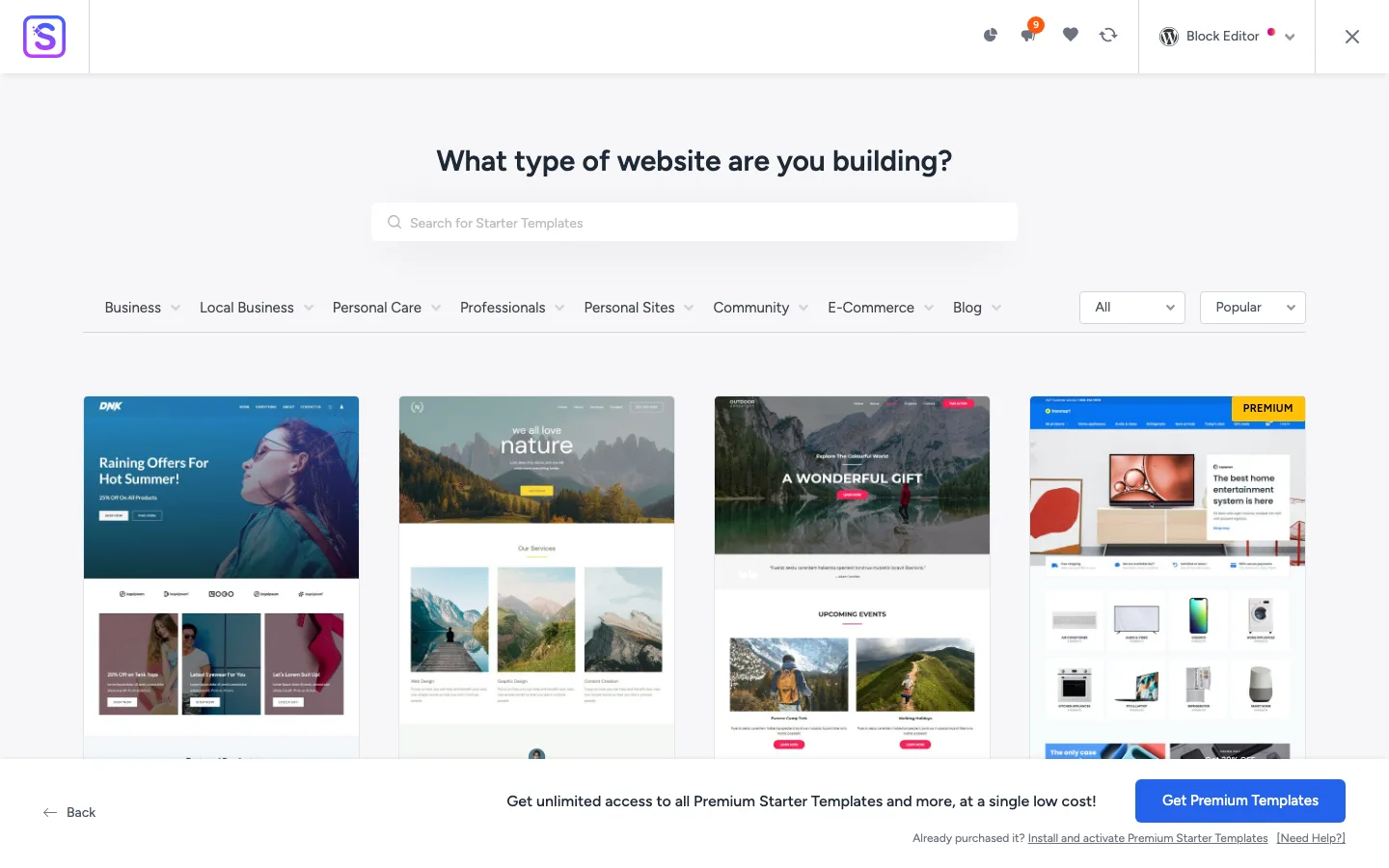
The Starter Templates library. Templates marked Premium need the Essential or Business Toolkit.
Our free Coffee Shop site imported in about a minute. It added Spectra Blocks and SureForms, with SureRank and SureCookie selected by default. Review the plugin choices before importing, especially if you already use an SEO or cookie plugin.
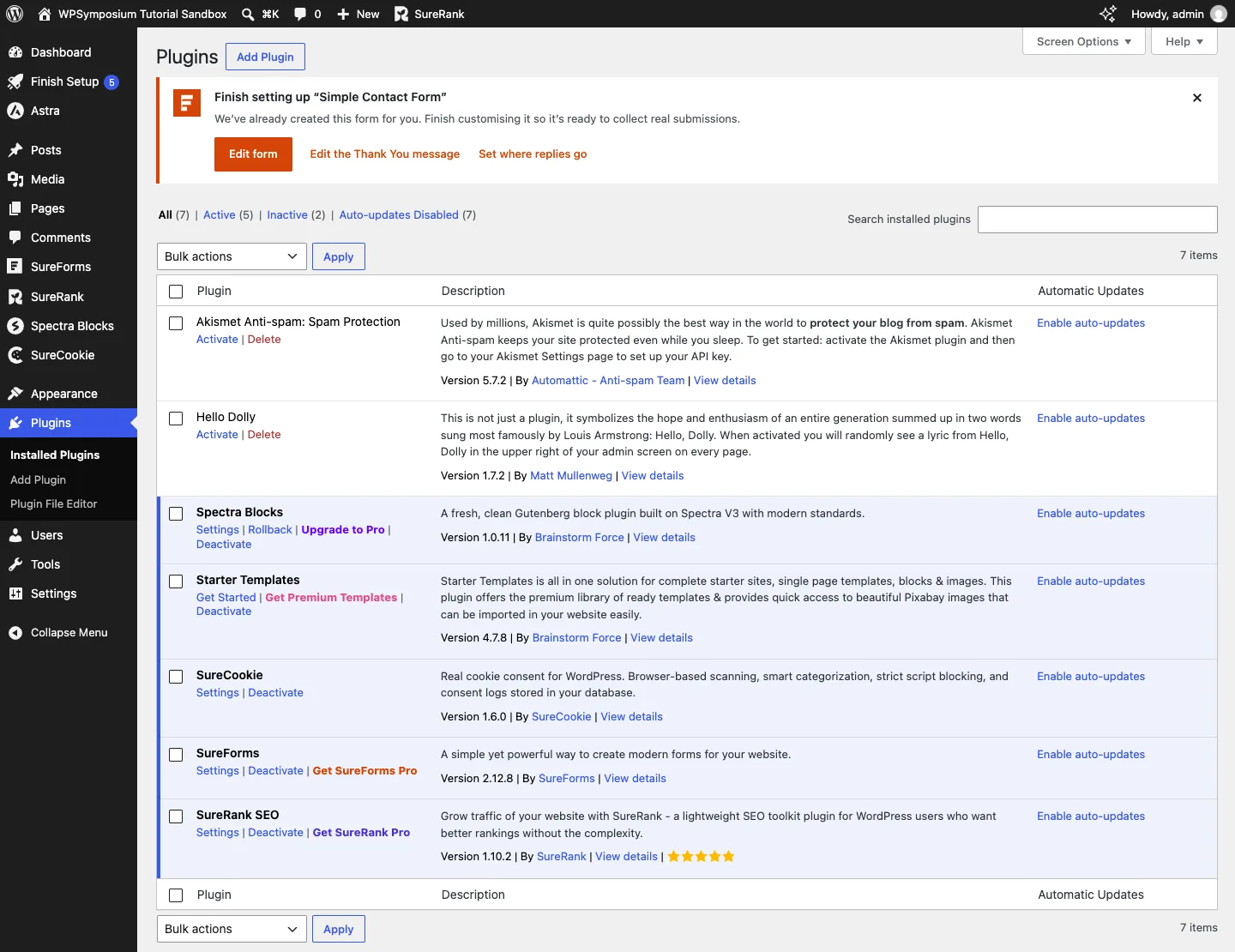
The Plugins screen after the import. Note the four new admin menus on the left and the SureForms setup notice.
The finished design matched the demo and adapted well to a phone. Replace the business details, sample text, images and form settings before launch.
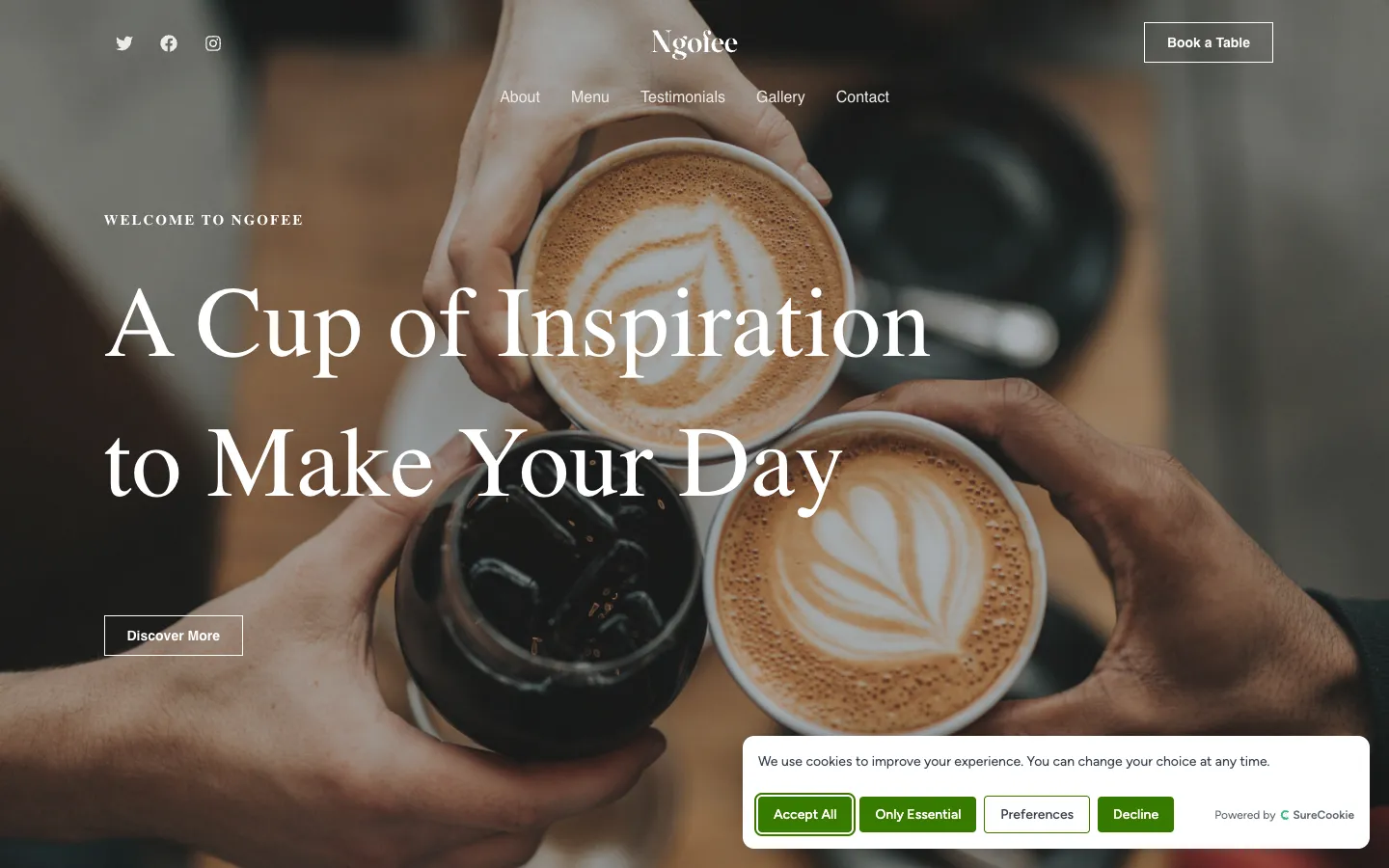
The imported homepage on desktop. The cookie banner comes from SureCookie, which the wizard ticks by default.
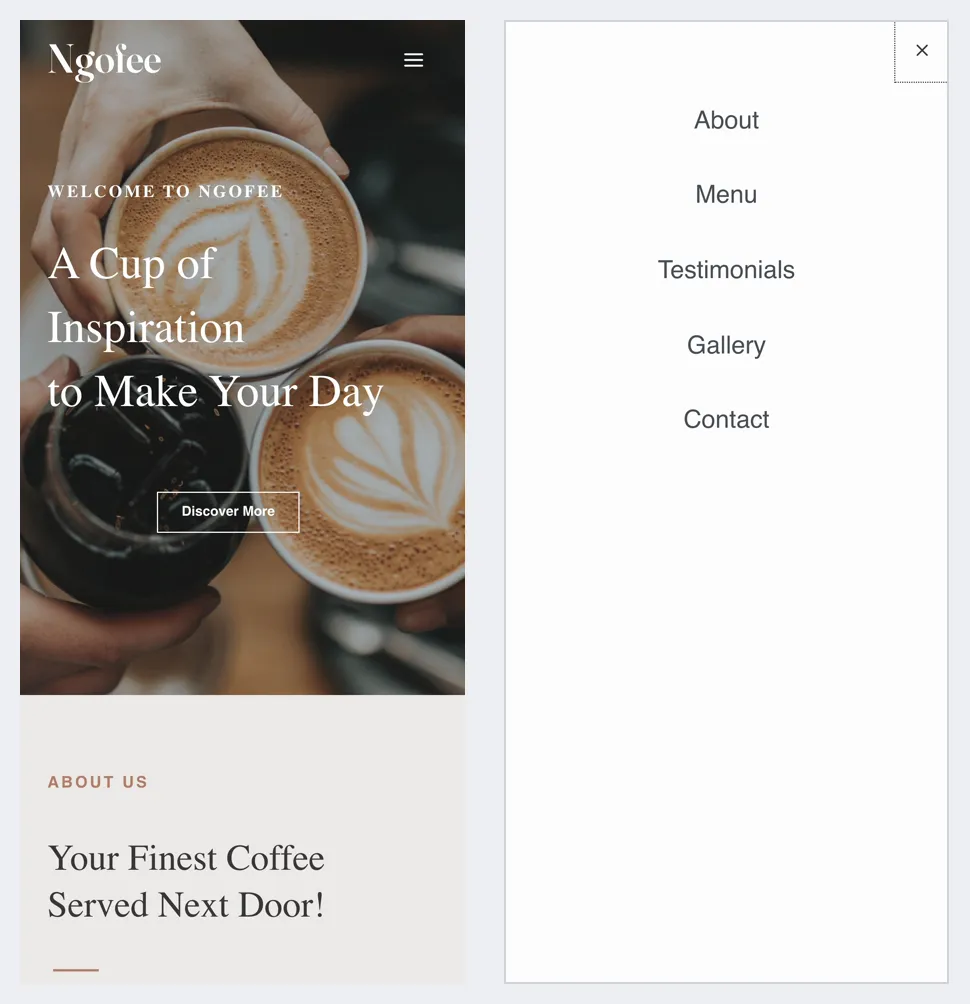
The same homepage on a phone, closed and with the menu open.
A few issues needed attention. Image links finished updating in the background, one footer logo still loaded from the demo server, and inner pages returned 404 errors on our test host until we refreshed permalinks. The homepage also contained about 1 MB of uncompressed HTML, largely inline styles from Spectra Blocks. A lean theme does not guarantee a lean imported site.
Astra Free vs Astra Pro
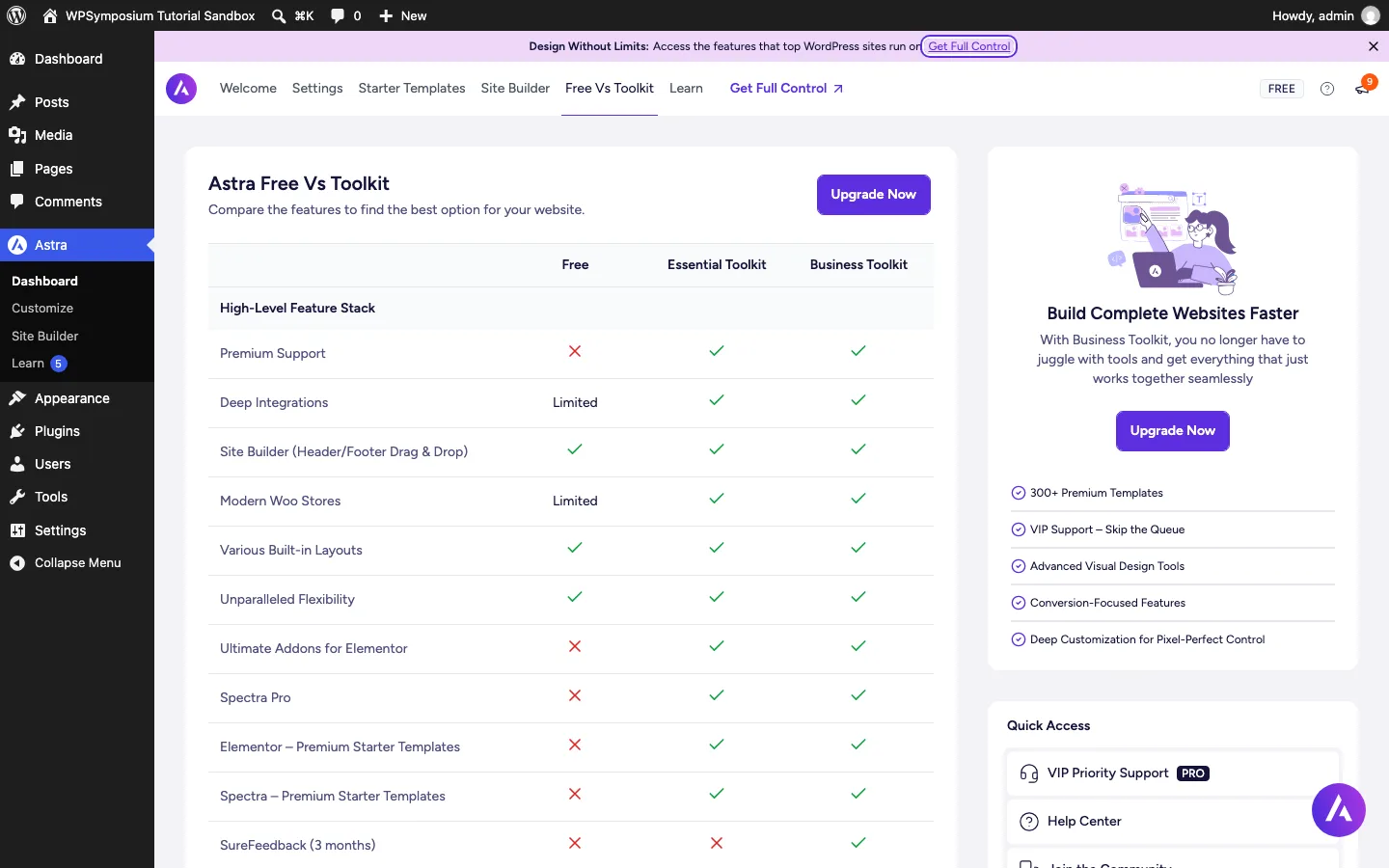
Astra’s own Free vs Toolkit table inside the dashboard.
This is the question most people searching for “Astra Pro” want answered. The short answer: the free theme covers the basics well, and Pro adds polish, layout control and store features.
Several reviews still claim the header builder is a Pro feature. That is out of date. On our test install, the drag-and-drop header and footer builders worked in the free theme, and Pro only locks some of the extra elements you can drop into them.
What the free theme includes (seen on our test install)
- Drag-and-drop header builder with above, primary and below rows, and a separate mobile header with an off-canvas menu
- Free header elements: logo, two menus, social icons, search, account, one button, two HTML blocks, two widget areas, and a cart icon once WooCommerce is active
- Footer builder with copyright, footer menu, social icons, two HTML blocks and four widget areas
- Transparent header, with a different logo option
- Global color palette with four preset palettes (including a dark one), six typography presets, Google Fonts and per-device font sizes
- Container layouts (normal, narrow and full width), boxed or unboxed styles, sidebar width and a sticky sidebar
- Blog and single post controls, related posts and a scroll-to-top button
- WooCommerce shop, product and cart options, including a sticky add-to-cart bar and quantity plus and minus buttons
- Per-page settings in the block editor and in Elementor
- Local Google Fonts with preloading, focus highlight settings for accessibility, and schema markup
- Access to the free Starter Templates
What Astra Pro adds (from Brainstorm Force’s pages)
- Sticky headers: stick on scroll, shrink, hide on scroll down and animations
- Mega menus: wide dropdowns that can show widgets or saved block editor, Elementor, Beaver Builder, Divi or Brizy templates
- More header and footer elements: extra buttons, HTML and widget areas, a third menu, dividers, a language switcher, a toggle button, flyout and full-screen off-canvas menus, extra search styles, and the Color Switcher for dark mode
- Site Builder (formerly Custom Layouts): build your own headers, footers, 404 page and hooks that insert content anywhere, shown by display conditions. In the free theme, the Site Builder tab only shows an upgrade screen.
- Page Headers: different header designs for different pages
- Site layouts: full width, max width, padded and fluid layouts, plus full color, typography, spacing and background controls
- Blog Pro: grid and masonry layouts, post filters, read time, author box, infinite load and autoload of the previous post
- WooCommerce: AJAX add to cart, quick view, infinite product loading, off-canvas shop sidebar, product gallery layouts, image zoom, upsells, distraction-free checkout, two-step checkout and saved checkout form data
- LMS: distraction-free learning layouts and account menus for LearnDash and LifterLMS
- Extras: white label, version rollback, CSS file generation for speed, shortcodes for breadcrumbs and mini carts, and 24/7 premium support
The free version shows upgrade prompts at the bottom of many Customizer panels and a banner in the dashboard. They go away when Pro is active.
Do you need Astra Pro?
Stay on the free theme if you run a blog, portfolio, brochure site or simple store with a standard header. Pro makes sense when you need a sticky header or mega menu, custom templates for specific pages without Elementor Pro, a WooCommerce store where checkout matters, or white label settings for client sites. A good rule is to build on the free theme first and upgrade when you hit a wall that Pro solves.
Customization: Colors, Fonts and Layout
All of Astra’s design settings live in the WordPress Customizer, with a live preview on the right. You change the layout, colors, typography, header, footer, blog layouts and sidebars without code, and every panel has Desktop, Tablet and Mobile buttons at the bottom.
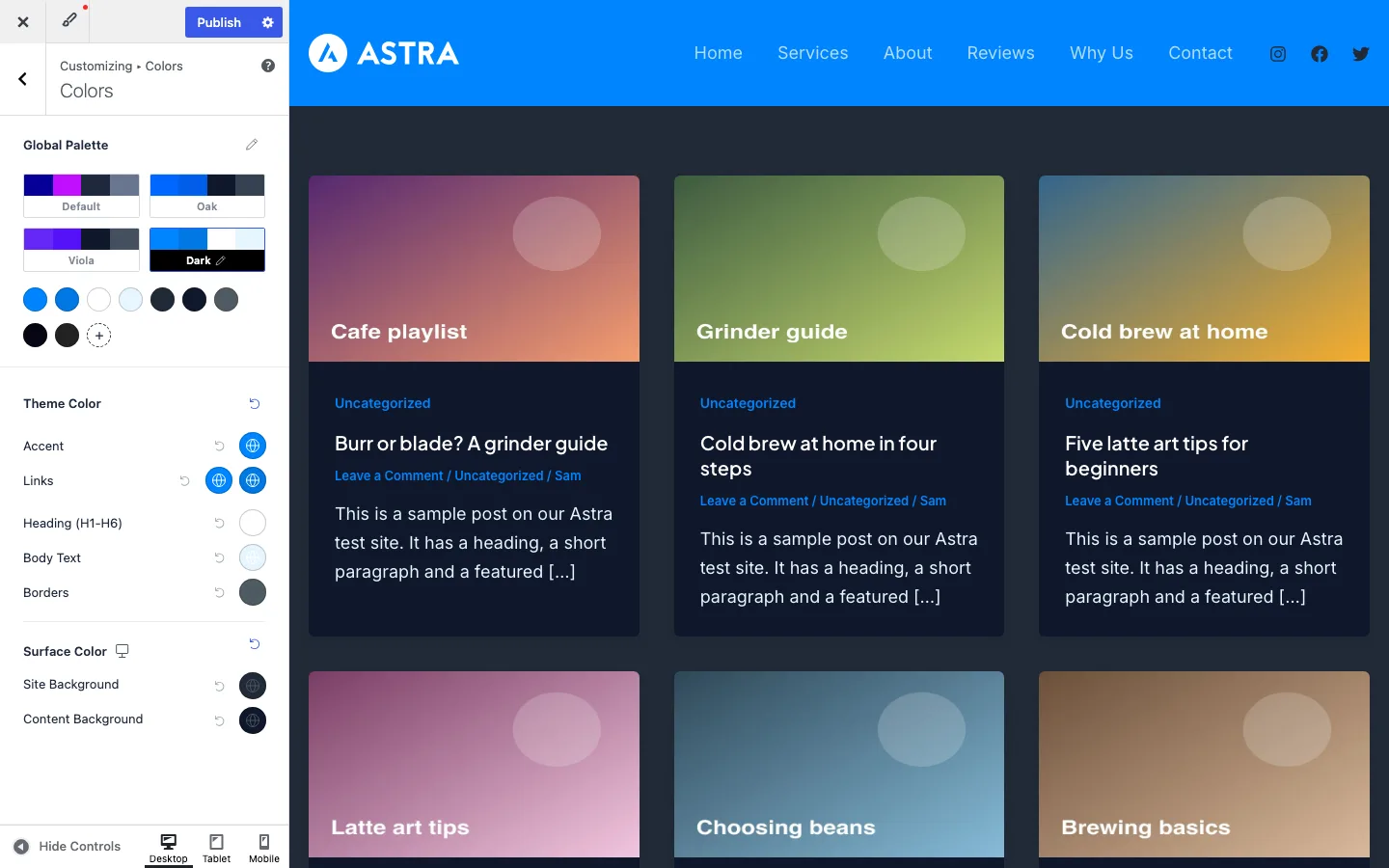
A preview of Astra’s “Dark” palette, which changes the whole site in one click.
Colors. The Global Palette has four presets: Default, Oak, Viola and Dark. Each palette holds nine colors, and a plus button lets you add your own named colors (a 2026 addition). Below the palette you assign colors to the accent, links, headings, body text, borders and backgrounds. Clicking “Dark” turned our whole test site dark at once. The palette colors also show up in the block editor and in Elementor, so you have one color list everywhere.
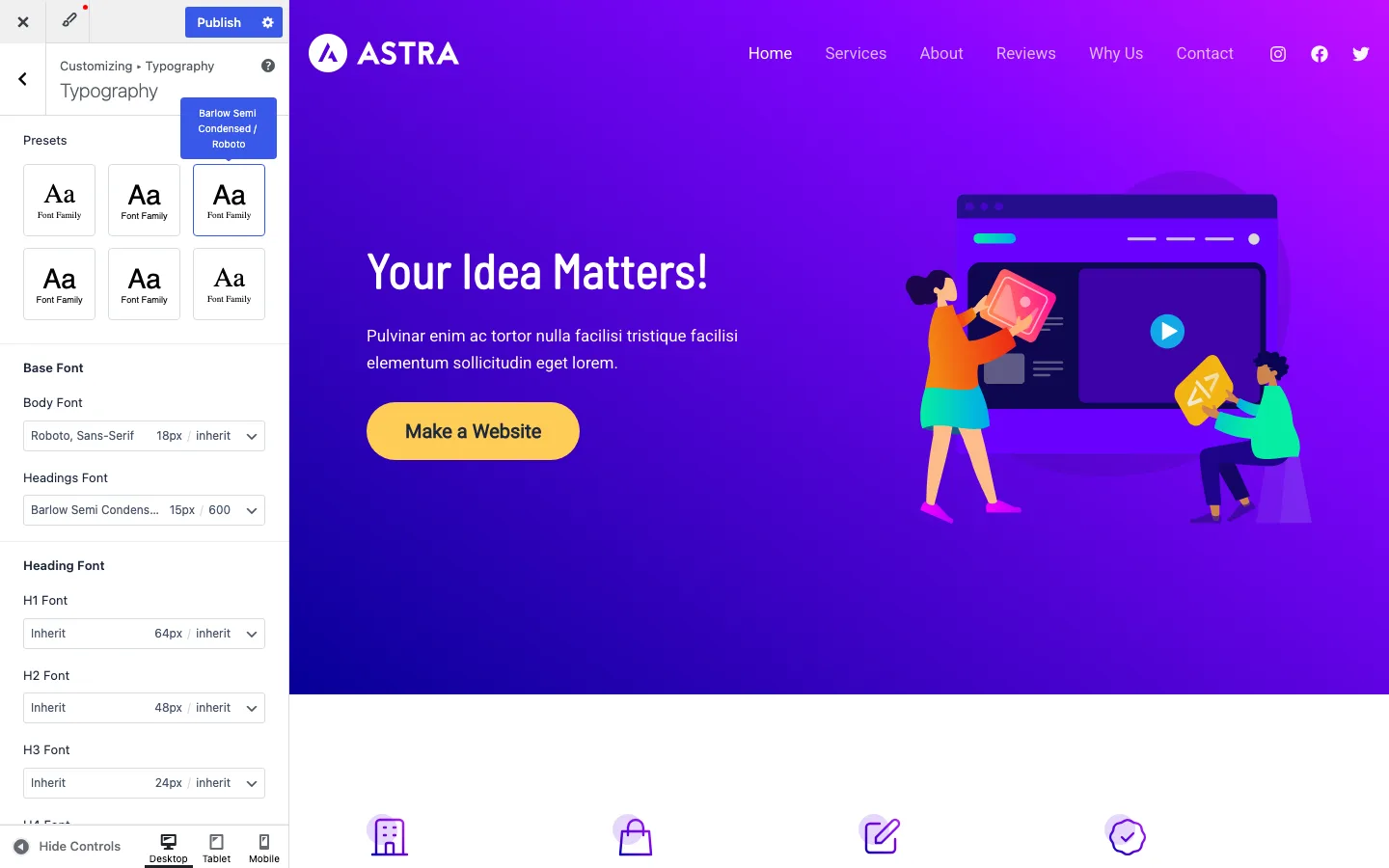
Typography presets. Picking the third preset switched the site to Barlow Semi Condensed headings and Roboto body text.
Typography. Six presets set a heading and body font pair in one click. Under them you can set the body and heading fonts, sizes and weights, then H1 to H6 one by one, each per device. You can use Google Fonts or system fonts, and Astra can load Google Fonts from your own server (see Performance below).
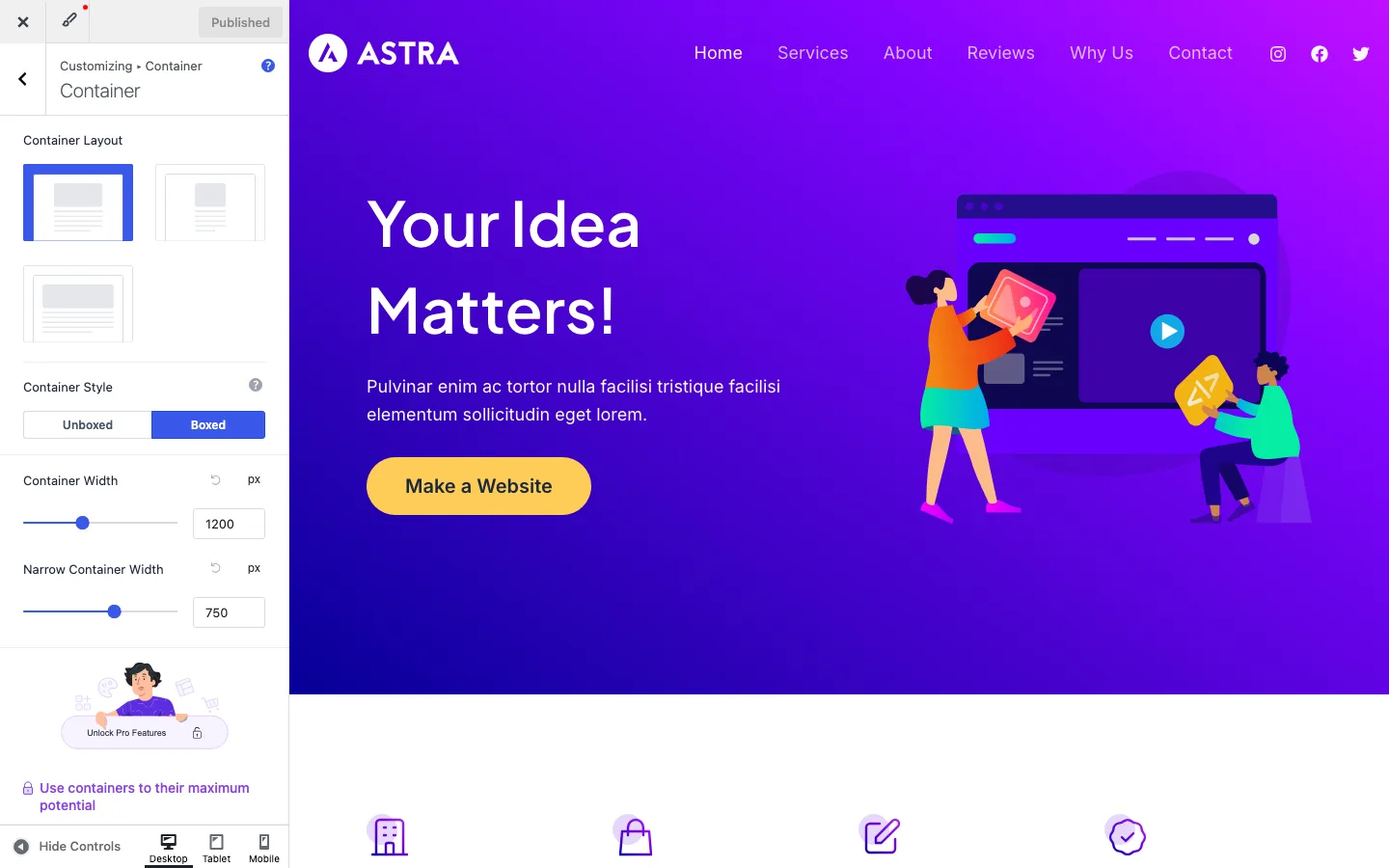
Container settings. The default width was 1,200 px, with a 750 px narrow option.
Layout. Container settings offer normal, narrow and full width layouts, a boxed or unboxed style, a 1,200 px default width and a 750 px narrow width. The sidebar panel sets the default sidebar position, its width (30% by default) and a sticky sidebar switch. The site-wide max width, padded and fluid layouts are Pro.
Astra can feel like a lot at first, with many panels and Pro upsells mixed in. Turning off upgrade notices in Astra > Settings, and turning off Pro modules you don’t use once you upgrade, keeps it tidier.
Header and Footer Builder
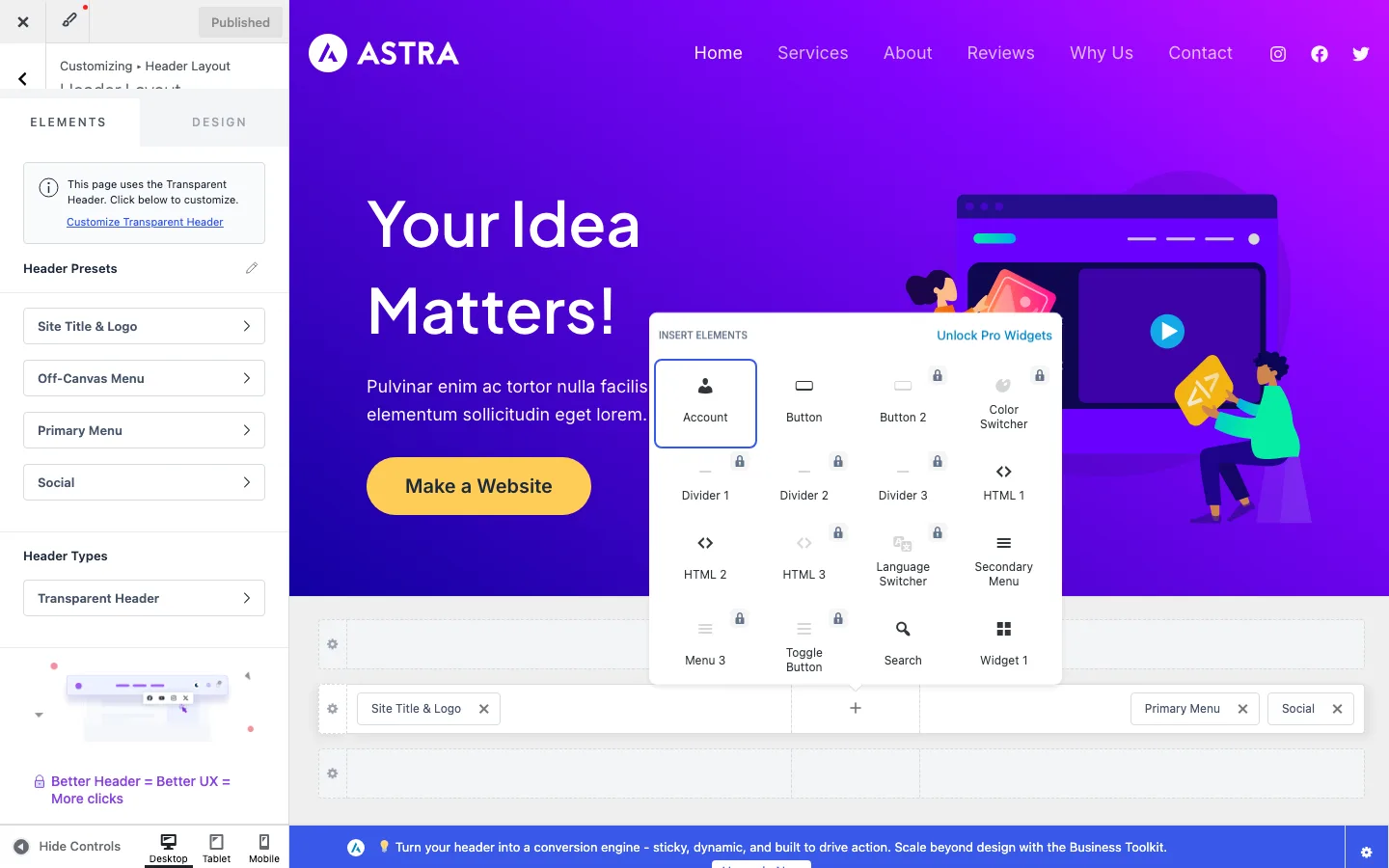
The header builder’s element picker in the free theme. Elements with a lock, such as Color Switcher and Language Switcher, need Astra Pro.
The header builder sits at the bottom of the Customizer. It has three rows (above, primary and below), each split into left, center and right zones. You click a plus sign in a zone, pick an element, and drag elements between zones. Presets at the top of the panel give you common layouts.
On our test install, the free elements were Site Title & Logo, Primary Menu, Secondary Menu, Social, Search, Account, Button, HTML 1 and 2, Widget 1 and 2, and Cart once WooCommerce was active. Locked Pro elements were Button 2, HTML 3, Widget 3 and 4, Menu 3, Divider 1 to 3, Language Switcher, a desktop Toggle Button and Color Switcher. A sticky header is not in the free builder at all.
The transparent header is free. You can turn it on for the whole site or only some devices, and give it a different logo. Astra’s demo homepage uses it, so the header floats over the hero image.
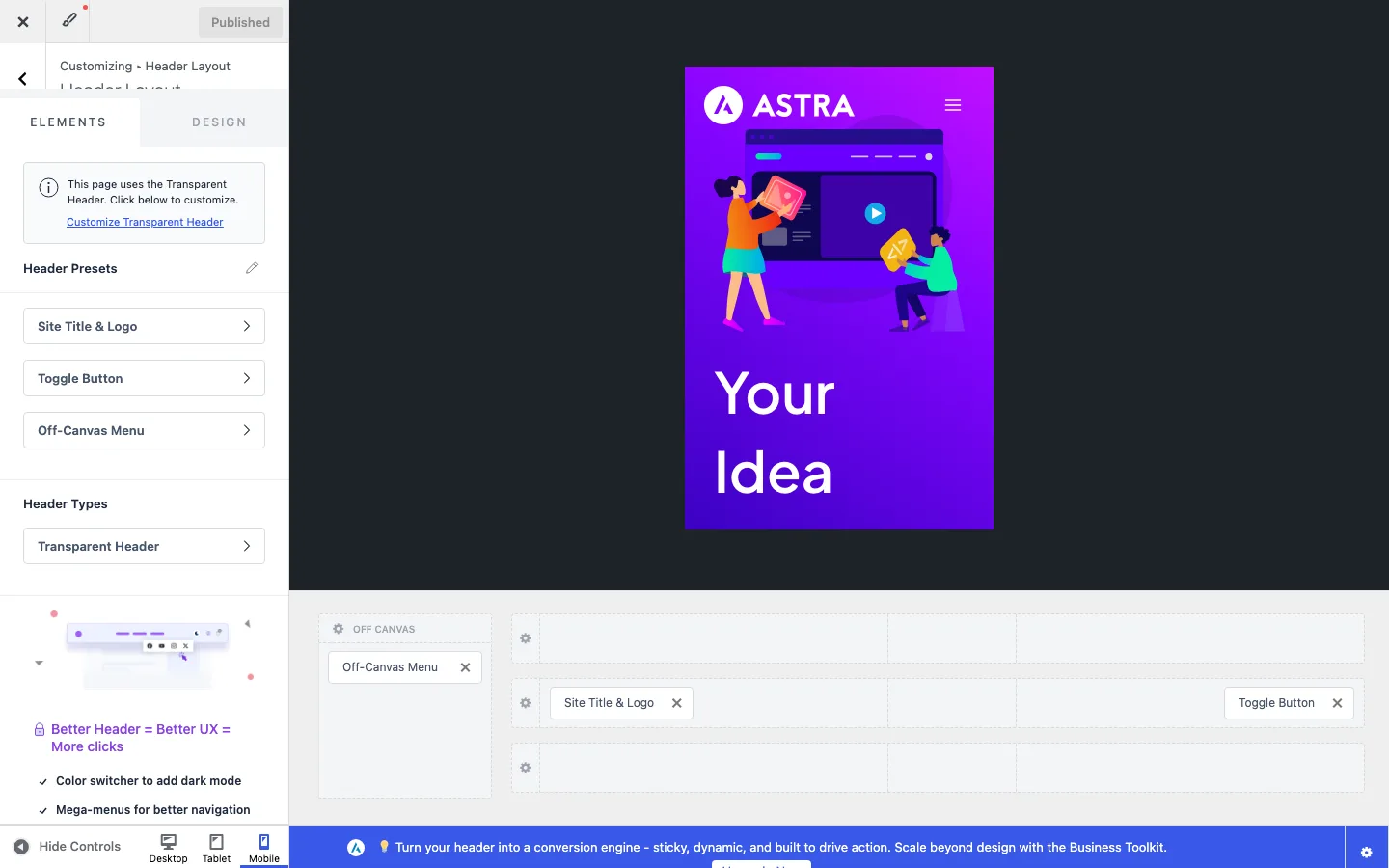
Switching the Customizer to Mobile shows a separate mobile header layout with its own off-canvas area.
Mobile header. Click Mobile at the bottom of the Customizer and the builder switches to a separate mobile layout. On ours it held the logo, a toggle button and an off-canvas area with the menu. You can change the toggle style (fill, outline or minimal), add a menu label, and move or remove elements for phones without touching the desktop header.
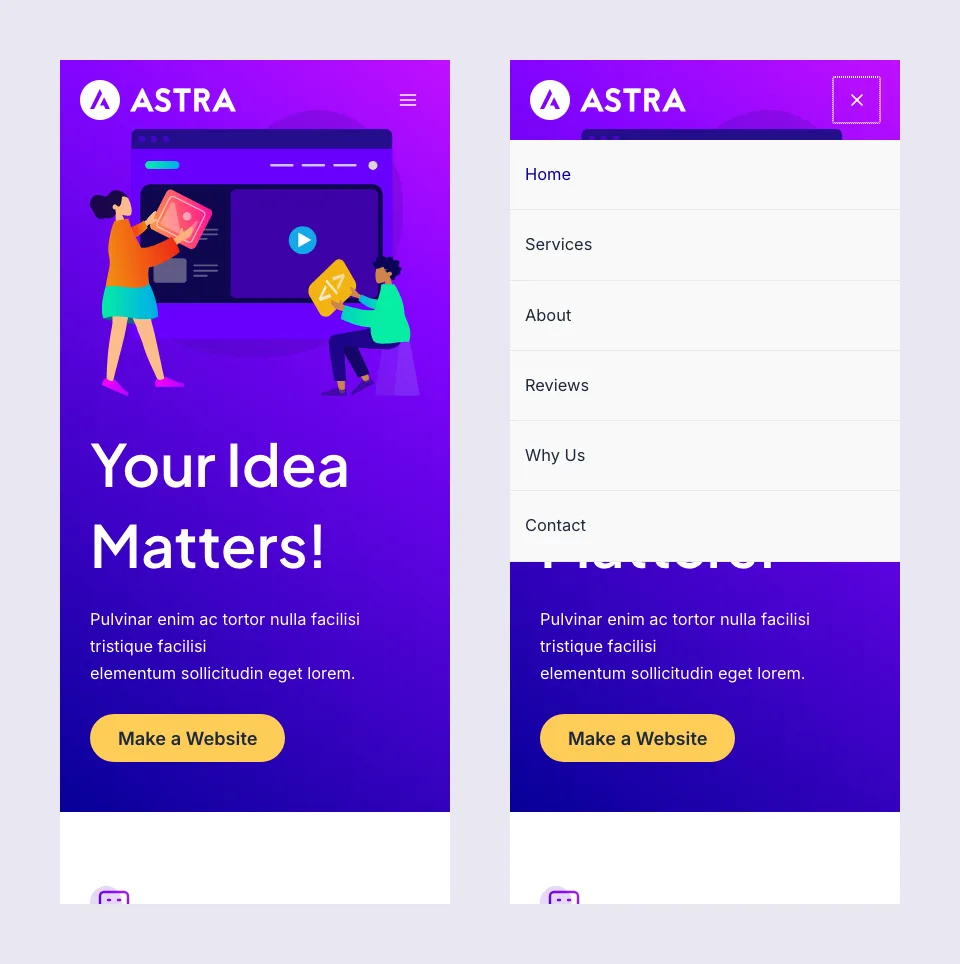
The demo homepage on a 390 px wide phone screen, before and after tapping the menu button.
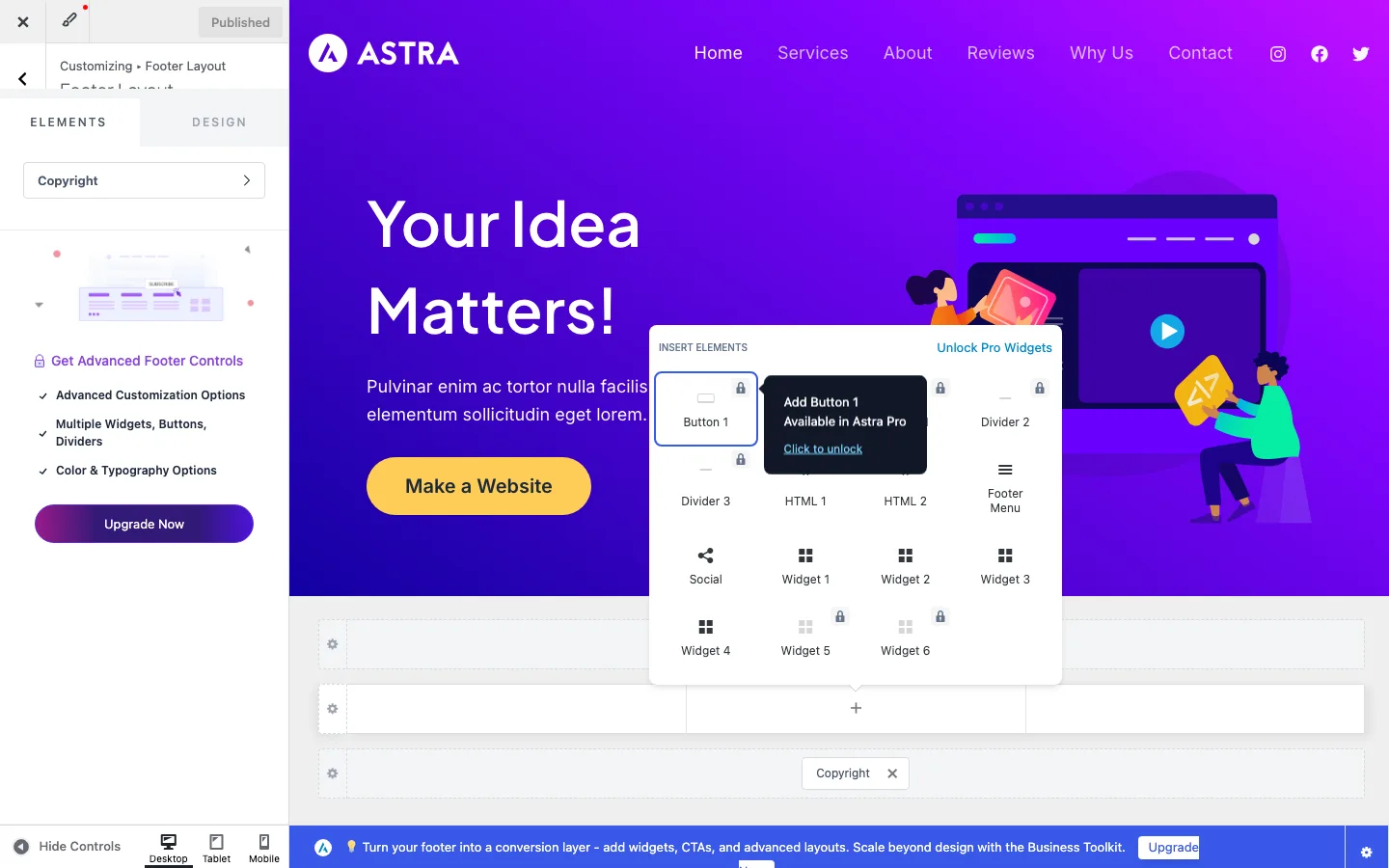
The footer builder’s element picker. Buttons, dividers and widget areas 5 and 6 need Astra Pro.
Footer builder. The footer works the same way, with above, primary and below rows. Free elements were Copyright, Footer Menu, Social, HTML 1 and 2, and Widget 1 to 4. Footer buttons, dividers and widget areas 5 and 6 are Pro.
Blog and Archive Options
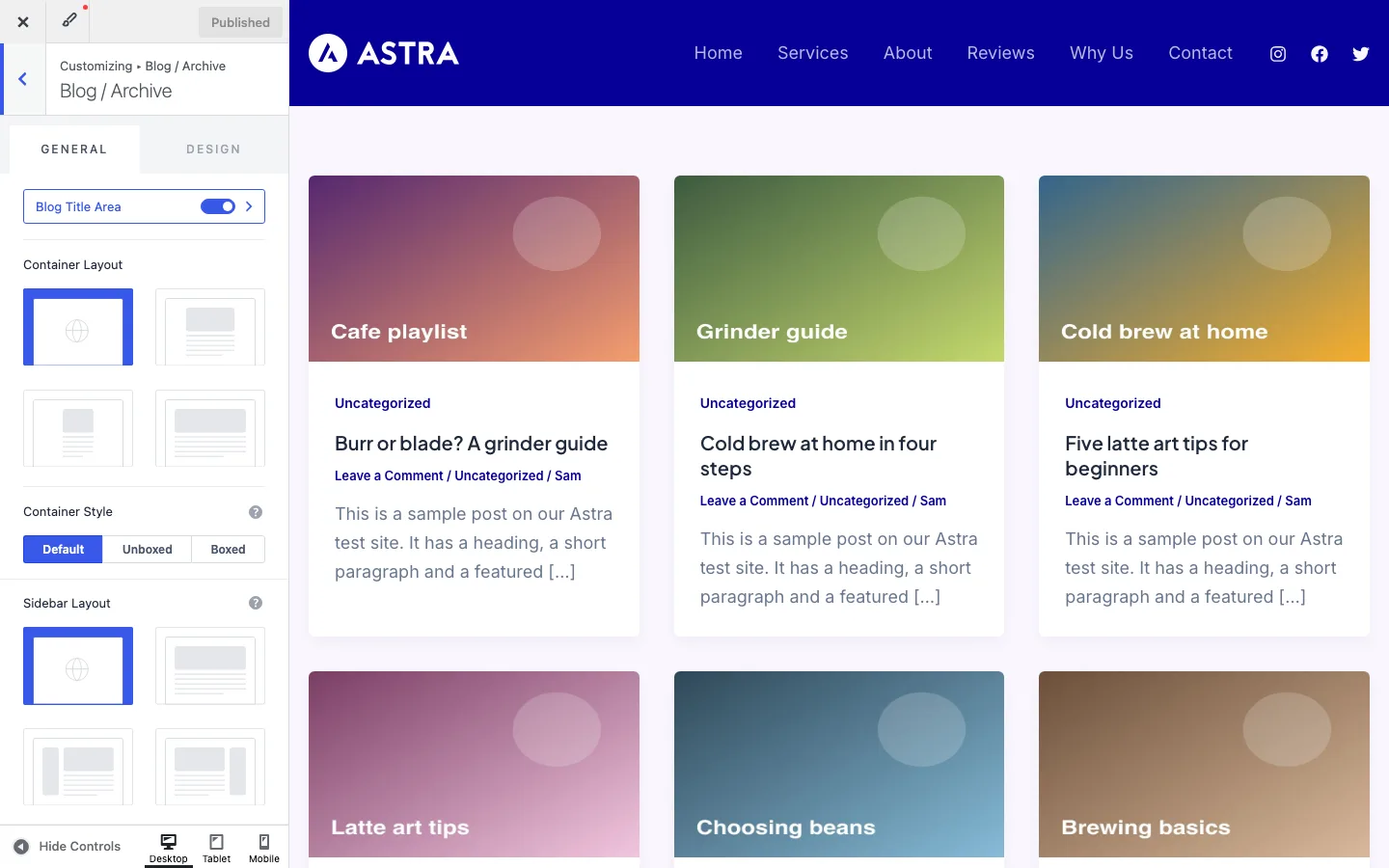
The free Blog / Archive panel. Our test posts showed as a three-column card grid by default.
With six test posts, Astra’s default blog page was a three-column grid of cards, each with the featured image, category, title, meta and excerpt. The free Blog / Archive panel lets you change the container and sidebar, pick a layout, set posts per page and content width, and turn each post element on or off: featured image, categories, title, meta, excerpt, tags and read more. You can also choose which meta items show (comments, categories, author, date, tags).
The Single Post panel has the title area, container, sidebar, content width, related posts and comments. Masonry layouts, post filters, read time, author boxes, social sharing, infinite loading and autoloading the previous post are all Pro.
Block Editor and Page Builder Compatibility
Astra works with almost every popular way of building pages. Its comparison table lists support for the block editor (Gutenberg), Spectra, Elementor, Beaver Builder, Divi, Brizy, WPBakery and Thrive Architect. We checked the two that Starter Templates offers: the block editor and Elementor.
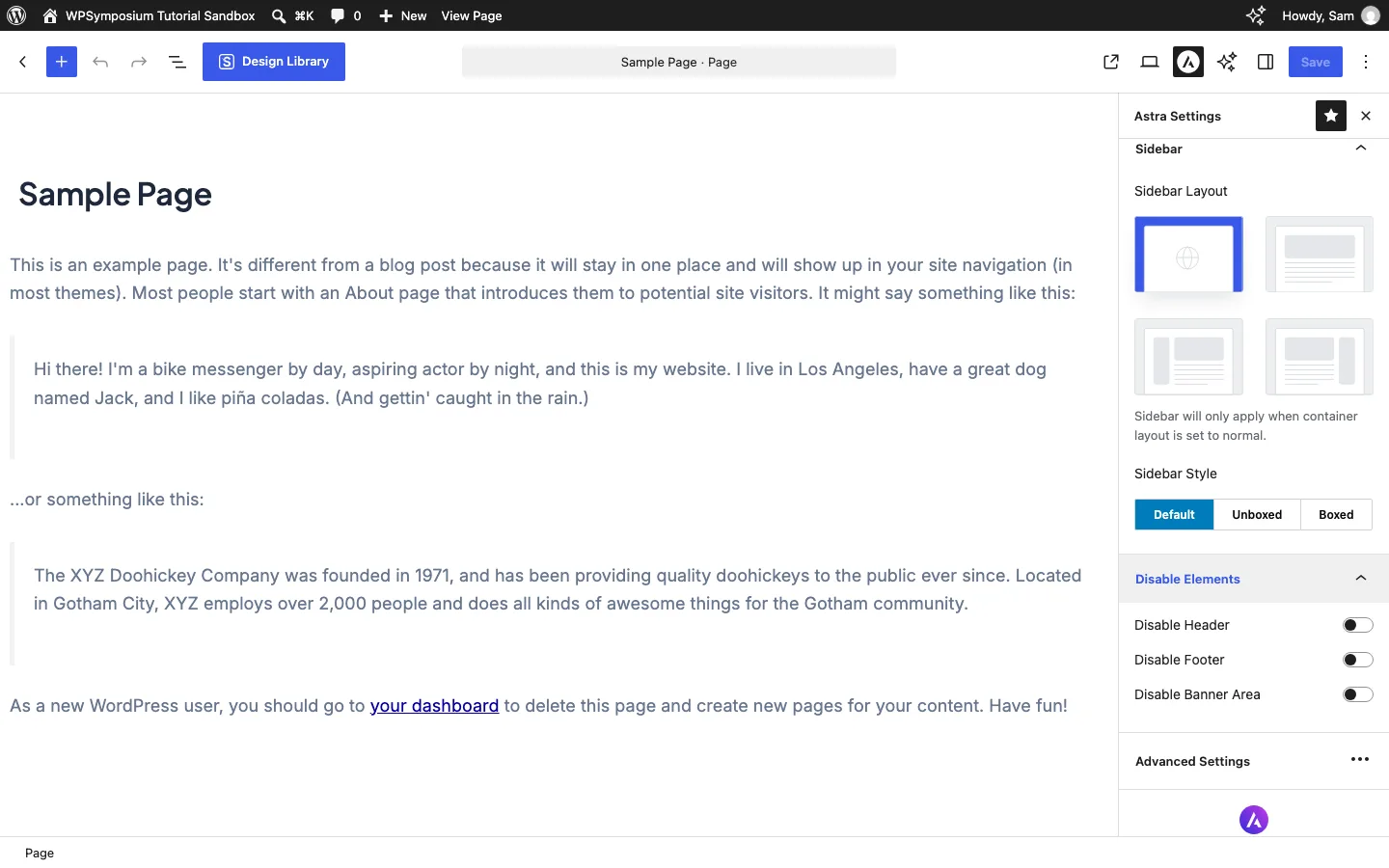
The Astra Settings panel in the block editor. Each page can override the container, sidebar, header, footer and title.
Block editor. Every page and post gets an “Astra Settings” panel in the editor sidebar. On our test install it had Container (layout and style), Sidebar (layout and style), and Disable Elements, with switches to hide the header, the footer or the banner area (the page title). Advanced options such as per-page header rows are Pro. This is how you give a landing page a clean canvas without any page builder. Astra pairs naturally with Spectra, Brainstorm Force’s block plugin, and its block editor Starter Templates are built with it.
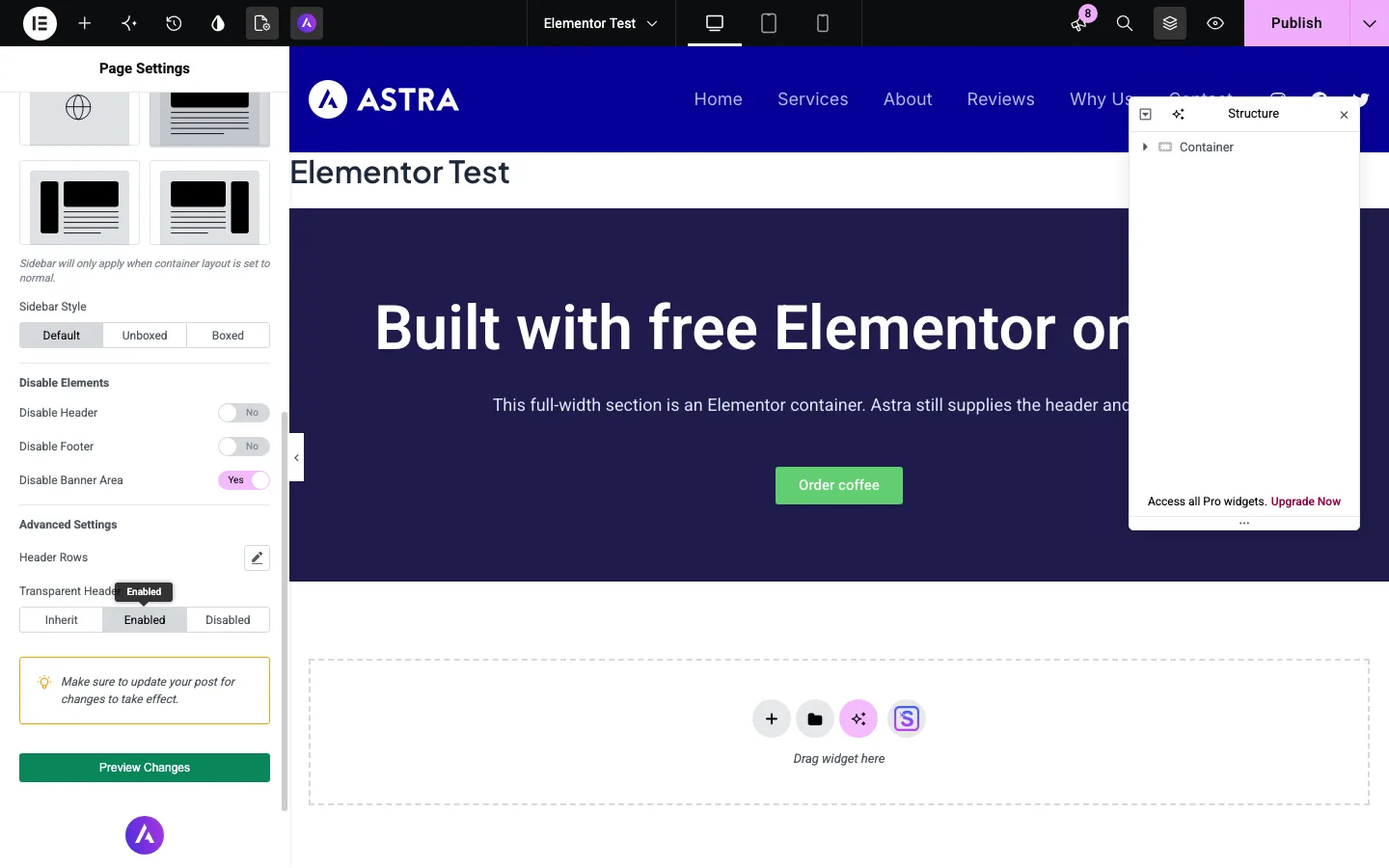
In free Elementor, Astra’s options appear under Page Settings > Astra Settings.
Elementor. We installed free Elementor 4 and built a simple page section. Astra adds its own “Astra Settings” group to Elementor’s Page Settings panel, with the same container, sidebar and disable-element options, plus a per-page transparent header switch. When we opened a new page in Elementor, Astra had already set its container to Full Width, so the section ran edge to edge. Elementor’s own “Hide Title” switch is synced with Astra’s title setting, which avoids the common double-title problem. Turning on the transparent header and hiding the title gave us a clean landing page with Astra’s header floating over the Elementor section.
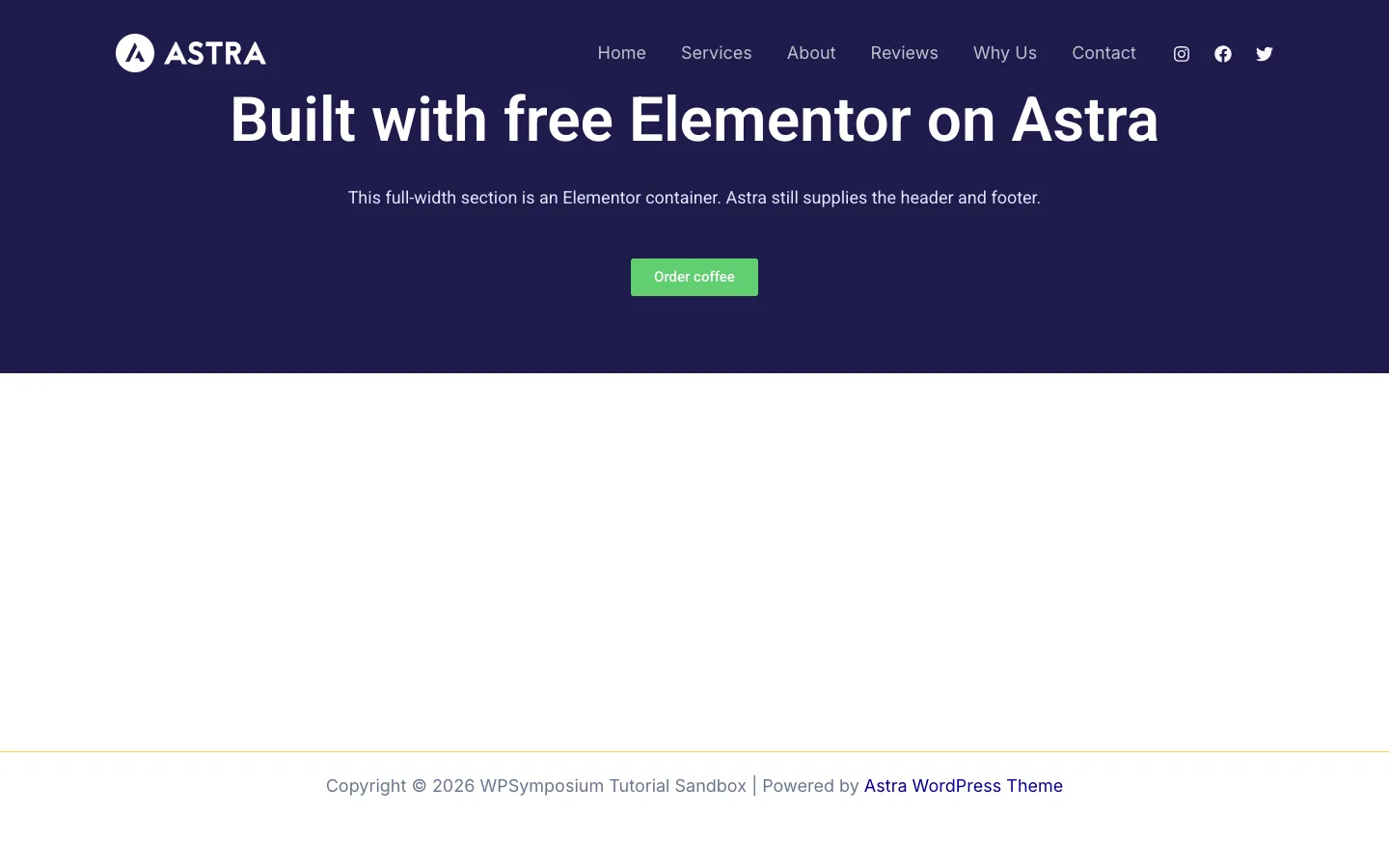
The finished Elementor test page: full width, title hidden and Astra’s transparent header on top.
Because Astra has its own header and footer builder, free Elementor is enough for most sites; you don’t need Elementor Pro just to build a header. The toolkit plans include Ultimate Addons for Elementor, which adds extra widgets on top of free Elementor. They do not include Elementor Pro, which is sold by a different company. One Elementor annoyance on our install: a pop-up promoting Elementor’s Angie AI tool appeared in the editor, and we closed it.
Beaver Builder and others. Astra’s table lists them as supported, and Brainstorm Force sells Ultimate Addons for Beaver Builder. We did not install them, and the current Starter Templates wizard does not offer Beaver Builder templates.
WooCommerce
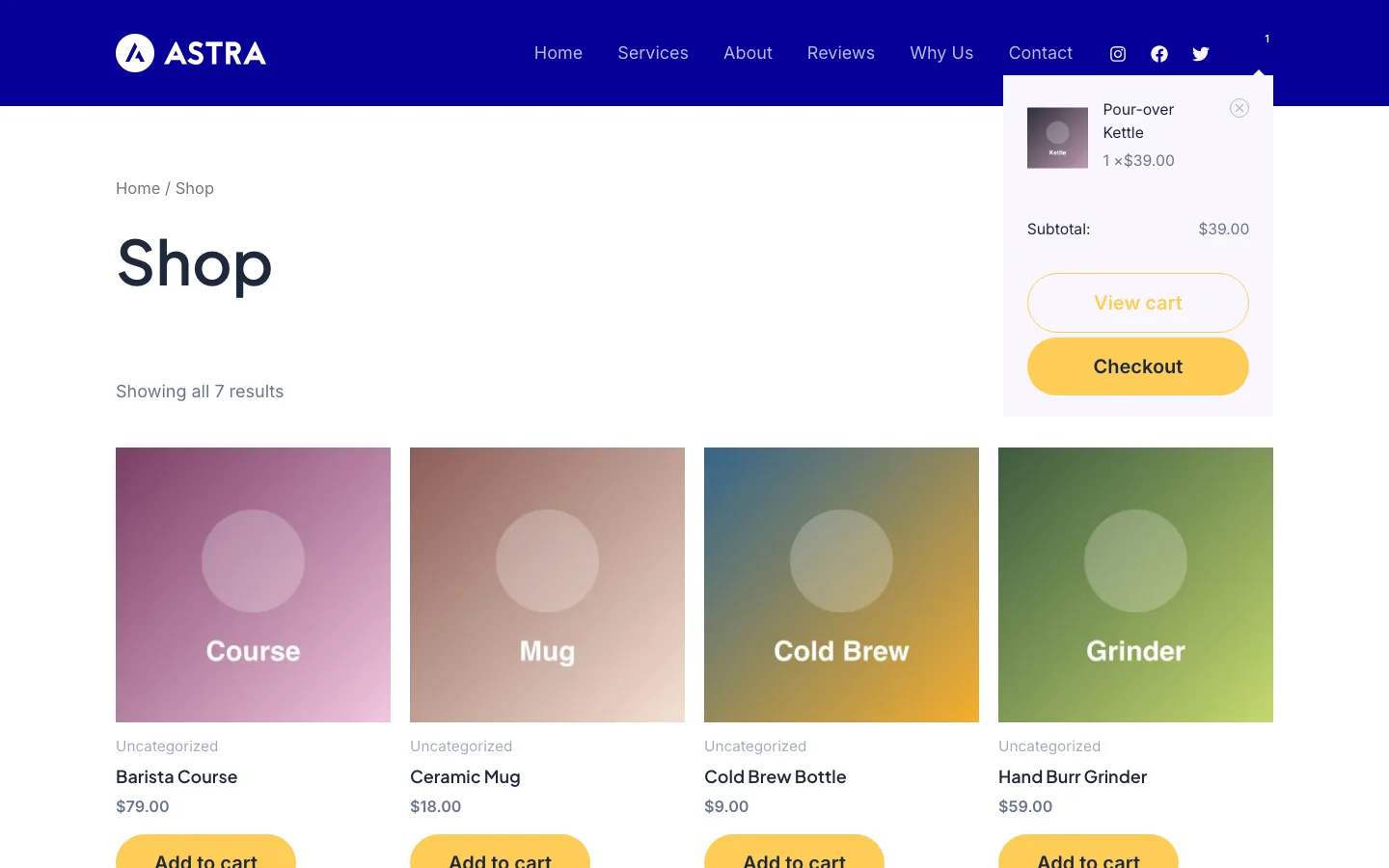
Our seven-product WooCommerce shop on free Astra, with the header cart open.
We installed WooCommerce 11.1.2 and added seven sample products. With no extra setup, Astra styled the shop as a four-column grid with yellow add-to-cart buttons that matched the demo homepage. Adding the free Cart element to the header gave us a cart icon with an item count and a dropdown mini cart with View cart and Checkout buttons.
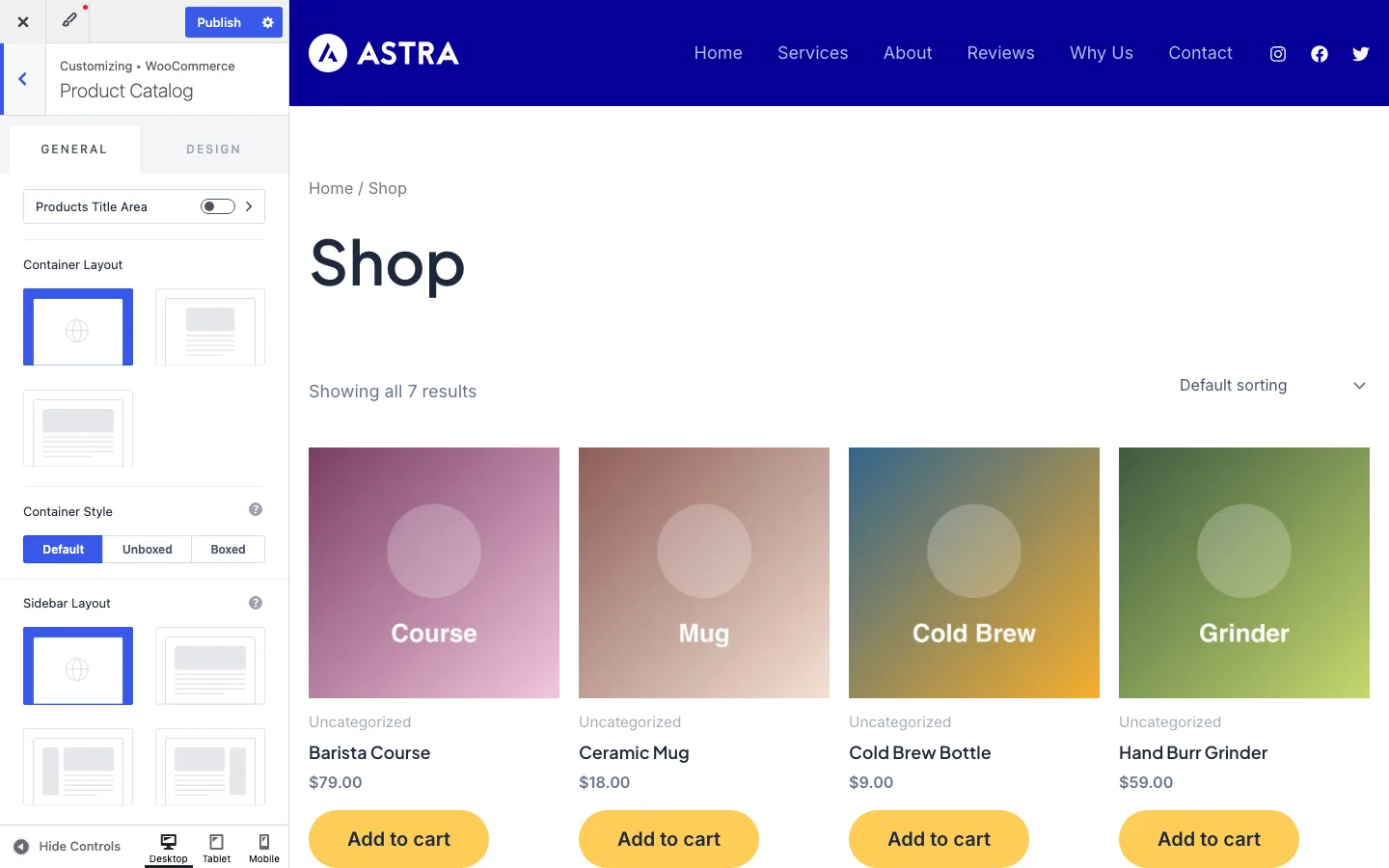
The free Product Catalog panel. Pro adds more card designs, filters and pagination styles.
The free WooCommerce panels in the Customizer include:
- Product Catalog: container and sidebar, shop card design, number of columns, products per page, content width, and which card parts show (category, title, ratings, price, add to cart, short description)
- Single Product: container and sidebar, the order of product parts, breadcrumbs, shipping text, inline or stacked variations, and a sticky add-to-cart bar
- Cart: custom cart button text and cross-sells
- Misc: quantity plus and minus buttons
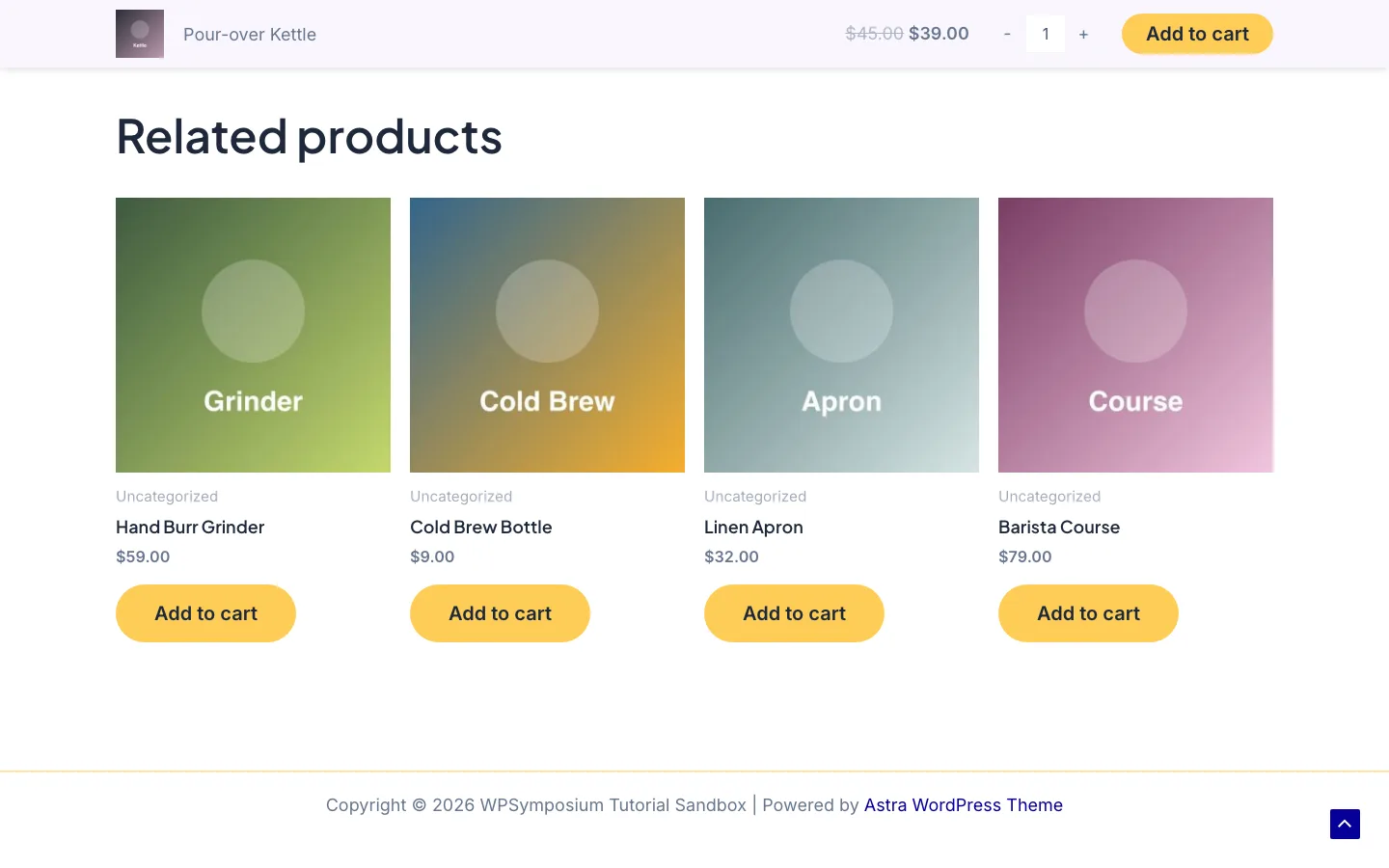
The free sticky add-to-cart bar appears when you scroll down a product page. The plus and minus quantity buttons are also free.
Two of these surprised us, because many reviews list them as Pro: the sticky add-to-cart bar and the quantity plus and minus buttons both worked on the free theme. Pro adds the features that most affect conversions, according to Brainstorm Force: quick view, AJAX add to cart, infinite loading, an off-canvas filter sidebar, product gallery layouts, image zoom, upsells, and distraction-free, two-step and modern checkout and cart layouts. If you would rather have filters, swatches and wishlists built into the theme, see our WoodMart review.
Astra also supports Easy Digital Downloads and SureCart for digital products.
LifterLMS and LearnDash
Astra supports LearnDash, LifterLMS and Tutor LMS, and the free Customizer includes LearnDash and LifterLMS sections once those plugins are active. Pro adds distraction-free course and checkout pages for LearnDash and LifterLMS, so students are not pulled away by menus and sidebars while they learn or pay. We did not install an LMS plugin for this review.
Performance
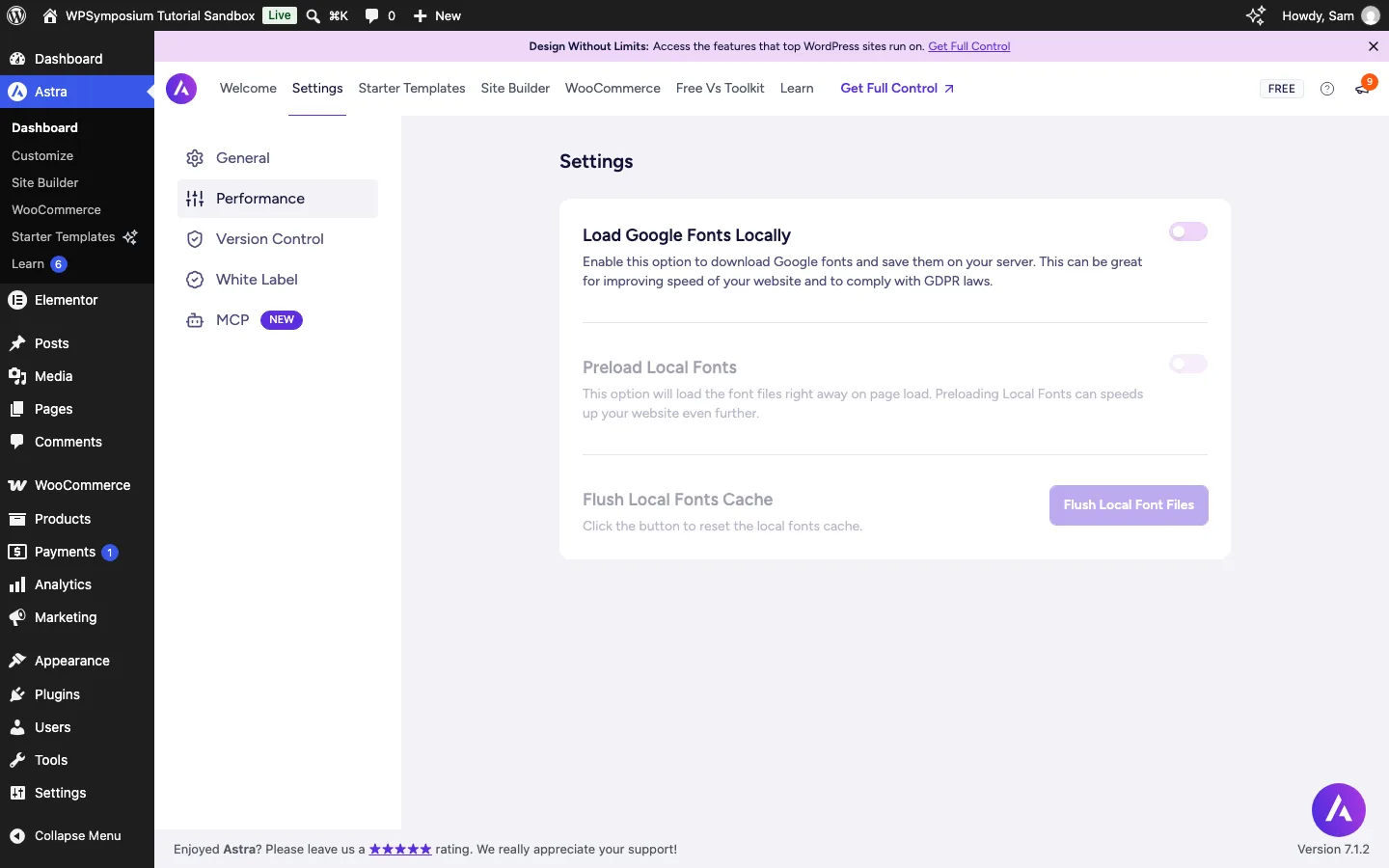
Astra > Settings > Performance in the free theme: load Google Fonts from your own server and preload them.
Brainstorm Force says a default Astra site loads in about half a second and that the theme adds less than 50 KB of front-end resources. Our fastest WordPress theme benchmark measured Astra 4 on a bare test site (WordPress 7.1.2, no plugins, same content for all nine themes):
- Homepage weight: 68 KB in 7 requests, tied for the fewest requests
- No jQuery: the only theme script on the page was Astra’s own small frontend file
- Astra’s own files: 15.2 KB of CSS and JavaScript; most of the rest was inline CSS printed into each page
- Lighthouse mobile score: 100 on both the homepage and a blog post
- Visually complete: 0.56 seconds in a recorded, throttled page load
That puts Astra in the close second group with Neve, Blocksy and Kadence, behind GeneratePress (51 KB). The 50 KB claim is fair for the theme’s own code, but a real page also carries HTML, images and Astra’s inline CSS.
On our review install we also checked a plain blog post with all plugins switched off: the page loaded only Astra’s frontend script and WordPress’s comment reply script, and no jQuery.
The free Performance tab can download Google Fonts to your server and preload them, which helps speed and privacy. Astra Pro adds an option to generate CSS as a file, which lets browsers and caching plugins cache it.
Your real speed depends far more on what you build with. Independent tests published by other review sites agree that the page builder matters more than the theme. Astra with the block editor produces small pages. Astra with Elementor and a stack of add-ons produces much heavier ones, and the theme cannot fix that. Builders focused on lean output, such as Bricks, are another route. Templates add weight too: the free Coffee Shop template’s homepage came to about 1 MB of HTML before compression, mostly inline CSS from Spectra Blocks (details in the Starter Templates section). If speed is your top priority, build with the block editor, untick extra Starter Templates plugins, enable only the Pro modules you use, and add a caching plugin. Astra lists compatibility with WP Rocket, LiteSpeed Cache, W3 Total Cache and Autoptimize, among others.
If you want to compare Astra with the theme most often named as the lightest option, see how Astra compares with GeneratePress on performance and features.
SEO Friendliness
A theme will not rank a site on its own, but it can load quickly and output clean HTML. On our test install, Astra’s pages carried Schema.org microdata in the HTML for the header, footer, navigation, organization (site logo and name), the article and its author. It did not add JSON-LD, the format most SEO plugins use, so the two do not overlap.
Astra works with Yoast, Rank Math and SEOPress, and its breadcrumbs can use Yoast, Rank Math or Breadcrumb NavXT. For advanced schema types, Brainstorm Force sells Schema Pro as a separate plugin. Note that the Starter Templates wizard ticks its own SEO plugin, SureRank, by default; if you already use another SEO plugin, untick it.
Accessibility, Dark Mode and Languages
Accessibility. Astra includes a “Skip to content” link for keyboard users, and the free Customizer has an Accessibility section that controls focus outlines for links and form fields (dotted or solid, and their color). Check color contrast after changing palettes; the Starter Templates wizard even warns when a custom color is too light to read.
Dark mode. Some reviews say Astra has no dark mode, even in Pro. That is out of date. The free theme has a “Dark” palette preset that turns the whole site dark, and the Starter Templates wizard has a Light or Dark style switch. What the free theme lacks is a toggle that lets visitors switch. Brainstorm Force’s documentation says the Color Switcher header element, added in Astra Pro 4.10.0, does that by swapping between two palettes. We saw it as a locked element in the free header builder.
Languages. WordPress.org tags Astra as translation-ready with RTL language support, and the theme folder ships a WPML configuration file so header and footer text can be translated. A language switcher element in the header is Pro. We did not test a multilingual setup.
AI Features
Since version 4.13.0 (April 2026), Astra has an “MCP” tab under Astra > Settings, available in the free theme. It can register Astra’s settings with the WordPress Abilities API and create an MCP endpoint, so AI tools such as Claude or Cursor can read and, if you allow it, change theme settings like colors, fonts and layout. Everything on that tab was switched off by default on our install, and we left it off.
The other AI features are tied to accounts or paid plans: the AI website builder in Starter Templates runs on ZipWP and needs a ZipWP account, and the paid “+ AI” plans add AI site generation, blueprints and sandbox sites.
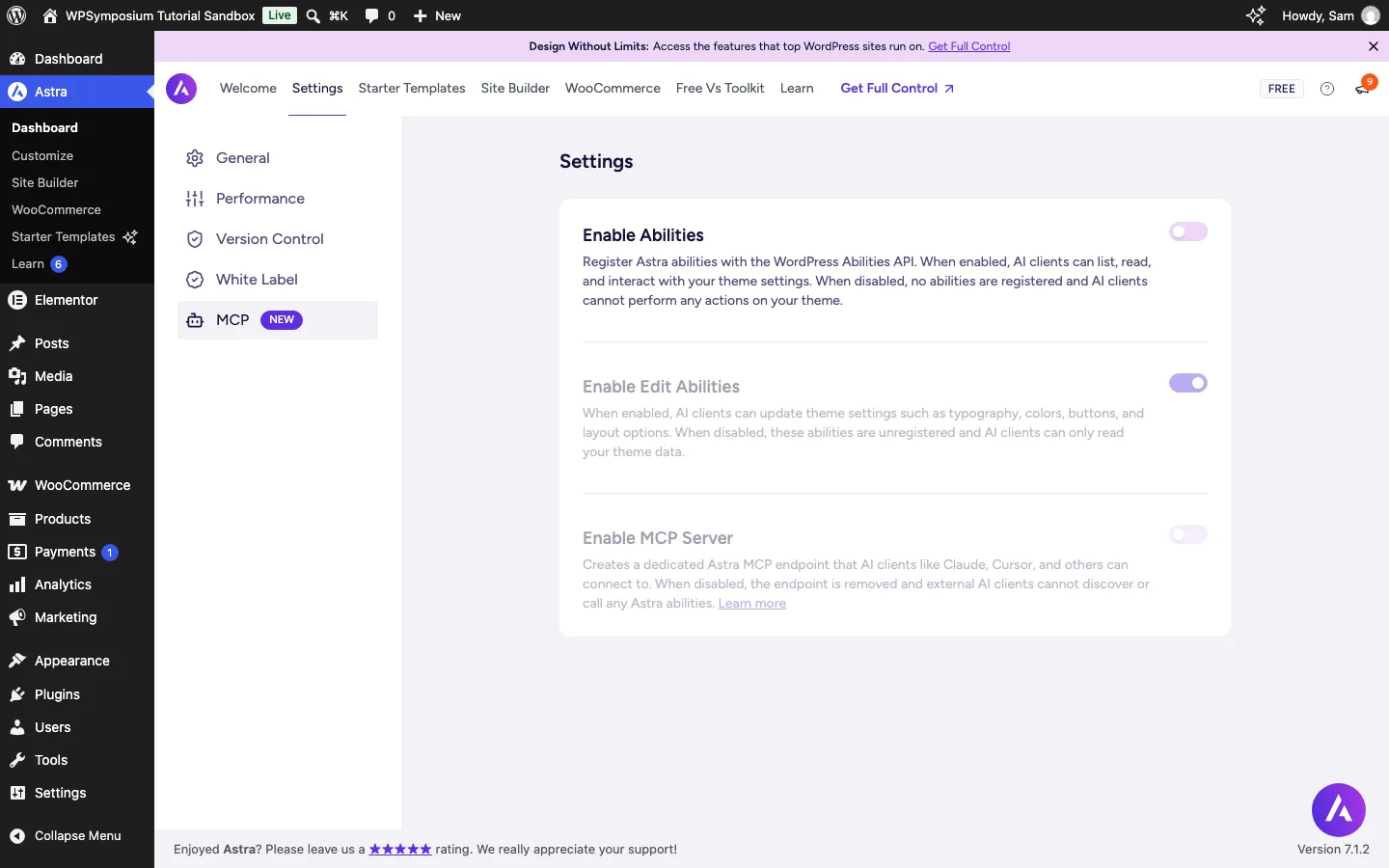
The MCP tab in Astra. AI access to theme settings is off until you switch it on.
Updates, Support and Documentation
Astra is actively maintained. Version 4.14.0 shipped on September 24, 2026, and its changelog lists the new custom named colors, fewer duplicate cart requests on WooCommerce stores, and fixes for several security issues. Seven releases shipped between late June and late September 2026. Keep Astra and Astra Pro updated, as you would with any theme. Rolling back to an older version from the dashboard (Version Control) is a Pro feature; on the free theme you would reinstall an older zip by hand.
Astra has a large documentation library, a Learn tab in the dashboard with guided tutorials, and a YouTube channel. Free users can ask in the WordPress.org support forum. Every paid plan includes 24/7 premium support, and the Business Toolkit adds priority VIP support. There is also a large Facebook community, so most common questions already have answers online. We did not contact support for this review.
Astra Pricing (as of October 2026)
The Astra theme is free, and you can install it from the WordPress.org theme directory with no license key. The free version already includes the drag-and-drop header builder, a separate mobile header with an off-canvas menu, and global color and typography settings, as the video above shows.
The paid options are below. Prices were checked on the pricing page at wpastra.com on October 5, 2026 and are in US dollars.
Astra Pro covers three sites for $69 a year or $249 once. The Pro + AI bundle starts at $99 for the first year and renews at $149; its lifetime option is $279.
Essential Toolkit + AI covers ten sites and adds Spectra Pro, Premium Starter Templates and Ultimate Addons for Elementor. It starts at $199, renews at $299 and offers a $549 lifetime option. Business Toolkit + AI covers up to 1,000 sites, adds the wider agency toolset and costs $279 initially, $429 on renewal or $799 once. The bundles also include different hosted-site allowances, so compare those if you will use the hosting.
Renewal terms to know before you buy:
- The first-year bundle prices are introductory. Bundles renew at full price. Astra says your renewal rate is locked at the price shown when you buy.
- Every site counts. Staging, local and development sites all count toward your site limit.
- Lifetime is not lifetime for everything. The theme and plugins are yours with updates for life. The AI platform and included hosting run for three years, then renew yearly.
- If you stop paying, your sites keep working. You lose updates, support, new premium templates and the AI features. Sites on the included hosting do go offline, so move them first.
- Refunds: there is no free trial of Pro, but every plan has a 14-day money-back guarantee. The free theme is the best way to try Astra before paying.
- Upgrades to a bigger plan, or from annual to lifetime, are charged as the difference in price.
Which plan fits? If you already have hosting and only want the theme features, the $69 add-on is the simplest choice. Freelancers who want premium templates and Spectra Pro should look at the Essential Toolkit. The 10-site limit is the main reason to step up to Business. Prices and plan names change often, so confirm them on the Astra website before you buy.
Astra Alternatives
Blocksy is worth comparing for its free sticky header and stronger store features on the Business plan. Kadence suits a site built around blocks, while GeneratePress is the leaner option if you need fewer design controls.