BeTheme Review (2026): Pricing, BeBuilder and 700+ Websites
BeTheme suits people who want to start from a finished website design and adapt it. Its large template library and BeBuilder cover many kinds of business sites. The trade-off is a crowded set of controls and a bigger commitment to the theme than a leaner WordPress setup.
What Is BeTheme?
BeTheme is a multipurpose WordPress theme made by Muffin Group, a team based in Europe. It launched on ThemeForest in 2014 and is one of the marketplace’s best-selling themes. Muffin Group says more than 330,000 people use it.
“Multipurpose” means it is not built for one niche. The same theme can run a law firm site, a restaurant, a photography portfolio or an online clothing store. You pick a pre-built website that is close to what you need, import it, and then change the text, images and colors.
The current offer centers on BeBuilder, with templates for more than ordinary page content, plus a large starter library and optional AI tools. Elementor and WPBakery provide other routes, but a chosen layout still depends on the builder it was made for.
This review assesses official demos, product information and current license offers. We have not installed a licensed package or tested its store checkout and AI tools.
Pre-Built Websites
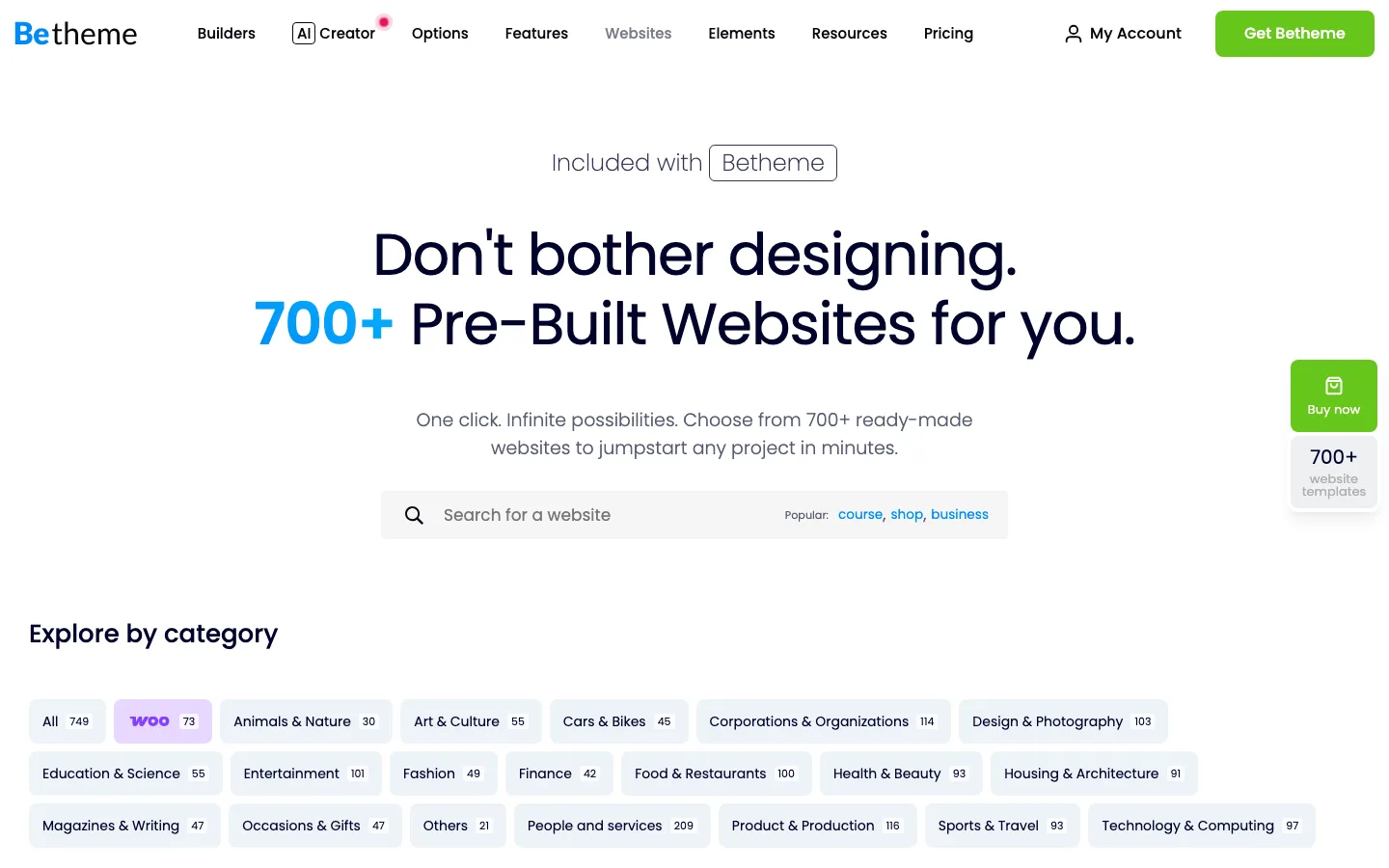
The BeTheme pre-built websites library with its category filters.
The pre-built websites library is the main reason people buy BeTheme. The current offer advertises more than 700 prebuilt websites, including business, portfolio and store designs. That is a wide selection, but not a measure of how closely any one design fits your real content.
The designs supply coordinated pages and sample content. Importing one still leaves images, copy, menus, privacy settings and dependencies to review before launch.
A few things worth knowing before you rely on the library:
- Quality varies by age. BeTheme has been adding demos for over ten years. The newest ones (marked with a “2” or “3” in many names, like Clothing Store 3) look current. Some older ones look dated.
- Builder matters. Most demos are built with BeBuilder. Newer releases often come in an Elementor version too. If you plan to use Elementor, filter for those.
- Library access is tied to your license. On the direct annual plans, you lose access to new demo imports if the plan lapses. Your existing site keeps working.
You can browse every demo for free on the BeTheme site before you buy. That is the best way to judge whether there is a design close to what you need.
BeBuilder and the Other Builders
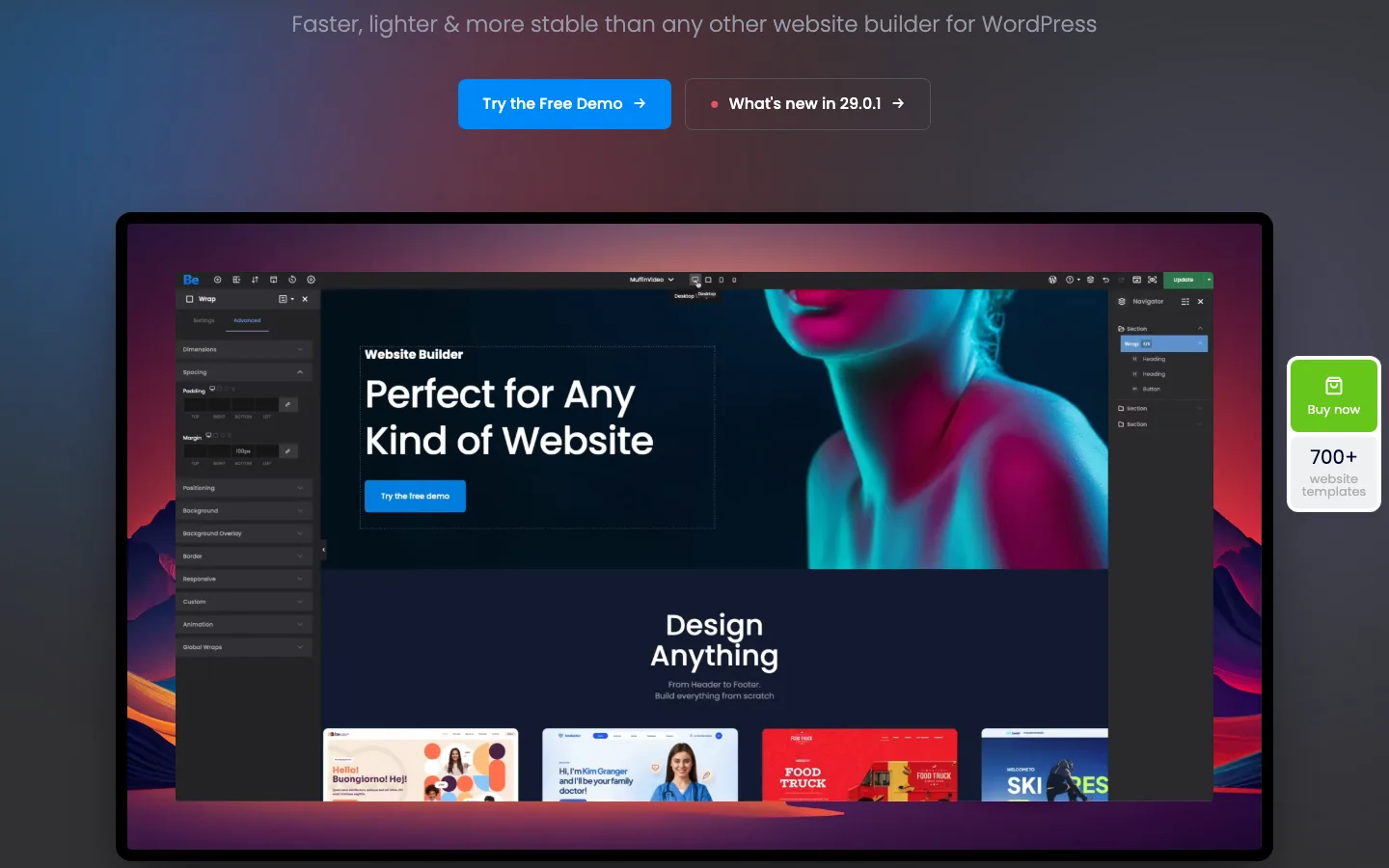
The BeBuilder editor as shown on the official BeBuilder page.
BeBuilder is BeTheme’s own drag-and-drop editor. You edit the page as visitors will see it, with a settings panel on the left and a navigator (a tree of sections and elements) on the right. It includes responsive controls for desktop, tablet and mobile, revisions, and import and export of single sections.
The editor presents many layout and style choices. Compare its actual workflow with the editor you already know instead of assuming a similar-looking panel means the same capabilities or learning time.
The vendor advertises builders for headers, menus, footers, product pages, listings and popups. Their value is a consistent design system across a site, rather than buying a separate layout tool for each area.
Dynamic data and ACF support can help with structured content, but a named integration does not establish compatibility with every custom field type. Check the exact templates and data the project needs before relying on it.
WPBakery and Elementor
You do not have to use BeBuilder:
- WPBakery Page Builder is bundled free. It is an older shortcode-based builder and mainly useful if you already know it.
- Elementor and Elementor Pro are supported. BeTheme adds its own Elementor widgets and offers Elementor versions of many newer demos.
One caution: pick one builder per site and stick to it. Mixing BeBuilder, WPBakery and Elementor pages on the same site loads extra code for each.
Lock-in
Like most multipurpose themes, BeTheme’s own layouts only work while BeTheme is active. If you switch themes later, pages built in BeBuilder will need to be rebuilt. If you think you might change themes in a few years, building in Elementor or the block editor inside BeTheme reduces that risk, though you then give up some of BeTheme’s features.
AI Creator
The current AI Creator offering includes layout, copy and image generation. Annual plans advertise a one-time credit bonus: 250,000 on Basic, 500,000 on Advanced and one million on Pro and Ultimate. Those are bonus credits, not a monthly recurring allowance.
The $60 lifetime plan lists AI as requiring a separate extension. We have not tested output quality or credit consumption, so choose the ordinary builder and license first rather than treating AI as a guaranteed saving.
WooCommerce
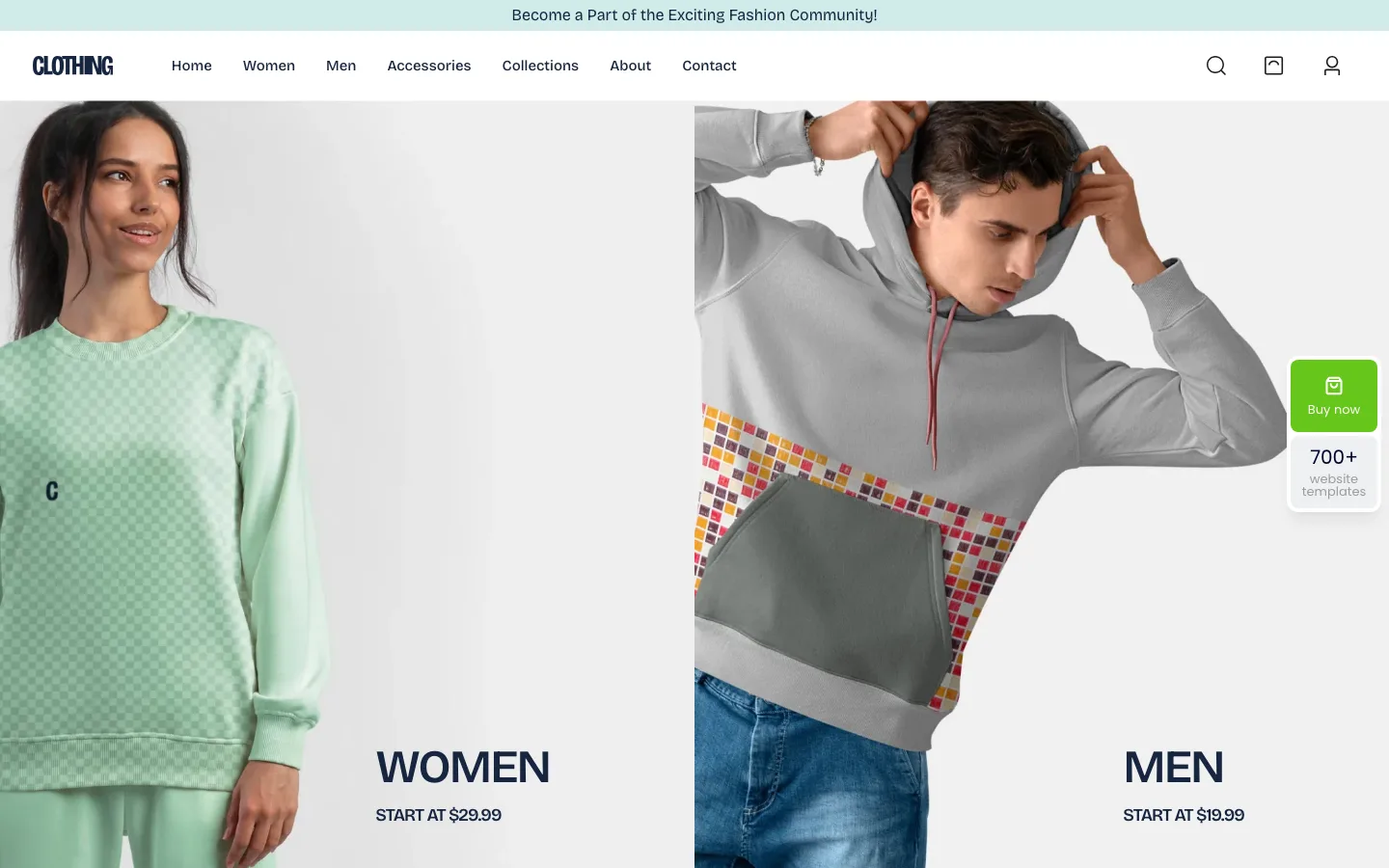
The official Clothing Store 3 demo, one of BeTheme’s most popular WooCommerce designs.
The published WooCommerce tools include product and shop templates, filters, a side cart and wishlist features. Those can reduce presentation work, but the product catalog, payment methods, tax settings and mobile checkout still need testing together.
The demo screenshot illustrates a vendor design, not a successful purchase on our own installation. Check compatibility with the specific WooCommerce extensions the store will use.
If your site is mainly a store and you do not need BeTheme’s range of other designs, a store-focused theme such as Flatsome is also worth comparing.
Performance
We have not run a controlled current BeTheme speed test. The vendor promotes optimization controls and faster builder performance, but those claims do not predict the size or responsiveness of a finished store.
Images, sliders, tracking and companion plugins can change the result substantially. Assess the actual chosen layout, including uncached pages and phone-width navigation, rather than repeating an anonymous review’s load time.
A site that mainly publishes text may need less infrastructure. Astra and Kadence are useful alternatives to compare when the larger design library is not a requirement.
Customization and Theme Options
BeTheme has a large Theme Options panel for site-wide settings: layout, colors, fonts, headers, blog and portfolio layouts, shop settings, and more. Beginners can stick to the pre-built website and BeBuilder. Advanced users can go deeper.
Reusable sections, white labeling and translation support can help an agency hand off a consistent site. Bundled sliders and page builders still have their own update and distribution conditions, so their advertised combined value is not the same as independent full licenses.
Privacy controls and Google Consent Mode support are configuration tools, not an automatic guarantee that the final site meets every consent requirement. The same caution applies to SEO compatibility: a theme does not determine rankings by itself.
Pricing and License Terms
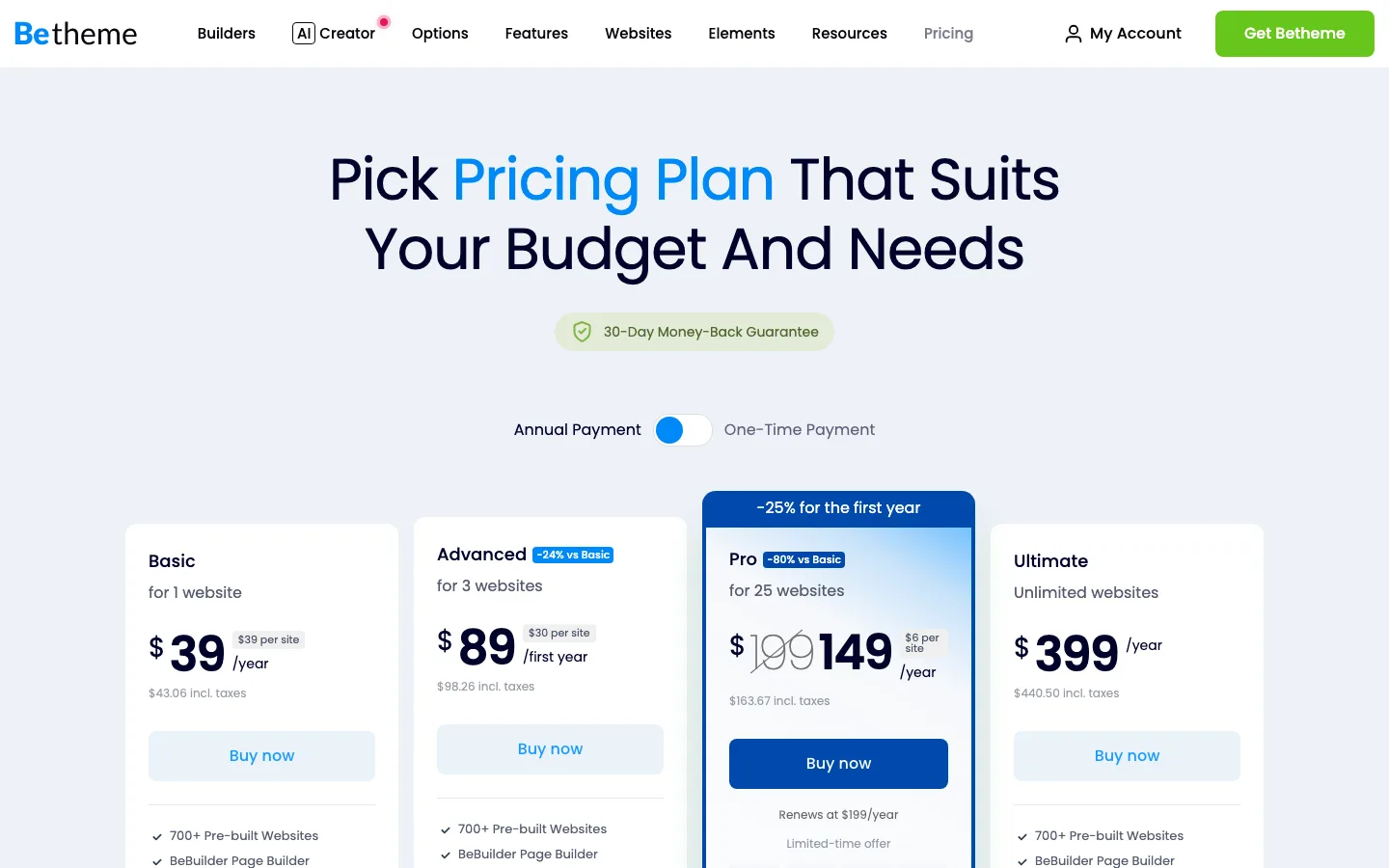
BeTheme’s direct pricing plans on muffingroup.com.
BeTheme has direct plans and a separate marketplace purchase. The direct page displays tax-inclusive US-dollar prices; confirm the currency, local tax treatment and selected term in the final checkout.
Direct from Muffin Group
Muffin Group’s Basic plan costs $39 a year for one site. Advanced covers three sites for $89 in the first year. Pro covers 25 sites and currently advertises a discounted first year, renewing at $199 annually. Ultimate costs $399 a year for unlimited sites. All annual plans include support while active.
The $60 one-time Lifetime option covers one site and includes six months of support. Compare the renewal and support terms before treating a first-year discount as the ongoing price.
The annual plans include updates, support, the pre-built website library, and AI Creator with bonus credits. If you stop paying, your sites keep working. You lose new updates, support, and new demo imports for those domains. The direct plans come with a 30-day money-back guarantee.
On ThemeForest
- Regular License: $69 for one site. It includes lifetime updates and 6 months of support. Extending support to 12 months cost about $21 extra at checkout when we checked.
- Extended License: $3,999. You only need this if end users pay to use the site you build, for example a paid membership product. A normal business site or online store does not need it.
ThemeForest purchases follow Envato’s refund rules, which are stricter than a no-questions refund.
Which one to buy
For a single site you plan to keep for years, the $60 lifetime license or the $69 ThemeForest license is the cheapest option over time. For agencies, the multi-site annual plans are a big change. Older reviews criticize BeTheme for requiring one license per client site, but the Advanced, Pro and Ultimate plans now cover 3, 25 or unlimited sites.
Support and Documentation
Support runs through Muffin Group’s Support Center, on weekdays from 8 AM to 6 PM (GMT+1). Muffin Group says the average response time is about six hours. There is a large documentation library, video tutorials, a searchable forum, and an active Facebook group.
Some reviewers note there is no classic ticket system and that complex issues may require you to share admin and FTP access with the support team. That is common for theme support, but agencies with strict security rules should know about it upfront.
BeTheme vs Avada
The useful distinction is the editor and purchase model. BeTheme emphasizes BeBuilder and its large complete-site library, with Elementor editions of some designs. Avada now distinguishes its One subscriptions from the Classic marketplace product, so compare the actual editions rather than treating both brands as one $69 purchase.
Choose the layout and workflow you want to maintain. Sales counts, review ratings and the difference between a complete website and a reusable section do not establish which one will fit the project.
BeTheme Alternatives
Divi offers an unlimited-site membership and a base lifetime option. The7 has a current direct subscription with block-editor and other builder routes.
If the site needs fewer built-in tools, compare Astra or Kadence with the editor you already use. The cost of maintaining custom templates and later rebuilding them can matter more than the initial license saving.