Is WordPress Free? Yes, but Here's What a Site Costs (2026)
WordPress software is free. A public website usually is not: you still need hosting and a domain, and may choose to pay for themes, plugins or email. WordPress.com is a separate hosted service with its own free and paid plans. The useful question is what your complete site will cost.
Why is WordPress free?
WordPress is open source software, built by a large community of contributors and released under the GNU General Public License (GPLv2 or later). According to WordPress.org, that license gives you the freedom to run the program for any purpose, to study and change it, and to share it, including your changed versions. In plain terms, nobody can charge you a license fee for WordPress, and you can run it on as many personal or commercial sites as you like.
So how does anyone make money? Companies sell things next to the software: hosting, premium themes, paid plugins and services. That is why the free tools you add to WordPress often ask you to upgrade, as our hands-on test below shows.
WordPress.org vs WordPress.com
Most “is WordPress free” questions come from mixing up these two. They share a name and the same core software, but they are different things.
WordPress.org provides free software to install on a host you choose. You pay for hosting and any domain, can install any plugin and control whether ads appear. Updates and security are your responsibility or your host’s. It is the more flexible route for business sites and stores.
WordPress.com is Automattic’s hosted service. Its free plan uses a wordpress.com address and displays its ads, without plugin installation. Paid plans start at $4 monthly on annual billing, allow your own domain and permit plugins. WordPress.com manages updates and security, which suits hobby bloggers who want less setup.
The real difference is who runs the server and how much control you get.
What WordPress.com costs in 2026
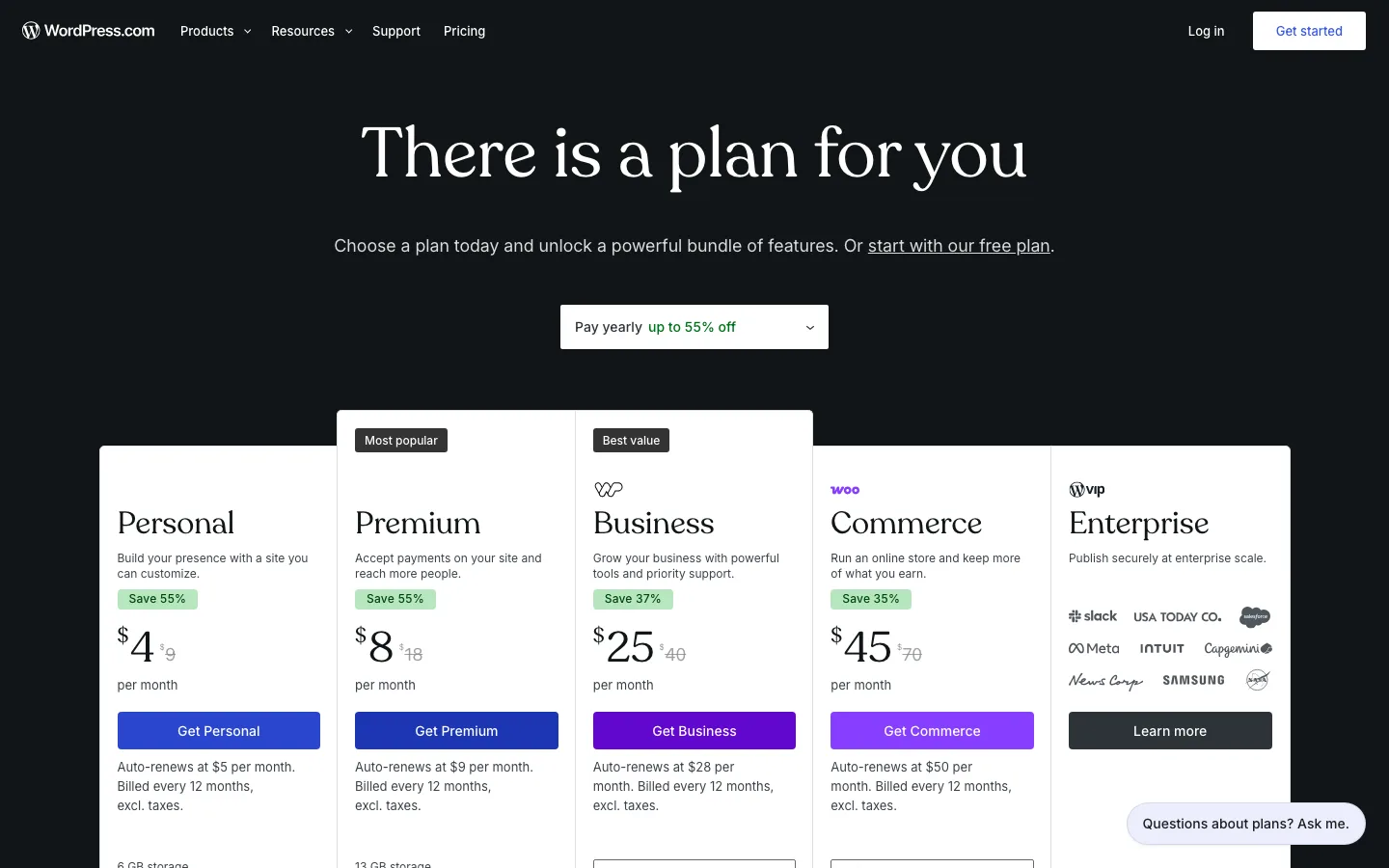
WordPress.com’s plans on yearly billing, checked. Each plan shows its renewal price below the button.
WordPress.com plans include hosting, security and updates, so there is no separate hosting bill. Prices below are from WordPress.com’s pricing page in October 2026, in US dollars, before tax.
WordPress.com Free includes 1 GB storage, unlimited posts and pages and seven days of basic stats, with no fee. Personal costs $48 for the first year, equivalent to $4 monthly, renews at $5 monthly and costs $9 on monthly billing. It adds 6 GB storage, removes ads, allows plugins and selected premium themes, and includes a first-year domain.
Premium costs $96 initially at $8 monthly, renews at $9 and costs $18 month to month. It provides 13 GB, all premium themes, payment buttons, video uploads and full stats. Business costs $300 initially at $25 monthly, renews at $28 and costs $40 month to month, with 50 GB, priority support and a year of business email.
Commerce costs $540 initially at $45 monthly, renews at $50 and costs $70 month to month. It has 50 GB and WooCommerce-based store features.
Longer terms cost less. Personal drops to $3.25/month on a two-year term and $2.75/month on a three-year term. The free domain is only included with yearly or longer plans, not monthly ones.
One change from a few years ago matters a lot. WordPress.com now lets every paid plan install plugins, starting with Personal. Older guides that say you need the Business plan for plugins are out of date.
What the WordPress.com free plan allows
According to WordPress.com, the free plan gives you:
- A yoursite.wordpress.com subdomain, with no custom domain
- 1 GB of storage
- Unlimited pages and posts
- Dozens of free themes
- Basic visitor stats for the last 7 days
- No expiration date, and no credit card needed
It does not include plugins, a custom domain, or an ad-free site. WordPress.com shows its own ads to your visitors until you upgrade to Personal. That makes the free plan fine for a hobby blog or for learning, but a poor fit for a business. If you are weighing other free options, our WordPress vs Blogger comparison covers Google’s free blogging platform.
The real costs of a self-hosted WordPress site
Self-hosted WordPress means the WordPress.org software on a host you choose. You pay for the pieces separately. Here is what each one costs.
Hosting is required
Hosting is the server that stores your site and shows it to visitors. It is the one cost you cannot avoid for a public site, and most hosts now include the SSL certificate, the padlock in the browser bar, for free.
Shared hosting is the cheapest option and is fine for most new sites. According to our Hostinger review, the Premium plan costs $3.99/month on a 12-month term, paid upfront as $47.88. On a 48-month term it is $2.99/month, or $143.52 upfront. Either way it renews at $10.99/month. Our FastComet review lists its Starter plan at $1.99/month as an introductory price, renewing at $9.95/month.
The pattern across cheap hosts is the same: a low first-term price, then a renewal price three to five times higher. Plan your budget around the renewal price, not the headline price. If you would rather pay more for a host that handles more of the work for you, see our guide to the best managed WordPress hosting.
A domain name
A .com domain costs around $10 to $20 a year at most registrars. Hostinger lists .com at $19.99 before discounts. Many hosts, including Hostinger, include a free domain for the first year on yearly plans, so the domain cost usually starts in year two.
A premium theme is optional
There are thousands of free themes on WordPress.org, and the good ones are enough for most sites. Paid versions add design options, more starter templates and support. As of October 2026:
- GeneratePress Premium: $59/year
- Astra Pro add-on: $69/year for 3 sites
- Kadence Essentials, with the premium theme and blocks add-ons: $99/year
Paid plugins are optional, but they add up
Plugins add features. Most popular plugins have a solid free version and a paid tier. Some typical paid prices as of October 2026:
- Forms: WPForms Basic is $49.50 for the first year and renews at $99/year, according to WPForms. Our WordPress form plugin comparison covers cheaper options.
- SEO: Rank Math PRO is $7.99/month for the first year, then $8.99/month ($107.88/year). Yoast SEO Premium is $118.80/year per site. See Rank Math vs Yoast for which free version is better.
- Backups: UpdraftPlus Premium starts at $70/year for two sites; our UpdraftPlus review shows what the free version leaves out.
Business email
A free Gmail address works, but a business usually wants you@yourbusiness.com. Google Workspace Business Starter costs $7 per user per month on a one-year commitment ($84 a year), according to Google. Some hosts include basic mailboxes: Hostinger’s are free for the first year, then $0.59 per mailbox per month.
Maintenance costs time or money
WordPress, themes and plugins need regular updates, and you should keep an offsite backup. Many hosts now apply updates automatically. Doing the rest yourself costs time, not money; hiring someone means a monthly fee.
How much does a WordPress site cost? Year 1 vs year 2
These examples use 12-month hosting terms so year one and year two are easy to compare. All prices are in US dollars, before tax, as of October 2026.
A WordPress.com Free site or a local installation can cost $0 in both years. A public self-hosted blog using Hostinger Premium, a free theme and free plugins costs about $48 initially, from its $47.88 yearly hosting offer and included domain, then about $152 with hosting and domain renewal.
Our small-business example adds GeneratePress Premium at $59, WPForms Basic at $49.50 initially then $99, and one Google Workspace user at $84. With hosting, that totals about $240 in year one and $394 in year two.
The store example uses Hostinger Cloud Startup at $119.88 initially then $25.99 monthly, free WooCommerce, Astra Pro at $69, Rank Math PRO, UpdraftPlus Premium at $70 and Workspace at $84. It totals about $439 initially and $663 in year two, plus card-processing fees.
How we got these numbers:
- Year 2 jumps because of renewals. Hostinger Premium renews at $10.99/month ($131.88/year) and Cloud Startup at $25.99/month ($311.88/year). We added about $20 for the domain renewal. WPForms Basic doubles from $49.50 to $99, and Rank Math PRO goes from $95.88 to $107.88.
- Longer hosting terms smooth this out. Hostinger’s 48-month Premium term costs $143.52 upfront and covers four years, about $36 a year.
- Store payments cost extra. WooCommerce itself is free. WooPayments has no setup or monthly fee but charges 2.9% + $0.30 per US card payment, according to WooCommerce. On $20,000 of sales that is roughly $580 plus $0.30 per order.
- Not included: paying a developer or designer, paid stock photos, and ads. Those can easily cost more than everything above.
For comparison, the WordPress.com Personal plan would cost $48 in year one and $60 plus a domain renewal in year two, with hosting and updates handled for you.
What a free-software site can do
We built a small business site with free WordPress, Kadence, WPForms Lite, Yoast and UpdraftPlus. It had a designed homepage, a working contact form, SEO controls and a manual backup without a software purchase. It ran locally; making it public would still require hosting and a domain.
The limits came from the surrounding products. WPForms Lite did not save entries locally, so reliable email or a form plugin with storage matters. Its payment options added a plugin fee. UpdraftPlus left backups on the same server until remote storage was connected. Premium templates, advanced design tools and extra automation also cost more.
We encountered many upgrade prompts in those free products, but none in WordPress itself. They did not block the basic site. The practical lesson is to budget for the features your business actually needs, rather than assuming either that everything is free or that every upgrade prompt requires a purchase.
What you can do with WordPress for free
- Use the software. Download WordPress from WordPress.org and run it on any number of sites, for any purpose.
- Learn and build locally. WordPress Playground runs WordPress in your web browser, and WordPress Studio is a free desktop app for building sites on your own computer. Neither costs anything, but neither makes your site public.
- Start a hobby site on WordPress.com’s free plan. You accept ads and a wordpress.com address.
- Use free themes and plugins. WordPress.org says it offers over 15,000 free themes. As our test shows, a complete small business site is possible with free ones.
When you’ll have to pay
- You want a public site on your own domain. That means hosting and a domain, or a paid WordPress.com plan.
- You want no ads and a custom domain on WordPress.com. That starts with the Personal plan at $4/month billed yearly.
- You need a specific premium feature. Saved form entries, redirects, mega menus or backups to several places are common reasons people upgrade.
- You sell online. WooCommerce is free, but store-ready hosting, payment fees and paid extensions add up.
- You want business email or outside help. Budget about $84 per person per year for Google Workspace. Developers, designers and maintenance plans are often the biggest cost of all.
Is WordPress cheaper than Wix or Squarespace?
Usually, yes, for a basic site. Wix’s paid plans start at $17/month billed yearly, and Squarespace starts at $19/month billed yearly, as of October 2026. A self-hosted WordPress blog costs about $48 in year one and about $152 in year two. The trade-off is that you handle more of the setup and upkeep yourself. See Wix vs WordPress, WordPress vs Squarespace, or our three-way WordPress vs Wix vs Squarespace comparison for the full picture. Writers choosing a newsletter platform can compare costs in Ghost vs WordPress.