Shopify vs WordPress (2026): Which Is Better for Your Store?
Choose Shopify if you want one company to handle hosting and the store platform. Choose WordPress with WooCommerce if content drives sales or you want more control over hosting, payments and features. WooCommerce offers flexibility, but you take on more setup and maintenance.
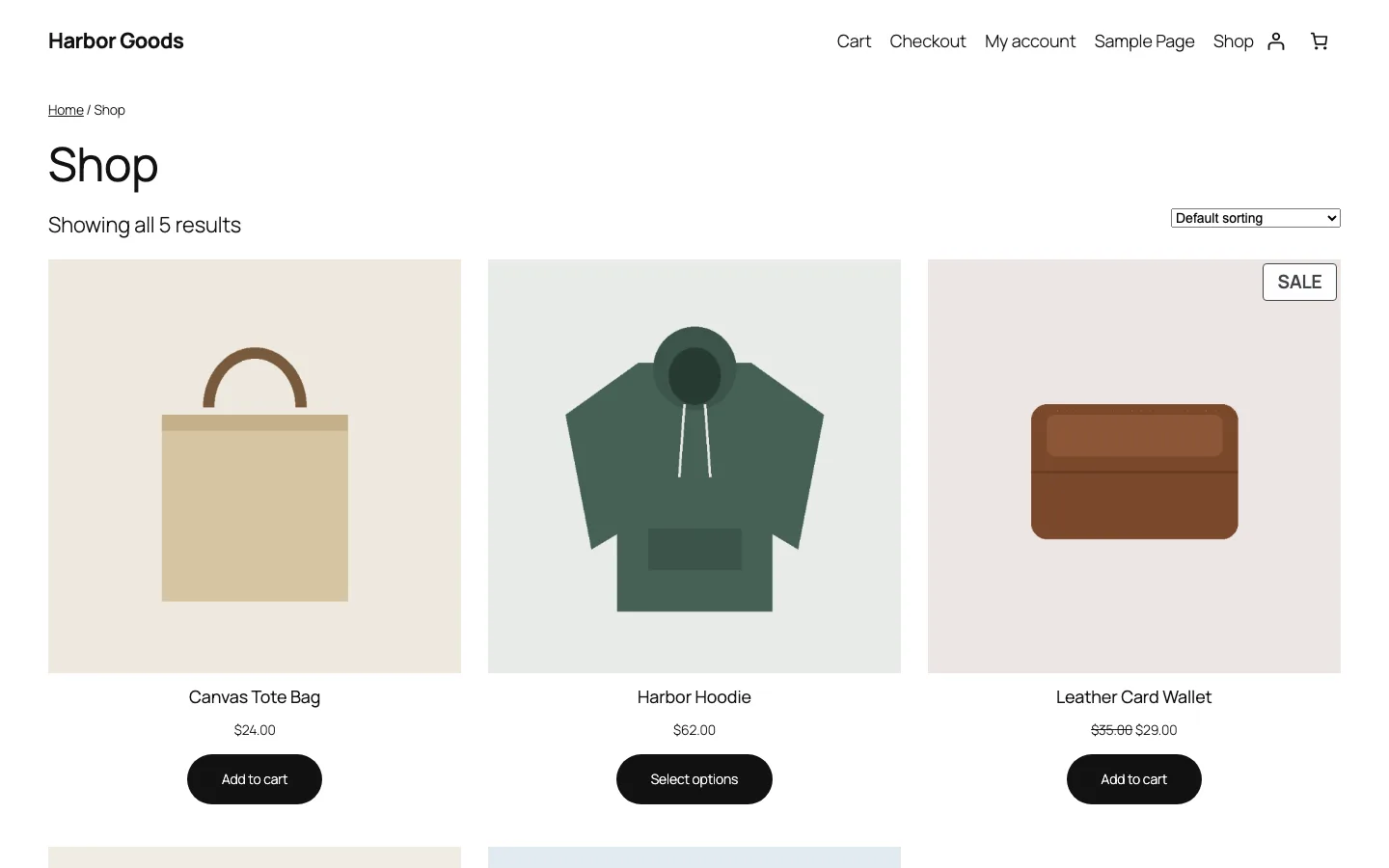
The Basic Difference: Hosted Platform vs Your Own Software
Shopify is a hosted service. You pay a monthly plan, and Shopify runs the hosting, store software, checkout and updates. You customize within what Shopify and its apps allow.
WordPress is free, open source software you install on hosting you choose. The free WooCommerce plugin turns it into a store, so for selling online the real comparison is WooCommerce vs Shopify.
Both are huge. According to W3Techs, WordPress runs 40.2% of all websites and Shopify runs 5.4%. WooCommerce shows 7 million+ active installs on WordPress.org.
Total Cost: Plans, Payment Fees and Add-ons
What Shopify costs
Shopify Basic costs $29 monthly on annual billing or $39 month to month, with US Shopify Payments at 2.9% plus $0.30 and a 2% platform fee for another provider. Grow costs $79 or $105, with 2.7% plus $0.30 and a 1% external-provider fee.
Advanced costs $299 or $399, with 2.5% plus $0.30 and a 0.6% external-provider fee. Plus starts at $2,300 monthly on a three-year term or $2,500 on a one-year term, with the stated 2.25% plus $0.30 card rate and 0.2% external-provider fee.
Prices and fees as shown on the plan page inside our trial store’s admin. The Plus term prices are from Shopify’s Plus pricing page; the admin only says “Starts at $2,300 USD/mo.”
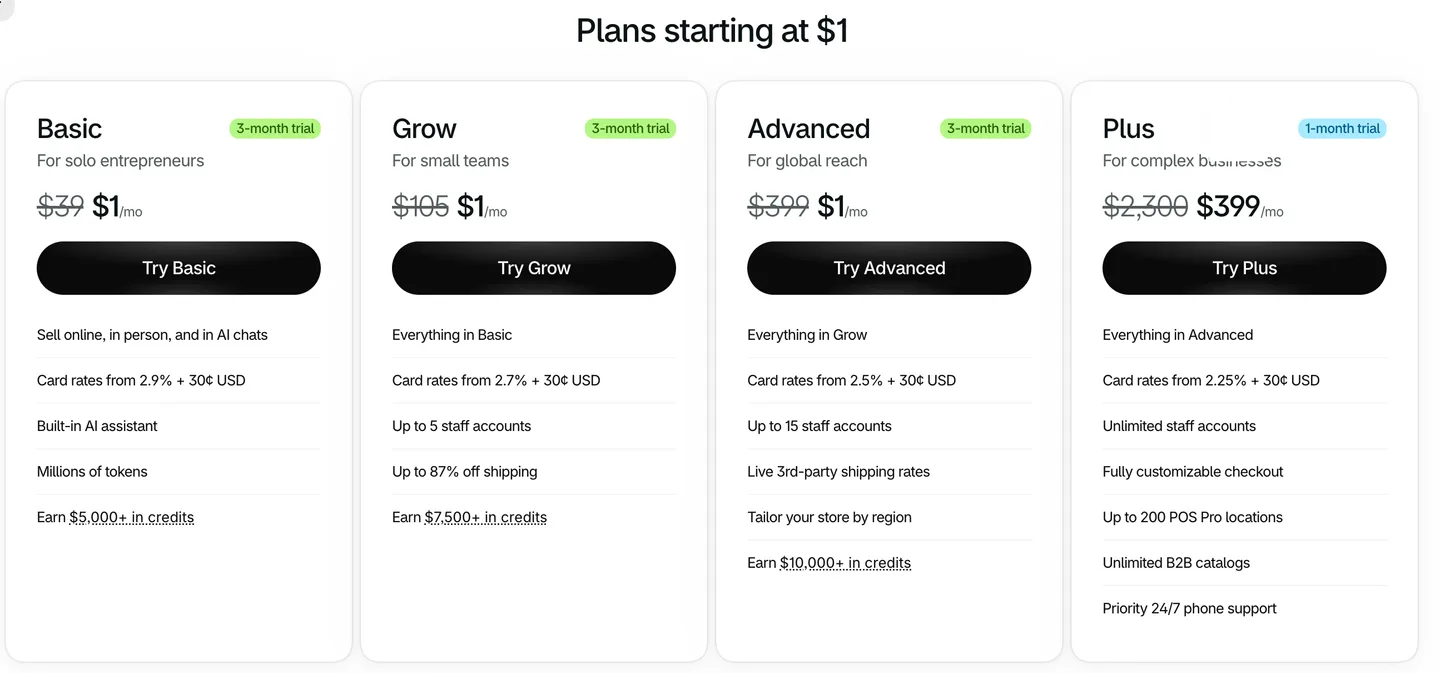
The “Plans starting at $1” page in our Shopify trial store’s admin. We looked, but did not pick a plan.
A few details matter more than the headline price:
- The trial. 3 days free, then $1/month for 3 months. Our trial store’s plan page showed that $1 offer on Basic, Grow and Advanced; Plus was $399 for one month instead.
- The third-party payment fee. If you use a payment provider other than Shopify Payments, Shopify adds its own fee on top of that provider’s fee: 2% of each order on Basic. The admin’s plan table lists the same 2%, 1%, 0.6% and 0.2% as the public pricing page. Shopify’s help center says manual methods like cash on delivery and bank transfer are exempt.
- Sales tax calculation. Shopify Tax was switched on by default in our trial store. Its settings page says it charges 0.35% in transaction fees after your first $100,000 in global sales.
- The old Starter plan is gone for new stores. Shopify’s help center says the cheap Starter plan “isn’t available to new stores.”
- Paid themes and apps. Paid themes are a one-time purchase; the ones featured in the Theme Store mostly cost $300 to $400. Apps usually bill monthly and are where Shopify bills tend to grow.
What WordPress and WooCommerce cost
WooCommerce itself is free. You pay for:
- Hosting. As of October 2026, Hostinger Premium is $2.99/mo on a 48-month term and renews at $10.99/mo (see our Hostinger review for the full renewal math). SiteGround’s WooCommerce StartUp plan is $2.99/mo for the first 12 months, then $17.99/mo. Managed hosting such as Kinsta starts at $30/mo for one site, or $350/year; our Kinsta review explains what that plan includes.
- A domain. Usually $10 to $20 a year, sometimes free for the first year with hosting.
- A theme. Free themes work fine; our test store used the default Twenty Twenty-Five theme. Paid WooCommerce themes such as Flatsome or WoodMart are a one-time purchase.
- Payment fees. WooPayments charges 2.9% + $0.30 per US card payment, plus 1.5% for international cards. Stripe’s standard rate is also 2.9% + 30¢. WooCommerce adds no platform fee on top.
- Paid extensions, if you need them. For example, the official WooCommerce Subscriptions extension is $279 a year.
A worked example
Take a small store selling $5,000 a month in 100 orders of $50, all US cards:
In this example, Shopify Basic on annual billing costs $29 monthly plus $175 in payment fees, totaling $204 with Shopify Payments. Using another provider at the same card rate adds a $100 Shopify platform fee, bringing the monthly total to $304.
WooCommerce with Hostinger Premium at its $10.99 renewal price and WooPayments totals about $186 with the same $175 payment bill. On the $30 Kinsta hosting example it totals $205. Optional themes, extensions and maintenance costs remain outside these totals.
Card processing is the biggest cost on both platforms, and it is about the same. With Shopify Payments, Shopify is not much more expensive at this size. The gap opens up with Shopify’s extra fee for other payment providers, monthly app bills, and moving up to Grow, Advanced or Plus. WooCommerce costs grow in other ways: better hosting as traffic rises, paid extensions, and developer time.
Setting up a store
Shopify gave us the easier start. Its trial included a theme and shipping defaults, and it suggested product categories and variants from uploaded photos. WooCommerce supported the same basic product and shipping work, but needed more decisions and showed more optional extension offers. Both stores still needed real content and payment configuration.
Our WooCommerce test order used cash on delivery. It reached the confirmation page, appeared in orders and reduced stock correctly. We did not connect a live gateway. The Shopify trial did not allow orders before choosing a paid plan, so we did not test a purchase there.
Check tax collection and payment instructions on either platform. Neither was collecting tax in our test without further configuration. WooCommerce’s check-payment text still contained placeholder address details, and product variations without prices stayed hidden. Shopify’s shipping options also depend on the plan: live carrier rates can cost more.
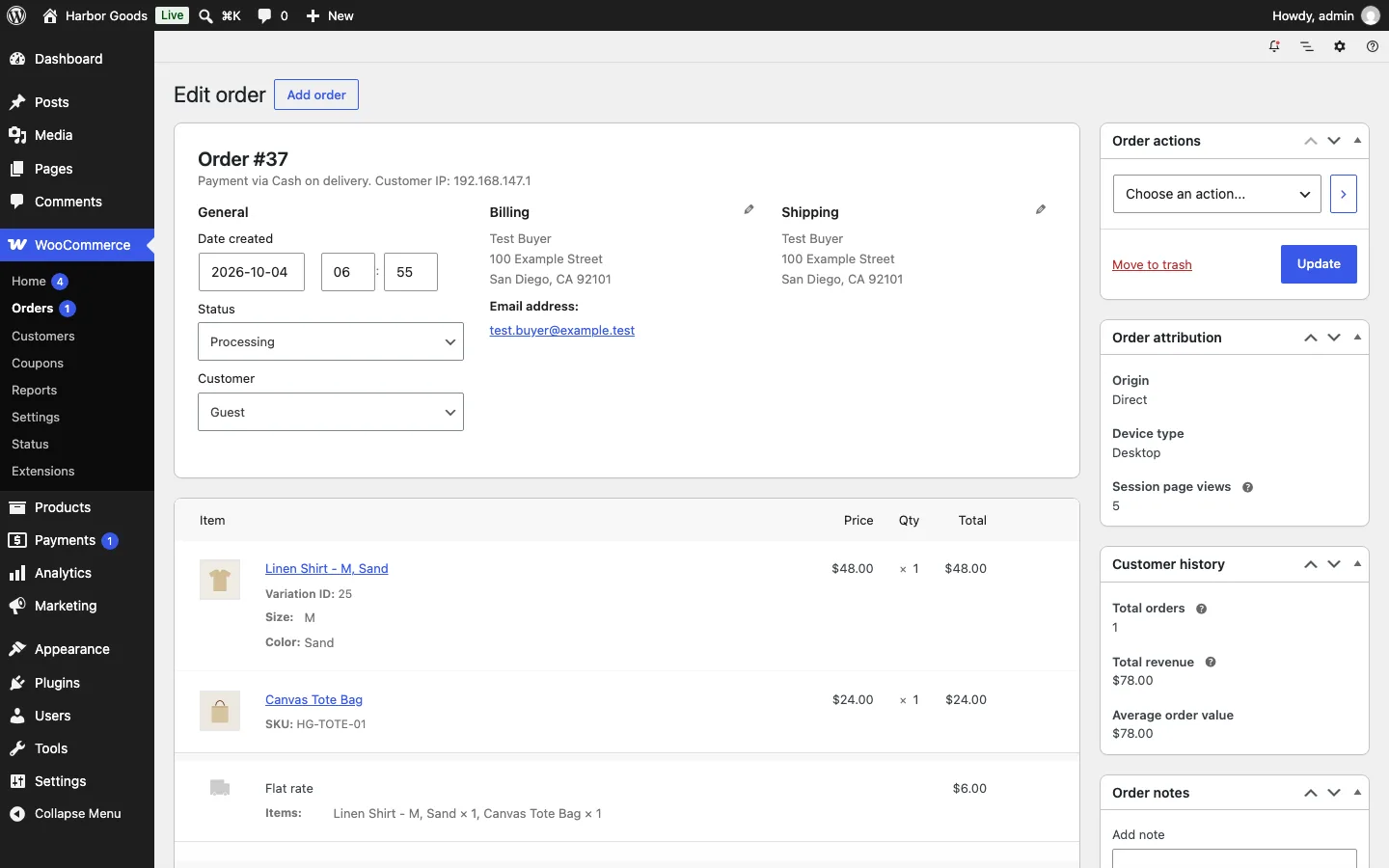
The practical difference is responsibility. Shopify handles the platform and supplies more defaults. WooCommerce gives you more choices, including offline payments, but you must verify those choices and maintain the surrounding plugins.
Design and Themes
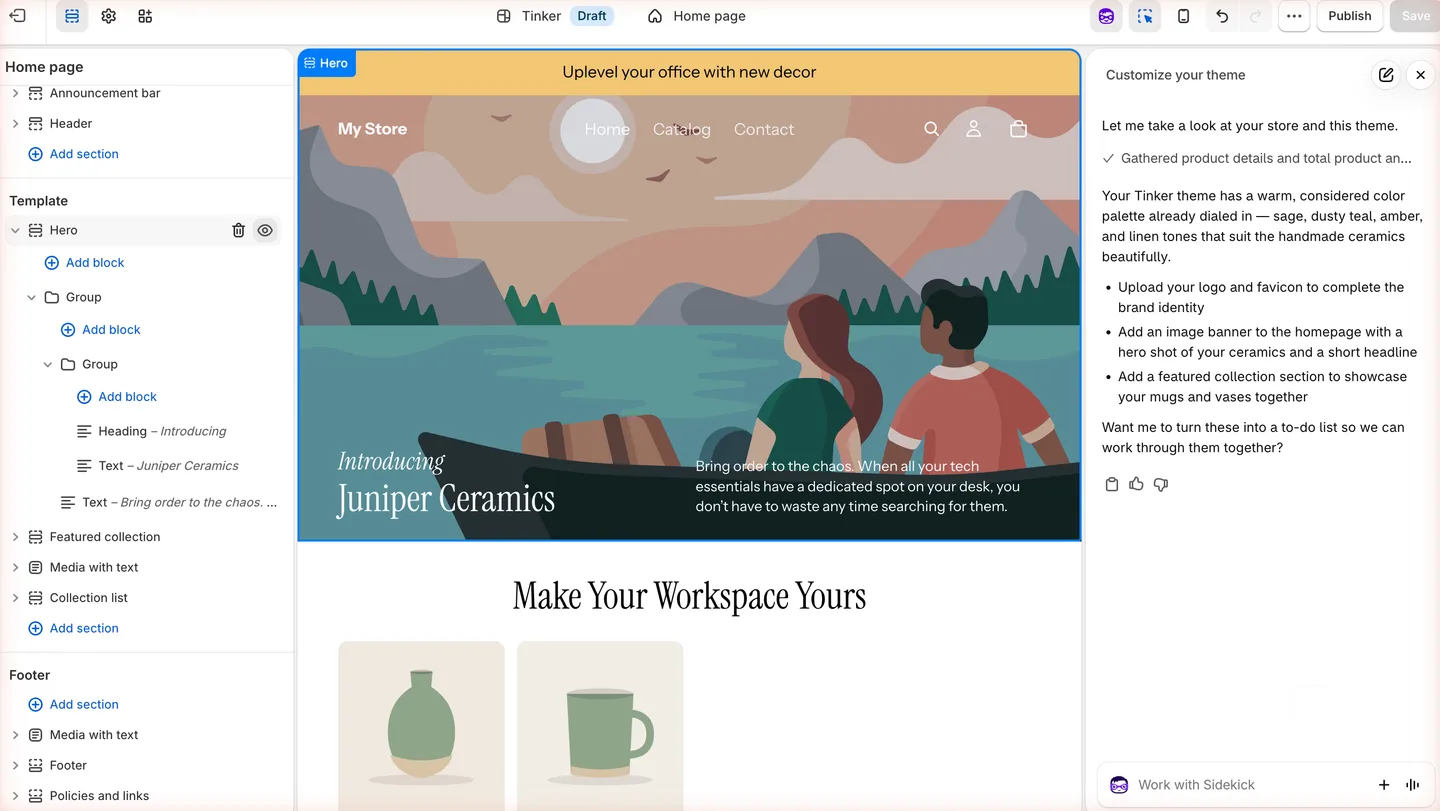
The free Tinker theme in the Shopify theme editor on our trial store, with Sidekick’s suggestions on the right.
The Shopify Theme Store listed 1,299 themes when we checked, 24 of them free. Each has a live demo store, and paid themes are a one-time purchase with free updates. Developers can edit theme code, written in Shopify’s own Liquid language, which only works on Shopify.
On our trial store, adding the free Tinker theme from the admin took one click and installed it as a draft beside the live Horizon theme, so you can try a theme without switching. In the editor, you edit text right on the preview; changing the hero heading took seconds. Sidekick, the AI assistant Shopify’s plan page lists on every plan, opened by itself, looked at our products and suggested a logo, a banner with “a hero shot of your ceramics” and a featured collection for “your mugs and vases,” without changing anything.
WordPress gives you far more choice: any WooCommerce-compatible theme, from the free default theme our test store used to paid themes like Flatsome, plus page builders and the site editor. The trade-off is quality control. WordPress themes range from excellent to abandoned, so check when one was last updated before you buy.
Winner for design: WordPress for flexibility, Shopify for a consistent, curated starting point.
Product and Inventory Features
Shopify’s selling features are strong on every plan: unlimited products, inventory across up to 10 locations (200 on Plus), discount codes, gift cards, abandoned checkout recovery, email campaigns, discounted shipping labels, and selling on social channels and marketplaces. Basic has no extra staff accounts (Grow allows 5).
WooCommerce covers the same basics in its free core. Our test install offered simple, variable, grouped and external (affiliate) product types, stock tracking, sale prices, categories, tags, brands, reviews and coupons. The external product type is handy if you link out to products on other sites; our guide to the best Amazon WordPress plugins covers tools that build on it. Subscriptions, bookings and memberships usually need a paid extension, just as they need an app on Shopify. For subscriptions, Shopify has the edge on price: its own Shopify Subscriptions app is free in the App Store, while WooCommerce Subscriptions is $279 a year.
Winner: tie. Shopify bundles more marketing tools into the plan; WooCommerce lets you add exactly what you need.
Payments and Checkout
Shopify’s checkout is its strongest feature; Shopify says it converts 15% better on average than other platforms. Shop Pay and PayPal are built in, and fraud analysis comes with Shopify Payments, which the help center lists in 40 countries. The downsides: checkout customization is limited below Plus, and other payment providers trigger the extra fee.
We could not try Shopify’s checkout during the trial. Both the checkout editor’s preview and a real checkout started from the storefront preview said: “This store isn’t set up to receive orders yet.” Visitors only see an “Opening soon” password page, and the setting to remove the password says to select a plan first. So on Shopify you pay before you see a working checkout; on WooCommerce, we placed a test order before spending anything.
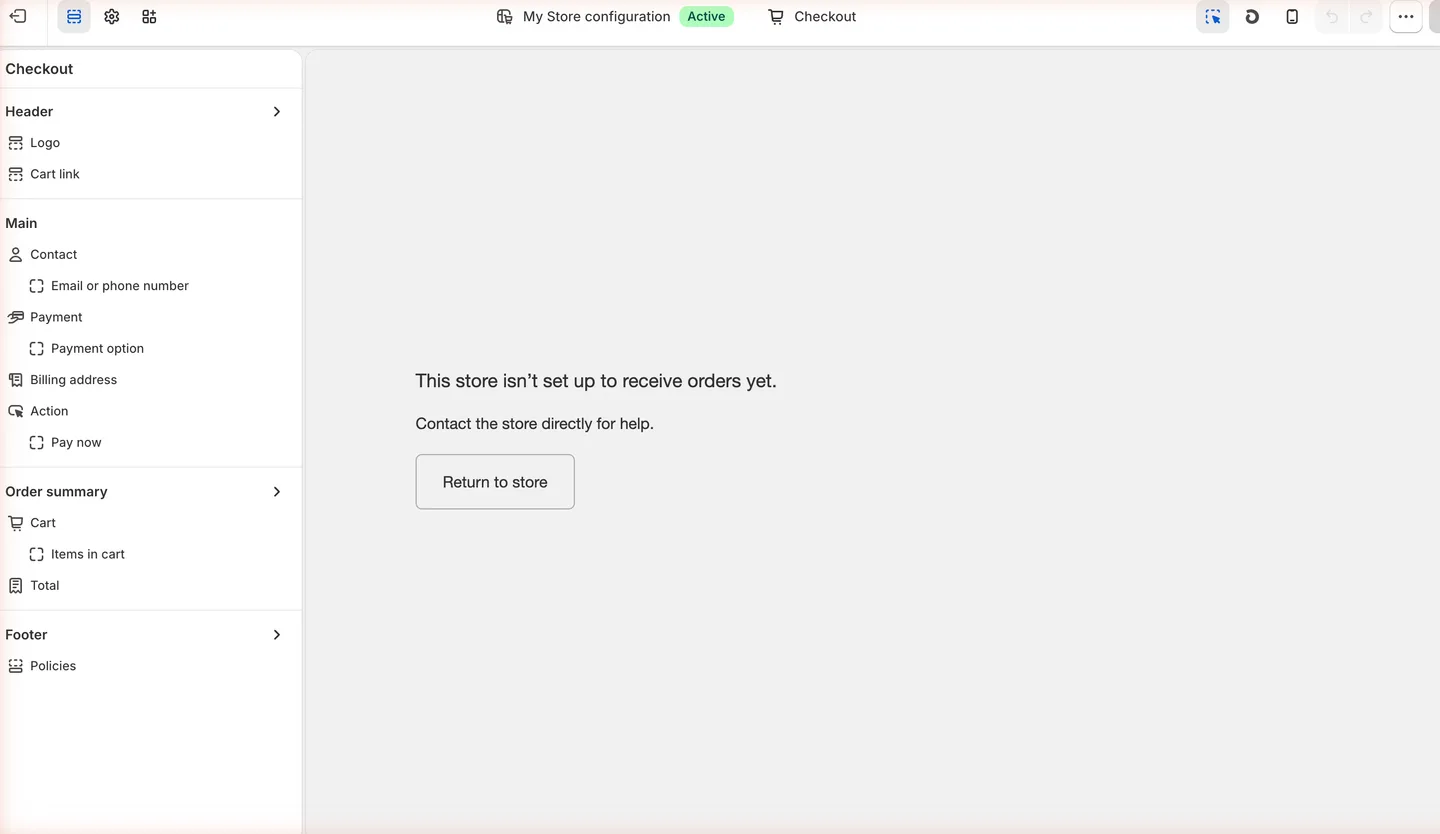
The checkout editor on our Shopify trial store. Checkout stays closed until you pick a plan.
WooCommerce lets you use any payment gateway with no platform fee. Woo says its own WooPayments works in 38 countries, and Stripe, PayPal and many others have plugins. On our test install, the default checkout was a single page with guest checkout switched on, and you can edit its layout in the WordPress site editor.
Winner: Shopify for a polished checkout out of the box, WooCommerce for payment choice and no extra fees.
SEO, Content and Blogging
This is WordPress’s biggest advantage. It was built for publishing, so blog posts, category pages, landing pages and buying guides are first-class content, and SEO plugins give you full control of titles, schema and sitemaps. If you are choosing an SEO plugin, see our Rank Math vs Yoast comparison. You also control every URL.
Shopify has a built-in blog and handles the SEO basics: editable titles and descriptions, automatic sitemaps, and an editable robots.txt file through the theme code. Its URL structure is partly fixed, though. Product and collection URLs always include /products/ and /collections/, and Shopify’s help center says you can’t redirect those fixed paths.
Our trial store showed both sides. Each product has a “Search engine listing” box with a page title, meta description and URL handle, filled in from the product name and description, but the handle starts with a fixed products/ you cannot edit. Our test blog post landed at /blogs/news/how-we-glaze-our-stoneware-mugs, inside the default “News” blog. The blog editor is basic: title, rich text, excerpt, featured image, tags (no categories), the same search fields and a visible or hidden switch. Fine for a few posts a month, but nothing like WordPress’s block editor and SEO plugins.
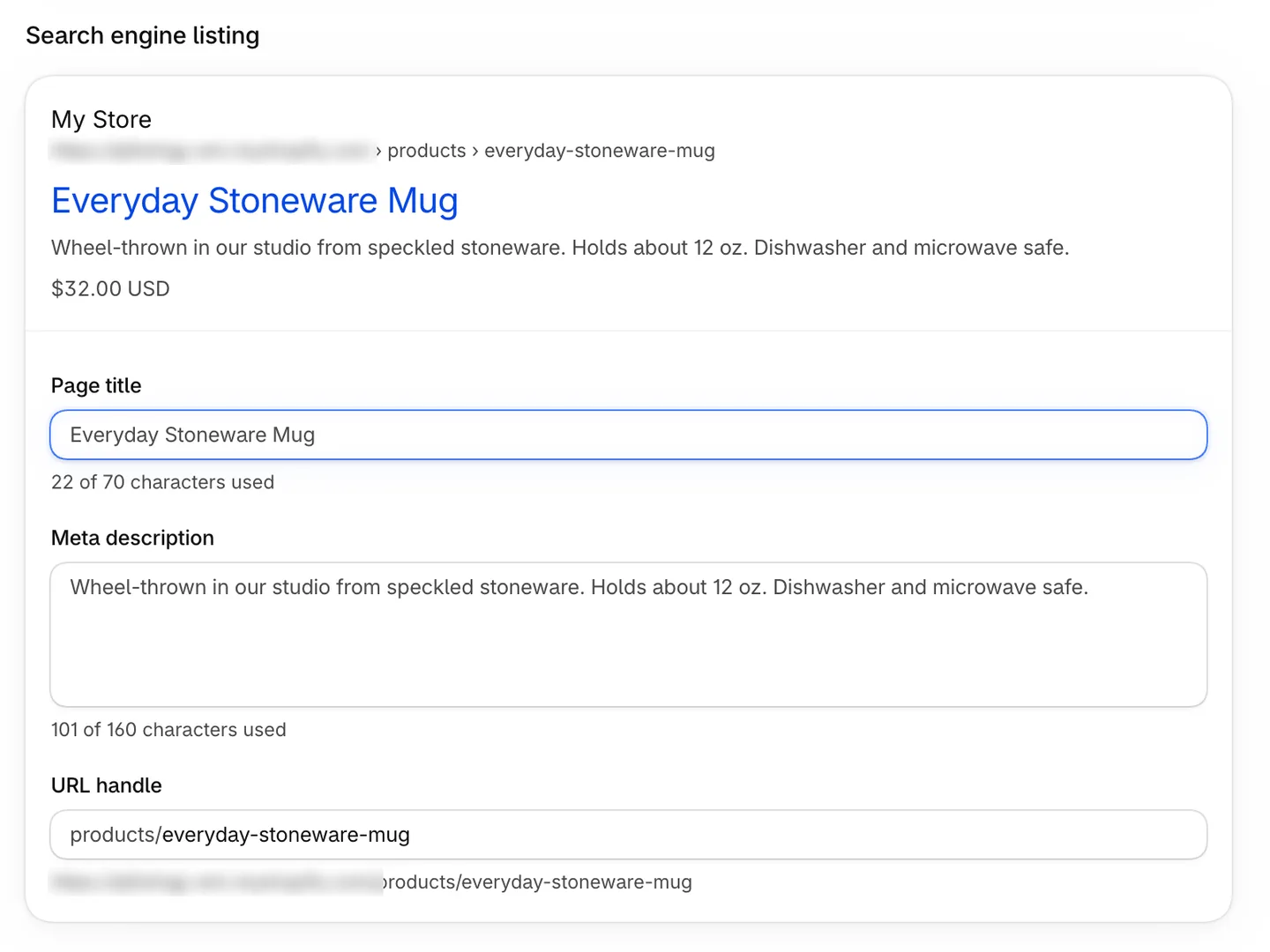
The search engine listing fields for a test product on our Shopify trial store. The products/ part of the URL handle is fixed. We blurred the store’s address.
Winner: WordPress, clearly, for any store that plans to win traffic with content.
Speed
With Shopify, speed is mostly Shopify’s job, since hosting is included. What you control is your theme and the apps you add.
With WooCommerce, speed depends on your host, theme and plugins. We ran Google Lighthouse on our test store’s shop page on the local test machine. With five products, the default theme and no other plugins, it scored 93 for performance on mobile and 100 on desktop, with a simulated mobile Largest Contentful Paint of 2.8 seconds and a page weight of about 230 KB. Treat that as a best case with no real traffic, a tiny catalog and no tracking scripts. A live store with a heavy theme and many plugins will score lower.
Winner: Shopify for consistent speed with no effort. A well-built WooCommerce store on good hosting can be just as fast, but that is on you.
Scaling and Large Catalogs
Shopify scales without you thinking about servers. As you grow you move up plans for more staff, lower card rates and, on Plus, a fully customizable checkout and higher API limits. Plus starts at $2,300 a month.
WooCommerce scales as far as your hosting and setup allow. Our test install used WooCommerce’s newer dedicated order tables by default, rather than storing orders as ordinary WordPress posts. For a big catalog or lots of traffic, plan on managed hosting; our managed WordPress hosting guide and Kinsta vs SiteGround comparison are good starting points.
Ownership and Lock-in
On Shopify you rent your store. You can export products, customers and orders as CSV files, but your theme (written in Liquid) and your apps do not move with you, and your fixed URLs will change if you leave.
WooCommerce is open source. You own the files and the database and can move to another host whenever you like with a tool such as All-in-One WP Migration. No company can raise your platform fee or change your plan’s features.
Winner: WordPress.
Shopify can also supply a Buy Button and cart embedded in WordPress for a small catalog. A full move to WooCommerce involves importing supported data, rebuilding the theme and app features, and redirecting changed product and collection URLs.
Maintenance and Security
Shopify handles updates, hosting, SSL and checkout security. Your job is mostly to keep apps and staff access under control.
With WooCommerce, you or your host are responsible for updates to WordPress, WooCommerce, your theme and plugins, plus backups and security. WooCommerce updates often (version 11.1.2 arrived on September 22, 2026), so test updates on a copy of your store first; our WordPress staging plugin roundup shows how. Managed hosts take much of this work off your hands for a higher price.
Winner: Shopify.