Rank Math vs Yoast: Which SEO Plugin Is Better in 2026?
Rank Math PRO Review 2026: Schema, Sitemaps and Shop SEO Tested
Yoast SEO Free Review 2026: Search Previews, Readability and Sitemaps Tested
Choose Rank Math if you want more SEO features without paying. Choose Yoast if you prefer a familiar editor and a more guided workflow. Both cover the basics; your content and how you use the settings matter more than the plugin’s score.
Quick reviews of each plugin
Rank Math review in brief
Rank Math suits someone who wants detailed control over metadata, redirects and structured data. Its free edition covers more of those advanced jobs, while PRO adds reusable schema workflows, multiple locations and specialist sitemaps.
Its pitch has not changed since 2020: give away features that other plugins charge for. The free version includes five focus keywords per post, a redirect manager, a 404 monitor, a schema generator and Google Search Console data inside WordPress. The plugin is built from modules, so you can switch off the parts you do not use.
One PRO license covers your own sites, which is useful for a personal portfolio. The tradeoff is a busier interface and a separate charge for the full AI toolset. Client sites need a different plan.
Yoast SEO review in brief
Yoast suits writers who want a guided editor without connecting an account. Our free-edition review verified saved titles and descriptions, writing feedback, article schema and indexing controls.
Yoast focuses on doing the basics well and guiding writers. Its red, orange and green lights tell you what to fix while you write. Its readability checks are the most complete of the two, and it also has an inclusive language check.
The free edition handles everyday publishing well. Redirect management and related-keyphrase features need Premium, which is priced per site. We have not tested Yoast Premium or its paid AI tools.
Setup and ease of use
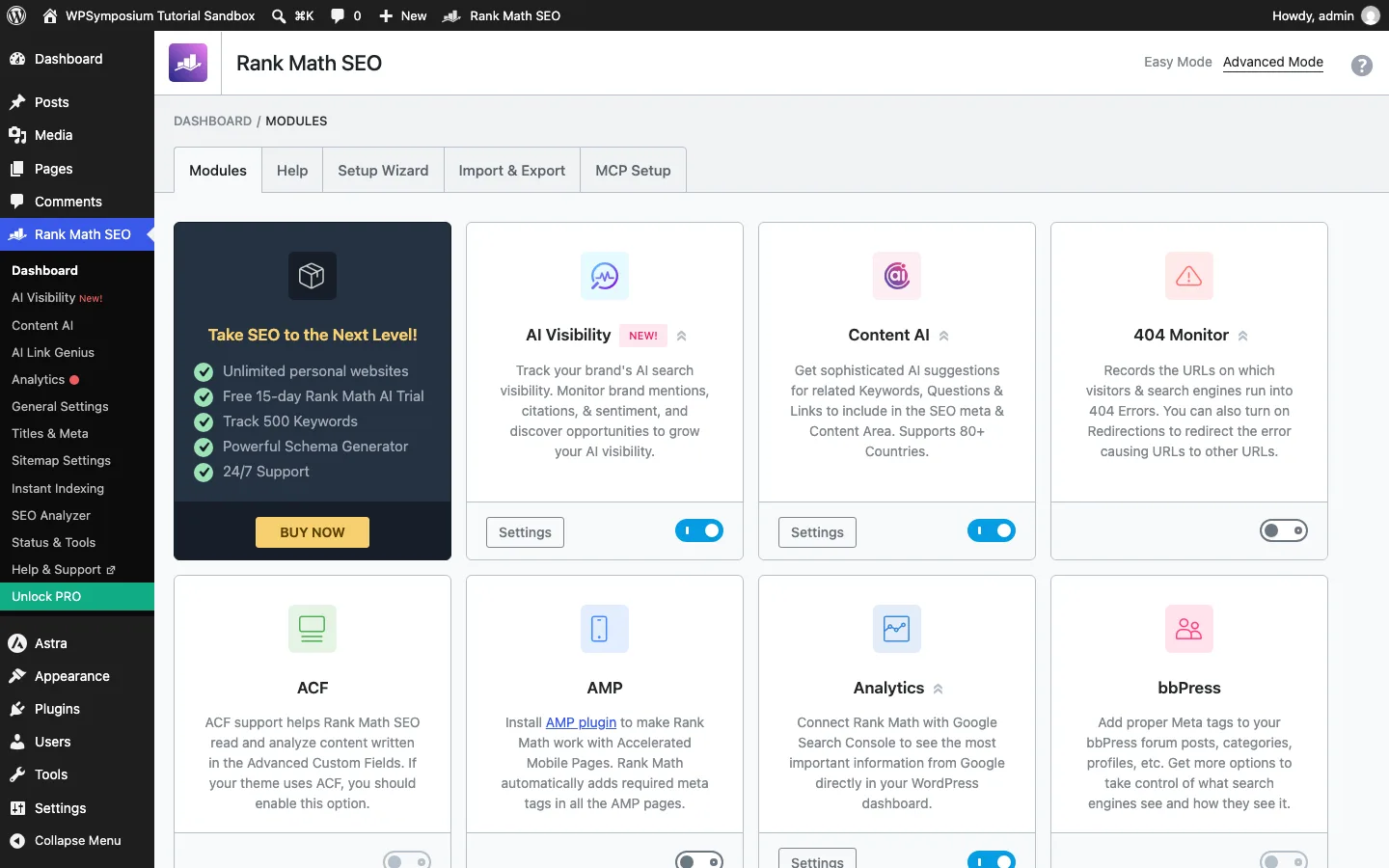
Rank Math’s module screen. Some modules, such as the 404 Monitor, stay off until you switch them on.
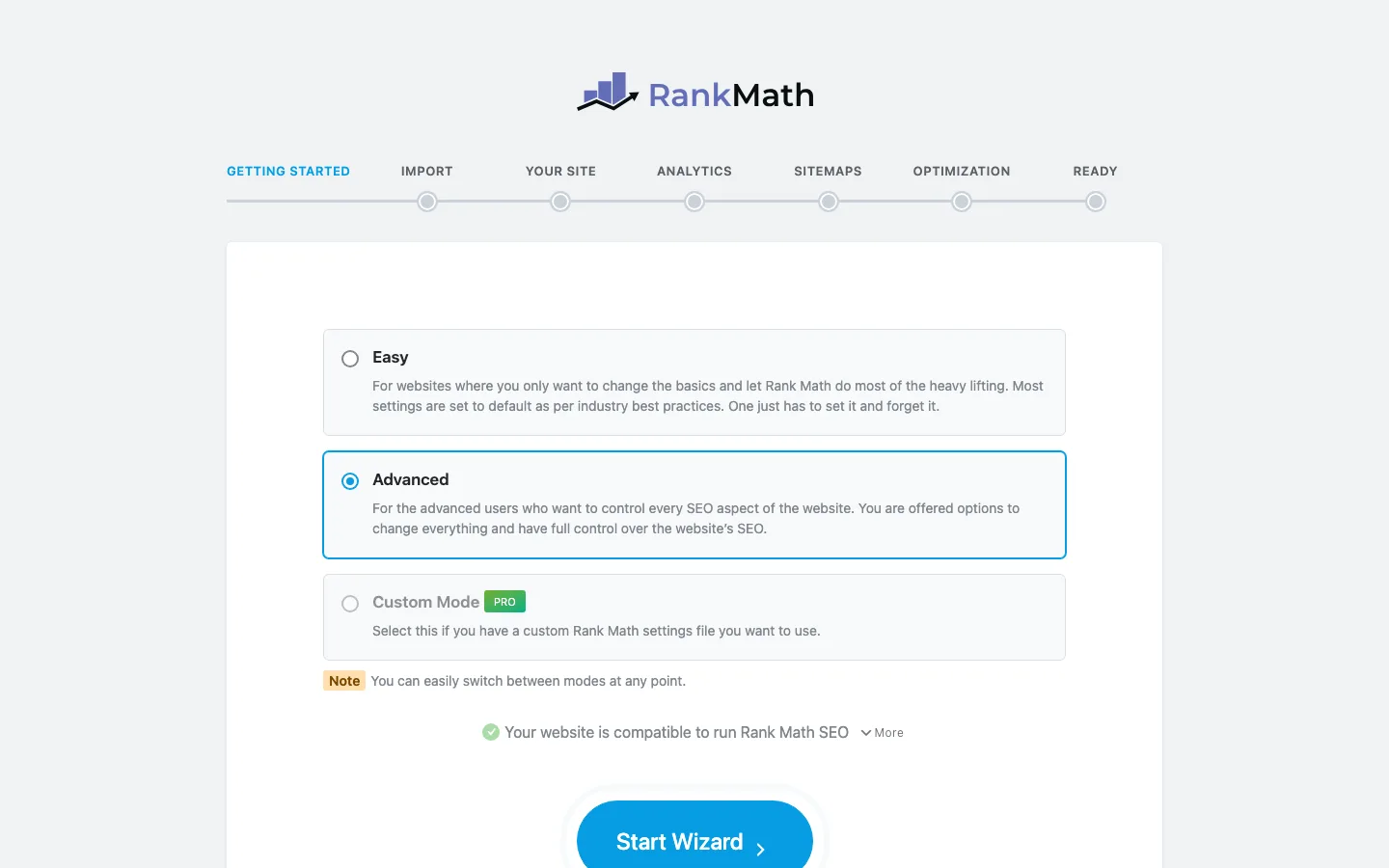
The Rank Math setup wizard. Custom mode needs PRO.
When you activate Rank Math, it opens a screen asking you to connect a free Rank Math account. You can skip this step, but some features need the account, including Google Search Console data, keyword suggestions and Content AI.
Next comes a setup wizard with an Easy mode and an Advanced mode. You can switch modes at any time. A third Custom mode is for PRO users. The wizard also finds other SEO plugins on your site and offers to import their data.
The wizard asks a lot of questions. Read each step, especially the ones about which content types should be indexed. Ticking the wrong “noindex” box can hide pages from Google.
Yoast needs no account for the free plugin. It has a “first-time configuration” that walks you through the essentials, such as whether your site represents a person or an organization. Most defaults are sensible, so you can be running in a few minutes.
Yoast is easier for a first-timer. Rank Math gives you more control from day one, at the cost of a longer setup.
On-page analysis and keywords
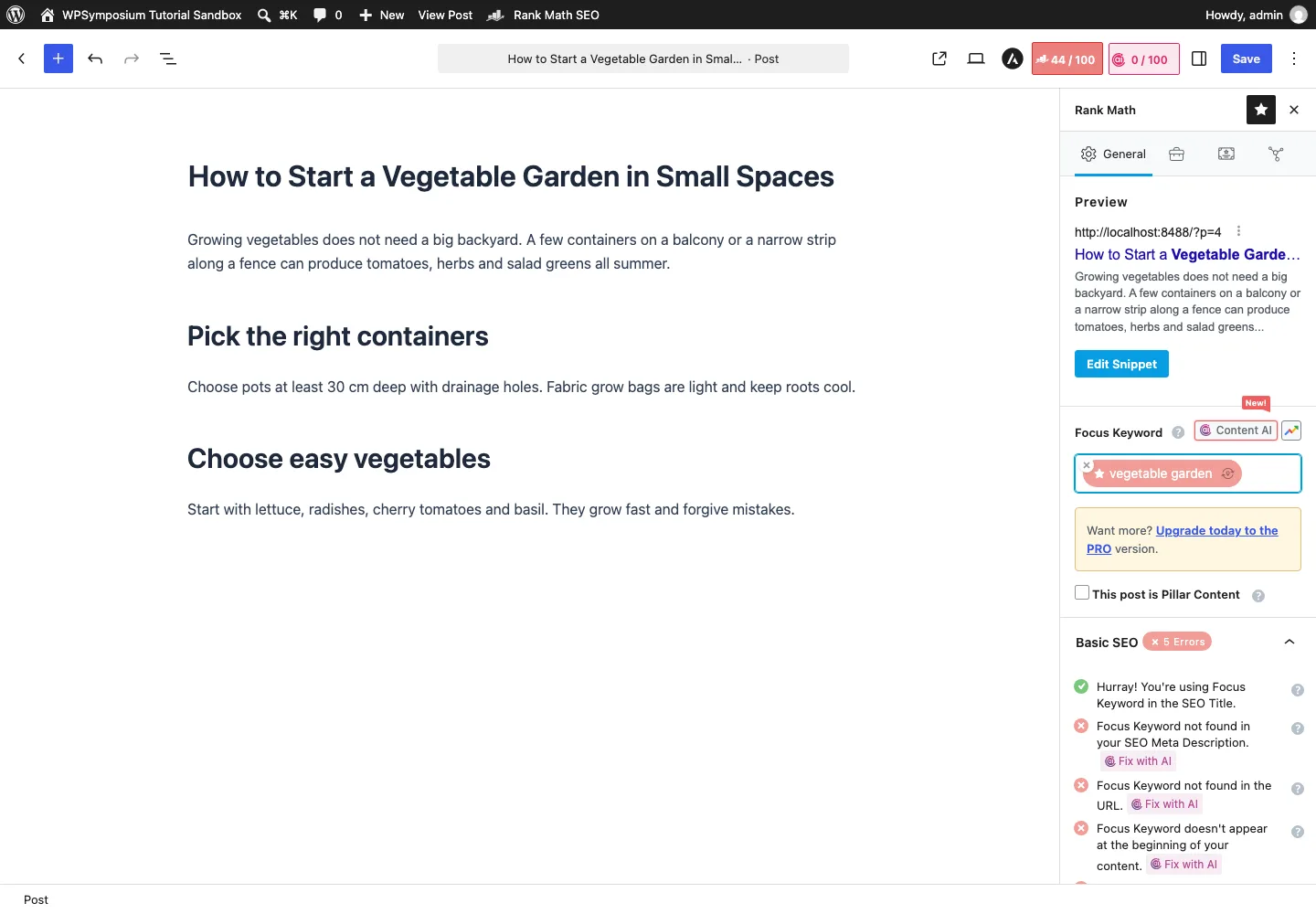
Rank Math in the block editor, with a 0 to 100 score and a checklist of fixes.
Both plugins add a panel to the post editor where you set your SEO title, meta description and focus keyword, and see a preview of how the page may look in Google.
Rank Math gives each post a score out of 100. You can enter five focus keywords for free, and developers can raise that limit with a filter. It suggests related keywords as you type. Checks are grouped into sections, starting with Basic SEO and ending with readability checks for the title and content.
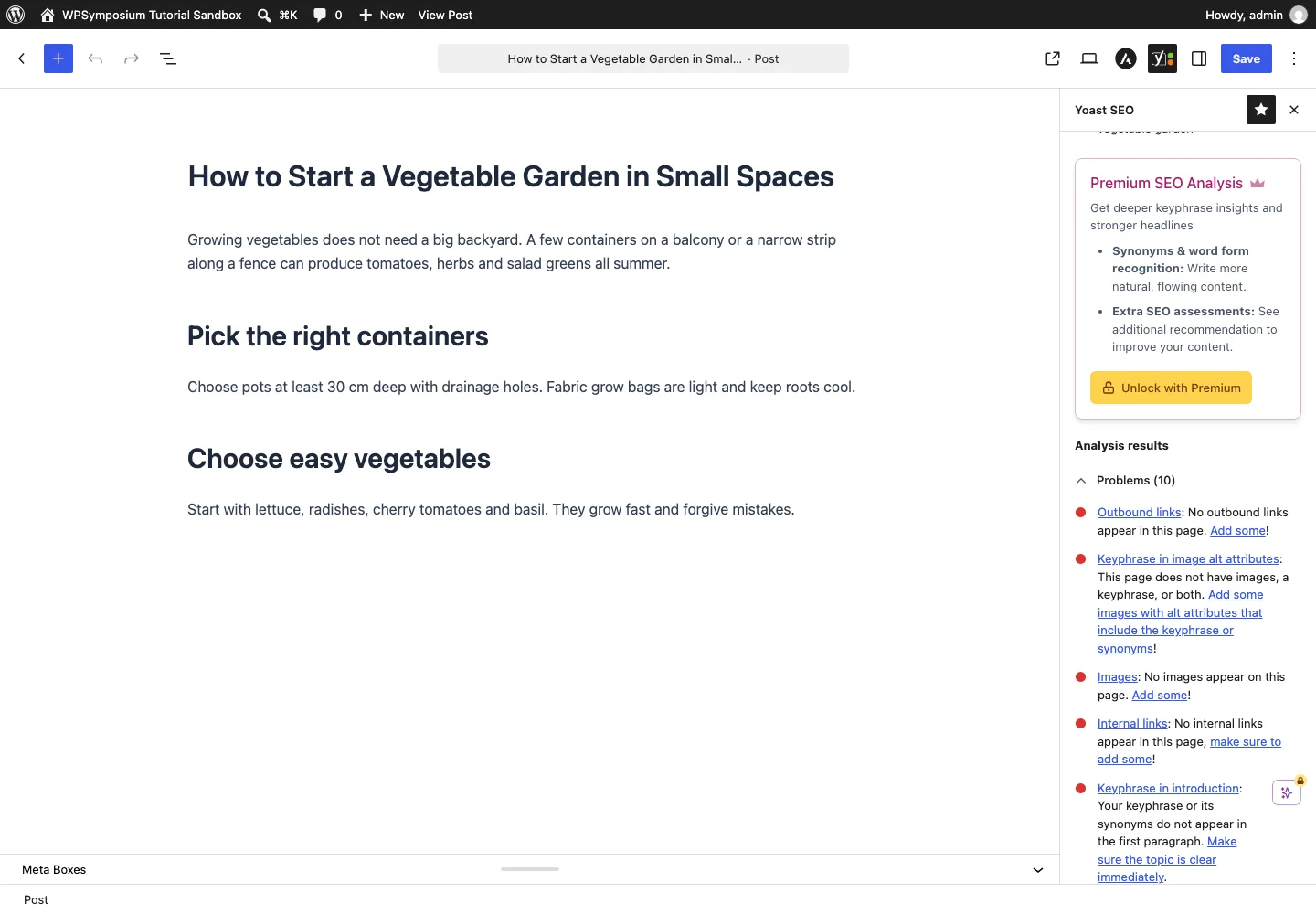
Yoast SEO in the block editor, listing problems found for the focus keyphrase.
Yoast uses traffic lights instead of a number. It runs an SEO analysis and a separate readability analysis, which looks at sentence length, passive voice, transition words, subheadings and more. The free version lets you target one keyphrase per post. Premium raises that to five and counts synonyms and other word forms in more than 20 languages.
In the free-edition test, the saved title and description appeared in the visitor page’s actual metadata. The readability panel gave an overall green result while still flagging 15% passive voice against its 10% recommendation. Read the individual suggestions rather than treating one green light as approval of every sentence.
A number feels precise, but chasing 100/100 can lead to awkward writing. Yoast’s lights give less detail but push you toward plain, readable copy. Writers often prefer Yoast here. People who like to tweak often prefer Rank Math.
Rank Math offers more free keyword controls; Yoast makes the writing feedback easier to follow. Neither score establishes better rankings.
Schema markup
Schema is code that tells search engines and AI tools what a page is about, such as a product, recipe, event or review.
Rank Math has a schema generator in the free plugin with 16+ types, including Article, Product, Recipe, Event, Course, Job Posting, Local Business, Video and Service. PRO adds a custom schema builder, schema templates, importing schema from any URL, validating with Google, and support for 840+ schema types.
Our PRO test saved question data alongside an article and reused it through a schema template on a second post. A schema-only change left WordPress’s Save control disabled; editing the excerpt enabled a normal save, after which the added data appeared in the visitor page. That is a workflow caveat worth checking before relying on bulk or repeated edits. FAQ markup itself is also available through the free FAQ block.
Yoast builds a site-wide schema “graph” automatically in the free plugin. It covers your pages, articles, organization or person, and breadcrumbs. It also ships FAQ and HowTo blocks with built-in schema. Premium outputs more schema types, including signals about who wrote the content and why they can be trusted. It also adds “schema aggregation”, which joins your site’s structured data into one file that AI agents can read in a single request.
Yoast free saved our Blog Post selection and emitted the matching article type on the visitor page. That supports its ordinary publishing workflow; it is not a hands-on assessment of Premium’s extra schema features.
One caution: adding a schema type does not guarantee a rich result in Google. Google decides which results get stars, FAQs or other extras, and it has cut back on some types in recent years.
Rank Math offers more control over specialist schema. Yoast’s automatic output is enough for many standard blogs and business sites.
Sitemaps, local sites and shop data
Both plugins produce XML sitemaps and let you control whether content should be indexed. In Yoast free, excluding our sample checklist added a noindex instruction and removed it from the post sitemap. Its direct address still returned the page. Noindex is a search-engine instruction, not privacy protection.
Rank Math PRO produced separate addresses for two sample business locations. Its news sitemap included the prepared articles and publication name, and its video sitemap referenced the real clip that played on the page. These are useful outputs for a specialist site, but they do not prove Google News acceptance, indexing or richer search results.
On the shop site, Rank Math emitted the chosen product brand, GTIN-13 identifier and price. A hidden sample product carried noindex and was absent from the product sitemap. The identifier type needed deliberate selection; a setting being available does not make its value correct for your catalogue.
Rank Math’s free redirect manager and 404 monitor remain practical differences from Yoast free, whose redirect manager requires Premium. Yoast Premium includes its Local, News and Video SEO plugins, but those paid integrations were outside our Yoast test. We left Google services unconnected in both reviews, so neither establishes live ranking or traffic results.
Image metadata also deserves a check after saving. Rank Math generated missing alt text in an optional test, but its title-casing setting did not change that block image’s generated value. Neither SEO plugin replaces image compression; see our image optimizer comparison for that job.
AI tools
Yoast includes AI title and description assistance in Premium. Rank Math sells the full Content AI subscription separately from PRO, so buying PRO alone does not include the whole AI toolset.
Neither review tested paid AI generation, brand-visibility tracking or connected Google data. We cannot judge the quality of those results from an upgrade screen or a feature list. Choose the SEO workflow first, then assess a paid AI service against work you actually need it to do.
Free vs paid: what you actually get
This is where Rank Math has the clearest lead. Many features that need Yoast Premium are free in Rank Math.
Rank Math Free includes five focus keywords, redirects, a 404 monitor, Search Console data, basic internal-link suggestions, single-location SEO and a small AI allowance. Its PRO edition adds advanced redirects, rank tracking, a custom schema builder, fuller link suggestions, multi-location SEO and news/video sitemaps. PRO’s AI offer is a 15-day trial rather than an unlimited inclusion.
Yoast Free provides one focus keyword, an automatic schema graph and forum support, without redirects, a 404 monitor, Search Console reporting, AI or local SEO. Premium adds five keywords, redirects, more schema types, link suggestions, AI without credits, local SEO, news/video sitemaps and 24/7 support. It still has no 404 monitor or Search Console dashboard. Both free editions use forum support; Rank Math’s paid tier adds premium support.
When does paying make sense?
- Rank Math PRO is worth it if you want keyword rank tracking for up to 500 keywords, multi-location local SEO, news or video sitemaps, WooCommerce SEO PRO, or advanced schema. Many single-site bloggers never need it.
- Yoast Premium is worth it if you want redirects, internal linking suggestions, five keyphrases, built-in AI tools, local SEO, and round-the-clock support in one plan. You also get Yoast SEO Academy courses and one seat for Yoast’s Google Docs add-on, which lets writers check SEO before a draft reaches WordPress. Extra seats cost $5/month each.
Pricing
Both have a free edition. The Rank Math pricing page currently displays PRO at €7.99 a month billed annually, or €95.88 for the first year before tax. Renewal is €8.99 a month, or €107.88 a year. It covers unlimited sites you own and 500 tracked keywords; client sites are excluded.
Business covers up to 100 client sites and 10,000 tracked keywords at €24.99 a month for the first year, renewing at €27.99. Agency covers up to 500 client sites and 50,000 keywords at €54.99, renewing at €64.99. Both are billed annually before tax. The full Content AI subscription is separate from PRO.
The Yoast Premium page displays $118.80 a year before tax for one site, including its Local, News and Video SEO plugins. More sites require additional subscriptions, with bulk discounts available. We have kept the currencies actually displayed by each vendor; these figures are not an exchange-rate comparison.
The licensing difference matters more for several sites: Rank Math PRO covers your own portfolio under one subscription, while Yoast Premium scales by site. An agency must compare Rank Math’s client-site plans rather than using its personal PRO allowance.
A recent Rank Math PRO security incident
Rank Math reports that PRO 3.0.123 downloads supplied during a limited window on October 15 and 16 contained malware. It replaced that package with 3.0.124. Our PRO review used the screened replacement, and the free WordPress.org plugin was outside the vendor-reported incident.
If you activated an affected download, follow the vendor’s incident and recovery guide. Its instructions go beyond updating the plugin because activation could have left other changes on the site.
Performance
These hands-on reviews did not run a controlled speed comparison, so they do not establish a faster plugin. Rank Math lets you disable unused modules, but the effect on your site needs a measurement rather than an assumption. Check representative pages on your own hosting before making speed the reason to switch.
Switching between the plugins
Both import titles, descriptions and other SEO data from each other. Back up first and test the import on important pages before deactivating the old plugin. Yoast’s FAQ and HowTo blocks need a separate conversion when moving to Rank Math, or they can break afterwards.
Check redirects, schema, titles and descriptions, then submit the active sitemap in Search Console. Keep only one SEO plugin generating output. If your existing setup works and already includes the features you need, a switch offers less benefit than it does for someone regularly hitting free-edition limits.
Other options
Rank Math and Yoast are not the only good choices. See our roundup of the best SEO plugins for WordPress for six options tried side by side, but two names come up most often:
- SEOPress: 300,000+ installs and a 4.8 rating (see our full SEOPress review). SEOPress PRO costs $49/year for one site and renews at the same price, as of October 2026. A good fit if you want a lighter plugin at a lower paid price.
- All in One SEO (AIOSEO): 2+ million installs and a 4.7 rating. It uses a “TruSEO” score, much like Rank Math’s number score. Paid plans start at $49.50 for the first year for one site, as of October 2026. The normal price is $99.