WordPress vs Wix vs Squarespace 2026: Real Costs Compared

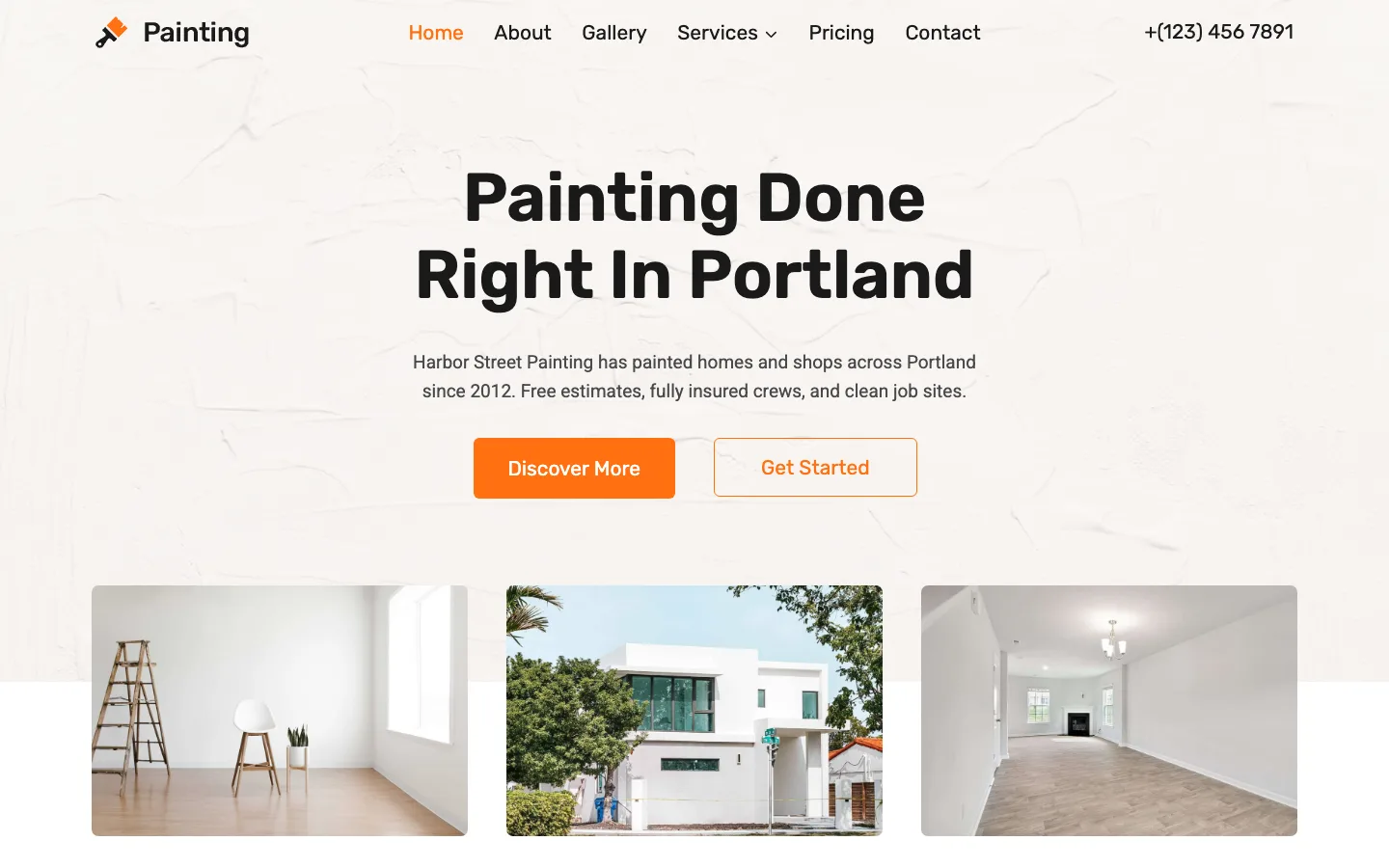
The homepage of our WordPress test site after about 35 minutes of setup: Kadence theme 1.5.2 with the free Painting Service starter template on WordPress 7.1.2, October 2026.
Our verdict: Pick Wix if you want an easy all-in-one builder with the most built-in business tools and a free plan to learn on. Pick Squarespace if looks matter most, such as a portfolio or a small, design-led shop. Pick WordPress (the free, self-hosted software from WordPress.org) if you want to own your site, plan to blog seriously or grow a store, or want the lowest running costs. WordPress is the cheapest of the three in year one and still competitive in year two, but it asks the most of you: on our test install, a basic business site took about 30 steps and 35 minutes, with several upsell pop-ups along the way.
This guide compares all three on price, ease of use, design, SEO, ecommerce, speed, ownership and support, then sends you to our detailed two-way comparisons. All three sides are hands-on: we built a small business site in a local WordPress test install, and a small pottery studio site (home, about, contact form, blog post and a shop with one product) on Wix’s free plan and a Squarespace free trial, without paying for anything or publishing either site. Prices, template counts and fees come from each company’s public pricing pages, template galleries and help centers. All prices are US prices before tax, checked in October 2026.
WordPress vs Wix vs Squarespace: Quick Facts
| WordPress (self-hosted) | Wix | Squarespace | |
|---|---|---|---|
| What it is | Free open-source software you run on a web host you pick | All-in-one website builder and host | All-in-one website builder and host |
| Cheapest real setup | Hostinger Premium from $3.99/month on a 12-month term ($47.88 first year), renews at $10.99/month | Light, $17/month billed annually | Basic, $19/month billed annually ($25 billed monthly) |
| Free option | Software is free; hosting is not | Free plan with Wix branding and a wixsite.com address | No free plan; 14-day free trial |
| Popular middle plan | Same hosting plus paid extras if you want them | Core, $29/month billed annually | Core, $29/month billed annually |
| Themes or templates | About 8,700 free themes on WordPress.org | 2,000+ (vendor figure) | 202 in the gallery |
| Add-ons | About 70,000 free plugins on WordPress.org | Over 800 apps (vendor figure) | A smaller set of Squarespace Extensions |
| Platform fee on store sales | None (WooCommerce) | None listed | 2% on Basic, 0% on Core and up |
| Export your whole site | Yes, files and database | No | Partial, in WordPress format |
| Updates and security | Your job, or your host’s | Handled by Wix | Handled by Squarespace |
| Setup on our test sites | About 30 steps and 35 minutes | About 13 minutes with the Aria AI builder | Under three minutes with Blueprint AI |
| Share of all websites | 40.2% (W3Techs, October 2026) | 4.2% | 2.4% |
| Best for | Blogs, growing businesses, stores, anyone who wants control | Small businesses, beginners, budget sites | Portfolios, creatives, small design-led shops |
Winner for each type of site
- Small local business (services, leads, bookings): Wix. Online booking is included from the $29 Core plan, and its app market is the biggest of the two builders. WordPress can match it with plugins, but you assemble the pieces yourself.
- Portfolio or creative work: Squarespace. Fewer templates, but they share a polished, editorial look, and the grid editor makes it hard to end up with a messy page.
- Blog: WordPress. It is built for publishing, you own every post, and you can move hosts at any time. More on this in the blogging section below.
- Online store you plan to grow: WordPress with WooCommerce. No platform fee, no product cap, and thousands of extensions. For a quick start with a few products, Wix is easier. See our Shopify vs WordPress guide if a dedicated store platform is on your list.
- Lowest cost over time: WordPress. See the cost table below.
- Least effort, no upkeep: Wix or Squarespace. You pay one bill and the company handles hosting, updates and security.
If you have already narrowed it down to two, our head-to-head guides go deeper: Wix vs WordPress, WordPress vs Squarespace, and Squarespace vs Wix.
What it costs: year 1 and year 2

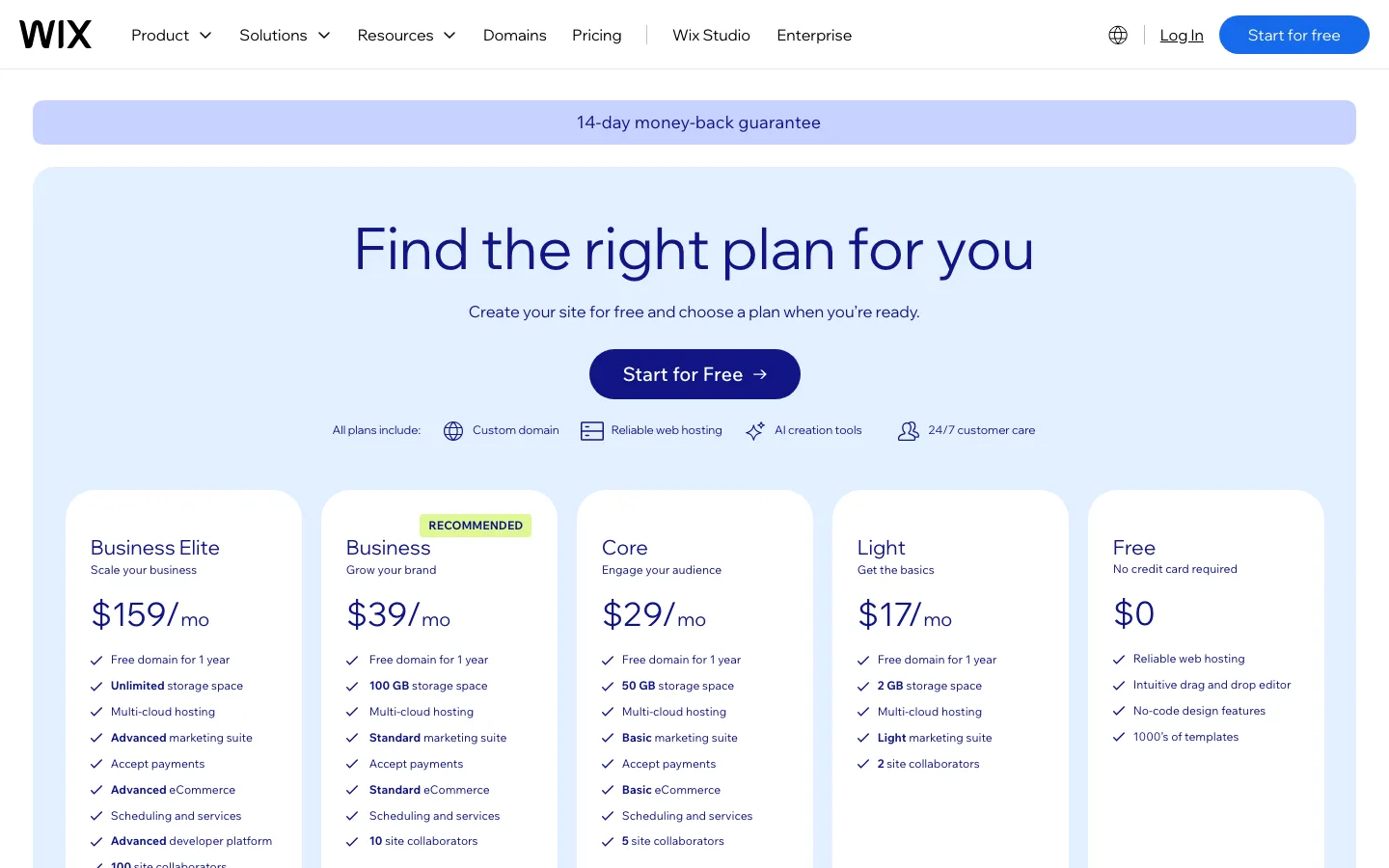
Wix’s pricing page, which shows yearly prices only, October 2026.
Hosted builders charge one plan price. WordPress costs are split between hosting, a domain name, and any paid themes or plugins you choose. The table below adds them up for the first two years, because the second year is where intro prices end and domain renewals start.
| Setup (US prices, October 2026) | Year 1 | Year 2 | What is included |
|---|---|---|---|
| WordPress on Hostinger Premium, 12-month term, free theme and plugins | $47.88 | $151.87 | Hosting $3.99/month intro, renews at $10.99/month ($131.88/year). Free .com for year one, then $19.99 |
| WordPress on Hostinger Premium, 48-month prepay | $143.52 | $19.99 | Pays four years of hosting upfront ($2.99/month); year two is only the domain renewal |
| WordPress on FastComet Starter, 1-year term, plus a .com | $43.87 | $139.39 | Hosting $23.88, then $119.40/year ($9.95/month). We assumed $19.99/year for the domain |
| WordPress on Hostinger (12-month) plus Kadence Essentials and Yoast SEO Premium | $265.68 | $369.67 | Adds $99/year for Kadence’s premium theme and blocks and $118.80/year for Yoast SEO Premium |
| Wix Light, billed annually | $204 | $225.35 | Free domain for year one, then $21.35 for a .com. Cannot sell online |
| Wix Core, billed annually | $348 | $369.35 | Can sell. Same domain terms |
| Wix, billed monthly | Not public | Not public | Wix only shows monthly prices at checkout, inside an account |
| Squarespace Basic, billed annually | $228 | $248 | Free domain for year one, then $20 for a .com. 2% fee on store sales |
| Squarespace Basic, billed monthly | $310 | $320 | $25/month. No free domain on monthly plans, so a .com is $10 the first year, then $20 |
| Squarespace Core, billed annually | $348 | $368 | No store fee |
| Squarespace Core, billed monthly | $478 | $488 | $39/month plus the domain |
A few things stand out:
- WordPress with free plugins is the cheapest option in year one, even with a separate domain. The catch is the renewal. Hostinger’s Premium plan roughly triples from $47.88 to $131.88 a year, and FastComet’s Starter plan goes from $23.88 to $119.40. Our Hostinger review and FastComet review break down those renewal prices.
- The 48-month prepay is the cheapest way to run WordPress for several years, at $143.52 for four years of hosting. You pay it all upfront, and Hostinger’s refund window is 30 days.
- Paid extras change the picture. Add a premium theme and a premium SEO plugin and WordPress costs about the same as Wix Core or Squarespace Core in year two. Our test site used only free plugins and did the job.
- Monthly billing costs more on both builders. Squarespace says paying annually saves up to 36%, and neither builder gives a free domain on monthly plans.
Transaction fees if you sell
| WordPress (WooCommerce) | Wix | Squarespace | |
|---|---|---|---|
| Platform fee on product sales | None | None listed | 2% on Basic, 0% on Core and up |
| Card processing (US) | 2.9% + $0.30 with WooPayments | 2.9% + $0.30 with Wix Payments | 2.9% + $0.30 on Basic and Core |
| Fees on memberships or subscriptions | Depends on the plugin you pick | 4% on Core, 2% on Business, 0% on Business Elite (Pricing Plans) | 7% on Basic, 5% on Core, 1% on Plus, 0% on Advanced |
| Cheapest plan that can sell | Any hosting plan | Core, $29/month | Basic, $19/month |
On Squarespace Basic, $1,000 a month in store sales adds $20 a month, or $240 a year, in platform fees. At that point Core ($10 a month more) is the cheaper Squarespace plan.
Ease of use: what setting up WordPress actually took

The Kadence Starter Templates library on our test install, version 2.3.4. It listed 93 templates, 41 of them marked Premium, October 2026.
We set up a small business site the way a beginner following a typical tutorial would: a free theme with a starter template, a contact form from a free plugin, and an SEO plugin. Everything was done through the normal WordPress dashboard on a fresh WordPress 7.1.2 install running in a local test environment. Here is what it took.
| Step | What we did | What we saw |
|---|---|---|
| 1. Theme | Appearance > Themes > Add Theme, searched “Kadence”, installed and activated it | About 20 seconds. No setup wizard; the theme’s own page lists Pro add-ons |
| 2. Starter template | Installed Kadence Starter Templates from the theme page, picked a template, kept the default colors, chose “Import Full Site” | Our first pick (Coffee Shop) required WooCommerce, so we switched to the free Painting Service template. The import took about 75 to 90 seconds and created 7 pages |
| 3. Fix inner pages | Settings > Permalinks > Save | Inner pages showed “Not Found” until we re-saved the permalink settings. Most hosts’ one-click installers handle this, but it is the kind of snag a beginner hits |
| 4. Contact form | Installed WPForms Lite, picked the Simple Contact Form template, embedded it on the Contact page | Worked on the first test submission. The template’s Contact page already had a booking form made with Kadence Blocks, which we replaced |
| 5. SEO | Installed Yoast SEO and ran its 5-step first-time configuration | Took about a minute. We skipped the newsletter sign-up and chose not to share site data |
| 6. Your content | Changed the site title and edited the homepage headline and intro | Every other page still had placeholder “lorem ipsum” text and a logo that said “Painting” |
In total that was about 30 steps (screens or clicks that matter) and about 35 minutes of clock time from the first login, including the template detour. It does not include buying hosting and a domain, installing WordPress (most hosts do this in one click), or writing real text for seven pages, which is the slow part on any platform. The site ended up with one theme and four plugins to keep updated: Kadence Blocks, Kadence Starter Templates, WPForms Lite and Yoast SEO.

Embedding the contact form opened the editor with three overlays at once: the WordPress welcome guide, a WPForms tip, and a five-minute WPForms “Challenge” timer. Test install, October 2026.
The biggest friction was not difficulty but noise. WPForms Lite alone showed a welcome screen pushing a setup wizard on WPForms.com (with a “Lite Connect” data backup box ticked by default), a top banner, a “50% off Pro” notice, a builder tour, the timed “Challenge”, and finally a pop-up asking for a 5-star rating. Yoast’s success screen promoted Yoast SEO Premium. None of it blocked the work, but a beginner has to learn to click past it.

The Simple Contact Form template in WPForms Lite 2.0.2.1 on our test install, October 2026. Many fields in the left panel are Pro-only.
Wix and Squarespace skip all of this. There is nothing to install or update. You pick a template or describe your business to an AI builder (Wix calls its assistant Aria and its newest editor Wix Harmony; Squarespace’s is called Blueprint AI), then edit on the page. Wix’s editor lets you drag elements anywhere. Squarespace’s Fluid Engine editor snaps blocks to a grid, which keeps layouts tidy.

The homepage Wix’s Aria built for our made-up pottery studio on the free plan, about 13 minutes after we clicked “Create New Site”, October 2026.
On Wix, a short chat with Aria and one “Generate Site” click produced a full site: a homepage with product collections, nine sample products, three on-topic blog posts, priced classes and a services list. It took about 13 minutes in total, most of it waiting for Aria (our browser tab was in the background, which may have slowed it). Aria also added a bookings page we had turned off and invented a phone number and email for the footer, so every page needs a read before you publish.

Squarespace’s Blueprint AI on our free trial. The preview updates as you pick a name, tone, pages, colors and fonts, October 2026.
On Squarespace, Blueprint AI asked for a topic, goals, a name and tone, pages, colors and fonts, and had a clean, styled starter site ready in under three minutes. It wrote less than Wix did: Blueprint offered no blog page even though we picked blogging as a goal, and the footer still read “Your Site Title”. Adding a blog page and a post took a few minutes in the editor.
Both were far easier than WordPress for a first site. Our Wix vs WordPress comparison covers Wix’s AI builder in more detail.
Winner: Wix and Squarespace, for different reasons. Squarespace got us to a clean starting site fastest; Wix’s AI wrote far more of the content for us. WordPress is learnable, but it is the only one of the three where you are the site’s IT department.
Design and templates
| WordPress | Wix | Squarespace | |
|---|---|---|---|
| Number of designs | About 8,700 free themes on WordPress.org, plus starter template libraries inside themes like Kadence (93) | 2,000+ templates | 202 templates |
| Layout freedom | Unlimited with the block editor, a page builder, or code | Free-form drag and drop | Grid-based blocks |
| Switch design later | Yes, change themes and keep your content | No; start a new site and copy content over | Not on version 7.1 sites; restyle the same site instead |
| Custom code | Full access | Only through Wix’s own developer tools | Code injection on Core and up |
Squarespace has the most consistent look out of the box. Wix has the most templates and the most freedom inside its editor. WordPress has no ceiling at all: the free Kadence theme we used looked professional after one import, and if you outgrow the block editor you can add a page builder (our page builder comparison covers the options). The flip side is that WordPress designs vary a lot in quality, and you have to judge them yourself.
The biggest practical difference is switching. On WordPress you can change themes and keep every post and page. On Wix you cannot switch templates at all without rebuilding, and on Squarespace 7.1 you restyle the site you have. Our Squarespace vs Wix guide covers both builders’ template rules in detail.
Winner: WordPress for flexibility, Squarespace for polish with no effort.
SEO
All three handle the basics: editable page titles and descriptions, automatic sitemaps, clean URLs, mobile-friendly pages and free SSL.
- WordPress gives the most control. On our test site, Yoast SEO (10+ million active installations, according to WordPress.org) took about a minute to configure and adds title and description fields, schema markup and an XML sitemap. Rank Math is the main alternative; our Rank Math vs Yoast comparison weighs the two.
- Wix gives more technical control than Squarespace, including robots.txt editing, canonical tags, bulk redirect imports and custom URL structures for blog posts and products.
- Squarespace is simpler and does a sensible job by default, which is fine for most small sites.
Winner: WordPress, then Wix.
Ecommerce
| WordPress (WooCommerce) | Wix | Squarespace | |
|---|---|---|---|
| Cost of the store software | Free plugin (7+ million installs, per WordPress.org) | Included from Core ($29/month) | Included on all plans |
| Product limit | None set by the software | 50,000 on Core and up | 10,000 site-wide (help center) |
| Platform fee | None | None listed | 2% on Basic |
| Extras | Thousands of extensions for subscriptions, bookings, memberships | Dropshipping, marketplaces and social selling built in from Core | Abandoned cart emails on all plans; Google Shopping from Core |
Wix is the easiest way to start selling with a real catalog. Squarespace suits a small, good-looking shop or digital products next to a portfolio. WooCommerce is the most flexible and has no platform fee, but you run it yourself, and a busy store usually needs better hosting than a $3.99 plan. If your goal is a sales funnel rather than a catalog, see our ClickFunnels vs WordPress comparison.
Winner: WordPress for a store you plan to grow, Wix for a quick start.
Speed
We ran Google’s Lighthouse tool (version 13.5.0) three times on our finished WordPress test homepage, which was served from the test environment on the same computer. The mobile performance score was 88 on all three runs, with a Largest Contentful Paint of 3.8 seconds, zero Total Blocking Time, no layout shift, 855 KiB of page weight and 35 requests. A desktop run scored 98.
Treat that as a measurement of one test page, not a prediction. A local test skips real network distance, has no traffic, and has no caching or CDN set up. Your host, images and plugins will matter more than the platform. For comparison, our Squarespace vs Wix test measured two official live demos over the internet: a Wix portfolio demo scored 71 on mobile and a Squarespace demo scored 60.
Winner: none clearly. All three can be fast or slow depending on what you put on the page. On WordPress, speed is in your hands; on the builders, it is mostly in theirs.
Ownership and moving away
- WordPress: you own the files and the database. You can download a full copy of your site and move it to another host at any time with a migration plugin (see our All-in-One WP Migration guide).
- Squarespace: exports an .xml file in WordPress format with pages, one blog and its posts, and galleries. Store pages, styles and custom CSS stay behind. Squarespace says the site must be active and public; on our trial site the export ran but the file held no page text or posts.
- Wix: your site must run on Wix’s servers, and Wix’s help center says blog posts cannot be exported to other platforms. The site menu on our test site offered duplicate and transfer to another Wix account, but no download. Leaving means copying content by hand.
Winner: WordPress, by a wide margin.
Support and upkeep
Wix and Squarespace both list 24/7 customer support on paid plans, and they handle hosting, security and updates for you. With WordPress, support comes from your host (our Hostinger review notes that its support now starts with an AI agent) plus free community forums and each plugin’s own support. You also own the upkeep: updating WordPress, the theme and every plugin, and keeping backups. Our test site already had five things to update.
Winner: Wix and Squarespace.
Which is best for starting a blog?
WordPress, for almost anyone who wants a blog to grow. It was built as a blogging tool, and it still has the deepest set of publishing features: categories and tags, scheduled posts, full control over URLs, SEO plugins like Yoast, and the option to add a newsletter, ads or memberships later. If the blog is mostly an email newsletter, see how it compares in Ghost vs WordPress. Most importantly, the blog is yours. If a host raises prices, you move.
- Squarespace is a good second choice for a blog that sits next to a portfolio. It has no post limit, looks great with little effort, and can export one blog to WordPress format if you leave later.
- Wix works for a hobby blog, and its free plan lets you start at $0. But Wix says blog posts cannot be exported, so you are tied to Wix for as long as you keep the blog.
- Free options: a Wix free plan shows Wix branding and a wixsite.com address. If you want free and Google-owned, our WordPress vs Blogger comparison covers that route.
A typical new blog on WordPress costs $47.88 in year one on Hostinger’s 12-month plan with a free domain, and the free Kadence theme plus Yoast SEO cover the basics. Plan for about $152 in year two when the intro price ends.
Our pick for you
Choose WordPress if you want the lowest cost over time, full ownership, unlimited design and plugin options, a blog you plan to grow, or a store without platform fees, and you are willing to spend an afternoon on setup and a few minutes a month on updates. Hostinger and FastComet are the budget hosts we priced here.
Choose Wix if you want an easy start with the most AI help, a free plan to learn on, the most built-in business tools, and you are fine with your site living on Wix for good.
Choose Squarespace if your site sells your look: portfolios, creative services and small design-led shops, with no upkeep.
Still deciding? Read Wix vs WordPress or WordPress vs Squarespace for the full two-way comparison, or our Webflow vs WordPress guide if you are a designer weighing a fourth option.
FAQ
Is WordPress cheaper than Wix and Squarespace?
Usually, yes. As of October 2026, WordPress on Hostinger’s Premium plan costs $47.88 in year one (12-month term, free domain) and $151.87 in year two once the hosting renews and the domain is paid. Wix Light costs $204 and Squarespace Basic $228 in year one on annual billing. Paid themes and plugins can close the gap.
Which is easiest for beginners: WordPress, Wix or Squarespace?
Wix and Squarespace are both much easier than WordPress. On our test sites, Squarespace’s Blueprint AI had a clean starter site ready in under three minutes, and Wix’s Aria built a fuller site with more written content in about 13 minutes. A basic WordPress business site took about 30 steps and 35 minutes, plus a fix for inner pages and several plugin pop-ups.
Which is best for SEO?
WordPress gives the most control, thanks to free plugins like Yoast SEO and Rank Math. Wix gives more technical control than Squarespace. All three cover the basics, so your content matters more than the platform.
Can I move my site from Wix or Squarespace to WordPress later?
From Squarespace, partly: it exports pages, one blog and galleries in WordPress format, but not store pages or styles. From Wix, you have to copy content over by hand, because Wix does not export sites or blog posts.
Do Wix and Squarespace charge transaction fees?
Wix lists no platform fee on store sales, but you need the $29 Core plan to sell. Squarespace charges 2% on store sales on its $19 Basic plan and 0% on Core and up. Card processing is 2.9% + $0.30 for US cards on both, the same as WooPayments on WordPress.
Is WordPress.com the same as WordPress?
No. This guide compares self-hosted WordPress, the free software from WordPress.org that you install on a host of your choice. WordPress.com is a hosted service built on the same software, with its own plans and limits.