Ghost vs WordPress (2026): Which Is Better for Blogging?
Choose Ghost if your main product is a publication, newsletter or paid subscription. Choose WordPress if the site also needs a store, courses, custom layouts or other plugin-driven features. Ghost brings publishing tools together; WordPress gives you more ways to expand.
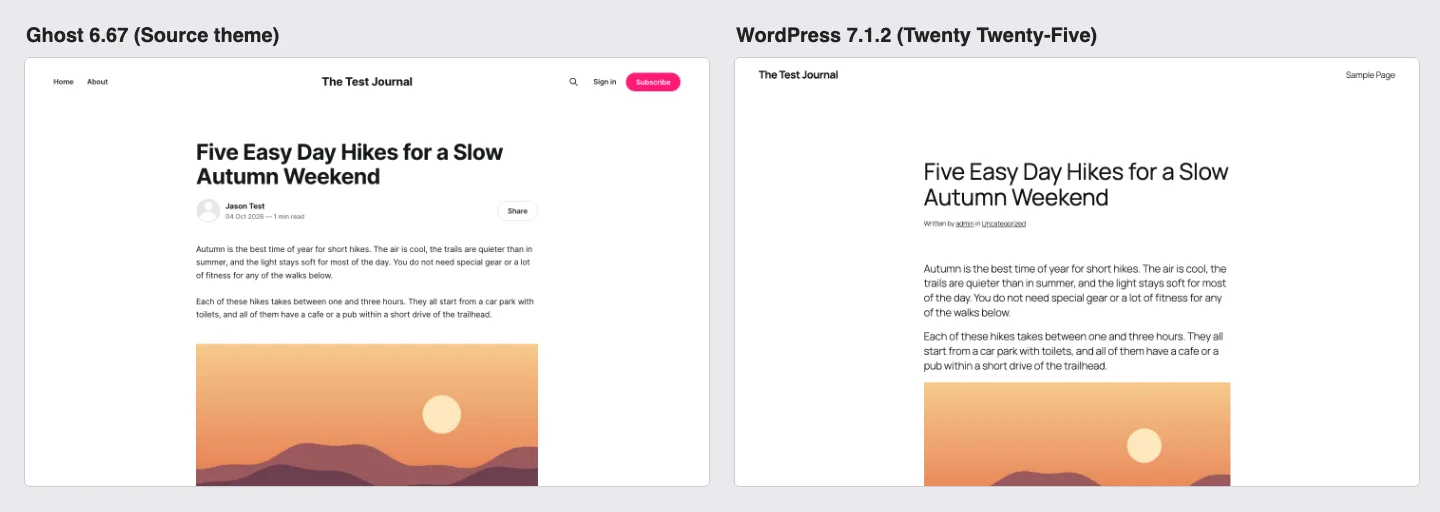
The Basic Difference: A Publishing Tool vs a Do-Anything CMS
Both are free, open source software you can run on your own server. The difference is scope.
Ghost is built for one job: publishing posts, collecting readers’ email addresses, sending those posts as newsletters, and charging for premium content. It started in 2013 and is run by the Ghost Foundation, a non-profit that says all of its revenue goes back into the product. Most of that revenue comes from Ghost(Pro), its official managed hosting.
WordPress started as a blogging tool too, but plugins and themes have turned it into a general website builder. The same install can run a blog, an online store, a forum, or a company site. That flexibility is why it powers 40.2% of all websites, according to W3Techs, against 0.1% for Ghost.
A note on names: this article compares Ghost with self-hosted WordPress from WordPress.org. WordPress.com is a separate hosted service with its own plans. Our guide on whether WordPress is really free explains the difference.
Price: Ghost(Pro), Self-Hosted Ghost and WordPress
Ghost(Pro) plans
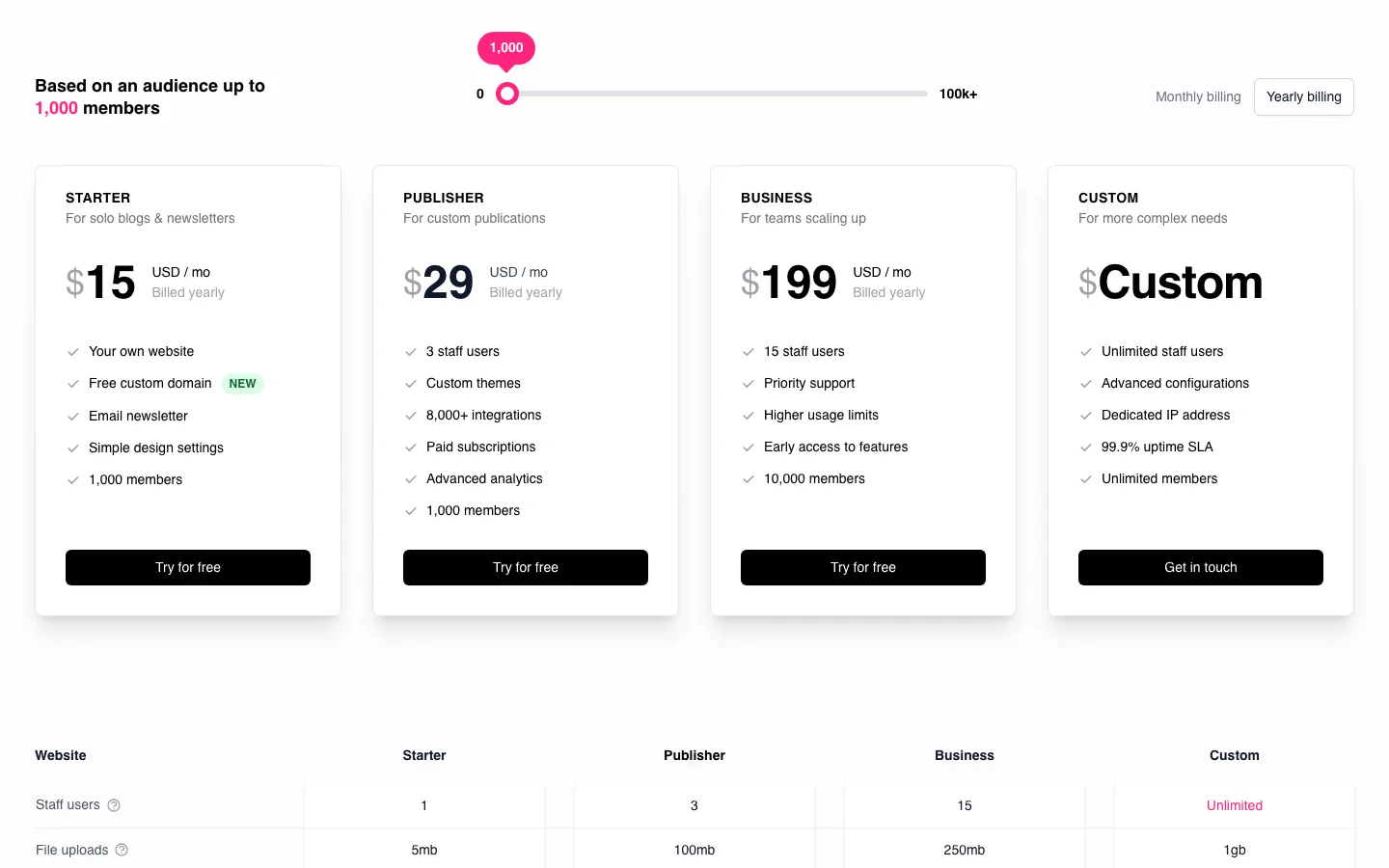
The Ghost(Pro) pricing page with the member slider at 1,000 and yearly billing.
Ghost(Pro) Starter costs $15 monthly on annual billing or $18 month to month. It supports 1,000 members and one staff user, limits uploads to 5 MB, uses the default theme and does not support paid subscriptions.
Publisher costs $29 or $35 respectively, with 1,000 members, three staff users, custom themes, paid subscriptions and three newsletters. Business costs $199 or $239, with 10,000 members, 15 staff users, priority support and ten newsletters. Custom is quote-based, with unlimited members, an uptime SLA, single sign-on and a dedicated IP.
Prices from ghost.org/pricing.
The price grows with your audience, and Ghost counts every member, free or paid. When we moved the pricing page’s slider, Publisher went from $29/mo at 1,000 members to $46 at 2,500, $63 at 5,000 and $88 at 10,000 (all billed yearly). Business went from $199 at 10,000 members to $266 at 25,000.
What every plan includes: hosting, a CDN, backups, SSL, unlimited newsletter sends, and a free custom domain for one year (a .link domain, which renews at the standard rate). Ghost takes 0% of your subscription revenue on the plans that allow paid subscriptions; Stripe’s own card fees still apply.
Self-hosting Ghost
The Ghost software itself is free. Ghost’s hosting docs put the running costs of a self-hosted site at “from $10/mo” for a server and “from $15/mo” for newsletter email delivery, with extra costs if you want a CDN, analytics or backups. Its recommended production setup is an Ubuntu server with NGINX, Node.js, MySQL 8 and at least 1 GB of memory. A newer Docker-based install exists, but Ghost’s docs still label it a preview.
WordPress costs
WordPress itself is free. A blog on WordPress costs:
- Hosting. As of October 2026, Hostinger Premium is $2.99/mo on a 48-month term and renews at $10.99/mo; our Hostinger review covers the renewal details. Managed hosting such as Kinsta starts at $30/mo for one site.
- A newsletter plugin, if you want one. MailPoet’s free plan covers up to 500 subscribers and 5,000 emails a month. Its Business plan starts at $10/mo for 500 subscribers and rises with list size.
- Optional extras. Premium themes and plugins are usually one-time or yearly purchases. Many bloggers never need them.
What a small newsletter blog costs per month
For a newsletter of up to 1,000 members, Ghost(Pro) Starter costs $15 monthly on annual billing for a free publication; Publisher costs $29 if you need paid subscriptions. Both leave the hosting administration to Ghost.
Ghost estimates self-hosting at about $25 monthly for a server and Mailgun, with updates, backups and email configuration your responsibility. The WordPress example using Hostinger Premium and free MailPoet for up to 500 subscribers costs $2.99 monthly initially and $10.99 at renewal, with plugins, updates and backups still requiring attention.
WordPress is the cheapest way to start. Ghost(Pro) costs more, but the price covers hosting, email delivery and upkeep in one bill. The gap narrows as a WordPress newsletter grows, because email sending services charge by list size too.
Ease of Use and the Writing Experience
Setting up
Our local Ghost install asked for four things on its welcome screen: site title, full name, email address and password. About six seconds after we submitted the form, we were in the dashboard, with a sample “Coming soon” post already published. Ghost’s admin is short: Posts, Pages, Tags, Members, Comments, Settings, plus an analytics overview.
The WordPress dashboard has more menus from the start (Posts, Media, Pages, Comments, Appearance, Plugins, Users, Tools, Settings), and grows as you add plugins. It does more, but there is more to learn.
Writing a post

Writing our test post in the Ghost editor, Ghost.
Ghost’s editor is a clean page with nothing around the text. Typing “/” opens a menu of cards: image, divider, button, bookmark, gallery, call to action, email content, callout and more. Markdown shortcuts work: typing “## “ turned a line into a heading. The word count sits in the corner (our test post came to 323 words). Post settings such as the URL, excerpt and meta data are in a side panel you open when you need them.
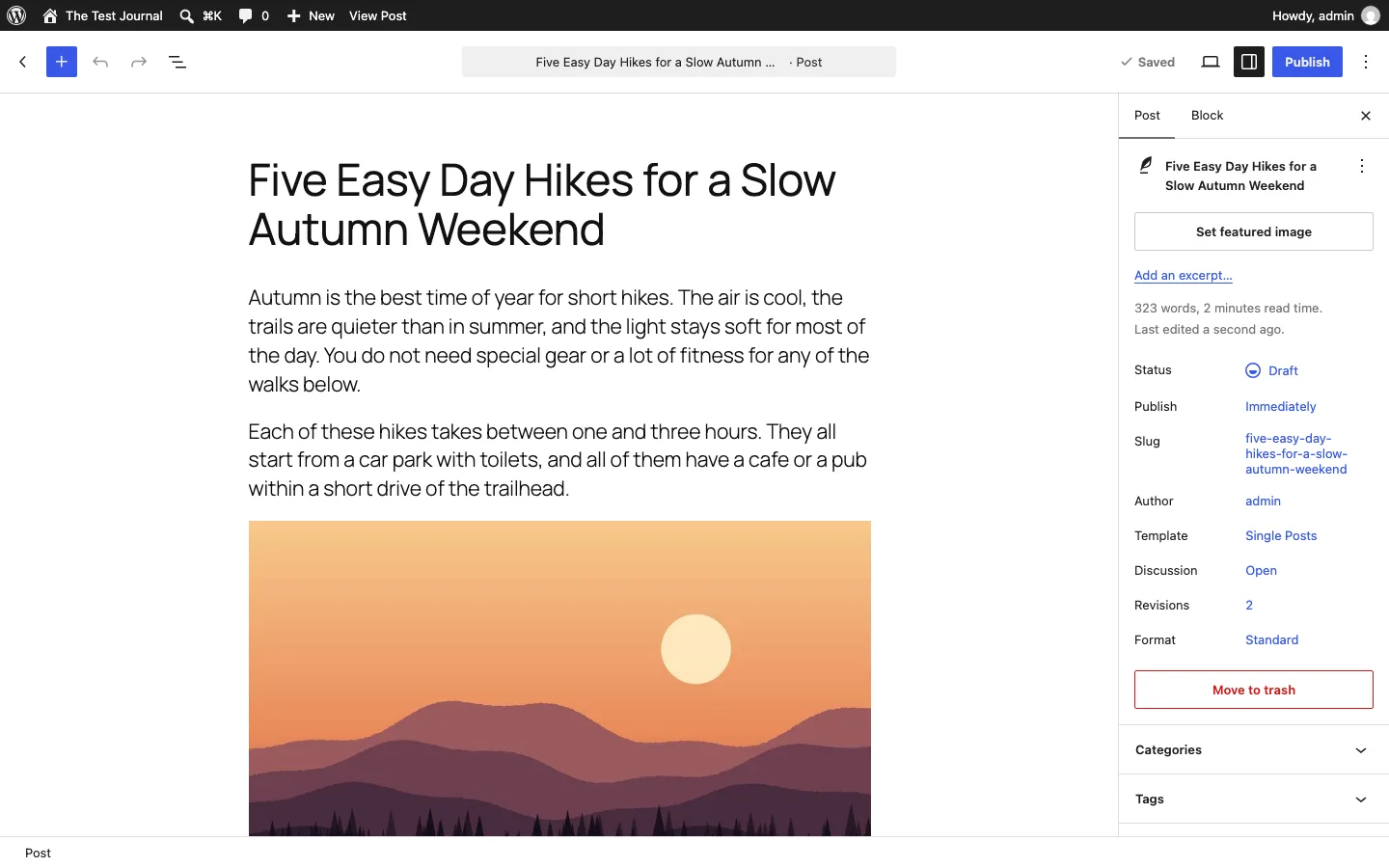
The same post in the WordPress block editor.
The WordPress block editor opened with a four-slide “Welcome to the editor” guide the first time. After that, writing feels similar to Ghost: type “/” to pick a block, such as an image. The difference is the sidebar, which shows the post’s status, slug, template, categories, tags and more, and the much larger block library. That makes WordPress better for building pages with columns, buttons and layouts, and Ghost a bit calmer for pure writing.
Publishing
Ghost’s Publish button opens a full-screen step with three choices: publish, send as a newsletter, and when. On our install, “Not sent as newsletter” was greyed out; the site had no members and no Mailgun connection yet. After “Continue, final review” and “Publish post, right now,” Ghost showed a share screen with links for X, Threads, Facebook, LinkedIn and Bluesky. WordPress shows a pre-publish check panel, then a “now live” panel with the post address.
Newsletters, members and subscriptions
Ghost includes sign-up forms and member access controls. On our self-hosted test, collecting members worked, but sending newsletters required Mailgun. Ordinary SMTP is not a substitute for Ghost’s bulk newsletter service. Ghost(Pro) includes sending. Paid subscriptions use Stripe, with no additional Ghost transaction fee.
WordPress needs a plugin for newsletters and another tool for paid membership if required. We tried MailPoet’s form builder: it offered more placements than Ghost, but needed a mailing list and display settings before the form appeared. You can use MailPoet’s sending service or configure another supported provider.
Ghost is simpler when publishing and subscriptions are the whole business. WordPress gives you more combinations, with more setup and maintenance. See our form-plugin guide for other collection tools.
Design and Themes
Our Ghost install came with two themes, Source (the default, version 1.7.6) and Casper. Ghost’s site says its theme marketplace has “hundreds” of designs, free and paid. Themes are coded in Handlebars, so bigger design changes need a developer, while day-to-day changes (colors, fonts, header style) are in Design settings. Note that Ghost(Pro) Starter only allows the default theme; you need Publisher to install any other.
WordPress has 8,700+ free themes on WordPress.org, thousands of paid ones, and the Site Editor lets you change templates, headers and footers visually. Twenty Twenty-Five on our test site looked plain but tidy, and page builders add more layout control. If design freedom matters, WordPress wins easily.
Plugins vs Integrations
WordPress.org lists 70,304 free plugins as of October 2026. That is WordPress’s biggest advantage: forms, SEO, stores, bookings, courses, forums and translation are all a plugin away. The cost is upkeep, since every plugin needs updates and can conflict with others.
Ghost has no plugin system. It connects to other tools through its APIs, webhooks and Zapier, and lists built-in integrations such as Slack, Unsplash and Pintura (an image editor). On Ghost(Pro), Zapier, webhooks and the Admin API need the Publisher plan or higher. If you need a feature Ghost does not have, you either connect an outside service or wait for Ghost to build it.
SEO
We checked the HTML of the published test post on both platforms with no SEO plugins installed:
Both platforms include canonical tags, an XML sitemap and RSS. Ghost also includes Open Graph and Twitter cards, JSON-LD structured data and a per-post meta-description field. Core WordPress does not provide those latter controls in this comparison, so an SEO plugin is usually needed to match them.
Ghost ships the social and structured data tags most sites want, with no setup. WordPress needs an SEO plugin to match it, which takes a few minutes; our guide to the best SEO plugins for WordPress and the Rank Math vs Yoast comparison help you choose. With a plugin such as Rank Math, WordPress gives you more control than Ghost: redirects, schema types, and per-post analysis.
Neither platform ranks better by itself. Content, links and speed matter far more than the CMS.
Speed and Page Weight
Ghost’s comparison page says independent tests found Ghost “up to 1,900% faster” than WordPress. We could not check that claim, but we did measure the default post on each of our test installs, at a 1440 px desktop view with an empty cache.
With the same test text and image, default Ghost with Source made 19 requests and transferred 1,163 KB compressed, or 4.0 MB before compression, including 3.7 MB of JavaScript. Turning comments off reduced that to 14 requests, 922 KB transferred, 3.2 MB uncompressed and 2.9 MB of JavaScript.
WordPress with Twenty Twenty-Five made nine requests and transferred 127 KB, or 249 KB uncompressed, with 67 KB of JavaScript. Adding a MailPoet form below posts raised it to 14 requests, 202 KB transferred, 501 KB uncompressed and 284 KB of JavaScript. The default features loaded on each page explain much of the difference.
Measured on local Docker installs with Playwright. No CDN or caching plugin on either side.
Ghost’s own files were small, and it served a resized 1,000 px copy of our image (19 KB) where WordPress served a 1,024 px one (31 KB). The weight came from three scripts Ghost loads from a public CDN on every post: the sign-up popup (Portal, about 666 KB compressed), the comments app and the search tool. Turning comments off removed five requests and about 240 KB. Even with its MailPoet form, the WordPress post was about one-sixth the size of Ghost’s.
Server response time went the other way. Over 20 requests each, Ghost’s median time to first byte was 36 ms and WordPress’s was 54 ms, with no page cache on WordPress. Both are fast. On real hosting, a caching plugin or a host with built-in caching closes that gap for WordPress, and a CDN matters more than either number. For tips on a fast WordPress setup, see our list of the fastest WordPress themes.
Ecommerce
Ghost sells memberships, not products. Its pricing page lists paid subscriptions, premium tiers, special offers, and tips or donations, all through Stripe. There is no product catalog, cart or shipping.
WordPress with WooCommerce is a full online store: physical and digital products, shipping, taxes and many payment providers. If selling products is part of your plan, WordPress is the clear pick. Our Shopify vs WordPress comparison shows what setting up a WooCommerce store involves.
Ownership, Hosting and Moving
Both are open source, so you can always take your content and run it yourself. The practical difference is where you can run it.
- Ghost runs on Ghost(Pro) or on your own server, usually a VPS (a virtual private server you manage yourself). Typical shared hosting is built for PHP apps like WordPress, while Ghost needs Node.js and MySQL. Self-hosting is a real sysadmin job: server updates, Ghost updates, backups, SSL and the Mailgun setup are yours.
- WordPress runs on almost any host, from a few dollars a month to fully managed plans. Most hosts install it in one click and many handle updates and backups. See our picks for the best managed WordPress hosting.
Moving from WordPress to Ghost is supported. Ghost Admin has a WordPress migrator under Settings, Advanced, Import/Export: you upload the XML export file from WordPress, and Ghost imports posts and pages. Ghost’s docs say it handles files up to 100 MB and up to 2,500 posts, turns categories into tags, and does not support custom post types or most unusual shortcodes. You will also need redirects if your URLs change. Moving the other way means exporting Ghost’s content and rebuilding the design, and our guide to moving a WordPress site to a new host covers what comes after that.
Ghost’s built-in WordPress migrator accepts XML exports up to 100 MB and 2,500 posts. Categories become tags, custom post types are excluded and changed URLs may need redirects. Check those limits before planning a larger move.
Support
Ghost(Pro) includes email support on Starter and Publisher, priority support on Business, and an account manager on Custom. Self-hosted Ghost users get the community forum. WordPress has no official paid support; help comes from the WordPress.org forums, plugin and theme developers, and your host. A good host is often the best support you will get on WordPress.