Uncode Theme Review (2026): Demos, Builder, WooCommerce and Pricing
Our verdict: Uncode is a polished creative WordPress theme for designers, agencies and freelancers who want striking portfolio, agency or shop sites and are happy to work in a page builder based on WPBakery. It comes with 100+ demos, 800+ section templates and strong WooCommerce tools, and it is still updated often. Skip it if you are a beginner who wants a simple editor, if you build with Elementor or the block editor, or if you want the lightest theme you can find.
Uncode Quick Facts
Facts below were checked on ThemeForest, undsgn.com and the Uncode changelog on October 3, 2026.
| Item | Details |
|---|---|
| Developer | Undsgn (Power Elite author on ThemeForest) |
| First released | 2015 |
| Latest version | 2.12.8 (released September 1, 2026) |
| ThemeForest price | $59 Regular License (1 end product), $2,950 Extended License |
| ThemeForest support | 6 months included, 12 months for $17.63 more at checkout, lifetime updates |
| Direct plans | $49, $129 or $399 per year (1, 5 or unlimited sites), or $149, $249 or $799 one-time |
| Sales and rating | 138,528 sales, 4.89 out of 5 from about 3,500 reviews on ThemeForest |
| Page builder | Uncode WPBakery Page Builder (backend and frontend editor), bundled |
| Demos and templates | 100+ demos, 800+ Wireframes section templates (the vendor’s pricing page now says 900+) |
| Compatibility | WordPress 7.0, WooCommerce 11.1, WPML certified, ACF |
| Best suited for | Agencies, designers, portfolios, creative businesses and design-led WooCommerce stores |
What Is the Uncode Theme?
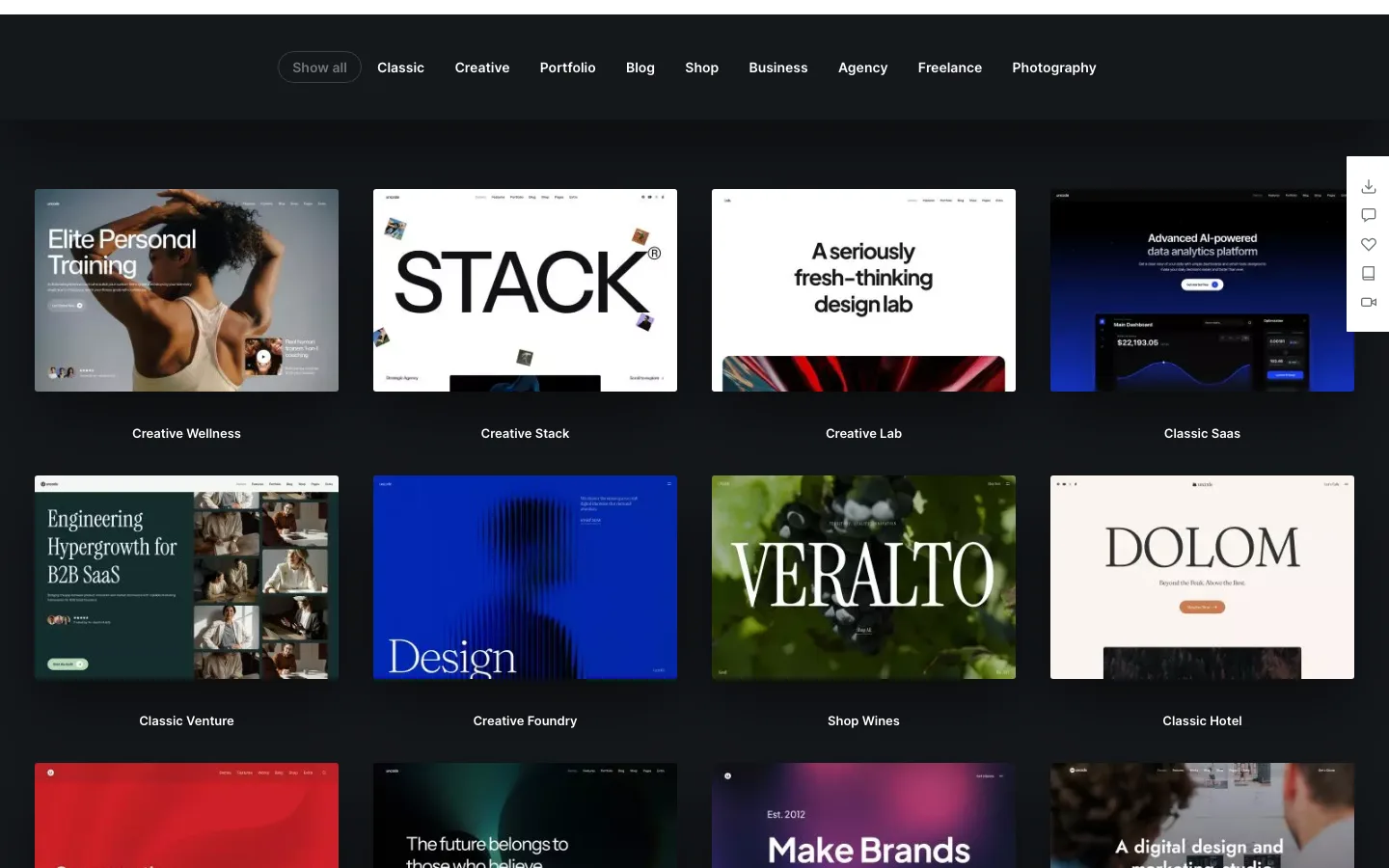
Part of the Uncode demo library on undsgn.com, with the newest demos at the top, October 2026.
Uncode is a premium multipurpose WordPress theme made by Undsgn, a European design studio that holds Power Elite author status on ThemeForest. It launched on ThemeForest in 2015 and has become one of the best-selling creative themes on the marketplace.
ThemeForest calls it a “Creative & WooCommerce WordPress Theme”, and that is a fair summary. Its demos lean toward agencies, studios, portfolios, photographers, SaaS landing pages and fashion or lifestyle shops. You can also build blogs and business sites with it.
Like Salient, Uncode is built around its own version of the WPBakery Page Builder. You do not need to buy WPBakery separately. The theme package includes:
- Uncode Core and Uncode WPBakery Page Builder (both required)
- Slider Revolution and LayerSlider (premium slider plugins)
- Uncode Wireframes (the section template library)
- Uncode Privacy (GDPR consent tools)
- Contact Form 7, a WPBakery clipboard add-on and a few smaller helpers
Note that “Uncode Lite” on WordPress.org is a different theme by a different author. There is no official free version of Uncode.
Demos and Wireframes
The demo library is the main reason people buy Uncode. As of October 2026 there are over 100 demos, grouped as Classic, Creative, Portfolio, Blog, Shop, Business, Agency, Freelance and Photography.
Undsgn keeps adding new ones. The May 2026 release (version 2.12) added Creative Wellness, Creative Stack, Classic Venture, Classic Saas and Classic Hotel. Earlier in 2026 it added Creative Foundry and Shop Wines.

The Creative Agency demo, one of the agency starting points in the Uncode library, October 2026.
A few things to know before you import a demo:
- You can import any demo, at any time. One purchase covers the whole library, and you can mix pages and sections from different demos.
- Demo images are not included. The importer uses placeholder images, so your site will not look exactly like the preview until you add your own media.
- Imports need decent hosting. Undsgn lists a 96 MB memory limit,
max_input_varsof 3000 and a 120-second execution time as minimums. Cheap shared plans sometimes fail on large demo imports.
The Wireframes plugin adds a library of ready-made sections (hero areas, pricing tables, team blocks, mega menus and more). ThemeForest lists 800+ of them and the vendor’s own pricing page now says 900+. Wireframes are useful when you want to build a page from scratch but not from a blank canvas.
The Page Builder Experience
Uncode uses a heavily customized version of WPBakery. It looks and behaves quite differently from the stock plugin, with Uncode’s own modules for headings, media galleries, posts grids, sliders, buttons and more. You can work in two modes:
- Backend editor: the classic block-and-row view inside the WordPress admin. Fast and stable, but not visual.
- Frontend editor: edit the page as it appears on your site, with changes shown in place.
Recent releases have added a lot to the builder. Version 2.12 (May 2026) brought new Flexbox container modules, a new Advanced Button module, and content slider modes for marquee, carousel and sticky scroll. Version 2.11 (January 2026) added builders for overlay, off-canvas and side menus, plus page transition effects. Version 2.10 (November 2025) let you build mega menus and mobile menus from Content Blocks.
The builder is powerful, but it has a real learning curve. Most reviewers, and many buyers, say the same thing: the options are deep and the panels are dense. If you are used to Elementor or the block editor, expect to spend some time with the documentation and video tutorials before you feel quick.
There is also a lock-in cost. Pages built with any WPBakery-based builder are stored as shortcodes. If you switch themes later, you will need to rebuild those pages or keep a compatible builder active. This is true of Salient, The7 and other WPBakery themes too, but it is worth knowing up front.
Elementor users: Uncode is not designed for Elementor. ThemeForest lists WPBakery as its builder, and some users report conflicts when they try to use Elementor Pro’s Theme Builder for headers and footers. If you want to build in Elementor, pick a theme made for it. Our page builder comparison covers the main options.
Design and Customization Features
Beyond the builder, Uncode has a long list of design tools. These are the ones that matter most:
- Content Blocks: reusable sections you can drop into any page, or use as headers, footers, mega menus and archive templates. Change the block once and it updates everywhere.
- Posts and Media Gallery modules: grids, masonry, metro, justified and carousel layouts for blog posts, portfolio items, products and galleries, with filtering and pagination.
- Dynamic content and ACF: you can pull data from custom fields into modules to build templates for custom post types. Version 2.12 extended ACF support to headings, text, media and buttons.
- Header and menu builder: many menu layouts, plus overlay and off-canvas menus built with the page builder.
- Hierarchical theme options: set global defaults, then override them for a post type or a single page.
- Typography and color palette: Google Fonts, Adobe Fonts and custom fonts, and a global color palette. Change a palette color and it updates across the site.
- Light and dark skins, animations and effects: scroll animations, animated headings, shape dividers, parallax and mouse effects.
- Slides Scroll: turns a one-page layout into a full-screen, slide-by-slide presentation.
- Coming soon and maintenance mode.
- WPML certified, with RTL support, for multilingual sites.
- Accessibility: Undsgn says the theme is built to help sites meet WCAG 2.2, and recent updates include several accessibility fixes for menus and links.
WooCommerce Features

The Shop Classic demo, one of several WooCommerce starting points in Uncode, October 2026.
WooCommerce support is one of Uncode’s strongest areas and something many older reviews skip over. As of October 2026 it includes:
- A Product Builder to design single product layouts with the page builder and apply them to all or some products
- Custom cart, checkout and My Account page layouts
- Ajax product filters and variation swatches
- Quick view, a wishlist, a side cart and a catalog mode (shop without checkout)
- Product grids and carousels from the same Posts module used for blogs and portfolios
Undsgn keeps up with WooCommerce releases. Version 2.12.8 added WooCommerce 11.1.0 compatibility. As with any heavily styled shop theme, test product pages, filters and checkout on a staging site after updates.
Performance
We have not run our own speed tests on Uncode, so treat this section as a summary of what the vendor says and what other testers report.
Undsgn says the theme is built with performance in mind. Its main tools are:
- Adaptive Images and Dynamic Srcset, which aim to serve images sized for each visitor’s screen
- Lazy loading for images and media
- A Performance panel in the theme options with image and loading settings
Independent reviews report mixed results. Some testers saw slow scores on the full demos without tuning, mostly because of large images, sliders and many requests. Others report good results after setting up caching and image optimization. Undsgn has also shipped performance fixes in recent updates.
Our take: Uncode can be fast enough for most sites, but it is a feature-rich theme, not a lightweight one. Use good hosting, a caching plugin and compressed images, and avoid loading both slider plugins if you do not need them. If raw speed is your top priority, a lighter theme such as Astra or Kadence is an easier starting point.
SEO
Uncode does not have its own SEO suite, and it does not need one. It works with Yoast SEO, Rank Math and other common SEO plugins. Inside the builder you can set the HTML heading level (H1 to H6) for each heading module, which helps you keep a clean page structure. The theme is responsive, so mobile layouts are covered out of the box.
Support, Updates and Documentation
Uncode has a good reputation for support and documentation. You get:
- A help center with a ticket system and a detailed knowledge base
- 50+ narrated video tutorials, according to the vendor
- An active Facebook group for Uncode users
Updates are frequent. The changelog shows nine releases between May and September 2026 alone, from big feature releases to small fixes, including a security fix (an XSS vulnerability) in version 2.12.8. That is a good sign for a theme that has been on sale for over ten years. Updates are free for life with a ThemeForest license or a lifetime direct plan.
Uncode Pricing (as of October 2026)
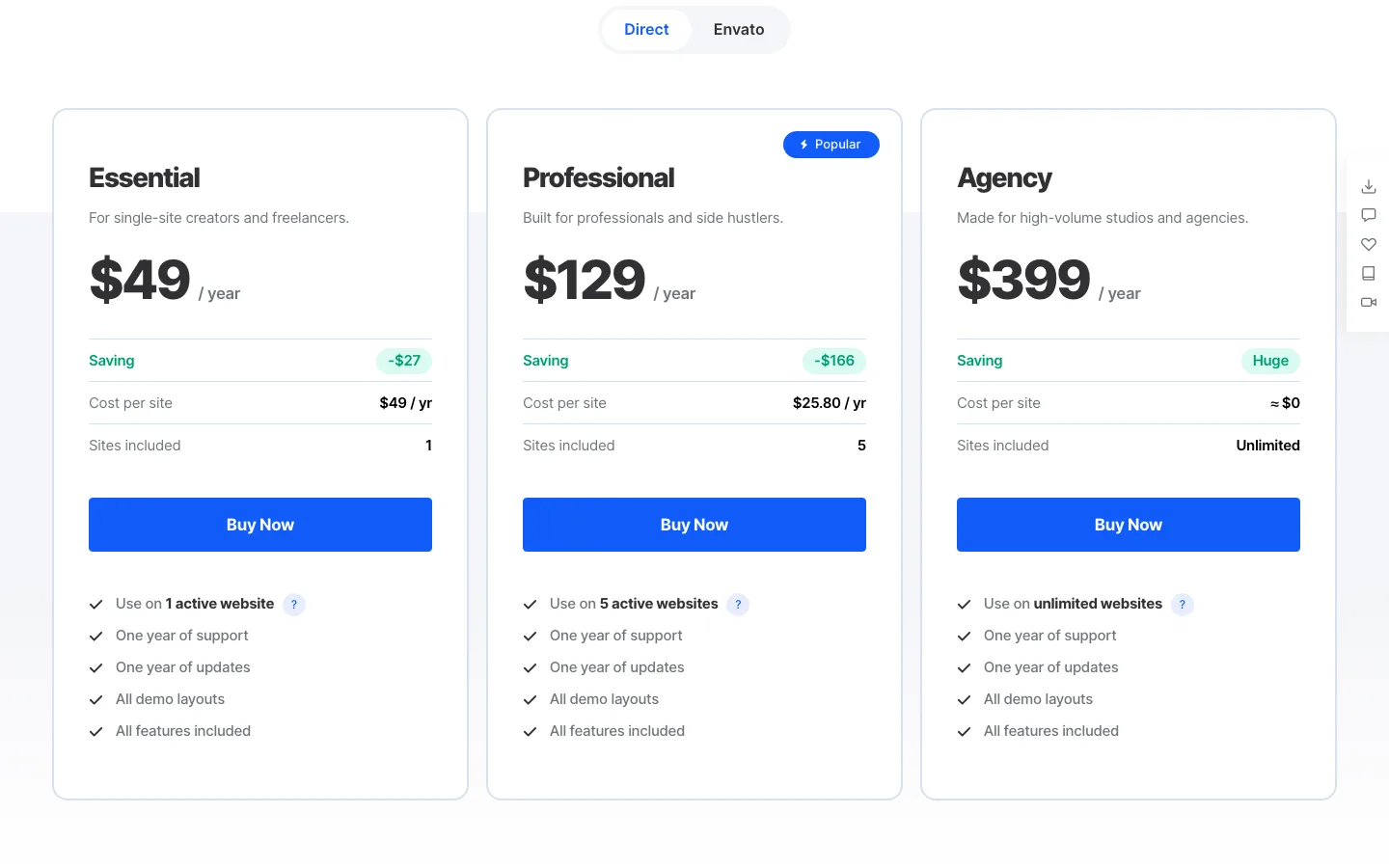
Uncode’s annual direct plans on the official pricing page, October 2026.
Uncode used to be sold only on ThemeForest. It now has three ways to buy, and the right one depends on how many sites you build.
ThemeForest (Envato) license
| License | Price | What you get |
|---|---|---|
| Regular | $59 | 1 end product that users are not charged for, 6 months of support, lifetime updates |
| Regular + 12 months support | about $76.63 | Same, with support extended to 12 months at checkout (+$17.63) |
| Extended | $2,950 | 1 end product that users can be charged for, such as a paid SaaS or membership product |
Extending support later, after your support period has run out, costs more than adding it at checkout.
Direct annual plans
| Plan | Price | Sites | Support and updates |
|---|---|---|---|
| Essential | $49/year | 1 | 1 year of each |
| Professional | $129/year | 5 | 1 year of each |
| Agency | $399/year | Unlimited | 1 year of each |
Direct lifetime plans
| Plan | Price | Sites | Support and updates |
|---|---|---|---|
| Essential | $149 one-time | 1 | 3 years of support, lifetime updates |
| Professional | $249 one-time | 5 | 3 years of support, lifetime updates |
| Agency | $799 one-time | Unlimited | 3 years of support, lifetime updates |
Direct plans come with a 14-day money-back guarantee, and the license can be moved from one live site to another. Undsgn says sites keep working if an annual license expires, but you lose updates, the template library and support until you renew.
Which should you pick? For a single site, the $59 ThemeForest license is still the cheapest way to own Uncode with lifetime updates. If you build several sites a year, the Professional or Agency plans cost much less per site than buying a ThemeForest license for each one. Envato licenses cover one end product each, which used to be the biggest drawback for agencies.
Pros and Cons
Pros
- Large, modern demo library with new demos added every year
- 800+ Wireframes section templates on top of the full demos
- Deep design control: Content Blocks, Posts module, dynamic content, ACF and mega menus
- Strong WooCommerce features, including a product builder, Ajax filters and swatches
- Premium plugins bundled (custom WPBakery, Slider Revolution, LayerSlider)
- Frequent updates and a long track record since 2015
- High ThemeForest rating (4.89 out of 5) and well-regarded support
- New multi-site direct plans make it more affordable for agencies
Cons
- Steep learning curve, especially for beginners and non-technical clients
- Tied to its WPBakery-based builder, with shortcode lock-in if you switch themes
- Not built for Elementor or full block-editor workflows
- Feature-heavy, so you need to tune it for good speed scores
- Demo images are not included in imports
- ThemeForest support lasts only 6 months unless you pay to extend it
Uncode Alternatives
- Salient: the closest rival. Also a creative ThemeForest theme built on a custom WPBakery builder, with a similar audience and price.
- The7: a multipurpose theme that supports both WPBakery and Elementor, which helps if you are not sure which builder you want.
- TheGem: another creative multipurpose theme with a big demo library and both WPBakery and Elementor versions.
- Avada and Enfold: long-running multipurpose themes with their own builders. See our Avada vs Enfold comparison if you are weighing those two.
- Divi: a visual builder theme from Elegant Themes. One license covers unlimited sites.
- Astra or Kadence: lighter themes that work with the block editor and Elementor. Better if speed and simplicity matter more to you than ready-made creative designs.
Verdict: Is Uncode Worth It?
Yes, for the right person. Uncode is one of the most refined creative themes on the market. It is still actively developed in 2026, and the 2025 and 2026 releases (menu builders, Flexbox modules, ACF support and new demos) show it is not coasting on its sales count.
It suits designers and agencies who want high-end visuals, a big demo library and solid WooCommerce tools, and who are comfortable with a WPBakery-style builder. The new direct plans also make it far better value than before if you build many sites.
It is not the best pick for beginners, for people handing sites to clients who need a simple editor, or for anyone set on Elementor or the block editor. In those cases, start with Astra, Kadence or Divi instead.
Uncode Theme FAQ
Is Uncode a free WordPress theme?
No. Uncode is a premium theme. As of October 2026 it costs $59 on ThemeForest, or from $49 a year on undsgn.com. The free “Uncode Lite” theme on WordPress.org is made by a different developer and is not related.
What page builder does Uncode use?
Uncode uses its own extended version of WPBakery Page Builder, called Uncode WPBakery Page Builder. It is included with the theme, so you do not need to buy WPBakery. You can use it in a backend editor or a frontend editor.
Can I use Elementor with Uncode?
Uncode is not built for Elementor. Its demos, modules and templates all use its WPBakery-based builder, and some users report conflicts with Elementor Pro’s Theme Builder. If you want to work in Elementor, choose a theme designed for it.
Can I use one Uncode license on multiple sites?
A ThemeForest Regular License covers one end product. To use Uncode on more sites, you either buy another license for each site or choose a direct plan. As of October 2026 the Professional plan covers 5 sites and the Agency plan covers unlimited sites.
Is Uncode good for WooCommerce?
Yes. Uncode has a product page builder, custom cart and checkout layouts, Ajax filters, variation swatches, quick view, a wishlist and catalog mode. Version 2.12.8 added WooCommerce 11.1.0 compatibility.
Is Uncode good for beginners?
It can be used without code, and the demo importer helps. But the builder and theme options are deep, and most reviews mention a learning curve. Beginners who want something simpler may be happier with Astra or Kadence.