Salient 18 Review: Polished Design, With Some Tradeoffs
Salient Theme Review (2026): Hands-On With 18.4.1 and Nectarblocks
Nectarblocks Review 2026: Responsive Design and Templates Tested
Salient is a good fit for designers who want polished layouts and a capable visual builder at a reasonable one-time price. Its header and shopping tools worked well, but the imported shop needed repairs and leaving WPBakery means rebuilding pages. Nectarblocks is a separate product, with its own benefits and compromises.

The Ecommerce-Robust demo after a one-click import.
What Is Salient?
Salient is a multipurpose WordPress theme from ThemeNectar, first released in 2013. It is one of ThemeForest’s long-running best sellers, with 171,789 sales and a 4.82 rating when we checked. ThemeNectar’s own site still says “over 130,000 licenses sold”, which looks like an older figure.
It is a classic theme. You style the site in a large theme options panel under a Salient menu in the dashboard, and you build pages with Salient WPBakery Page Builder, a version of WPBakery that ThemeNectar has redesigned and filled with its own elements. You do not need to buy WPBakery separately.
Salient is no longer ThemeNectar’s only product. In May 2024 the company launched Nectarblocks, a builder for the WordPress block editor with its own theme. The two are sold and licensed separately. We tested Nectarblocks too, and cover it in its own section below.
There are two ways to buy Salient. On ThemeForest you get an Envato license and 6 months of support. Buying direct from ThemeNectar gets you a license that also turns on one-click updates inside WordPress.
Installing Salient and Its Bundled Plugins
Salient needs its Core plugin and bundled WPBakery builder. Other plugins add imports, sliders, portfolios, social buttons and widgets; their updates arrive with the theme. Slider Revolution was not included in our download.
The theme options initially appeared empty until we saved them once. Setup and the demo import otherwise worked with our standard hosting limits.
Prebuilt Websites and the Demo Import
Full demo imports need an activated license. The importer listed 41 demos, but had no search or category filter; the public website is easier to browse.
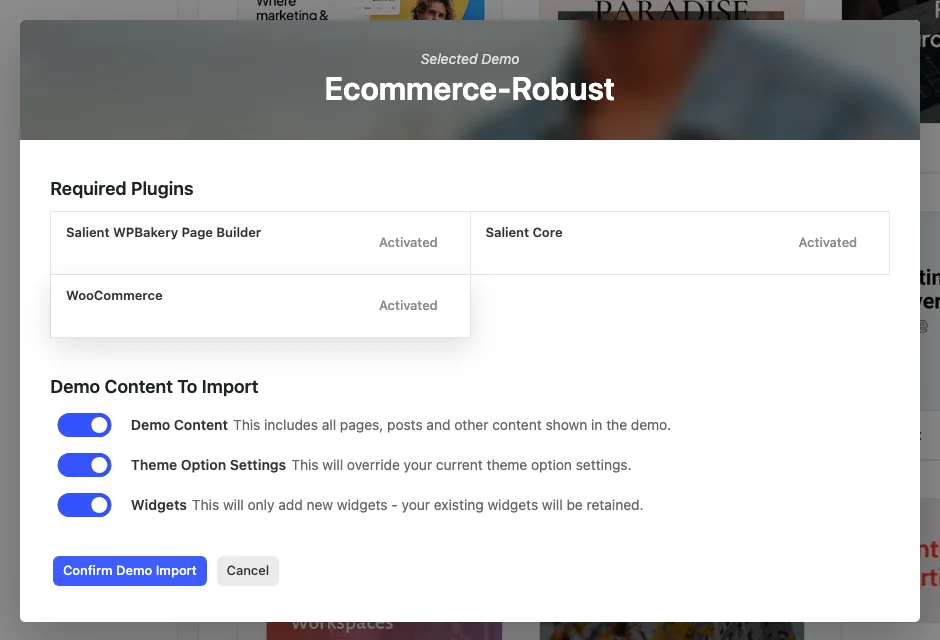
The Ecommerce-Robust import window.
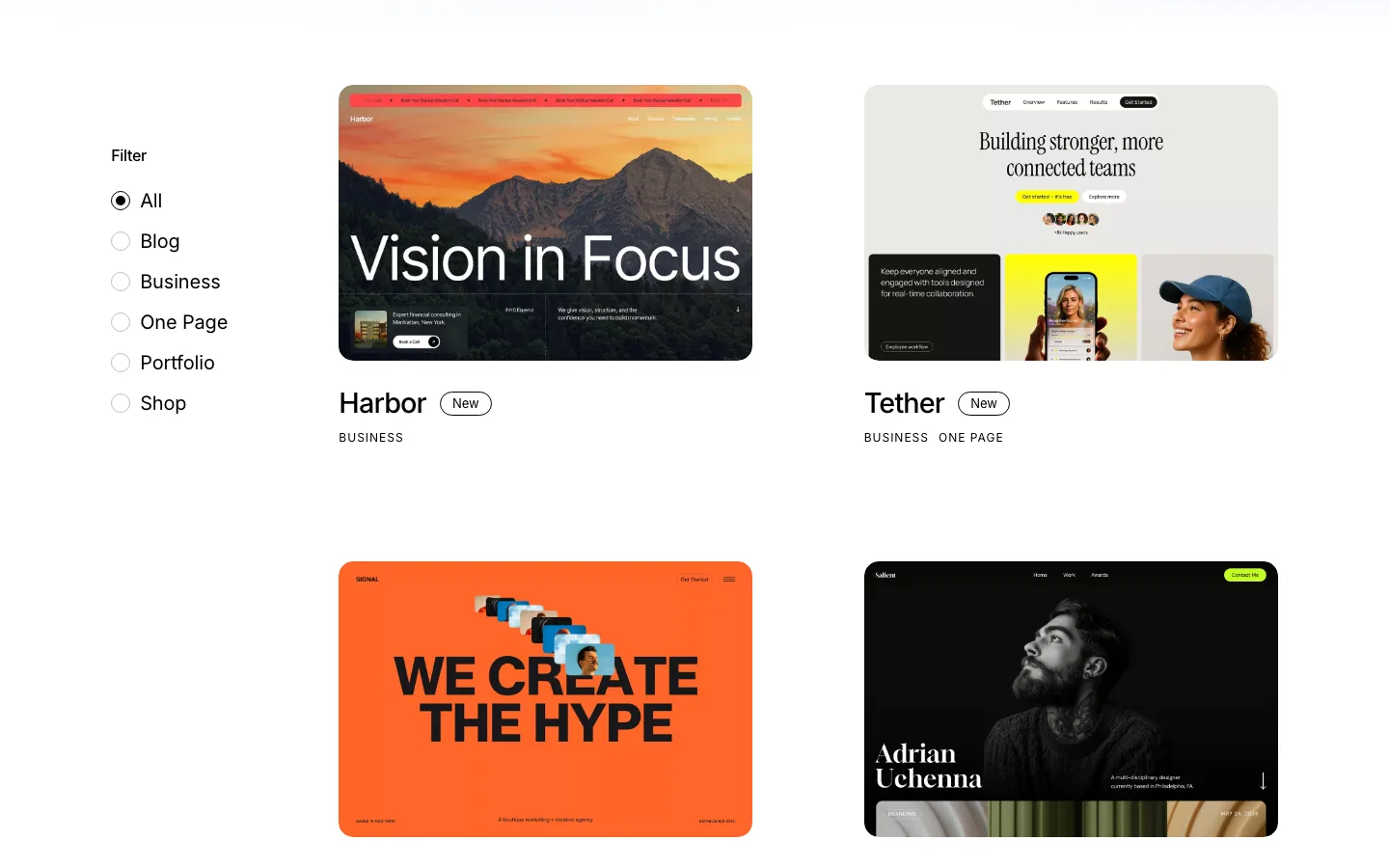
Part of the prebuilt website library on themenectar.com, with category filters and the newest demos first.
Ecommerce-Robust imported in under a minute and configured the homepage, products, menus, footer and performance settings. A full import overwrites theme settings, so use a fresh site or a backup.
The imported shop needed substantial cleanup:
- The landing page contained every section twice and had four H1 headings.
- Variable products arrived as simple products without selectable options.
- The price filter was missing until we regenerated WooCommerce’s product lookup tables.
- Several buttons linked nowhere or back to the vendor’s website.
- Sample copy, reviews and contact details needed replacing, and the newsletter block had no form.
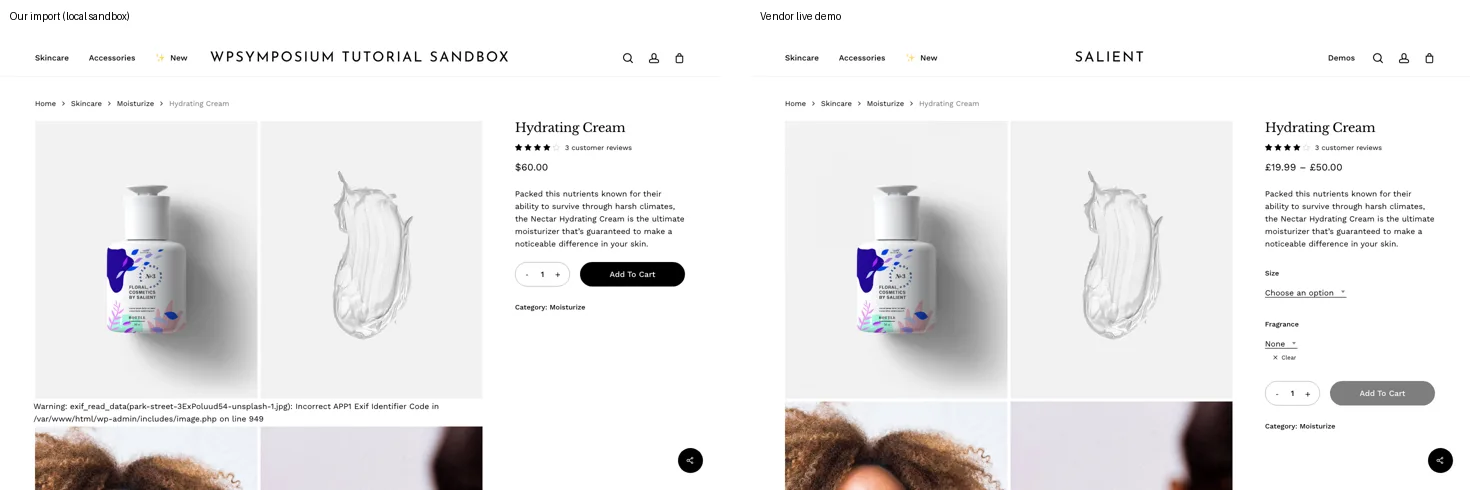
Hydrating Cream on our import (left) and on the vendor’s live demo (right). Our test site had PHP debug output switched on, so a one-time warning about a demo image’s photo data shows under the gallery.
We repaired a product to continue testing the store. The demo is a useful starting design, but it is not ready to launch immediately after import. We did not check every other demo.
The Salient Page Builder
Salient’s customized WPBakery offers a structural backend editor and a visual frontend editor. Both were responsive on our test page, and neither needed a separate WPBakery license.
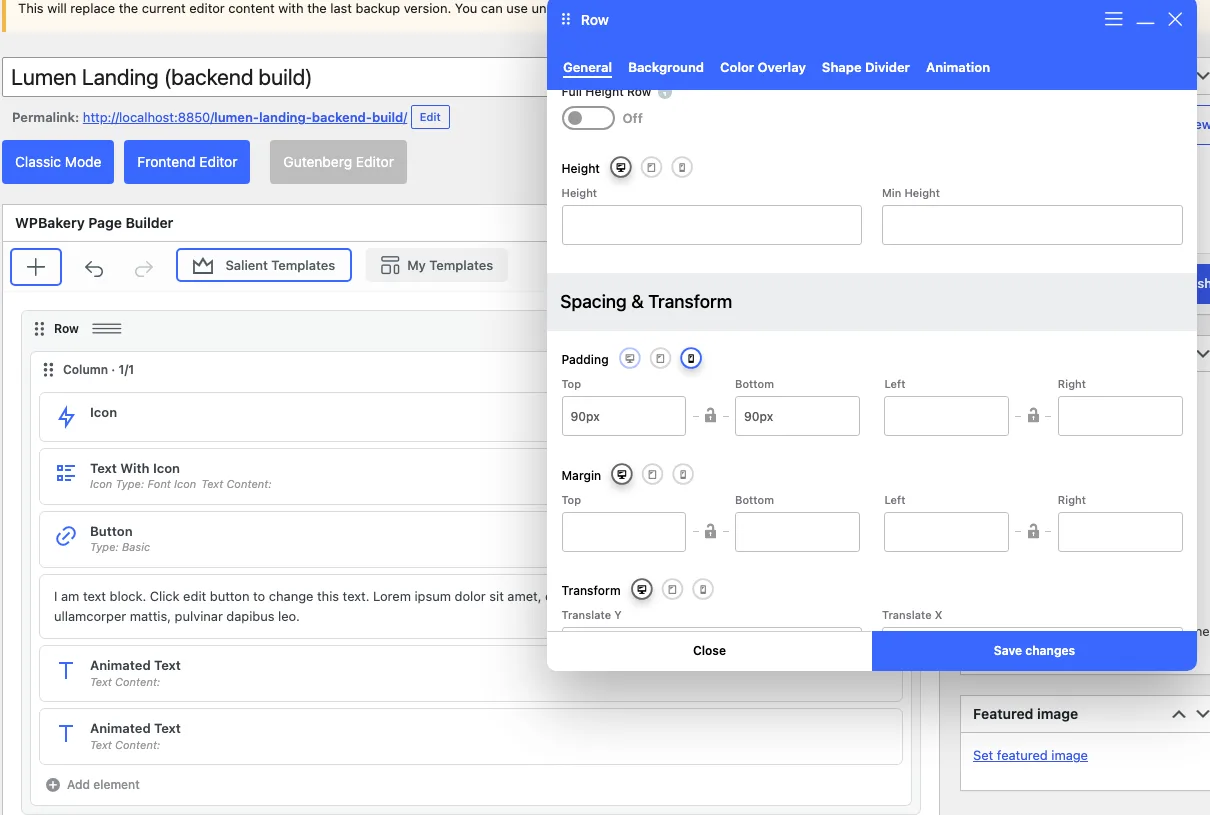
Row settings in the backend editor, with the phone icon selected for padding.
Per-device controls made it straightforward to change phone spacing without affecting desktop. The tradeoff is a dense interface with settings spread across large dialogs. New pages also open in the block editor first; switching to WPBakery lost a title we had already entered.
Other rough edges were more specific. Viewport-based padding saved as pixels, the Element Navigator gave every row the same generic label, and My Templates saved whole pages rather than individual rows. The Basic button style also needed manual contrast and padding fixes.
Animation is a strength. Entrance effects, background and mouse parallax, page transitions and Lottie playback all worked. There is also a large icon library. These tools make polished layouts possible, although finding individual settings takes practice.
Contact Form 7 and WPForms Lite picked up the theme’s form styling, and a test notification arrived. WPBakery AI needed a separate subscription, which we did not test. Keep WPBakery pages in its editor: the block editor exposes their shortcodes and can change the stored markup.
Salient Studio Section Templates
Salient Studio worked without a license and offered 470 reusable sections. Search, sorting and recent designs made it useful, although much of the library is older and still contains sample copy.
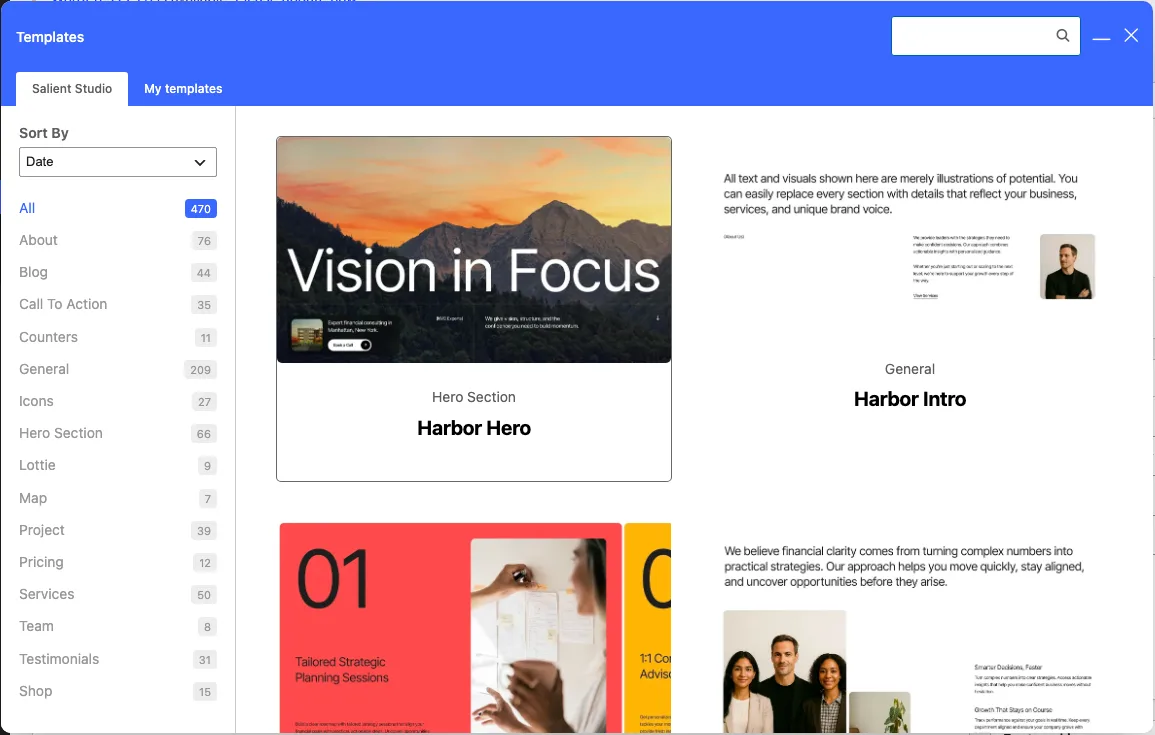
Salient Studio with 470 templates, sorted by date.
Inserted sections kept images on the vendor’s server and sometimes linked buttons back to its demo. Colors also followed global settings only partly. Replace the media, links and sample content before launch, and check that the design follows your palette.
Theme Options and Site Design
The theme options cover most site-wide styling, but their depth makes settings harder to find. Search only matches field titles, so familiar wording may not return the option you need. Custom CSS worked as expected.
Header and mega menu
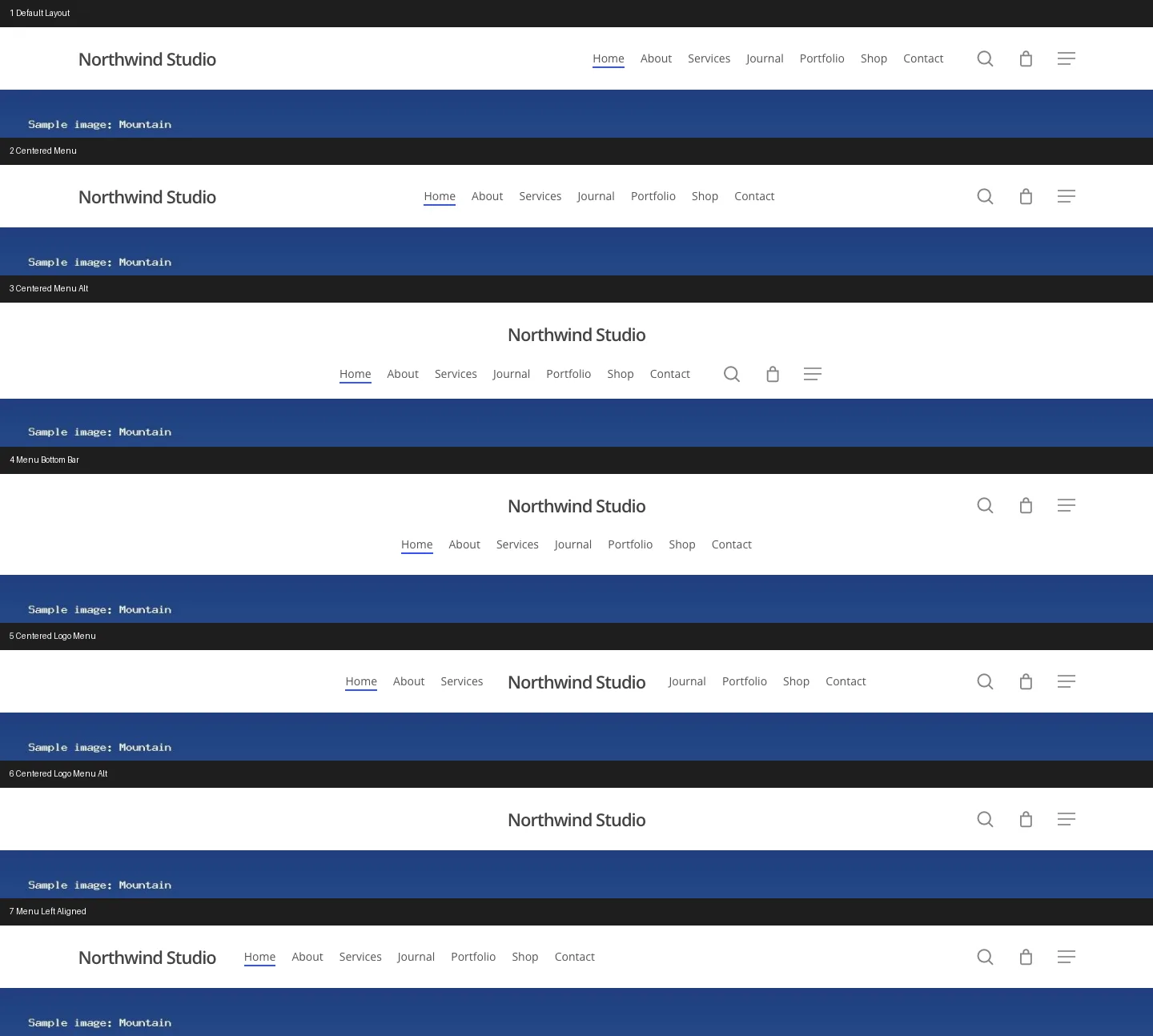
Seven of the eight header layouts on our test site. Layout 6 shows no links because it uses two other menu locations.
Salient has 8 header layouts, and we switched through all of them. Most are 78 pixels tall; Centered Menu Alt and Menu Bottom Bar are 120 and 126 pixels, and Left Header is a 275-pixel side column. One layout caught us out. Centered Logo Menu Alt showed no menu links, because it uses two other menu locations, “Pull Left” and “Pull Right”, instead of the main one. Assign those menus first.
The other header features worked:
- Transparent header. Off by default. Once on, it sat over pages with a header image and stayed solid on pages without one. On scroll it turned solid and shrank from 78 to 53 pixels.
- Off-canvas menu (a menu panel that slides in from the side). On by default, with 7 styles, and all 6 desktop styles opened. Watch the phone menu: with menus in both the main and off-canvas locations, the phone panel lists both, so our Home, About and Contact links appeared twice. The “separate mobile menu” setting only works when the desktop off-canvas menu is off.
- Header button. Any menu item can become a button through a Menu Item Style setting with 5 choices.
- Live search. The header search can show AJAX results as you type, but that is off by default. You have to untick “Disable AJAX from search”.
The mega menu, a wide dropdown with several columns of links, is built in Appearance > Menus. Each menu item gets a Salient Menu Item Options window with up to 46 fields. We built a 3-column mega menu with 6 links, and it opened on hover at full header width. Image tiles need two settings, Media Type “Custom Image” and a taller Menu Item Height. A mega menu can also show a global section instead of links. On phones it turns into a nested accordion without the images.
Typography and colors
The font picker lists 1,925 fonts: 17 standard fonts and 1,908 Google Fonts. ThemeForest still says “over 800” and ThemeNectar’s site says over 1,400, so the real number is higher than either claim. Each typography field sets the family, weight, size, line height, letter spacing and text transform. Fluid Typography makes the base text size grow and shrink with the screen width (with a CSS clamp() formula), so headings sized in rem, a unit based on that base size, scale smoothly with the screen. Our 3.5rem H1 measured 36 pixels on a phone and 67 pixels on a 1,440-pixel screen. Sizes set in pixels do not scale.
Three font gotchas:
- Open Sans keeps loading. After we picked Inter and Playfair Display, pages still loaded the default Open Sans from Google until we set Default Theme Font to “Do not load default font”.
- Local fonts work. The Load Google Fonts Locally switch cut font requests to Google from 5 to 0.
- No custom font upload. There is no upload field in the theme options, and a font we added in WordPress’s own Font Library did not appear in Salient’s picker. Custom fonts need code.
The Accent Colors tab has one accent color, three extra colors and two gradients. Changing the accent recolored buttons, links, the header button, portfolio filters and the off-canvas menu. One bug: the gradient’s From and To colors come out reversed, so From #0f8a5f and To #f2a900 put the yellow on the left.
Global sections, hooks and the 404 page
Global sections are reusable blocks of builder content that you attach to places in the theme, such as after the header, before the footer or inside WooCommerce pages. ThemeNectar pitches them for footers, archives and 404 pages. They work, but the setup has traps:
- The builder is not enabled for them. A new global section opens without WPBakery until you change WPBakery > Role Manager > Post types from “Pages only” to “Custom” and tick Global Sections. The list page does warn about this.
- No condition means never shown. There are 39 locations and 26 display conditions, joined with AND. A section with a location but no condition does not appear. Add “Everywhere”.
- “Single: page” never matches pages. The code checks for single posts, which pages are not. Use the plain “page” condition instead. With that, our promo bar showed on pages for logged-out visitors only, as intended.
The admin bar’s “Display Salient Hooks” item outlines each hook location on the live page, with an “Add New Global Section” link in each. A global section on the “404 Content” location replaced our 404 page and kept the 404 status code. A section on “Before Shop Loop” shows on the shop page and on every product category alike; there is no per-category condition.
Footer and the old call to action bar
The main footer area is off by default, so a fresh site shows only the copyright bar. Turn it on and you get 5 column layouts, from one centered column to an uneven four-column layout, plus your own copyright text.
Older reviews show a site-wide call to action bar above the footer. On a new install there is no Call To Action tab. The theme only shows it if the option already has text, as on older sites. We filled the option from the command line and the tab and bar appeared. New sites should use a global section on “After Page Content” instead, which worked on pages and posts.
Portfolio, blog and sliders
- Portfolio. The Salient Portfolio plugin adds a project post type. The Portfolio element has 9 project styles and 5 layouts. Its filter bar switched categories without reloading the page.
- Blog. There are 5 blog layouts, 3 standard styles, 5 masonry styles and 4 single post header types. Infinite scroll loaded the next posts as we scrolled. The “love” button, a like counter, counted a logged-out click once. On single posts it is hidden until you change Salient Social’s style from the default “Fixed to screen”.
- Sliders. Nectar Slider worked with two slides, arrows and a phone view. Home Slider worked through its own page template. ThemeNectar’s docs call Home Slider deprecated and mark Nectar Slider, Shortcodes and Widgets as legacy plugins. They point new sliders to the Carousel element. Nothing inside the theme says so.
Translation and RTL
Salient ships only a .pot file, the blank template translators start from, with no finished translations, and WordPress offered no German translation for it. With the site in German, the WordPress admin was German but every Salient panel title and front-end string such as “Leave a Reply” stayed English. You would need a translation plugin such as Loco Translate, which we did not test.
Right-to-left layouts mostly work. In Arabic the logo, menu and text mirrored, but the page header title and buttons stayed on the left. Free Polylang worked: an Arabic translation of a page loaded in RTL with hreflang links (tags that tell search engines which language each version is in), and the language switcher sat in Salient’s header menu. We did not test WPML, which is paid.
Child theme and switching themes
The child theme is a 3-file starter. Our theme options carried over when we activated it. One quirk: the options page moves to a new address, and the old bookmark shows “Sorry, you are not allowed to access this page.”
Switching away from Salient is painful, as with any WPBakery theme. On Twenty Twenty-Five with Salient Core still active, our pages kept their text but lost their layouts, and global sections disappeared. With Salient Core off, pages showed raw shortcode text, 71 snippets on our Studio test page alone. Switching back restored everything. If you might leave in a few years, see our guide to the best page builders for WordPress.
WooCommerce Features
Salient > WooCommerce has 52 settings, including 4 product styles, 4 shop layouts, 3 single product layouts, 4 gallery types and 2 review styles. We switched through all 4 product styles, 4 shop layouts and 4 gallery types on the imported shop without problems. The WooCommerce status report listed 15 Salient template overrides, none out of date for WooCommerce. We found no wishlist setting, which one older review claims.
AJAX cart
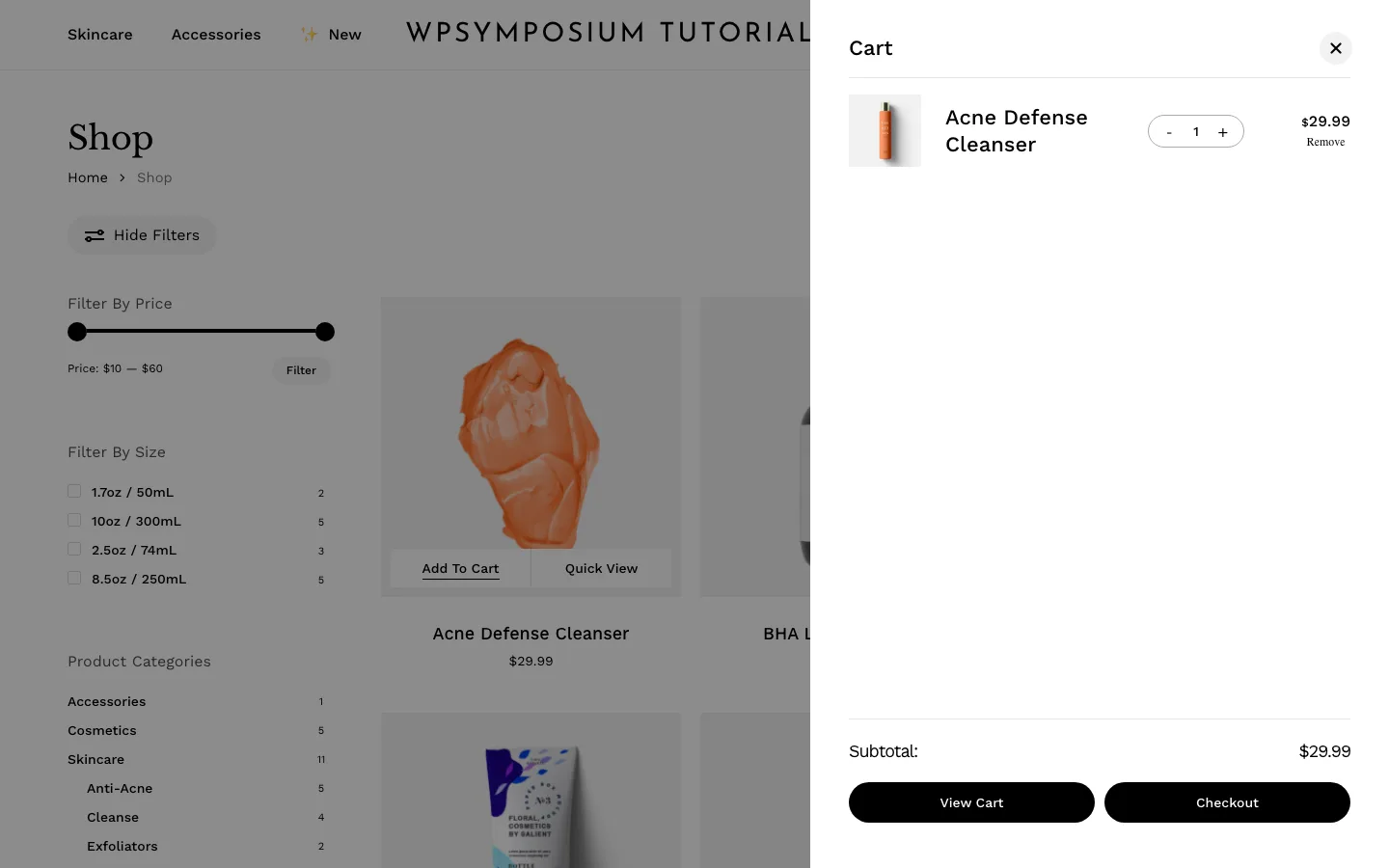
The slide-out cart after adding a product from the shop grid.
As a logged-out shopper on desktop, Add To Cart in the shop grid sent one background request. The page did not reload, the cart count went from 0 to 1 and the slide-out cart opened. Its plus button raised the quantity from 1 to 2 and updated the subtotal from $29.99 to $59.98, also without a reload. On product pages, Add To Cart reloaded the whole page, even with the demo’s AJAX add to cart setting on.
Quick View
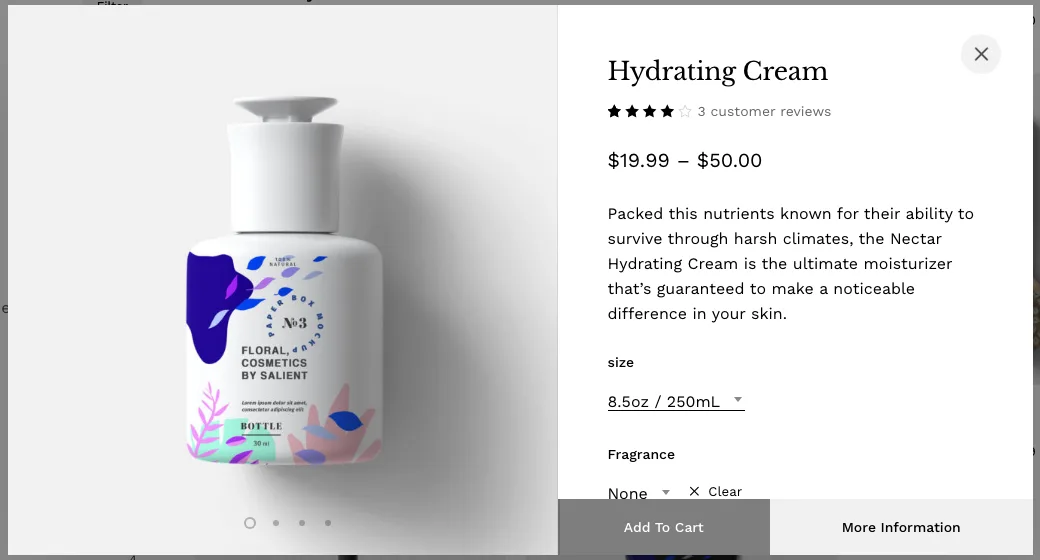
Quick View on a variable product with a size picked. The $40.00 price for that size appears below the dropdowns, further down the panel.
Quick View loaded in the background and handled variations. Picking a size changed the price to $40.00, and Add To Cart in the window added that variation and opened the cart. Two catches: Escape did not close the window (clicking outside it did), and Salient hides Quick View on screens under 1,000 pixels wide, so phones and most tablets held upright never see it.
Filters, search, reviews and categories
- Filters reload the page. The size and price filters worked but reload the page with the filter in the address; they are not AJAX. On phones a Filters button opens a full-screen panel.
- Product search is live. Typing “cream” in the header search showed 2 matching products with images and prices as we typed.
- Reviews can open in a slide-out form (“Write A Review”).
- The Category Grid element listed 9 categories, with an image that follows the mouse on hover.
One annoying bug came from the Delay JavaScript Execution option, which holds back the theme’s scripts until the visitor scrolls or taps. The demo turns it on. On the shop page, the first click on “Hide Filters” did nothing if we had not scrolled yet; the second worked. The phone Filters button also needed two taps. With only that option off, the first click worked every time.
Checkout and a test order
We placed a guest order with Cash on Delivery through WooCommerce’s block cart and checkout. The order went through in 628 milliseconds: order 1644 for $104.98 including $5 shipping. Salient styles both the block versions and the older shortcode cart and checkout to match the theme, and neither scrolled sideways on a phone. We did not test card payments or order emails.
Product pages built with the builder
Product descriptions can use the full builder. Ours had text, a list and progress bars, and rendered inside the Description tab. For a custom category page, we built a normal page with a Category Grid and a WooCommerce Products element filtered to one category. The real product category archive cannot be built with the builder; you get 6 Archive Header settings.
Mobile
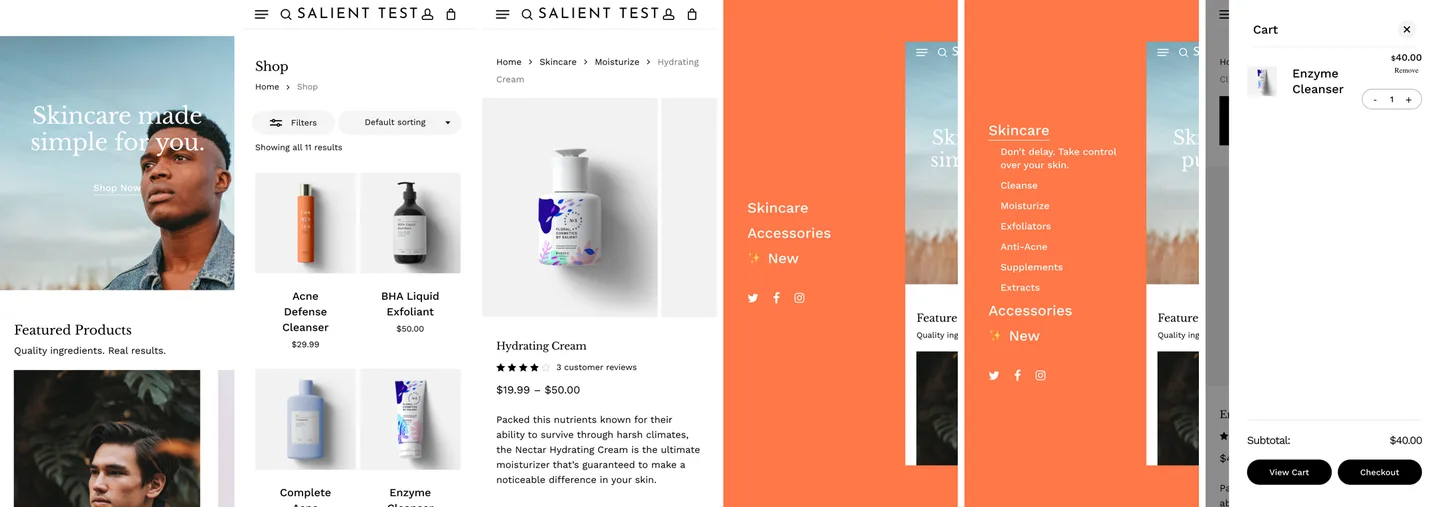
The imported shop on a 390-pixel phone: home, shop, product page, menu (closed and with Skincare open) and cart.
At 390 pixels wide, the home, shop, product and cart pages had no sideways scrolling. The menu slid in from the right with the Skincare sub-menu, and the cart icon opened the slide-out cart. Two issues showed up:
- No Add To Cart in the shop grid with the Minimal product style the demo uses. A tap opens the product page instead. With the Classic style, adding from the grid worked on a phone.
- A long text logo can cover the menu button. With our original 28-character site title as the logo, the centered header text covered the menu button. The demo’s short logo fits; just keep yours short.
We did not test tablet widths.
SEO Basics
Salient leaves SEO to plugins, and that is fine. It printed no structured data of its own (the hidden schema code that tells search engines what a page is, such as a product with a price). The only schema came from WooCommerce: breadcrumbs on the shop and Product data, with price and reviews, on product pages. The shop, product and category pages had one H1 each. The doubled demo home page had 4, or 2 without the duplicate. Heading levels skip around, and all 17 images on the imported home page had no alt text, so fix those in the demo content.
Yoast SEO and Rank Math both read builder content correctly: each counted 199 words on our landing page, and Rank Math built its snippet text from a builder Text block. Yoast added a canonical URL (a tag that names the main address of a page), Open Graph tags (the title and image used when the page is shared on social media) and its schema without changing the layout. We did not run Google’s Rich Results Test, which needs a public URL. Our best SEO plugin for WordPress guide compares the options.
Plugin Compatibility
Beyond the SEO plugins, Contact Form 7, WPForms Lite, Polylang and WP Super Cache all worked. With WP Super Cache, our landing page response dropped from about 0.09 to 0.003 seconds on the local sandbox, animations still ran, and Add To Cart worked from the cached shop page. With PHP’s debug display on, 14 front-end pages and 13 admin screens on our builder sandbox showed no warnings. Elsewhere we saw a one-time deprecation notice from the bundled Redux framework at the top of the options panel, and warnings about broken photo data in some demo images during the import and once on the first view of a product page. We did not test paid plugins such as WPML, WP Rocket or Slider Revolution.
Performance: Local Lab Test
These numbers come from our local Docker sandbox on a Mac, not from real hosting. We loaded pages in Chromium, the open-source base of Chrome, driven by the Playwright testing tool, logged out, with the cache off and the network slowed to 1.6 Mbps and 150 milliseconds of latency, and took the median of 3 runs. These are page-load timings, not Lighthouse scores (Google’s 0 to 100 speed rating). Treat them as a comparison.
The imported shop home page transferred about 1.6 MB on desktop and 1.7 MB on a phone. Its main content appeared after 6.6 seconds on desktop and 2.2 seconds on the phone, while full loading took roughly nine seconds. The product page was lighter, around 1.4 MB, with main content appearing in about 2.3 seconds on the phone.
Turning every Performance option off roughly doubled the desktop home page to 3.3 MB and pushed its main content to 11.7 seconds. The four settings ThemeNectar recommends first brought it back close to the imported defaults, rather than producing a dramatic improvement.
The home page figures include the doubled landing content, so a fixed home page would be lighter. Delay JavaScript holds back another 10 requests and 211 KB until the first scroll.
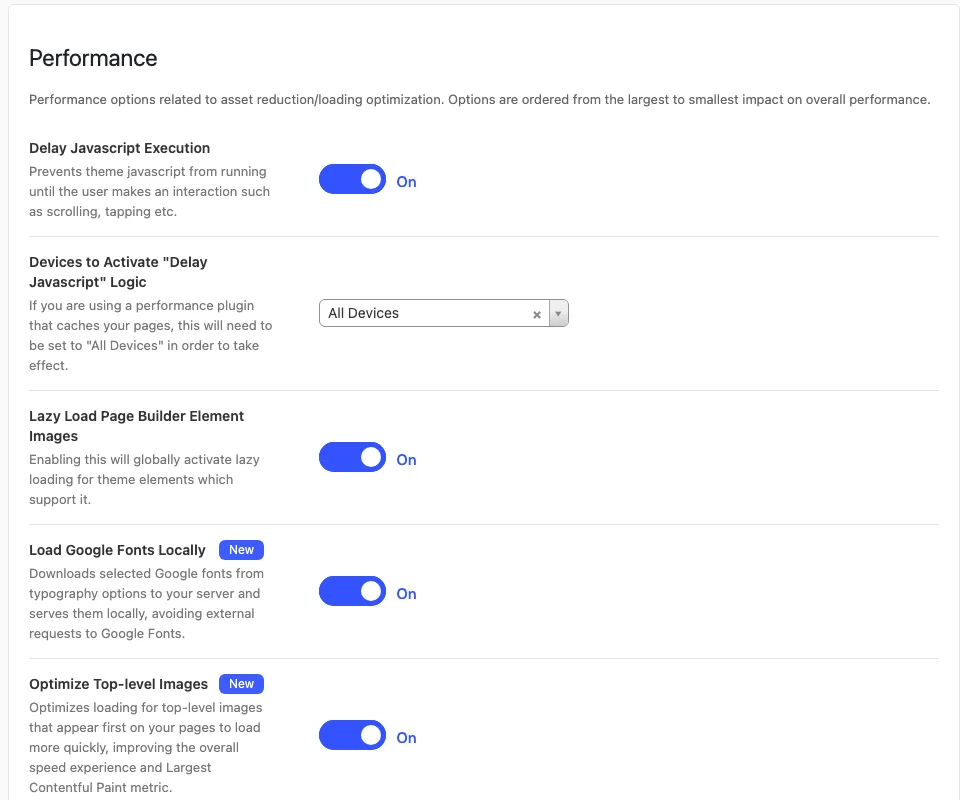
The top of the Performance tab after the demo import, which switched all 11 options on.
The Performance tab is worth having. Its 11 options include delayed JavaScript, lazy loading, local Google Fonts, hints that tell the browser which images to load first, loading the jQuery script library at the end of the page and removing unused icon and emoji files. With all 11 off, the home page nearly doubled in weight to 3,329 KB and loaded fonts from Google. The four options ThemeNectar’s guide suggests starting with gave almost the same result as all 11. Remember the first-click bug above if you turn on Delay JavaScript.
Salient’s own files are moderate. The home page loaded 23 theme CSS files (122 KB) plus 36 KB of generated CSS, and 6 small scripts up front, with 7 more scripts (131 KB, mostly the 87 KB init.js) after the first scroll. Font Awesome added 101 KB. Images were the biggest cost, at about 1,050 KB.
Older reviews praise Salient’s “adaptive images”, meaning smaller image files on smaller screens. That is half true. On a phone the hero image came as a 1,024-pixel file of 84 KB. On desktop it was the 1,805-pixel original at 340 KB, which explains the slow desktop LCP. Shop thumbnails were sized and lazy-loaded properly, but each product’s second “hover” image loaded a 1,300 to 1,440-pixel file for a 311-pixel slot. If speed is your top priority, our fastest WordPress theme test covers lighter starting points.
Nectarblocks: ThemeNectar’s Block Editor Builder
Nectarblocks works inside the WordPress block editor and bundles its own theme and starter-site importer. It is a separate purchase from Salient, and existing WPBakery pages do not convert into Nectarblocks designs.
We tested Nectarblocks on its own and alongside Salient. It can build new pages on a Salient site, but mixing the products introduces styling and performance tradeoffs.
The standalone Nectarblocks video adds a fresh check of responsive editing, text animation, licensed templates and a shared footer using its own theme. A phone-specific heading size reached the actual narrow page, the accordion remained usable and the saved footer appeared across the tested pages. The inserted FAQ still contained placeholder answers until they were replaced. These checks support the editing workflow; the migration, shop and performance findings below come from the earlier comparison.
Building pages with Nectarblocks
Its blocks cover layout, content and motion, with shared Layout, Style and Motion controls.
The motion tools are a step beyond Salient’s. Text can animate per word or letter with 6 effects. Blocks can animate when they scroll into view, follow the scroll position with start and end points, or react to interaction. On our landing page, a fade-up headline and four counting numbers played as expected.
Responsive editing is well done. You switch between Desktop, Tablet and Phone, and values flow down from desktop until you override them. A reset icon clears an override. A Hover mode stores hover colors, shadows and a lift effect separately, and a copy and paste button moves styles between blocks.
Global palettes recolored our pages and templates, but the theme’s own header and phone menu kept their Customizer colors. Palette changes saved immediately and could not be undone. Local Google Fonts kept font requests off the front end, although the editor still made many requests to Google. Uploaded and Adobe fonts were not tested.
With the Nectarblocks theme you also get a Theme Builder for headers, footers, off-canvas menus, single posts and archives, with conditions such as a category or a user role. Here is what worked:
- A header with states. The header builder has Default, Transparent and Scrolled states. Our scrolled header shrank and gained a shadow at 200 pixels of scroll.
- Dynamic data. A single post template pulled in the title, date, featured image and a custom field from the free Advanced Custom Fields (ACF) plugin.
- A conditional archive. A category archive template applied to the Design category and not to Business, as set.
We also rechecked problems from 2024 reviews. Heading tag changes now apply. The Flex Box block still has no column picker, though the Row block has 7 layouts. There is still no popup block. The Video Player block is still for self-hosted video only: it accepted a YouTube link without a warning and showed a blank player. Use the Video Lightbox block for YouTube.
Problems we hit while building:
- The transparent header needs a hidden switch. The page-level “Transparent Header” toggle did nothing until we also turned on Transparent Header in the Customizer. The editor gives no hint.
- The phone menu showed a second hamburger icon. Inside our off-canvas menu template, the menu collapsed into another menu button. Turning off every overlay device saves an empty list, which the plugin treats as “mobile”. Choosing Desktop only fixed it.
- A header row stacks on phones by default. Our header’s menu icon, search and button sat on top of the hero heading until we set the row direction in Tablet mode.
- The phone preview was wrong once. An H1 set to 1.9em in Phone mode showed 30 pixels on a real phone width but 40 pixels in the editor preview.
- Small irritations. The 9-step welcome tour comes back in every new browser, because finishing it is only stored in the browser. Search for “Row” and you get two blocks with the same name, core and Nectarblocks. The color popup has no close button.
The editor itself felt fast. Our 64-block landing page was ready to edit in about 0.8 to 1.3 seconds on a fast Mac, and we saw no typing lag.
Template library and starter sites
The template library and starter sites need a license. Without one, the library only says “Nectarblocks license not active.”
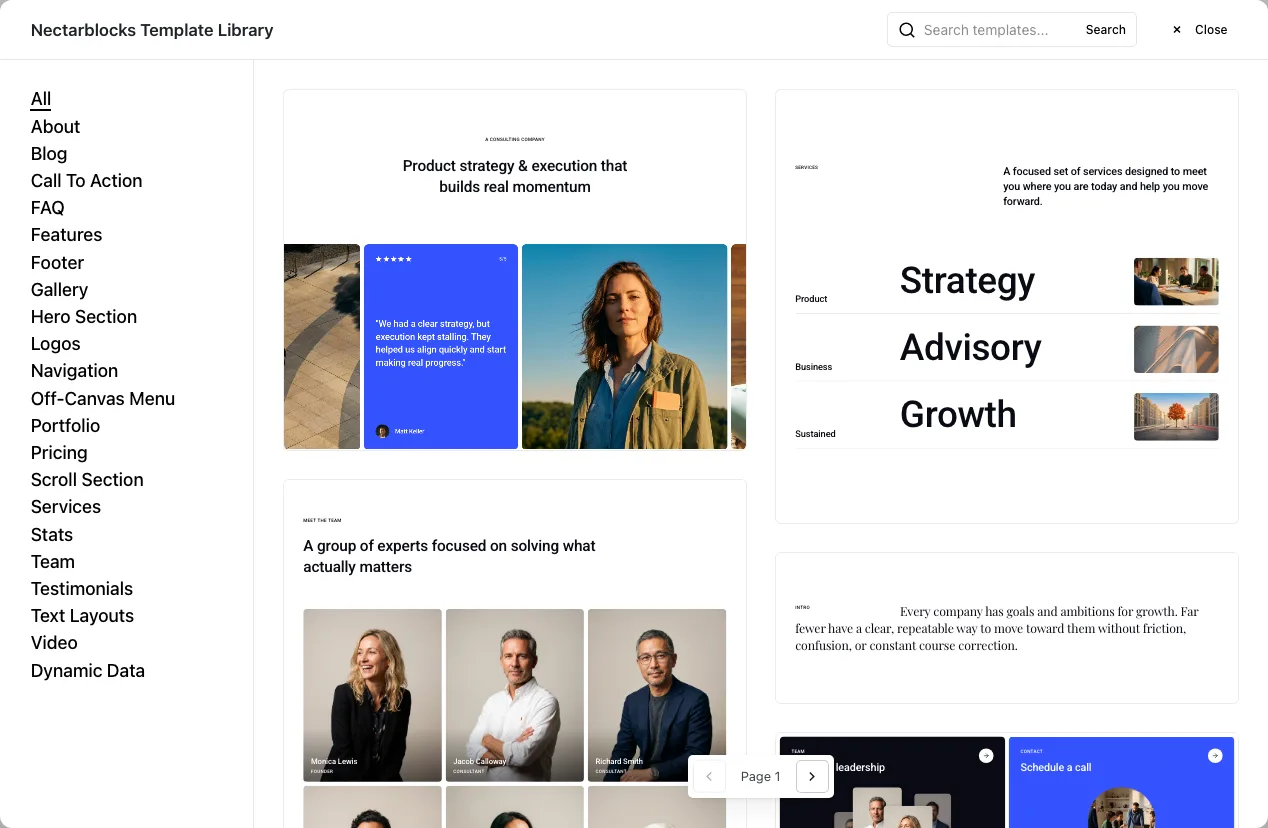
The Nectarblocks Template Library with a license.
With the license we counted 133 templates in 21 categories, including 8 header templates. That is far fewer than Salient Studio’s 470, but none of them can be older than 2024, when Nectarblocks launched. Templates load from Nectarblocks’ server. The first page of 20 took 1.3 seconds and weighed 1.1 MB. We inserted 6 templates, one click each, and the page rendered cleanly on desktop and phone. The same cleanup rules apply as with Salient Studio. Images stay on themenectar.com, a placeholder testimonial signed “CTO at ThemeNectar” praises Nectar Blocks, and the FAQ answers are lorem ipsum.
There are 9 starter sites. We imported Andromeda, the WooCommerce one. On stock PHP limits the first attempt failed after 46 seconds with only a “Failed to import demo.” message, because the server’s 30-second time limit ran out. Clicking Import again resumed and finished in 30 seconds. Nothing tells you that a second click works.
The result matched the vendor’s preview in layout, fonts and colors, but it had faults:
- Missing categories. The Explore grid showed 2 of 4 category tiles, because the block kept the demo’s category IDs.
- Vendor links. The home page had 16 links back to the vendor’s demo site, and 12 images and videos still loaded from it.
- An unbuyable product. The import did not create the Color, Gender and Season attributes, so the Beanie had an empty Color dropdown and could not be added to the cart.
- Empty filters and odd reviews. The shop’s filter column was empty, and product pages showed “Based on 2 reviews” next to “There are no reviews yet.”
The Nectarblocks theme and WooCommerce
The Nectarblocks theme has its own Customizer controls and useful shop features. Quick View worked on phones, and adding a product opened a cart drawer without reloading. Product galleries rendered correctly, while visible hook markers helped locate reusable sections.
The Theme Builder adds 6 WooCommerce templates: single product, product archive, cart, checkout, My Account and order confirmation. Created from Theme Builder > Add New Template, the product template starts with 31 blocks. Once published, these templates replace the theme’s shop pages, along with its Filters button and Quick View. Global sections offer 20 WooCommerce locations, but 14 of them, the cart and checkout spots, never show up on WooCommerce’s default block cart and checkout pages.
Using Salient and Nectarblocks on one site
ThemeNectar says you can add Nectarblocks to a Salient site for new pages. We tried it with Salient, its 10 plugins and the Nectarblocks plugin, without its theme. Both kinds of page worked, logged no errors and used the same 1,245-pixel content width. Salient 18 even has code to match the block editor’s width to its own when Nectarblocks is active.
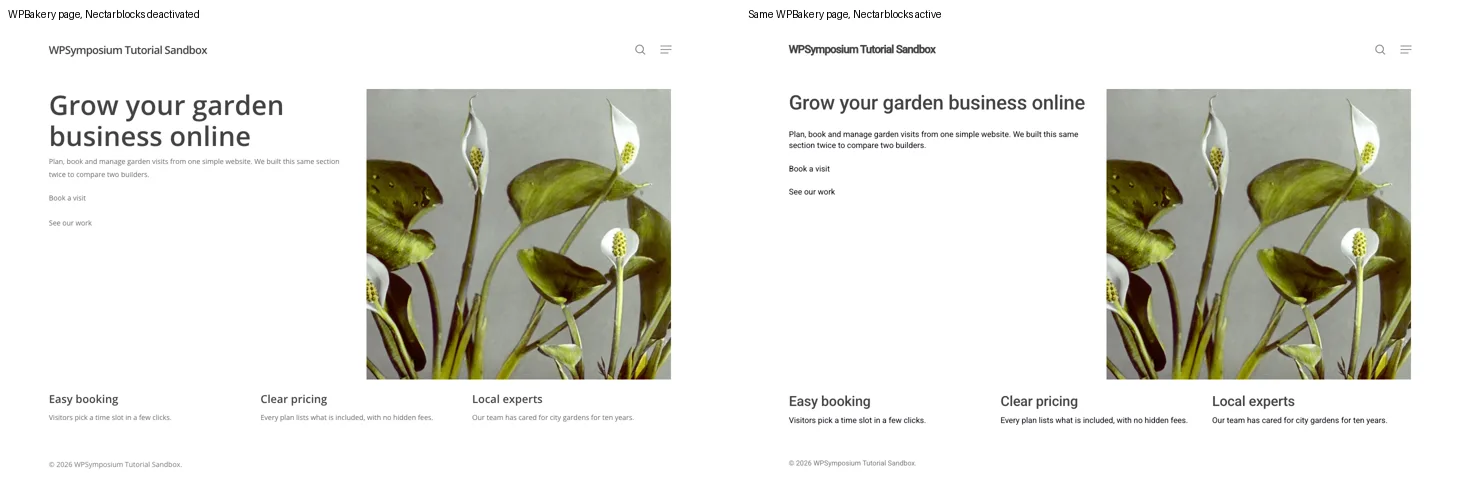
The same Salient WPBakery page with Nectarblocks off (left) and on (right).
The problems start the moment you activate it:
- It replaces Salient’s fonts site-wide. Nectarblocks’ global typography took over every page, including old WPBakery pages. Our H1 went from Open Sans 54px to Roboto 40px, and body text from 14px grey to 16px black, with no notice. The fix is Nectarblocks > Plugin Options > “Disable Core Typography Rules”, which is off by default.
- It adds weight to every page. Nectarblocks loaded its animation library and scripts even on pages without its blocks. On our WPBakery test page, that was 6 more requests and 111 KB, and LCP went from 2.40 to 2.99 seconds in our local lab test. Two sets of Google Fonts loaded too.
- Portfolio links break. Salient Portfolio and Nectarblocks’ own portfolio both use the “portfolio” address, so our Salient project returned a 404 error. Turning off Nectarblocks > Modules > Portfolio Post Type and resaving permalinks fixed it.
- The block editor gets heavy. With Nectarblocks, opening a new page in the block editor downloaded 16,859 KB, against 6,142 KB without it. On a second visit, 8,878 KB came down again: four icon sets and font lists that Nectarblocks marks as never to be stored, so the browser fetches them on every visit. Our sandbox does not compress these responses. With gzip, which most hosts use, those four downloads would be about 2.7 MB. The WPBakery editors were not affected.
- The tour gets in the way. The Nectarblocks tour covered the editor even when we only came to click the WPBakery button, and pressing Enter in the block editor makes a Nectarblocks text block instead of a normal paragraph.
There were no duplicate global sections or mega menu systems. Nectarblocks switches off its own when Salient Core is active. Without its own theme, Nectarblocks also had no Theme Builder on our combined site, so no header builder and no Nectarblocks templates for posts, archives or shop pages. ThemeNectar’s docs say its visual hooks and the starter site importer’s theme options need the theme too.
WPBakery vs Nectarblocks: the same section built twice
We compared the same small hero and feature section in both builders.
WPBakery was quicker to build with in our test. The finished pages downloaded almost the same amount, about 570 KB, and showed their main content in around three seconds on desktop.
Nectarblocks produced cleaner markup, but mixing it with Salient still meant loading files from both products.
Moving old pages is not possible. A WPBakery page opened in the block editor is one Classic block of shortcodes, and “Convert to blocks” turned it into WordPress Shortcode blocks, not Nectarblocks blocks. If you later remove WPBakery, those pages show raw shortcode text.
Nectarblocks page weight
Nectarblocks pages were light in our local lab test, with the same method as above. The imported Andromeda home page made 64 requests and weighed 815 KB on desktop, with LCP at 1.87 seconds. Our own 64-block landing page was 573 KB, and a plain page 272 KB. The animation library and jQuery load on every page, even the plain one. The Andromeda shop and Salient’s Ecommerce-Robust are different demos, so this is not a like-for-like contest, but Nectarblocks starts lighter.
Nectarblocks updates
With a license, Nectarblocks checks for updates every 4 hours, and Check for Updates confirmed 3.4.0 was current. Its release page lists 50 releases, starting with an early build in April 2024 a month before launch, 13 of them in the past 12 months.
Updates, License and What Salient Connects To
After our license was activated, the Salient dashboard showed a “Lifetime ThemeNectar License” badge, a Remove button and a One-Click Updates switch. The Support card said “Your support is active.” but showed no end date. With one-click updates on, WordPress’s normal update check reached ThemeNectar and reported 18.4.1 as the latest version. No newer release came out during our test, so we could not run a real update. ThemeForest buyers get updates through ThemeForest instead.
Activation only unlocks the demo importer, one-click updates and the support status. The builder, Studio, theme options and WooCommerce features all worked without a key on our unlicensed sandboxes, and no upgrade nags appeared.
Salient is updated often. ThemeNectar’s changelog lists ten 18.x releases between November 2025 and October 2026. Version 18.3.0 in September added license activation, and 18.4.0 on October 12 was tested up to WordPress 7.1 and updated its templates for WooCommerce 11.2.
On what the theme connects to: when you enter a key, it is sent to api.themenectar.com with your site’s hostname and your PHP, WordPress and theme versions. As imported, with local fonts on, the shop home page loaded nothing from other servers. Product pages called Gravatar for reviewer avatars. The demo import and any Studio section you insert do pull images from themenectar.com. The editors also load files from themenectar.com and ajax.googleapis.com, and the WPBakery About page loads a script from platform.twitter.com.
Pricing and License Terms
A ThemeForest Regular License costs $60 for one site, with lifetime updates and six months of support. Twelve months of support costs $18 more. The $2,950 Extended License has different use rights, so check the terms for a site whose users pay for access. Buying directly from ThemeNectar adds one-click updates and allows a live site plus up to five staging copies; its price appears after sign-in.
Nectarblocks is a separate purchase. Professional covers one site for $69.99 a year or $179.99 once. Agency covers up to 1,000 sites for $249.99 a year. Annual plans include a year of support and updates; the lifetime plan ties that entitlement to how long Nectarblocks is sold.
Prices were checked on October 16, 2026. ThemeForest prices include the buyer fee but not tax. Nectarblocks showed its Professional prices as discounts from $79.99 and $199.99 and offers a 14-day refund.
Each Salient license covers one live site. ThemeNectar’s license page says a direct license also covers up to 5 development or staging copies, recognized by their hostnames, and that there is no multi-site or agency license, only volume discounts at checkout. The Regular License is for sites people visit for free; you need the Extended License only when visitors pay to access the site itself. Building a site for a paying client is fine on a Regular License, but each client site needs its own. Nectarblocks licenses are perpetual. ThemeNectar says the version you have keeps working if yours expires, but new features, templates, updates, bug fixes and support stop. The template library and starter sites also need an active key: both were locked on our sandbox without one, so an expired license may lock them too. We did not test an expired key.
Support and Documentation
We did not open a support ticket, so we cannot rate support. ThemeNectar’s docs say tickets go through your ThemeNectar account, not Envato, with replies usually within 24 hours on business days. Every purchase includes 6 months of support, and you can renew it in 6-month periods without buying the theme again. The old Ticksy forum is now a read-only archive. Support does not cover custom work, hosting or third-party plugins.
Older reviews describe a PDF manual and video tutorials. Salient now has a full documentation site. During testing we used its written pages on plugins, the Home Slider, performance, support and licensing. They are step-by-step guides, and the how-to pages say which version they were checked against.
What We Could Not Test
- A second, non-shop demo import, or a legacy demo and its placeholder images.
- A real one-click update, since no newer Salient or Nectarblocks release came out during testing.
- Card payments, PayPal or Stripe, and order emails. We only tested Cash on Delivery.
- Lighthouse and PageSpeed Insights scores, CPU slowdown and real hosting. Our numbers are local page-load timings.
- The weight and speed of a plain blog post. We measured the home and product pages.
- Tablet widths.
- Rank Math on the imported shop and Google’s Rich Results Test.
- Smush, and whether its lazy loading clashes with Salient’s.
- WPML, WP Rocket, Slider Revolution and other paid plugins, and the Instagram and social widgets older reviews mention.
- WPBakery AI generation, which needs a separate WPBakery subscription.
- Salient’s Custom Branding plugin, which we only looked at.
- Whether inserted Studio templates follow your global fonts (we only checked colors), per-device column settings for shop pages, and the image mask element.
- What happens to portfolio projects and sliders after a theme switch.
- Nectarblocks: the other 8 starter sites, a checkout on the Nectarblocks shop, uploaded and Adobe fonts, blog archive layouts in the Nectarblocks theme, whether the hard-to-grab block handle a 2024 review mentions is fixed, WooCommerce on a site running both Salient and Nectarblocks, and a Salient global section built with Nectarblocks blocks.
Salient Alternatives
Uncode is the closest alternative if you like WPBakery and want detailed control over creative sites and stores. Astra is a simpler starting point for the block editor or Elementor. If you want a different visual builder with a lifetime option, compare Divi.