Squarespace vs Wix (2026): Which One Should You Pick?
Choose Squarespace for a portfolio or small shop where polished design matters most. Choose Wix if you want more built-in business tools and a free plan to learn on. Both simplify maintenance, but moving away later takes more work than changing a WordPress host.

Pricing: what you actually pay
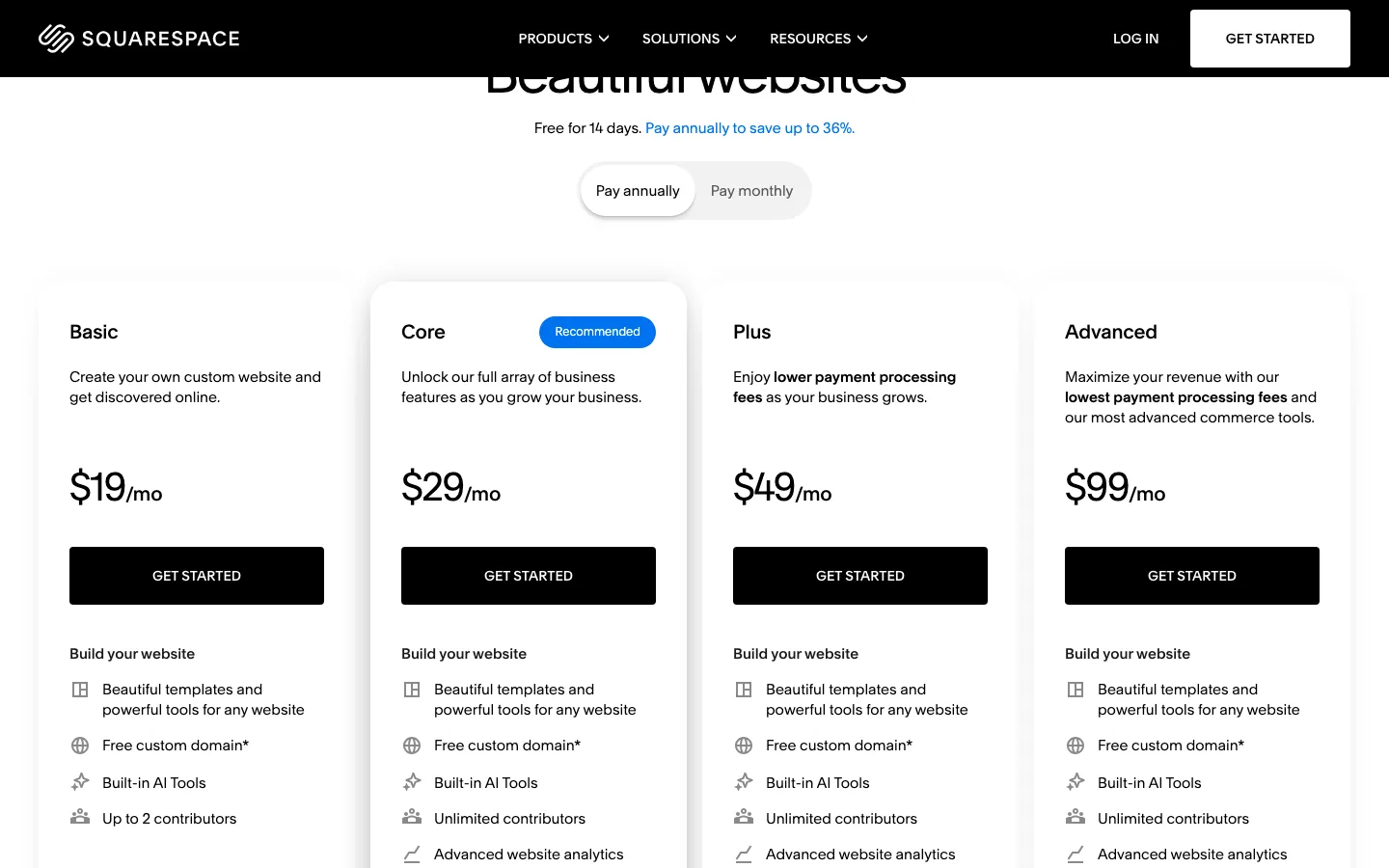
Squarespace’s pricing page with annual billing selected.
Squarespace has four website plans. Here is what each costs as of October 2026:
Squarespace Basic costs $228 annually, equivalent to $19 monthly, or $25 month to month. It charges 2% on store sales and 7% on digital content and memberships. Core costs $348 annually at $29 monthly, or $39 month to month, removing the store fee but charging 5% on digital content.
Plus costs $588 annually at $49 monthly, or $65 month to month, with no store fee and 1% on digital content. Advanced costs $1,188 annually at $99 monthly, or $139 month to month, with neither platform fee. Payment processing remains separate.
Every site starts with a 14-day free trial, and annual plans include a free domain for the first year. Squarespace refunds annual plans canceled within 14 days, minus the domain cost, but does not refund monthly plans.
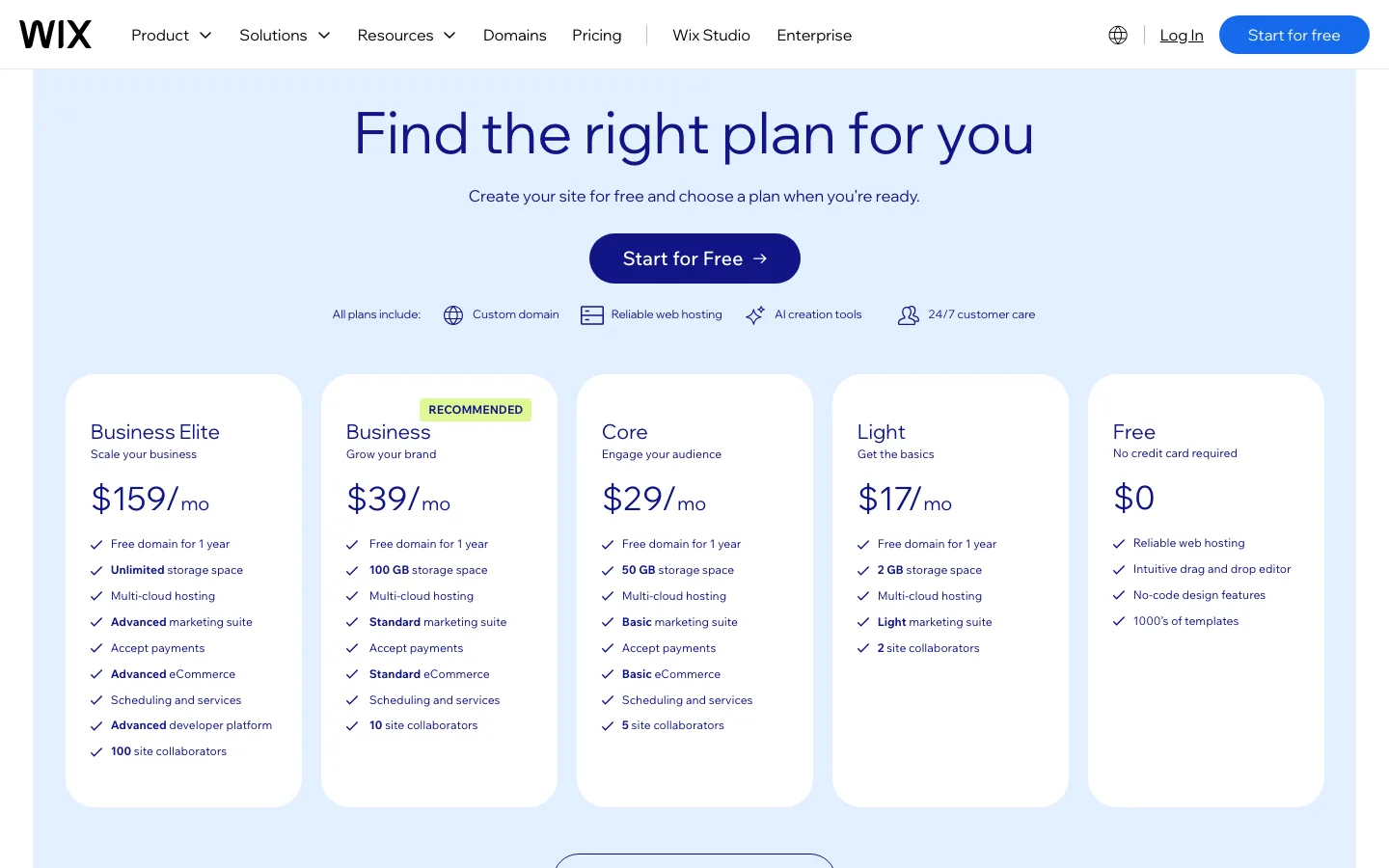
Wix’s pricing page, which shows yearly prices only.
Wix has a free plan and four paid plans:
Wix Free provides 500 MB with branding and no online selling. Light costs $204 annually, equivalent to $17 monthly, with 2 GB and no store. Core costs $348 annually at $29 monthly, with 50 GB and online selling.
Business costs $468 annually at $39 monthly with 100 GB. Business Elite costs $1,908 annually at $159 monthly with unlimited storage. Both support online selling.
Wix’s pricing page states that the prices shown are for yearly plans paid up front. Monthly billing exists, but the monthly price only appears at checkout, which needs an account, so we cannot quote it here. Paid plans include a free domain voucher for the first year, and Wix gives a full refund on new plans canceled within 14 days, whether monthly or annual.
Which is cheaper?
- Cheapest ad-free site: Wix Light at $17 a month, versus Squarespace Basic at $19.
- Cheapest way to sell: Squarespace Basic at $19 a month plus a 2% fee on sales. Wix’s lowest selling plan is Core at $29.
- The break-even point: Squarespace Core costs $10 a month more than Basic and drops the 2% fee. Two percent of $500 is $10, so once you sell more than about $500 a month, Core is the cheaper Squarespace plan.
- The popular middle plan: both Core plans cost $29 a month billed annually, or $348 a year.
Remember domain renewals after year one, and any paid apps or extensions you add.
Ease of use and editors
Both are built for people who have never made a website. You pick a template or describe your site to an AI builder, then edit on the page.
Wix uses a free-form drag-and-drop editor. You can place almost any element anywhere on the canvas. Its newest templates are labeled “Wix Harmony”, and Wix describes Harmony as a mix of AI prompting and hands-on drag and drop. Its built-in AI agent, Aria, can answer questions and make changes for you. AI creation tools are included on every plan.
Squarespace uses a grid-based editor called Fluid Engine. You drag and resize blocks, but they snap to a grid, which keeps layouts tidy on desktop and mobile. With its Blueprint AI builder, you describe your business and it creates a starting site with suggested content and styling. AI features run on credits: Basic gets 10 credits once, while Core, Plus and Advanced get 20, 40 and 120 credits a month.
In practice, the grid makes Squarespace harder to break and Wix easier to bend. If you like control, Wix. If you like guardrails, Squarespace.
What happened when we built the same site on both
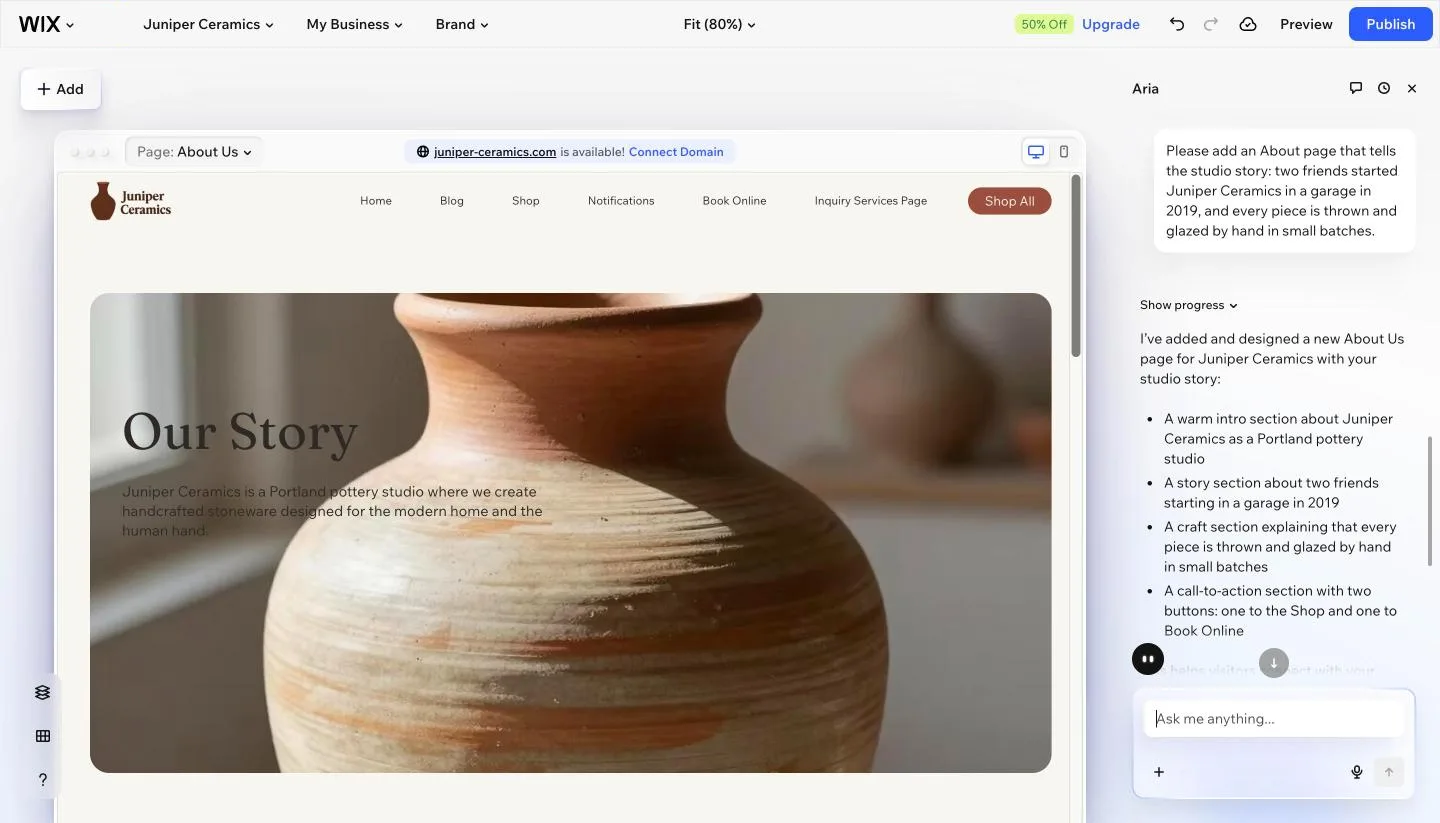
The Wix Harmony editor after we asked Aria to add an About page for our test site. Wix free plan.
Wix’s Aria setup took about 13 minutes to produce a usable homepage, mostly waiting for generation. It created collections, nine sample products, three relevant blog posts, bookings and services, but also reinstated a disabled bookings page, invented contact details and produced a misnamed product. Asking for an About page took another nine minutes. Preview showed an ad-removal bar and the editor showed discount offers.
Squarespace Blueprint took under three minutes after questions about the site’s topic, goals, tone, pages and styling. It produced Home, About, Contact and Shop pages with a form and sample products, but omitted a blog and left placeholder footer identity details. We added a blog in three clicks and edited blocks directly. The trial countdown remained on dashboard screens.
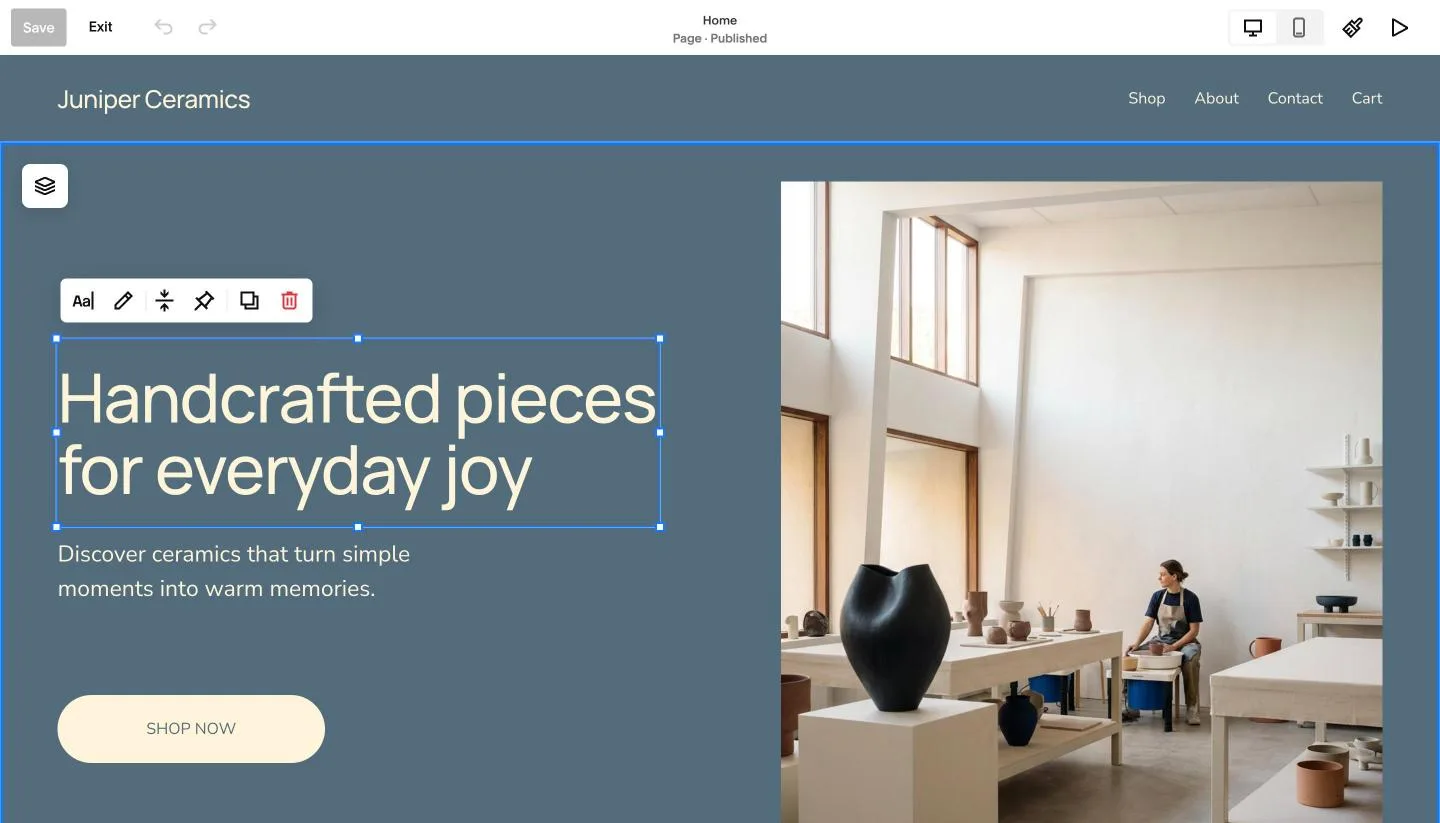
Editing the Blueprint homepage on our Squarespace trial. Clicking a block shows a small toolbar to edit, move, duplicate or delete it.
Wix’s AI did more of the writing: every section of the homepage had on-topic copy, and the blog posts were real first drafts. It was also slower and less careful, so you need to check each page. Squarespace’s Blueprint finished much faster and looked more polished, but left more for you to fill in, such as the blog and the footer. Each of our two big Aria requests (build the site, add an About page) took about nine minutes in our session (our browser tab was in the background, which may have slowed it), while Squarespace edits were instant because you make them yourself.
Templates and design
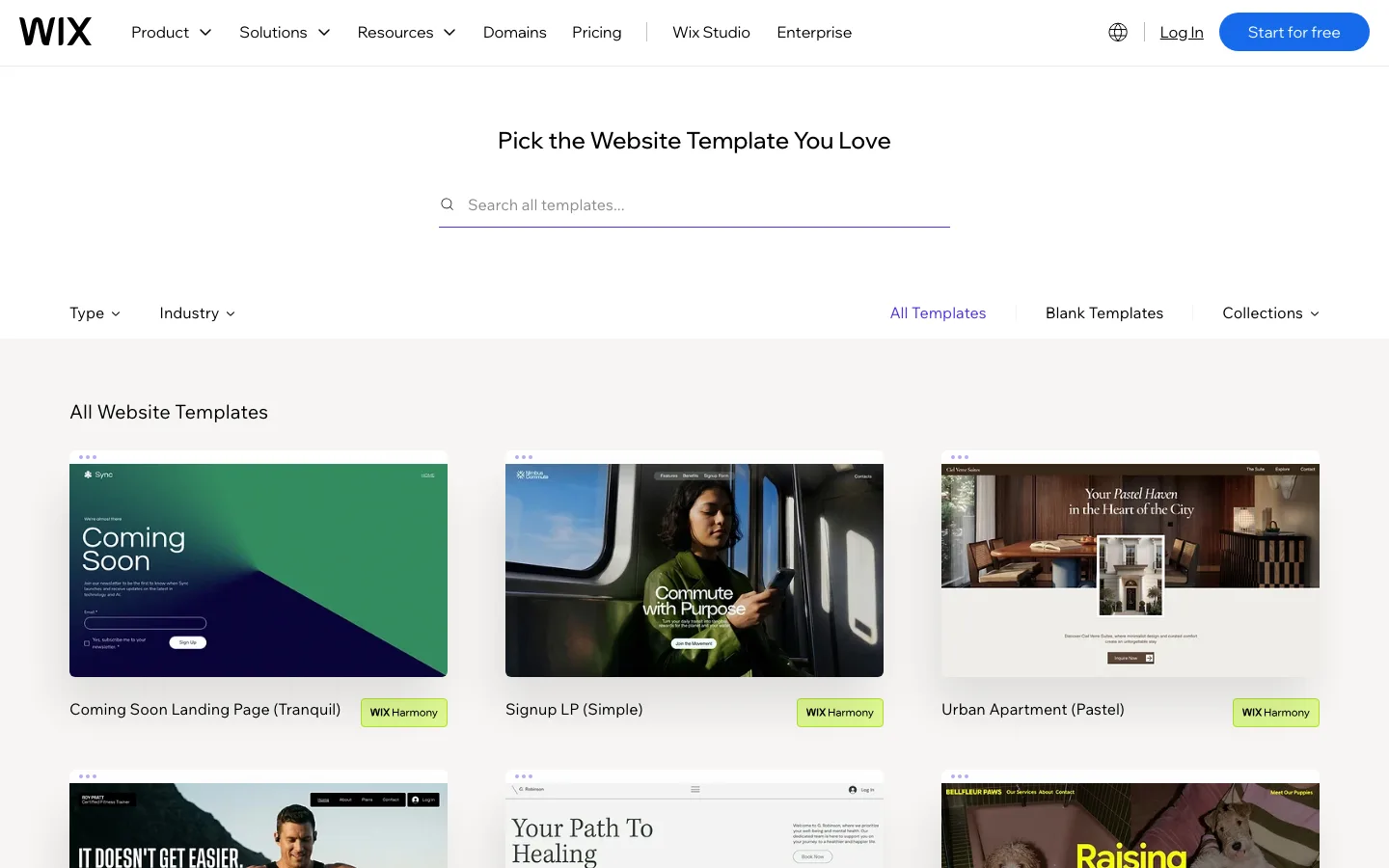
The Wix template gallery with its Type and Industry filters.
Wix says it has more than 2,000 templates, and its gallery runs to hundreds of pages. You can filter by type (store, portfolio, blog, one-page) and by industry. Many templates come in several styles, such as Fitness Trainer (Dynamic) or Photographer (Muted).
Squarespace’s gallery listed 202 templates when we checked, with filters for site type (online store, portfolio, memberships, blog, scheduling, courses) and topic. There are far fewer, but they share a consistent, editorial look that is the main reason designers choose Squarespace.
Both galleries open live previews without an account. On Squarespace, the preview page also lets you try the template’s preset color palettes and font packs before you start a trial.
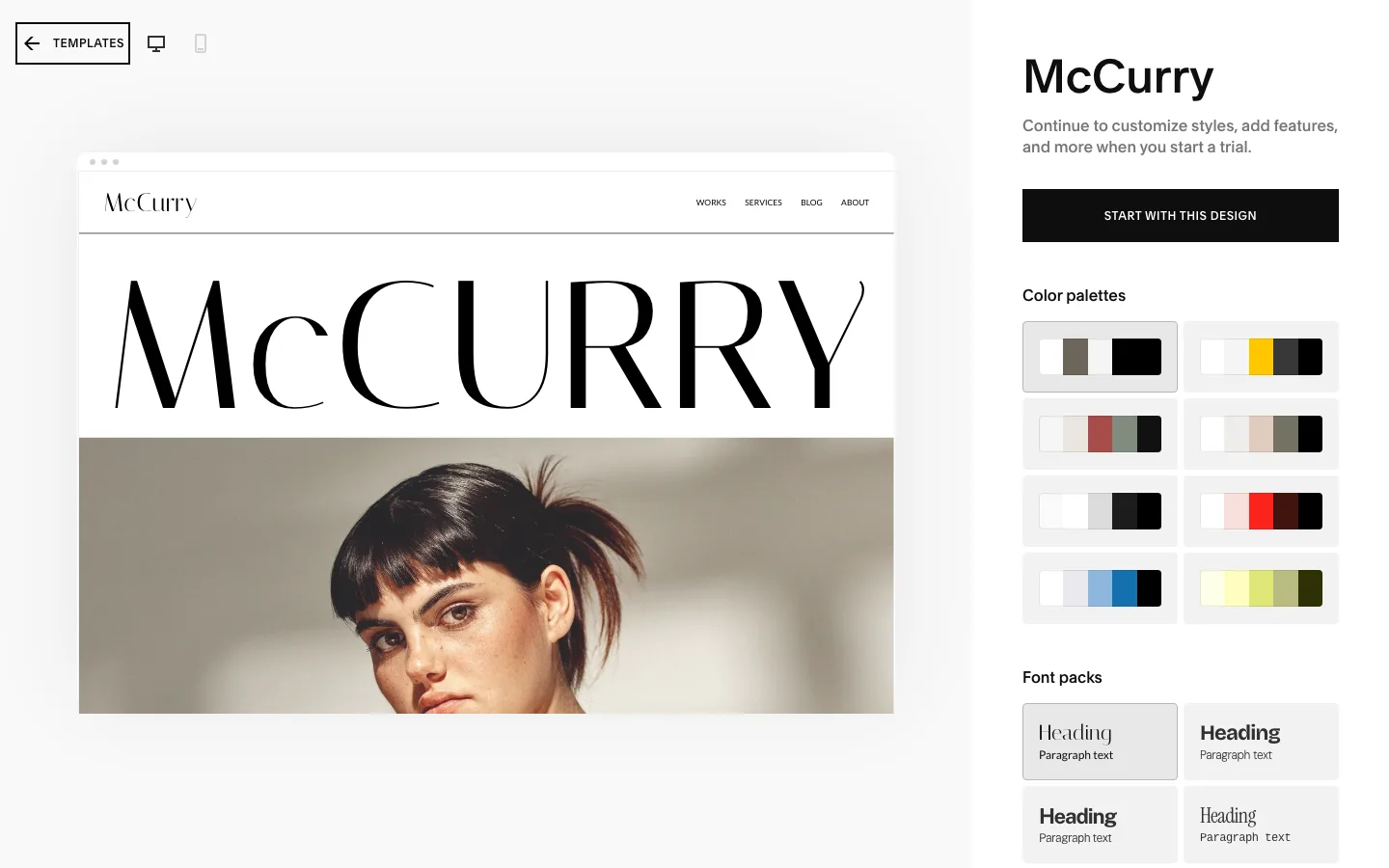
The McCurry template preview on Squarespace, with its color palettes and font packs on the right.
Can you change your template later?
This matters more than the template count:
- Wix: you cannot switch the template of a site you already created. Wix’s help center says to create a new site with the new template, copy elements and pages across, import your media, and then move your plan and domain to the new site.
- Squarespace: on current version 7.1 sites you also cannot switch templates. Instead, Squarespace’s help center says to change the look inside the same site: edit colors and fonts, pick a preset style pack, or add pre-built page and section layouts. That keeps your content in place and is less work than a Wix rebuild.
Ecommerce
Squarespace selling starts on Basic at $19 monthly on annual billing, with a 2% store fee; Core and higher remove that fee. Digital-content and membership fees are 7%, 5%, 1% and 0% across Basic through Advanced. Wix selling starts on Core at $29 monthly, with no listed extra store-sales fee, but its Pricing Plans app charges 4% on Core, 2% on Business and none on Business Elite.
Standard US card rates are 2.9% plus $0.30 on Squarespace Basic/Core, 2.7% on Plus and 2.5% on Advanced, each with the same fixed fee. Wix Payments uses 2.9% plus $0.30. American Express costs 3.2% plus $0.30 at Squarespace and 3.7% plus $0.30 at Wix.
Squarespace’s help center lists a 10,000-product site limit; Wix allows 50,000 from Core. Both offer abandoned-cart recovery on selling plans. Squarespace automated tax starts on Core at 0.05% to 0.15% per transaction, capped at $0.99. Wix includes 100 monthly tax transactions on Business or 500 on Business Elite. Wix has marketplace selling from Core; Squarespace offers Google Shopping from Core and other channels through extensions.
Wix is the stronger store builder for most sellers. It allows five times as many products, includes dropshipping (25 products on Core, 250 on Business), lets you sell on marketplaces and social channels, and charges no platform fee on product sales. Watch two gaps: automated sales tax starts on Business, and the Pricing Plans app for memberships and subscriptions takes a fee of up to 4%.
Squarespace is better for small, design-led shops and for selling digital products, courses and memberships alongside a portfolio. Its checkout runs on your own domain on every plan, and abandoned cart emails are included even on Basic. The catch is the 2% fee on Basic and the 7% fee on digital content until you move up.
Neither store could take a test order without paying or connecting payments. On our Squarespace trial, the cart worked, but checkout showed “Checkout is closed. This store isn’t set up to process payments.” On the Wix free plan, we could add products (Aria had already added nine), but Wix Payments showed “Not Connected”, and Wix’s pricing lists selling online only from Core. Adding a product took about a minute on Wix and two on Squarespace, which insisted on a SKU.
Note that Squarespace’s pricing page says you can “sell unlimited products”, while its help center gives a site-wide limit of 10,000 products. For almost every small shop, either number is plenty.
SEO and blogging
Both cover the SEO basics well: editable page titles and descriptions, automatic sitemaps, structured data, mobile-friendly pages, free SSL, Google Search Console integration, and an SEO checklist. Both now also sell “AI Visibility” tracking, which checks whether your brand shows up in answers from AI chatbots.
Wix gives you more technical control. You can edit your robots.txt file, set canonical tags, import up to 500 redirects at once, and change the URL structure of blog posts and products (by default they sit under /post/ and /product-page/). That makes Wix the better pick if SEO is a big part of your plan.
Squarespace is simpler and does a sensible job by default. Code injection, which some tracking scripts need, is only on Core and above.
For blogging, Squarespace places no limit on the number of posts, and its export tool includes one blog with all its posts and up to 1,000 comments per post. Wix’s blog has plenty of features, but you cannot take your posts with you. If you are building a content site, that difference matters.
Speed: what we measured on two official demos
We ran Google’s Lighthouse tool (version 13.5.0) three times each on two comparable portfolio template demos on October 4, 2026: Wix’s Photographer (Muted) demo and Squarespace’s McCurry demo. Mobile runs use Lighthouse’s default simulated mid-range phone on a slow connection. The results below are the median of three runs.
Wix’s Photographer demo scored a median 71 on mobile, with runs from 69 to 88, largest content at 3.8 seconds and 121 ms blocking time. Squarespace’s McCurry demo scored 60, ranging from 58 to 61, with largest content at 10.2 seconds and 151 ms blocking time.
Desktop medians were 93 for Wix, ranging from 82 to 95, and 63 for Squarespace, ranging from 58 to 64. Largest content appeared at 1.5 and 2.5 seconds, with layout shift of 0.00 and 0.35. Page weights were about 2.3 MB and 2.4 MB. These are two specific demo designs, not a platform-wide speed guarantee.
The Wix demo scored better on both mobile and desktop. On mobile, the Squarespace demo’s largest element was a big photo, and Lighthouse estimated about 550 KB of possible image savings. On desktop, almost all of its layout shift came from the large scaled headline settling into place. A score of 0.35 is in Google’s “poor” range.
Read this as a measurement of two demo pages on one day, not a verdict on every site. Your own images, fonts, apps and content will matter more than the platform. The Wix demo is served from wix.com, and the Squarespace demo from a squarespace.com address, so neither has a custom domain or real content.
Apps, extensions and business tools
Wix’s App Market is much bigger. Wix’s help center says it has over 800 apps, made by Wix and by outside developers. Wix also builds in bookings, events, restaurant orders, loyalty programs, email marketing and a CRM, with limits that grow with your plan.
Squarespace keeps more in-house and has a smaller marketplace. Its help center lists Squarespace Extensions for things like shipping, tax, inventory sync, reviews and translation. Its own add-on products, such as Squarespace Scheduling (from $16 a month billed annually, or $20 monthly) and Email Campaigns, cost extra.
If you know you need a specific tool, check the marketplace before you commit. Wix is more likely to have it.
Ownership and moving away
Neither platform lets you take your site with you in full.
- Wix: your site has to run on Wix’s servers. Wix’s help center says you cannot host a Wix site elsewhere, and blog posts cannot be exported to other platforms. The content belongs to you under Wix’s terms, but leaving means copying it out by hand.
- Squarespace: you can export an .xml file in WordPress format. It includes layout pages, one blog with its posts, text and image blocks, and gallery pages. It does not include store pages, portfolio pages, videos, style settings or custom CSS. Products can be exported separately to a .csv file. The help center says the site must be active and public; on our trial site the export ran, but the file held no page text or posts.
On our test sites, Wix’s site menu offered rename, preview, transfer, duplicate and trash, with no download option. Squarespace’s Settings had an Import and Export Content page with a WordPress export that takes a few clicks.
Squarespace is easier to leave, especially for a blog.
Support
Both list 24/7 customer support on every paid plan. Wix adds priority support on Business Elite. Wix also runs Wix Studio, a separate platform for agencies and freelancers who build sites for clients. We did not contact either support team, so we cannot judge response times or quality.
When WordPress is the better choice than either
We are a WordPress site, so here is the honest version. For many people, Wix or Squarespace is the right call: you pay one bill, and the company handles hosting, security and updates. WordPress asks more of you.
WordPress is the better choice when:
- You want to own everything. Self-hosted WordPress lets you export your whole site, move hosts, or change designs without rebuilding from scratch.
- Your site is mainly content. Blogs and publishers get unlimited posts, full control over URLs, and SEO plugins like Yoast and Rank Math.
- You need features neither builder has. WordPress has tens of thousands of plugins for memberships, directories, courses and more.
- Your costs will grow. As traffic and features grow, a well-chosen host can cost less than the higher builder plans. Our guide to managed WordPress hosting covers the trade-offs, and budget hosts like Hostinger start much lower.
The trade-off is upkeep. You handle updates, backups and plugin choices, or pay a host to do it. If you want drag-and-drop editing in WordPress, our WordPress page builder comparison is the place to start.
We go deeper in our head-to-head guides: Wix vs WordPress and WordPress vs Squarespace. For all three side by side, with year 1 and year 2 costs, see our WordPress vs Wix vs Squarespace comparison.