Kinsta vs SiteGround (2026): Real Costs and Which to Pick
Choose SiteGround for several small sites and a low first-year bill with email included. Choose Kinsta for a business site that benefits from managed migrations, malware cleanup and staging on every plan. After SiteGround’s introductory term, the price difference can be surprisingly small.
Pricing: year one vs year two
SiteGround: cheap first year, steep renewal
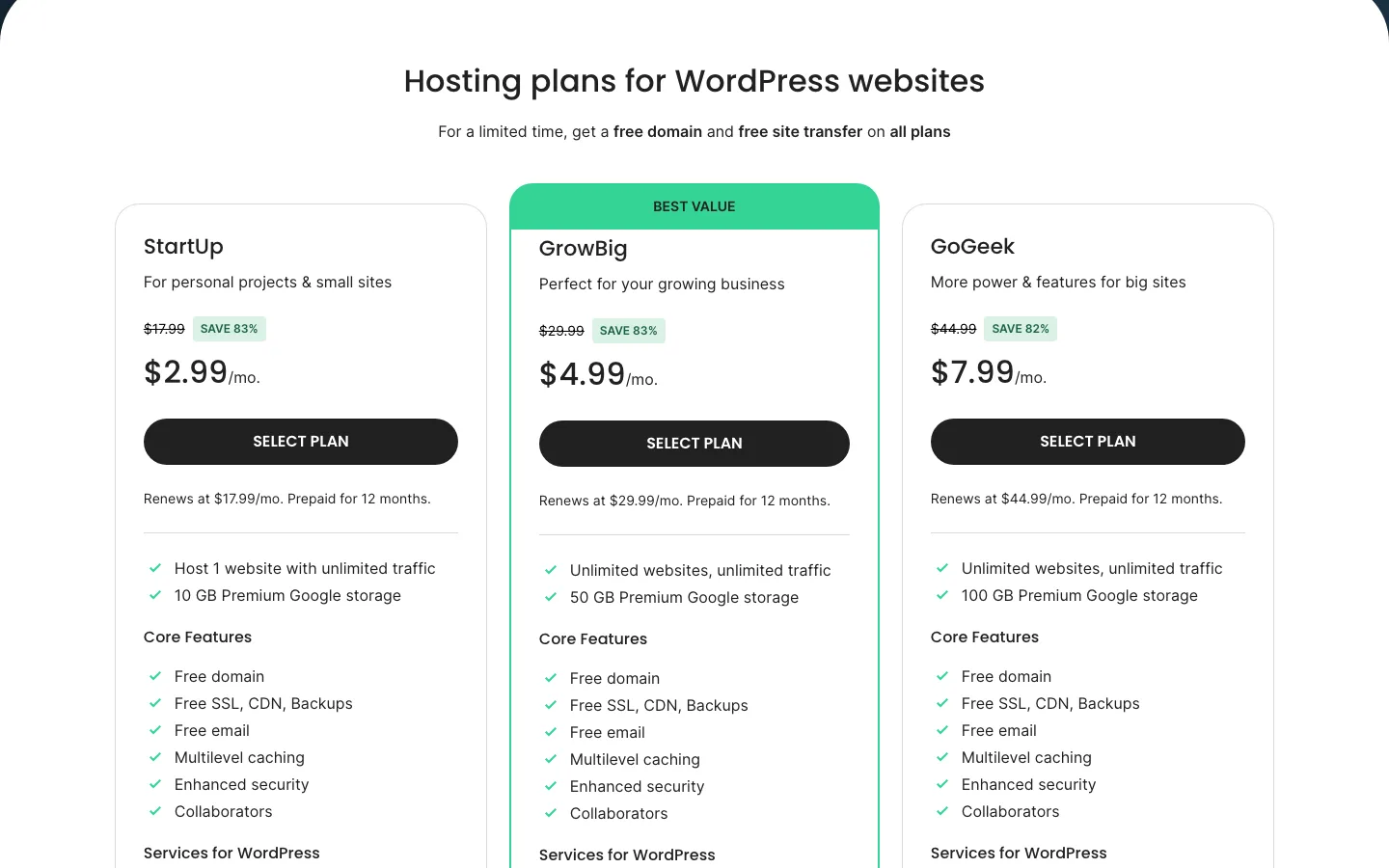
SiteGround’s WordPress hosting plans. Each card says “Prepaid for 12 months” and shows the renewal rate.
SiteGround’s intro prices need a 12-month prepay and apply to the first invoice only. After that you pay its standard rates, which SiteGround says have applied since September 7, 2023.
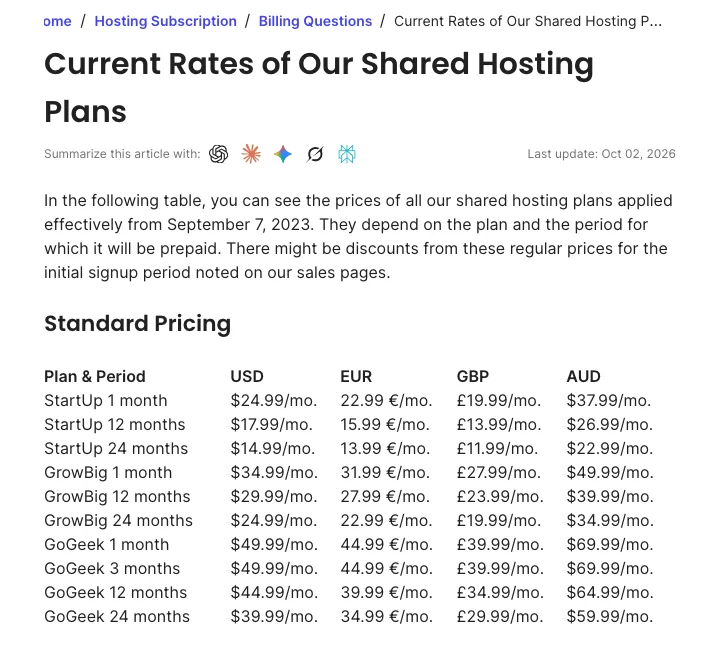
SiteGround’s standard rate table for shared hosting, last updated. These are the prices after the first term.
SiteGround StartUp costs $35.88 for the first year at $2.99 monthly, then $17.99 monthly on a yearly renewal or $14.99 on a two-year renewal. It covers one site, 10 GB storage and a suggested 10,000 monthly visits.
GrowBig costs $59.88 initially at $4.99 monthly, then $29.99 or $24.99 depending on renewal term, with unlimited sites, 50 GB and roughly 100,000 suggested visits. GoGeek costs $95.88 initially at $7.99 monthly, then $44.99 or $39.99, with unlimited sites, 100 GB and roughly 400,000 suggested visits. These visit figures are guidance rather than simple hard caps.
SiteGround calls the visitor figures “a point of reference, rather than a restriction.” The real limits are CPU seconds (300,000 a month on StartUp, 600,000 on GrowBig, 800,000 on GoGeek) and files, called inodes (200,000, 400,000 and 600,000).
Kinsta: one price, every year
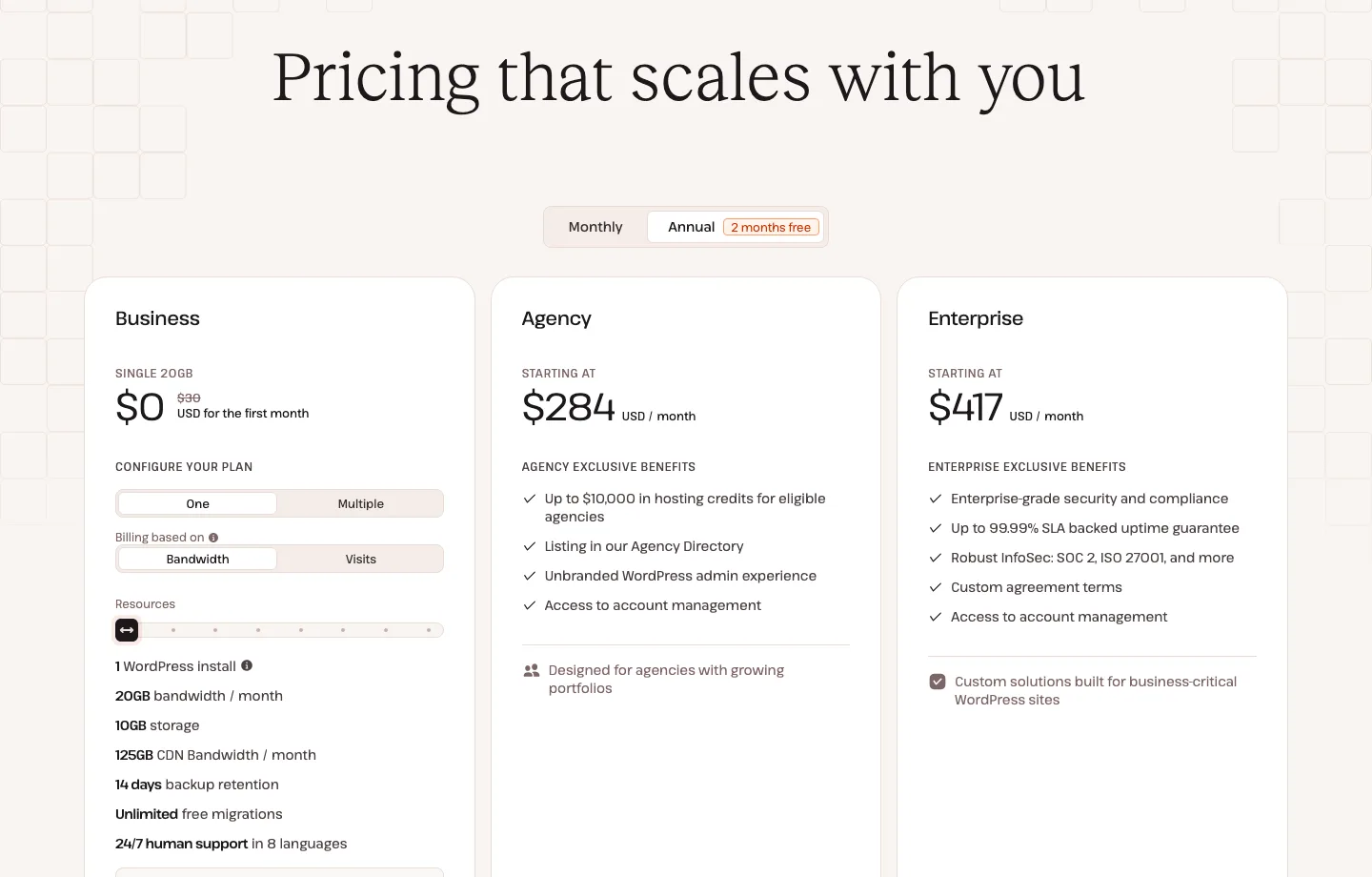
Kinsta has no intro discount, so there is no renewal jump. Its terms do allow price increases with notice. Annual billing gives two months free. Each standard plan comes in a visits version and a server bandwidth version at the same price.
Kinsta’s single-site options cost $35 monthly or $350 annually for 35,000 visits or 20 GB server bandwidth; $50 or $500 for 65,000 visits or 40 GB; and $90 or $900 for 125,000 visits or 65 GB. Each includes 10 GB disk and 14 days of daily backups.
WP 2 costs $70 monthly or $700 annually for two sites, 70,000 visits or 40 GB server bandwidth and 20 GB disk. WP 5 costs $115 or $1,150 for five sites, 125,000 visits or 65 GB and 30 GB disk. Both keep 14 days of daily backups.
The two cheapest single-site plans run on 2 PHP threads (the processes that build uncached pages) and do not allow WordPress Multisite. Our Kinsta review lists every plan, including Agency (from $340 a month) and Enterprise (from $500 a month).
What three years cost
Assuming you start on the term shown and renew yearly at the listed price:
Over three years, SiteGround StartUp totals $467.64: $35.88 initially and $215.88 in each following year. GrowBig totals $779.64 from $59.88 plus two years at $359.88. GoGeek totals $1,175.64 from $95.88 plus two years at $539.88.
Kinsta Single 35k costs $350 each year, totaling $1,050 over three years, while Single 65k costs $500 each year, totaling $1,500. These base-price comparisons do not include overages or optional services.
SiteGround wins on total cost at the small end. But look at the yearly rates from year two: GrowBig ($359.88) and Kinsta Single 35k ($350) cost about the same, and GoGeek ($539.88) costs more than Kinsta Single 65k ($500). GrowBig gives you more sites, more storage and email. Kinsta gives you more management for one site.
Overages and plan limits
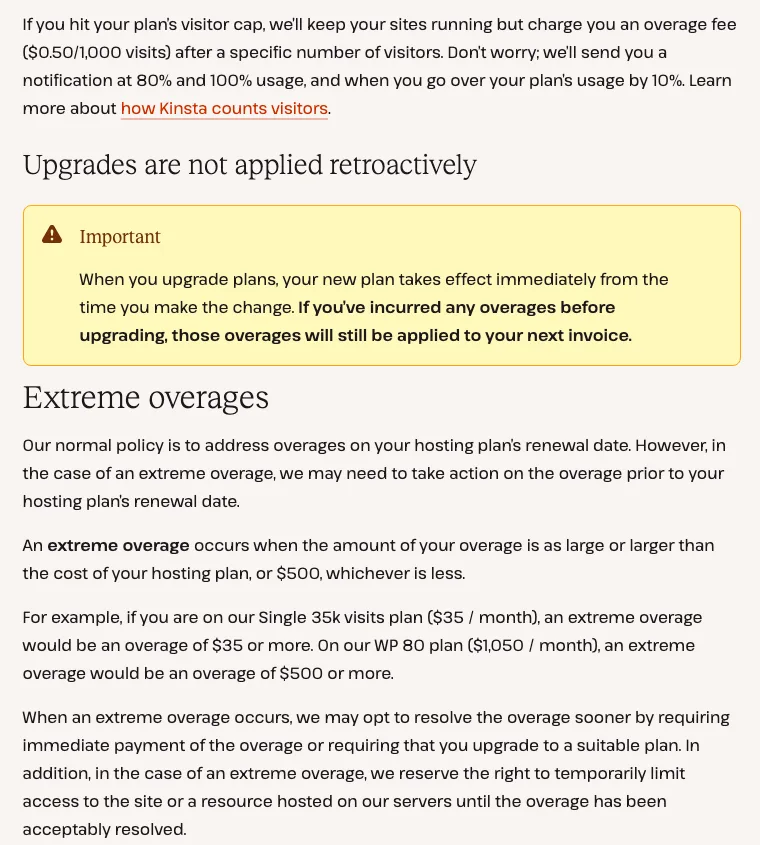
Two sections of Kinsta’s overages doc.: the visit overage fee and the “extreme overages” rule.
Kinsta keeps your site online when you pass a limit and bills the extra. It charges $0.50 per 1,000 extra visits, $0.50 per GB of server bandwidth, $2 per GB of disk a month and $0.05 per GB of CDN bandwidth. It emails you at 80% and 100% of a limit. If an overage equals your plan’s price or $500, whichever is less, Kinsta may ask for payment right away, require an upgrade or limit access. Kinsta counts each unique IP address in 24 hours as one visit, so bots can add up.
SiteGround’s shared plans list no overage fees. They cap CPU seconds and files instead, and SiteGround’s terms let it step in if you exceed a plan’s limits, so a busy site hits a ceiling rather than a bigger invoice. If you outgrow GoGeek, the next step is SiteGround Cloud.
Where SiteGround Cloud fits
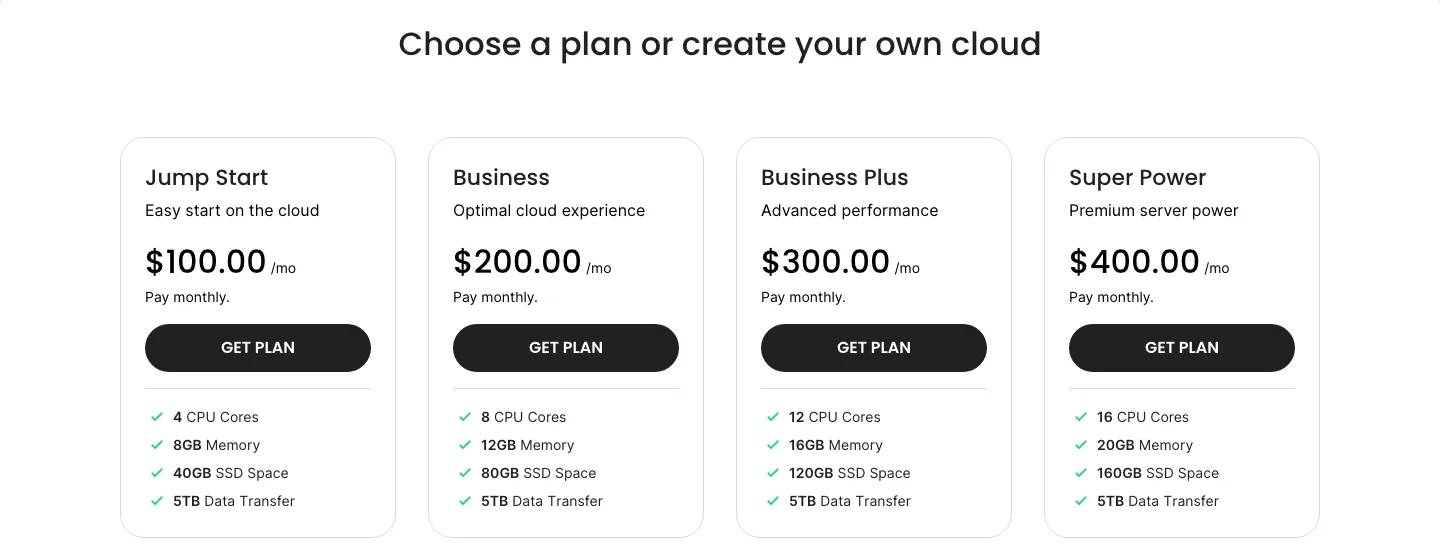
SiteGround’s Cloud plans, billed monthly.
If you want SiteGround at Kinsta-like prices, compare Kinsta with SiteGround Cloud, not shared hosting. Cloud starts at $100 a month for 4 CPU cores, 8GB of memory and 40GB of SSD, with unlimited sites, a dedicated IP, free email and optional autoscaling. You get fixed resources for many sites. Kinsta charges per site and per visit, with more management built in. The Cloud refund window is 14 days, not 30.
Features compared
Kinsta advertises unlimited team-assisted migrations, standard staging on every plan and an included APM tool. It keeps 14 days of daily backups on entry plans, allows five manual backups and one downloadable ZIP weekly. Premium staging costs $20 monthly, while automatic plugin and theme updates with visual checks and rollback cost $3 per environment; manual and bulk updates are available in MyKinsta.
SiteGround offers a self-service migration plugin and was advertising a limited free transfer. It keeps daily backups in another location for 30 days, adds on-demand backups and staging from GrowBig and Git on GoGeek, and includes scheduled WordPress and plugin updates. It uses SuperCacher and Memcached rather than Kinsta’s server and Cloudflare edge caching, and has no built-in APM.
SiteGround includes email and collaborator access through separate Client Areas, alongside a WordPress AI Agent with 20,000 monthly tokens. Kinsta does not host email, but allows unlimited role-based team users and provides an AI assistant in support chat.
Two more Kinsta details are worth knowing. Kinsta now offers automatic plugin updates, but as a paid add-on. It is free for 31 days, and free during the first month on Single 35k and WP 2. And Kinsta’s visit overage is $0.50 per 1,000 visits.
SiteGround’s AI Agent runs through a plugin. As of October 2026 that plugin averages about 1.6 out of 5 stars on WordPress.org from 97 ratings, many from people who said it appeared on their sites unasked. Check your plugin list after moving in.
Security and malware cleanup
Both hosts advertise firewalls and DDoS protection. Kinsta includes malware cleanup during migration and while hosted there. SiteGround sells scanning separately, puts one-click cleanup in a higher tier and may charge extra for difficult cases.
We tested SiteGround’s free Security Optimizer on a separate WordPress server, not a hosting account. Folder protection blocked PHP execution in uploads, login limiting worked and common hardening settings were available. After command-line activation, XML-RPC still accepted requests despite an enabled switch; toggling it in the dashboard applied the rule.
The post-hack tools include plugin reinstallation, password resets and forced logout. Reinstallation ran without a confirmation step, so use it deliberately. The plugin is useful hardening, but it does not replace cleanup or prove that the hosting service will recover a hacked site.
Speed: what we could measure
We could not benchmark either host’s servers without buying plans, so we measured public pages only. On October 4, 2026, from one location in the US, we timed each vendor’s own pages with curl (median of 10 requests).
On the vendor homepages, median server response was 308 ms for Kinsta and 428 ms for SiteGround. Their WordPress pricing pages responded in 233 and 425 ms. Their blog homepages were much closer, at 281 and 276 ms. These different public pages are not a matched hosting benchmark.
Kinsta’s pages came through Cloudflare with a Kinsta cache hit, SiteGround’s through a Google Cloud load balancer. These numbers say little about a small site on either host. Each company also publishes its own claims: Kinsta says edge caching cut time to first byte by an average of 48.6% in its testing, and SiteGround says WordPress sites moved to it in the first half of 2025 loaded 78% faster on average. Treat both as marketing.
The caching differences are real, though. Kinsta caches full HTML pages at Cloudflare’s edge on every plan. SiteGround caches full pages on its own servers by default, but its free CDN caches only static files; full-page caching at the CDN edge needs its Premium CDN. SiteGround’s caching plugin also only works fully on its own servers. When we tried its free Speed Optimizer plugin on a test install for our Hostinger vs SiteGround comparison, Dynamic Caching and the image tools only showed an “Available on SiteGround environment” message.
Dashboards: MyKinsta vs Site Tools
Neither host uses cPanel. MyKinsta puts staging, backups, caching, the APM tool, analytics, DNS, bulk plugin updates across sites and a file manager in one place, and since January 2026 it requires two-factor login. Site Tools gives each site its own panel for files, email, DNS, databases, backups, caching and the CDN, and GoGeek adds white-label access for clients. We could not log in to either without buying a plan, so this is based on each vendor’s published screens and docs. If you live in the dashboard every day, MyKinsta has more developer and multi-site tools. If you also need email and DNS for small sites, Site Tools covers more.
Support, uptime guarantee and refunds
Kinsta offers 24/7 chat in eight languages with an AI assistant, without phone support, and claims median first responses below two minutes. SiteGround begins with an AI help center, then provides human chat, tickets and phone, claiming over 90% first-contact resolution. These response figures are vendor claims.
Both state 99.9% uptime. Kinsta credits begin after 43 minutes of monthly downtime; SiteGround offers 5% of the monthly fee as extra hosting time under its terms. Kinsta’s 30-day refund is for first-time customers and excludes overages; SiteGround offers 30 days on shared hosting or 14 on Cloud.
Neither uptime guarantee pays much. On Kinsta’s annual entry plan, a three-hour outage earns about $5.83 in credit.
Infrastructure and data centers
SiteGround runs on Google Cloud in 11 locations: Iowa, Virginia, Dallas and Los Angeles in the US, plus London, Madrid, the Netherlands, Frankfurt, Paris, Sydney and Singapore. Kinsta is moving its WordPress hosting from Google Cloud to Oracle Cloud Infrastructure (OCI) and lists 30 data centers, including four in the US. Kinsta’s docs say most sites are offline for under a minute during the move, but the IP address can change and you cannot opt out. Our Kinsta review covers the move in detail.
Other hosts to compare
- WP Engine: Kinsta’s closest premium rival. See Kinsta vs WP Engine and WP Engine vs SiteGround.
- Cloudways: monthly billing on a cloud server you pick, with no renewal jump. Read our Cloudways review and Cloudways vs SiteGround.
- Hostinger: cheaper than both over several years. See Hostinger vs SiteGround.
For a wider shortlist, see our guide to the best managed WordPress hosting or browse all our WordPress hosting reviews.