Kinsta Review 2026: Is It Worth the Premium Price?
Kinsta suits a business site or store that can justify paying for managed security, migrations and specialist support. Its stable renewal pricing is welcome, but entry-plan limits still matter. A small personal blog will usually get better value from a budget host.
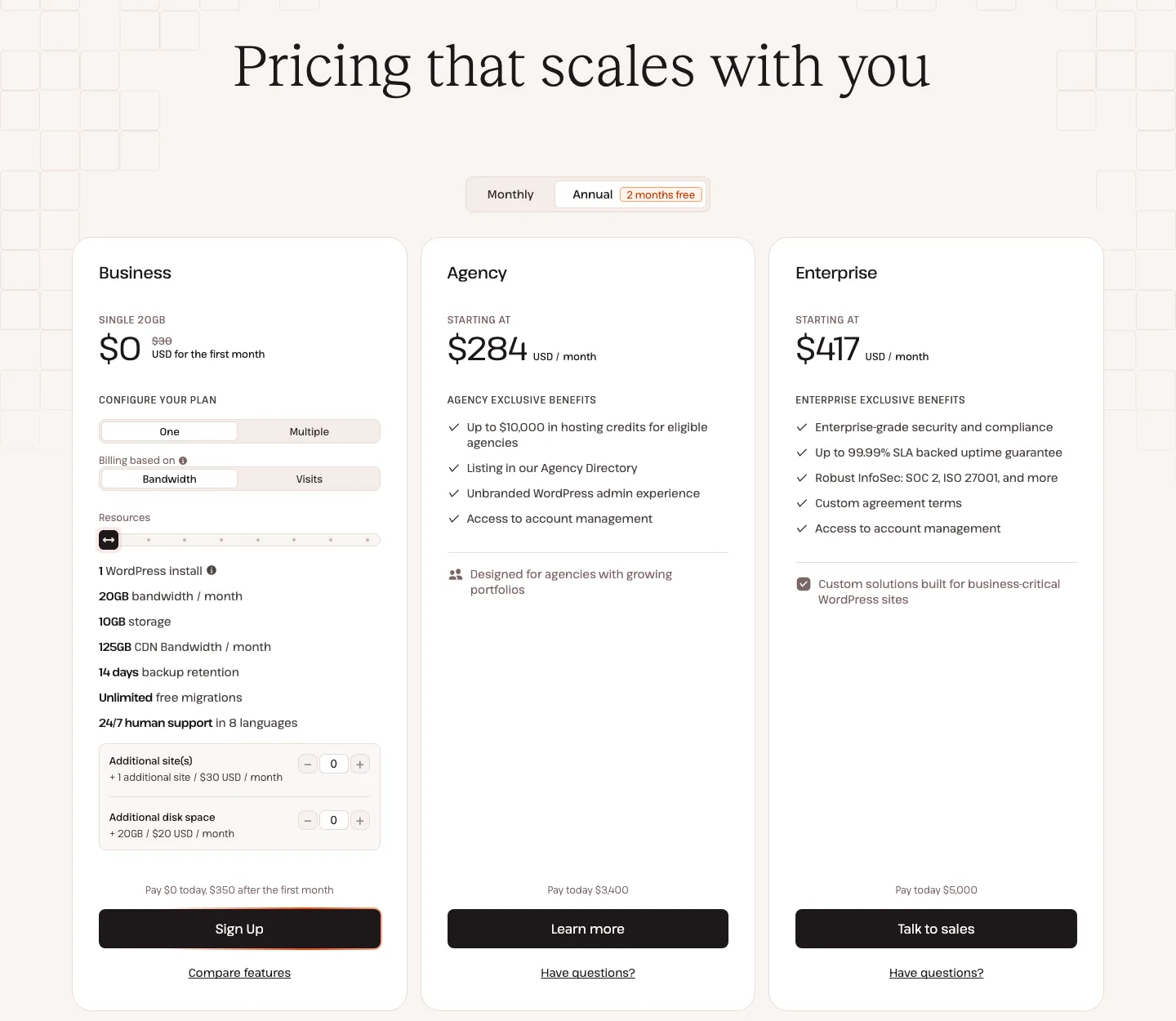
Kinsta plans and prices in 2026
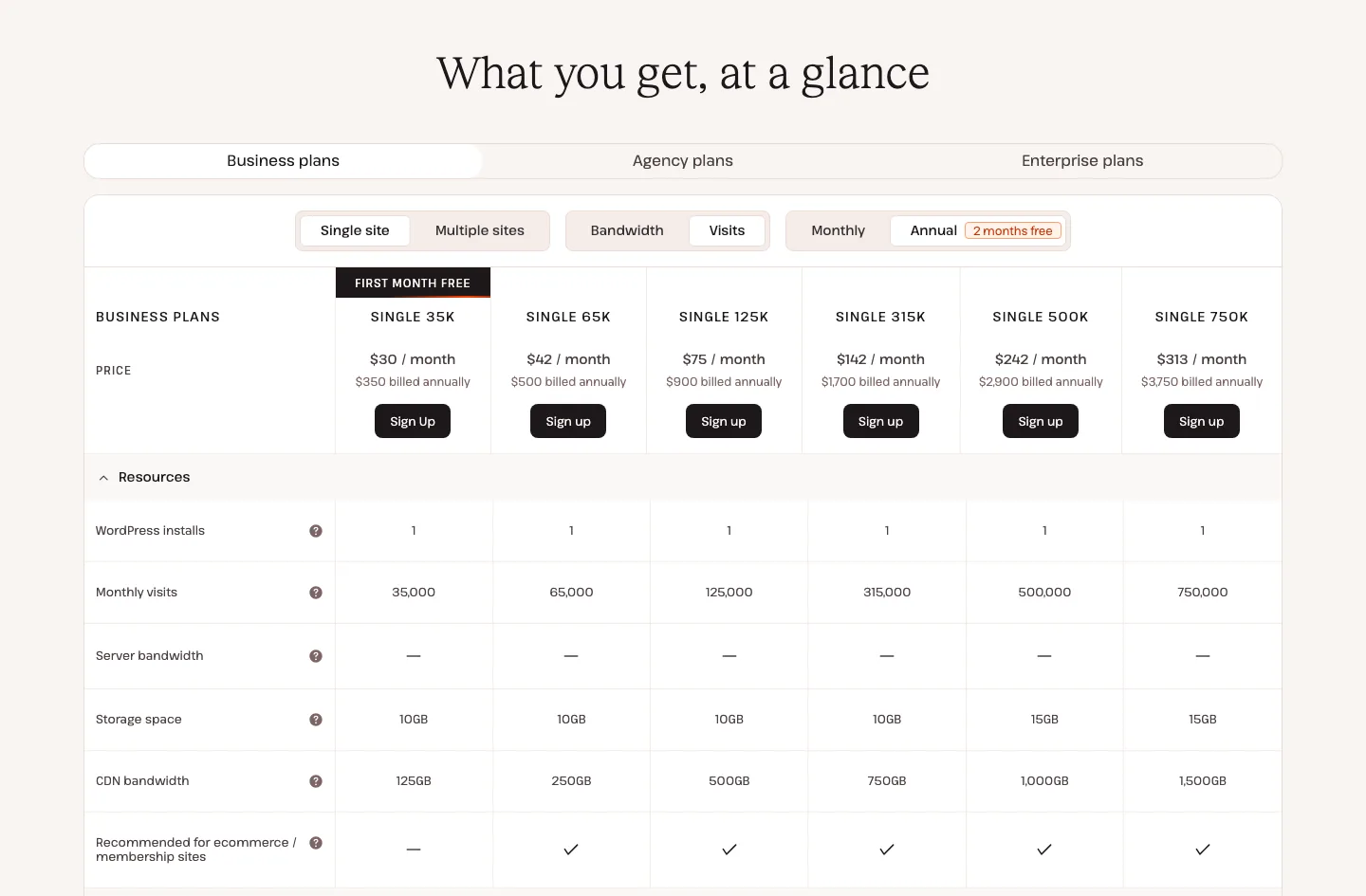
The “What you get, at a glance” table on Kinsta’s pricing page with Single site and Visits selected, annual billing.
Kinsta now sells each standard plan in two versions. One is limited by monthly visits. The other is limited by server bandwidth, meaning the data your origin server sends (anything served from the CDN or edge cache does not count). The price is the same either way, and you can switch between them in the MyKinsta dashboard.
Annual billing gives you two months free. All prices below are in US dollars before tax, as listed on Kinsta’s pricing page on October 4, 2026.
Single-site plans
Kinsta offers each single-site tier with either a visits or server-bandwidth allowance. The entry 35,000-visit/20 GB tier costs $35 monthly or $350 annually, with 10 GB disk, 125 GB CDN traffic and two PHP threads. The 65,000-visit/40 GB tier costs $50 or $500, with 10 GB disk, 250 GB CDN and four threads.
The 125,000-visit/65 GB tier costs $90 monthly or $900 annually, with 10 GB disk, 500 GB CDN and six threads. The 315,000-visit/125 GB tier costs $170 or $1,700, with 10 GB disk, 750 GB CDN and six threads.
For 500,000 visits or 250 GB bandwidth, the price is $290 monthly or $2,900 annually, with 15 GB disk, 1,000 GB CDN and eight threads. The 750,000-visit/500 GB tier costs $375 or $3,750, with 15 GB disk, 1,500 GB CDN and eight threads. Annual billing is discounted relative to twelve monthly payments.
You get either the visits limit or the server bandwidth limit, depending on which version you pick. PHP thread counts come from Kinsta’s PHP docs.
Multi-site plans
WP 2 covers two sites for $70 monthly or $700 annually, with 70,000 visits or 40 GB server bandwidth, 20 GB storage and 250 GB CDN bandwidth. WP 5 covers five sites for $115 or $1,150, with 125,000 visits or 65 GB server bandwidth, 30 GB storage and 500 GB CDN.
WP 10 costs $225 monthly or $2,250 annually for ten sites, 315,000 visits or 125 GB server bandwidth, 40 GB disk and 750 GB CDN. WP 20 costs $340 or $3,400 for 20 sites, 500,000 visits or 250 GB server bandwidth, 50 GB disk and 1,000 GB CDN.
WP 40 costs $450 monthly or $4,500 annually for 40 sites, 750,000 visits or 500 GB server bandwidth, 60 GB disk and 1,500 GB CDN. Choose the billing metric that fits your traffic rather than treating visits and bandwidth as interchangeable limits.
Agency plans start at $340 a month ($284 a month billed yearly) and add perks such as an unbranded WordPress admin and an account manager. Enterprise plans start at $500 a month ($417 a month billed yearly) and come with custom terms, dedicated virtual machines, and up to a 99.99% uptime guarantee.
A few limits worth knowing before you pick:
- The two cheapest single-site plans do not allow WordPress Multisite. Single 35k and Single 20GB are also the only single-site plans Kinsta does not mark as “recommended for ecommerce / membership sites”.
- Visits are shared across all sites on a plan. Kinsta counts each unique IP address in a 24-hour period as one visit.
- Storage is small on single-site plans. 10GB fills up fast on an image-heavy site. Extra disk space costs $20 a month per 20GB.
- Plans with first month free: Single 35k, Single 20GB, and WP 2. Overages still apply during the free month.
What renewal costs
Kinsta does not use teaser pricing. Its terms say plans renew automatically for the same period (or 12 months, whichever is shorter) at the standard fee. So a Single 35k plan bought at $350 a year renews at $350 a year, unless Kinsta raises prices. The terms do allow price increases “upon reasonable prior notice”, and you can cancel before a new price takes effect.
Budget hosts work differently. Hostinger, for example, starts at $2.99 a month on a 48-month prepay and renews at $10.99 a month (see our Hostinger review for the full math). Even after renewal, Hostinger costs about a third of Kinsta’s entry plan.
Overage charges and extra costs
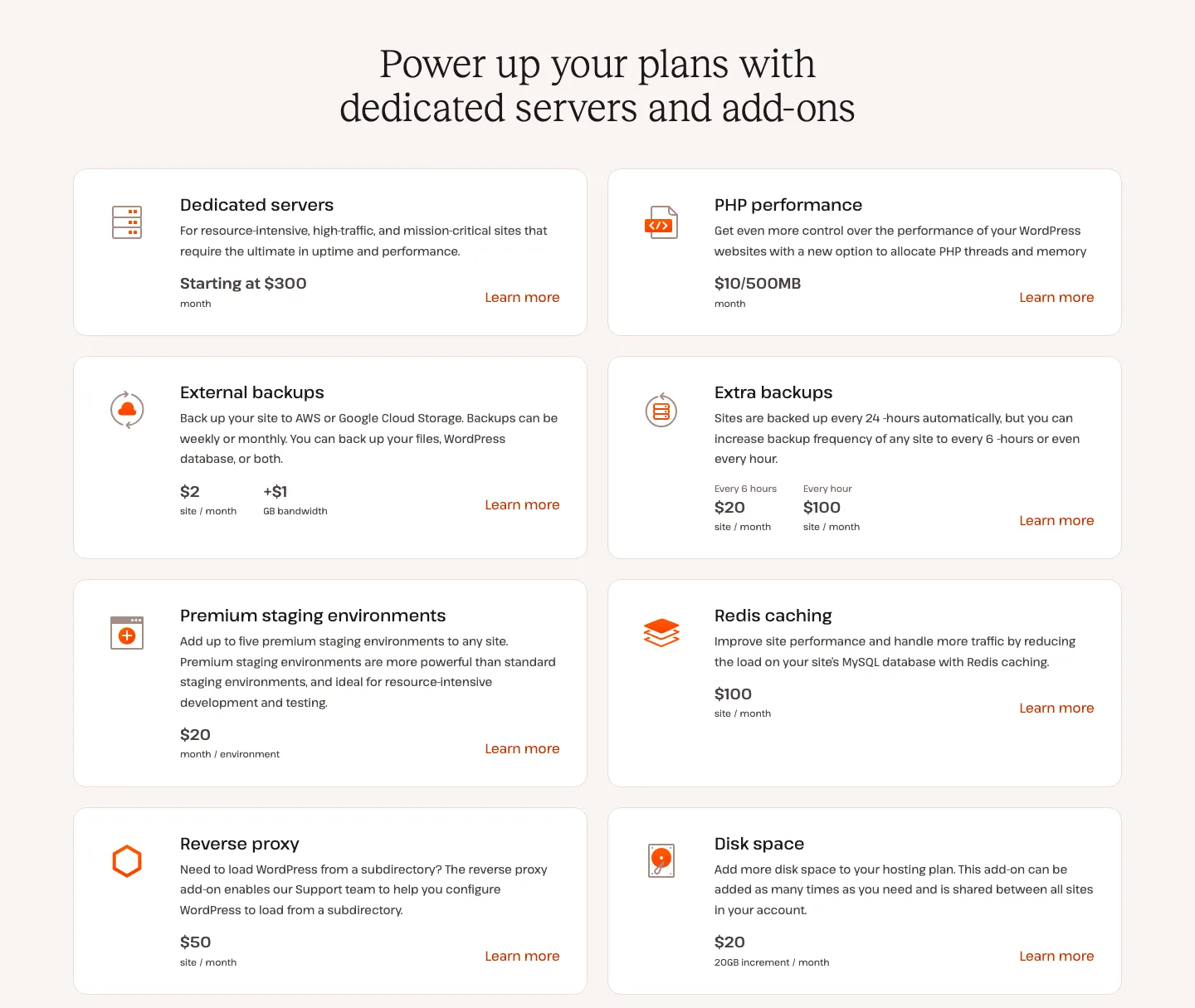
Kinsta’s paid add-ons as listed on its pricing page.
Kinsta keeps your site online if you go over a limit and bills the difference. It emails you at 80% and 100% of a limit, and again at 110% for visits. Overage rates from Kinsta’s docs, as of October 2026:
Overages cost $0.50 per thousand monthly visits or $0.50 per GB of server bandwidth, depending on the plan metric. CDN traffic costs $0.05 per extra GB. Extra disk costs $2 per GB monthly, calculated daily, so a busy month or growing media library can raise the bill beyond the base plan.
For example, a Single 35k site that gets 45,000 visits in a month owes $5 extra. The bigger risk is an “extreme overage”, which Kinsta defines as an overage equal to your plan’s price or $500, whichever is less. In that case Kinsta may ask for payment right away, require an upgrade, or temporarily limit access to the site. Upgrading after the fact does not cancel overages you already ran up.
Bots matter here. Kinsta’s own Bot Protection page lists inflated visit numbers and surprise overages as problems the feature is designed to reduce, which tells you automated traffic can eat into a visits-based plan. If a lot of your traffic is crawlers, the bandwidth-based version of a plan may be the safer pick.
The add-ons are where Kinsta gets expensive:
Premium staging costs $20 monthly per environment, with up to five per site. Redis costs $100 monthly per site for a 2 GB instance, and a reverse proxy costs $50. Extra WordPress sites cost $30 monthly, extra disk $20 per 20 GB, and extra PHP performance $10 per 500 MB. Dedicated servers start at $300 monthly.
Six-hourly backups cost $20 monthly per site, hourly backups $100, and external S3 or Google Cloud backups $2 plus $1 per GB. Automatic Updates costs $3 monthly per environment. These are separate from the standard backup and staging features.
Redis is the one that surprises people. Some hosts include object caching on mid-range plans. At Kinsta it costs $100 a month per site, which is nearly three times the price of the entry plan.
What every Kinsta plan includes
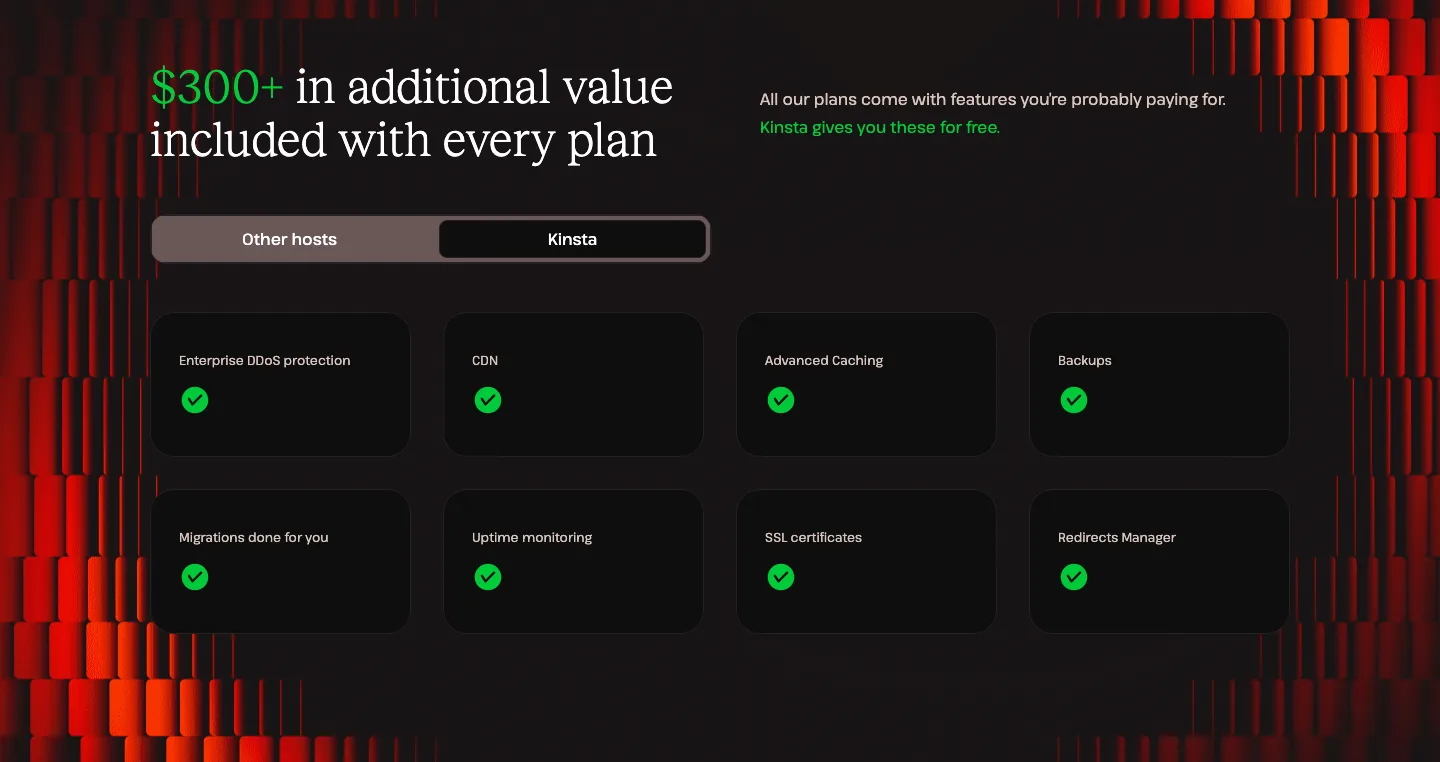
The “included with every plan” section of Kinsta’s Hosting for WordPress page.
- Free, unlimited migrations. Kinsta’s migration team moves your sites for you, usually within one business day, and the company says there is no downtime. An expedited option finishes in as little as 8 hours. If you would rather move a site yourself, our guide to migrating WordPress to a new host covers both a plugin move and a manual one, and our All-in-One WP Migration guide walks through the plugin.
- CDN and edge caching. Both run on Cloudflare’s network (the pricing page says 260+ locations, other Kinsta pages say 300+). Edge caching stores full HTML pages near visitors, not just images and scripts. Kinsta says that in its own testing of hundreds of sites, edge caching cut time to first byte by an average of 48.6%.
- Firewall, DDoS protection, and Bot Protection. Every site sits behind Cloudflare. Bot Protection, added in May 2026, has four preset levels and a toggle to block AI crawlers.
- Free malware removal. Kinsta calls it a “free hack-fix guarantee”: if your site is hacked while hosted there, its team repairs it at no extra cost. It also cleans malware it finds during migration. On other hosts, our WordPress malware removal guide shows how to clean a site yourself and what paid cleanup costs.
- Daily backups kept for 14 days (20 to 30 days on larger plans), up to 5 manual backups, and a downloadable ZIP backup once a week.
- Free standard staging for every site. Standard staging is capped at 2 PHP threads, so heavy testing needs the paid premium staging add-on.
- Kinsta APM. A built-in application performance monitor that shows slow database queries, slow plugins, and long external calls. Kinsta pitches it as a free alternative to paid tools like New Relic.
- Uptime checks every 3 minutes, free SSL with wildcard support, unlimited users with role-based access, SAML single sign-on, and the Kinsta API.
What is missing: email hosting. Kinsta’s docs say it does not provide email on its hosting plans.
MyKinsta dashboard and DevKinsta
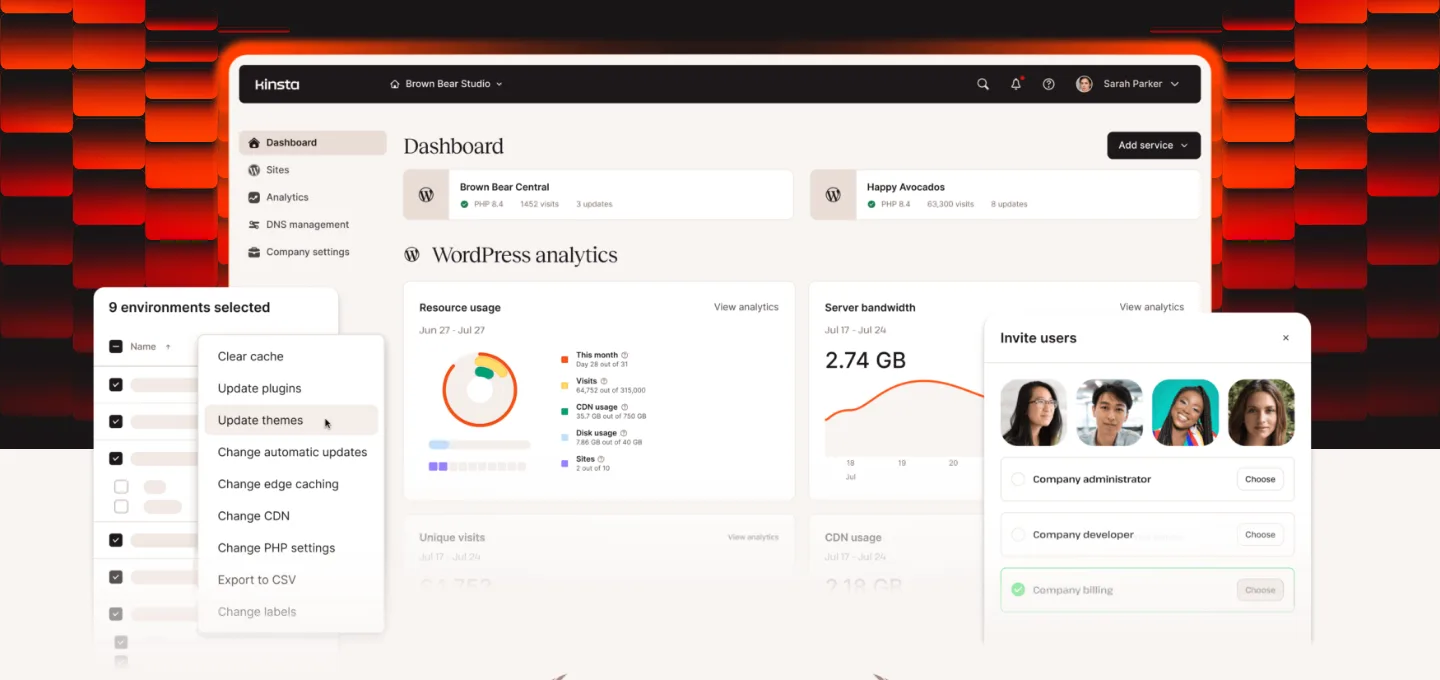
Kinsta’s own image of the MyKinsta dashboard, from its public MyKinsta page. This is a vendor image, not a screenshot from our account.
Kinsta does not use cPanel. Everything happens in MyKinsta, its own dashboard. According to Kinsta’s docs, it covers staging, backups, caching, the APM tool, analytics, DNS, bulk actions across many sites, plugin and theme updates, one-click WordPress admin and phpMyAdmin access, and (since June 2026) a file manager. Since January 2026, logging in requires two-factor authentication.
DevKinsta is a separate, free desktop app for building WordPress sites on your own computer. Kinsta says it runs on Docker with Nginx and MariaDB, includes a database manager (Adminer) and a local email inbox for testing contact forms, and supports PHP 7.2 to 8.3. It is a free download for macOS, Windows, and Linux. With a MyKinsta account you can pull a Kinsta site down, work on it locally, and push it back to a Kinsta staging environment. We looked at DevKinsta’s public page and docs only and did not install it.
Speed: what we could measure
Without a Kinsta account we cannot benchmark Kinsta’s servers, but we can measure public pages. On October 4, 2026, from one location in the US (the Pacific Northwest), we timed kinsta.com and three sites that Kinsta names as customers on its own case-study pages. All three returned Kinsta’s cache headers that day, which suggests they still host there.
Across ten requests, Kinsta’s homepage responded in a median 256 ms, with Lighthouse medians of 95 desktop and 46 mobile over three runs. EmailTooltester responded in 193 ms and scored 84/48; Ryan Robinson’s site responded in 343 ms and scored 99/74; Design Bombs responded in 159 ms and scored 98/99. Their differing layouts make these public-site examples, not a controlled estimate for your own site.
Read this for what it is: four home pages, on one day, from one place, using curl and Lighthouse 13.5. It is not a benchmark of Kinsta. Median time to first byte stayed between about 160 and 340 ms on all four. The spread in mobile scores comes from how each page is built, not from the host: Design Bombs scores 99 on mobile on the same platform where kinsta.com’s own home page scores 46. Kinsta’s claim that sites get “up to 200% faster” after migrating is its own marketing figure.
Data centers and the move to Oracle Cloud
Many reviews still describe Kinsta as a Google Cloud host. That is out of date. Kinsta’s docs now say its new infrastructure “is powered by Oracle Cloud Infrastructure (OCI)”, and banners on its older blog posts say Kinsta “now operates on” OCI. Existing sites are being moved during a 2 a.m. to 5 a.m. maintenance window, with an email 1 to 2 weeks ahead. According to Kinsta’s docs:
- Most sites are offline for less than a minute during the move.
- Your site’s IP address and SFTP/SSH host and port change. If you depend on a fixed IP or a reverse proxy, contact support first.
- Some old Google Cloud regions are not available on OCI, so your site may move to the nearest new region.
- You cannot opt out.
New sites can choose from 30 data centers: Ashburn (Virginia), Chicago, Phoenix, and San Jose in the US; Montreal and Toronto in Canada; London, Amsterdam, Frankfurt, Madrid, Milan, Paris, Stockholm, and Zurich in Europe; plus locations in Mexico, Colombia, Chile, Brazil, South Africa, Israel, the UAE, Saudi Arabia, India, Singapore, Indonesia, Japan, South Korea, and Australia. Each site runs in its own isolated container.
Uptime guarantee: the SLA fine print
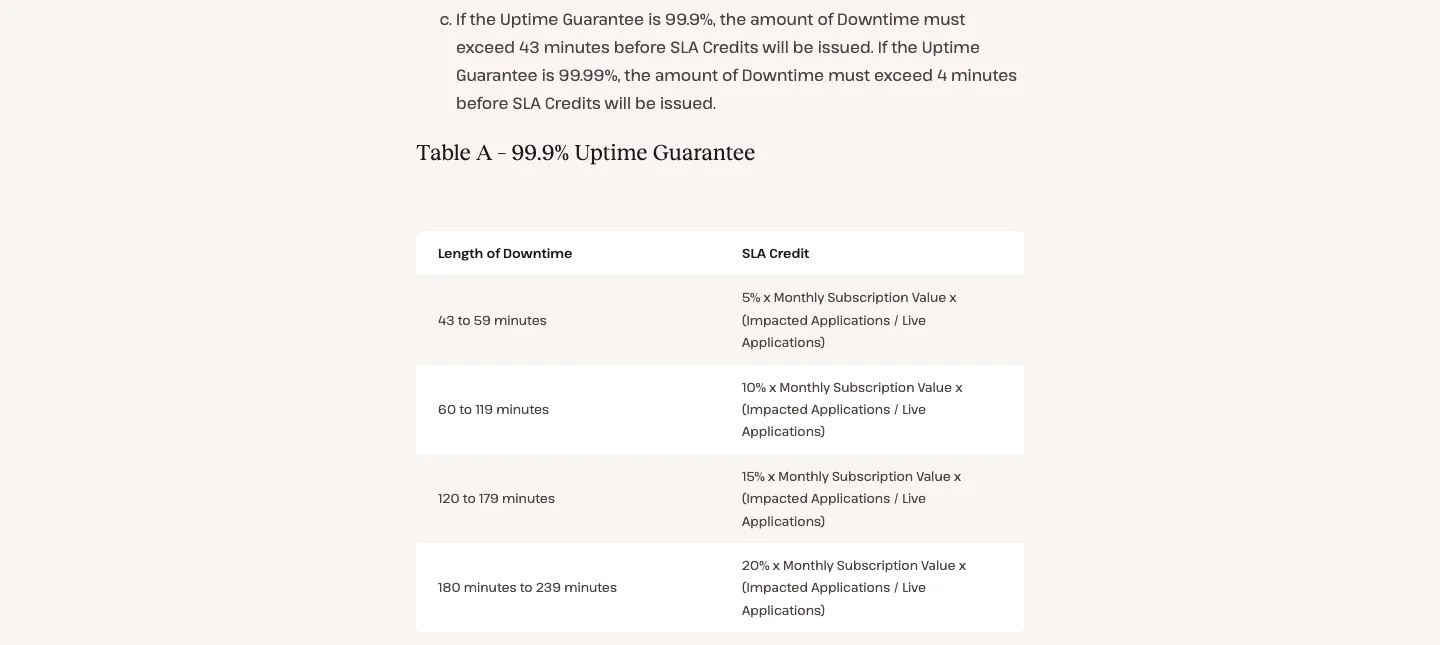
Section 3 of Kinsta’s Service Level Agreement (updated September 25, 2025), showing credits under the 99.9% guarantee.
The pricing page says “up to 99.99% uptime SLA”. The SLA itself, updated September 25, 2025, is more specific: the standard Uptime Guarantee is 99.9%, unless your order form sets a higher figure. In practice, 99.99% is for custom and enterprise agreements. How the credits work:
- Credits start only after 43 minutes of downtime in a billing month on the 99.9% guarantee (4 minutes on 99.99%).
- 43 to 59 minutes earns 5% of your monthly fee, 60 to 119 minutes earns 10%, 120 to 179 minutes earns 15%, and 180 to 239 minutes earns 20%.
- Credits are scaled down by the share of your live sites that were affected, and they never exceed one month’s fee. On an annual plan, the monthly fee is your yearly price divided by 12.
- You must ask for the credit in chat within 30 days. Credits have no cash value.
- Not counted as downtime: the daily 2 a.m. to 5 a.m. maintenance window (local data center time), emergency maintenance, scheduled outages, outages at outside providers, and traffic that exceeds your plan.
So on the annual entry plan, even a three-hour outage is worth about $5.83 in credit (20% of $29.17). Like most hosting SLAs, it is a small refund, not insurance.
Support
Kinsta’s support is 24/7 by chat inside MyKinsta, in 8 languages (English, Spanish, German, French, Italian, Dutch, Portuguese, and Japanese). There is no phone support for technical issues, and the docs explain why: Kinsta says written support lets engineers investigate without interruption. You can phone or WhatsApp the sales team, but not support. The chat window also offers an AI assistant if you want a quick answer first.
Kinsta says it has no level 1 or level 2 tiers, that its average first response is under 2 minutes, and that its median resolution time is 47 minutes. We could not check those figures without an account.
Refunds and the free month
Kinsta refunds plan fees if you cancel within 30 days, but only for first-time customers. Dedicated servers, one-time fees, and overages are not refunded, and fees you ran up in the first 30 days come off the refund. Switching plans does not restart the clock. If you start with a free month, the 30 days begin when paid billing starts. Canceling during the free month ends the plan immediately.
Notable changes in 2025 and 2026
- April 2025: plans renamed. “Starter” became Single 35k (up from 25,000 visits), the Business tiers became Single 125k to Single 750k, a Single 65k plan was added, and CDN allowances went up.
- October 2025: bandwidth-based pricing as an alternative to visits.
- Late 2025 into 2026: the move from Google Cloud to Oracle Cloud Infrastructure, with a new list of 30 data centers.
- January 2026: two-factor login required for MyKinsta.
- February 2026: application, database, and static site hosting moved to Sevalla, a separate Kinsta platform. MyKinsta is now WordPress only.
- March to June 2026: PHP 8.5, Bot Protection, and a file manager in MyKinsta.
Kinsta alternatives
- WP Engine. The closest premium rival. Read our Kinsta vs WP Engine comparison, and check WP Engine’s current plans before you decide.
- Flywheel. Owned by WP Engine and aimed at designers and agencies. Our Flywheel vs WP Engine comparison covers it.
For a wider shortlist, see our guide to the best managed WordPress hosting, or browse all our WordPress hosting reviews.