Webflow vs WordPress (2026): Which Should You Choose?
Choose Webflow if you want detailed visual design control with managed hosting and fewer maintenance tasks. Choose WordPress for lower running costs, a large content site or more ecommerce flexibility. Agencies should also weigh how easily clients can edit the finished site and move it later.
Design Control and Learning Curve
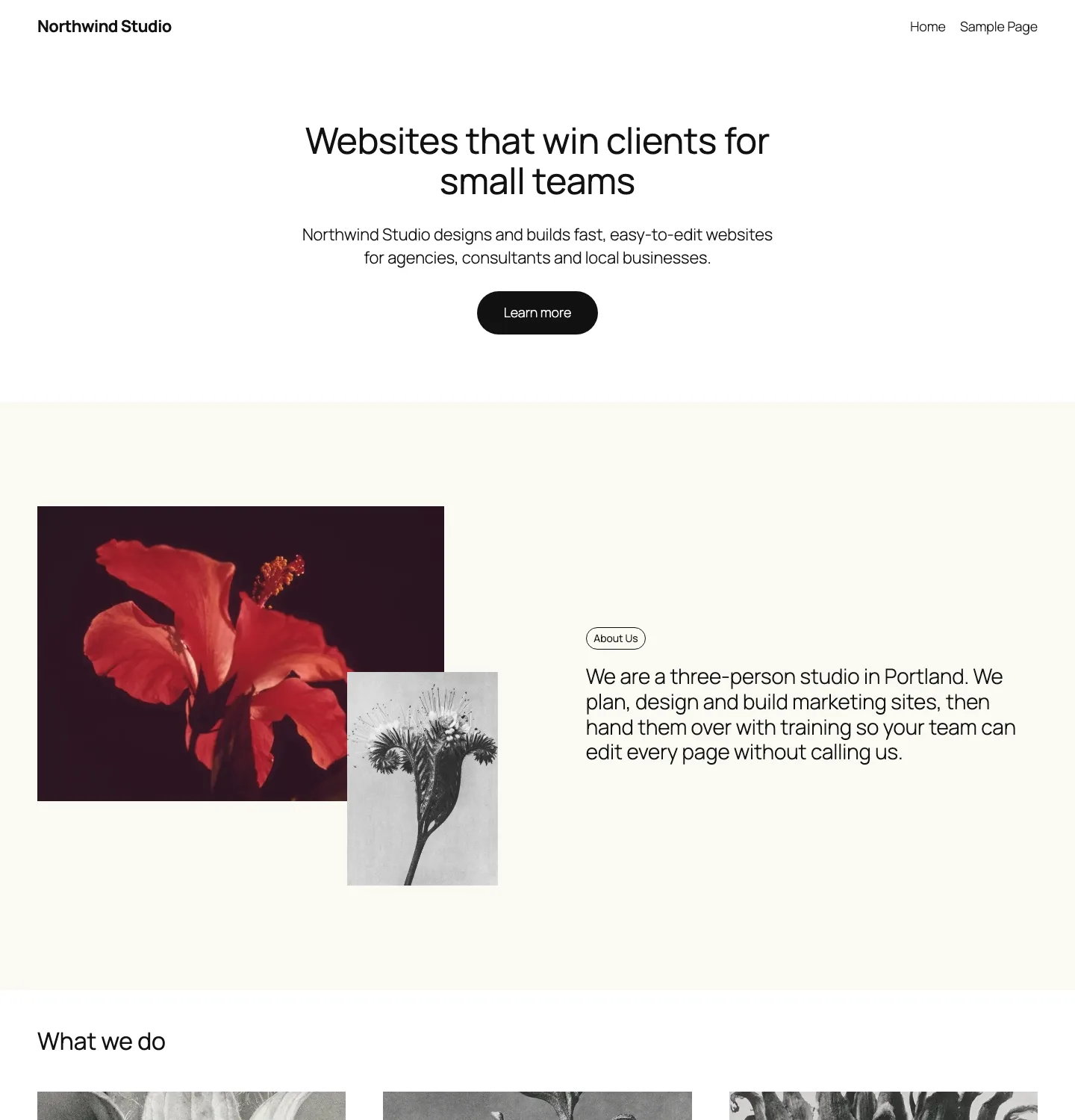
Webflow’s Designer is a visual canvas that writes HTML and CSS for you. You style elements with classes, set up layouts with flexbox and grid, and build animations on a timeline in an Interactions editor powered by GSAP. That is its big strength: a designer can build a fully custom layout without a developer.
The cost is a real learning curve. Webflow University’s beginner course starts with lessons like an intro to the box model, which tells you the level it expects. If you already understand how web layout works, Webflow feels natural. If you do not, expect to spend some time learning before you are fast.
WordPress gives you a choice of how deep to go:
- The block editor with a block theme. This is what we used. You build pages from blocks and ready-made patterns. It is easy to start, but you have less fine control than in Webflow unless you add custom CSS.
- A page builder such as Elementor, Bricks or Beaver Builder, which adds a drag-and-drop visual editor closer to Webflow’s. Our guide to the best page builders for WordPress compares them.
- A lightweight theme plus blocks, such as Kadence or GeneratePress, which give you more layout and design settings than a default theme while staying fast.
Out of the box, neither WordPress option gives a designer the class-level control Webflow does. With Bricks or a similar builder you can get close, but you are then stacking a theme and a builder on top of WordPress.
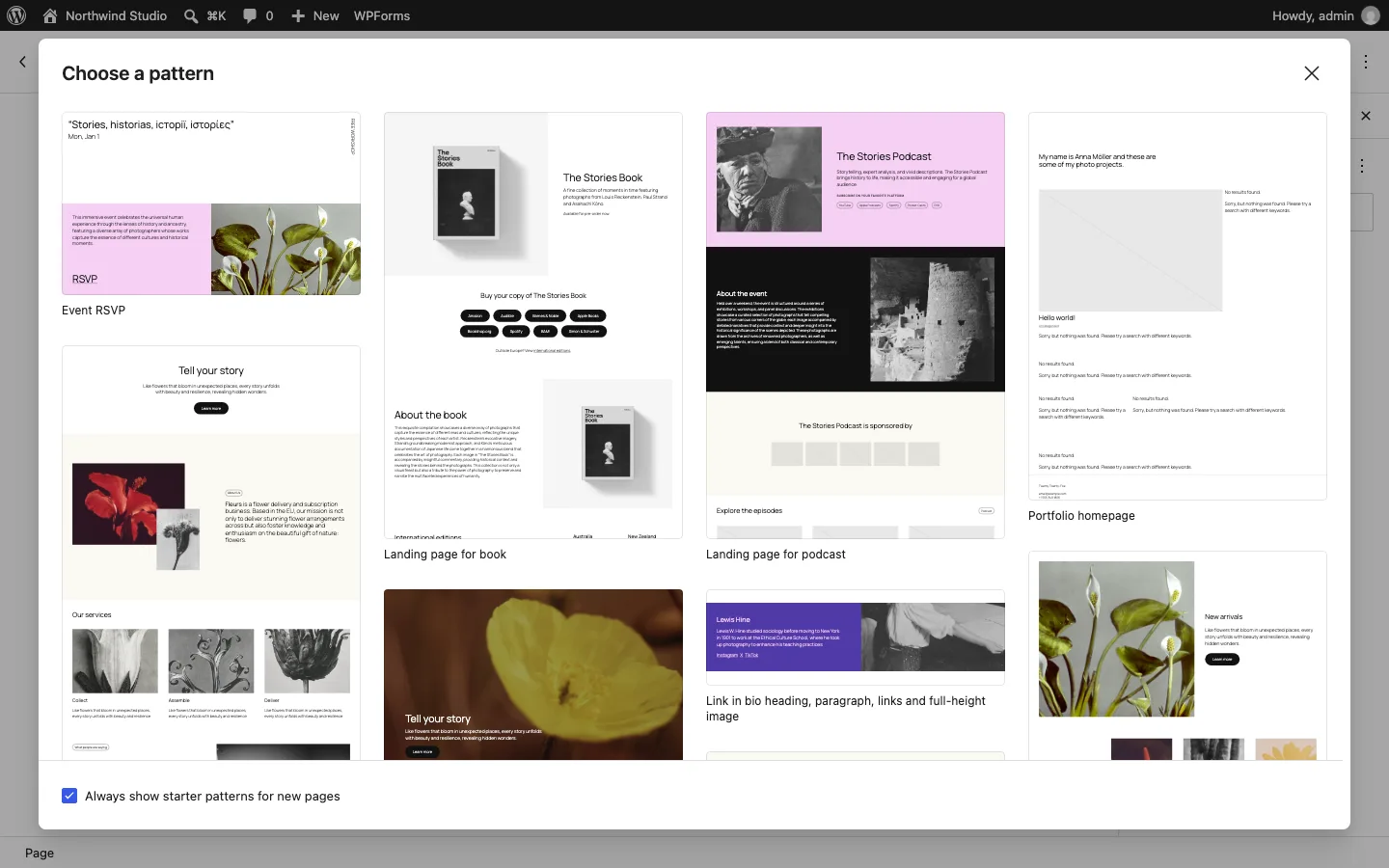
The starter pattern picker that opens when you create a new page, WordPress with Twenty Twenty-Five.
Building and editing a page
WordPress’ free patterns gave us a useful marketing-page layout, and WPForms Lite supplied a working contact form. The work was mostly replacing copy, removing unwanted sections and making the form match the theme. Header and footer edits happened separately in the Site Editor, and locked patterns added a small learning hurdle.
Webflow included forms without a plugin and offered detailed visual control. Finding a free template among paid options took attention, and dragging a form onto the canvas failed where clicking it in the Add panel worked. Its form button also needed styling to match the template.
Neither starting layout was ready to publish unchanged. WordPress asked us to manage more pieces; Webflow concentrated design work in one editor. Both still required real images, copy and a check of the finished page.
CMS and Content Editing
Webflow CMS is built around Collections: you define fields such as title, author, image and category, then design one template page that every item uses. On our test site we saved one draft item in a Blog Posts Collection. The limits matter, though. As of October 2026, per our test site’s plan comparison:
- The free Starter plan allows 50 CMS items and 20 Collections.
- The Basic plan has no CMS at all.
- The Premium plan allows 20,000 items and 40 Collections.
- The Team plan, at $2,500/mo on an annual contract, keeps 20,000 items and raises Collections to 100, with more items sold separately.
Ecommerce products count against a separate limit, not the CMS one.
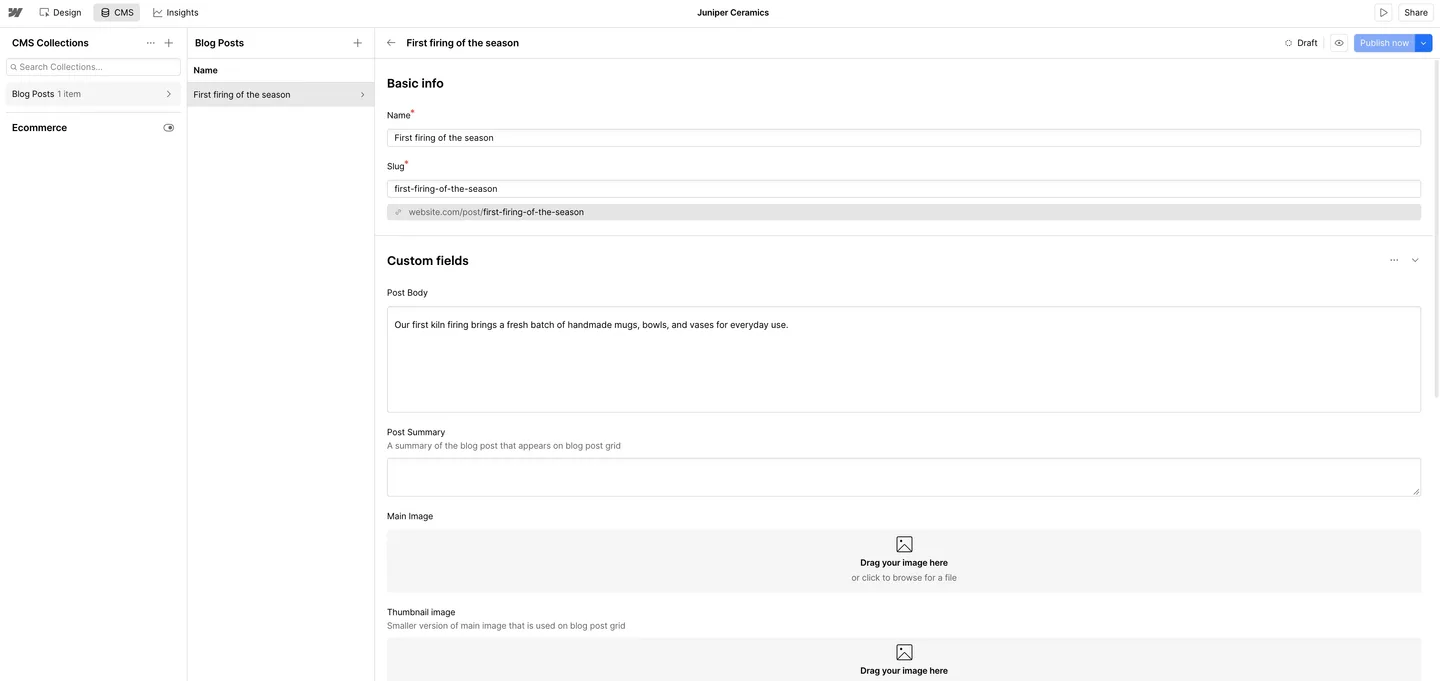
A draft item in the Blog Posts Collection on our Webflow test site, free Starter plan.
WordPress was built for content. Posts, pages, categories, tags, revisions, scheduled posts and user roles are all in the core software, and there is no item limit beyond what your hosting can handle. For custom content types like case studies or team members, you add a plugin or a little code. A 5,000-post blog is normal on WordPress; on Webflow it fits, but a fast-growing publisher should watch the 20,000 cap.
For day-to-day editing, Webflow lets editors change text and images directly on the page. WordPress editors work in the block editor, which looks close to the live page but is not identical to it.
Pricing: What Each One Really Costs
Webflow: Site plans, Workspace plans and add-ons
Webflow charges in two layers, which confuses a lot of people. A Site plan pays for hosting and features for one site. A Workspace plan pays for your team, staging sites and extras like code export. Webflow changed its lineup on May 13, 2026, folding the old CMS and Business plans into one Premium plan.
Free Starter uses a webflow.io address and permits two static pages, 50 CMS items in 20 Collections, 50 form submissions and 1 GB bandwidth. Basic costs $15 monthly on annual billing or $25 month to month for a custom domain, 300 pages and 10 GB bandwidth without CMS. Premium costs $25 or $39, with 20,000 CMS items and 50 GB bandwidth.
Ecommerce Standard costs $29 or $42 monthly, permits 500 products and takes a 2% platform fee. Plus costs $74 or $84 for 5,000 products without that fee; Advanced costs $212 or $235 for 15,000 products without it.
Workspace fees are separate. Core costs $19 monthly on annual billing or $28 monthly, with ten staging sites and code export. Freelancer costs $16 or $24 for ten staging sites and one client seat per site. Agency costs $35 or $42 for unlimited staging sites and three client seats per site.
The Plans screen in our test site matched these yearly prices, with Team at $2,500/mo on an annual contract and Enterprise at custom pricing. It also showed Starter’s 20 Collection and 50 form submission caps, which are worth checking alongside the headline price. Extra team seats cost $39/mo for a full seat and $15/mo for a limited seat that can edit content, billed yearly.
Bandwidth is the hidden cost. Premium includes 50 GB a month. More bandwidth is an add-on: on yearly billing, Premium with 100 GB is $45/mo, 200 GB is $85/mo, 500 GB is $199/mo and 2.5 TB is $999/mo. Webflow’s “surge protection” forgives one month over the limit, but if you go over two billing months in a row, it automatically moves you to a higher tier and charges for it.
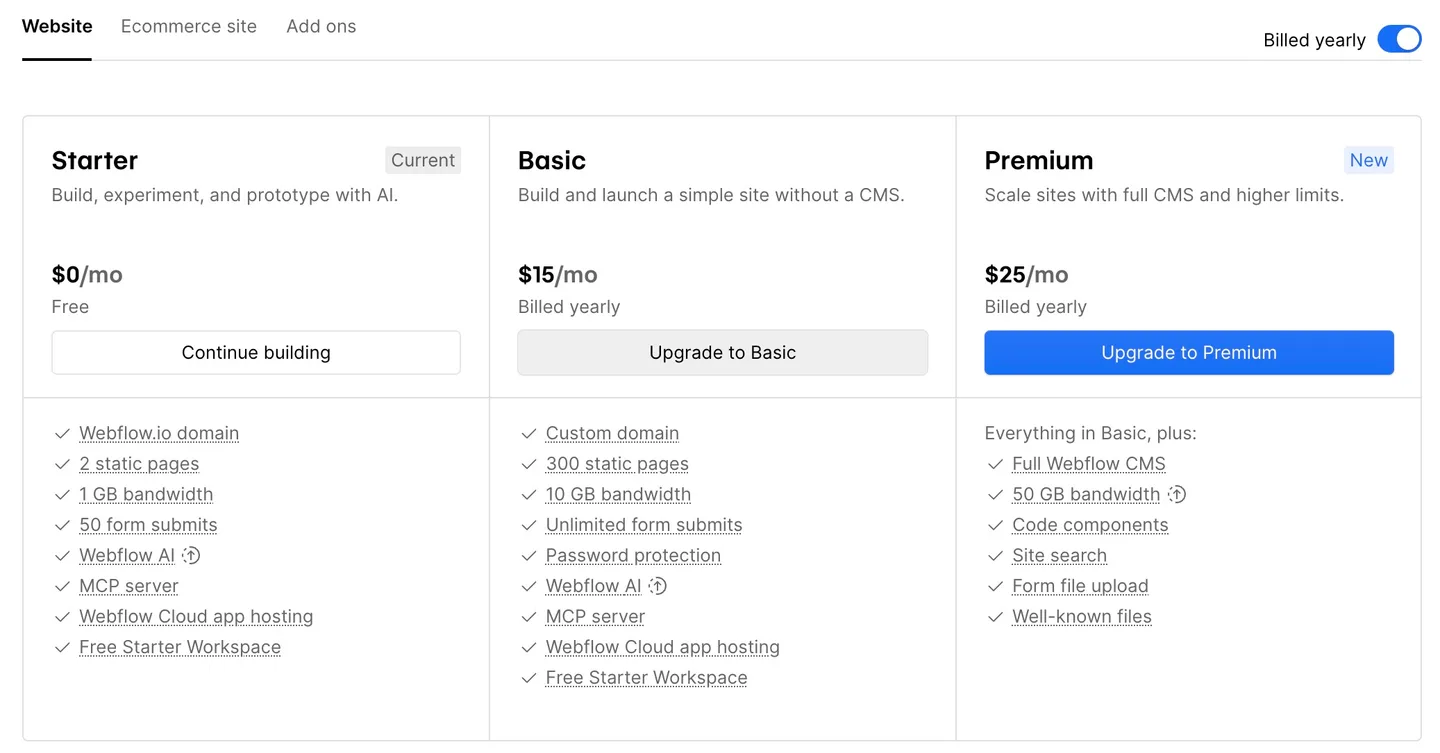
The Site plans screen for our free Webflow test site, yearly billing selected.
WordPress: hosting plus whatever you add
WordPress itself is free. You pay for hosting, a domain, and any premium theme or plugin you choose. Some real numbers, as of October 2026:
- Budget shared hosting: Hostinger’s Premium plan is $3.99/mo on a 12-month term ($47.88 upfront) and renews at $10.99/mo. Our Hostinger review covers the term-length catch.
- Managed WordPress hosting: Kinsta’s entry plan is $30/mo billed yearly ($350/year) or $35 monthly (our Kinsta review covers its limits and add-on costs). See our roundup of managed WordPress hosting for other options.
- Theme and builder: Twenty Twenty-Five and Kadence are free. GP Premium is $59/year, and Kadence’s Essentials bundle is $99/year.
- Forms, SEO, backups: free versions of WPForms, Yoast or Rank Math, and UpdraftPlus cover most small sites.
One year, side by side
WordPress on a 12-month Hostinger Premium term with free software costs $47.88 in year one and $131.88 at annual renewal. Adding GP Premium raises those totals to $106.88 and $190.88. Kinsta with GP Premium costs $409 each year in this example.
Webflow Basic on annual billing costs $180 yearly without CMS. Premium costs $300 yearly, or $528 when adding Core Workspace for code export. Ecommerce Standard costs $348 yearly plus 2% of sales. Optional services and payment processing can add to these base figures.
Budget for a domain name on either platform; Hostinger includes one free for the first year. The pattern is clear: WordPress is cheaper for a single small site and gets much cheaper per site when you run many of them. Webflow costs more, but the price includes managed hosting, a CDN and updates you would otherwise handle yourself.
Ecommerce
Webflow Ecommerce lets you design the cart and checkout as freely as the rest of the site, and it works with Stripe and PayPal, plus Apple Pay and Google Pay through Stripe. The limits are tight for growing stores: 500 products on Standard, which also takes a 2% transaction fee on top of payment processing. Removing that fee means the $74/mo Plus plan.
WooCommerce is a free plugin with 7 million-plus active installs, according to WordPress.org. It has no platform fee, no product cap, and extensions for subscriptions, bookings, memberships and multi-vendor marketplaces. You do need hosting that can handle a store, and more setup.
Winner: WordPress with WooCommerce for most stores. Webflow suits a small, design-led shop with a short product list.
SEO Controls
Both platforms can rank well. The difference is how you get there.
Webflow builds the basics into every plan. On our test site, each page’s settings had a title tag, meta description, sitemap indexing toggle and page canonical URL, plus Open Graph title, description and image fields, each with a “Same as SEO” checkbox; getting there took about 1 minute 51 seconds. Webflow also lists alt text, an automatic XML sitemap, robots.txt and llms.txt controls, schema markup support, and 301 redirects on paid plans. Premium adds per-item indexing control for CMS items. Webflow also sells AI tools for SEO audits and an Analyze add-on from $9/mo.
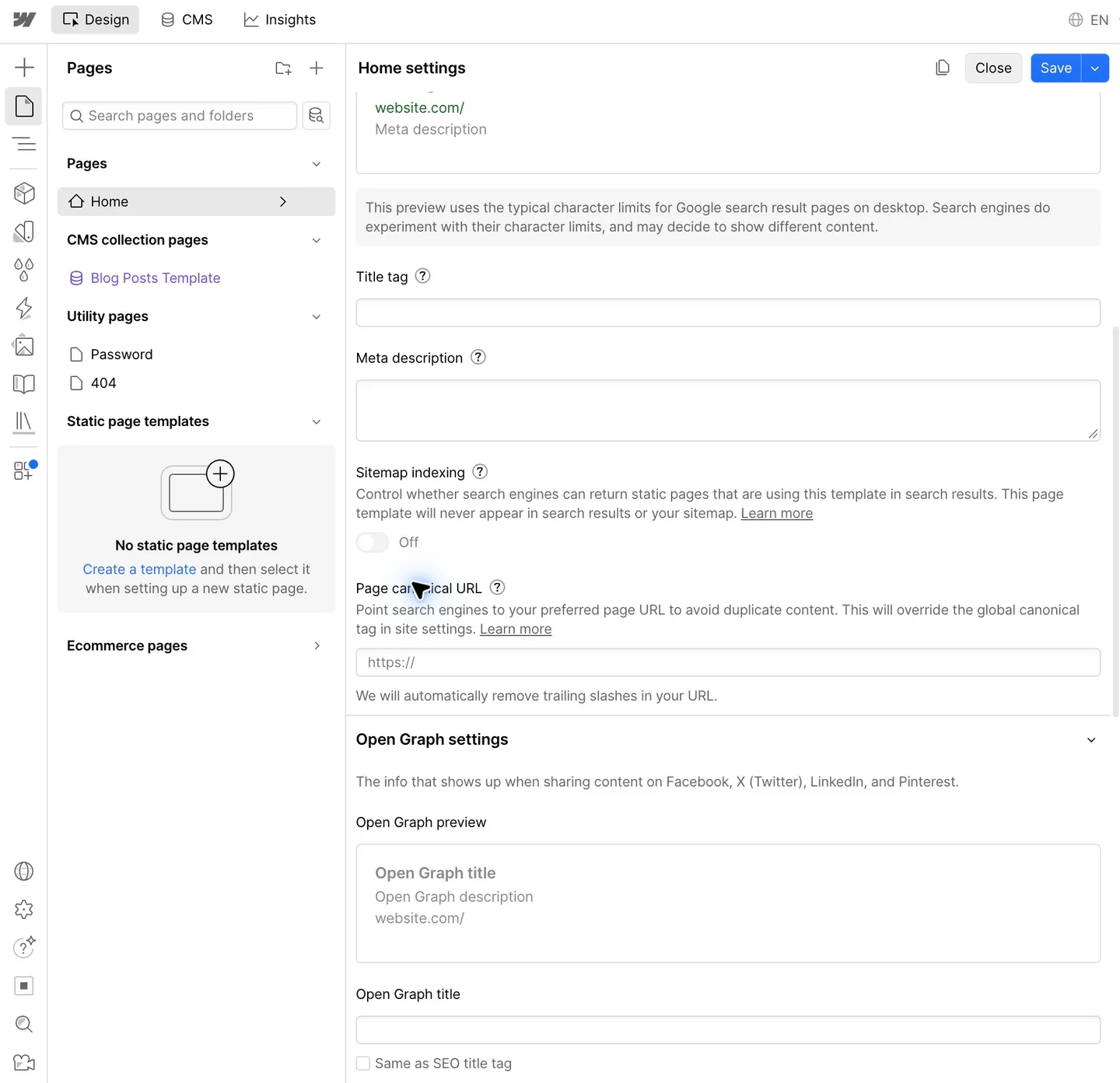
Per-page SEO and Open Graph fields on our Webflow test site, free Starter plan.
WordPress core gives you clean URLs and an automatic sitemap, but not a meta description field. Our Lighthouse run flagged exactly that: the test page had no meta description, which cost it points in the SEO score. Installing a free SEO plugin fixes this and adds schema, redirects and content checks. Our Rank Math vs Yoast comparison helps you choose between the two big ones.
Winner: a tie for most sites. Webflow is tidier out of the box; WordPress goes deeper once you add a plugin.
Performance: Our Lighthouse Results
We ran Lighthouse 13.5 at least three times per device on our WordPress test page and on Webflow’s official free “Business Starter” template demo, on October 4, 2026. The numbers below are medians. LCP, or Largest Contentful Paint, is the time until the biggest element on screen appears. One Webflow mobile run failed with a server error, so we ran it again.
Our local WordPress test page scored 89 on mobile and 100 on desktop, with largest content at 3.7 seconds, 522 KiB transferred and 27 requests. Webflow’s live Business Starter demo scored 81 and 99, also with 3.7-second mobile largest content, but transferred 159 KiB across 15 requests. A local installation and a public demo are different environments, so these figures do not isolate the platform’s speed.
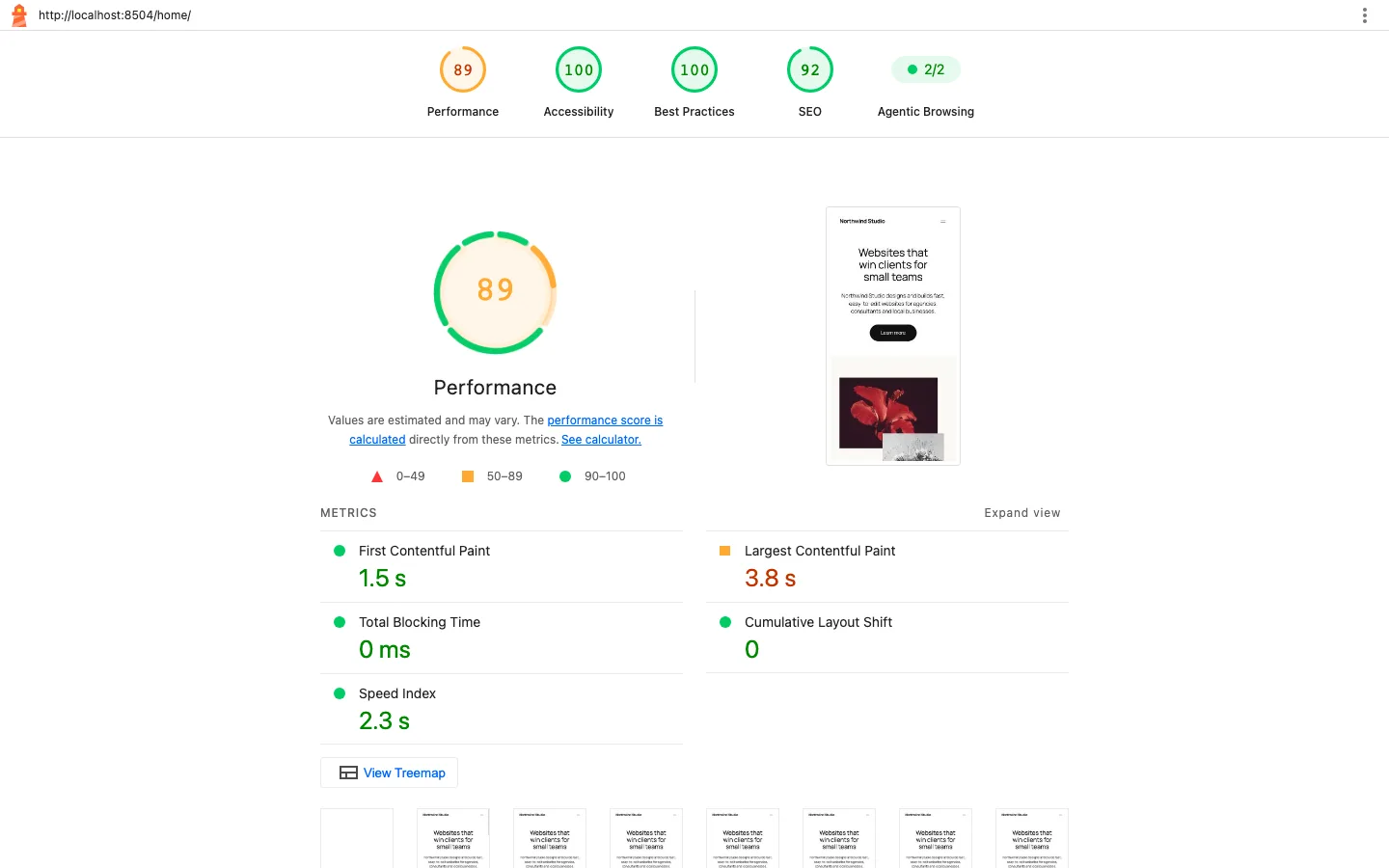
Lighthouse 13.5 mobile report for our WordPress test page on a local install.
Read these as measurements of two specific pages, not a verdict on either platform. They are different designs, and they were served differently: our WordPress page ran on the same computer as Lighthouse with no caching plugin, while the Webflow demo came over the internet from Webflow’s CDN.
What the reports did show:
- Images were the WordPress page’s main weight. The theme’s sample photos made up most of the 522 KiB, and the red flower photo was the element that set the mobile LCP. Compressing images, as covered in our image optimizer guide, is the first fix.
- Plugins add weight. WPForms loaded 12 files on a page with one form, about 86 KB in total. They included jQuery, a validation library, its own scripts and a stylesheet.
- The Webflow demo was light but slow to first paint on mobile. Its stylesheet and a Google web font loader blocked rendering, and it also loaded jQuery. It scored 85 for accessibility because of a missing page language and low-contrast text, and it had no meta description either.
Webflow gives you fast hosting with no setup. WordPress can be just as fast, but it depends on your host, theme and plugins, and you have to keep an eye on them.
We built unpublished sample sites in WordPress and Webflow’s free plan. The speed section compares our WordPress page with an official Webflow template demo, not identical finished sites. Paid-plan limits come from Webflow’s published documentation.
Plugins vs Integrations
This is WordPress’s biggest structural advantage. More than 70,000 free plugins on WordPress.org cover almost anything: memberships, LMS courses, forums, booking, directories, multilingual sites. Webflow’s Apps marketplace listed 412 apps when we checked. Webflow argues that it builds the most-used plugin features into the platform, and for a marketing site that is often true. For a site that needs to become something unusual, WordPress is far more likely to have a ready-made tool.
The trade-off is maintenance. Every WordPress plugin is code you need to keep updated, and an outdated plugin is a security risk. Webflow has no plugins to update.
Ownership, Code Export and Lock-In
With WordPress you own everything: the files, the database and the right to move. You can copy a whole site to a new host with a migration plugin like All-in-One WP Migration.
Webflow lets you export code only on paid Workspace plans: on our free test site, Export Code just showed an upgrade prompt. The export is limited, too. Per Webflow’s Help Center, CMS content, ecommerce data, user accounts, code components and localized content are not included. CMS lists show their empty state, and forms and site search stop working on an exported site. CMS Collections can be exported as CSV one at a time. Webflow’s own FAQ also says you cannot import a site or code into Webflow; you build there or not at all. Every site gets a free webflow.io staging address (ours was juniper-ceramics.webflow.io); a custom domain needs a paid site plan. We never published ours.
Winner: WordPress, clearly. A Webflow site is easy to keep running as long as you stay on Webflow.
Client Handoff for Agencies
Webflow has invested heavily here. On Freelancer and Agency Workspaces, each site gets free client seats, one per site on Freelancer and three on Agency, with roles for Marketer, Content editor and Reviewer, so clients can edit content without touching the design. Webflow retired its older “legacy Editor” on August 4, 2026, in favor of these seats. Clients can also put their own card on file to pay for their site plan.
WordPress handoff depends on how you build. Roles like Editor and Author are built in, and locked patterns help keep layouts safe, but a client with admin access can still break things or skip updates. Many agencies sell a care plan to cover updates and backups, which is also extra income.
Winner: Webflow for a clean handoff; WordPress if you want to sell ongoing maintenance or keep hosting costs low across many clients.