Bricks Builder Review 2026: Fast, but Is It for You?
Bricks suits developers and agencies who want detailed design control, WooCommerce tools and a lifetime license option. It takes more learning than Elementor and has no free version. Beginners who mainly want ready-made layouts will usually find an easier starting point elsewhere.
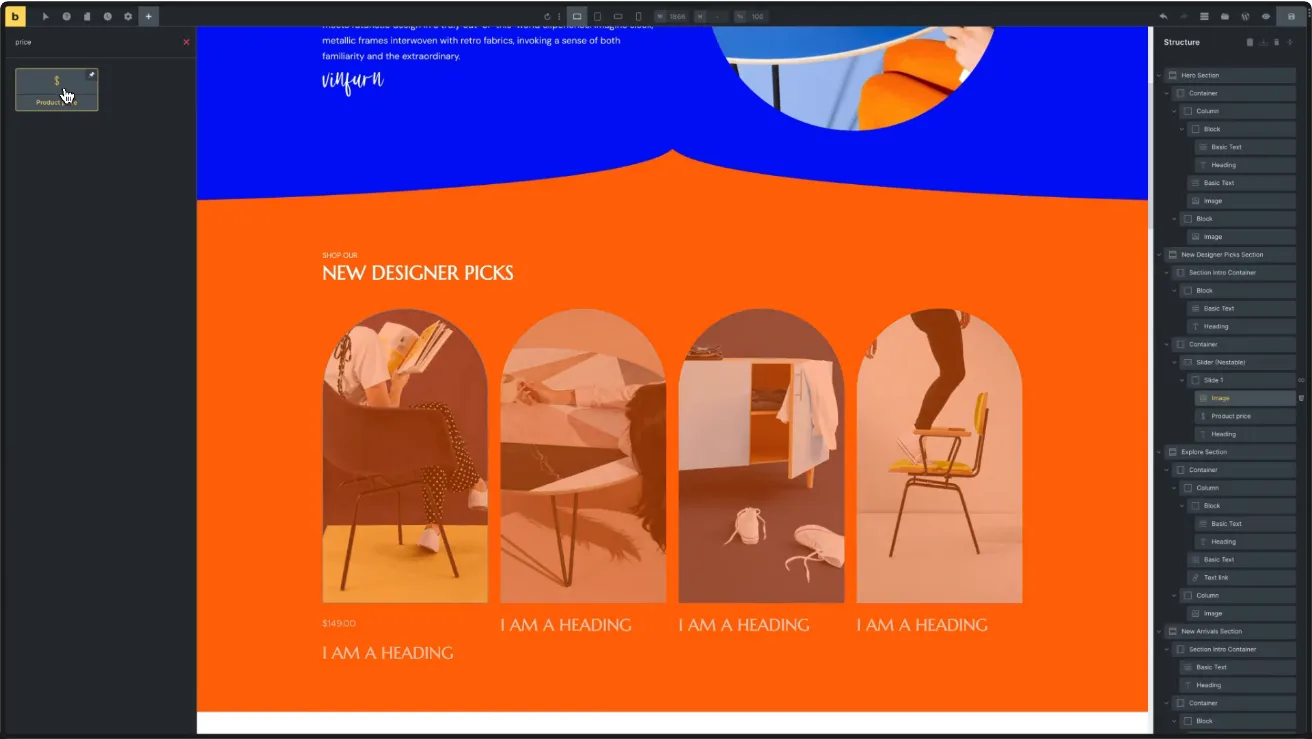
What Is Bricks Builder?
Bricks is a theme and a page builder in one. You upload it under Appearance > Themes, not under Plugins. Once active, it adds a visual editor that controls your whole site: headers, footers, single post templates, archive pages, popups and WooCommerce pages.
It launched in March 2021 and has a loyal following among WordPress freelancers and agencies. Its pitch is simple: a fast editor, lean front-end code, and every feature in every plan with no paid add-ons from the vendor.
Because Bricks is the theme, there is no second layer of theme code, which helps speed. It also means your designs live inside Bricks. If you ever leave, you rebuild your pages. Most visual builders lock you in this way, but it is worth knowing before you commit.
The Bricks Editor
The editor is built with Vue.js and runs on the front end. The vendor’s demo shows the usual three-part layout: elements on the left, your page in the middle, and a Structure panel on the right that lists every section, container and element as a tree. In Bricks 2.4 you can move the toolbar and panels to any side and save layouts as profiles for different users.
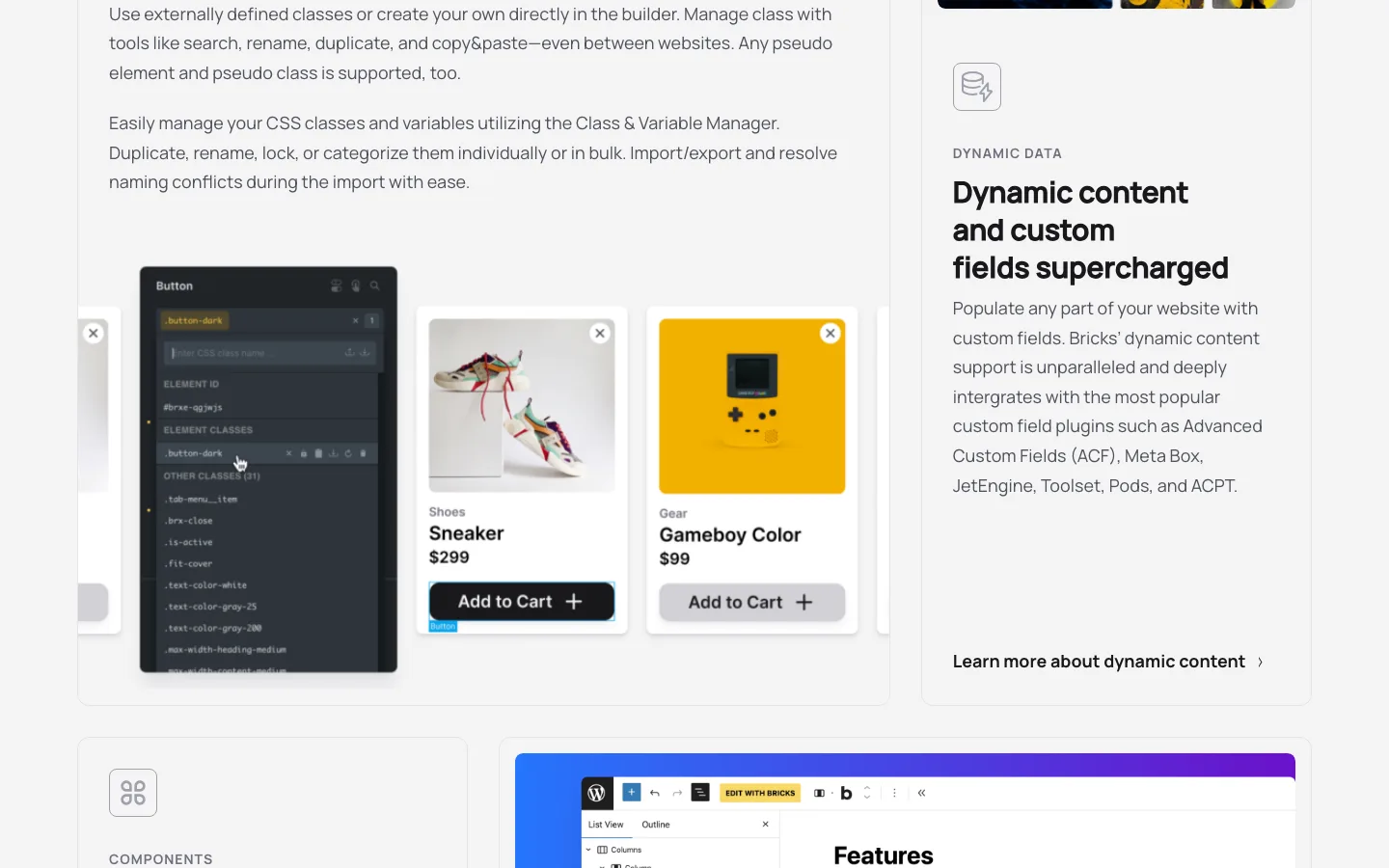
Class-based styling in Bricks, as shown on the official Bricks builder page.
What sets Bricks apart is how much it borrows from real CSS:
- Global classes and variables. You can style elements with reusable CSS classes and variables, then manage them in one place. Change a class once and every element that uses it updates.
- Flexbox and CSS Grid layouts with visual controls.
- Unlimited custom breakpoints, with a choice of desktop-first or mobile-first editing.
- Components. Build a card, a pricing table or a hero once, give it editable properties, and reuse it. Bricks can also turn components into blocks for the WordPress block editor.
- Custom code. Add your own HTML, CSS, JavaScript and PHP where you need it.
This is why developers like Bricks, and why some beginners struggle with it.
Templates
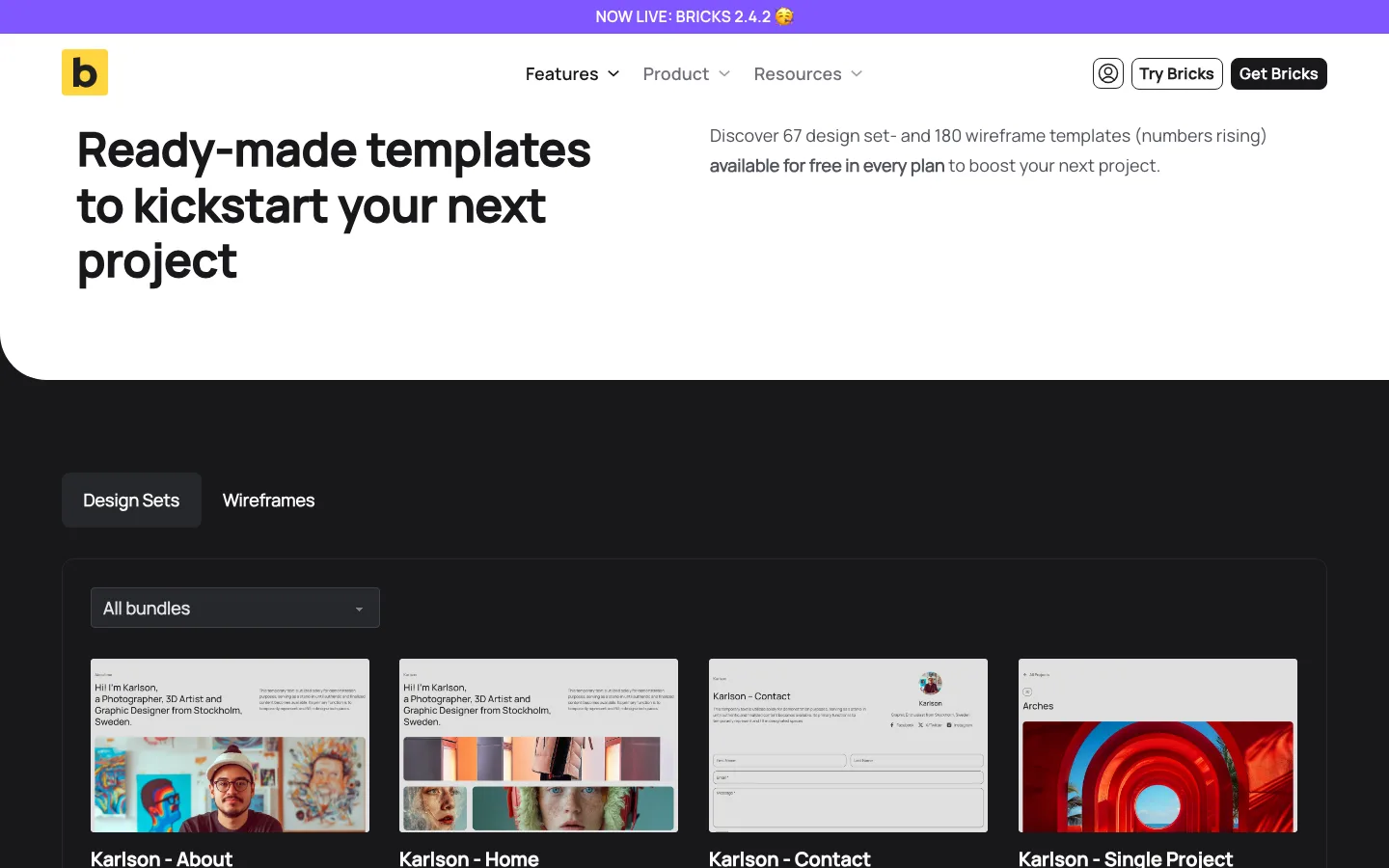
The official Bricks template library, which listed 67 design set and 180 wireframe templates.
Bricks includes 67 design set templates and 180 wireframe templates, free in every plan. Design sets are styled pages that belong to one look (for example a portfolio set with home, about, contact and project pages). Wireframes are plain layouts you style yourself.
That is a small library next to Elementor’s or Divi’s. If you like starting from a finished design, look at BeTheme or Divi instead. If you start from a blank page anyway, it won’t matter much.
One catch: community templates are tied to an active license. If you cancel a yearly plan, you lose access to them.
Features That Replace Plugins
Bricks markets itself as “fewer plugins, less money spent.” Every plan includes:
- Query Loop Builder to list posts, products, users, terms or custom data, with load more buttons, infinite scroll and AJAX filters.
- Popup Builder for promo and signup popups.
- Menu Builder for mega menus, mobile menus and off-canvas menus.
- Forms with actions that, since 2.4, can run only when certain fields match (for example, add someone to Mailchimp only if they tick a consent box).
- Conditions to show or hide any element based on rules you set.
- Interactions to show, hide or animate elements on click, hover or scroll.
- Dynamic data from custom field plugins such as ACF, Meta Box, JetEngine, Toolset and Pods.
- Extras such as maps, coming soon pages and custom login pages.
On a brochure site, that can replace separate forms, popup and mega menu plugins. On sites with custom post types, the query loop and dynamic data tools are the real draw.
What’s New in Bricks 2.4
Bricks 2.4 came out on September 16, 2026, followed by fix releases 2.4.1 and 2.4.2. According to the release notes, the main additions are:
- Bricks AI Abilities. You connect an AI client you already use (the vendor names Codex, Claude and Copilot) under Bricks > AI, and it can create pages, edit content and manage your design system.
- Builder Browser and Media Browser. One place to manage templates, components and media, including a Media Health check for missing alt text and oversized files.
- Global import and export of theme styles, classes, variables, components and templates between sites in one ZIP file.
- CSS Sync, an opt-in, experimental feature that keeps custom CSS and the visual controls in step.
Bricks ships often. Reviewers who manage many client sites say the pace can bring changed workflows and occasional bugs, and Bricks itself recommends testing updates on a staging site first. If your host does not offer one, our guide to WordPress staging plugins covers free ways to set one up.
Is Bricks Fast?
Speed is the main reason people switch to Bricks. The vendor says Bricks sites earn top grades in Lighthouse and GTmetrix out of the box, uses plain JavaScript instead of jQuery, lazy loads images and videos, and outputs clean, semantic markup. We have not benchmarked a Bricks site, so we won’t quote load times.
What we could do is compare the code each builder sends to the browser: a public Bricks template demo page hosted by the Bricks team, and the one-section test page we built in Elementor 4.3.3. They are different pages, so treat this as a rough look, not a benchmark.
The Bricks demo loaded a main stylesheet of about 33 KB and roughly 197 KB of scripts, including its 191 KB main script. Our one-hero Elementor page loaded a roughly 55 KB main stylesheet but only about 24 KB of scripts. Bricks used nine stylesheets; Elementor used 11, including two default Google Fonts families.
The Bricks heading sat inside a block, container and section, while Elementor’s heading sat directly in a flexbox div. These were different pages, a complete template and a small test section, so neither the asset totals nor the markup establish an overall speed winner.
Sizes are before compression. Measured.
Bricks used semantic tags like section and main and a smaller base stylesheet. But Elementor’s new Atomic elements were lean too: our heading sat directly inside its container with no extra wrapper divs. The old “Elementor div soup” complaint applies mostly to its classic widgets. So Bricks is a fast foundation, not magic. A page full of sliders and large images will still be heavy.
Bricks is covered from official documentation and demos, without a licensed installation. We tested free Elementor for the comparison. Public demo measurements are not matching-page benchmarks.
WooCommerce
WooCommerce support is one of Bricks’ strongest points, and every plan includes it. You can design the shop, product archives, single product pages, cart, checkout and account pages visually.
Bricks 2.4 added a WooCommerce setup wizard that can create cart, checkout, account, shop and product layouts in one place. It also added a mini cart builder and experimental v2 cart, checkout and account elements, where you design states like an empty cart or a thank-you page inside one element.
Compare that with Elementor: on our test install, all 25 WooCommerce widgets in the free plugin were locked behind Pro, and Elementor’s cheapest paid plan ($60/year) doesn’t include its eCommerce features either.
Is Bricks Good for Beginners?
Bricks says you don’t need to be a developer to use it. In practice, it suits people who already know their way around a page builder:
- It has no free version to learn on, and the playground needs an account.
- The template library is small, so you often start from a blank page.
- The best features (classes, variables, query loops, conditions) make the most sense if you understand CSS and how WordPress stores content.
- There are fewer add-ons, tutorials and freelancers than for Elementor.
On the other hand, the Bricks Academy docs are detailed, there is a forum and a Facebook group, and at least one testimonial on the vendor’s pricing page comes from a self-described novice coder who moved from Elementor. A patient beginner can learn Bricks, but someone who wants a site up this weekend will do better with Elementor or a simple theme like Astra.
Bricks Pricing and License
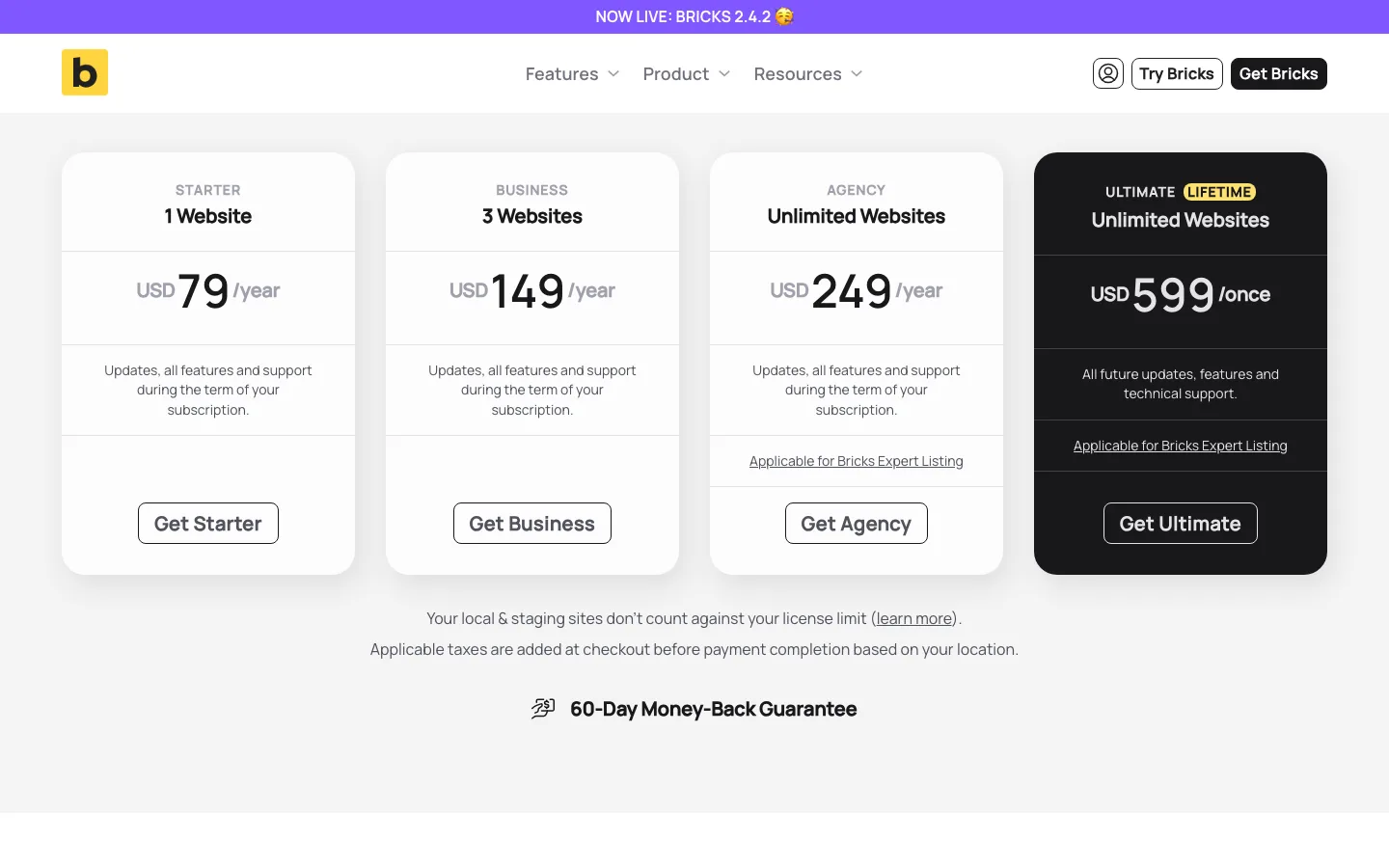
The Bricks pricing page.
All plans include every feature. The only difference is how many sites you can activate and whether you pay yearly or once. Prices as of October 2026, in US dollars, with tax added at checkout:
Starter costs $79 a year for one site and Business $149 a year for three. Agency covers unlimited sites for $249 a year. Ultimate Lifetime also covers unlimited sites, for a $599 one-time payment.
Details worth knowing before you buy:
- No free version, no download trial. The pricing page says there is no downloadable version. You can try Bricks online at the playground, but only after creating an account.
- 60-day money-back guarantee on your first purchase, which is twice the 30 days Elementor and Divi offer. It does not cover renewals or upgrades; renewals get a 30-day refund window.
- Local and staging sites don’t count against your limit. The docs list localhost,
.localand.testdomains,dev.,staging.andtest.subdomains, and staging domains at hosts such as Kinsta, WP Engine, SiteGround, Cloudways and Hostinger. - Subdomains and multisite subsites do count. Each live WordPress install needs its own activation.
- If you cancel a yearly plan, your sites keep working and you can still edit them, as long as you made at least one full, non-refunded yearly payment. You lose updates, support and community templates.
- Lifetime means as long as Bricks is developed. The terms say lifetime licenses get updates and support “as long as Bricks is in active development.”
- Client sites are allowed on every plan. Reselling the license is not.
Which plan makes sense? For one site, Starter costs $395 over five years, so lifetime only pays off if you build more sites. Against the $249/year Agency plan, the $599 lifetime license pays for itself in under three years; against the $149/year Business plan, in about four.
Security and Updates
In February 2024, Bricks released version 1.9.6.1 as a mandatory security update after a security researcher reported a serious vulnerability. The vendor told users to update all Bricks sites within 24 hours and warned that old backups could bring the flaw back. It said there was no evidence of exploitation at the time of release.
Every popular WordPress product needs security fixes now and then. The lesson is to keep your license active and update quickly when a security release lands.
Bricks vs Elementor
“Bricks vs Elementor” is the comparison most people search for, so we built the same small hero section in free Elementor 4.3.3 to see what the alternative looks like today. For page weight, pricing over five years and a pick for each type of reader, see our full Bricks vs Elementor comparison.
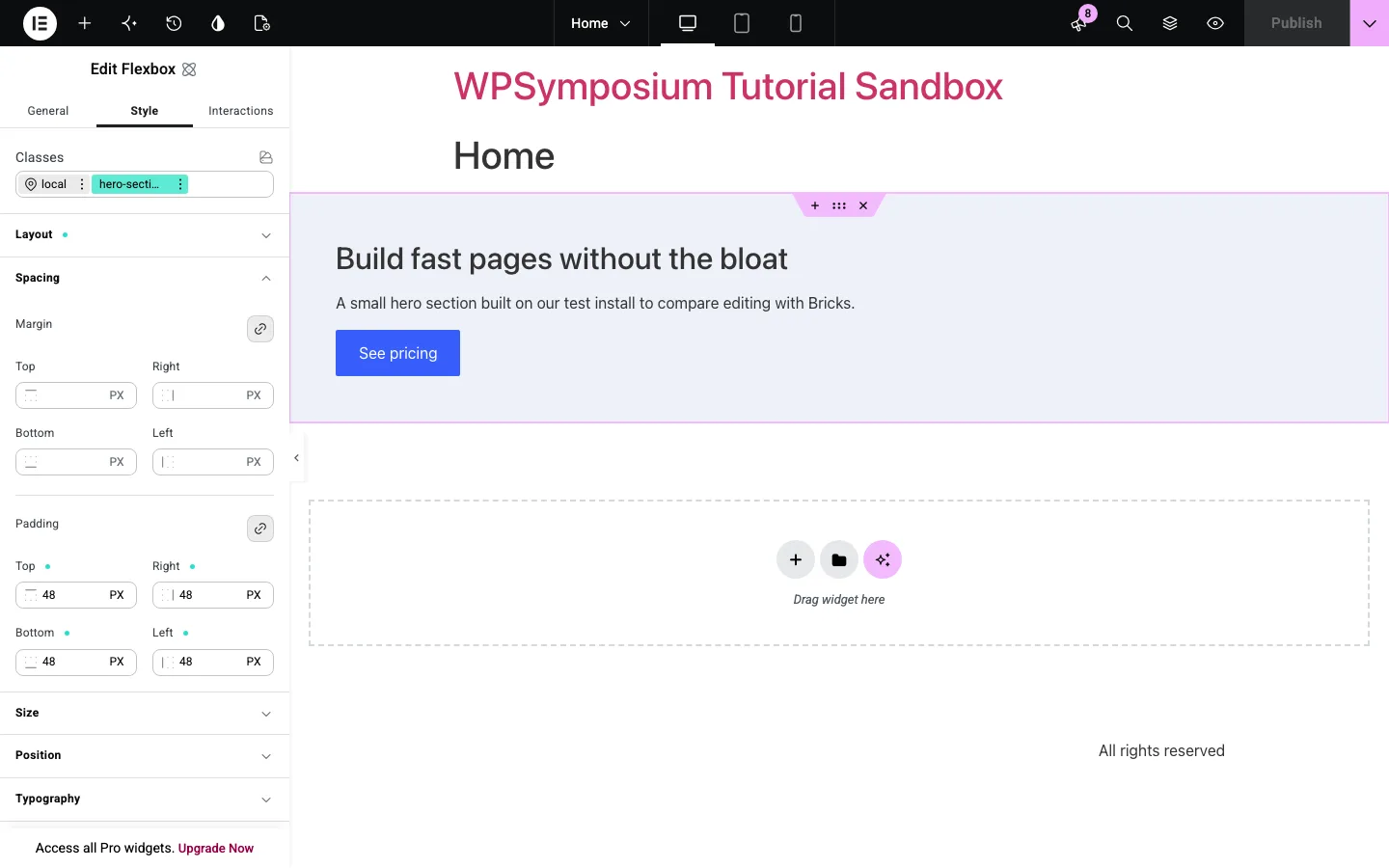
Our hero section in the free Elementor editor on a test install (WordPress, Hello Elementor).
It took a few minutes: a Flexbox container with a Heading, Paragraph and Button from Elementor’s new Atomic elements, then a column layout, a 16 px gap, 48 px padding and a background color. What we noticed:
- Elementor now works more like Bricks. Elementor 4’s Atomic elements have a Classes field, so we saved our styles to a reusable
hero-sectionclass. That class-first approach used to be a Bricks selling point. - The Flexbox defaults to a row, so the heading, text and button first appeared side by side until we changed the direction.
- Many controls are Pro-only. Custom CSS, Display Conditions and custom Attributes all carried a Pro crown. In Bricks, conditions and custom code are in every plan.
- Upsells are everywhere. The free panel listed 143 widgets, and 97 of them were locked, including every WooCommerce widget. The Elementor Quick Start screen alone showed four upgrade prompts.
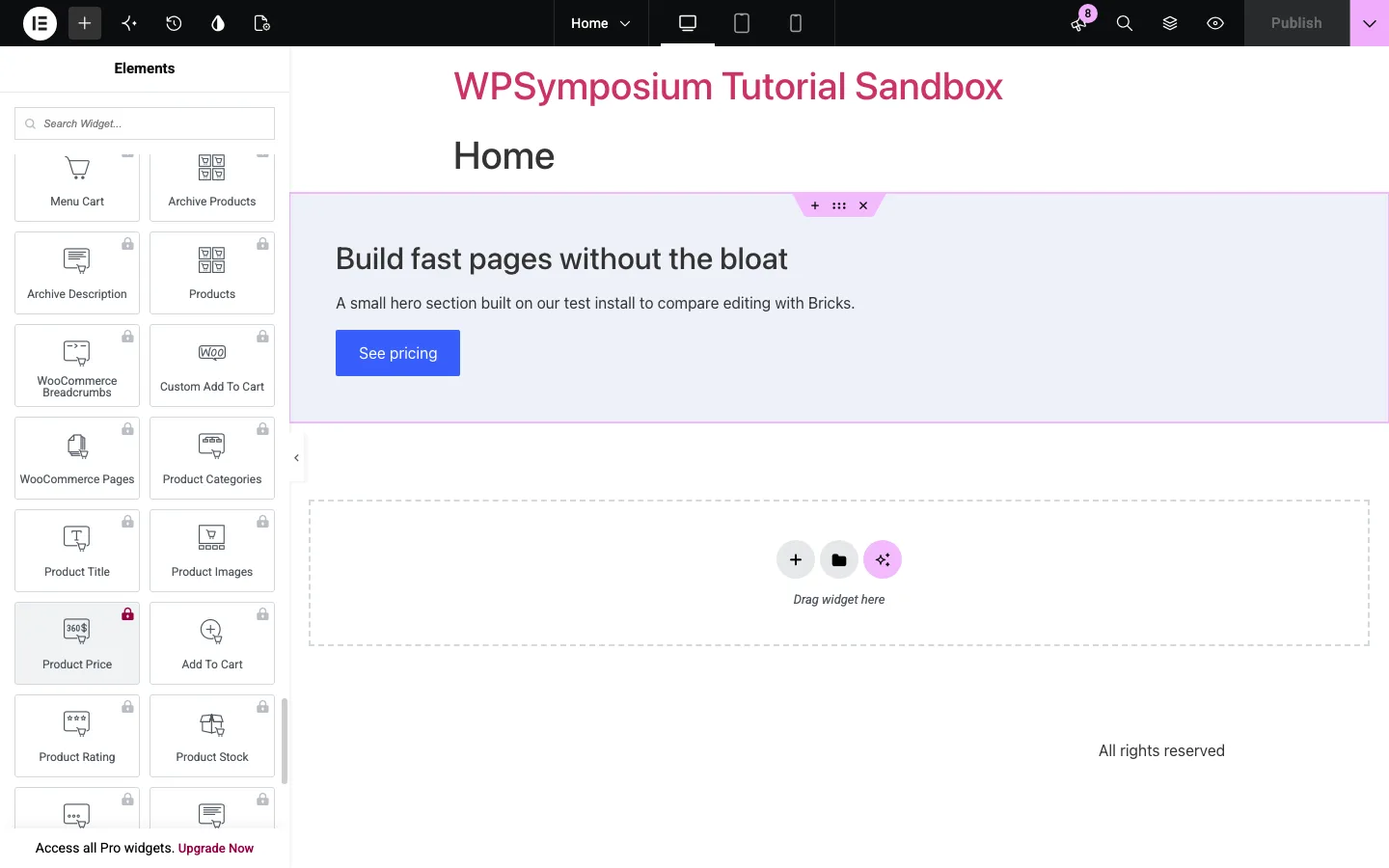
WooCommerce widgets locked behind Pro in free Elementor on our test install.
Elementor prices below are from its pricing page in October 2026. Bricks details are from the vendor’s site.
Bricks replaces your theme, whereas Elementor is a plugin that works with most themes. Elementor has a free edition with more than ten million installations and the larger template, add-on and hiring ecosystem. Bricks has a smaller ecosystem and an account-only playground, with 67 design sets and 180 wireframes included.
Bricks includes every feature, including WooCommerce, from $79 a year for one site. Elementor Essential costs $60 but excludes ecommerce, popups and custom CSS; Advanced Solo adds those for $84 a year. For multiple sites, Bricks costs $149 a year for three or $249 for unlimited sites, compared with Elementor’s $108 for three or $204 for 25. Bricks also offers a $599 unlimited lifetime license; Elementor has none.
Bricks allows 60 days for a first-purchase refund, versus Elementor’s 30. Bricks 2.4 connects to your own AI client, while Elementor offers built-in AI on higher plans with credits.
Price. For one site with WooCommerce, they are close: $79 vs $84 a year. For many sites, Bricks wins because of the $599 lifetime license.
Ease of use. Elementor is easier to start with: a free version, more templates, far more tutorials. Bricks is easier to keep tidy on big sites once you learn its class system.
Design and features. Bricks includes conditions, custom code, popups, forms and query loops in every plan; Elementor locks many of those behind paid tiers but has more widgets and add-ons overall.
Speed and SEO. Both can produce lean pages now. Bricks has the lighter base stylesheet and no theme layer. Elementor 4’s Atomic elements closed much of the markup gap, but loaded more stylesheets on our small test page.
Ecommerce. Bricks, because the WooCommerce builder comes with every plan.
Ownership and lock-in. Elementor is a plugin, so you can switch themes and keep your pages; with Bricks, leaving means rebuilding. Elementor is also far bigger: its pricing page says it powers over 22 million sites.
Who wins
- Beginners and DIY site owners. Elementor. Start free, upgrade only if you need to.
- Freelancers and agencies building many sites. Bricks, especially on the lifetime plan.
- WooCommerce stores on a budget. Bricks, since store design is included from the cheapest plan.
- Anyone who needs specific add-ons or wants to hire help easily. Elementor.
For a wider view, including Divi, Beaver Builder and block-based options, see our roundup of the best page builders for WordPress.
Bricks Alternatives
- Elementor. The best choice if you want a free start, the biggest ecosystem, and a plugin you can use with any theme.
- Breakdance. An easier all-in-one builder with a free version and $199.99/year for unlimited sites, but no lifetime plan.
- Divi. Another theme-plus-builder with a $249 lifetime plan for unlimited sites. It has more ready-made layouts than Bricks, and Divi 5 was rebuilt for speed.
- Beaver Builder. A stable, simple plugin builder with a free Lite version, popular with agencies that hand sites to clients.
- GeneratePress with GenerateBlocks. The lean option if you want to stay in the WordPress block editor. Read our GeneratePress review.
- Kadence. A fast free theme with block-based design tools and starter templates.