Breakdance Review: A Complete Builder for WordPress
Breakdance Pro puts headers, forms, popups and WooCommerce design in one place. Those tools worked in our tests, including a guest checkout. It is particularly good value for people building several sites. Expect some demo cleanup, a smaller add-on market and a more limited free version.
Our hands-on tests include the Breakdance 3 release candidate, so preview-only features may change before the final release.
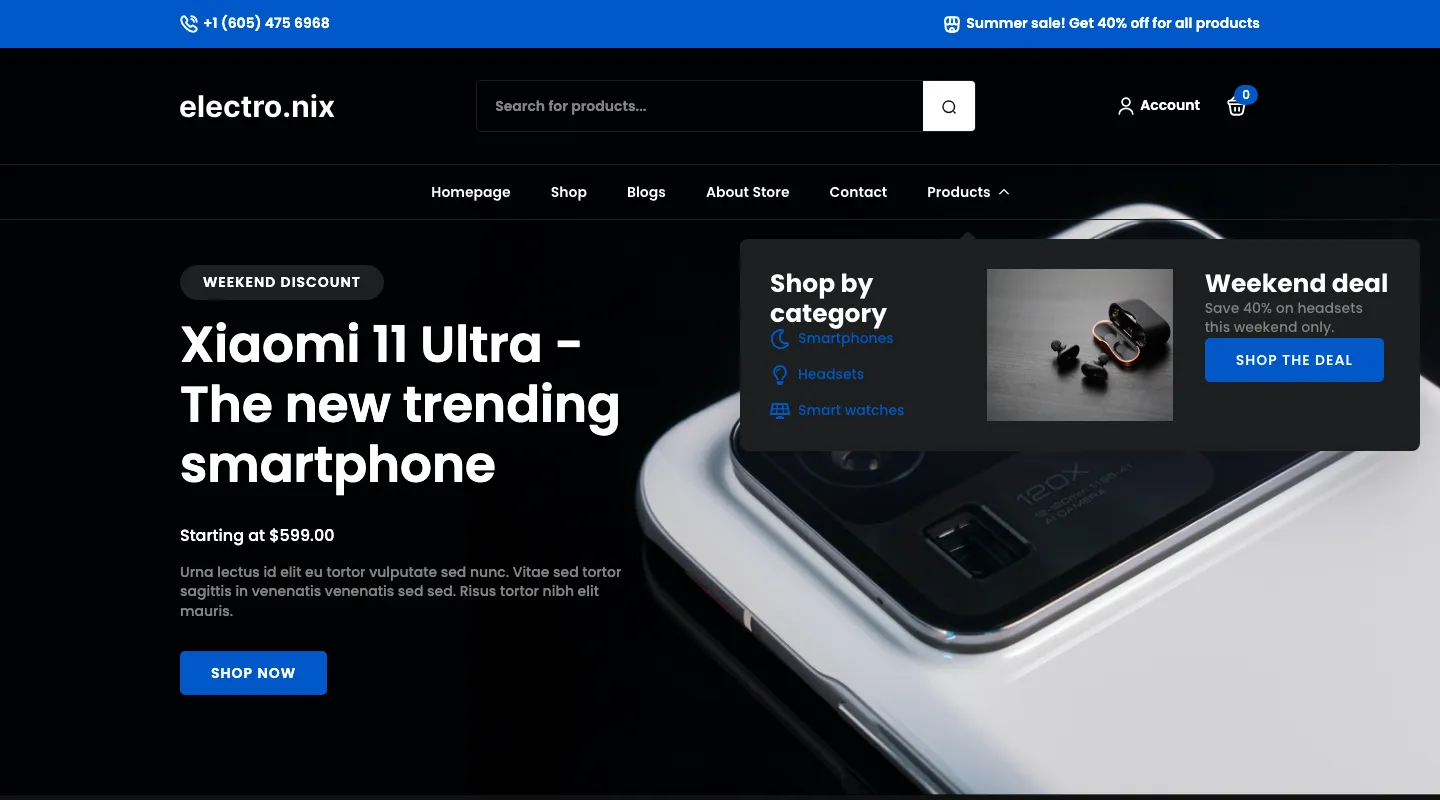
The three-column mega menu we built on the imported Electro.nix design.
What Is Breakdance?
Breakdance is a drag-and-drop site builder for WordPress made by Soflyy, the company behind Oxygen and WP All Import. Version 1.0 shipped on September 12, 2022, and the vendor says more than 100,000 creators now use it.
Unlike Elementor, Breakdance does not sit on top of a theme. It is “themeless”: you build the header, footer, blog templates and every page in Breakdance. On our test installs, activating the plugin also switched the site to Breakdance Zero, a blank theme that exists only so WordPress has something to load. Breakdance also ships seven hidden “Fallback” templates for posts, archives, the shop, search and 404 pages, which Oxygen 6 does not have.
The pitch is that one plugin replaces many. Forms, popups, mega menus, conditions, dynamic data and WooCommerce templates are all built in, and in Pro we found each of them working.
Is There a Free Version of Breakdance?
Yes. Breakdance Free costs $0, works on unlimited sites, and is downloaded from breakdance.com, not WordPress.org. The main difference is how much of the site you can design with it.
Free gives you a smaller element and template library, a form builder that saves entries, and popups opened by a click. Pro adds the header builder and mega menus, full popup triggers, email notifications and form integrations, reusable loops and custom WooCommerce pages. Free has no site limit; Pro’s allowance depends on the plan.
The free plan also has some limitations that are easy to miss in a feature list:
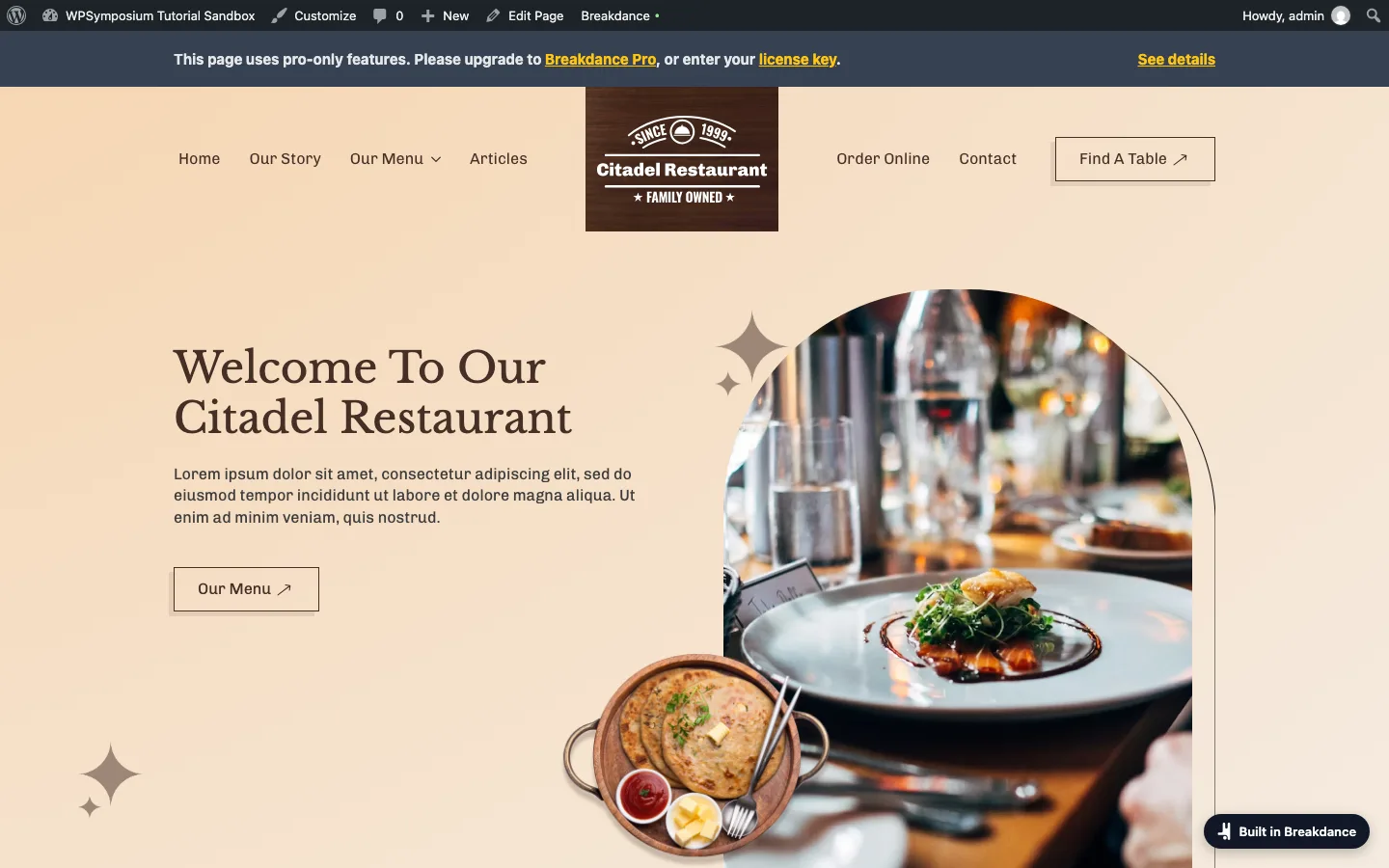
The imported Citadel Restaurant design viewed by a logged-in admin on free Breakdance.
- Admins see a warning bar. The restaurant design uses the Pro Header Builder and Menu Builder, so every page told logged-in admins “This page uses pro-only features”.
- Visitors see Pro elements fade away. For logged-out visitors, the header and menus faded to a pale grey within seconds. The plugin’s CSS fades Pro elements to 10% opacity and full grayscale over eight seconds.
- Every page gets a badge. A dark “Built in Breakdance” button sits in the lower right corner of every page, for every visitor, and links to breakdance.com.
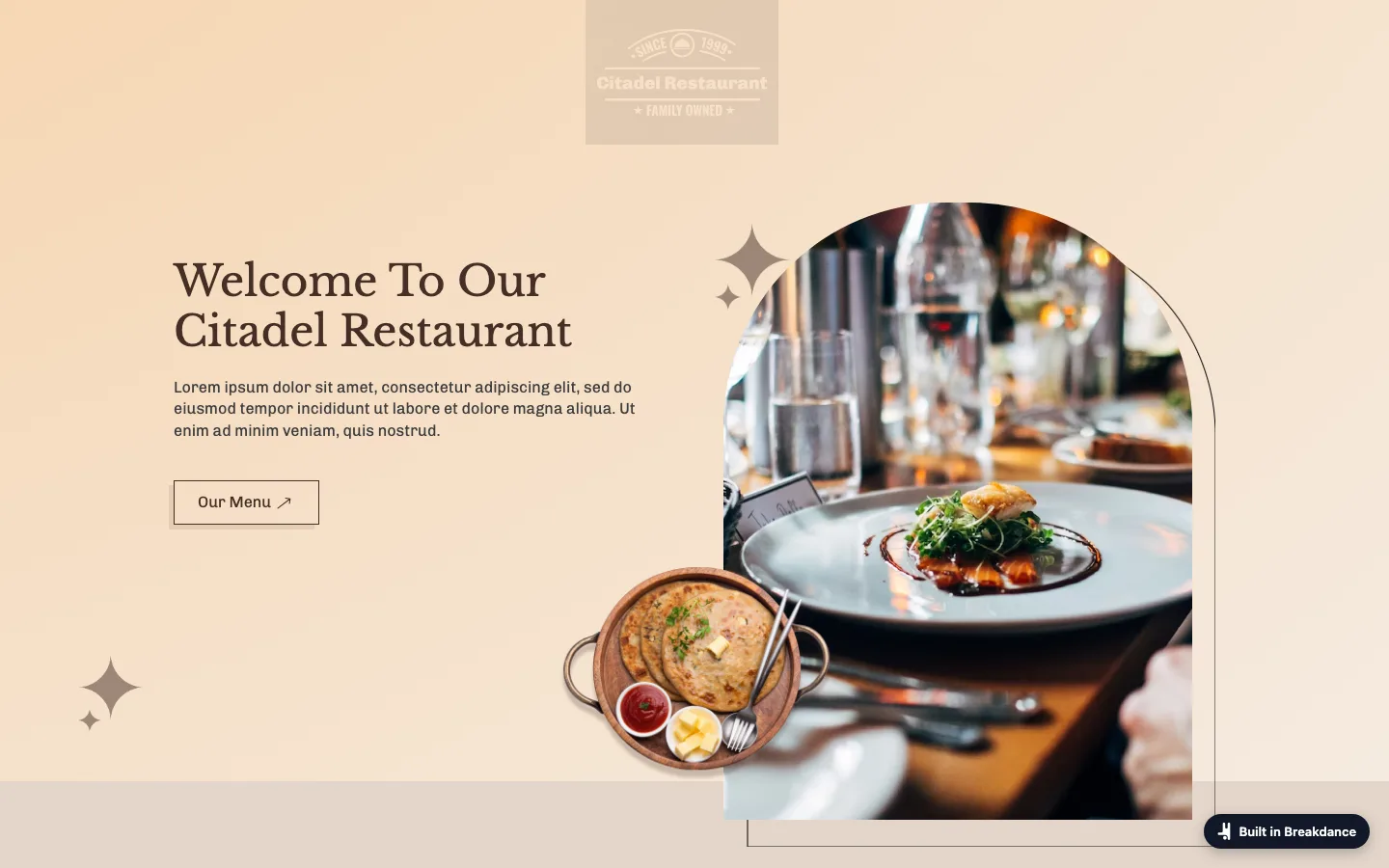
The header and menu faded for a logged-out visitor on the free plan.
Upsells inside wp-admin were mild: no nag notices on the dashboard, an “Upgrade to Pro” button on the Breakdance home screen, a “Try Breakdance Pro” button in the editor, and the Pro labels. The editor button offers a 14-day free trial of Pro that turns into a paid subscription unless you cancel. We did not start it. A free contact form stores entries in WordPress but cannot email them to you.
What the Pro license changed
Activating Pro removed the front-end badge and upgrade labels throughout the builder. The Privacy tab says usage collection stops for licensed sites. The license screen shows activation and expiry, but not how many sites you have used.
Our review key is for the 1-site plan. We activated it on three localhost sandboxes, and the vendor’s license server still reported zero sites used and one activation left. That matches the pricing page, which says local, staging and development installs do not count.
The free version is an unlimited way to learn Breakdance. For a client or business site, the badge alone means you will want Pro.
The Editor
The editor opens on the front end of your site. You get an Add panel on the left, your page in the middle, and a Structure panel on the right that lists every element as a tree.
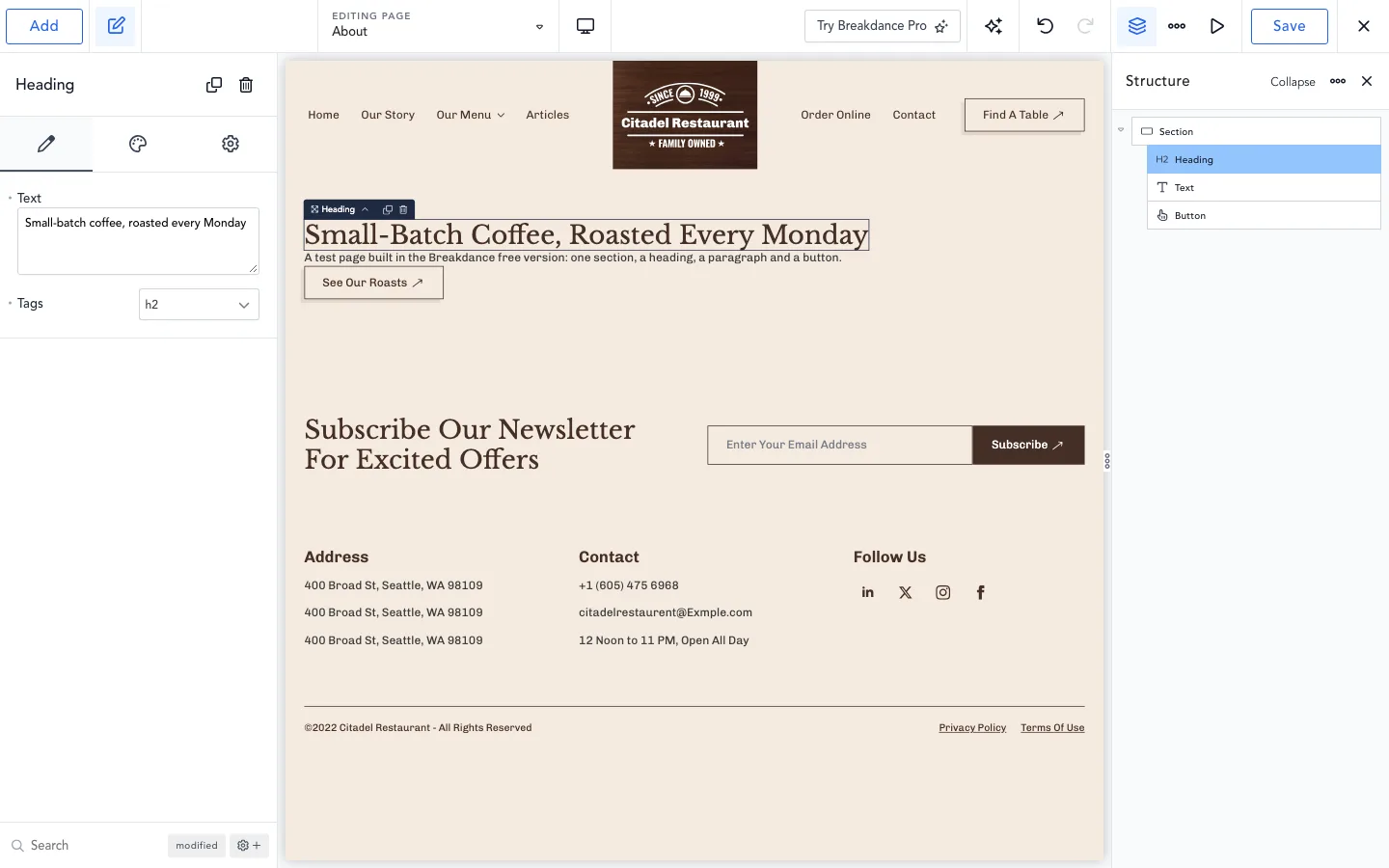
Our test page in the Breakdance editor, free.
On October 4 we built a simple hero area: a Section with a Heading, a Text element and a Button. Clicking an element in the Add panel dropped it straight into the selected section, with no dragging needed. In the Pro tests we built cards, menus and popups the same way. What we noticed:
- It is quick to learn. Labels are plain, and the Add panel inserts after whatever you have selected.
- Style settings nest deep. Many options sit in popovers inside popovers, for example Style > Popup > Animation > Entrance > Animation Type.
- The markup is lean. Our heading came out as a
section, one containerdiv, then theh2. - Pro elements are not hidden on Free. You can add and style a Pro element, like the Pricing Table. It is just labeled “Pro”.
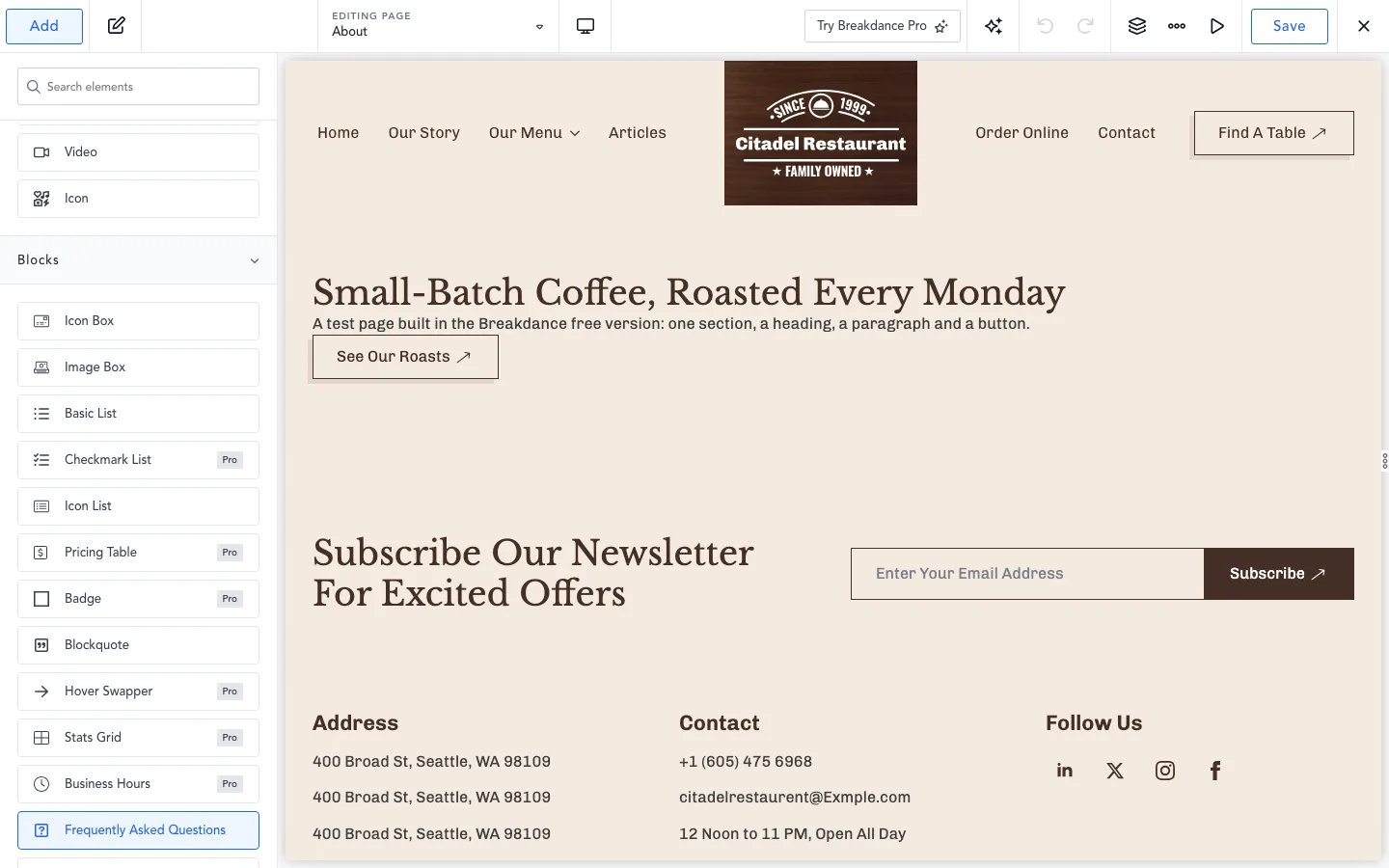
Pro labels in the Add panel of free Breakdance.
Editor speed on a long page
The builder felt quick on normal pages. Opening an 11-element block took about 0.4 seconds and a five-loop test page about 0.9 seconds on our local machine. To find its limits, we imported ten pages from the “Digital Marketing Agency” design set into one page. That gave us 53 sections and about 1,040 elements. On that page:
The large page exposed a noticeable slowdown. Opening its builder still took about two seconds, but ten quick keystrokes took 1.7 seconds to appear and saving took around seven seconds. The small popup comparison saved in little more than a tenth of a second. Duplicating an element and opening the Structure panel stayed responsive, at about a fifth of a second each.
Local Docker sandbox and headless Chromium on a Mac. Use these to compare pages, not as hosting benchmarks.
Typing lag of almost a fifth of a second is noticeable, and seven-second saves add up. Few real pages are this long, but if you build very long landing pages, split them into Global Blocks (reusable sections saved separately) or separate pages.
Templates and the Design Library
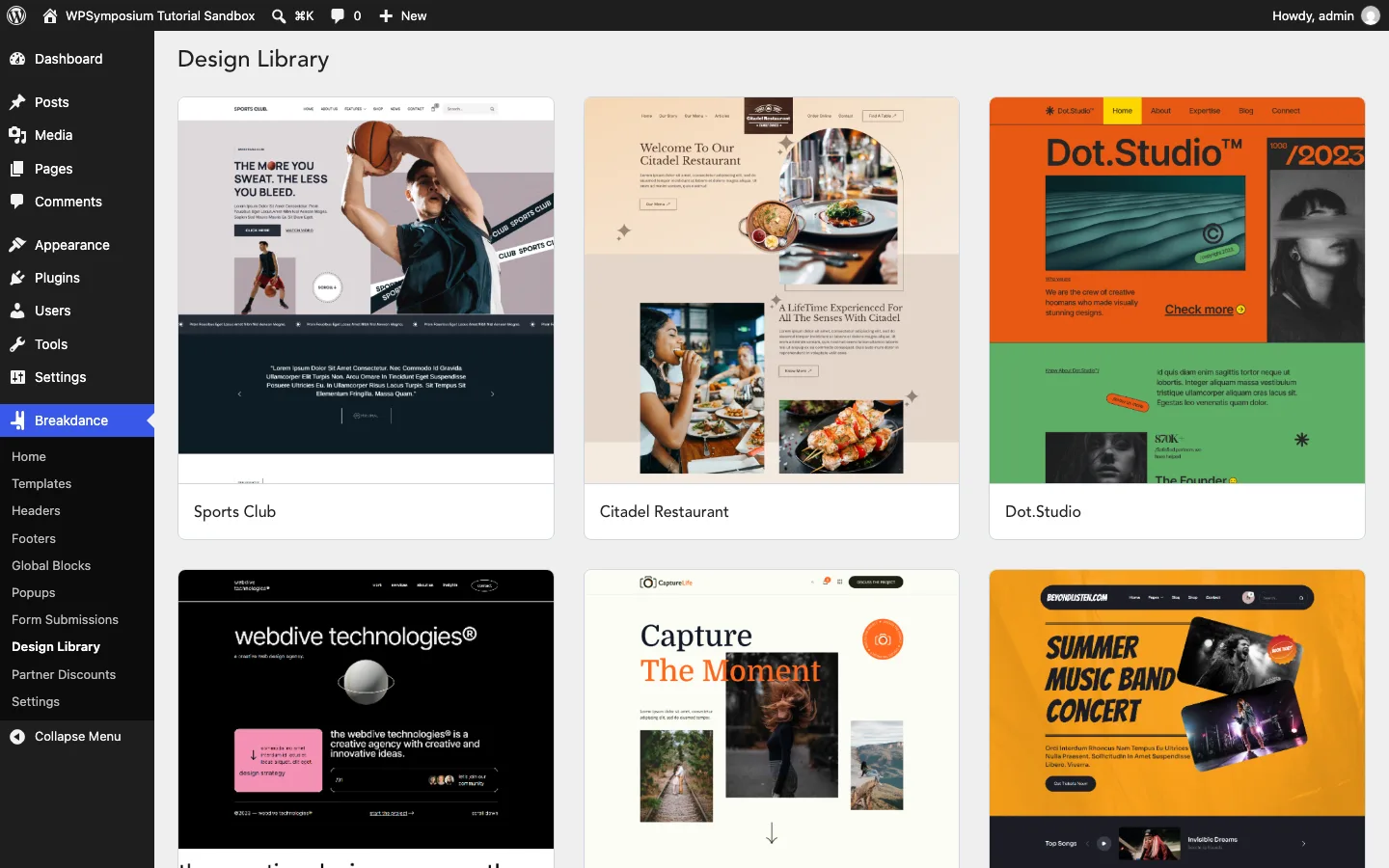
The Design Library on our free test install, which listed 37 website designs.
The Design Library holds full website designs, including a law firm, a dental clinic, a clothing shop and a gym. Our free and licensed installs both listed 37 of them, each with Live Preview and Import. The pricing page says the free plan gets about 100 page and section templates and no one-click websites, while Pro gets all 37 websites and 1,000+ templates. On October 4, the free 3.0 RC 1 still let us import a full website, the “Citadel Restaurant” design, in about ten seconds. We did not retest a free import on RC 2.
Importing a full shop design with Pro
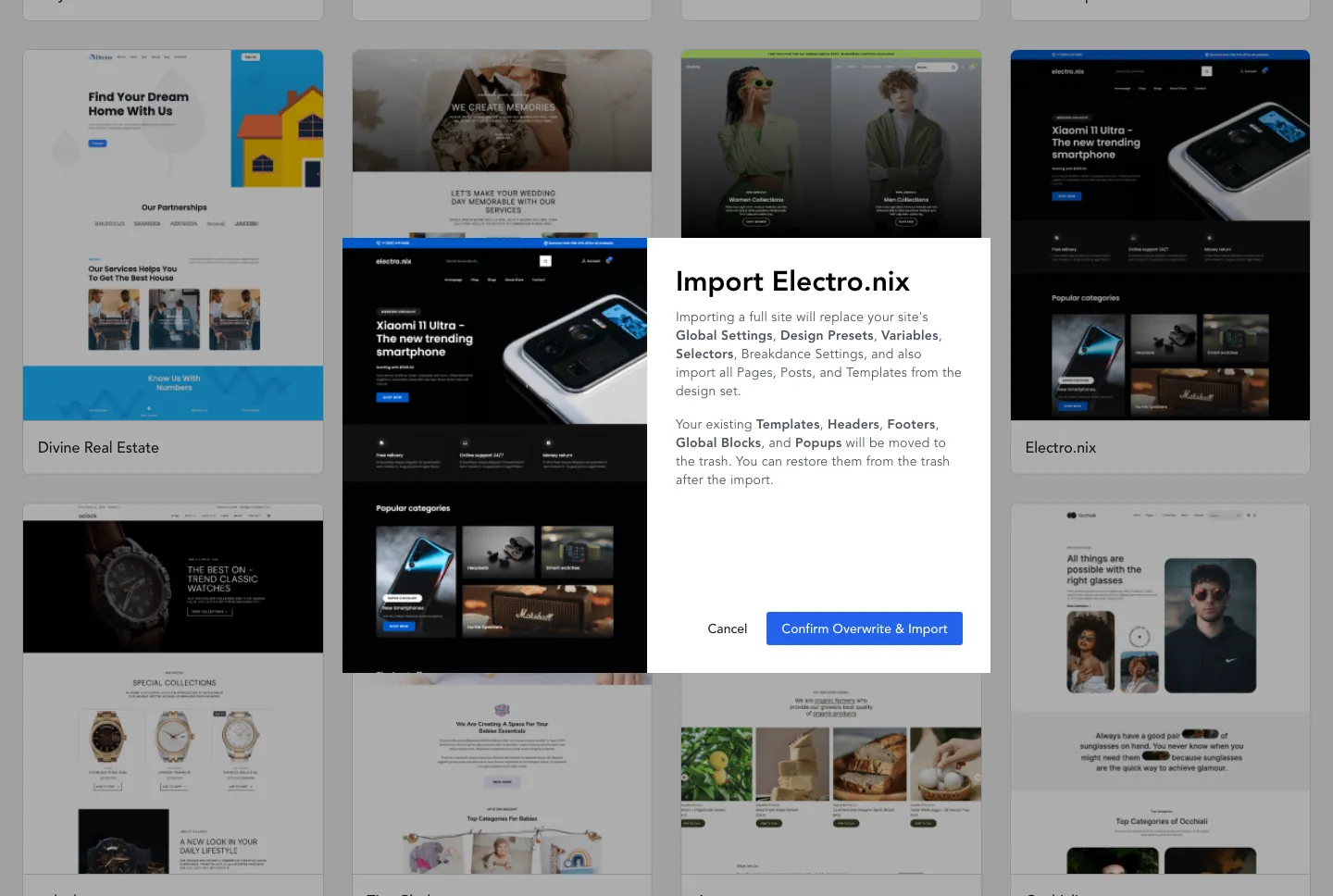
The import warning for the Electro.nix shop design.
The Electro.nix import was quick, but destructive: it replaced global design settings and moved existing templates, headers, footers, reusable blocks and popups to the trash. Use a fresh site or a backup rather than importing over finished work.
It added 10 pages, a header, a footer and five templates for posts, the blog archive, products, the shop and the 404 page. It did not add any products, any media files or any WordPress menus. The rough edges took longer to fix than the import took to run:
- The images stay on the vendor’s server. The home page loaded seven images, 1,992 KB in all, straight from breakdancelibrary.com instead of copying them into your Media Library. If that server changes, your images break. On a real site you would download and re-upload them.
- The front page was not set. We had to pick the new Home page under Settings > Reading.
- It created duplicate WooCommerce pages. The import added a second Cart, Checkout and My account page, while WooCommerce kept using the originals.
- Some links were broken. The “Blogs” menu link and one footer link returned 404 errors. With WordPress’s plain permalinks, every menu link showed the home page, so switch to pretty permalinks first.
- The shop sections were empty. Four product sections on the home page said “No products found” until you add products.
Global Styles and Design Presets
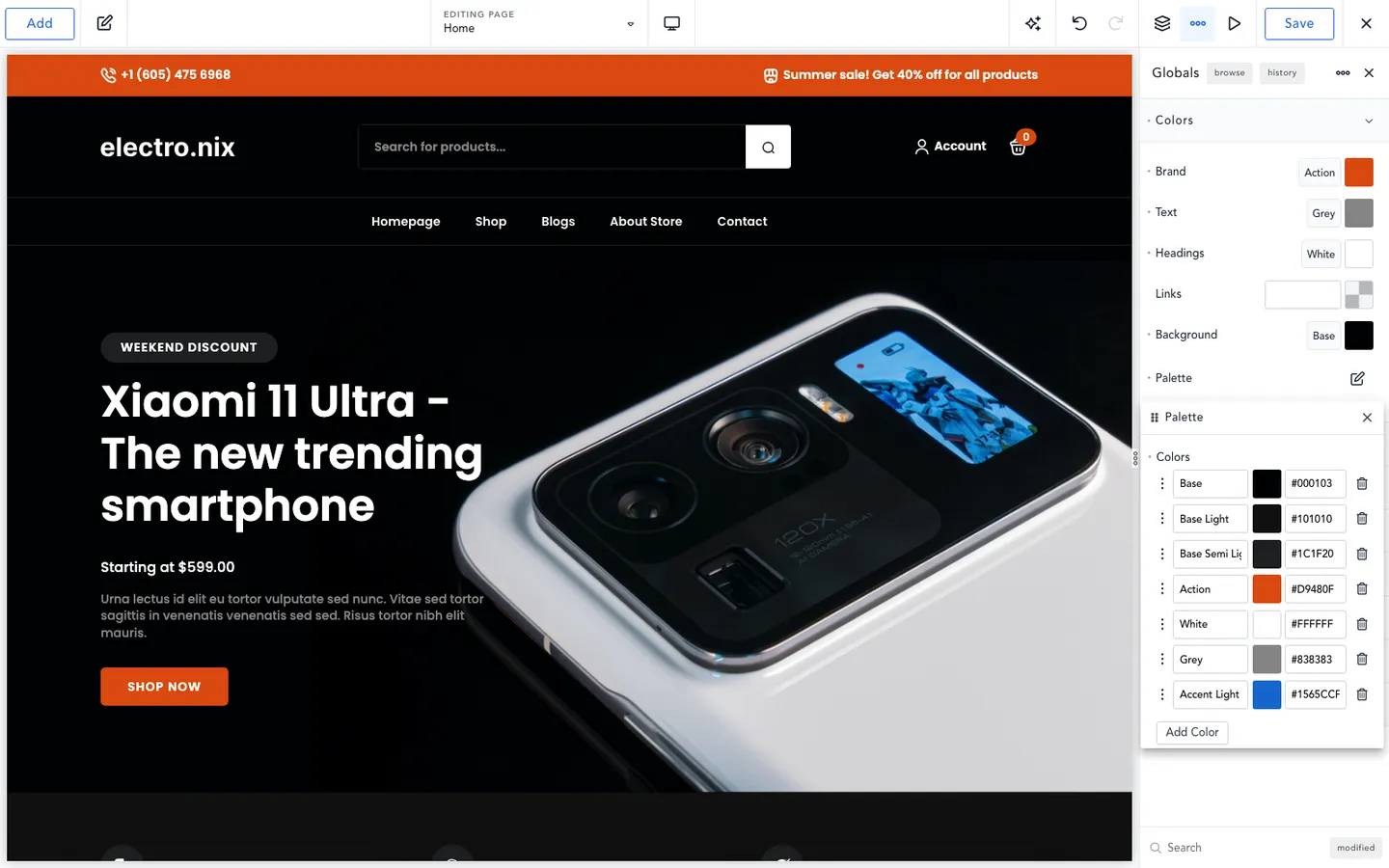
One palette color changed in Global Settings, and the whole imported design followed.
Global Settings is where Breakdance earns its keep for agencies. The panel has sections for colors, buttons, typography (heading and body fonts, base size, a type scale ratio and presets), forms, containers, code, other settings and WooCommerce, plus a browse mode and a history. Electro.nix brought seven palette colors, eight typography presets, the Poppins font and a 1,080 px container.
Global palette changes updated buttons, promotional sections and other linked elements across the imported site. A badge using a separate color stayed unchanged. The Globals history also restored the earlier palette correctly.
Design presets work like reusable element styles. On a button, “Create preset from design” saved our style as “Shop CTA”. After that, the button’s style panel shows only “A preset is currently selected for this element” with an Edit button, and the Design Presets panel lists the preset with its own history. Electro.nix shipped with no presets, Variables or Selectors, so the newer 3.0 tools start empty with this design.
One gap: we saw no setting to host Google Fonts on your own server. The Poppins files loaded from Google’s font servers.
Header Builder: Sticky, Overlay and Conditions
Headers are their own templates in Pro. Breakdance > Headers > Add Header asks for a title, a location (17 choices, such as Everywhere, Pages, Products or Search Results), conditions and a priority. Inside, you build the header from Header Builder rows, which carry the sticky and overlay options. Free users build headers from plain sections instead, with no sticky or overlay options.
Conditional headers worked. We made a “Checkout Header” for the cart and checkout pages. Picking the Pages location filled the priority with 20, higher than the main header’s 1, so the new header won on /cart/ while Home and About kept the main header. One snag came from the import’s duplicate pages: the condition picker listed two identical “Checkout” and two “Cart” entries with no way to tell them apart, so we picked both.
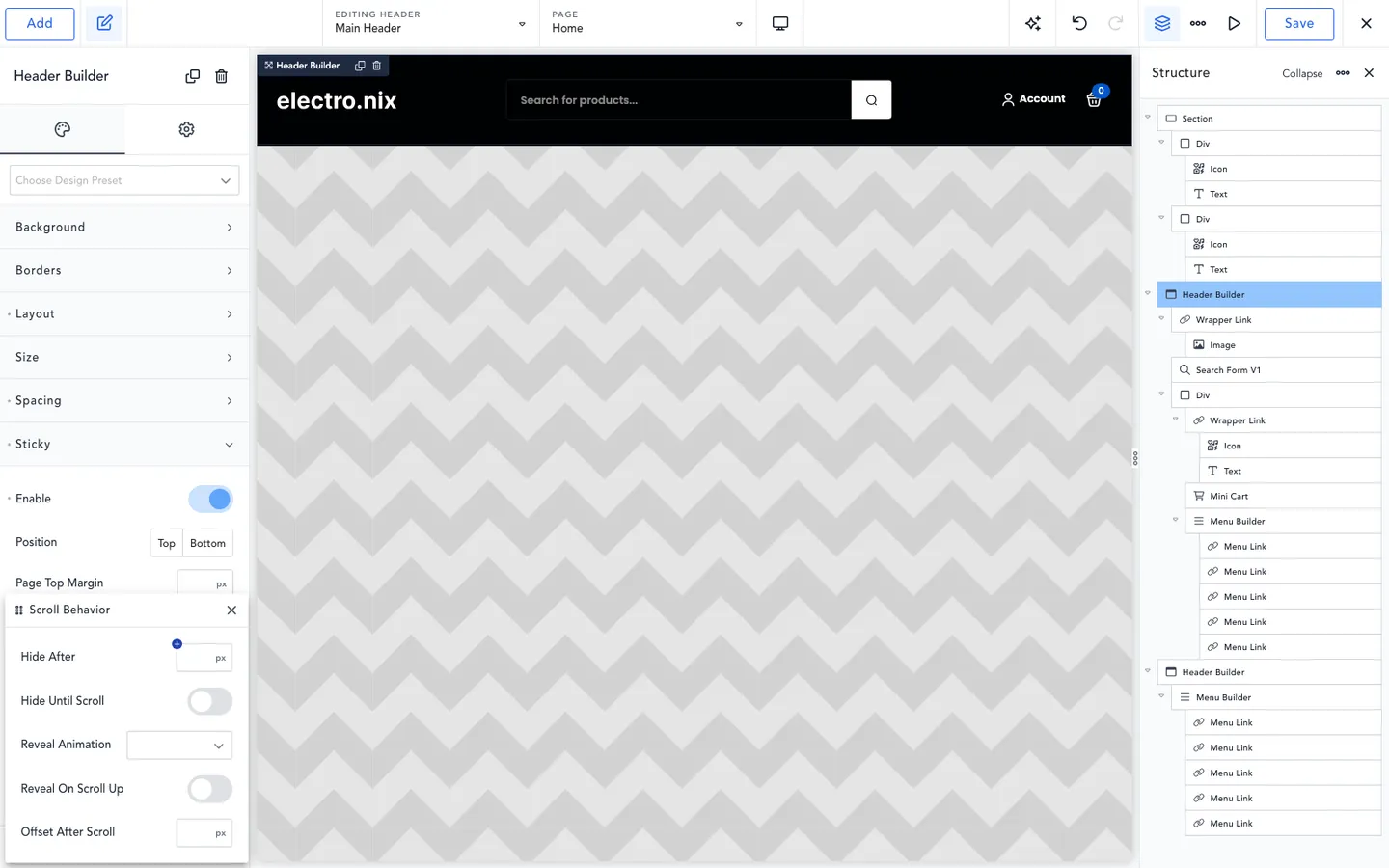
The sticky Scroll Behavior options in the Header Builder.
Sticky headers support reveal effects, scrolling rules, separate styling and device-specific disabling. Our imported multi-row header exposed some rough edges:
- Plain sticky covered the header. Turning on Sticky for the middle row pinned that row to the top from the moment the page loaded, and it sat on top of the blue top bar and the menu row.
- A sliding sticky bar needs a duplicate row. To get the common pattern, a normal header at the top and a compact bar that slides in once you scroll, we duplicated the row, turned sticky off on the original and set Hide Until Scroll on the copy. That worked. The copy stayed hidden at 0 and 200 px and slid in with its own dark background by 700 px. The builder draws “Show (300px)” and “Hide (800px)” marker lines on the canvas, which helps.
- Reveal On Scroll Up does nothing alone. The bar stayed visible all the way down the page. It only works together with Hide After. With Hide After at 800 px, the bar was hidden by the time we reached 1,200 px (we checked at 500 and 1,200 px), came back after we scrolled up 150 px and hid again further down. Breakdance’s script only re-shows a bar that Hide After has hidden, and the panel gives no hint of that.
- Sticky Min Height did not shrink the bar. A 72 px minimum height left our 117 px bar at 117 px, because its content was taller.
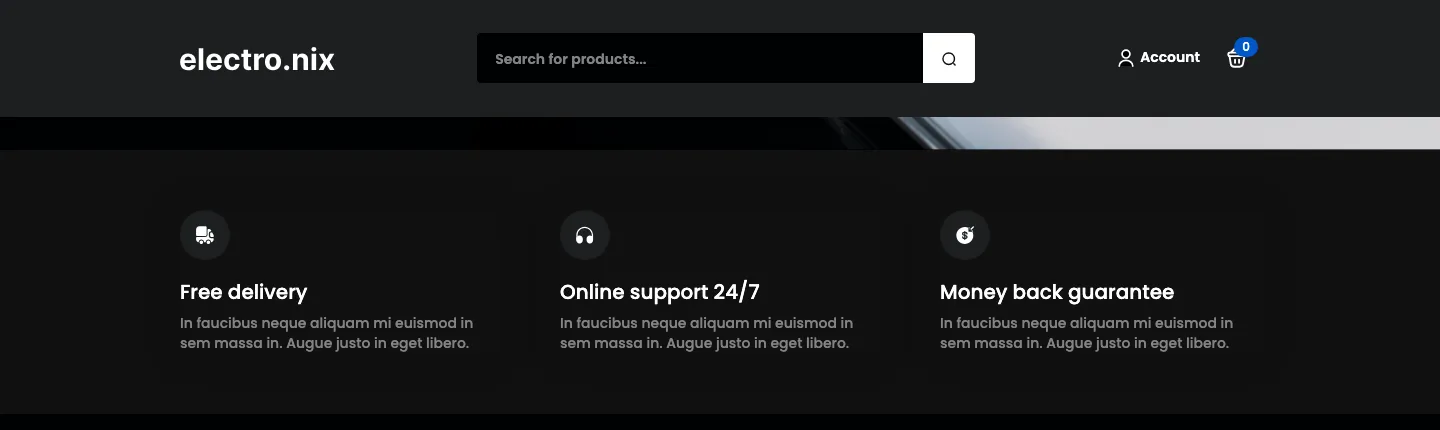
Our sticky copy of the main header row after it slid in at 700 px of scrolling.
The overlay option makes a row transparent over the content below it, the usual “transparent header over a hero image” look. On the last row (the menu) it worked, and the hero moved up 55 px under the transparent menu. On the middle row, the transparent row slid over the menu row and their text overlapped. Overlay works best on the bottom row of a header.
The Menu Builder has three mobile menu modes: Default, Fullscreen and Offcanvas. Default opened a full-width list under the header. Offcanvas with no width set covered the whole 390 px phone screen, and the Escape key closed it. The toggle is a real button with aria-expanded and aria-controls, the attributes screen readers use to announce an open menu, but its label stays “Open Menu” even while the menu is open. We did not test Fullscreen.
Mega Menus
The mega menu lives inside the Menu Builder element, which is Pro. A “Menu Custom Dropdown” is a free-form panel that opens from a menu item. It starts with a Heading and an Image, and its layout can be vertical, horizontal, grid or advanced, with items per row set per breakpoint. We built the three-column “Products” panel in the image at the top of this review: a list of categories with icons, a photo and a deal with a button.
On the desktop front end it opened on hover as a 680 x 212 px panel and picked up the global styles with no extra work. Keyboard support was good. Enter opened it and set aria-expanded to true, Tab moved to the submenu arrow button and then into the first link, and Escape closed it. The menu’s nav element had no aria-label, the name screen readers use to tell menus apart.
Two things slowed us down. While we edited items inside the dropdown, the builder canvas showed only an empty outline, so we built it from the Structure panel and checked the result on the front end. And this design, like many, uses one menu for desktops and a separate one for phones, so the mega menu had to go into each menu, three times in all with our sticky copy. Copy and paste between menus worked and kept every element inside. On a phone, “Products” opened as an accordion that stacked the three columns into a 515 px tall panel.
WooCommerce Templates and a Test Order
WooCommerce design is all Pro. Breakdance > Templates > Add Template offers seven ready template types, three of them for WooCommerce: Single Product, Shop Page & All Product Archives and Specific Product Archive. Clicking one creates and activates it at once. There is no ready type for the cart, checkout or My Account page. You build those as custom templates with the Pages location and a “Page is Cart” (or Checkout, or My account) condition. That worked, but expect to read the docs the first time.
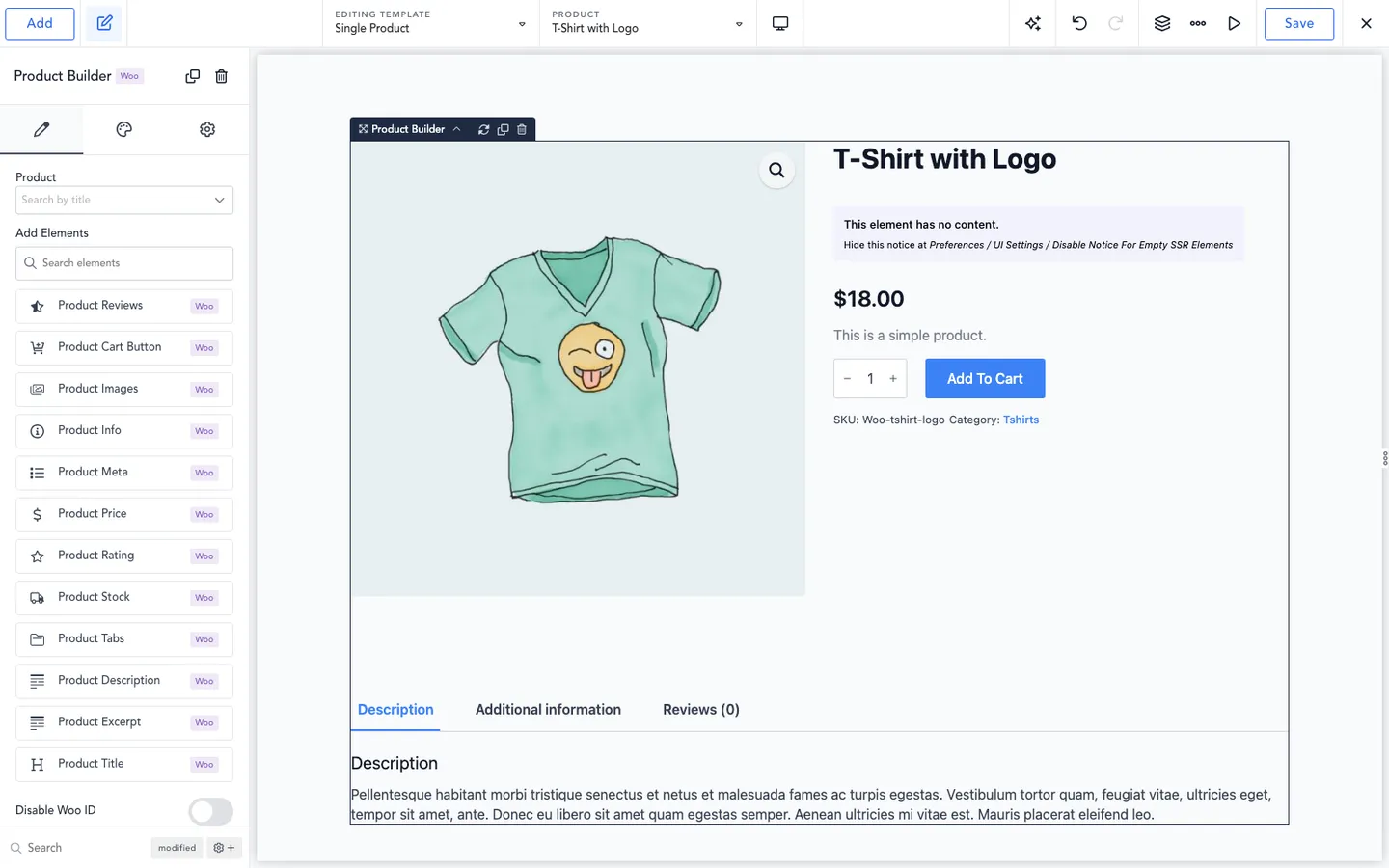
The Product Builder’s ready-made layout on a Single Product template.
The Product Builder drops in a complete two-column product layout: images on the left, then title, rating, price, short description, Add To Cart button and product details, with tabs below. Each part can be styled or removed. Related Products defaults to four random products. The Shop Page element gives you the result count, sorting, a four-column grid with sale badges and pagination. The Add panel’s WooCommerce group lists 23 elements, 22 of them Pro (only the Loop Cart Button is free), and the Product Builder and Checkout Builder add 16 more parts. Settings > WooCommerce has three Breakdance style modes: Enabled (the default), Disable Styles Only and Disable All.
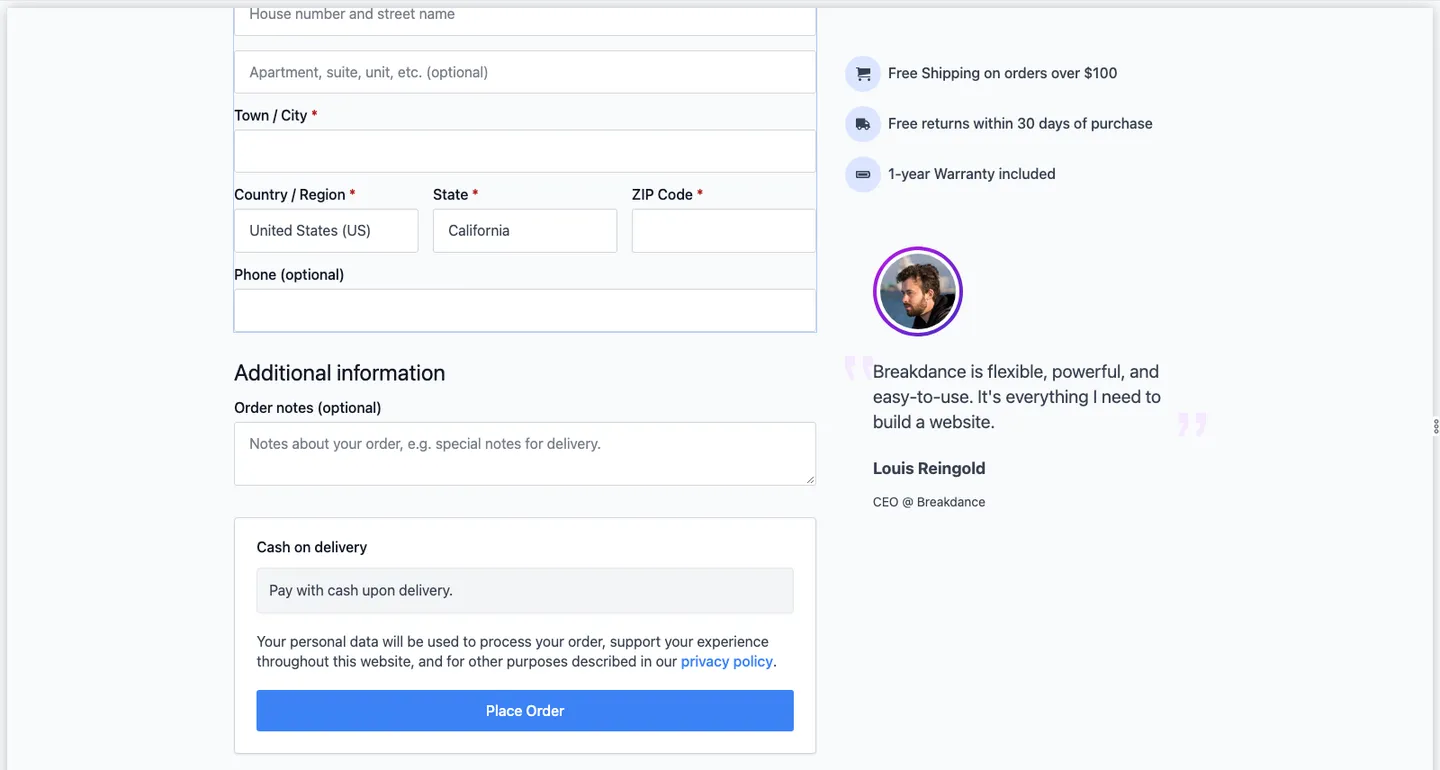
The demo promises and testimonial the Checkout Builder adds by default.
The Checkout Builder needs care. It inserts a two-column checkout plus demo content: an icon list promising “Free Shipping on orders over $100”, “Free returns within 30 days of purchase” and a “1-year Warranty included”, and a testimonial from “Louis Reingold, CEO @ Breakdance” with his photo. We saved it as it came, and all of it went live on our checkout page. The photo loads from louisreingold.com, so every shopper’s checkout page made a request to that outside site. Delete the demo content before you publish, or your store will make promises you may not keep. Also, with an empty cart the builder shows only “Sorry, your session has expired”, so add a product to your own cart before you design the checkout.
A guest cash-on-delivery order completed through the custom store flow, with both order emails recorded and no visible errors in the pages we tested.
On a 390 px phone screen the shop showed two products per row and the checkout had no sideways scrolling. The order summary, though, stacked below the Place Order button, so a shopper sees the total only after scrolling past the button.
WooCommerce > Status listed 16 template overrides from Breakdance, and two were flagged as older than WooCommerce 11.2’s versions: the mini cart and the shipping form. Outdated overrides can miss newer WooCommerce changes, so watch for a Breakdance update that refreshes them. We did not test card payments, the shop filters, the mini cart on the front end, per-category product templates or logged-in account pages.
Forms and Form Actions
The Form Builder starts a new form as a contact form with Name, Email and Message fields, and the Email and Store Submission actions already selected. There are 16 field types. File Upload and Step (for multi-step forms) are the two Pro field types. There are 13 actions that run after a form is sent. Store Submission works on Free. The other 12 are Pro: Email, Webhook, Popup, Custom JavaScript, Slack, Discord, ActiveCampaign, ConvertKit, Drip, GetResponse, MailChimp and MailerLite. Redirecting to a thank-you page is a toggle, not an action.
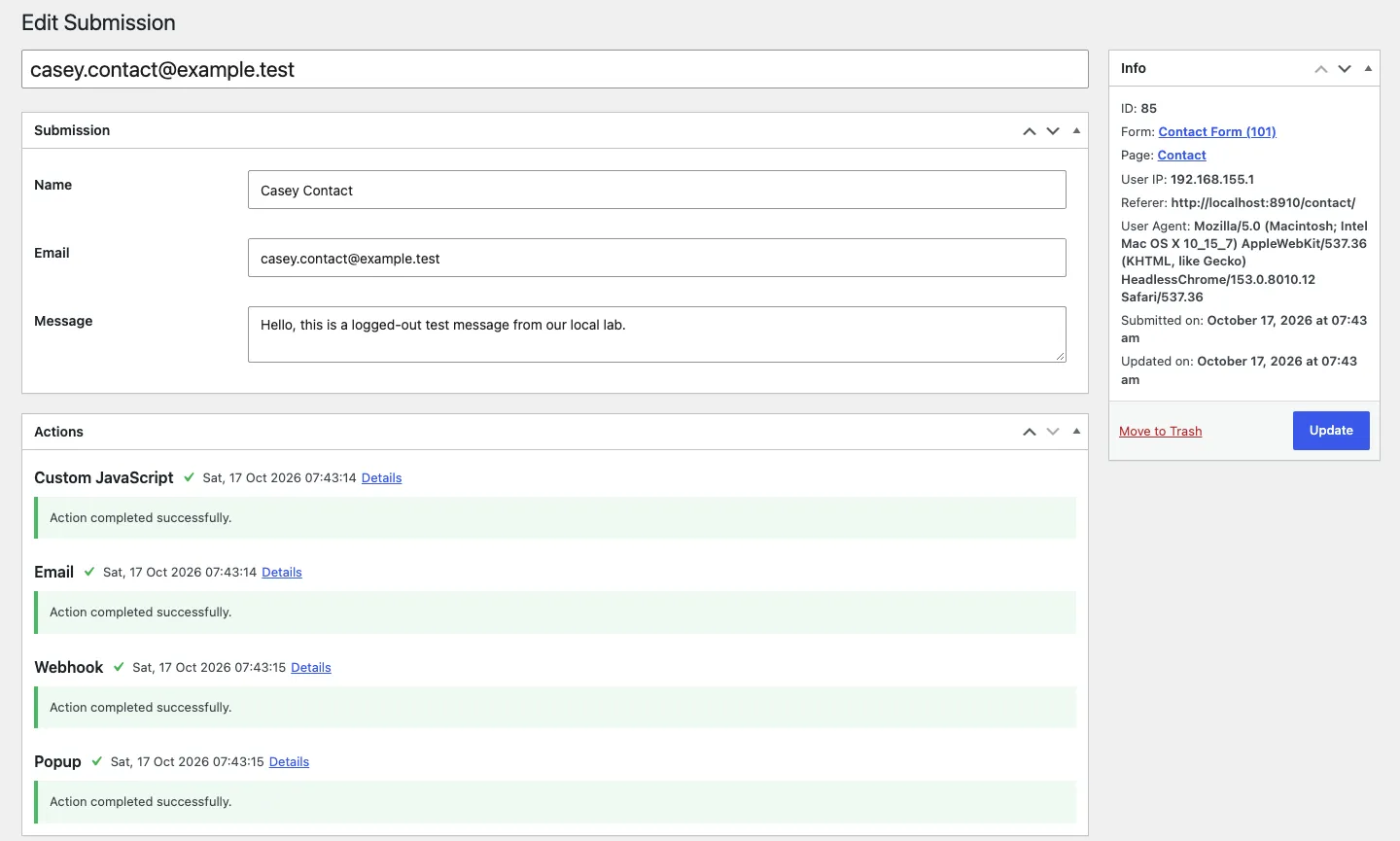
A stored test submission with its action log.
All five form actions worked: an admin email, a visitor confirmation, a webhook, a thank-you popup and custom JavaScript. Stored entries included an action log that made delivery problems easier to investigate.
We also built a three-step quote form with a field that only shows for “Online shop” and a file upload. It redirected to our thank-you page about 1.8 seconds after we sent it, and the admin email had the PDF attached plus a signed download link. Some quirks:
- Multi-step is fiddly to set up. Each Step field starts a new step, and any field above the first Step was hidden in the builder, so we had to drag a Step to the top.
- Conditional logic is basic. You get one rule per field (equals, not equals, is set, is not set), with no AND or OR groups.
- Field IDs are random. New fields get IDs like
spuqow, and those become your email merge tags and webhook keys unless you rename each one. - Emails show raw values. The select field came through as “shop”, not its label “Online shop”.
Pay attention to privacy and spam settings:
- Webhooks can send more than you expect. With a field map, the webhook sent only the field we mapped. With no field map, it sent every field, the visitor’s IP address, browser and referring page, and the uploaded file’s server path.
- Uploaded files are public. Each upload got a direct URL that opened for anyone logged out. The folder name includes a long random string, which makes the URL hard to guess, and our server blocked folder listings, but Breakdance wrote no protection file into that folder. Do not collect sensitive documents this way without protecting it.
- Spam protection is off by default. The honeypot (a hidden field that catches bots) and CSRF protection (a token that blocks forged posts) are both unticked on a new form. With the honeypot on, a bot that filled it was silently dropped, but a script that simply left the field out was accepted and even got the confirmation email. With CSRF on, posts without the token failed, but a script that first loaded the page and read the token got through. reCAPTCHA v3 is built in but needs Google keys, so we did not test it. The server does reject a missing required field or a badly formed email address.
- Entries store visitor data. Every submission keeps the visitor’s IP address, referring page and browser. Export to CSV gives you a zip with one file per form.
The eight third-party integrations need accounts we did not create, so we only checked their settings screens. A form inside a popup worked too.
Popups and Triggers
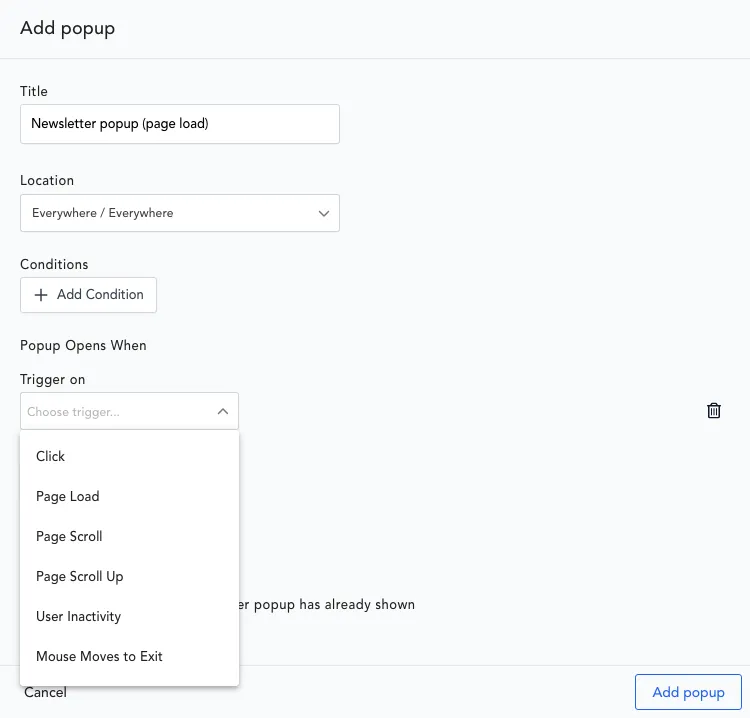
The six popup triggers in the Add popup dialog.
Breakdance > Popups > Add Popup asks for a location, conditions, one or more triggers and how often the popup may show (per page load, per session or forever). Free popups can only open on click. There are no ready-made popup designs: a new popup is a blank canvas, and the builder’s library had no popup templates. The Popup element has 11 entrance animations and options for the overlay, page scrolling and the close button.
We built a newsletter popup, an offer popup and a slide-in, and tested every trigger on a desktop browser and a phone emulation:
Page-load, scroll, scroll-to-element, scroll-up and click triggers all worked on desktop and the emulated phone. The three-second load trigger opened after roughly four seconds, and the halfway-down trigger fired close to the intended point. Exit intent worked on desktop but never opened on the phone. The inactivity popup also opened while we were scrolling, which makes it a poor fit for touch visitors.
The inactivity and exit triggers need thought. Inactivity only counts mouse moves and key presses as activity, so someone reading with the scroll wheel, or swiping on a phone, counts as idle. On the phone, the inactivity popup opened while we were still scrolling, and its overlay locked the page. Exit intent never fires on touch screens. Use both for desktop visitors only.
Other things we learned:
- “Per session” means per browser tab. A reload in the same tab respected the limit, but a second tab showed the popup again. “Forever” held across reloads.
- “Do not show if another popup has shown” covers one page view. It worked on the same page, but on the next page the second popup still opened.
- Conditions worked. We targeted logged-out visitors on one page, posts where an ACF field was set, and phones. There is no screen-size condition, so we used the Operating System condition (iOS and Android) to reach phones.
- Page View Count counts each URL separately. “Page View Count is greater than 2” fired on the third view of the same page, not after three different pages.
Post Loop Builder, Dynamic Data and ACF
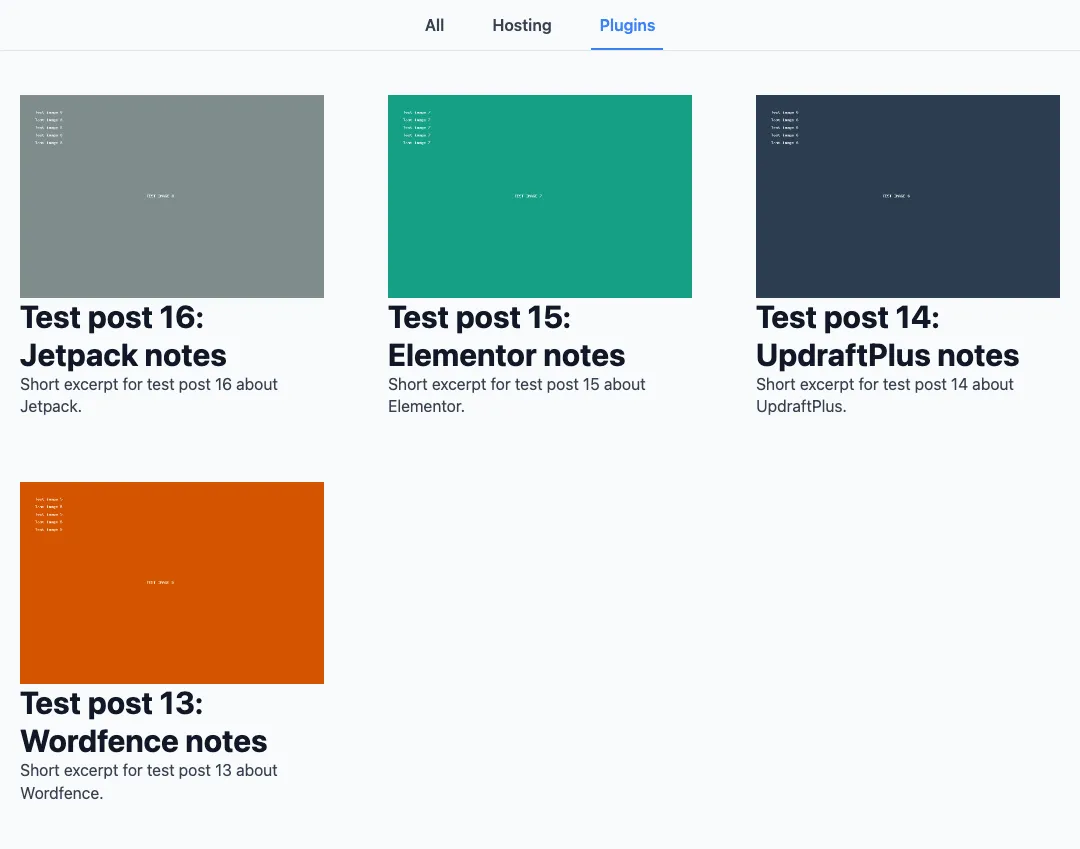
The loop’s filter bar on our test page: no Themes tab, because none of the 12 loaded posts was in Themes.
The Post Loop Builder repeats a reusable Global Block for posts, products or custom content. Our ACF-powered plan cards displayed prices, labels, dates, images and links correctly, including conditional content per card.
The loop offers six layouts (List, Grid, Slider, Accordion, Tabs and Masonry), six pagination types including Load More and Infinite Scroll, and Custom, Text and Array queries. Load More and Infinite Scroll worked, a grid of three per row became one per row on the phone, and a Custom query paginated correctly. Some results surprised us:
- Sorting by an ACF number sorts as text. Plans ordered by price came out $115, $12, $2.99, $24 and so on.
- A Text query can ignore pagination. Our numeric sort with a Text query showed the same three plans on pages 1, 2 and 3.
- Loops on one page share the page number. On /page/2/, a loop with no pagination of its own also jumped ahead, and on /page/3/ it showed nothing.
- The filter bar only filters what is loaded. It filters in the browser with no new requests, so a category with no posts among the loaded ones gets no tab. Turning the filter bar on also removes the Pagination section, so you cannot have both.
- Sliders need a phone setting. Three slides per view squeezed each card to 75 px wide on the phone until we set “One Per View At”.
Free ACF has no Repeater field, so we could not test Breakdance’s Repeater element. The page with five loops weighed 249 KB.
Breakdance 3 and the AI Tools
Breakdance 3.0, which the vendor calls “The AI Update”, went through public betas over the summer of 2026. RC 1 came out on October 1 and RC 2 on October 10. The main changes, according to the announcement:
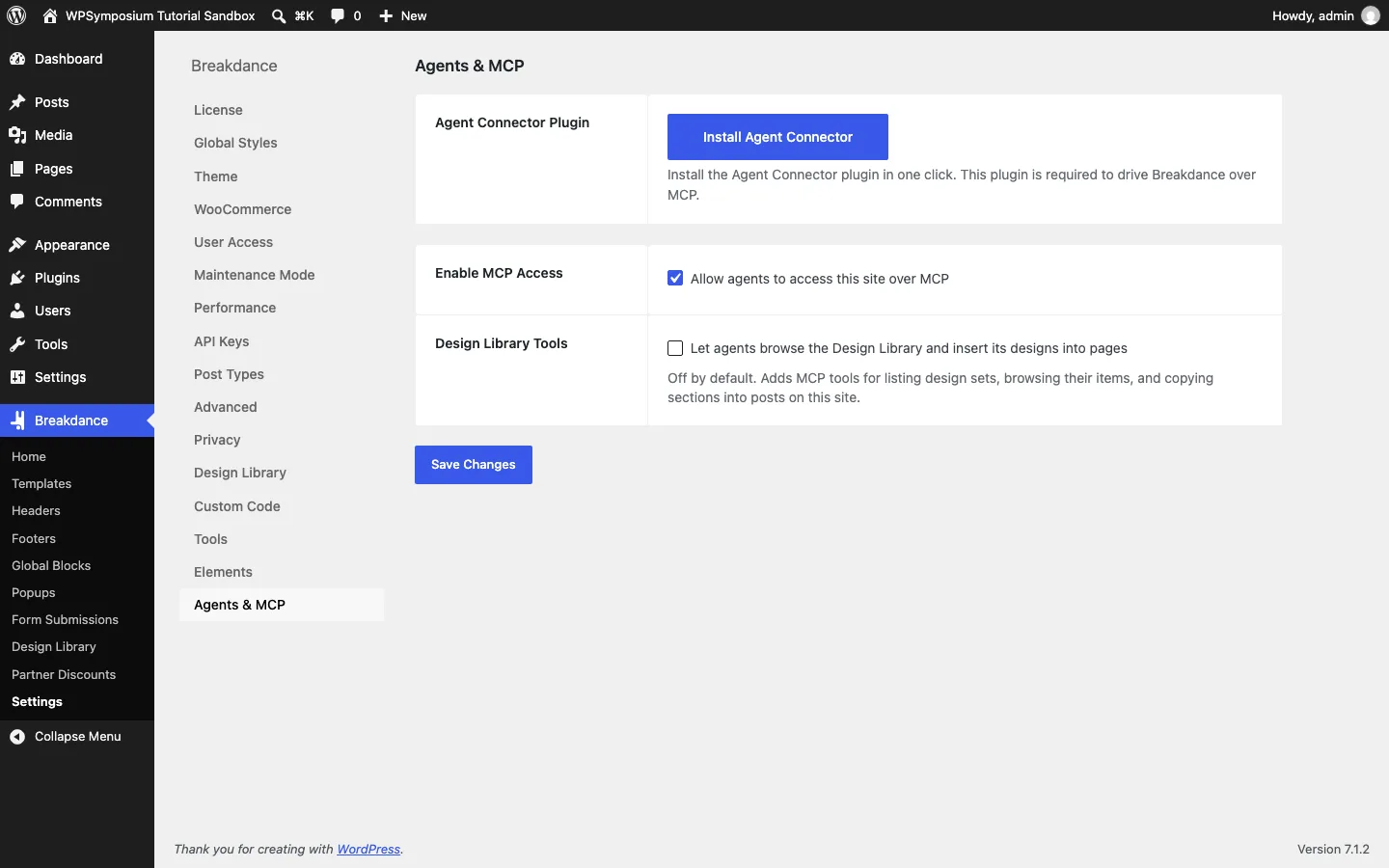
The Agents and MCP settings in free Breakdance.
- Build with your AI agent. AI agents such as Claude, Codex or Cursor can drive Breakdance through MCP (Model Context Protocol, a standard way for AI tools to control other software). The agent writes HTML and CSS, and Breakdance turns it into normal elements you can keep editing by hand. You bring your own AI subscription.
- A setup wizard in RC 2 with four steps: Welcome, Install (the Agent Connector plugin and “Universal Abilities”), Connect your agent, and Build. Agent Connector needs WordPress 7.0 and PHP 8.1.
- A new Selectors system. Classes now output without the automatic
.breakdancewrapper, socardis just.card. - Global CSS variables, with different values per breakpoint, and interactions for click, hover, keyboard and scroll behavior.
Here is what we found. Settings > Agents & MCP has “Enable MCP Access” ticked by default and “Design Library Tools” unticked. Nothing can connect until you install Agent Connector, which Breakdance downloads from GitHub rather than WordPress.org. We did not install it or connect an agent. With MCP access on, Breakdance registers 59 actions in WordPress 7.1’s Abilities API, the list of things an agent is allowed to do, such as creating a popup or editing a post. The sparkle buttons in the editor are a different feature: they open the “AI Writing Assistant”, which needs a separate paid plugin and uses OpenAI’s GPT-3.5.
Is Breakdance Fast? Our Local Lab Test
We measured two Pro pages with Playwright’s Chromium on our sandboxes: logged out, cache off, throttled to 1.6 Mbps and 150 ms latency, median of three runs, on a 1,440 px desktop window and a 390 px phone screen. These are local lab tests, not field data from real visitors.
The simple shop page was light: about 246 KB on desktop, with its main content appearing in under a second. On the simulated phone it transferred about 514 KB before scrolling, and the main content appeared in about 1.5 seconds. The imported Electro.nix home page was a different story. It transferred about 2.2 MB and took roughly twelve seconds to show its main content on both profiles.
LCP (Largest Contentful Paint) is when the biggest item on screen finished loading.
Breakdance’s own code was modest. On the shop page it sent seven files, 48.9 KB in all, and 36.4 KB of that was its WooCommerce stylesheet. On the imported home it sent 20 files, 104.3 KB over the network (541 KB before compression). The biggest were the same WooCommerce stylesheet, which loaded even though the home page’s product sections were empty, the menu’s CSS and JavaScript (24.0 KB), the global styles (7.8 KB) and the newsletter form (10.6 KB). The header builder’s script was only 1.7 KB. Adding our sticky bar, overlay and mega menu added about 1 KB to the header’s compressed CSS, one more font file for the new headings and no new scripts.
The slow home page was not Breakdance’s fault so much as the design set’s. Images were 90.6 percent of its weight, all seven loaded from breakdancelibrary.com, and the largest item on screen was a 665 KB PNG hero background. Phones downloaded the same images as desktops. Our long test page made of ten imported pages was worse: about 45 MB after scrolling, with some PNGs of 2 to 3.4 MB each loaded from the vendor’s server. Replace design set images with compressed copies in your own Media Library before you launch.
Other things to know:
- jQuery came with WooCommerce. Both shop sites loaded jQuery (30 KB). WooCommerce’s scripts need it, and Breakdance’s own store scripts for the quantity buttons and the mini cart rely on it too. On our October 4 free test site without WooCommerce, jQuery did not load, and the CSS for a hand-built section was under 1 KB.
- The Bloat Eliminator is off by default. Its options can remove WordPress extras such as the emoji script, which still loaded on our pages.
- Fonts come from Google. We saw no setting to host Google Fonts locally.
What Breakdance Sends and Stores
- Usage data on Free. According to the code we read, the free version sends usage events with your site URL to breakdance.com. The Privacy tab says this stops once a Pro key is entered. Free users can turn it off with “Opt out of usage tracking” in Settings > Privacy (from the code).
- Session cookies and caching headers. On all three of our Breakdance sites, with or without popups, every logged-out page we checked set a PHP session cookie (a cookie that ties your page views to one visit), three
breakdance_cookies, a “Cache-Control: no-store” header and an “Expires” header dated 1981. Those headers tell browsers and many caching layers not to cache the page. Breakdance does this by default so its Page View Count and Session Count conditions work. Settings > Privacy has “Disable Page & Session Cookies”, off by default. When we ticked it, the session cookie, thebreakdance_cookies and both headers were gone, but the plugin says those two conditions then stop working. Our Oxygen 6 site sent none of them. If you rely on page caching, tick that box or check your own response headers. - Outside requests. Design set images load from breakdancelibrary.com, the Checkout Builder’s demo photo from louisreingold.com, and fonts from Google. Our long test page also loaded the GSAP animation library from unpkg.com.
- Form data. Submissions keep the visitor’s IP address and browser, and uploads get public URLs (see the forms section).
Breakdance Pricing
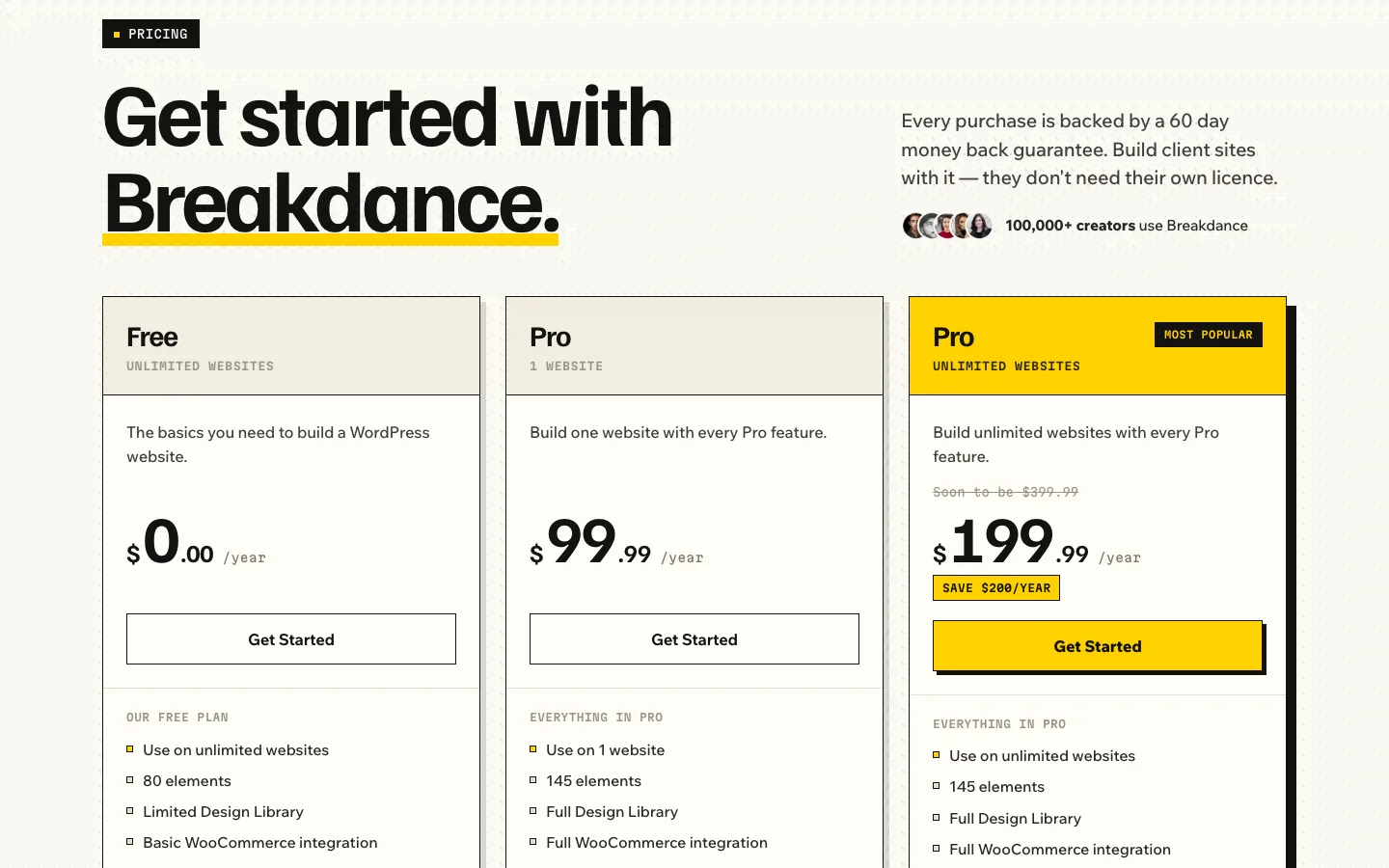
The Breakdance pricing page.
Prices on breakdance.com on October 17, 2026, in US dollars:
The free version costs nothing. Pro costs $99.99 a year for one site or $199.99 a year for unlimited sites.
Both Pro plans include the same features. What to know before you buy:
- Intro price equals renewal price. The vendor locks your price for as long as you keep renewing, with no first-year discount that doubles later.
- The unlimited plan is marked “Soon to be $399.99”, so buying early keeps the current $199.99.
- No lifetime license, unlike Bricks ($599 once) or Soflyy’s own Oxygen.
- 60-day refund on every payment, renewals included, according to the terms.
- Sites keep working if you stop paying. The vendor says Pro features stay active; you lose updates, support and the Design Library.
- Client sites are allowed, and local, staging and development installs do not count against the single-site plan. Our three localhost activations used no slot. WordPress Multisite needs the unlimited plan.
- The AI content writer is sold separately.
For one site, Pro costs about $500 over five years. If you build two or more sites, the unlimited plan is the obvious pick.
Security and Updates
In August 2026, Breakdance 2 fixed a security issue in three Design Library import endpoints that, according to the vendor, could be reached without logging in. Soflyy says it found the problem in an internal audit and told everyone to update immediately. Version 2.8.3 followed on September 1 to fix a theme bug from 2.8.2. On October 17, our licensed 3.0 RC 2 site, with beta updates off, was told 2.8.3 is the latest version and offered no update.
Before installing 3.0.0-rc.2 we scanned the zip with ClamAV, a free virus scanner, and read through the plugin’s code. We found no malware and no hidden code. One thing for agencies to know, from reading the code but not tested: the settings export appears to include the license key, so do not share exported settings files publicly.
Keep your license active, update promptly, and test big releases like 3.0 on a staging site first. Our guide to WordPress staging plugins covers free ways to set one up.
What We Could Not Test
These were outside what our test setup could cover:
- The eight third-party form integrations, reCAPTCHA and card payments, which need outside accounts.
- A real AI agent build over MCP, which needs your own AI subscription connected to the site; we did not connect one. The AI Writing Assistant is a separate paid plugin.
- Speed on real hosting and in Google PageSpeed Insights, which needs a public site.
- Real phones and Safari. We tested in Chromium and its phone emulation only.
We ran out of test time for these:
- WooCommerce. A single-column checkout, the thank-you and order tracking pages, per-category product templates, the other WooCommerce style modes, shop filters, the mini cart and logged-in account pages.
- Forms. Conditional actions and UTM fields.
- Menus and headers. A normal dropdown, vertical menus, the Menu Custom Area, the Fullscreen mobile menu, and the sticky options Disable At, Stack Vertically At and Page Top Margin.
- Loops and dynamic data. The Accordion, Tabs and Masonry layouts, Alternates, Raw Mode, the Array query, product loops, the Term Loop Builder, Meta Box fields and the Repeater element (free ACF has no Repeater field, and we did not get to Secure Custom Fields, a free plugin that has one).
- Accessibility. Screen reader testing and an automated scan. We only checked keyboard use and ARIA attributes.
- Speed. Pages with the Bloat Eliminator on.
Alternatives
Elementor has the larger add-on market, template library and hiring pool. It can cost less for a small number of sites, while Breakdance’s unlimited-site Pro plan includes the forms, popups and store tools we tested. Both require rebuilding layouts if you leave their builder.
Oxygen is a better fit for someone comfortable with CSS who wants detailed control and a lifetime license. It needs more work and additional tools for a designed store.
Bricks is another developer-oriented option. Compare its workflow if you value class-based design and dynamic content more than Breakdance’s ready-made elements.