Bricks vs Elementor 2026: Which Page Builder Wins for You?
Choose Bricks for client work, detailed design controls and the option to pay once for unlimited sites. Choose Elementor if you want to start free, keep your existing theme or use a larger library of add-ons and tutorials.
Bricks vs Elementor: The Core Difference
Elementor is a plugin. You install it on top of a theme (Elementor’s own lightweight theme is Hello Elementor; see our Hello Elementor review), and you can switch themes later. The free version builds pages. Paid plans add the Theme Builder for headers, footers and templates, plus popups, forms, custom code and WooCommerce tools, depending on the tier.
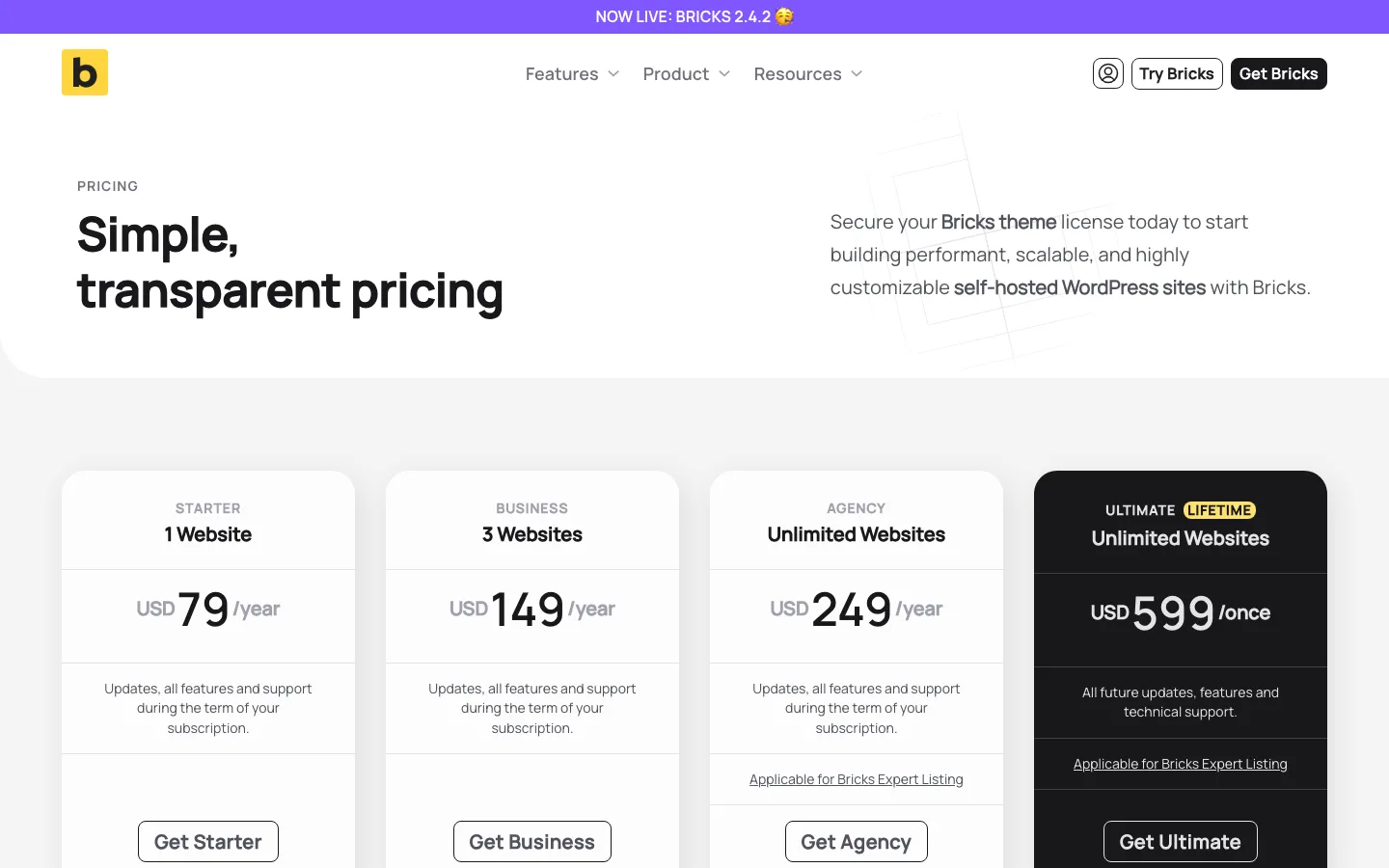
Bricks is a theme. You upload it under Appearance > Themes, and it controls the whole site: headers, footers, post templates, archives, popups and store pages. There is no separate theme layer, and there are no feature tiers. A $79 license gets the same tools as the $599 one.
Price
The Bricks pricing page.
The Elementor pricing page.
Here is what each costs as of October 2026, in US dollars before tax. Elementor’s pricing page says all its subscriptions renew at list price.
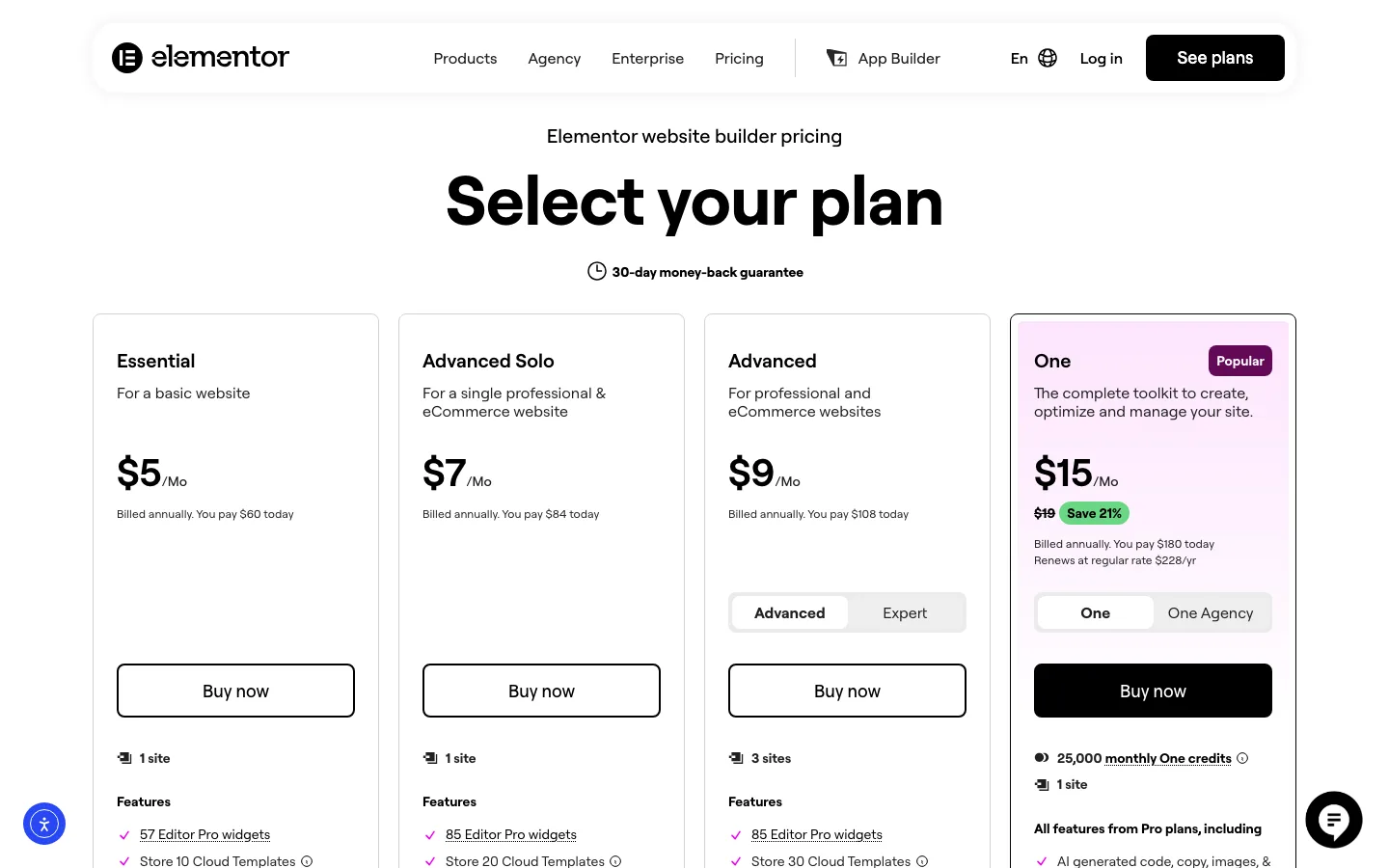
Elementor Free can run on any number of sites, but Theme Builder, popups, forms, custom CSS, display conditions and WooCommerce widgets need Pro. Essential costs $60 a year for one site and adds Theme Builder and forms without stored submissions, but leaves out popups, custom code and CSS, ecommerce and custom fields.
Advanced Solo provides the full builder on one site for $84 a year; Advanced covers three sites for $108 and Expert 25 sites for $204. Bricks includes all its features on every tier: $79 a year for one site, $149 for three, $249 for unlimited sites or $599 once for unlimited lifetime access.
Elementor also sells a bundle called One ($180 for the first year, then $228) that adds AI credits, image optimization, accessibility and email tools. You don’t need it to build pages.
What it costs over five years, if prices stay the same:
Over five years, one site costs $420 with Elementor Advanced Solo or $395 with Bricks Starter. Three sites cost $540 with Elementor Advanced, compared with $745 for Bricks Business or $599 for its lifetime license. At 25 sites, Elementor Expert totals $1,020 over five years, while Bricks’ unlimited lifetime option remains $599.
Winner: depends on your site count. For one simple site, free Elementor costs nothing. For one site with full features, they are close. For three sites, Elementor is cheaper. Beyond that, the Bricks lifetime license wins; against Elementor’s 25-site plan it pays for itself in about three years. Bricks also has a 60-day refund window (Elementor: 30 days), and its pricing FAQ says local and staging sites don’t count against your site limit.
Ease of Use
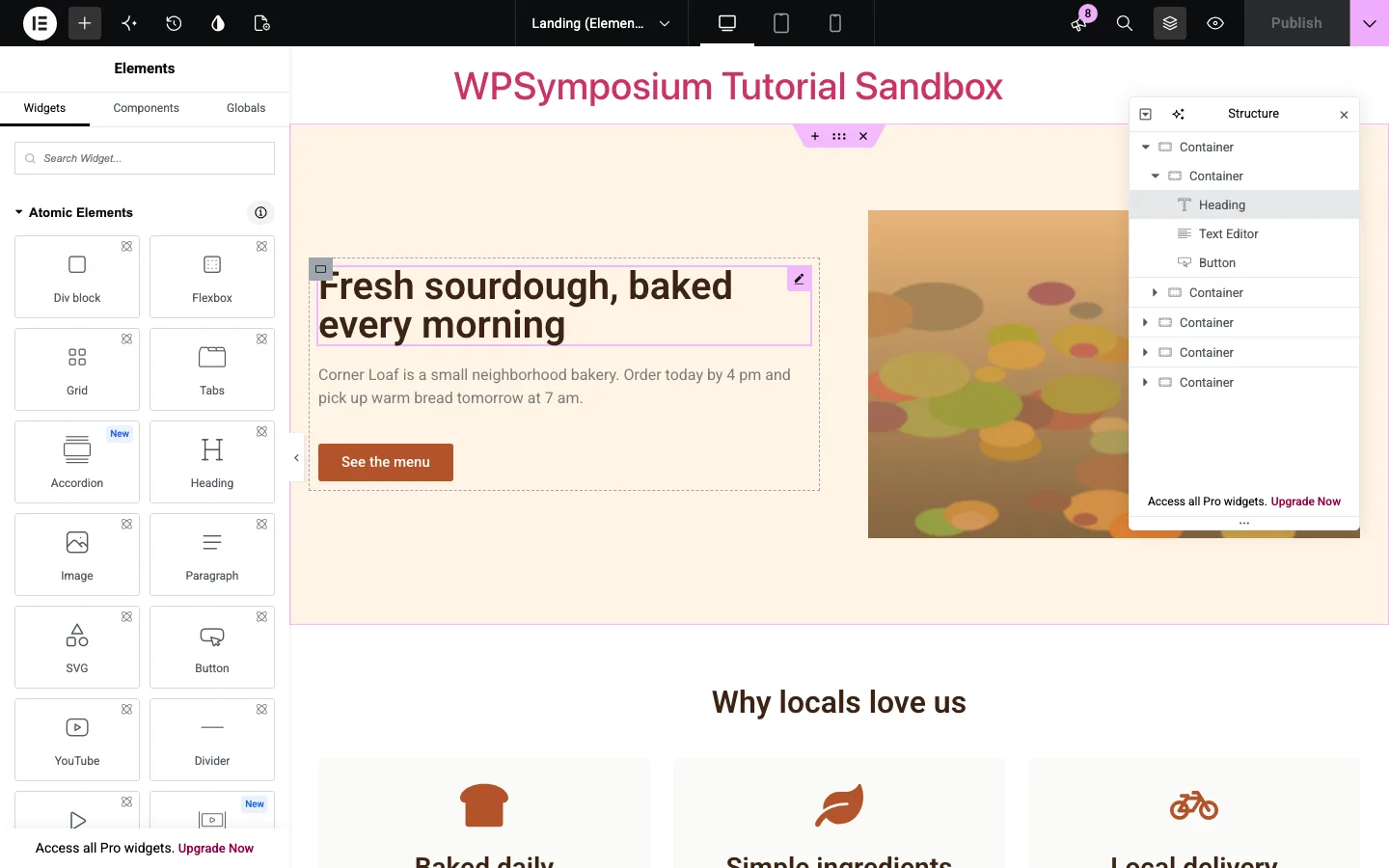
Elementor is easier to start with. On our test install the editor opened straight onto the page, with widgets on the left and settings in the same panel when you click an element. The Structure panel shows the page as a tree, which helped once containers were nested three deep. A few rough edges:
- Defaults you didn’t choose. Our new H2 headings and the testimonial name came out in Elementor’s default light blue, and the page loaded Elementor’s default Roboto and Roboto Slab fonts from Google until we switched Google Fonts off.
- Prompts. The second time we opened the editor, a pop-up asked us to install Angie, Elementor’s AI agent, and “Upgrade Now” links stayed at the bottom of two panels.
- Two element systems. Elementor 4 lists its new Atomic Elements first, with the classic widgets below. We used the classic ones, but a beginner may wonder which to pick.
Bricks has no free version to try, so this part comes from its docs and demos. Its editor uses the same layout: elements on the left, the page in the middle, a Structure panel. Its power tools are global CSS classes, CSS variables, components and custom code. Bricks says you don’t need them, but the editor is built around them, and they make the most sense if you know some CSS.
Winner: Elementor for beginners, thanks to the free version, more templates and far more tutorials. Bricks is easier to keep tidy on big sites once you learn its class system.
Speed and Page Weight
Speed is the main reason people switch to Bricks. The vendor says Bricks sites earn top Lighthouse and GTmetrix grades out of the box. We checked what each builder sends to the browser.
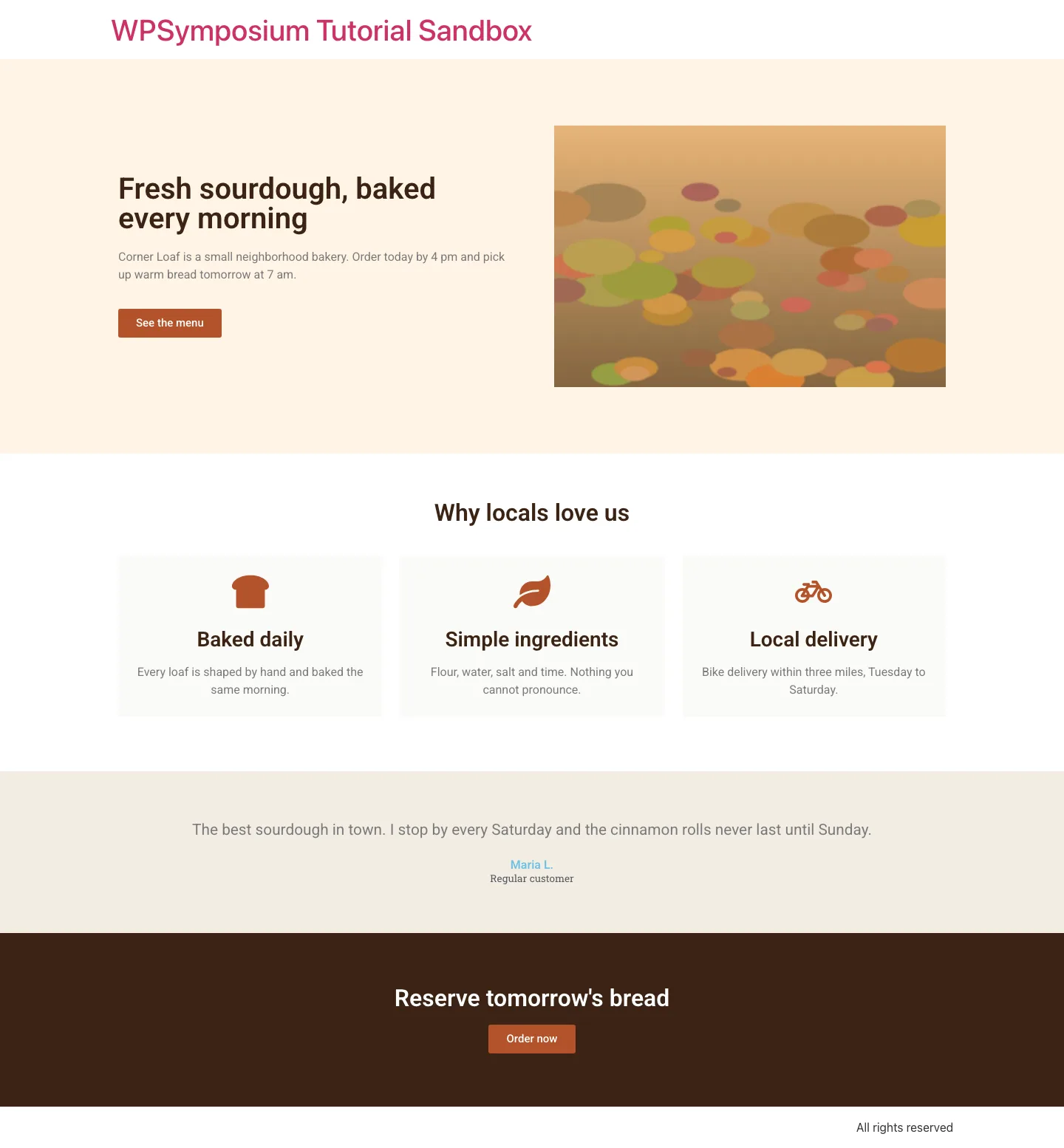
The finished Elementor test page on the front end of our test install.
On our test install, with Elementor’s default settings, the landing page made 29 requests and transferred 238 KB. Here is how that compares with the home page of Karlson, an official Bricks design-set demo.
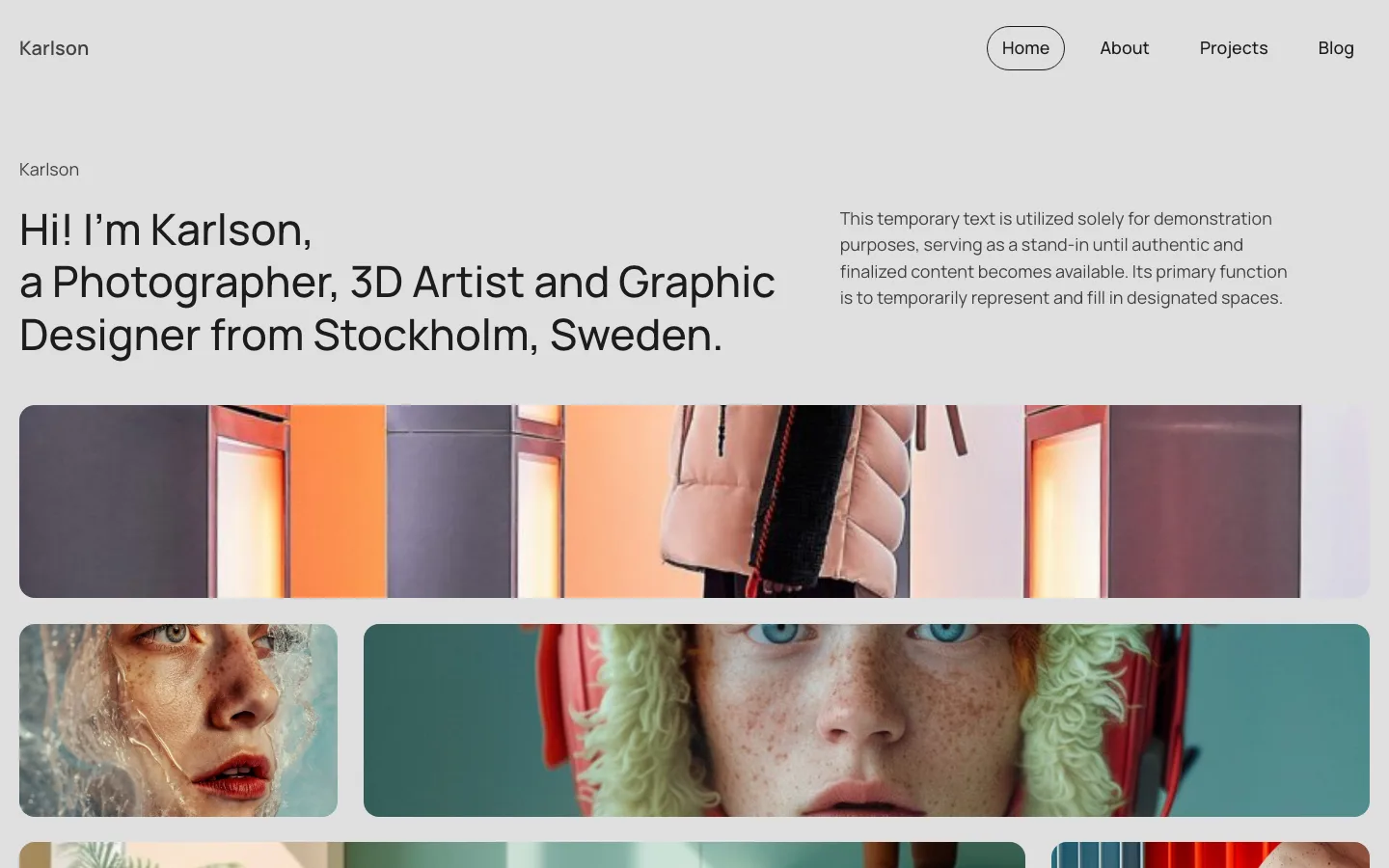
The official Karlson design-set demo, built and hosted by the Bricks team.
Our Elementor landing page made 29 requests and transferred 238 KB; the Bricks Karlson demo made 23 requests and transferred 896 KB. The pages were not equivalent: Elementor used one 26 KB image, while Bricks used ten images totaling about 800 KB.
Looking at HTML, CSS and JavaScript before compression, Elementor used 24 files totaling 452 KB, versus Bricks’ 11 files and 312 KB. Elementor’s 11 JavaScript files totaled 318 KB, including 117 KB of jQuery, jQuery Migrate and jQuery UI Core. Bricks used two scripts totaling 193 KB with no jQuery. Builder styles totaled 76 KB across nine Elementor files and 56 KB across eight Bricks files.
Elementor loaded Roboto and Roboto Slab through four font requests totaling 75 KB; Bricks loaded Manrope through two requests totaling 26 KB. Elementor’s page contained 137 HTML elements, including 48 divs, while Bricks had 258 elements, including 49 divs. These measurements describe their different layouts and asset choices, rather than a matched speed benchmark.
Measured. with a headless Chrome browser at 1440 x 900. Code sizes are uncompressed because the two servers compress files differently.
The Bricks demo is a bigger page served from Bricks’ own server, and our Elementor page ran on a local test server. Still, the pattern is clear:
- Bricks shipped less code for more page. The Karlson page needed 312 KB of HTML, CSS and JavaScript. Our smaller Elementor page needed 452 KB.
- jQuery is the biggest gap. Elementor’s front end loaded jQuery, jQuery Migrate and jQuery UI Core. The Bricks demo loaded no jQuery at all. Elementor’s own scripts (177 KB) were actually a little smaller than Bricks’ main script (187 KB).
- Elementor loads things you didn’t ask for. Two of its scripts handle background videos and slideshows, which our page didn’t use. The Roboto fonts came from Elementor’s default global fonts, not from any choice we made.
- Images outweigh both. Most of the Bricks demo’s weight was photos, which no builder fixes; an image optimizer plugin can.
Elementor can be trimmed. Under Elementor > Settings > Advanced we turned off Google Fonts, and the same page dropped to 25 requests and 163 KB. The Performance tab adds image loading, lazy loading and element caching options. jQuery stays, though. Bricks has similar switches, according to its docs, including ones to disable WordPress emojis, jQuery Migrate and Google Fonts.
Winner: Bricks. It starts leaner, though the gap is smaller than Elementor’s “bloated” reputation suggests, and the theme you pair with Elementor matters too. Our fastest WordPress theme tests show how much the base theme adds.
We built a landing page in free Elementor and measured an official Bricks demo. We did not install Bricks, so the different pages cannot establish which builder would be faster on an identical site.
Design Tools and Features
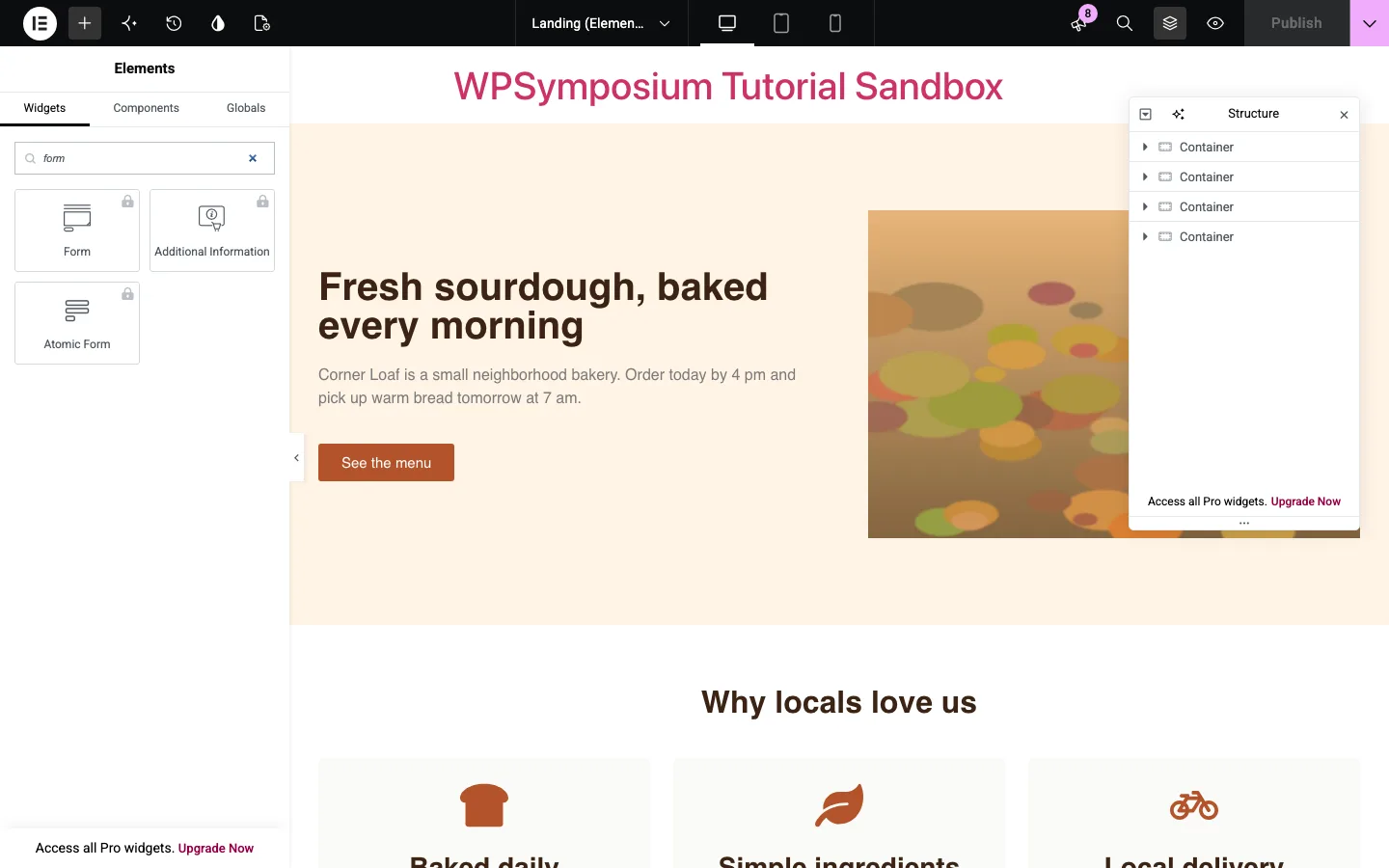
Searching for “form” in free Elementor: every form widget is locked to Pro. Test install.
On our test install, the free Elementor panel listed 143 items, and 96 of them carried a Pro lock or an “Upgrade” label. The free version covers the basics well (headings, text, images, buttons, icon boxes, testimonials, tabs, accordions, video). Forms, popups, the Theme Builder and display conditions are all Pro.
Every Bricks plan includes, according to the vendor:
- A Query Loop Builder for lists of posts, products, users or custom data, with filters and infinite scroll.
- A Popup Builder, a Menu Builder for mega menus, and Forms with actions such as sending email or adding a subscriber.
- Conditions to show or hide any element, and Interactions for click, hover and scroll effects.
- Dynamic data from custom field plugins such as ACF, Meta Box, JetEngine, Toolset and Pods.
- Custom code (HTML, CSS, JavaScript and PHP) and reusable components.
Elementor Pro covers most of the same ground (Theme Builder, popups, forms, loop grids, dynamic content), spread across tiers; the cheapest, Essential, leaves out popups, custom code and custom fields. Elementor wins on choice: more widgets, many more templates, and a far bigger add-on market.
Winner: Bricks for features per dollar. Elementor if you want ready-made designs or a specific add-on.
SEO
Neither builder decides your rankings. Content, speed and links do. Two practical differences:
- Metadata. Bricks page settings include an SEO title, meta description and social sharing fields, according to the Bricks Academy docs. You can skip an SEO plugin on a small site, though most people still use one. Free Elementor’s page settings on our test install had no SEO fields, so you’ll want a plugin like Rank Math or Yoast. See our Rank Math vs Yoast comparison.
- Markup and speed. Both output proper heading tags; our Elementor H1 sat inside a single wrapper
div. Bricks’ smaller code can help Core Web Vitals a little.
Winner: Bricks, narrowly.
WooCommerce
Bricks includes a full WooCommerce builder in every plan, for the shop, product archives, single products, cart, checkout and account pages. Bricks 2.4 added a setup wizard that creates those layouts in one place.
Free Elementor has no store design tools. On our test install, all 25 WooCommerce widgets were locked. You need Advanced Solo ($84/year) or higher for Elementor’s eCommerce features.
Winner: Bricks. It is slightly cheaper for one store ($79 vs $84 a year) and includes everything else too.
Ownership and Lock-in
Every visual builder locks you in to some degree. The difference is how much you lose when you leave.
On our test install, we deactivated Elementor to check. The page still showed its headings, text, button link and image as plain, unstyled HTML, because Elementor saves a basic copy of the content in the normal WordPress editor field. You can also switch themes while keeping Elementor.
Bricks is the theme, so moving to another theme means rebuilding your pages. If you cancel a yearly Bricks plan after at least one full, non-refunded year, the vendor says your sites keep working and you can still edit them. You lose updates, support and community templates. A lifetime license avoids that question, as long as Bricks remains in active development.
Going from Elementor to Bricks means rebuilding pages by hand, since there is no converter. Do it on a staging copy (see our WordPress staging plugin guide); Bricks says staging sites don’t count against your license.
Winner: Elementor.
AI Tools
Bricks 2.4 lets you connect an AI client you already use (the vendor names Codex, Claude and Copilot) to create pages and manage your design system. Elementor sells built-in AI on its One plans, with 25,000 monthly credits, and promotes its Angie agent inside the free editor. Winner: tie. It depends on whether you already pay for an AI tool.
Support and Community
Bricks offers email and forum support while your license is active, detailed Academy docs, and a community Facebook group. Elementor’s support page lists live chat and email support for paying customers. Standard support runs during business hours, with 24/7 priority support on higher tiers. Elementor’s real advantage is scale. Its pricing page says it powers over 22 million sites, so tutorials are easy to find, and so are freelancers who know it.
Winner: Elementor, for the size of its community.