PowerPress Review 2026: Is Blubrry's Free Plugin Enough?
PowerPress is a capable free podcast plugin if you want detailed control over your feed and freedom to choose an audio host. Its players are plain, and we found a setup error affecting the explicit-content setting. Beginners may prefer Seriously Simple Podcasting’s simpler start.
What Is PowerPress?
PowerPress is a free WordPress plugin that turns your site into a podcast publisher. It builds the RSS feed that Apple Podcasts, Spotify and other apps read, adds a player to each episode post, and gives you subscribe tools. Blubrry, a podcast host, has made it since 2008.
The plugin does not store your audio. Your MP3 files can sit in the WordPress Media Library or with any podcast host. Blubrry makes money from its hosting and statistics, but neither is required. Blubrry’s FAQ says it also runs on WordPress.com’s Business plan. WordPress.com now allows plugins on its other paid plans too, as our guide to what WordPress actually costs explains, but not on the free plan.
It also supports Podcasting 2.0, a set of newer feed tags for transcripts, chapters, listener payments and more that some apps can show.
Setup problems to check
PowerPress works without a Blubrry account, and its hosting and statistics offers can be skipped. The wizard checked our artwork dimensions, but uploading the image cleared fields we had already filled in.
More seriously, choosing clean content saved the show as explicit. The artwork control shared the explicit-setting field name and overwrote it. We saw the same issue in our podcast comparison. The feed also used the site title instead of our host name, and a later screen reported an image-type error despite valid artwork in the feed.
Before submitting to directories, open the feed’s Apple settings and confirm Explicit, Author Name and Feed Type. Uploading artwork before completing the form avoids losing the other entries.
Publishing episodes
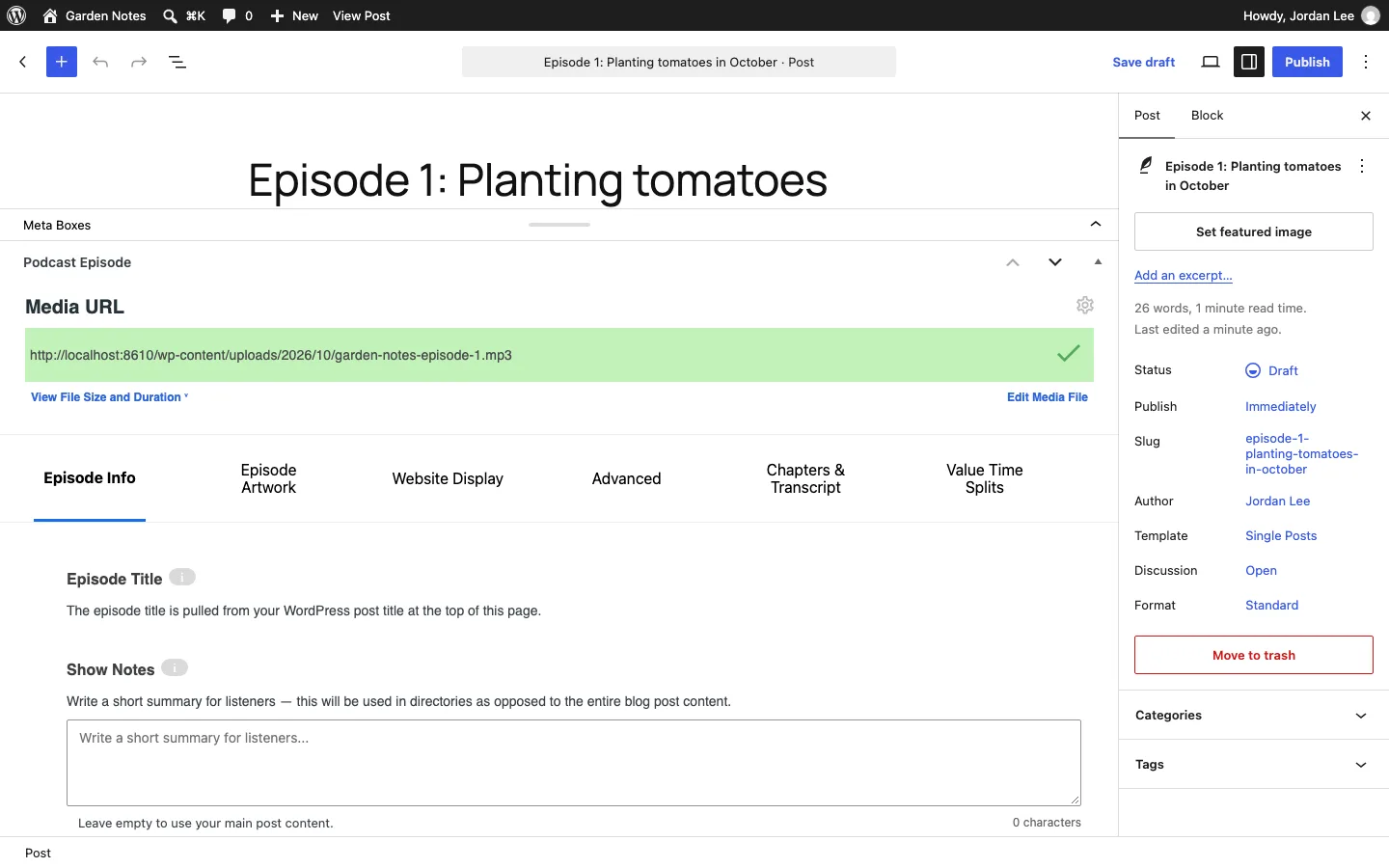
Episodes use normal WordPress posts with a Podcast Episode panel. Without Blubrry hosting, supply the address of an MP3 uploaded to your own storage. Verification read its size and duration correctly in our test.
The panel supports episode and season numbers, artwork, transcripts, chapters and optional listener-payment information. Only the media address is required. Its safety check rejected our private local address; a normal public site should not need that protection disabled.
The RSS Feed
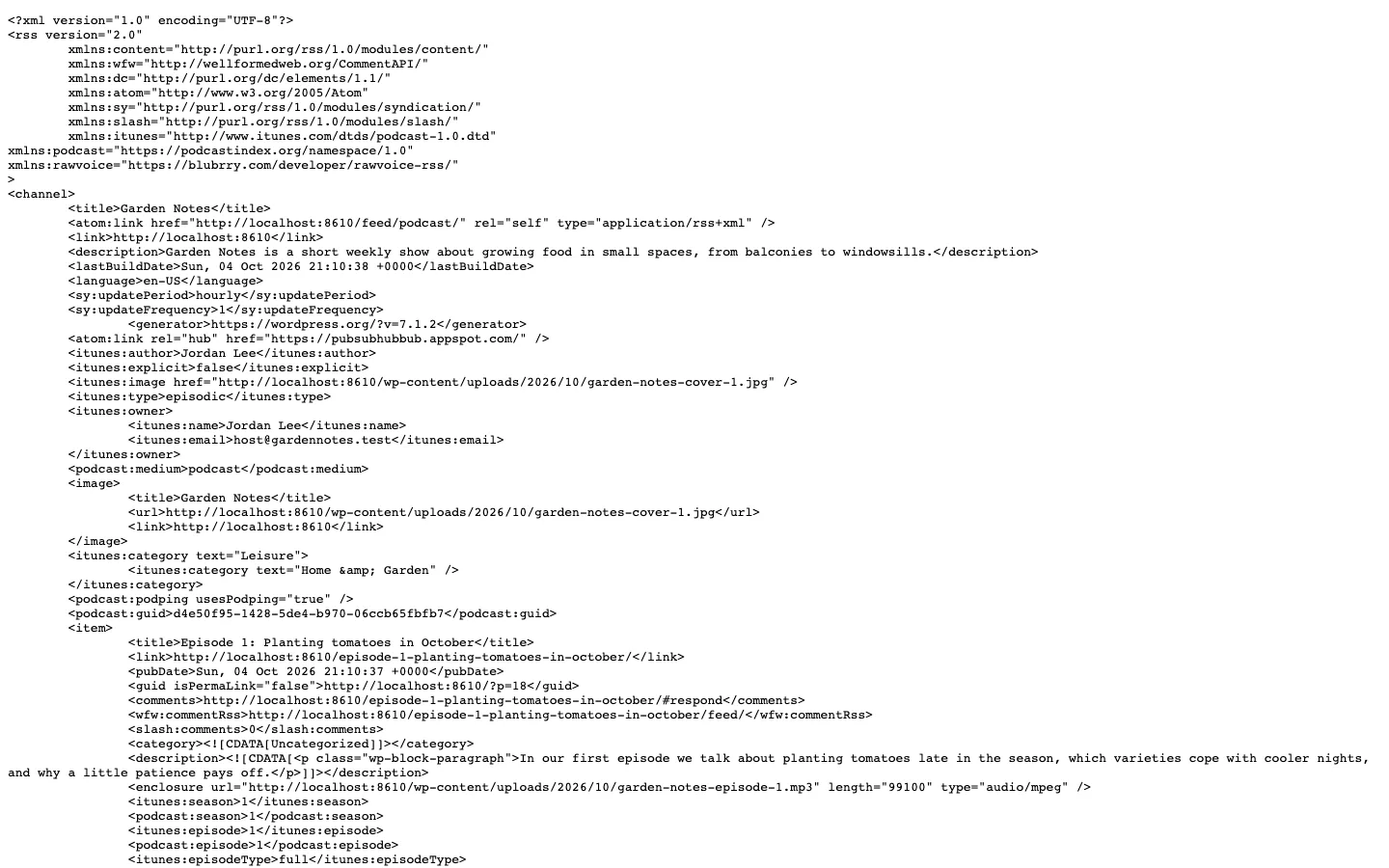
The podcast feed PowerPress generated on our test install after fixing the explicit setting.
The podcast feed lives at /feed/podcast/ on your own domain, so you can switch media hosts later without listeners having to resubscribe. The Feeds tab shows a warning until you publish your first episode, because an empty podcast feed is not valid.
After the Apple Settings fix, our feed was well-formed XML and had what directories check for:
The feed included the author after we entered one, using the site title beforehand, plus the 1400-by-1400 cover, Leisure/Home & Garden category and owner email. The explicit flag was incorrectly true after the wizard and became false after the fix described here. Feed Type also needed selecting before itunes:type appeared.
The enclosure correctly declared audio/mpeg with length 99100 and a twelve-second duration. Episode and season numbers appeared as both iTunes and Podcasting tags, and podcast GUID, medium and podping tags were added by default.
By default, PowerPress “enhances” all feeds, so your main blog feed at /feed/ also carried the episode’s audio file. Blubrry recommends submitting only the podcast feed to directories, and the Feeds tab says the same.
We published an episode on a local WordPress site and checked its feed, player and subscription page. This was a short functional test, not a measure of long-term reliability or traffic handling.
Players and Subscribe Tools
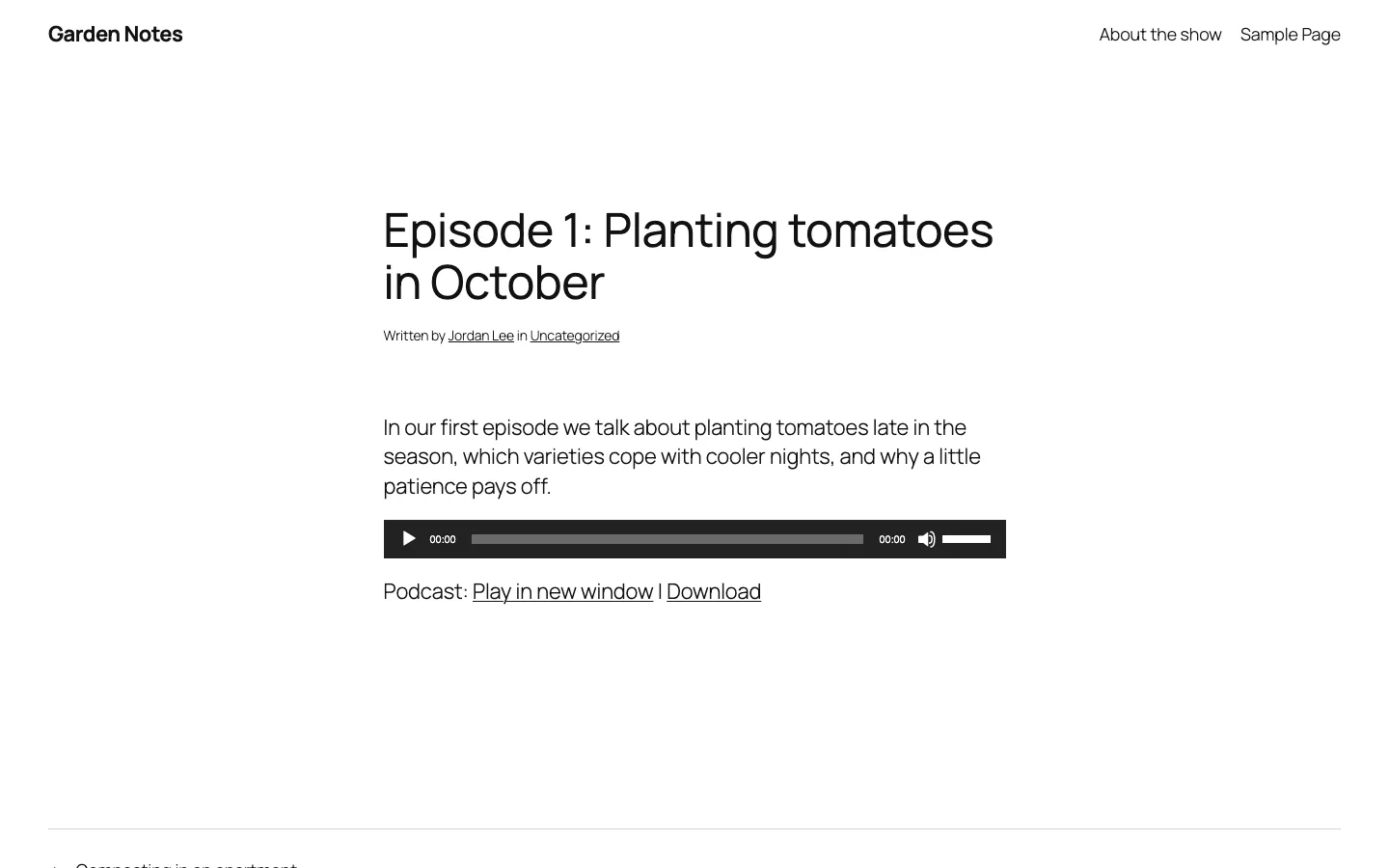
The default PowerPress player (MediaElement.js) on an episode page of our test site.
PowerPress put a player under the post content with “Play in new window” and “Download” links. The free choices are MediaElement.js (the default, shown above) and the plain HTML5 player. MediaElement played our file fine but has no speed control or skip buttons. The nicer Blubrry Player, with skip buttons, a speed control and captions, is only for Blubrry hosting customers.
Speed is a plus. On a normal blog post with no episode, PowerPress loaded no scripts or styles at all. On the episode page it added a 3 KB script plus the MediaElement files that ship with WordPress. If site speed matters to you, a light theme from our fastest WordPress themes test will make a bigger difference than the player.
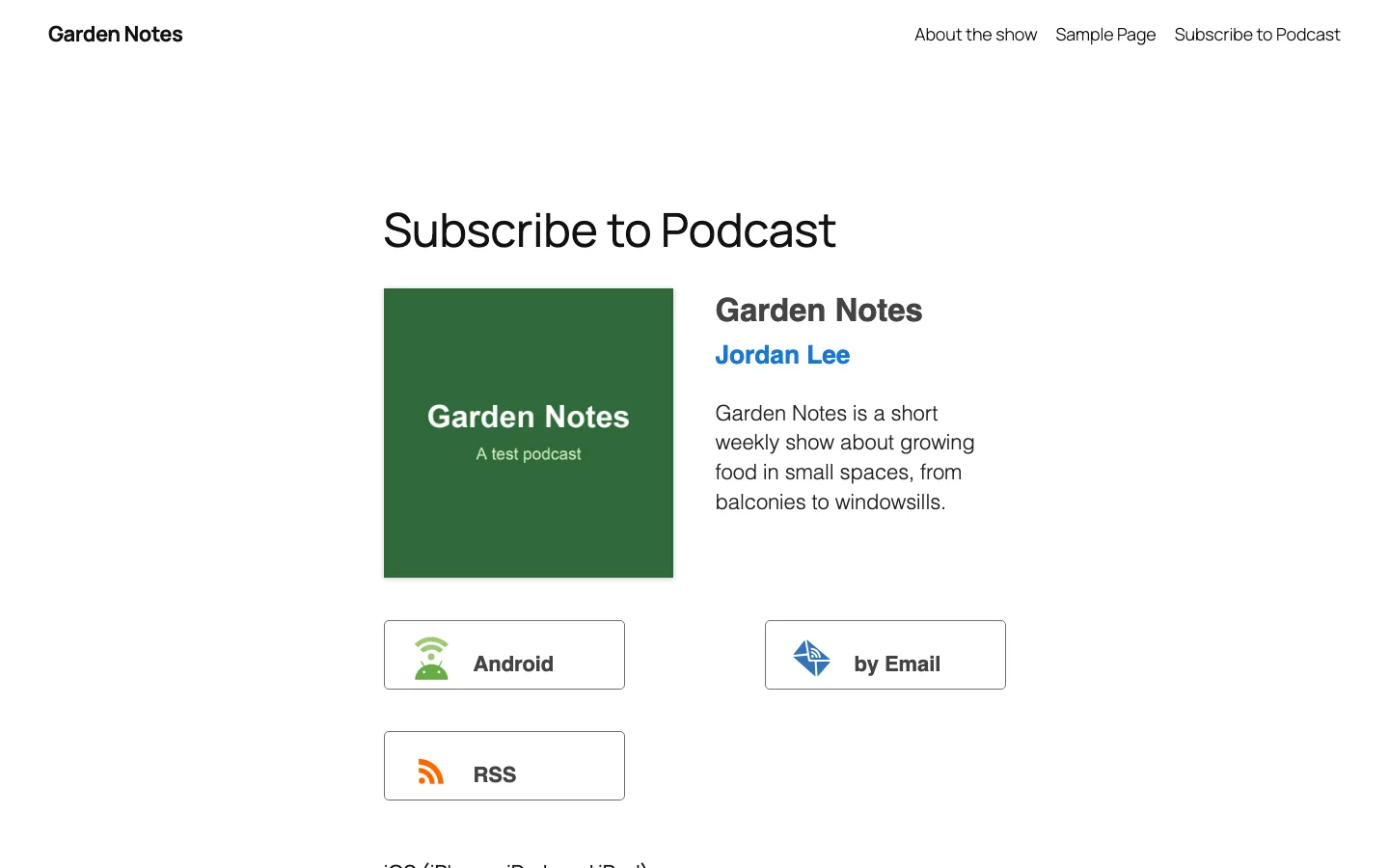
The subscribe page PowerPress created from its template on our test site.
One click under Settings, Website, Subscribe Page created a “Subscribe to Podcast” page with the cover, host, description and subscribe buttons. Our theme added it to the menu by itself. The page’s text told visitors to tap a “Subscribe on Apple Podcasts” button that wasn’t there yet. The Apple and Spotify buttons only appear after you paste your show’s listing links into the Destinations tab, which lists 16 destinations, including Apple Podcasts, Spotify, email and RSS. Add those links once your show is approved.
Podcasting 2.0, Imports and Multiple Shows
PowerPress has the broadest Podcasting 2.0 support of the free plugins in our roundup: transcripts, chapters, credits, location, funding links, Live Item (for live audio or video streams), and Value4Value listener payments in cryptocurrency through services such as Alby. The Experimental tab notes that PowerPress adds an automatic 3% split to support the plugin’s development when you set up Value4Value. That only applies if you turn the feature on.
The Import Podcast tool lists SoundCloud, Libsyn, PodBean, Squarespace, Anchor, Buzzsprout and “Anywhere else”. It reads your existing feed and creates WordPress posts for the old episodes. If you are moving a whole site rather than a feed, see our guide to moving a WordPress site to a new host.
For several shows on one site, Blubrry describes two options: Podcast Channels (separate feeds you assign posts to) and Category Podcasting (one feed per category). Version 11.16.0 (April 2026) deprecated the older post type and taxonomy podcasting modes, so new setups should use channels or categories.
Blubrry Hosting and Stats Pricing
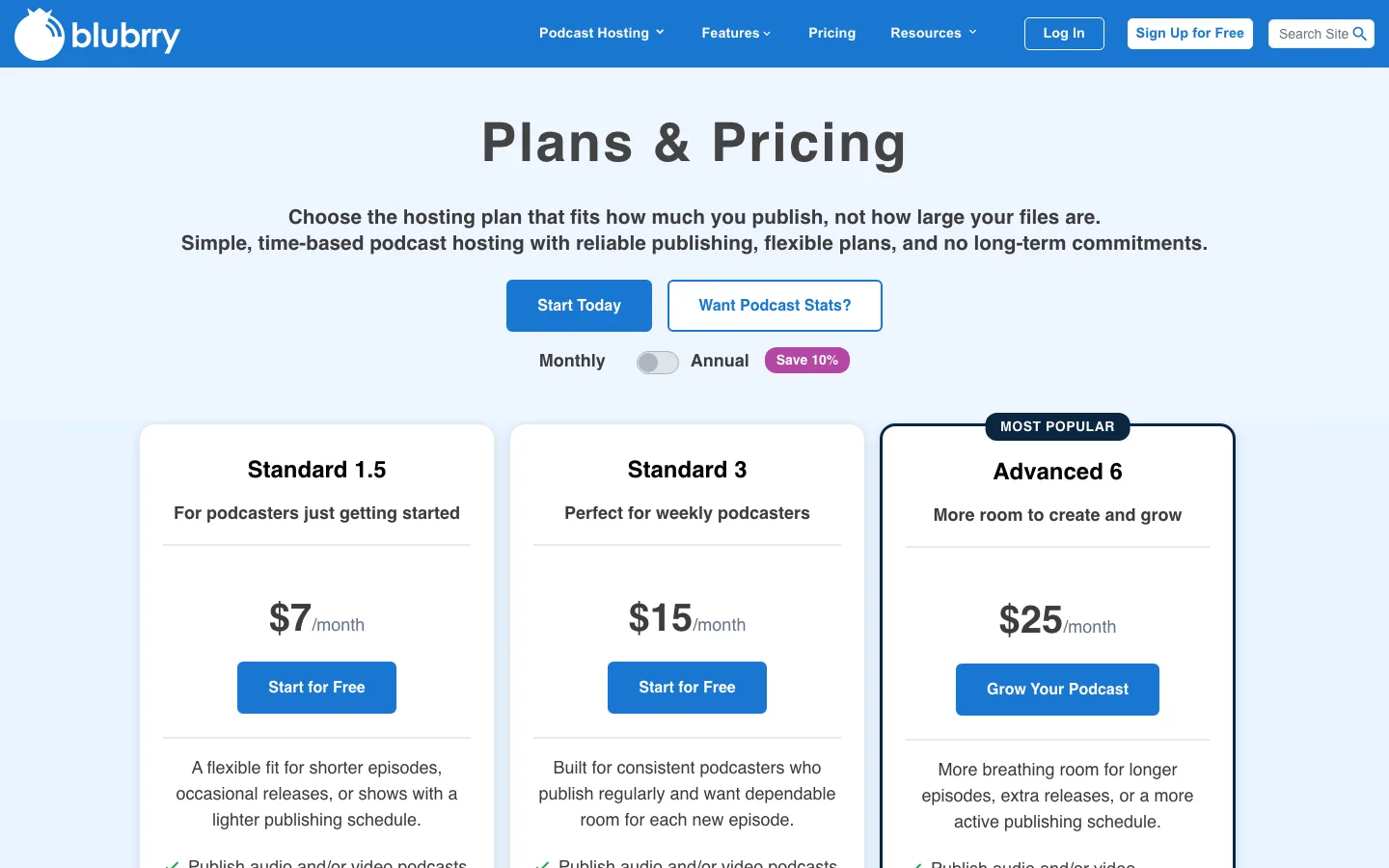
Blubrry’s public Plans & Pricing page.
You don’t need Blubrry to use PowerPress. But if you’d rather not serve audio from your web server, Blubrry is the host the plugin is built around. Its plans are priced by hours of new audio or video you publish each month, not by storage. Prices below are from Blubrry’s public pricing page as of October 2026.
Standard 1.5 costs $7 monthly for 1.5 new audio hours and has no annual option. Standard 3 costs $15 monthly or $155 annually for three hours. Both include Standard statistics.
Advanced 6 costs $25 monthly or $260 annually for six hours; Advanced 12 costs $50 or $540 for twelve hours; Advanced 25 costs $90 or $970 for 25 hours. Each includes Advanced statistics. Pro Unlimited starts at $100 monthly without an annual offer, includes unlimited new media and Advanced statistics.
Blubrry says Standard and Advanced plans include unlimited downloads and a free managed WordPress website. Pro includes 1 TB of bandwidth a month, then charges 1 cent per extra GB. The plan buttons say “Start for Free”, and the wizard’s hosting screen offers a free trial; check the trial terms when you sign up.
Statistics are sold separately if you host elsewhere. Basic stats are free (downloads, top locations, top apps). Standard stats cost $5 a month and add full location and app lists, trends, demographics and exports. Advanced stats, which add listener retention and IAB certification (the measuring standard advertisers trust), come only with Advanced hosting.
For a small show, $7 a month is cheap, but 1.5 hours is about three 30-minute episodes a month. A weekly hour-long show needs Advanced 6 at $25 a month.
Free vs Paid: How Hard PowerPress Pushes Blubrry
Everything we used on the test site was free. The Blubrry prompts are frequent but easy to ignore: a hosting banner on Get Started, the two wizard sales screens, a “PowerPress works best with Blubrry” box beside every settings tab, an “If you host with Blubrry” box in every episode, two Blubrry dashboard widgets, and a Blubrry Player preview you can’t use without hosting. Watch out for the “Let’s Connect” button in the settings sidebar. It opens Blubrry’s sign-in screen.
Security and Updates
PowerPress is updated often. WordPress.org lists 22 releases since version 11.16.0 in late April 2026, many of them security fixes. According to the WPScan vulnerability database, PowerPress has 26 reported vulnerabilities, 15 of them published since January 2025, and every one is listed as fixed in a later version. Most needed a logged-in user with Contributor or Author rights, and one in late 2025 let such a user upload harmful files.
Keep PowerPress updated and be careful who gets Contributor access. Test big updates on a copy of your site first with one of the tools in our WordPress staging plugin roundup, and keep regular backups (our backup plugin picks can help).
PowerPress vs Seriously Simple Podcasting
Seriously Simple Podcasting (SSP), from the podcast host Castos, is PowerPress’s main free rival. In our podcast plugin roundup, SSP was the best pick for most people. Here is how the two compare, using WordPress.org figures as of October 2026.
Both plugins are free. PowerPress has more than 20,000 installations and stores episodes in ordinary posts; Seriously Simple Podcasting has more than 30,000 and uses its own Podcasting menu, with posts optional. Without paid hosting, PowerPress asks for an audio URL, while SSP provides a Media Library upload button.
SSP has the more capable free album-art player with speed and skip controls and the easier five-step setup. PowerPress uses a simpler MediaElement player and a long setup form with two sales screens. Their paired hosting starts at $7 monthly for Blubrry or $19 for Castos, but those services are optional.
Choose SSP if you want the easiest start and a nicer free player. Choose PowerPress if your episodes should be regular blog posts, you want every feed option, or you plan to run several shows. Either way, both work with any host.
PowerPress Alternatives
- Podlove Podcast Publisher: free and open source, with chapters, multi-format feeds and privacy-friendly stats, but more manual setup.
- Buzzsprout plus its free plugin: let the host build the feed and just embed episodes on WordPress.
- Libsyn: a long-running host that can post episodes to WordPress from its own dashboard.
Our full podcast plugin comparison covers each of these in detail. And since every episode is a blog post, a good WordPress SEO plugin helps your show notes get found in Google.