Best SEO Plugin for WordPress (2026): 6 Tried Side by Side
Rank Math offers the broadest free toolkit, while Yoast is easier to recommend to someone who wants a familiar, guided setup. SEOPress is worth considering for client sites. Choose the plugin whose controls you will use: adding more SEO features does not by itself improve rankings.
Do You Need an SEO Plugin?
WordPress already outputs a page title, a canonical URL, a basic robots.txt file and a simple XML sitemap. What it does not do on its own is write meta descriptions, social sharing tags (Open Graph and X cards), structured data (schema), or give you a place to edit any of these per page. That is the job of an SEO plugin.
No plugin will rank a page by itself. They all write similar code, so the real differences are defaults, free features, nagging and weight. That is what we measured.
Our Test Results
Rank Math, Yoast and SEOPress took about two minutes to set up, AIOSEO about three; The SEO Framework and Slim SEO had no wizard. Rank Math’s account prompt and AIOSEO’s email request were skippable. All six produced an XML sitemap, with AIOSEO also adding an RSS sitemap and The SEO Framework using a single flat list.
Yoast was the only plugin that did not add a meta description by default. AIOSEO was the only one missing the social sharing image, and free SEOPress did not add schema to the test post. Rank Math produced BlogPosting and Organization schema; Yoast added Article, Organization and breadcrumbs; AIOSEO added BlogPosting, Organization and breadcrumbs. The SEO Framework used WebPage with breadcrumbs, while Slim SEO added Article, Organization and breadcrumbs.
Rank Math includes free breadcrumbs, robots.txt editing, redirects, a 404 monitor, one-location local SEO and product schema, although several modules start switched off. Yoast includes free breadcrumbs and file editing, but redirects, local SEO and its commerce tools need payment; it has no 404 monitor. AIOSEO includes free breadcrumbs and robots.txt editing, with local SEO on Plus and redirects and 404 monitoring on Pro, priced from $199.50 at our check.
SEOPress puts breadcrumbs, robots.txt editing, full redirects, 404 monitoring, local SEO and WooCommerce features in PRO, though a per-post redirect is free. The SEO Framework offers schema breadcrumbs, AI-crawler blocking and per-post redirects, with local SEO as a paid extension and no 404 monitor. Slim SEO includes a free breadcrumb shortcode, robots.txt editing, redirects and 404 monitoring, with some tools disabled initially; it has no local SEO module. Both are compatible with WooCommerce.
The quieter interfaces were SEOPress and The SEO Framework, neither of which had upgrade spots in its menu. Rank Math had four, Yoast five, AIOSEO five plus a banner, and Slim SEO one. Rank Math, Yoast and SEOPress showed no notices on core screens; AIOSEO showed a progress bar, The SEO Framework one notice, and Slim SEO a notice on every screen.
Added post HTML ranged from 1.9 KB for SEOPress to 7.3 KB for Yoast. Rank Math added 4.3 KB, AIOSEO 5.7 KB, The SEO Framework 3.3 KB and Slim SEO 4.7 KB. Their head sections contained 21, 15, 13, 17, 17 and 18 SEO meta tags respectively. Database additions also varied: Rank Math added 21 options and six tables, Yoast six and six, AIOSEO 14 and 13, SEOPress ten and one, The SEO Framework four and none, and Slim SEO two and none. All five alternatives could import Yoast data; The SEO Framework needed its free add-on, while Rank Math and SEOPress offered the import in their wizard.
Two notes on the numbers. Rank Math’s and AIOSEO’s counts include 4 options and 4 tables from Action Scheduler, a background-task library many plugins share. None of the six loaded extra CSS or JavaScript for visitors, so “HTML added” is the whole front-end cost.
Each free plugin started from the same WordPress site. We checked its default metadata, sitemap, editor controls, upgrade prompts and import from Yoast. This was a short functional comparison, not a test of ranking gains, long-term support or reliability.
The 6 Best SEO Plugins for WordPress
1. Rank Math: Best free SEO plugin overall
Rank Math offers redirects, a 404 monitor, breadcrumbs, local SEO for one location and WooCommerce product schema without a paid license. Some modules need enabling. Our test produced descriptions, social tags and BlogPosting schema, and basic setup worked without accepting the account prompt.
The breadth of settings can overwhelm beginners. AI writing tools cost extra, and the paid PRO license covers sites you own rather than client sites. Business is a separate license for client work. See Rank Math vs Yoast for the closer comparison.
2. Yoast SEO: Best for beginners and writers
Yoast offers familiar writing and readability feedback with no account required for basic setup. It produced a detailed schema graph and social tags, but did not generate a meta description automatically. Write one for important pages or deliberately let the search engine choose a snippet.
Its robots.txt output also omitted WordPress’s usual admin-path rule in our test. Check generated settings rather than assuming installation preserves every default. Redirects require Premium, WooCommerce SEO is sold separately, and licenses are priced per site. Promotions stayed within Yoast’s own screens and widgets.
3. All in One SEO: Guided dashboard, with more upselling
AIOSEO provides approachable controls and a content score, but its setup preselects optional plugins and paid extras. Review those choices if you want to avoid installing unrelated tools.
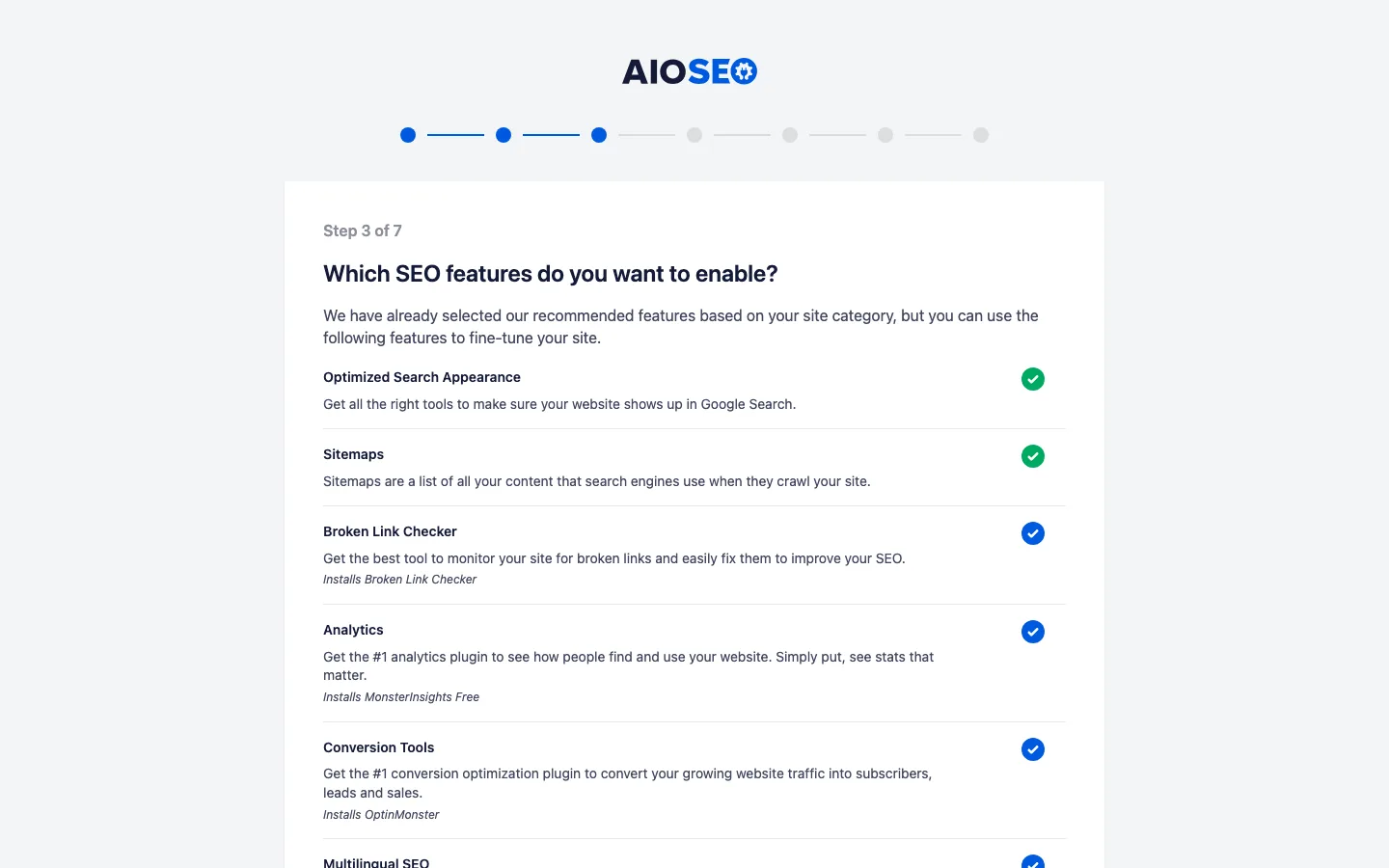
The default metadata and schema worked, but social shares had no image until we configured a default image source. Upgrade prompts were the most prominent of this group. Redirects and 404 tracking require a higher paid plan, not the entry license. Introductory prices also rise substantially at renewal.
4. SEOPress: Best value for agencies
SEOPress was quieter, needed no account and imported from a wide range of other SEO tools. Its defaults enabled social tags, sitemaps and content analysis. Our test post had no schema, however; schema, breadcrumbs, redirects and several advanced controls require PRO. Unconfigured Facebook fields also left empty tags.
The paid license includes WooCommerce, local SEO and white labeling, with an unlimited-site option and unchanged listed renewal pricing. Our full SEOPress review covers its importer and a public-email setting worth checking.
5. The SEO Framework: Best for a quiet dashboard
The SEO Framework supplied descriptions, social tags and a sitemap immediately, without a wizard or a crowded menu. Basic schema and a per-post redirect field were included; article schema, keyword tools and local extensions require payment. There is no central redirect list or 404 log.
It produced correct titles despite a theme-support warning in our test. Its recent update gap is the larger concern, so confirm compatibility before adopting it for a new site. Importing from Yoast needs the separate Transport extension, which we did not test.
6. Slim SEO: Best zero-setup option with redirects
Slim SEO enabled titles, descriptions, social tags, schema, sitemaps and a redirect module without a wizard. The 404 log and robots.txt editor needed enabling. It offers fewer controls than Rank Math, but less configuration work too.
A dismissible notice appeared across the dashboard because our test site lacked HTTPS and used full-text RSS. Other promotions were limited. Optional AI metadata generation needs your own provider key; Pro adds a visual schema builder, link suggestions and Search Console data. Local SEO is not part of the free toolkit.
What the Plugins Add to Your Site
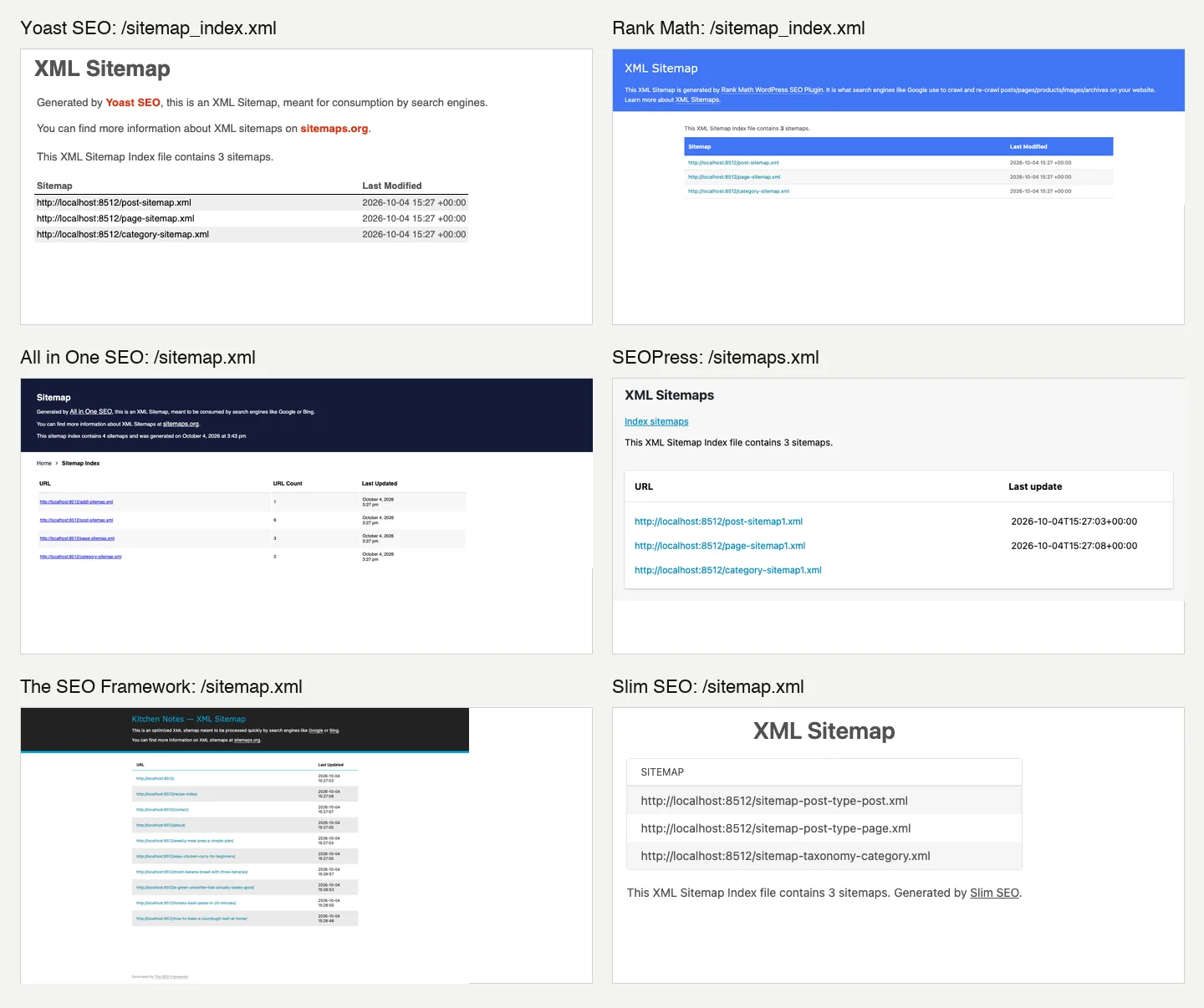
The XML sitemap each plugin generated on our test install. Note the different addresses.
All six replaced WordPress’s built-in sitemap with their own, but at different addresses: /sitemap_index.xml (Yoast, Rank Math), /sitemap.xml (AIOSEO, TSF, Slim SEO) and /sitemaps.xml (SEOPress). If you switch plugins, resubmit the new address in Google Search Console.
On the page itself, the spread was small. The leanest (SEOPress) added 1.9 KB of HTML to our post and the heaviest (Yoast) added 7.3 KB. About 5.8 KB of Yoast’s total is its schema graph. For comparison, a single unoptimized photo is often hundreds of kilobytes, so if speed is the goal, an image optimizer plugin will do far more than switching SEO plugins.
In the database, Rank Math, Yoast and AIOSEO each created 6 to 13 tables, while TSF and Slim SEO created none. That matters on very large sites, not on a small blog.
Switching from Yoast: What We Saw
We gave one post a custom Yoast title and description and set another to noindex, then ran each importer with Yoast still active.
- Rank Math spotted Yoast and added an Import step to its wizard. The import finished in under half a minute.
- SEOPress imported from its wizard in about 10 seconds and showed a 10 of 10 progress list.
- Slim SEO imported from its Tools tab and reported “Processed 9 posts… Processed 3 terms… Done!”
- AIOSEO listed Yoast in its wizard, but the box was unticked. Its Tools importer reported success right away, while the post data was copied by a background task a moment later.
- The SEO Framework needs its free Transport extension (installed through the separate Extension Manager plugin). We did not try it.
All four importers we ran carried over the custom title, the description and the noindex setting. Two tips: run the import while the old plugin is still active, and never leave two SEO plugins running afterward, or you get duplicate tags and two sitemaps. Making the switch on a copy of your site first is the safe way; our guide to the best WordPress staging plugins shows how.
After switching, confirm the active sitemap address in Search Console and inspect important pages for duplicate metadata. Keep only one SEO plugin generating tags once the import is checked.
Pricing Compared
All prices are as of October 2026, billed yearly, before tax.
For one site, SEOPress PRO costs $49 a year and Slim SEO Pro $59, both with unchanged renewal prices. SEOPress also offers five sites for $59 or unlimited sites for $149; Slim SEO’s unlimited plan costs $179.
AIOSEO Basic costs $49.50 for year one and $99 at renewal. Yoast Premium costs $118.80 a year for one site. Rank Math PRO covers unlimited sites you own for $95.88 in year one, equivalent to $7.99 a month, then $107.88 a year, or $8.99 a month. The SEO Framework Pro costs $84 a year, equivalent to $7 a month, for two sites; its renewal price was not stated.
For one site, SEOPress PRO is the cheapest paid plan that includes a redirect manager and WooCommerce SEO. For several sites you own, Rank Math PRO costs the same no matter how many you add. AIOSEO looks cheapest in year one but roughly doubles at renewal, and its redirect manager needs the $199.50 Pro plan.
What About Squirrly and the Rest?
Squirrly SEO, now listed as “GEO Plugin by Squirrly SEO”, is still updated (version 14.2.7, October 3, 2026) but has only 30,000+ installs. On our test install it opened a “Connect Your Site to Squirrly Cloud” sign-up form, and until you connect, it added no SEO tags to the page at all. Its PRO plan costs $19.99/month billed yearly. It suits people who want a cloud-based SEO coach, not a set-and-forget plugin, so we left it out of the main list.
Older lists often include Google Keyword Planner, MonsterInsights or a broken link checker. Those are research, analytics and maintenance tools, not SEO plugins, and they do not replace one of the six above. Browse our WordPress plugin reviews for other categories.