Best WordPress Auction Plugins and Themes (2026): What Still Works
Our verdict: For most sites, the best WordPress auction plugin is one that adds auctions to WooCommerce. Start with the free Ultimate Auction for WooCommerce: on our test install it ran a full auction, emailed the winner and sent them to a normal WooCommerce checkout. If you need proxy bidding, anti-sniping or automatic relisting, move to WooCommerce Simple Auctions ($99) or YITH Auctions for WooCommerce ($149.99 a year). If you want a ready-made auction site design, iBid ($75) is the strongest theme still being updated.
Quick Facts
Prices, versions and install counts were checked on WordPress.org, CodeCanyon, ThemeForest and vendor sites as of October 2026.
| Product | Type | Price | Free version | Last update | Best for |
|---|---|---|---|---|---|
| Ultimate Auction for WooCommerce | WooCommerce plugin | Free, Pro from $79/year | Yes (v2.5.5, 2,000+ installs) | July 2026 | Small stores trying auctions |
| WooCommerce Simple Auctions | WooCommerce plugin | $99 (CodeCanyon) | No | August 2026 | Serious auction stores |
| YITH Auctions for WooCommerce | WooCommerce plugin | $149.99/year | No | Not listed (v4.27.0) | eBay-style stores with Stripe |
| Ultimate WordPress Auction | Standalone plugin | Free | Yes (v4.3.4, 1,000+ installs) | July 2026 | Sites without WooCommerce |
| WC Vendors auctions add-on | Marketplace add-on | $299.50/year plan plus $99 plugin | No | Not listed | Multi-vendor auction marketplaces |
| WooCommerce Marketplace Auction | Marketplace add-on | $101 (CodeCanyon) | No | July 2026 | Webkul marketplace owners |
| Auction Nudge | eBay listings plugin | Free | Yes (v8.4.0, 1,000+ installs) | August 2026 | eBay sellers |
| WordPress Automatic Plugin | Autoblogging plugin | $39 (CodeCanyon) | No | September 2026 | eBay affiliates |
| iBid | WooCommerce theme | $75 (ThemeForest) | No | September 2026 | Full auction marketplace sites |
| PremiumPress Auction Theme | Theme | $99 | No | Not listed | eBay or penny auction sites |
| AuctionTheme by SiteMile | Theme | $249/year or $899 once | No | July 2026 | All-in-one auction script |
| Adifier | Classifieds theme | $49 (ThemeForest) | No | June 2026 | Classified ads with bidding |
How We Picked and Checked These
We installed the three free WordPress.org plugins in this list on a fresh test install (WordPress 7.1.2, WooCommerce 11.1.2, Twenty Twenty-Five). We created auctions with a start price, reserve and an end time a few minutes away, bid as two test customers and followed what happened when they ended.
We did not buy the paid products. Those reviews are based on vendor pages and the CodeCanyon and ThemeForest listings.
Do You Need WooCommerce for Auctions?
Usually yes. A WooCommerce auction plugin makes an auction a normal product type, so the winner pays through your existing checkout, gateways, taxes and shipping. Pick a standalone plugin only for one-off auctions (a charity fundraiser, for example). Pick an auction theme if you are building a dedicated auction site from scratch. If you are still deciding between platforms, see our Shopify vs WordPress comparison.
Best WordPress Auction Plugins
1. Ultimate Auction for WooCommerce (Best Free Plugin)
Ultimate Auction for WooCommerce is the most installed free auction plugin on WordPress.org, with 2,000+ active installs and a 4.7 out of 5 rating as of October 2026. Its developer also makes the standalone Ultimate WordPress Auction plugin below.
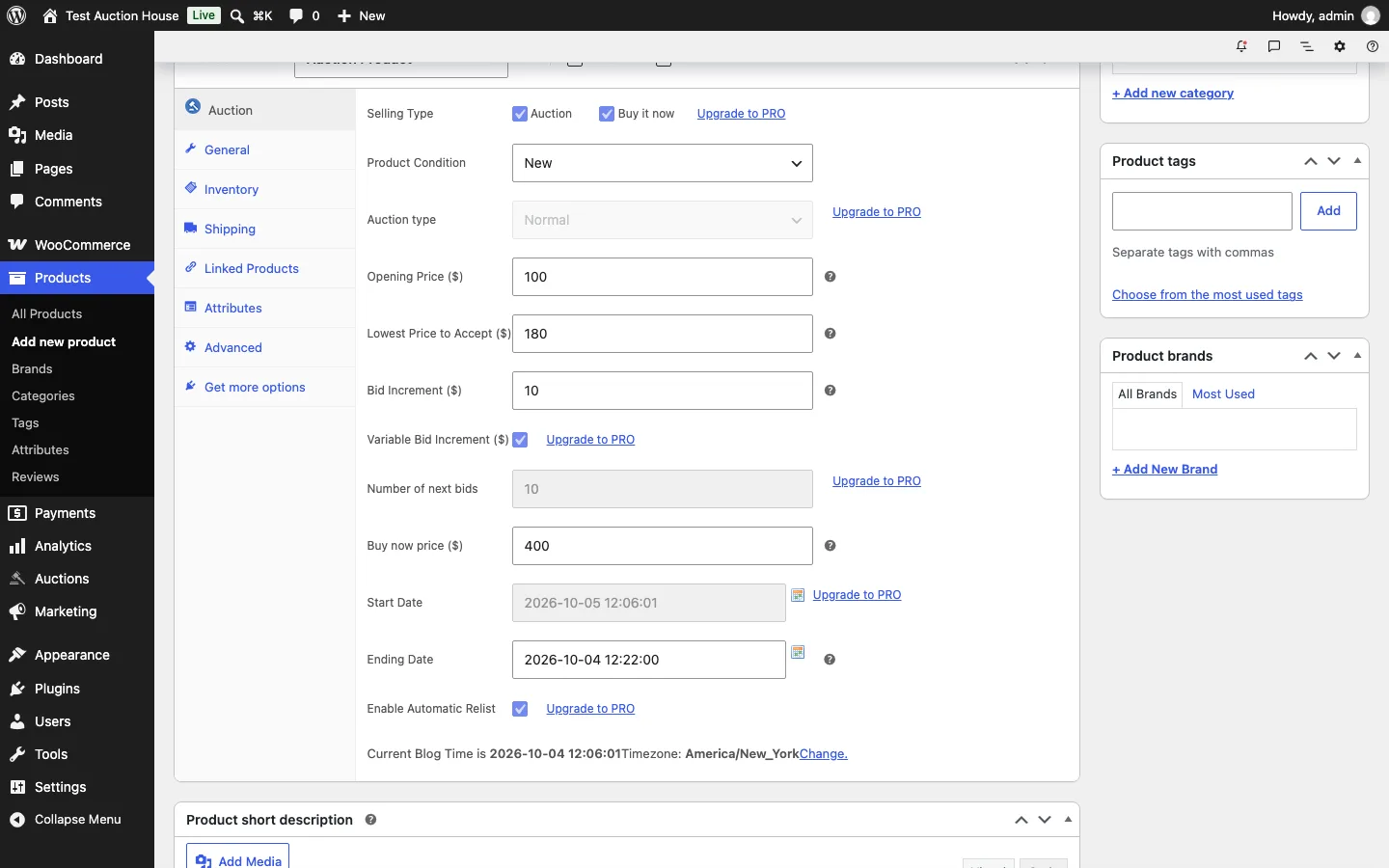
The Auction tab in the WooCommerce product editor on a test install, Ultimate Auction for WooCommerce 2.5.5, October 2026.
Setup. There is no wizard. You pick “Auction Product” as the product type and fill in an opening price, a “lowest price to accept” (the reserve), a bid increment, an optional buy now price and an end date. Six fields carry an “Upgrade to PRO” link, including reverse auctions, future start dates and relisting. One confusing detail: the locked start date box showed tomorrow’s date, but the plugin saved the current time.
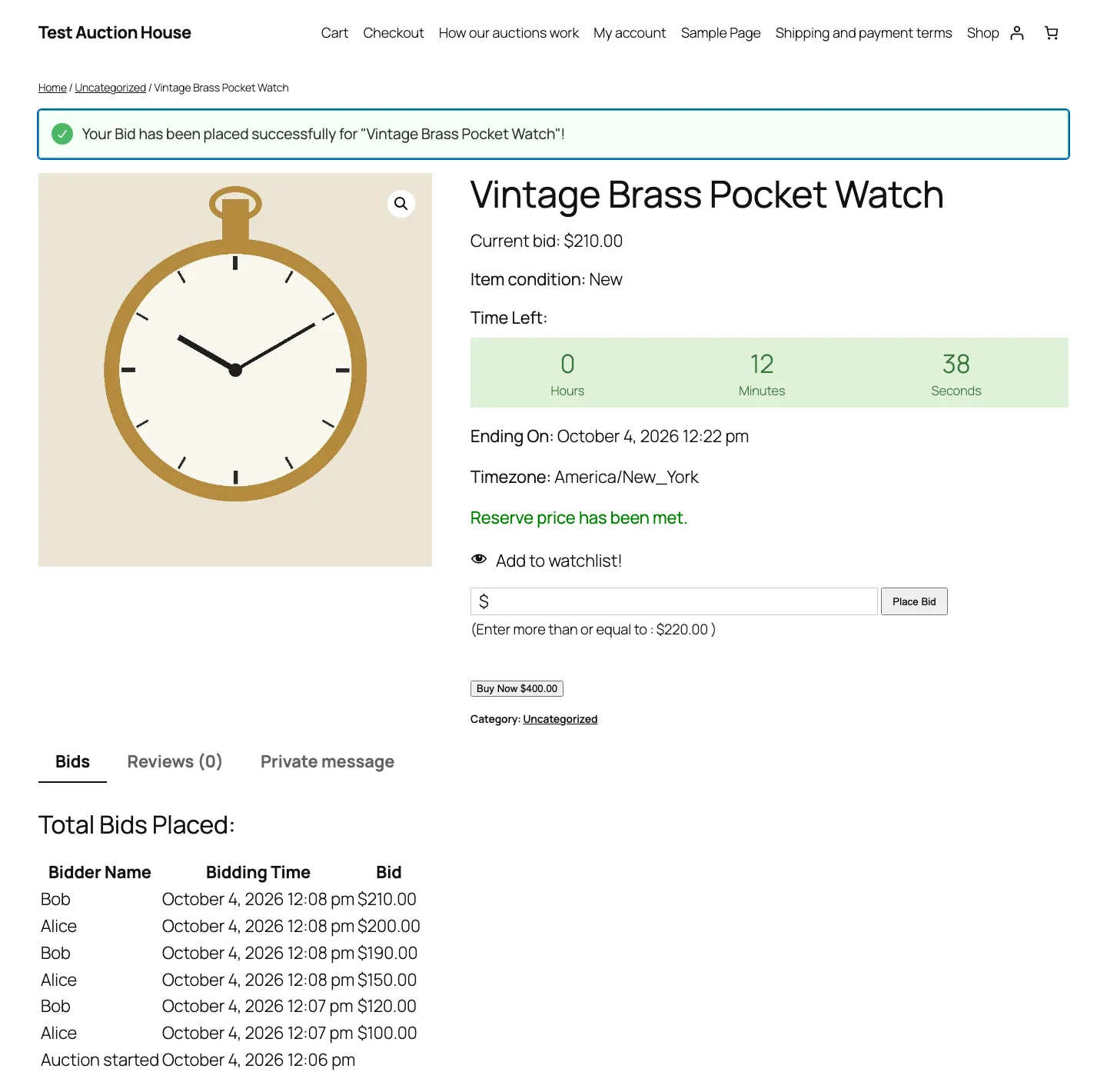
A live test auction with six bids from two test users, Ultimate Auction for WooCommerce 2.5.5, October 2026.
Bidding. Our two test bidders placed eight bids between $100 and $230. A bid below the minimum was blocked before it was sent, and the reserve message turned green once a bid passed the $180 reserve. The page does not update by itself: live bidding is Pro, and so is hiding buy now after the reserve is met. Each bid sent four emails: a confirmation to the bidder, an outbid notice to the previous leader and two admin notices.
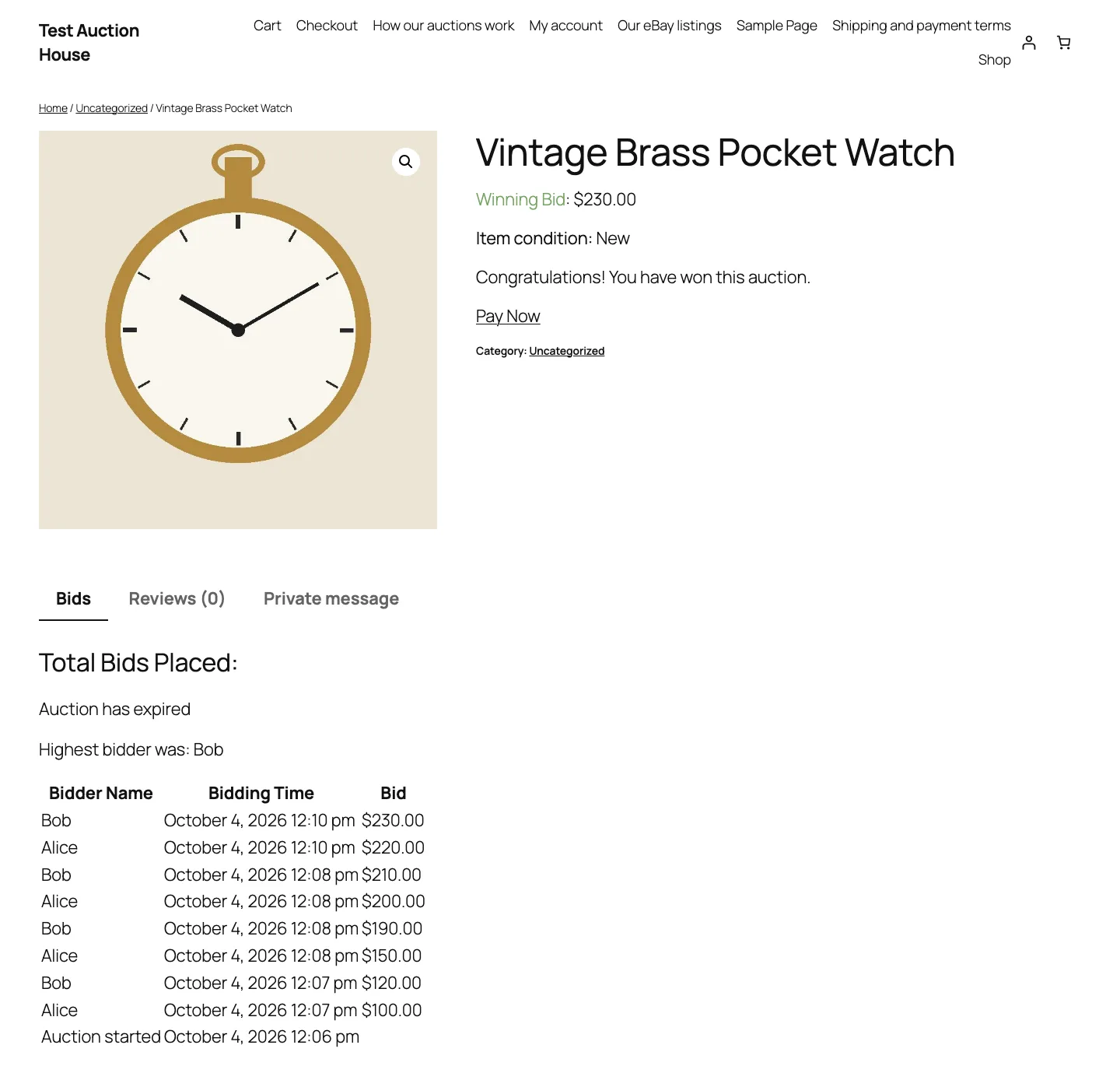
The winner’s view after the test auction closed, Ultimate Auction for WooCommerce 2.5.5, October 2026.
When it ended. The auction closed on the first page load about a minute after the end time, and the winner and admin got emails. The winner saw a “Pay Now” link. When a second test auction ended below its reserve, the page said so, but no one got an email and nothing was relisted.
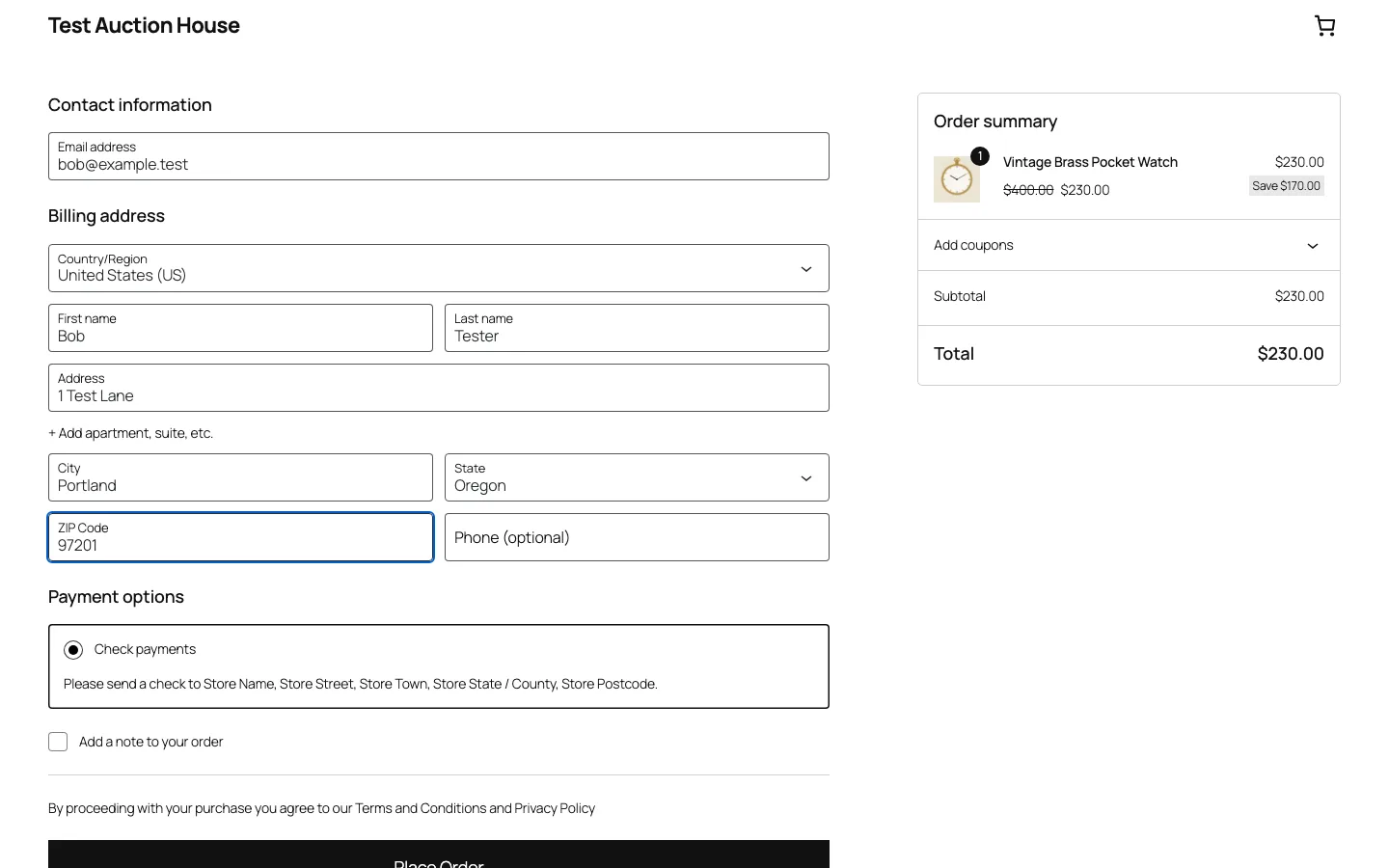
Pay Now sends the winner to the regular WooCommerce checkout at the winning price, test install, October 2026.
Checkout. Pay Now added the item to the cart at the $230 winning bid, and a test order with WooCommerce’s check payment went through. Oddly, the summary showed the $400 buy now price struck through with “Save $170”.
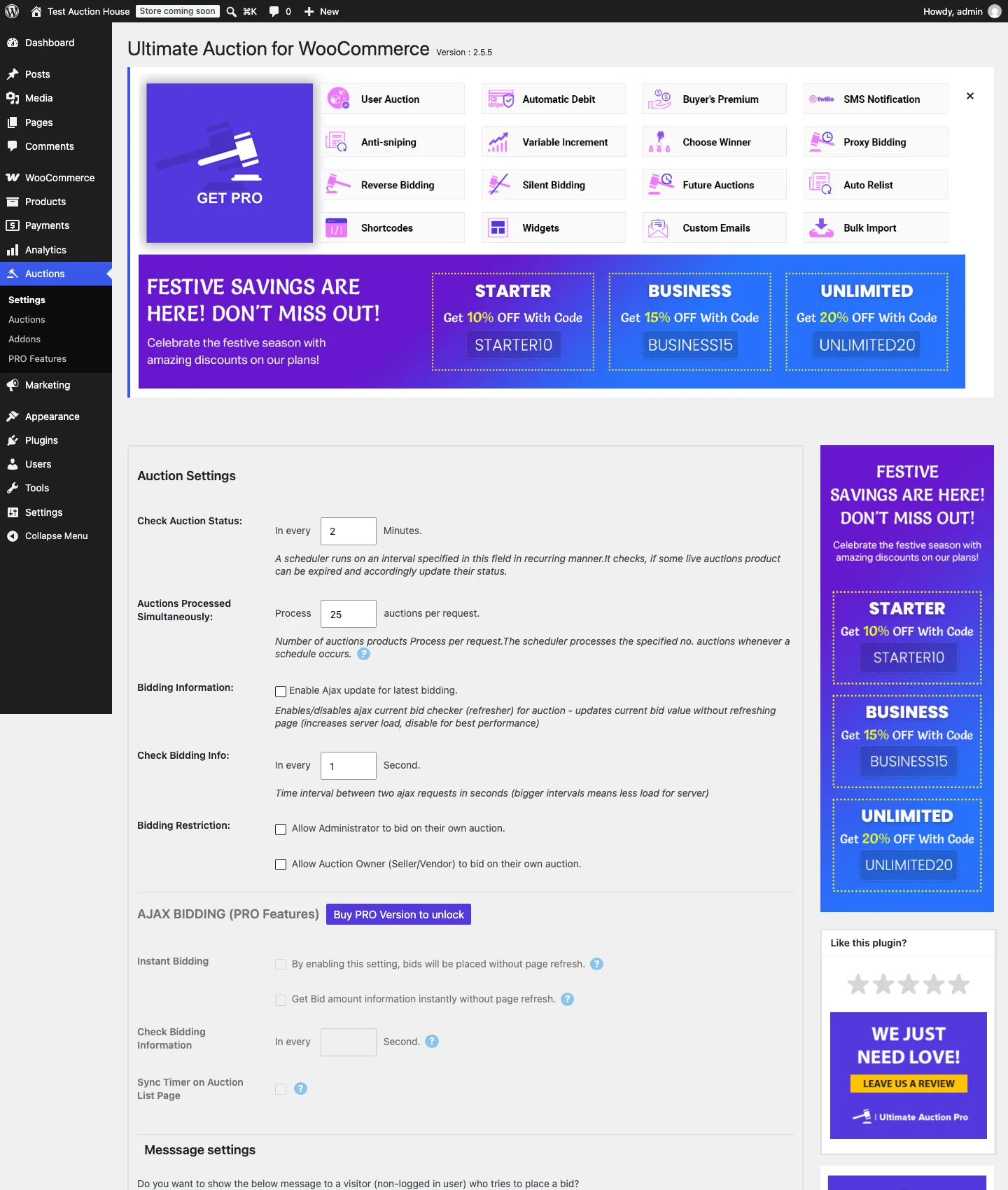
The settings page, where five sections are locked behind Pro, October 2026.
Upsells. Expect plenty. The settings page opens with a “Get Pro” panel and a coupon banner, and five sections are locked (Ajax bidding, proxy bidding, silent bidding, anti-sniping and extra settings). The Get Pro panel also showed up on other admin screens. Pro costs $79 a year for one site, $119 for three or $199 for unlimited sites as of October 2026.
Good for: trying auctions on an existing store for free. Skip if: you need proxy bidding or anti-sniping and do not want to pay for Pro.
2. WooCommerce Simple Auctions (Best Paid Plugin)
WooCommerce Simple Auctions by wpgenie has been sold since February 2014, which makes it the oldest WooCommerce auction plugin according to its author. It has 8,257 sales and a 4.66 rating from 206 reviews as of October 2026. It costs $99 for a regular license and was last updated on August 31, 2026 (version 3.0.10).
According to the listing, it covers what the free plugin locks away: normal, reverse and sealed auctions, proxy bidding, anti-sniping, a winner commission, editable emails (outbid, won, reserve failed, payment reminder) and automatic charging of winners with a stored card (Stripe only).
Good for: stores that run auctions every week. Watch for: the $99 includes six months of support from the author; extending it costs extra on CodeCanyon.
3. YITH Auctions for WooCommerce
YITH’s plugin costs $149.99 a year for one year of updates and support, with a 30-day money back guarantee, as of October 2026. YITH says 12,196 customers use it. The free version that used to be on WordPress.org was closed in 2018, so there is no free tier now. Version 4.27.0 requires WordPress 6.9 and WooCommerce 11.0.
The vendor says it supports standard, reverse and sealed auctions and reschedules auctions automatically when there are no bids, the reserve is missed or the winner does not pay. With YITH’s separate Stripe plugin, it can require a card before bidding and charge the winner.
It works inside your current WooCommerce theme, so if your store already runs on a theme you like, such as Flatsome, you can keep it.
Good for: stores that want unpaid-winner handling built in. Watch for: the yearly price is the highest here, and Stripe features need a second paid plugin.
4. Ultimate WordPress Auction (Best Without WooCommerce)
This is the original, standalone plugin from the Ultimate Auction developer. It has 1,000+ active installs, a 4.3 out of 5 rating and version 4.3.4 from July 2026 on WordPress.org. It does not need WooCommerce: auctions are their own post type, shown on a page with the [wdm_auction_listing] shortcode.
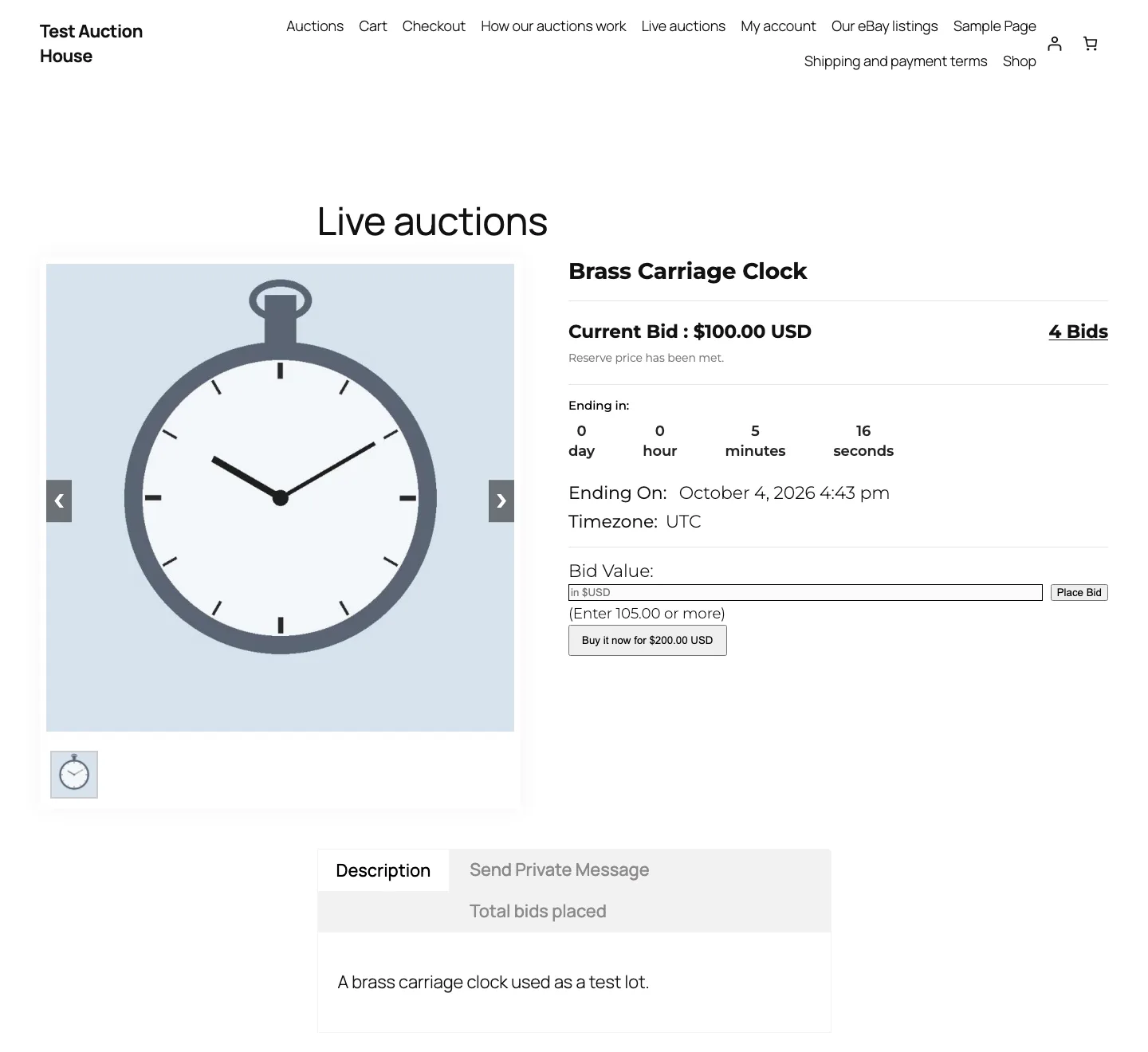
A test auction in the standalone Ultimate WordPress Auction plugin, version 4.3.4, October 2026.
Setup on our test install had snags:
- Currency. The menu defaulted to the first entry (Albania Lek), so saving payment settings without changing it switched the currency.
- Payment methods. You tick a method (PayPal, wire transfer, cheque or cash) on one screen and add its details on another, or it stays greyed out.
- End times. With the site on New York time, an end time six minutes away was rejected as not in the future. The plugin checks it against UTC, so we switched the test site to UTC to continue.
Once running, bids went through without a page reload, and bidders got confirmation and outbid emails. Admin notices went to a blank address until we filled in the plugin’s own email setting. The winner email arrived about two minutes after the end with our cash payment instructions. There is no checkout, and the ended page shows the winner’s username publicly.
Good for: a one-off charity or club auction. Skip if: you already run WooCommerce. Use the WooCommerce version instead.
5. WC Vendors WooCommerce Simple Auctions
This add-on lets sellers in a WC Vendors marketplace create normal, reverse and sealed auctions from their dashboard. The free WC Vendors plugin (3,000+ installs) does not include it. As of October 2026 it comes with the Business plan at $299.50 a year (a 50% sale from $599), and you still need WooCommerce Simple Auctions ($99) for the bidding engine.
Good for: eBay-style marketplaces with many sellers. Watch for: the total cost is close to $400 in the first year.
6. WooCommerce Marketplace Auction Plugin
Webkul’s add-on costs $101 on CodeCanyon, has 114 sales and was last updated on July 18, 2026. It needs Webkul’s own Multi Vendor Marketplace plugin, sold separately. The listing mentions standard, incremental, automatic and reverse auctions. It only makes sense if you already run Webkul’s marketplace.
7. Auction Nudge (Best for eBay Sellers)
Auction Nudge does not run auctions on your site. It shows your live eBay listings, including auctions with current bids and time left, through a block or the [auction-nudge] shortcode. It is free, has 1,000+ installs and a 4.8 out of 5 rating, and version 8.4.0 came out in August 2026. The developer says it stays free through eBay referral commissions.
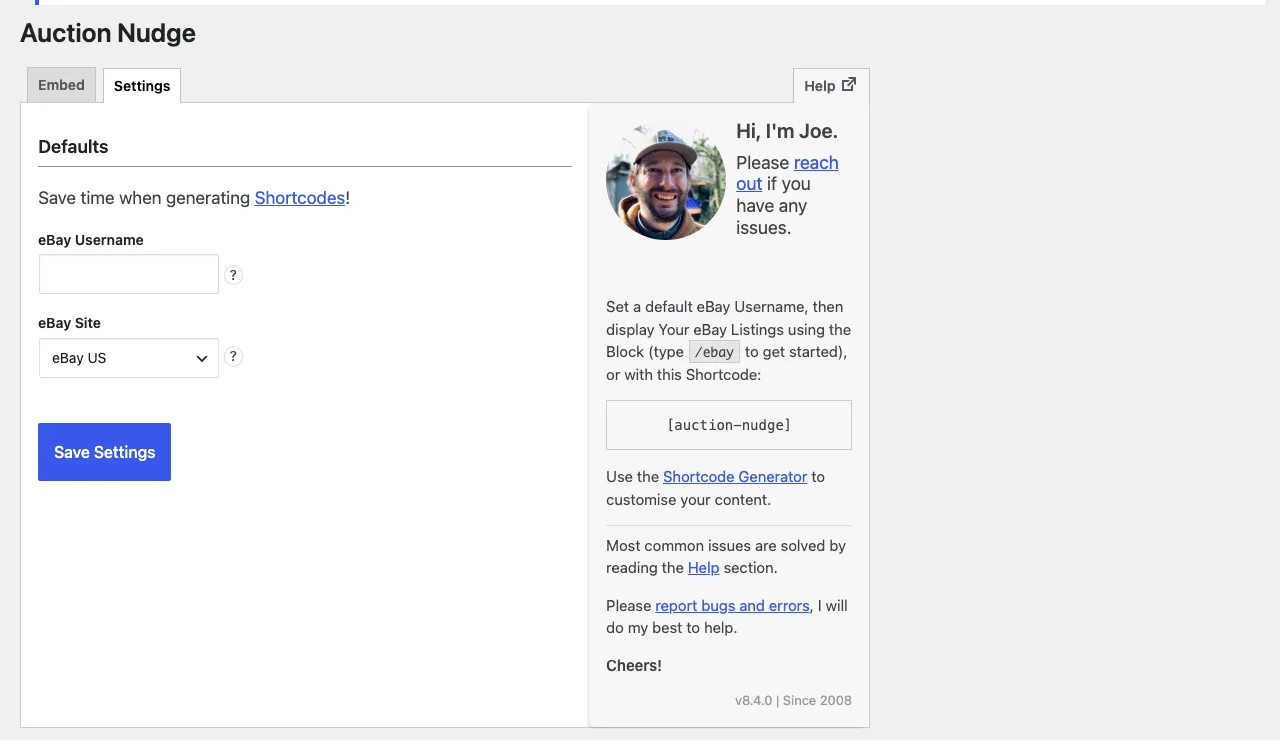
Auction Nudge settings on a test install, version 8.4.0, October 2026.
Setup is one screen: your eBay username and eBay site (14 countries). A shortcode generator adds display and filter options. We did not connect an eBay account, so our test page showed “No items found”, and the plugin logged a PHP warning on each page view until a username is saved.
Good for: eBay sellers who want their listings on their own site.
8. WordPress Automatic Plugin
This $39 CodeCanyon autoblogging plugin by ValvePress can import eBay auctions by keyword or seller, with affiliate links. It has 42,869 sales, a 4.82 rating from about 2,490 reviews, and version 3.138.0 came out on September 26, 2026. Use it only if you earn eBay affiliate commissions. If you also promote Amazon products, see our picks for the best Amazon WordPress plugins.
Best WordPress Auction Themes
An auction theme is worth it when you want the whole site built around bidding. If you just need auctions on a store, use one of the plugins above with your current theme. (New to themes? Here is how to install a WordPress theme.)
1. iBid (Best Auction Theme)
iBid by ModelTheme costs $75 on ThemeForest with six months of support. It has 3,424 sales, a 4.66 rating from 102 reviews, and was last updated on September 2, 2026. Its auctions run on WooCommerce Simple Auctions, it lists 25+ demos, and it works with Dokan, WCFM, WC Vendors and MultiVendorX for multi-seller sites. It is built for Elementor and WPBakery, not the block editor.
2. PremiumPress WordPress Auction Theme
Auction Theme by PremiumPress costs $99 with six months of support and updates as of October 2026. Bidding is built into the theme. The vendor lists live Ajax bidding, proxy bidding, hidden reserves, buy now, a penny auction mode and seller fees (listing fees, a final-value commission and a buyer’s premium).
3. AuctionTheme by SiteMile
AuctionTheme is another all-in-one auction script. SiteMile says it was last updated on July 12, 2026 and works with WordPress 7.0+. It costs $249 a year or $899 once as of October 2026.
4. Adifier
Adifier is a classified ads theme with a built-in auction ad type, countdowns and auction emails. It costs $49 on ThemeForest, has 3,884 sales and a 4.96 rating from 280 reviews, and was last updated on June 9, 2026 (version 3.9.9). It is the cheapest pick if you want classifieds first and auctions second.
5. Motors by StylemixThemes
The Motors theme is a car dealership and vehicle listing theme: $89, 23,765 sales, a 4.63 rating and an update on October 2, 2026. Its current listing describes dealer, rental and classified listing layouts but no bidding feature, so you would add an auction plugin from the list above for actual auctions.
Bidding themes for freelance marketplaces
Two picks are bidding themes for job marketplaces, where freelancers bid on projects and payment is held in escrow.
- FreelanceEngine by EngineThemes is $89 for unlimited sites with 12 months of updates and support, or $299 with all extensions (version 1.12, October 2026).
- The Project Freelancer theme by SiteMile costs $249 a year or $899 once and was last updated on July 12, 2026.
What to Look for in an Auction Plugin or Theme
Gutenberg and GDPR support are standard now. These features matter more:
- Proxy bidding. Bidders set a maximum and the system bids for them. It is paid-only in the Ultimate Auction plugins.
- Anti-sniping. Extends the end time after a last-second bid, so snipers cannot win cheaply.
- Payment collection. WooCommerce plugins send winners to checkout; some paid plugins charge a stored card automatically.
- Unpaid winner handling. Look for payment reminders, offers to the second bidder or relisting.
- Emails. Outbid and winner emails are the minimum. On our test install, the free WooCommerce plugin sent no email when an auction missed its reserve.
- Fees. If you host other sellers, you need listing fees, commissions or a buyer’s premium.
Auction pages refresh often near the end, so a decent host helps too. See our guide to the best managed WordPress hosting.
Verdict
Start with the free Ultimate Auction for WooCommerce. It ran a full auction on our test install, from bidding to checkout, but lacks proxy bidding and anti-sniping and pushes Pro hard. When you outgrow it, WooCommerce Simple Auctions at $99 is the best value. For a complete auction site, choose iBid, which runs on that same plugin.
FAQ
What is the best free WordPress auction plugin?
Ultimate Auction for WooCommerce. It is free, has 2,000+ installs and covers reserve prices, buy now, bid emails and winner checkout. Without WooCommerce, use the standalone Ultimate WordPress Auction plugin.
Do I need WooCommerce to run auctions on WordPress?
No, but it helps. The standalone Ultimate WordPress Auction plugin and themes like PremiumPress and AuctionTheme run auctions without it. With WooCommerce, the winner pays through your normal checkout and gateways.
Can I set a reserve price?
Yes. Every auction plugin in this list supports a reserve price. On our test install, the free Ultimate Auction plugins showed whether the reserve had been met on the auction page.
Can winners be charged automatically?
Yes, with paid plugins. WooCommerce Simple Auctions can charge a stored card through Stripe. YITH can with its separate Stripe plugin. Ultimate Auction Pro offers auto-debit via Stripe on its $119 Business plan and up.
What happened to WP Auctions?
Its free WordPress.org version was closed in December 2024 for a security issue. The paid version is still sold from $39 a year, but the vendor’s site lists no update since version 6.0 in October 2024.