6 GoDaddy Alternatives for WordPress in 2026 (Real Prices)
Hostinger is our first GoDaddy alternative for a small WordPress site. DreamHost offers a shorter commitment, SiteGround adds phone support, and Cloudways suits a site that needs more room to grow. Compare the full renewal bill, including backups and email, before switching.
Why people look for a GoDaddy alternative
GoDaddy’s annual report for 2025 says it had 20.4 million customers and about 81 million domains under management at the end of 2025. Many people buy a domain there and add hosting in the same cart, without comparing hosts first.
Here is what usually pushes WordPress users to switch:
- Add-ons cost extra. On most GoDaddy shared tiers, daily backups, malware scans and SSL certificates are sold separately from the base plan. Every host in this guide includes free SSL, and all of them include some kind of automatic backup.
- One site on the entry plan. GoDaddy Economy hosts a single website. Hostinger’s entry plan hosts three and DreamHost’s hosts 25.
- Short refund window on monthly plans. GoDaddy gives 30 days if you pay for a year or more, but only 48 hours on monthly billing.
- Older tools. GoDaddy’s annual report says most of its hosting plans use cPanel or Plesk. That is familiar, but hosts like Hostinger, SiteGround and Kinsta now build their own dashboards with WordPress staging, caching and backups in one place.
Support is the one area where GoDaddy still does well. It offers phone and chat support, and only SiteGround matches the phone line among the hosts below.
Price check: GoDaddy vs the alternatives
The headline price is only part of the cost. What matters is the renewal price, how long you must prepay to get the deal, and what you pay extra for.
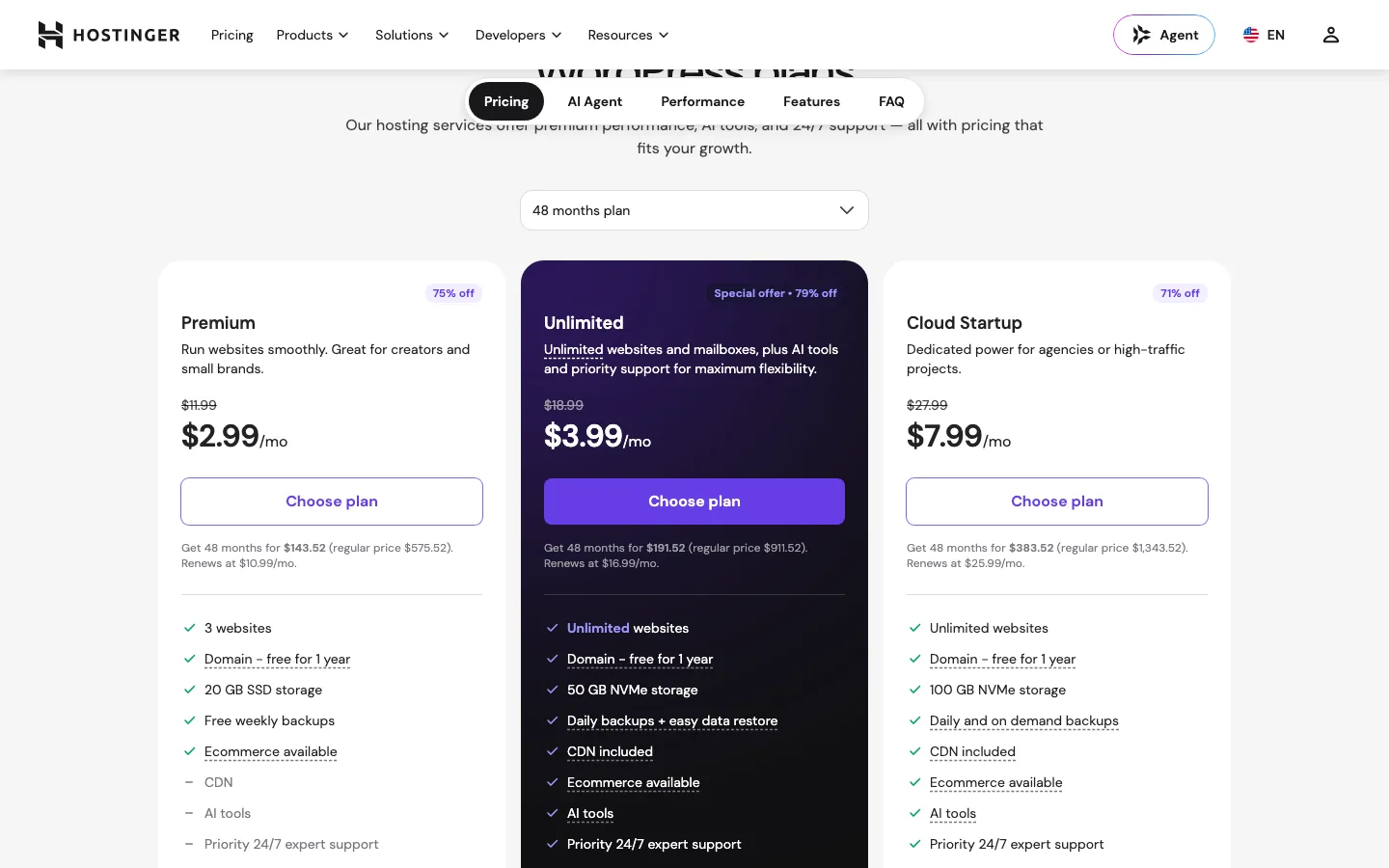
Hostinger Premium requires $143.52 upfront for 48 months and renews at $10.99 monthly; daily backups and CDN need Unlimited. DreamHost Launch costs $2.89 monthly for year one, then $10.99, with email becoming paid after three free months.
SiteGround StartUp costs $2.99 monthly prepaid for 12 months, then $17.99; staging needs GrowBig. FastComet Starter costs $1.99 monthly for its first term and renews at $9.95, while Restore Manager needs Essential.
The GoDaddy reference is the July 2026 $5.99 introductory Economy price, renewing at $9.99. We could not verify the qualifying term here, and backups, security and SSL can add to the bill on most tiers.
On paper, GoDaddy Economy’s $9.99 renewal is one of the cheaper renewals compared here. The gap shows up when you add a backup or security product to it, or when you need a second website and have to move up to Deluxe, which renews at $13.99 a month. Hostinger and DreamHost already cover several sites and some backups at the entry level, for about the same renewal price.
1. Hostinger: best GoDaddy alternative for most small sites
Hostinger is the cheapest way to get good WordPress hosting for several years, as long as you are fine paying upfront. Our full Hostinger review covers it in depth.
As of October 2026, Premium costs $2.99 a month on a 48-month term, which is $143.52 upfront. It renews at $10.99 a month. A 12-month term costs $3.99 a month, and month to month costs $11.99. The middle plan, Unlimited, is $3.99 a month on the same 48-month term and renews at $16.99.
What you get on Premium:
- 3 websites and 20 GB of SSD storage
- A free domain for the first year
- Free weekly backups
- LiteSpeed web server and LiteSpeed Cache
- Free WordPress migration on every plan
Premium does not include a CDN or daily backups. Both start on Unlimited, which also adds 50 GB of NVMe storage and unlimited websites.
Moving from GoDaddy. You request a migration in hPanel and Hostinger says it finishes within 24 hours. That is the easiest route if you have never moved a site before.
Watch out for. Support starts with an AI agent that hands you to a person when needed, and there is no phone line. The low price needs a long prepay. Hostinger’s 30-day money-back guarantee helps if the first month goes badly.
Wondering how it stacks up against another popular choice? See Hostinger vs Bluehost, which works through six years of renewal math.
2. DreamHost: best for many sites and a one-year commitment
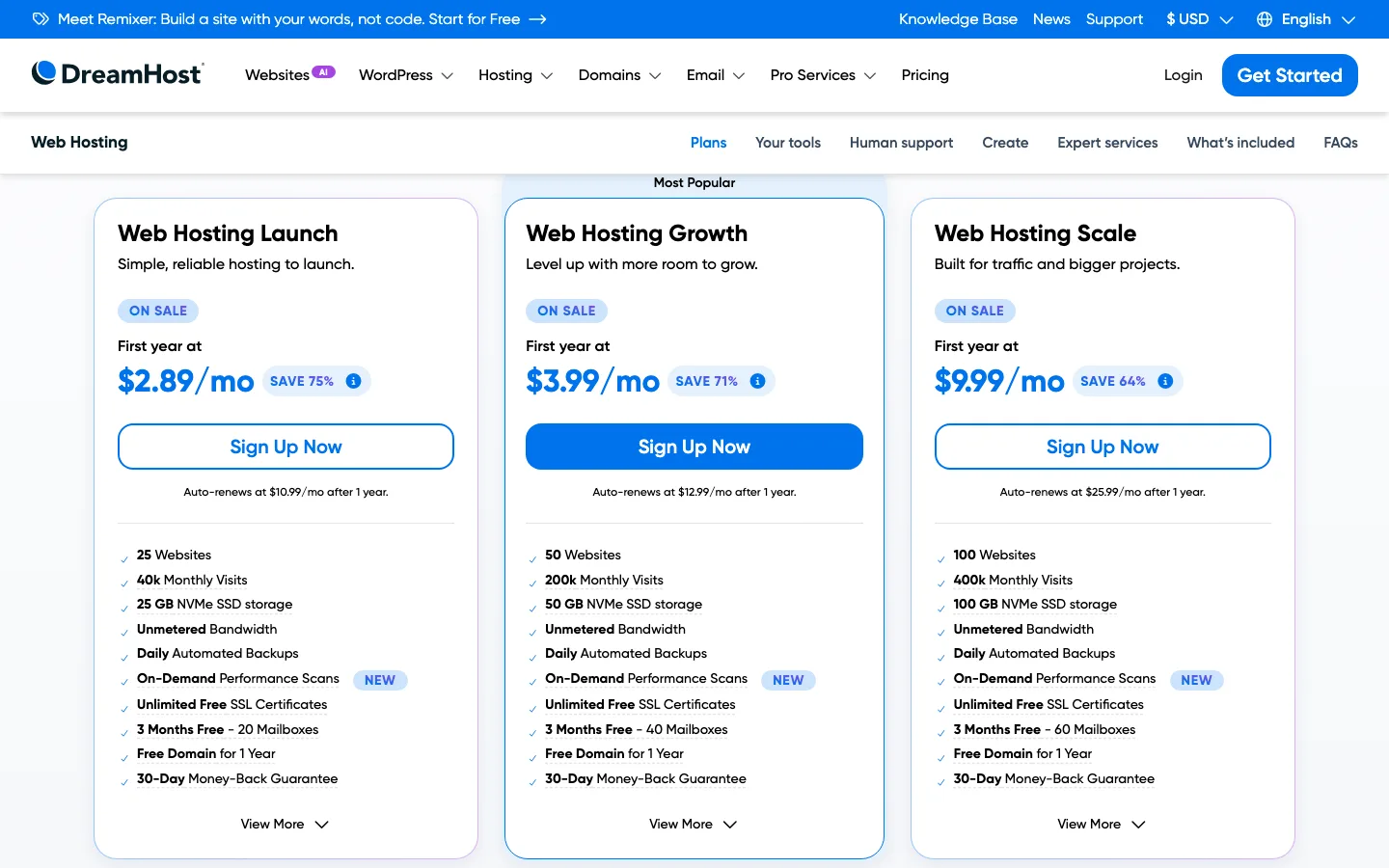
DreamHost’s Launch, Growth and Scale shared plans on a 1-year term, with the auto-renew price under each button.
DreamHost is the closest like-for-like switch from GoDaddy, and it is the host we compare GoDaddy against in DreamHost vs GoDaddy. It also has an advantage the other budget hosts lack. You get the sale price on a one-year term, not a three- or four-year prepay.
As of October 2026, Web Hosting Launch costs $2.89 a month for the first year and renews at $10.99. Growth is $3.99 and renews at $12.99. Scale is $9.99 and renews at $25.99. The page also says monthly billing is available.
What you get on Launch:
- 25 websites and 25 GB of NVMe storage
- Daily automated backups
- Unlimited free SSL certificates
- 20 mailboxes free for three months, then billed separately
- A free domain for the first year on annual or longer plans
- A 30-day money-back guarantee
That is the most generous entry plan here for anyone running several small sites. The weak spot is support. DreamHost offers chat and email support around the clock, but no phone line, and its page says chat may start with an AI assistant before you reach a person. If you want a managed WordPress plan instead, DreamPress 1 costs $14.99 a month for the first year, renews at $19.99, and includes one professional site migration.
3. SiteGround: best for support
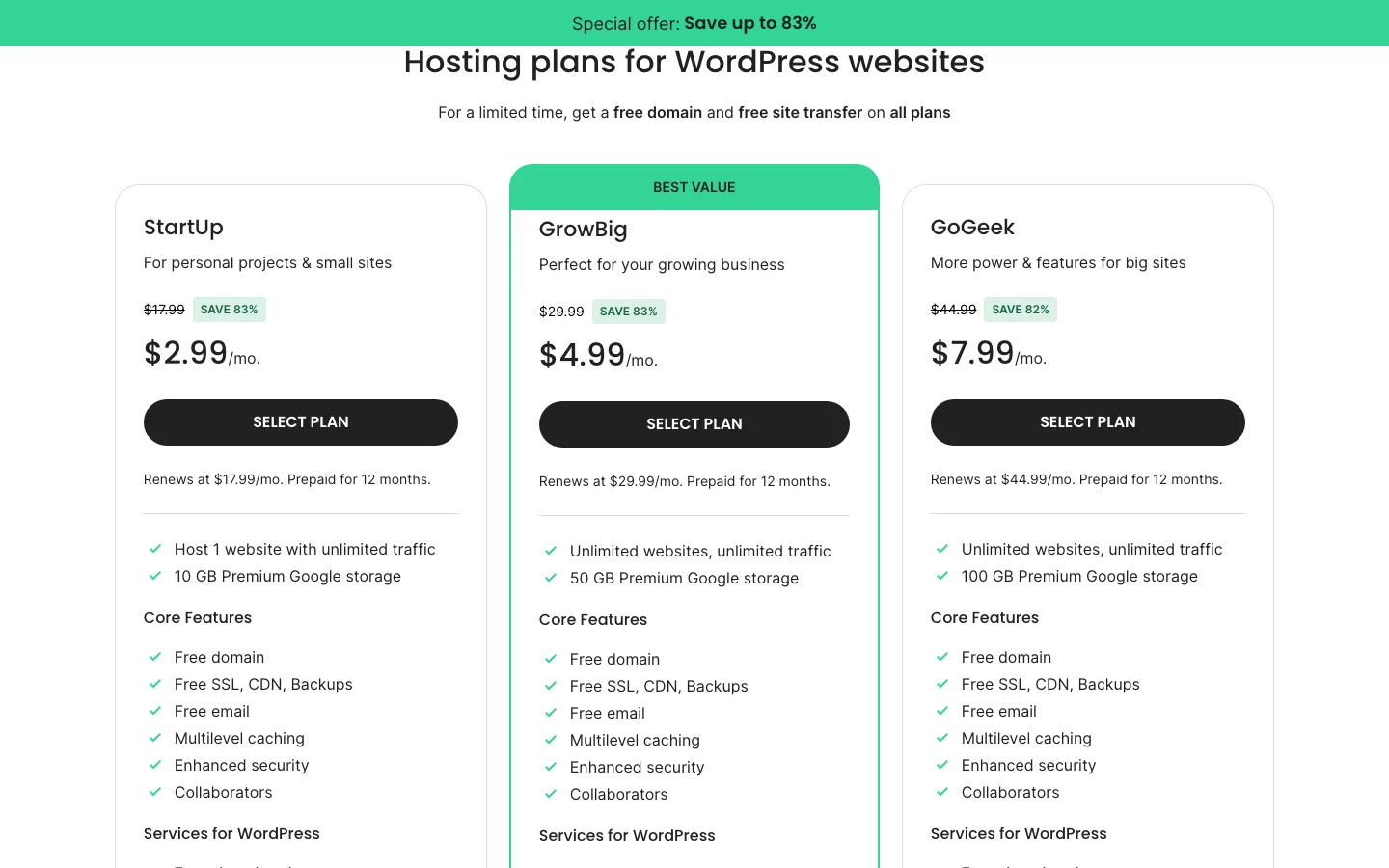
SiteGround’s WordPress hosting plans, prepaid for 12 months, with renewal prices under each button.
If GoDaddy’s phone support is the one thing you will miss, SiteGround is the alternative to look at. It offers human chat, tickets and phone support.
As of October 2026, StartUp costs $2.99 a month prepaid for 12 months and renews at $17.99. GrowBig is $4.99 and renews at $29.99. GoGeek is $7.99 and renews at $44.99.
StartUp includes one website, 10 GB of storage, free SSL, a CDN, daily backups and free email. SiteGround’s pricing page currently advertises a free domain and a free site transfer on all plans. It also has a free SiteGround Migrator plugin if you prefer to move the site yourself.
The catch is the renewal. $17.99 a month for one site is close to double what Hostinger or DreamHost charge for their entry plans, and more than GoDaddy Economy. Our Hostinger vs SiteGround comparison shows how that adds up over four years: about $144 for Hostinger against about $684 for SiteGround.
4. FastComet: best for a hands-off transfer
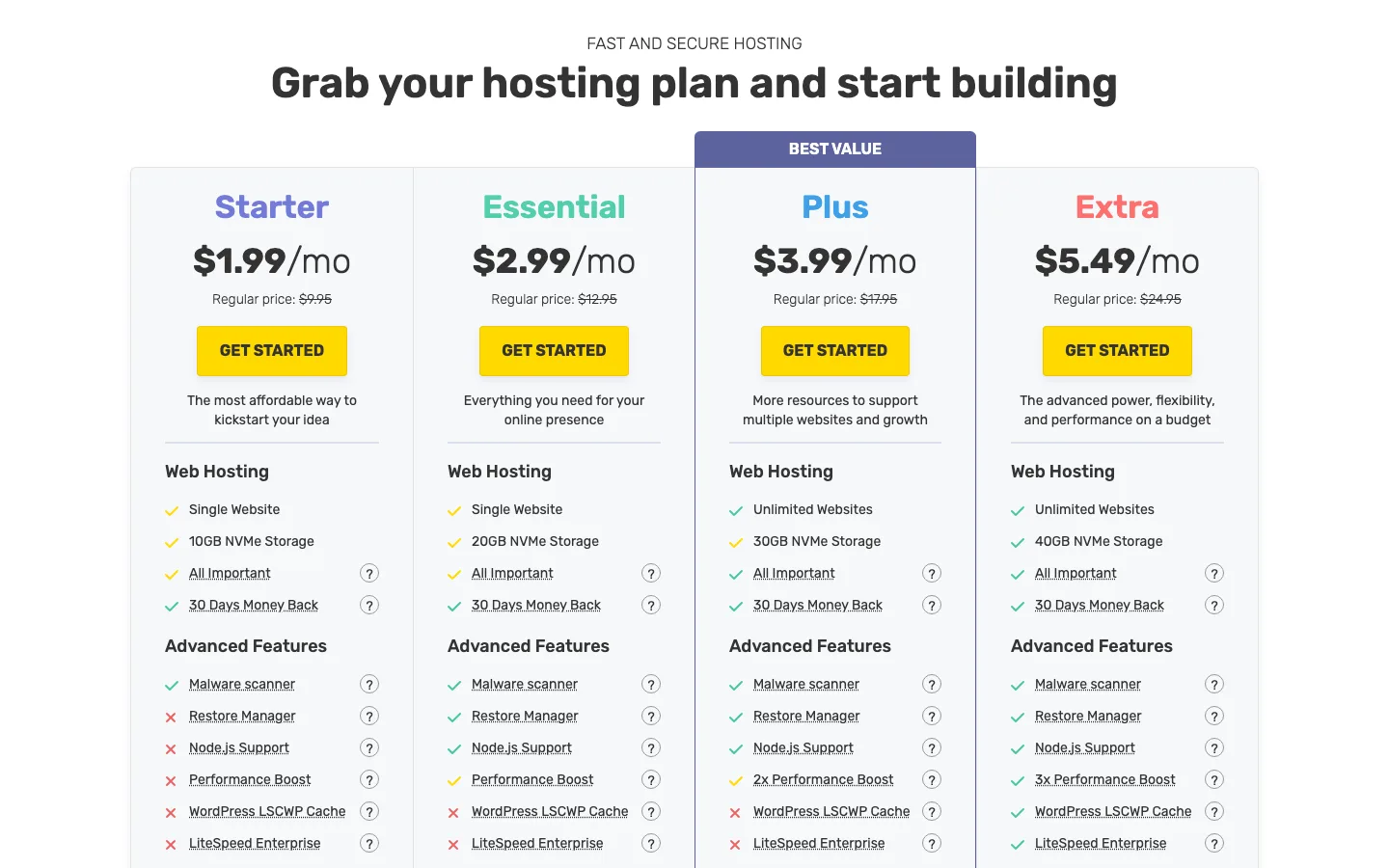
FastComet’s four shared hosting plans with the regular price under each intro price.
FastComet has the lowest renewal price in this guide and the most generous transfer offer. Our FastComet review covers the plans in detail.
As of October 2026, Starter costs $1.99 a month and has a regular price of $9.95. Essential is $2.99 ($12.95 regular), Plus is $3.99 ($17.95) and Extra is $5.49 ($24.95). FastComet says the promotional price applies to the first term only. Its pricing page does not say which term length the $1.99 needs, so check the cart before you pay.
Two things make it a good fit for people leaving GoDaddy:
- Express Transfer on every plan. FastComet’s support staff move the site for you. It also offers a free domain transfer with a year of renewal included.
- Credit for unused time. FastComet’s knowledge base says it will add up to six months of free hosting to cover prepaid time you are giving up at your old host. You need proof that you canceled, and the credit is applied after your domain transfers to FastComet.
Starter is limited to one website and 10 GB of NVMe storage, and it lacks the Restore Manager. Plus is the first plan with unlimited websites. FastComet was bought by World Host Group in April 2025, so watch for policy changes.
5. Cloudways: best for a growing site that wants monthly billing
Cloudways is a different kind of host. Instead of a slice of a shared server, you rent your own cloud server from DigitalOcean, Vultr, Linode, AWS or Google Cloud, and Cloudways manages it. Our Cloudways review explains how that works.
As of October 2026, plans start at $11 a month on a DigitalOcean Standard 1 GB server or $14 a month on a DigitalOcean Premium 1 GB server. The Premium plan includes 1 vCPU, 1 GB of RAM, 25 GB of NVMe storage and 1 TB of bandwidth. Billing is hourly with no contract, so the price does not jump at renewal. Cloudways currently offers 30% off for the first three months and a three-day free trial with no credit card.
You can run as many WordPress sites as the server can handle. Free WordPress migration, staging, SSL and daily offsite backups are included. Email hosting and domain names are not, so plan to keep your domain at GoDaddy or move it to a registrar, and move your email elsewhere.
For one small brochure site, the shared hosts above cost less.
6. Kinsta: best for business sites and WooCommerce
Kinsta is premium managed WordPress hosting. It handles caching, security, backups and malware cleanup for you, and its support team works in 8 languages around the clock. Read the full Kinsta review for the details.
As of October 2026, the entry Single plan costs $35 a month or $350 a year, and new customers get the first month free. There is no intro discount, so the price stays the same at renewal. The entry plan covers one WordPress site with 10 GB of storage, 14 days of backups and unlimited free migrations. Extra sites cost $30 a month each.
Kinsta does not include email hosting and has no phone support. Its 30-day money-back guarantee applies to first-time customers only. It costs roughly three times what a good budget host does, so it only makes sense when downtime or a slow store costs you real money. If you are weighing managed hosts, our Kinsta vs WP Engine comparison and our list of the best managed WordPress hosting are good next reads.
Other hosts worth a look
- Bluehost is another big name with phone support on its Business plan and up. Its Starter plan allows 10 sites. Our Hostinger vs Bluehost page has its current prices, and if you are leaving Bluehost, see our Bluehost alternatives.
- Liquid Web sells managed VPS and dedicated servers with around-the-clock support. See our Liquid Web review if you need more than shared hosting but still want someone else to run the server.
Do you have to move your domain too?
No. Your domain and your hosting are separate. You can move your website to a new host and leave the domain registered at GoDaddy. You then point the domain at the new host by changing its nameservers or its DNS records in your GoDaddy account.
ICANN, the body that oversees domain names, says a registrar may refuse a transfer within 60 days of a domain’s first registration or its last transfer. ICANN’s own FAQ also suggests changing hosts instead of registrars if you want to avoid that wait. So if you bought your domain recently, move the website first and the domain later.
If your email also runs through GoDaddy, check your email (MX) records before you change nameservers. A nameserver change moves all DNS for the domain to the new host, and your mail can stop arriving if those records are not copied over.
Moving away from GoDaddy
Keep GoDaddy active until the new copy and email work. An assisted transfer is usually easiest; for a small site, a migration plugin is another option. Our test export worked, but the destination server’s upload limit blocked its import until that limit was addressed.
Test before switching DNS, and treat mailbox migration separately from the WordPress files. GoDaddy’s stated refund window is 30 days on annual plans and 48 hours on monthly ones. Our complete migration guide covers the process.