Kinsta vs WP Engine (2026): Prices, Limits and Which to Pick
Kinsta is the stronger starting point for one business site, with lower overage costs and no renewal jump. WP Engine can be better value for agencies managing many small sites through its bundles. Neither is an economical choice for a basic personal blog.
Pricing compared
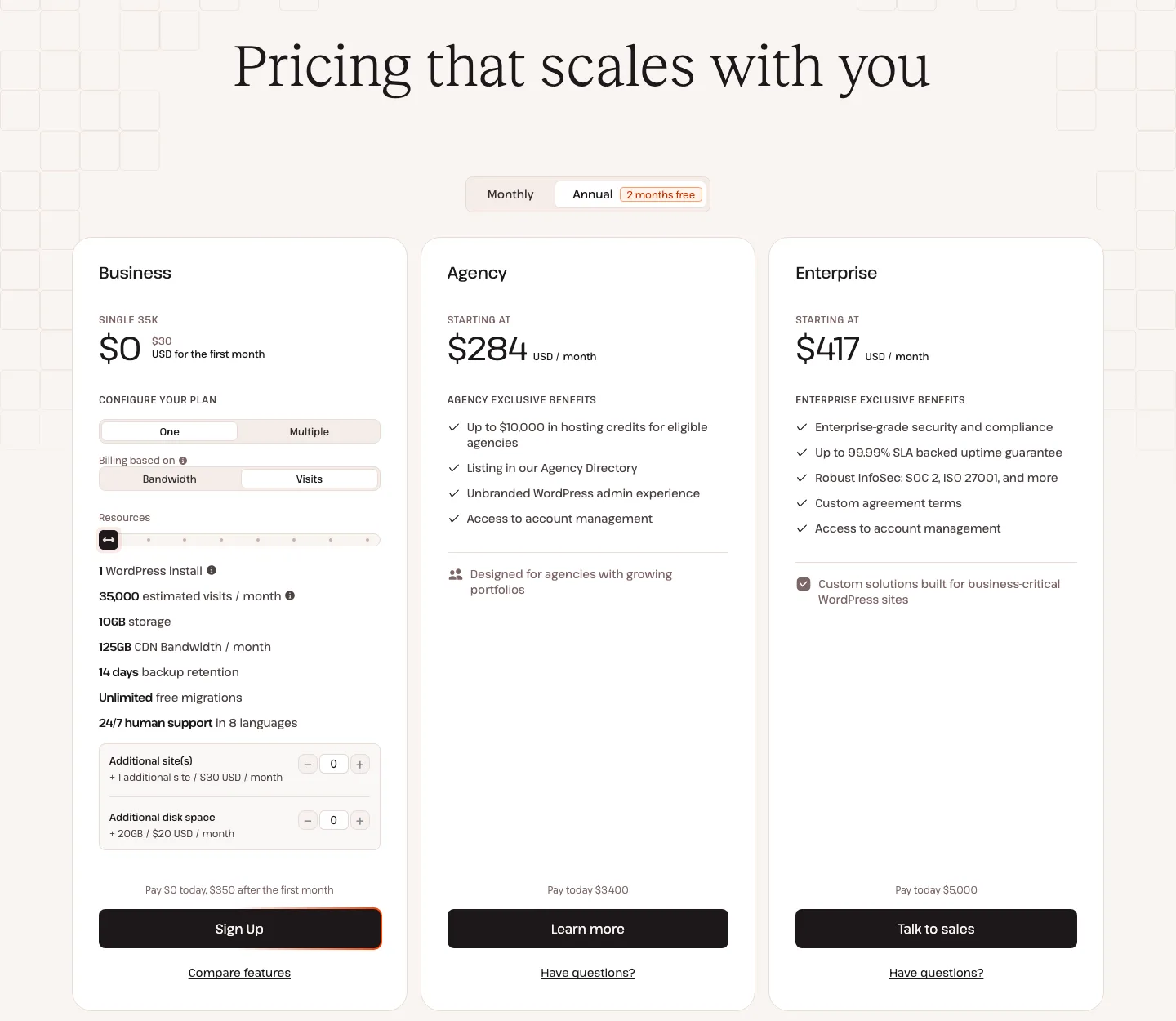
Kinsta’s pricing page on annual billing with “Visits” selected. The entry plan is $0 for the first month, then $350 for the year.
Kinsta plans
Kinsta sells each standard plan in two versions at the same price: one limited by monthly visits, one limited by server bandwidth. Annual billing gives two months free. Prices from Kinsta’s pricing page as of October 2026:
Kinsta Single 35k costs $35 monthly or $350 annually for one site, 35,000 visits and 10 GB storage. Single 65k costs $50 or $500 for one site, 65,000 visits and the same storage.
WP 2 covers two sites, 70,000 visits and 20 GB for $70 monthly or $700 annually. WP 5 covers five sites, 125,000 visits and 30 GB for $115 or $1,150. WP 10 covers ten sites, 315,000 visits and 40 GB for $225 or $2,250.
Single-site plans go up to Single 750k at $375 a month, multi-site plans up to WP 40 at $450, Agency plans start at $340 a month, and Enterprise starts at $500 a month. Our Kinsta review has the full grid, including PHP threads and CDN allowances.
WP Engine plans
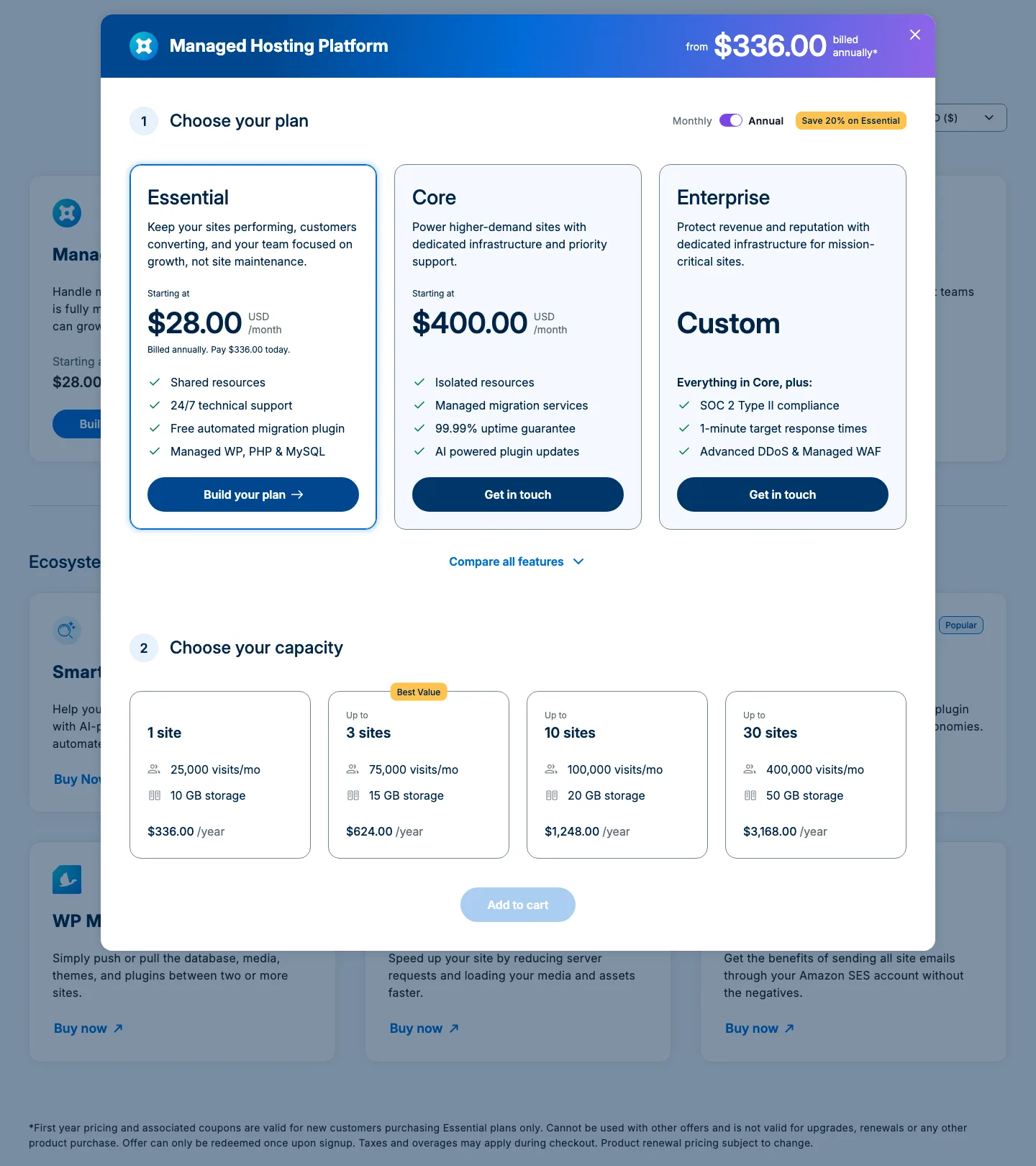
WP Engine now has three plans: Essential (shared servers), Core (isolated servers, from $400 a month), and Enterprise (custom). Most readers of this page will look at Essential, which you size by picking a capacity step. Prices from WP Engine’s plan builder as of October 2026:
WP Engine’s single-site Essential plan costs $35 monthly or $336 in the first annual term, renewing at $420, with 25,000 visits and 10 GB. The three-site tier costs $65 monthly, $624 initially or $780 at annual renewal, with 75,000 visits and 15 GB.
The ten-site tier costs $130 monthly, $1,248 initially or $1,560 at renewal, with 100,000 visits and 20 GB. The 30-site tier costs $330 monthly, $3,168 initially or $3,960 at renewal, with 400,000 visits and 50 GB.
The first-year price uses a 20% coupon that WP Engine applies automatically. The fine print says it is for new customers on Essential only and “renewal pricing subject to change”. The regular annual price comes from the plan builder’s own data and equals 12 monthly payments. WP Engine’s terms also say renewals are at its “then-current rates”, with notice of any increase before you can opt out.
What you pay in year one and year two
For one annually billed site, Kinsta costs $350 each year with an eligible first-month-free promotion; WP Engine costs $336 in year one and $420 in year two. Monthly billing is $35 at either host.
Three sites cost $100 monthly at Kinsta using WP 2 plus an extra site, or $115 on WP 5, compared with WP Engine’s $65. Ten sites cost $225 at Kinsta versus $130 at WP Engine. For larger portfolios, Kinsta WP 20 costs $340 monthly for 20 sites, while WP Engine costs $330 for up to 30.
The pattern is clear. For one site the two hosts cost about the same in year one, and Kinsta is cheaper from year two. Once you host three or more small sites, WP Engine costs much less per site. Kinsta gives you more visits and storage on its multi-site plans, so a busy portfolio may still fit Kinsta better.
Overage charges and plan limits
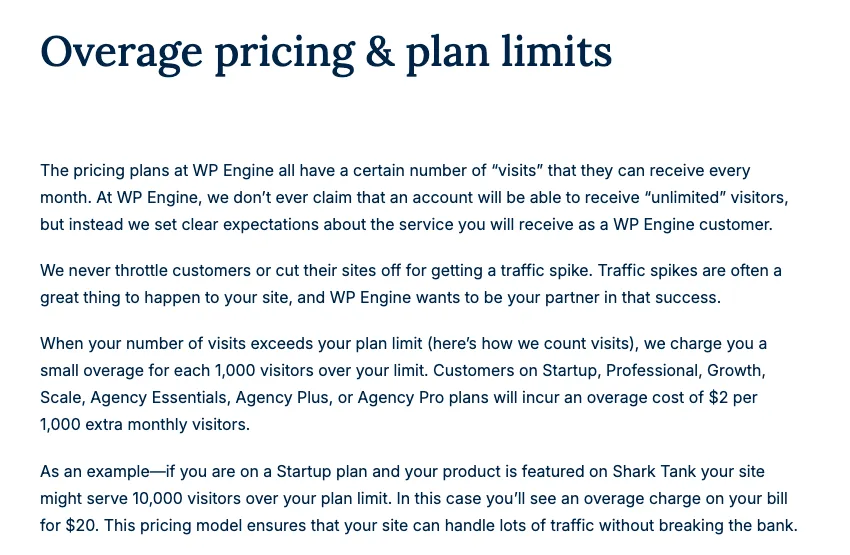
WP Engine’s overage pricing page. It still uses the old plan names (Startup, Professional, Growth, Scale), which match today’s 1, 3, 10 and 30-site steps.
Neither host takes your site offline for going over a limit. Both bill the difference.
Kinsta charges $0.50 per thousand visits, counting a unique IP over 24 hours. WP Engine charges $2 per thousand and counts a unique IP per UTC day, excluding known and suspected bots. Both bill overages monthly even on annual plans; Kinsta can charge an extreme overage immediately.
Kinsta also lists $0.50 per extra GB of server bandwidth, $0.05 per CDN GB and $2 per disk GB. WP Engine Essential lists 75 GB bandwidth, but corresponding extra-use charges were not published in the source checked.
An example: a site on either 1-site plan gets 45,000 visits in a month. At Kinsta that is 10,000 visits over the 35,000 limit, so $5. At WP Engine it is 20,000 over the 25,000 limit, so $40. Repeat that for a year and WP Engine costs $480 more in overages alone.
Bots matter on both. WP Engine’s docs say that since September 2025 it also excludes “suspected bots” from billable visits, not just known ones. Kinsta’s answer is a bandwidth-based version of each plan and a Bot Protection feature that its own page describes as reducing inflated visit counts. If a lot of your traffic is crawlers, Kinsta’s bandwidth plans are worth a look.
Kinsta has one extra rule: an “extreme overage” (equal to your plan price or $500, whichever is less) can trigger an immediate charge or a forced upgrade. WP Engine’s overage page says it never throttles sites for traffic spikes, but suggests upgrading if you go over every month.
Add-ons that change the bill
Automatic plugin updates with visual checks cost $3 monthly per environment at Kinsta or $10 per Smart Plugin Manager license at WP Engine. Extra sites cost $30 versus $20. Kinsta includes three-minute uptime checks; WP Engine Site Monitoring costs $5 per license monthly.
Kinsta includes Cloudflare firewall, DDoS protection, edge caching and Bot Protection. WP Engine’s basic network is included, but Global Edge Security adds $35 monthly and NitroPack adds $20. Its plans include three environments per site and Genesis/StudioPress themes; Kinsta charges $20 for each premium staging environment and does not include premium themes. Kinsta Redis costs $100 monthly per site; it was not listed in WP Engine’s Essential builder.
Both include a Cloudflare CDN and a basic firewall. Kinsta also includes uptime monitoring and bot protection, while WP Engine includes more of the development workflow (environments and themes) and charges for monitoring and its advanced firewall package. If you would add Global Edge Security and Smart Plugin Manager to a 1-site WP Engine plan, the bill rises from $35 to $80 a month.
Features: staging, backups, migrations and themes
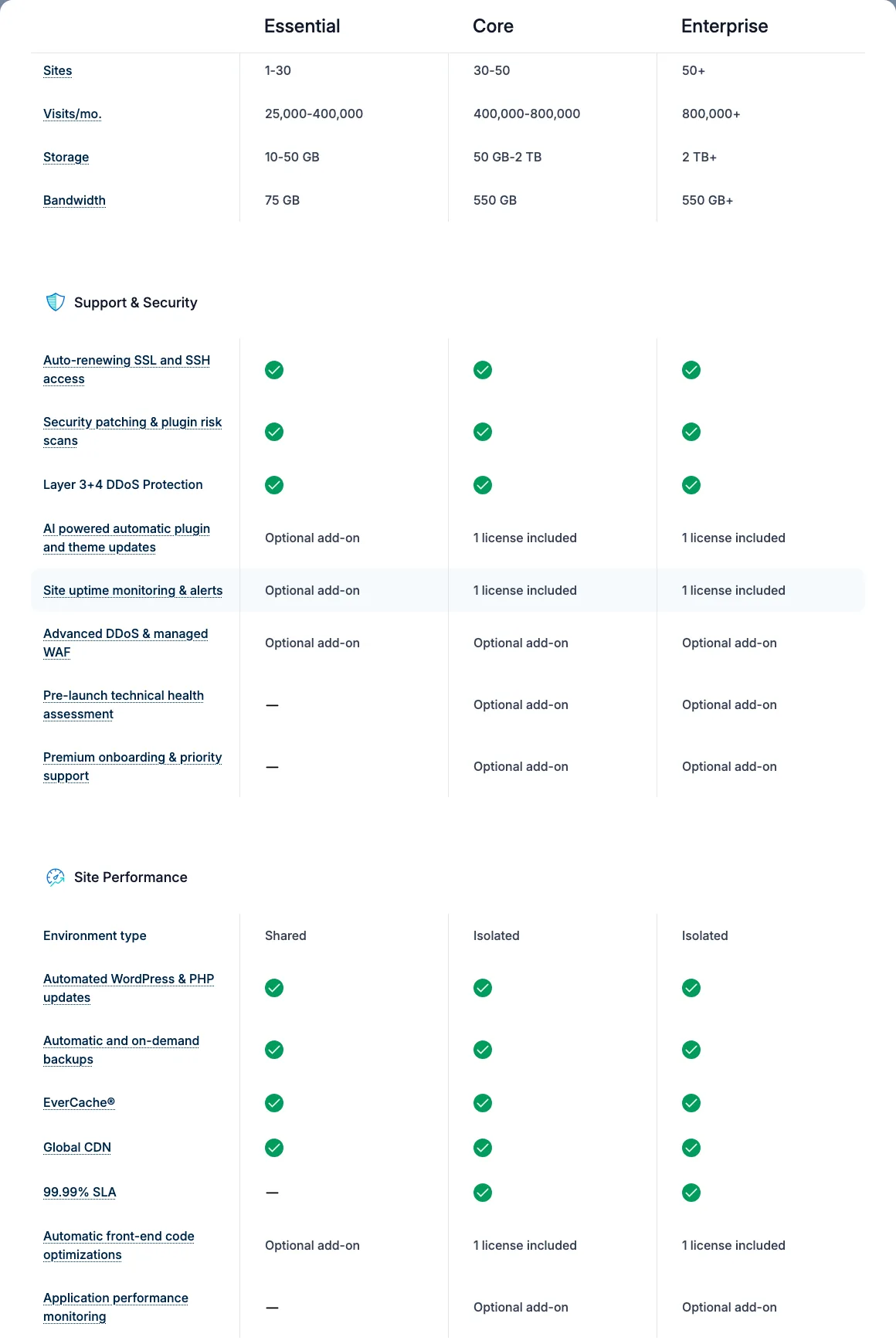
The “Compare all features” table in WP Engine’s plan builder. Essential runs on shared servers and does not include the 99.99% SLA.
Staging. Every WP Engine site is a group of up to three environments: production, staging and development. That suits teams that test changes in two steps or hand a staging copy to a client. Kinsta gives every site a free standard staging environment, capped at 2 PHP threads, and sells premium staging at $20 a month each (up to 5 per site).
Backups. WP Engine makes daily and on-demand backups, stores them on Amazon S3 in the same region as your site, and keeps 30 days in the dashboard. Its plans page says it keeps backups “no less than 30 days and no longer than 60 days”. Kinsta keeps daily backups for 14 days on entry plans (20 to 30 days on larger ones), plus up to 5 manual backups. Kinsta sells backups every 6 hours ($20/month) and hourly ($100/month).
Migrations. Kinsta’s migration team moves as many sites as you like for free, usually within one business day. WP Engine Essential gives you a free automated migration plugin, so you do the move yourself; managed migrations start with Core. If you plan to move a site yourself on either host, our guide to the All-in-One WP Migration plugin walks through the process.
Themes and tools. WP Engine owns the Genesis Framework, StudioPress themes, Advanced Custom Fields, the Local desktop app and Flywheel. Its plans include 10 premium themes and Genesis Blocks, and its docs say Genesis and StudioPress themes come with every plan. Genesis Pro is a $30 a month add-on. Kinsta does not bundle themes, but includes its APM tool (for finding slow plugins and queries) and the free DevKinsta local development app.
Transferable sites. WP Engine lets you build a site and transfer it to a client’s account on every plan, which agencies like.
Email. Neither host includes email hosting. WP Engine’s support docs recommend a third-party email provider, and Kinsta’s docs say it does not offer email.
Infrastructure and data centers
Many comparisons still say both hosts run on Google Cloud. That is only half true now, though both have good US coverage.
- Kinsta is moving its WordPress hosting from Google Cloud to Oracle Cloud Infrastructure (OCI). Its docs say most sites are offline for under a minute during the move, IP addresses change, and you cannot opt out. New sites can pick from 30 data centers, 4 of them in the US. CDN and edge caching run on Cloudflare.
- WP Engine puts shared (Essential) plans on Google Cloud in the region closest to you at sign-up. Its docs list 13 Google Cloud locations, a few of them for premium plans only. AWS and Microsoft Azure regions are for premium plans only. Its “Advanced Network”, available on all plans at no charge, uses Cloudflare for the CDN, edge page caching, image optimization and a web application firewall.
Speed: what we could measure
Without an account we cannot benchmark either host’s servers, but we can measure public pages. On October 4, 2026, from one location in the US (the Pacific Northwest), we timed each host’s home page and two sites that each host names as a customer on its own case-study pages. All four customer sites returned that host’s headers on the day (Kinsta’s cache headers or “x-powered-by: WP Engine”), which suggests they still host there.
These public pages showed a wide spread within each host. Across ten requests, Kinsta’s homepage responded in 272 ms and scored 91 desktop/34 mobile over three Lighthouse runs. Design Bombs responded in 205 ms and scored 99/99; EmailTooltester responded in 201 ms and scored 83/38.
WP Engine’s Headless Platform homepage responded in 393 ms and scored 78/34. Yosemite’s site responded in 247 ms and scored 94/49; B&G Foods responded in 155 ms and scored 77/56. Different layouts, content and caching prevent treating these as a controlled host comparison.
Read this for what it is: six home pages, on one day, from one place, using curl (10 requests each) and Lighthouse 13.5 (median of 3 runs). It is not a benchmark of either host.
Median time to first byte stayed between about 150 and 400 ms on all six, and the fastest single result (B&G Foods, 155 ms) was a WP Engine customer. wpengine.com itself was the slowest to respond, but its headers show it runs on WP Engine’s separate Headless Platform, not the Essential plan most readers would buy. The spread in mobile scores comes from how each page is built: Design Bombs scores 99 on mobile on the same host where kinsta.com scores 34. Results also move between runs; when we measured kinsta.com earlier the same day for our Kinsta review, its median time to first byte was 256 ms. The honest takeaway is that both hosts can serve fast pages, and your theme, plugins and images will matter more than the logo on the invoice.
Uptime guarantees: the SLA fine print
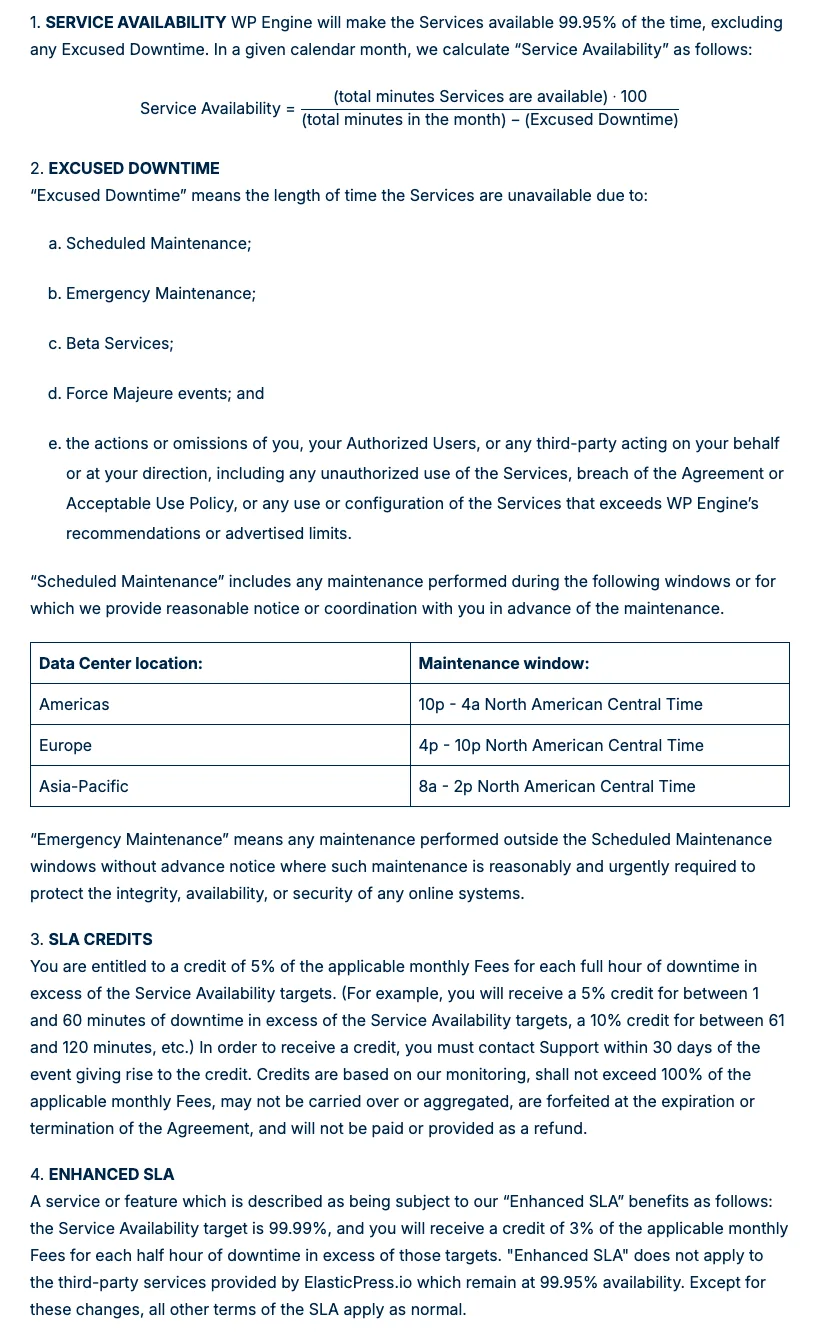
Sections 1 to 4 of WP Engine’s Service Level Agreement (page updated May 12, 2021).
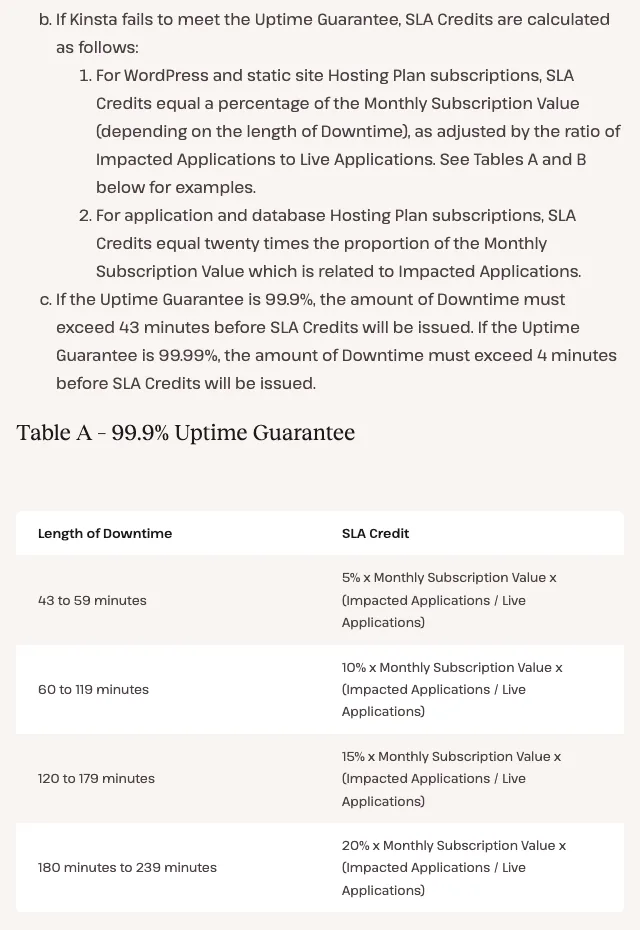
Table A of Kinsta’s Service Level Agreement (updated September 25, 2025).
On paper WP Engine’s standard guarantee is stronger.
Kinsta’s standard SLA is 99.9%, with custom contracts up to 99.99%. In a 30-day month, credits begin after about 43 minutes of downtime and range from 5% to 20% of the monthly fee, scaled by affected sites. Claims must be made through chat within 30 days. Maintenance from 2 a.m. to 5 a.m., emergencies and outside providers are excluded under the stated terms.
WP Engine’s standard SLA is 99.95%, with 99.99% on Core and Enterprise. That is roughly 22 minutes before standard credits begin; the remedy is 5% of the monthly fee for each full hour beyond the target, claimed through support within 30 days. Scheduled maintenance, emergencies and beta services are excluded, including the stated 10 p.m.-to-4 a.m. Central maintenance window for the Americas.
Kinsta’s pricing page says “up to 99.99% uptime SLA”, but its SLA sets the standard at 99.9% unless your order form says otherwise. WP Engine’s plans page marks the 99.99% SLA as not included on Essential. Either way, an hour of downtime on a $35 plan is worth a credit of a couple of dollars. An SLA is a small refund, not insurance.
Support
Kinsta: 24/7 chat inside MyKinsta in 8 languages, with an AI assistant first if you want it. There is no phone support for technical issues. Kinsta says it has no support tiers and a median resolution time of 47 minutes.
WP Engine: 24/7 chat in the User Portal (an AI assistant answers first and hands off to a person), plus phone support. Its support docs say phone support “is unavailable for Lite and Startup plans”, and the 1-site Essential step is still called Startup in WP Engine’s overage docs, so expect chat only on the cheapest plan. Customers on most plans cannot open tickets themselves; WP Engine staff open them for you. Support staff work from Texas and Ireland. Core is pitched with priority support, and Enterprise lists 1-minute target response times.
We could not test response times without accounts. If phone support matters to you, WP Engine is the only one of the two that offers it.
Refunds, trials and cancellation
This is where the hosts differ most, and it is easy to miss.
Kinsta gives new customers the first month free on Single 35k, Single 20GB and WP 2, then a 30-day money-back guarantee for first-time customers. Overages and some fees are not refunded.
WP Engine used to advertise a 60-day money-back guarantee. As of October 2026 its plans page does not mention one, and its terms of service (updated January 1, 2026) say fees “are not refundable except as expressly stated herein”. One older Small Business page on its site still mentions 60 days, so ask sales to confirm in writing before you buy. The terms also say plans renew automatically unless you give notice at least 30 days before the term ends, and that ending a plan early means the remaining fees for the term become due. On an annual plan, that means you are committed for the year.
Alternatives worth a look
- SiteGround sits between budget and premium hosting. See our Kinsta vs SiteGround and WP Engine vs SiteGround comparisons.
- Flywheel is owned by WP Engine and aimed at designers. Our Flywheel vs WP Engine comparison covers how they differ.
- Cloudways gives you more raw server resources for the money if you are happy to manage a little more yourself. Read our Cloudways review.
- Hostinger is the pick for small blogs and brochure sites where either premium host is overkill. See our Hostinger review.
For a wider shortlist, see our guide to the best managed WordPress hosting, or browse all our WordPress hosting reviews.