Liquid Web Review 2026: Is It Still Good Hosting for WordPress?
Liquid Web is worth considering when your business needs a managed server and a team to help run it. Its cheaper WordPress plans broaden the appeal, but check the support and refund terms carefully. A small site is likely to find a simpler fit with a budget host.
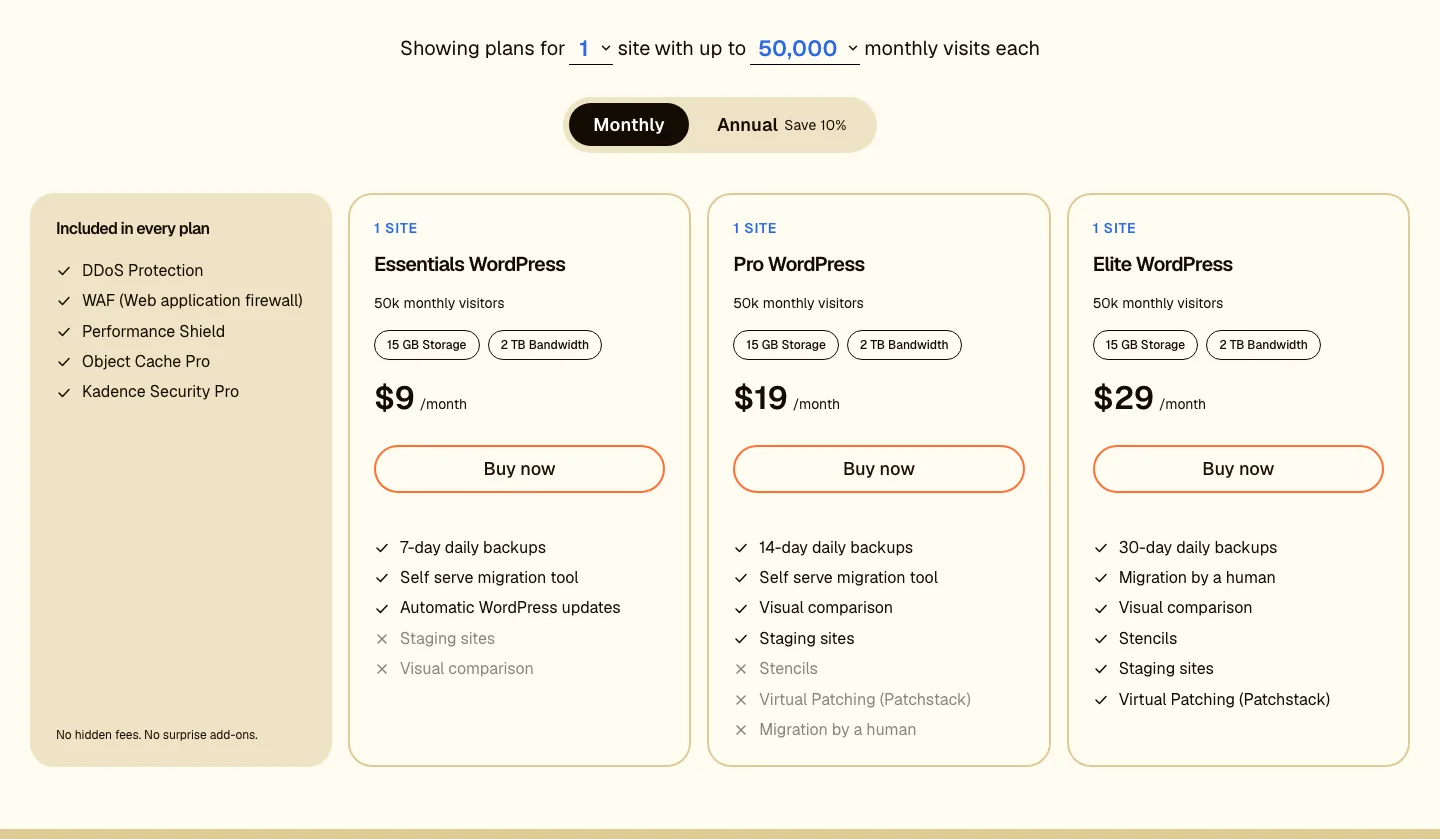
The earlier pricing image includes an Essentials offer. The current public page emphasizes Pro and Elite, as explained below.
Who owns Liquid Web now? The 2026 Nexcess changes
Liquid Web now presents itself within the Nexcess group. Its server products, managed WordPress plans and WordPress software are separate offers, even when they share a parent company.
The current managed WordPress page links to Liquid Web’s sites portal. Do not assume an older Nexcess checkout, support package or refund offer applies to every present product. The order form and management level are more important to the purchase than the brand history.
Plans and pricing
Liquid Web still sells no shared hosting. All prices below are in US dollars, before tax, as of October 2026.
Managed WordPress and WooCommerce
The current public page presents Pro at $19 monthly and Elite at $29 for one site with 50,000 monthly visits, 15 GB shared storage and 2 TB bandwidth. Annual billing advertises a 10% saving. Higher traffic and multi-site combinations need their own quote or checkout check.
The earlier review and screenshot included a $9 Essentials offer. That tier is not displayed in the refreshed public plan section, so do not budget a new account from that old entry price without confirmation.
Pro lists daily backups retained for 14 days, staging and visual update comparison. Elite extends retention to 30 days and advertises additional assistance and store-management tools. Self-service migration is available, while the page specifically promotes human-assisted migration on Elite.
The listed common features include a firewall, DDoS protection, Cloudflare-powered CDN, Object Cache Pro and Kadence Security Pro. Performance Shield is now described as an optional add-on, so it should not be treated as included in every price.
The current page leaves some larger configuration prices blank. Confirm the full cart amount, resource allowance and optional usage charges before comparing a large plan with the base one-site offer.
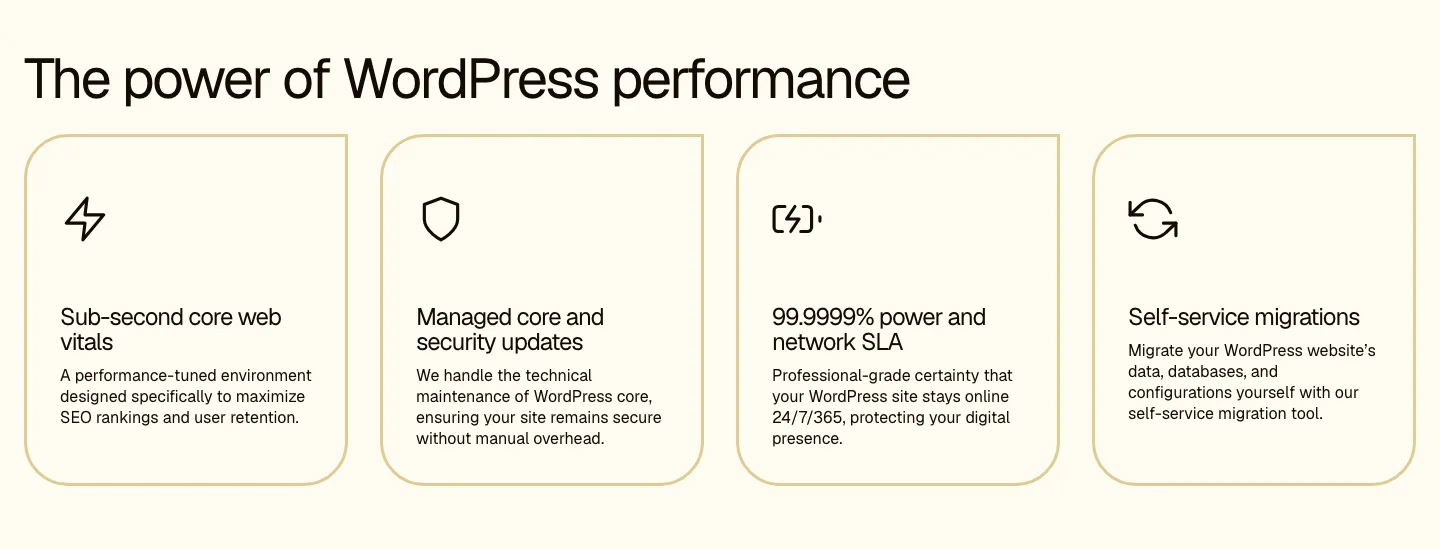
The vendor’s feature image uses an uptime figure that needs to be read alongside the applicable written SLA.
VPS hosting
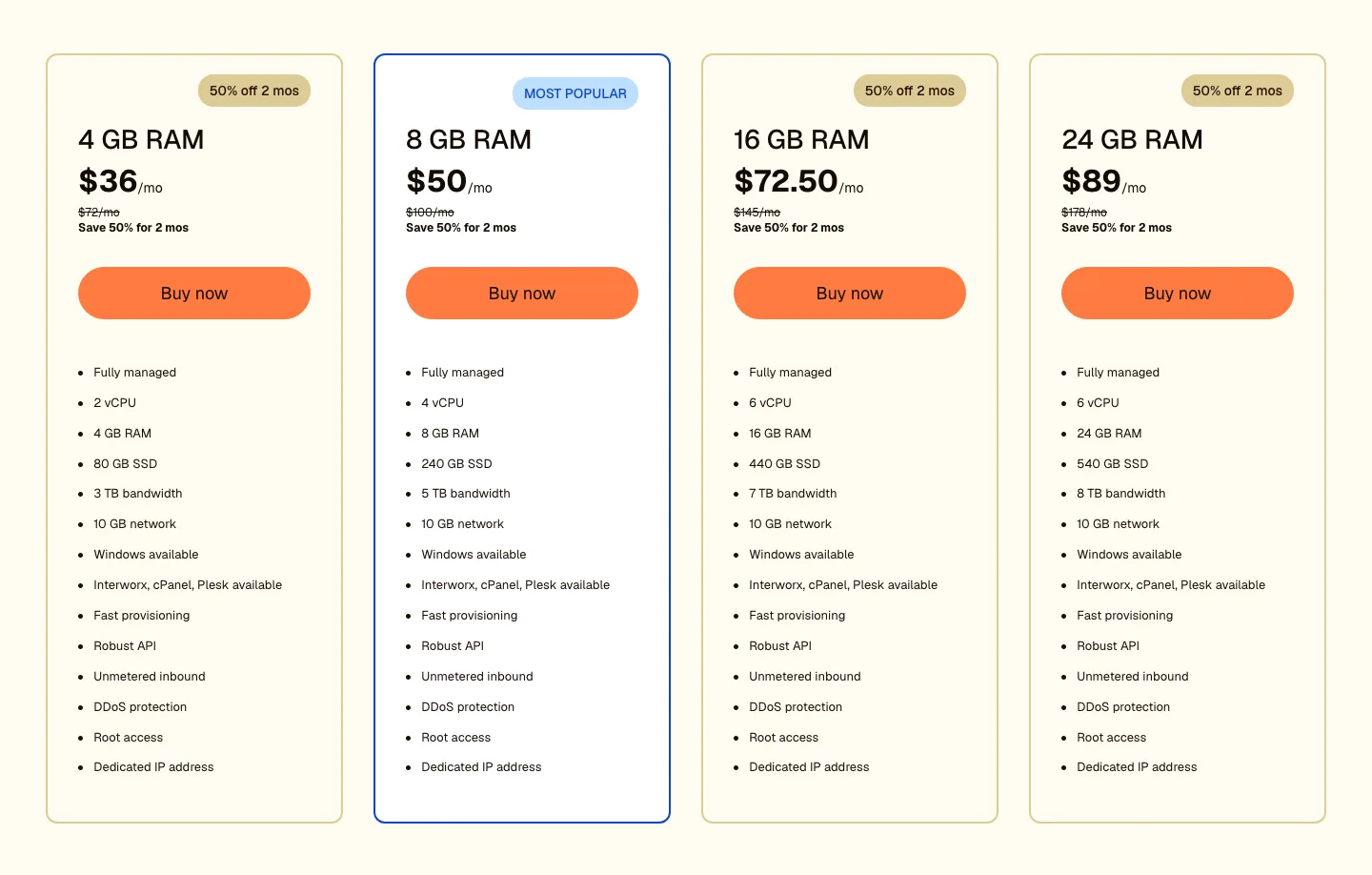
An earlier half-price VPS promotion. The current written prices use the regular rates, rather than assuming that opening offer still applies.
This is where Liquid Web is strongest. A VPS comes self-managed (you run the server) or fully managed (Liquid Web runs it), with Linux or Windows and a choice of cPanel, Plesk, or InterWorx.
Fully managed VPS:
The current managed-VPS page lists $72 monthly for the 4 GB entry server, followed by $100, $145 and $178 options with more resources. The earlier screenshot shows a half-price opening promotion, which is not the regular rate now displayed. Confirm the selected configuration and any control-panel or backup extras before ordering.
The distinction between self-managed and fully managed matters more than the lowest VPS price. A cheaper self-managed server leaves operating-system and application work with you. Choose it only if you have the people and time to perform that work.
Dedicated servers
Dedicated hardware is a separate product with different resource, backup and management choices. Request a current configuration rather than applying the WordPress plan’s support or refund assumptions to a server contract.
Contract and refund terms
Read this before you buy. Liquid Web’s terms of service (effective May 8, 2024) say that, except where stated otherwise, “all Fees are non-refundable.” None of the pricing pages advertised a money-back guarantee as of October 2026.
The terms reviewed here also say:
- Plans renew automatically unless you give 30 days’ written notice before the term ends.
- Cancelling before the end of a term means paying the rest of it: 100% of the remaining monthly charges, or 100% of a prepaid amount.
- Liquid Web can raise fees with 30 days’ notice, taking effect at your next renewal.
Start on monthly billing if you are unsure, and note the 30-day notice deadline if you sign up for longer. WordPress plans check out through Nexcess, so ask sales which terms apply before you buy.
Features that matter
Management levels determine what support will actually handle. Hardware and network coverage is different from operating-system work, PHP troubleshooting or help with a control panel. Confirm that scope in the plan, not just the word managed in a headline.
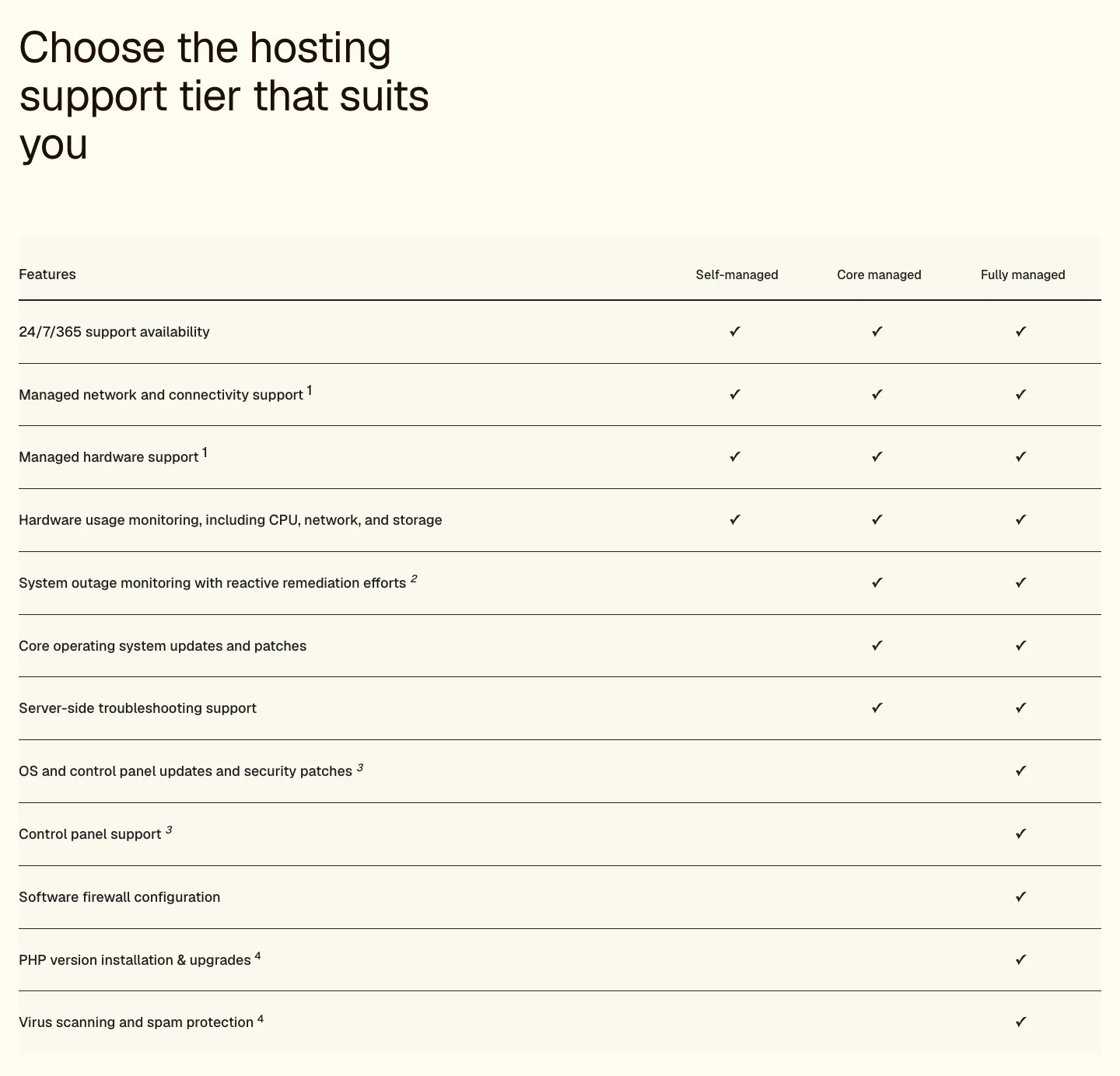
The vendor’s management tiers cover different kinds of work. They are separate from the WordPress plan names.
For WordPress, backup retention and staging are practical differences between plans. Keep an independent backup too; our backup plugin roundup covers options. A staging plugin may help on a plan without staging, but it does not reproduce the hosting provider’s full managed-update service.
Speed and uptime
What the SLA really promises
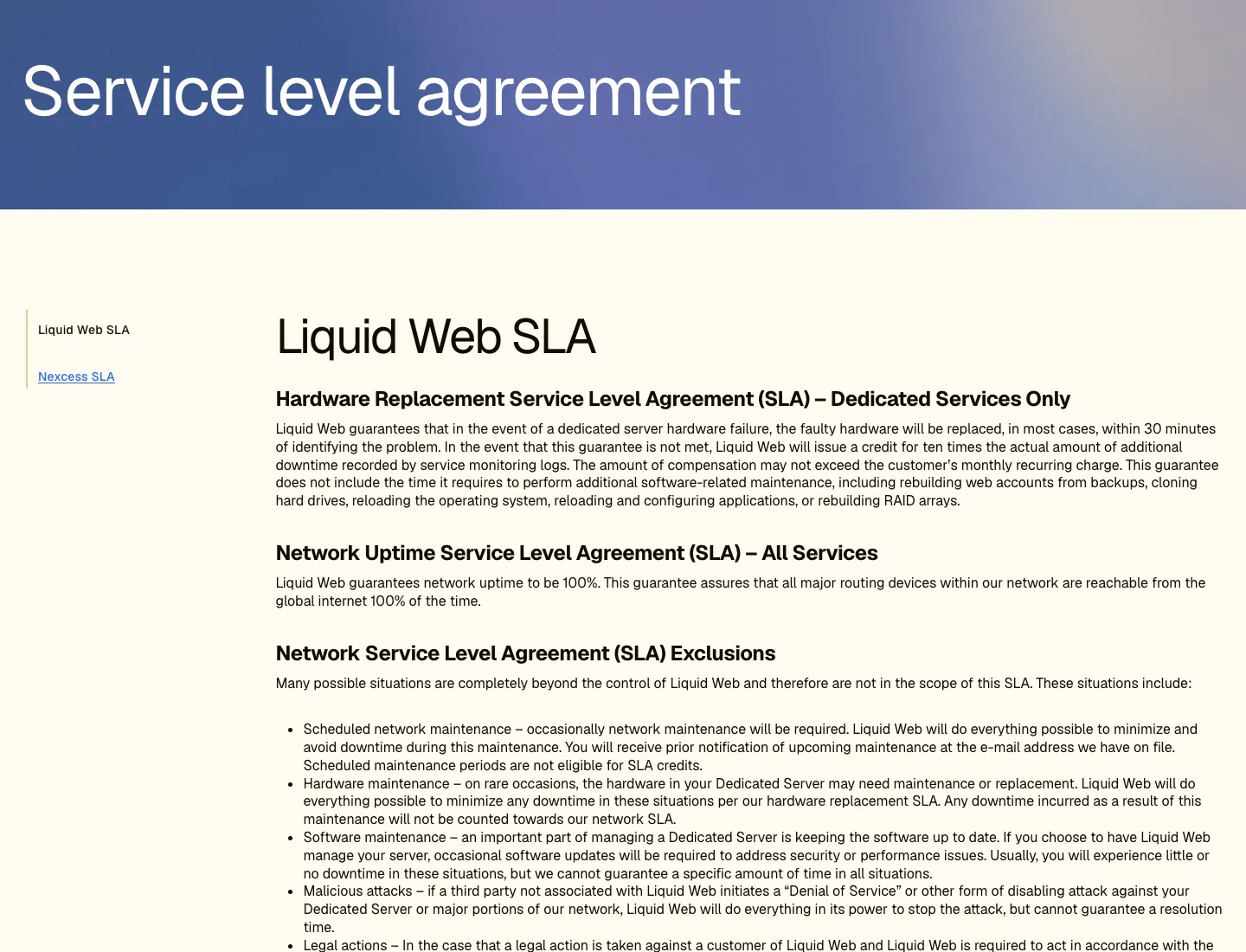
The top of Liquid Web’s SLA page.
Liquid Web’s SLA page says it “guarantees network uptime to be 100%” for all services. The fine print matters:
- What counts: “all major routing devices within our network are reachable.” It covers the network, not your website.
- What does not count: scheduled maintenance, hardware and software maintenance, attacks such as DDoS, legal actions, and cPanel update problems.
- The credit: 10 times the downtime. One hour down earns 10 hours of credit. The remedy paragraph names dedicated hosting clients as eligible.
- The cap: credits can never exceed your monthly fee, and you must ask within 5 business days of the incident.
- Hardware: on dedicated servers, failed hardware is replaced “in most cases” within 30 minutes, again with a 10 times credit.
A separate Nexcess SLA on the same page promises 100% network transit and power, with 5% credits per 15 minutes of outage.
Product pages quote different numbers: 99.99% on the VPS and WooCommerce pages, 99.9% on the managed VPS page, and 99.9999% on the managed WordPress page. Treat the SLA page as the written promise, and ask sales which section covers your plan.
What we measured from the outside
We have not benchmarked a WordPress site in our own Liquid Web account. The earlier results below are public-page snapshots, not an uptime test or a controlled comparison of hosting plans.
Liquid Web’s public homepage responded in a median 0.18 seconds and scored 45 mobile and 96 desktop in Lighthouse. The customer-story example stober.com responded in 0.40 seconds and scored 51/74. Different public sites do not show how the same WordPress installation would perform on different hosting plans.
- liquidweb.com is served through Cloudflare, so its quick response mostly reflects Cloudflare, not a Liquid Web server.
- Stober is named in Liquid Web’s customer stories, and its domain pointed to Liquid Web’s own network that day. Its first byte took about 0.4 seconds including connection setup. Lighthouse timed the server’s own response at about 0.13 seconds, which is quick; the low mobile score comes from the page’s images and scripts.
These are snapshots from one place on one day. They say nothing about uptime, support, or how your own site would perform.
Support
Support is the reason most people pick Liquid Web, and it runs 24/7/365. The support page lists live chat and support cases (tickets); the VPS FAQ also mentions phone support.
The big change is the response-time promise. In 2020, Liquid Web guaranteed a reply within 59 seconds on phone and chat and 59 minutes on tickets, with credits if it missed. The current SLA page says something different:
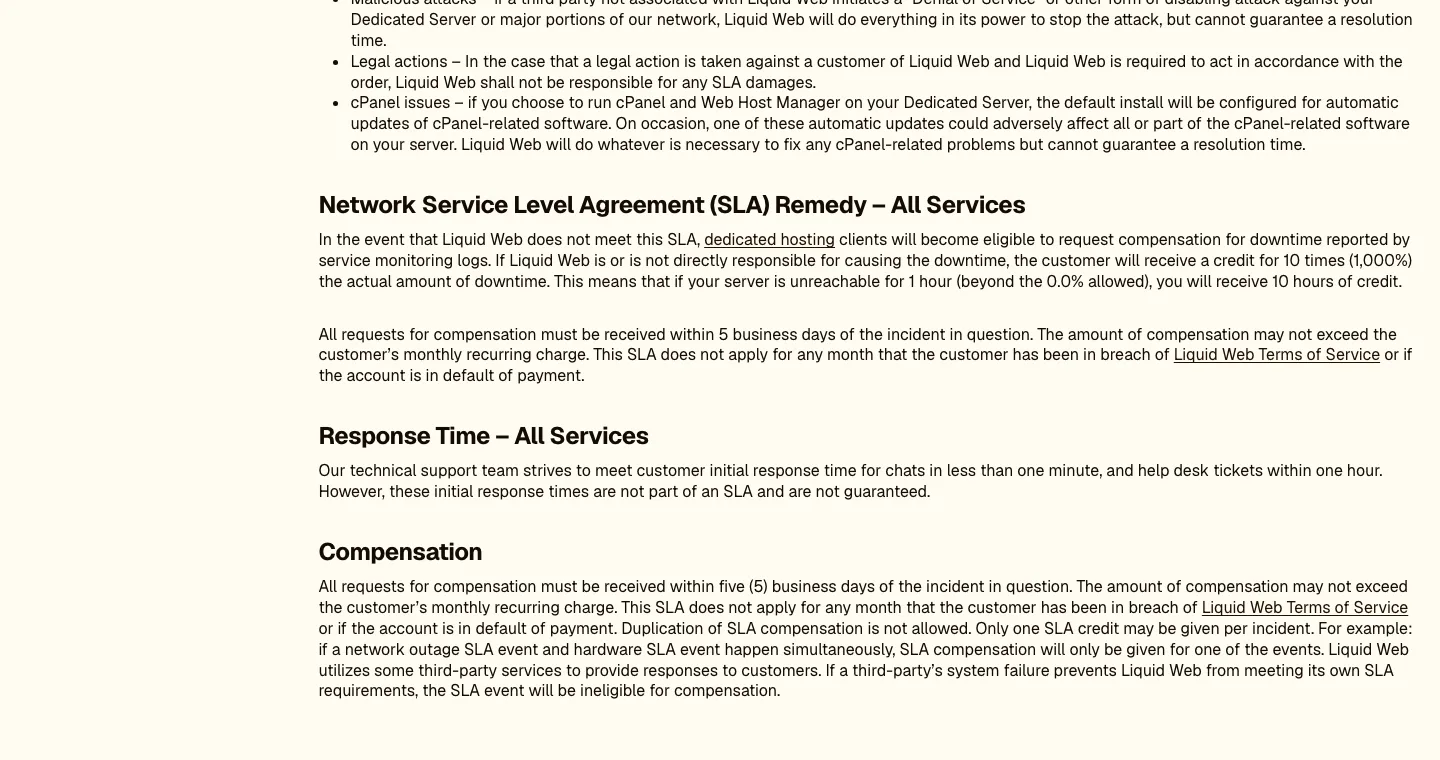
The “Response Time” section of Liquid Web’s SLA page.
The team “strives” to answer chats in under one minute and tickets within one hour, but these “are not part of an SLA and are not guaranteed.” Fast support is still the aim, with no written promise behind it. How much help you get also depends on your plan: on self-managed servers, support covers hardware and network only.
We have not opened a current support case. A published response target and an uptime credit do not establish how quickly a WordPress problem will actually be resolved.