Hostinger vs SiteGround (2026): Which Costs Less to Keep?
Choose Hostinger if keeping the total bill down matters most. Choose SiteGround if daily backups, included services and easier access to human support justify a higher renewal price. Their similar introductory prices hide a much larger long-term difference.
Pricing: intro vs renewal
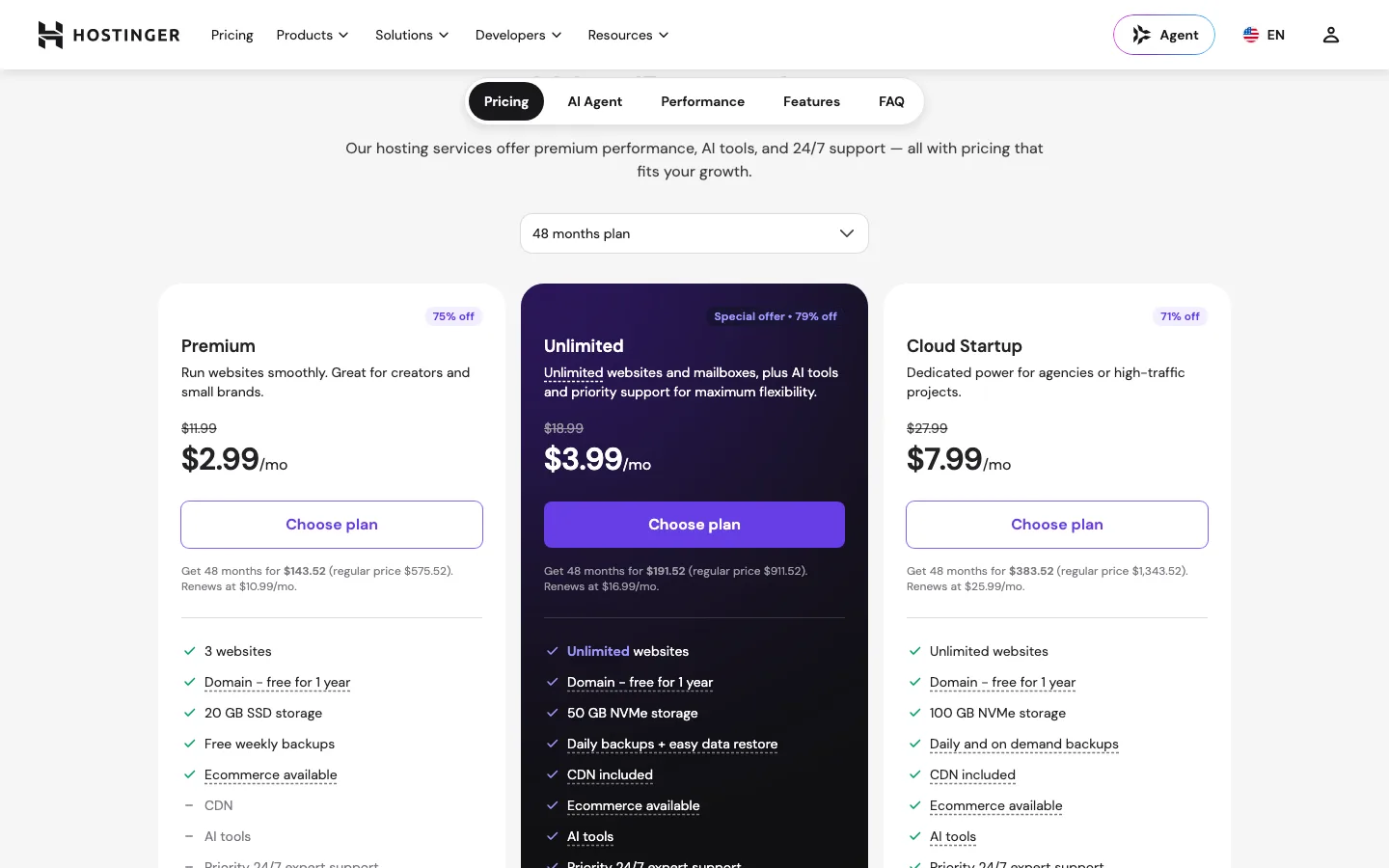
Hostinger prices by term
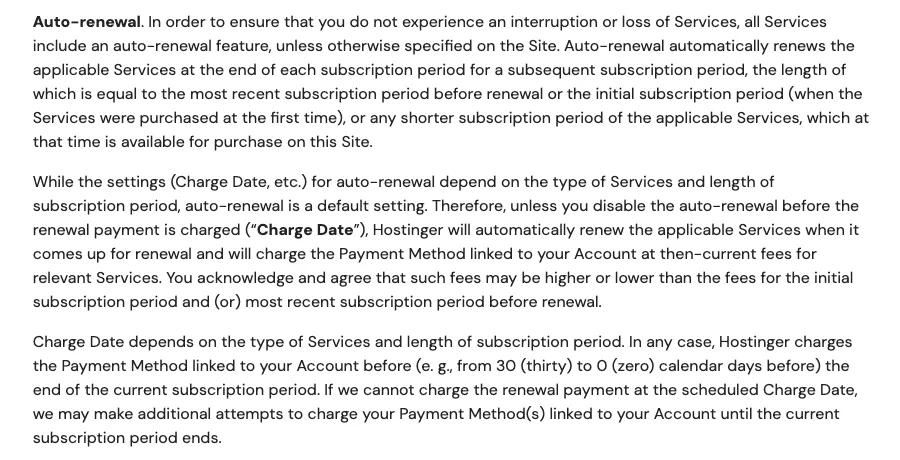
The auto-renewal section of Hostinger’s terms of service. Renewals run for the same length as your last term unless you pick a shorter one.
Hostinger offers four terms and bills the whole term upfront. The lower the monthly price, the longer the prepay.
Premium costs $143.52 for 48 months, equivalent to $2.99 monthly. Shorter commitments cost $83.76 for 24 months at $3.49, $47.88 for 12 months at $3.99, or $11.99 month to month. Renewal is $10.99 monthly.
Unlimited costs $191.52 for 48 months at $3.99, $107.76 for 24 months at $4.49, or $59.88 for 12 months at $4.99. Monthly billing costs $18.99 and renewal $16.99.
Cloud Startup costs $383.52 for 48 months at $7.99, $215.76 for 24 months at $8.99, or $119.88 for 12 months at $9.99. Monthly billing costs $27.99 and renewal $25.99.
Things to know before you buy:
- The $2.99 price needs a 48-month prepay. That is $143.52 on day one.
- Auto-renewal is on by default. Hostinger’s terms say the renewal runs for the same length as your most recent term, or a shorter term you choose, at the then-current price. If you bought 48 months, check your renewal settings in hPanel well before the end, or you could be billed for another long term in one go.
- The charge comes early, and the price can change. Hostinger’s terms say it may charge anywhere from 30 days to 0 days before expiry, and that it can change the renewal fee shown when you first bought.
- Email is free for one year only. After that, Hostinger lists mailboxes at $0.59 per mailbox per month on a 12-month term.
SiteGround prices by term
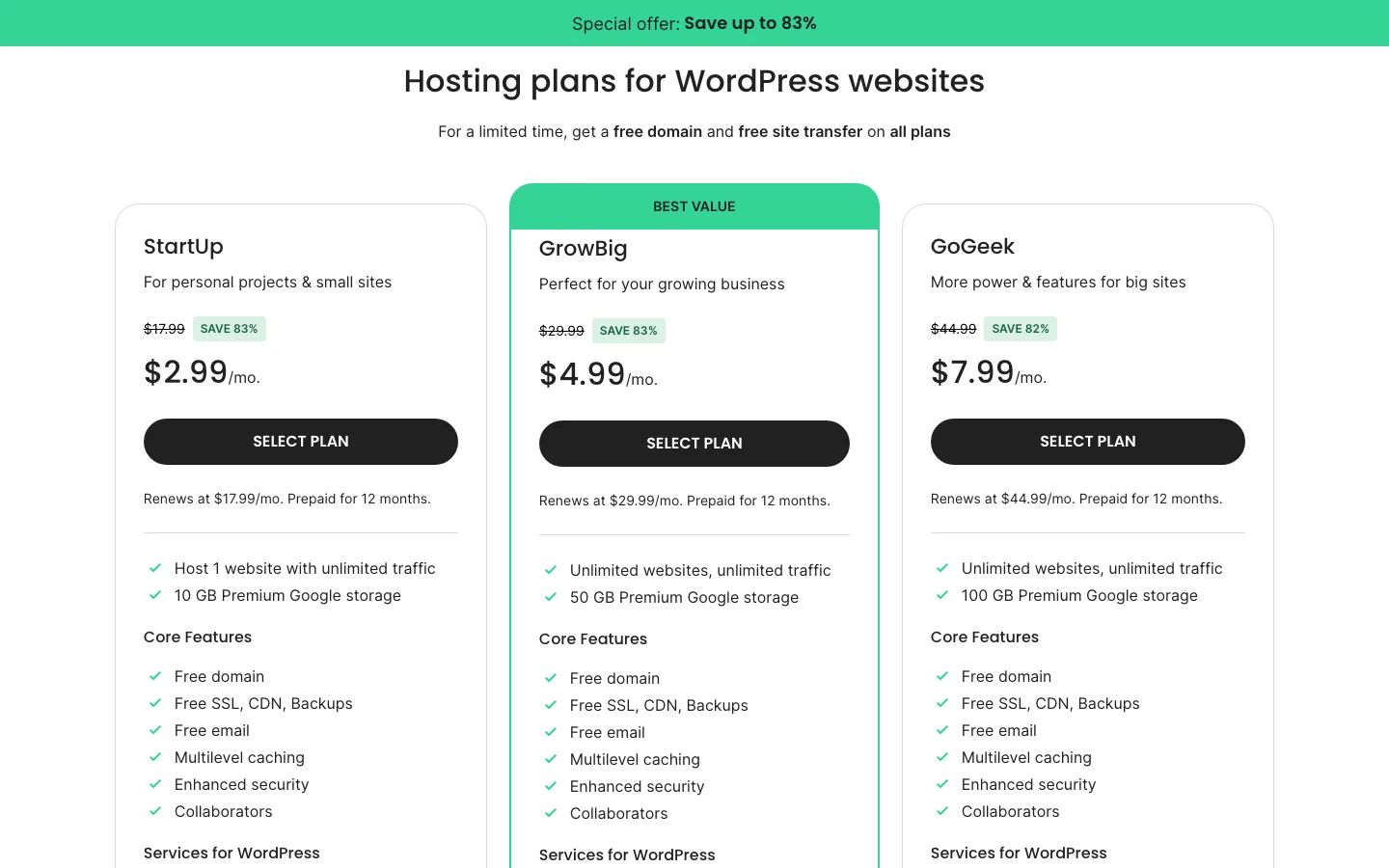
SiteGround’s WordPress hosting plans. Each card says the price is prepaid for 12 months and shows the renewal rate.
SiteGround’s plan pages show one intro price per plan, and each card says “Prepaid for 12 months.” Its checkout adds that discounted prices apply to the first invoice only. After that, you pay SiteGround’s standard rates, which it publishes in its knowledge base.
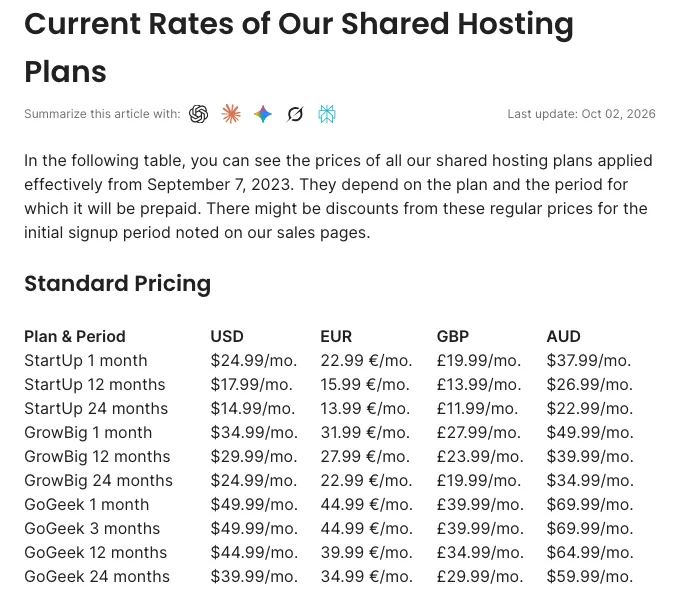
SiteGround’s standard rate table for shared hosting, last updated. These are the prices you pay after the first term.
SiteGround StartUp costs $35.88 for the introductory year, equivalent to $2.99 monthly. Annual renewal costs $215.88, or $17.99 monthly; a 24-month renewal is $14.99 monthly, while month-to-month billing is $24.99.
GrowBig costs $59.88 initially at $4.99 monthly, then $359.88 on yearly renewal at $29.99. A 24-month renewal is $24.99 monthly, and a single month $34.99. GoGeek costs $95.88 initially at $7.99 monthly, then $539.88 yearly at $44.99, with $39.99 monthly on a two-year renewal or $49.99 month to month.
SiteGround says these standard rates have applied since September 7, 2023. Its knowledge base says shared plans are set to renew yearly, it charges 15 days before the end of a 12-month term, and you can renew for two years from the Client Area to bring StartUp down to $14.99 a month. SiteGround also says existing customers are sometimes offered renewal discounts, so it is worth asking before you cancel.
On StartUp, the jump from $2.99 to $17.99 is six times the intro price. That is the steepest renewal of any plan in this comparison.
What four years really costs
Here is the total for four years of hosting, assuming you start on the term shown and then renew yearly at the listed renewal price. Taxes are extra on both.
Over four years, Hostinger Premium costs $143.52 if prepaid for 48 months or $443.52 if bought yearly after the initial offer. SiteGround StartUp costs $683.52 when the first year is followed by yearly renewals.
For the middle plans, Hostinger Unlimited costs $191.52 prepaid or $671.52 on the yearly route, versus GrowBig’s $1,139.52. Cloud Startup costs $383.52 prepaid or $1,055.52 yearly, versus GoGeek’s $1,715.52. These figures assume the listed prices remain unchanged.
Even if you pay Hostinger’s 12-month price and its renewal rate every year after, it still costs less than SiteGround over four years at every tier. The long Hostinger prepay is cheaper again, as long as you are sure you will keep the site. If you are not sure, remember that both refund windows are only 30 days long.
What each plan includes
Hostinger Premium provides three sites, 20 GB SSD and 400,000 files, versus SiteGround StartUp’s one site, 10 GB SSD and 200,000 files. Premium has weekly backups and no CDN; StartUp has daily backups kept 30 days and CDN. Neither includes staging. SiteGround suggests about 10,000 monthly visits, while Hostinger publishes no visit target here.
Unlimited and GrowBig both allow unlimited sites with 50 GB storage, NVMe at Hostinger and SSD at SiteGround. Their file limits are 600,000 and 400,000. Both have daily backups, CDN and staging; GrowBig adds on-demand backups and suggests about 100,000 monthly visits. Unlimited includes priority support.
Cloud Startup and GoGeek both offer unlimited sites, 100 GB storage, priority support, staging and on-demand backups. Their file limits are two million and 600,000, and GoGeek adds Git with a suggested 400,000 visits. All six include SSL. Hostinger mailboxes are free for a year, with two per site on Premium and unlimited on higher plans; SiteGround includes unlimited accounts.
A few notes on the table:
- Visits. SiteGround publishes a rough visitor figure for each plan and calls it a point of reference, not a limit. Hostinger’s current plan pages do not give a visitor figure; they list unlimited bandwidth under a fair usage policy and cap you with CPU, RAM, PHP workers and inodes instead. Premium gets 1 CPU core and 2 GB of RAM, Unlimited 2 cores and 3 GB, and Cloud Startup 4 cores and 4 GB.
- Backups. SiteGround keeps up to 30 daily copies on every shared plan, stored in a different data center from your site. Hostinger’s pricing page says Cloud Startup keeps daily backups for 7 days and weekly ones for 7 weeks, and does not list retention for the other plans. On Hostinger Premium, a backup plugin is a good idea; our backup plugin roundup can help you choose.
- Email. SiteGround’s email accounts share up to 10 GB, taken from your plan’s storage. Hostinger mailboxes get 1 GB each and turn into a paid extra after the first year.
- Free domain. Both include a domain free for the first year, then it renews at the normal price.
- Staging. Neither entry plan has a staging copy. If you stay on an entry plan, a WordPress staging plugin fills the gap.
WordPress tools
Both hosts offer installation, updates and free site transfers. Hostinger uses LiteSpeed Cache; SiteGround uses Speed Optimizer with its own server caching. Each works best on the infrastructure it was designed for.
We tested the plugins away from both hosts. Speed Optimizer’s file cache worked, although its dashboard still said caching was disabled. Dynamic Caching, Memcached and image services required SiteGround. LiteSpeed Cache could minify and lazy-load on our Apache server but could not provide page caching there. Those results do not compare the hosts’ actual speed.
Hostinger Tools’ controls were unavailable on our local site, so we could inspect the screen but not verify its functions. Hostinger’s full AI package requires higher plans; SiteGround includes an AI agent allowance on every plan. Review the installed plugins and disable tools you do not want, particularly given user complaints about SiteGround’s agent appearing without consent.
Hostinger handles requested transfers through hPanel, while SiteGround also offers a Migrator plugin. Our migration guide covers the independent route.
Control panel: hPanel vs Site Tools
Neither host uses cPanel. Hostinger has hPanel and SiteGround has Site Tools, both built in-house. We could not log in to either without buying a plan, so this section is based on each host’s published screens and help pages.
hPanel uses big, clearly labeled tiles for WordPress, domains, email, files and databases, with an “Ask AI” button tied to Hostinger Agent. You can move an active plan to another data center yourself from the Plan Details page.
Site Tools gives each site its own dashboard with a file manager, DNS, databases, backups, caching and email. GoGeek adds white-label Site Tools access for clients. Changing data center is a job SiteGround’s team does for you, and its FAQ warns of a short downtime window.
Both include SSH, WP-CLI, SFTP, PHP version switching and Git (on SiteGround, Git needs GoGeek).
Performance: what we could measure
We could not run a real hosting benchmark without buying plans, so we measured public pages only. This is not a test of the plans you would buy. On October 4, 2026, from one location in Washington State, US, we timed each host’s own pages with curl (median of seven requests) and ran Lighthouse 13.5 in mobile mode (median of three runs).
Hostinger’s marketing homepage responded in a median 235 ms but scored 32 on mobile, with largest content at 7.9 seconds. SiteGround’s homepage responded in 476 ms, scored 79 and showed its largest content at 4.1 seconds. Their WordPress sales pages responded in 238 and 442 ms, but were not run through Lighthouse.
The blog results reversed the mobile-score order: Hostinger responded in 231 ms and scored 76 with 6.1-second largest content, while SiteGround responded in 282 ms and scored 47 with 8.3 seconds. These different public pages cannot establish which host would run the same customer site faster.
What this tells you: not much about your future site. Hostinger’s pages were served from Cloudflare’s cache, and SiteGround’s through a Google Cloud load balancer. Hostinger had the lower median time to first byte on every page, but SiteGround’s homepage scored much higher in Lighthouse, while Hostinger’s blog scored higher than SiteGround’s. Those scores mostly reflect how heavy each marketing page is, not how fast a small WordPress site on a shared plan would be.
SiteGround says WordPress sites moved to it with its migrator plugin in the first half of 2025 loaded 78% faster on average, and quotes a 95% speed increase for sites coming from Hostinger. Hostinger says its caching and CDN make sites up to 40% faster. Treat both as marketing. For independent results on Hostinger, see our full Hostinger review.
Data centers
You choose a location when you sign up. Pick one near most of your visitors.
- Hostinger (12 locations for web and cloud plans): USA (Phoenix, Boston and Asheville), Brazil, France, Germany, Lithuania, the Netherlands, the United Kingdom, India, Indonesia and Malaysia. The CDN, on Unlimited and up, adds edge locations such as Johannesburg, Japan and Sydney.
- SiteGround (11 locations on Google Cloud): Ashburn (Virginia), Council Bluffs (Iowa), Dallas and Los Angeles in the US, plus London, Madrid, Eemshaven (Netherlands), Frankfurt, Paris, Sydney and Singapore. Its free CDN runs on 170+ edge locations, and backups are stored in a different region from your site.
SiteGround has servers in Australia and Singapore; Hostinger covers South America, India and more of Southeast Asia.
Support
SiteGround starts you in a help center with an AI assistant, but a human is easy to reach. It offers 24/7 live chat, tickets and phone support, with the phone number shown inside your account so callers can be verified. SiteGround says its staff resolve over 90% of questions on first contact, and its site cites a 4.9 Trustpilot rating. GoGeek chats and tickets go to its most experienced agents first.
Hostinger starts every conversation with Hostinger Agent. A human specialist can join if the AI cannot solve the problem, and you can also use email or WhatsApp. There is no phone support. Hostinger says its AI resolves 91% of roughly 1.5 million support conversations a month on its own. Priority support is listed on Unlimited and Cloud Startup, not on Premium. In October 2026, Hostinger’s Trustpilot page showed about 72,800 reviews averaging 4.6, with the usual complaints about getting past the AI to a person.
If quick access to a human matters to you, SiteGround is the safer choice.
Money-back and uptime terms
Hostinger offers 30 days from each transaction, including renewals. New domains are only refundable within 96 hours, and the free domain’s cost may be deducted. SiteGround allows 30 days from shared-plan activation or 14 days for Cloud. A renewal can be refunded in full within 30 days if its term has not started, or minus the first month if it has; domain fees are nonrefundable even when initially waived.
Both state 99.9% monthly uptime. Hostinger’s remedy is a 5% credit toward other products, requested within 30 days and assessed at its discretion. SiteGround’s remedy is 5% of the monthly fee as extra hosting time, based on its own records rather than third-party reports.
Neither uptime guarantee pays much: 5% of a $10.99 month is about 55 cents.
Ownership and notable 2025 to 2026 changes
Hostinger was founded in 2004 in Kaunas, Lithuania, and has offices in Kaunas and Vilnius. It says it has never been publicly listed and that a private equity firm holds a minority stake of about 30%, with the rest owned by the founders and team. Giedrius Zakaitis became CEO in June 2026. The big product changes this year were the Hostinger Agent merger in August and the Business plan’s rename to Unlimited (some help pages still use the old name).
SiteGround was also founded in 2004 and says it has been privately owned ever since. US customers contract with SG Hosting Inc. of Alexandria, Virginia. This year it launched the AI Agent for WordPress (February), made AI Studio Essential free for all customers, faced the plugin auto-install complaints (August), and added Node.js hosting (October 1). Its standard renewal prices have not changed since September 2023.
If you are weighing SiteGround against pricier managed hosts too, our Kinsta vs SiteGround, Cloudways vs SiteGround and WP Engine vs SiteGround comparisons cover those pairings. Our WordPress hosting reviews hub lists the rest.