Fluent Forms Review: How Far Can the Free Version Go?
Fluent Forms is a strong choice when you want useful forms without paying. The free plugin handled conditional logic, saved entries, conversational forms and reports in our tests. Pro becomes more relevant for uploads, multi-step forms and business integrations. Check email notifications, spam settings and payment fees before publishing.
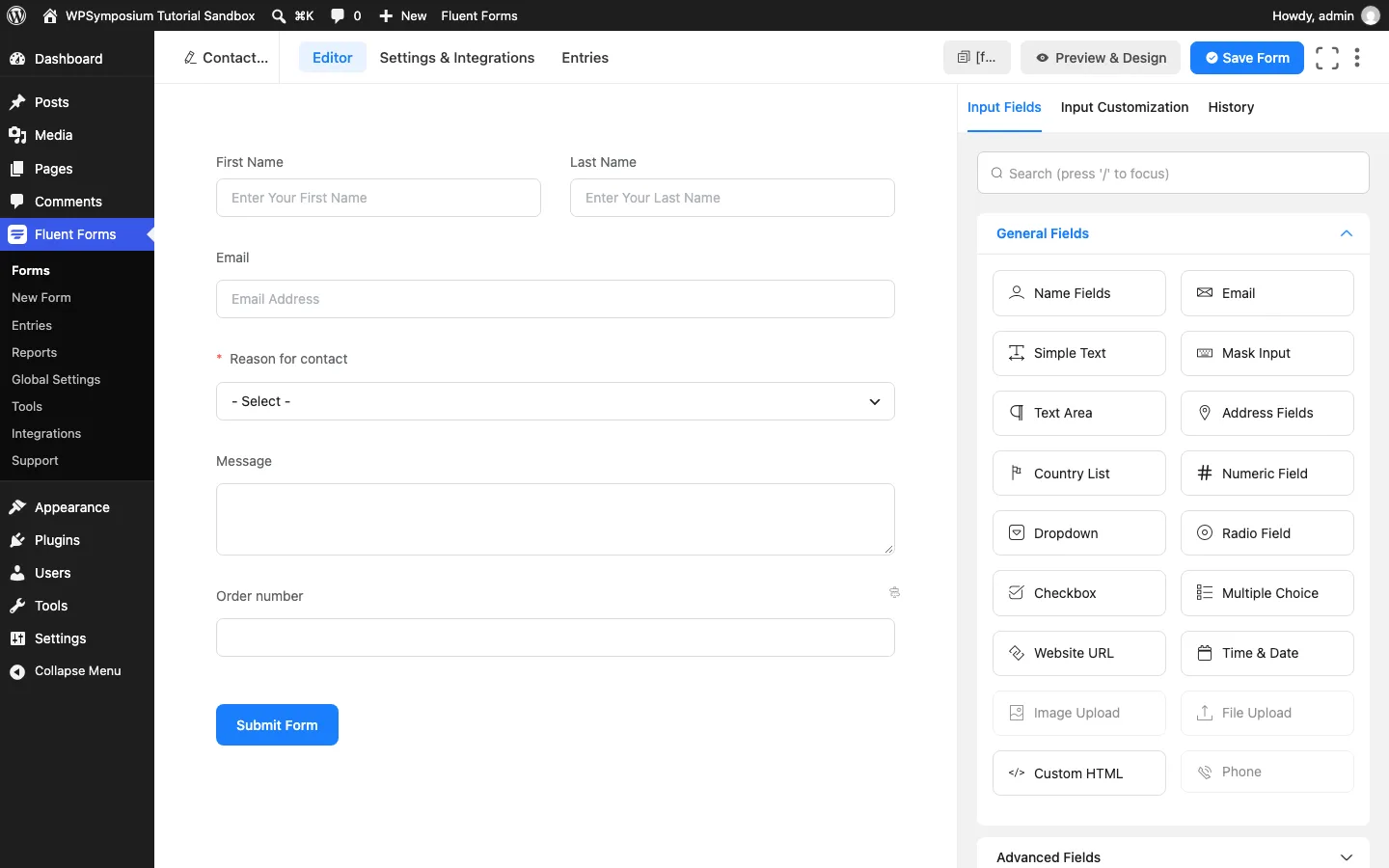
The Fluent Forms builder with our test contact form.
What Is Fluent Forms?
Fluent Forms is a drag-and-drop form builder for WordPress, used for contact forms, quote requests, surveys, registrations and simple order forms. The free plugin lives on WordPress.org, and Fluent Forms Pro is a paid add-on installed alongside it. It comes from WPManageNinja, which also makes FluentCRM (email marketing) and FluentSMTP (email delivery).
Building a Contact Form
The free builder handled our contact form without an account or setup wizard. Its library had both free and Pro templates, and the editor was easy to learn.
Conditional logic and saved entries
An Order number field appeared only when visitors selected Order support. WPForms Lite and free Ninja Forms required a paid upgrade for the same rule.
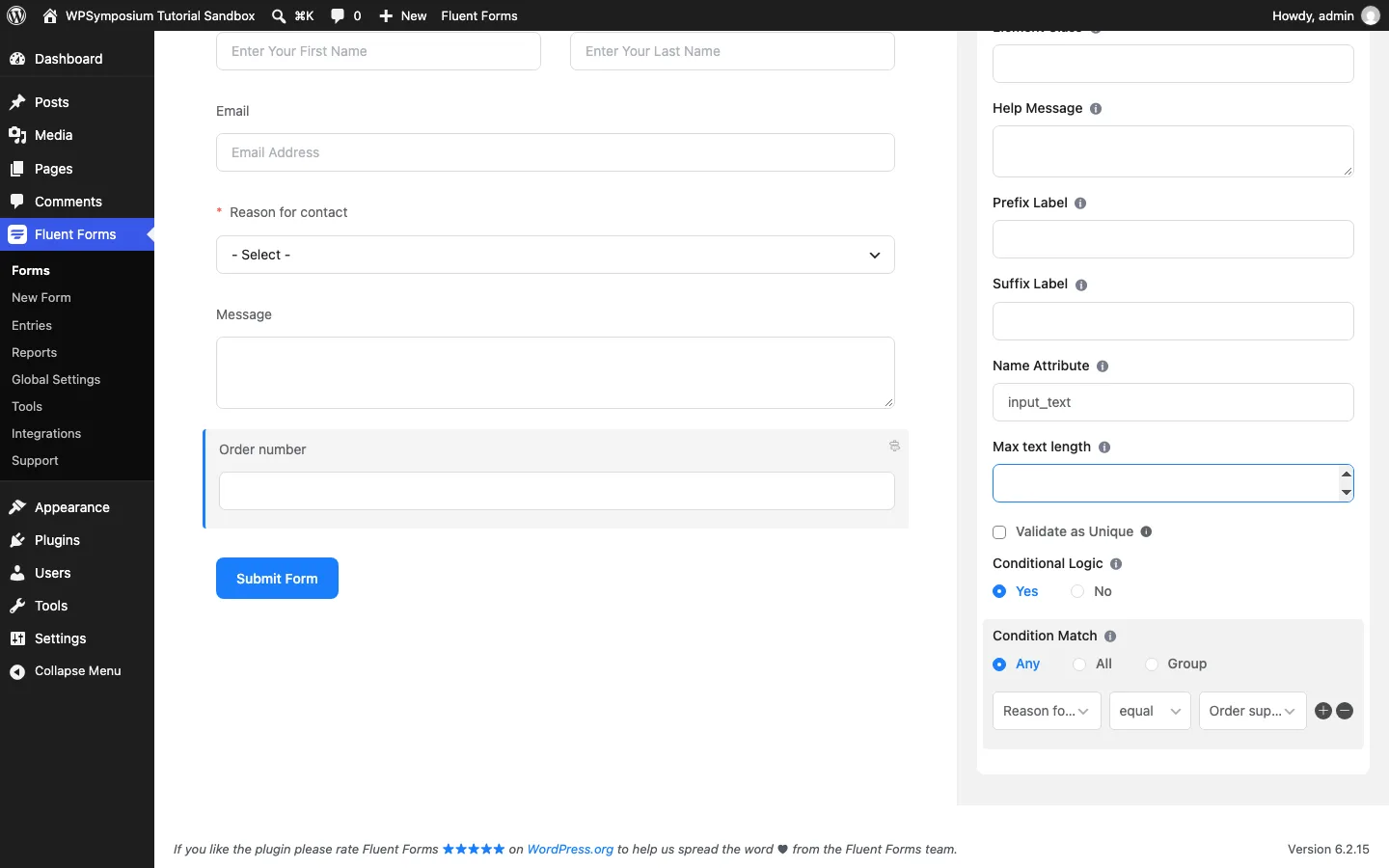
The free conditional logic rule on our Order number field.
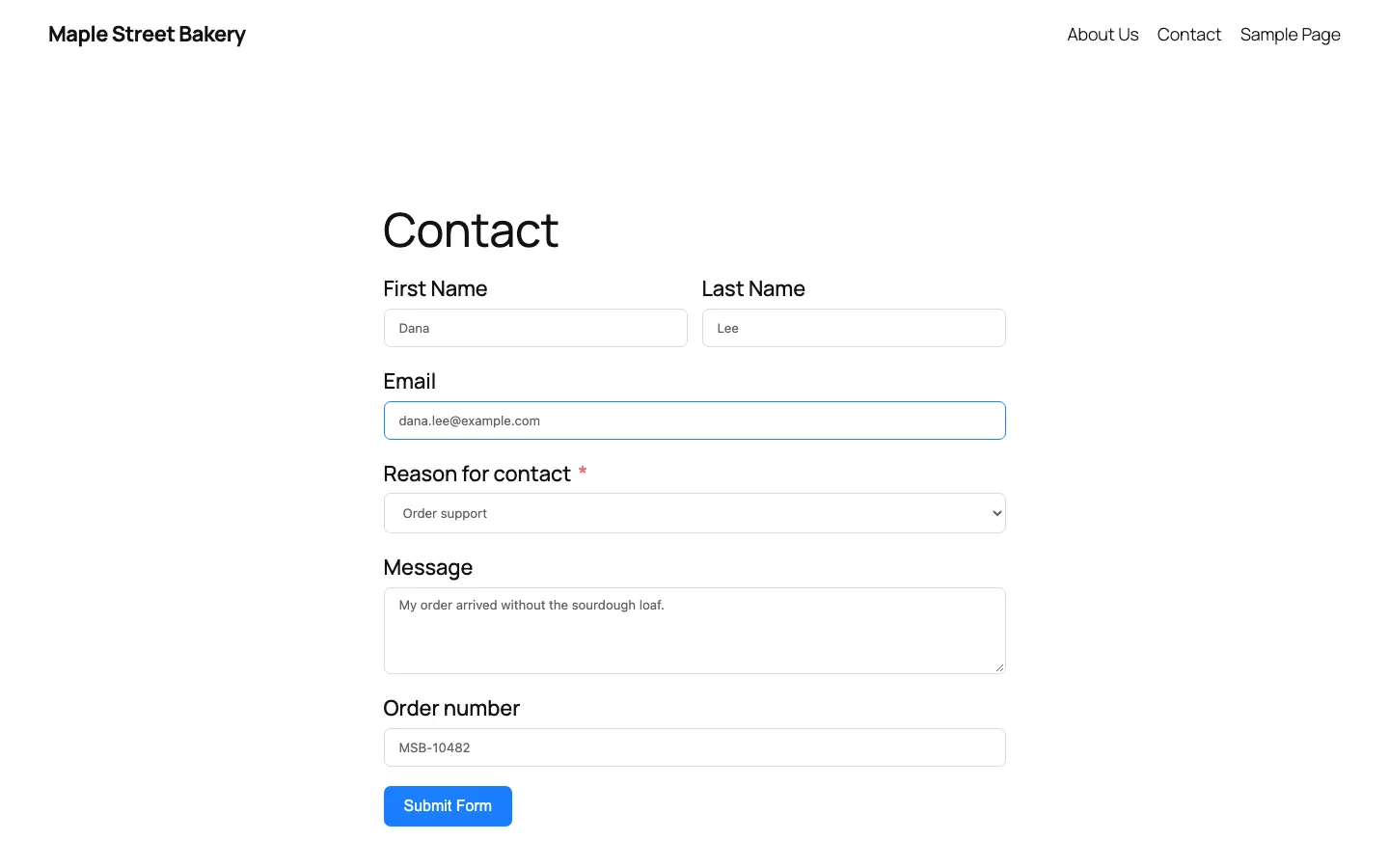
Our test contact form with the conditional Order number field showing.
Required-field validation worked, and submissions were saved correctly. The Entries screen included answers and visitor details; IP logging can be switched off.
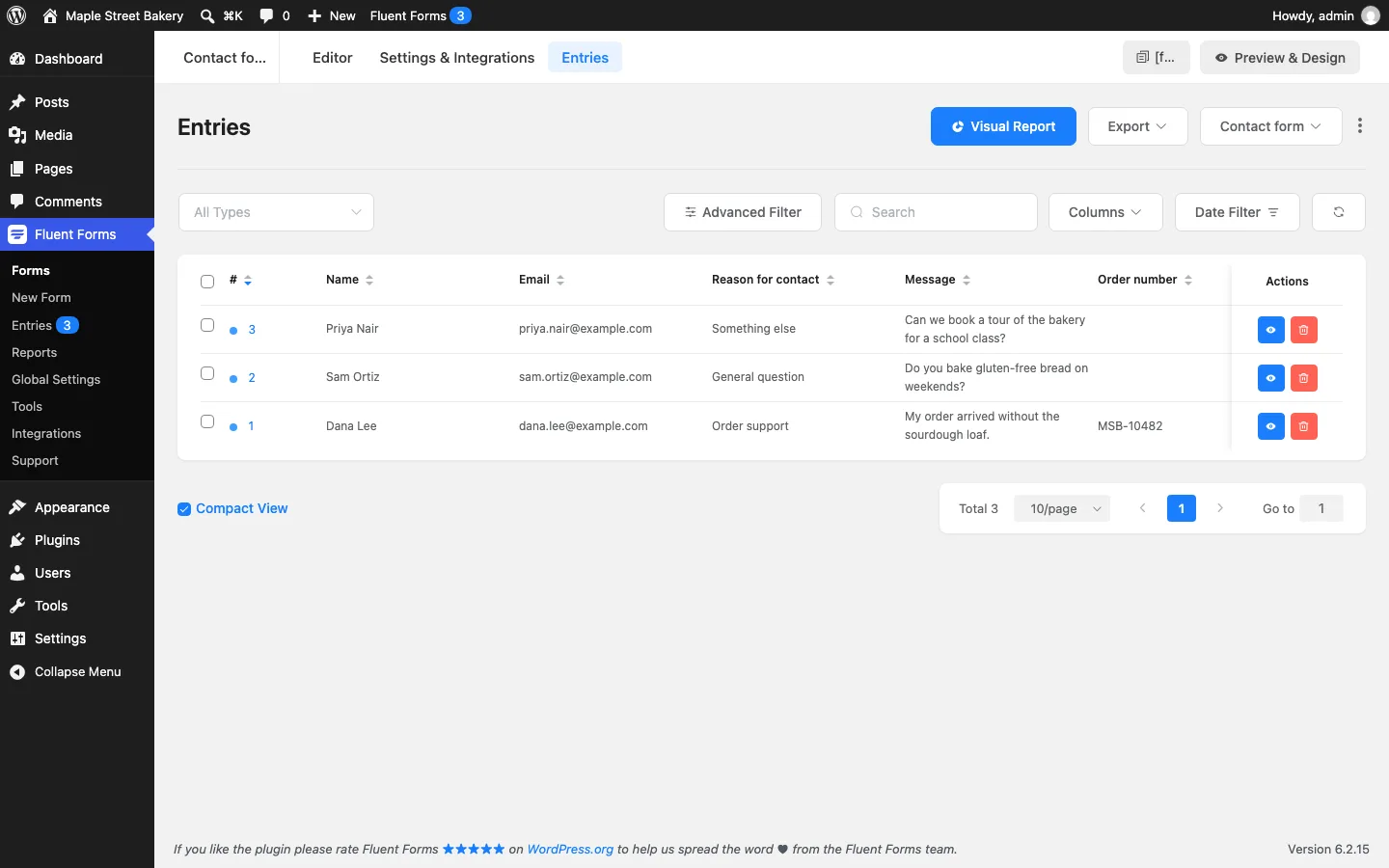
Three test entries on the free Entries screen.
CSV, Excel, ODS and JSON exports are free, but choosing specific export columns needs Pro.
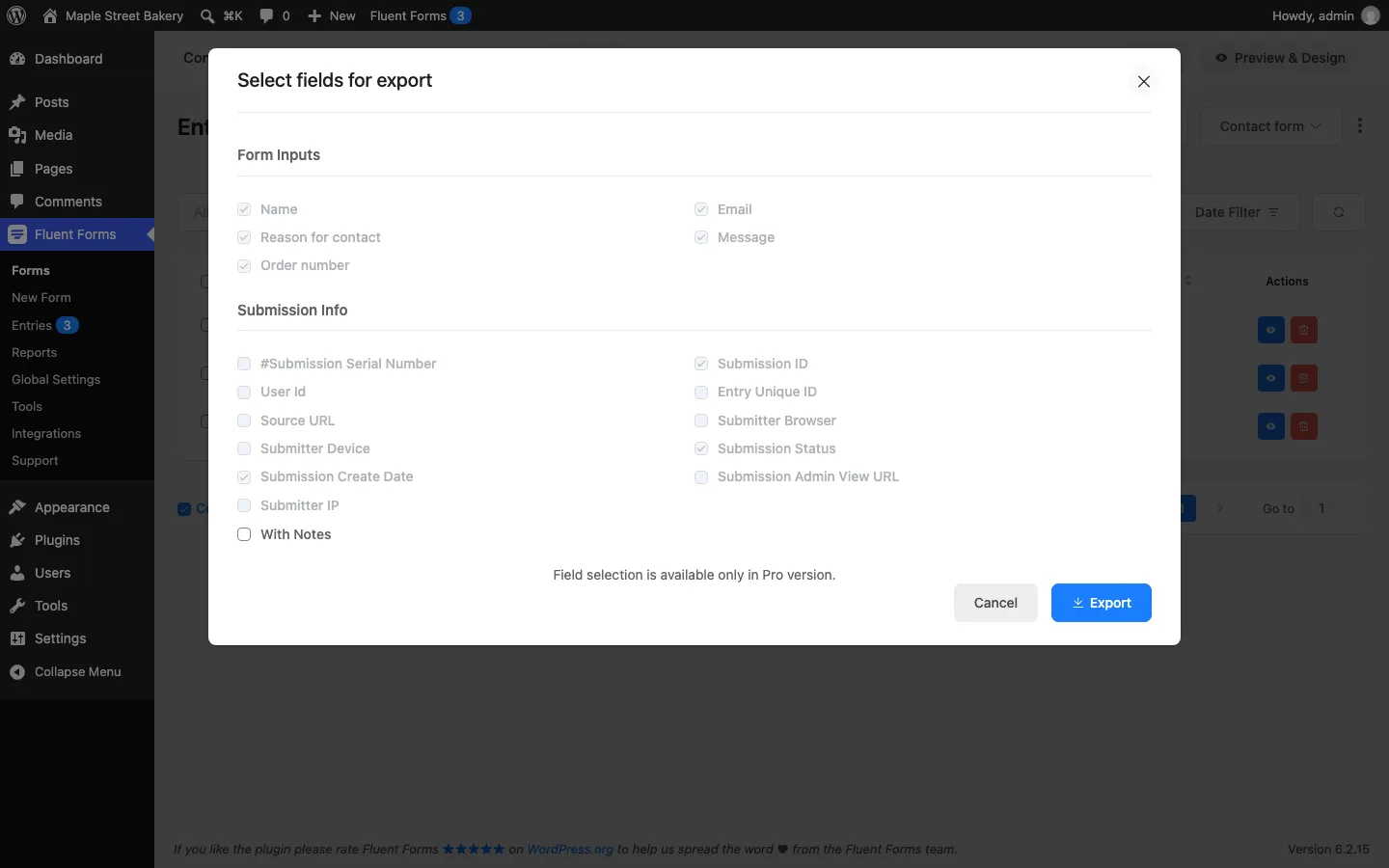
The free CSV export dialog, where picking columns is a Pro feature.
Defaults worth changing
Admin email notifications and both recommended spam-protection options started switched off. Enable them before publishing a form: saving an entry does not mean anyone has received a notification.
Quote Request and Payment Forms in the Free Version
A quote request form
Next we built a quote form for a bakery: name, email, phone, a “What do you need?” checkbox list, an event date with a calendar picker, a budget dropdown and a details box. It worked and saved the entry, but two fields you might want were locked:
- Phone is a Pro field. We used the free “Mask Input” field instead, which accepts any text.
- File Upload and Image Upload are Pro. Clicking one opened a pop-up saying it “is not available with the free version”, with a video and an “Upgrade to PRO” button. If customers need to send photos or documents with a quote, you need Pro.
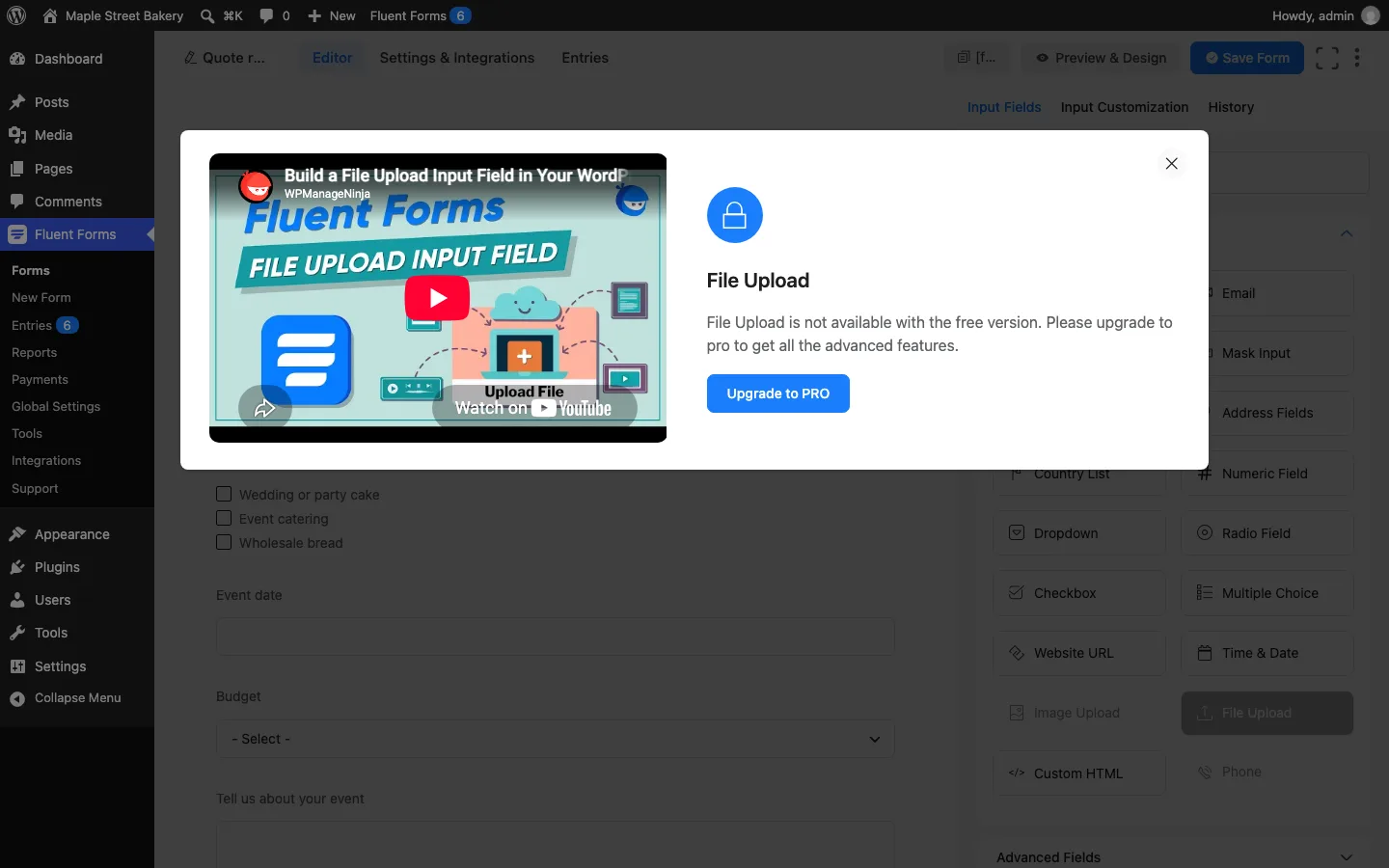
The Pro lock on the File Upload field.
Multi-step forms are also Pro: the “Form Step” field showed the same lock.
A simple payment form
Payments are off until you click “Enable Payment Module” in the settings. After that, the free version offers one payment method, Stripe, and five payment fields: a fixed-price item, subscriptions, a custom amount, quantity and a payment summary. Coupons are Pro. The list was the same on 6.2.16.
We built a booking form for a $45 bread-making workshop. Connecting Stripe means clicking “Connect with Stripe” and signing in to a Stripe account, so we stopped at the settings screen. That screen states the cost of free payments: a 2.5% platform fee per transaction on top of Stripe’s own fees, and Pro removes that fee. Version 6.2.16 shows the same 2.5%. But the WordPress.org listing and posts on the vendor’s blog say 1.9%, and so does the plugin’s own code. When Pro is not installed, the code that sets up each Stripe charge asks for 1.9% of the payment, and 1.9% on subscriptions. The 2.5% wording comes from the plugin’s list of on-screen text, which replaces an original 1.9% sentence. We could not see what Stripe actually charges without connecting an account, so check the fee in your Stripe dashboard after your first payment.
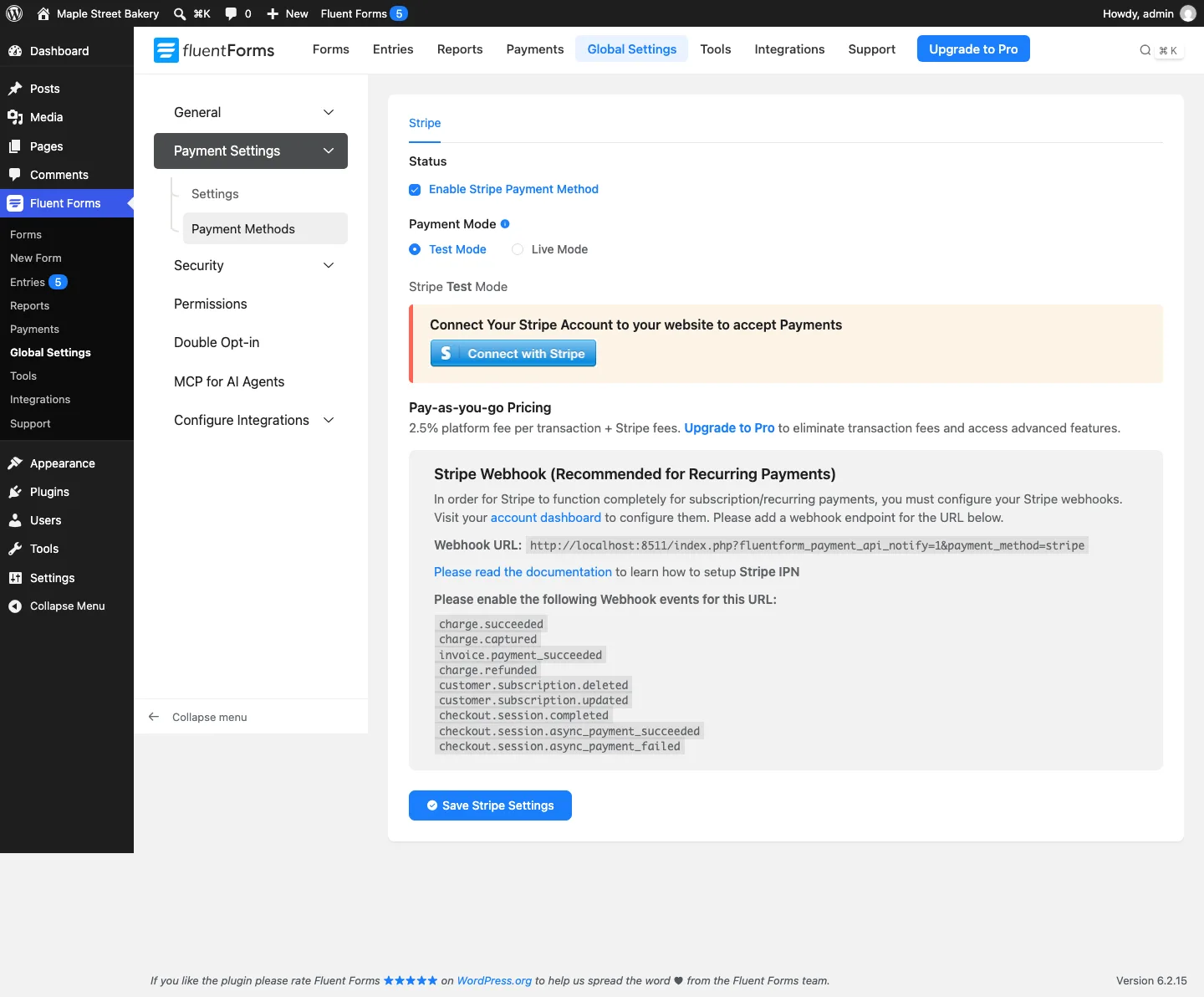
Free Stripe settings in test mode, showing the 2.5% platform fee.
One thing to watch: with no payment method connected, our workshop form still accepted a submission. It showed the normal thank-you message and logged a $45 entry as “Pending” with no payment method. We tried again on 6.2.16, whose changelog says it rejects invalid payment amounts and fixes missing emails on payment forms without a Payment Method field. The form behaved the same way. Two test bookings got the thank-you message and became $45 “Pending” entries, and Payments, then Transactions, stayed empty. With the admin notification switched on, the site sent its email (our test site logged it instead of delivering it). We had not tested emails on 6.2.15, so we cannot say whether this changed. And when we changed the hidden price from 45 to 1 in the browser, the entry still recorded $45.00, so the price comes from the form, not the visitor’s browser. Finish the Stripe setup and test a payment before you publish a form that is meant to charge people.
PayPal and payment coupons need Pro, according to the plugin’s Integrations screen and builder.
Spam Protection
Once switched on, the free honeypot worked: a test submission with the hidden field filled in was blocked with “Sorry! You can not submit this form at this moment!”, while normal submissions went through.
Fluent Forms also has a built-in limit with no settings screen. While we sent quick test entries for our reports test on 6.2.16, the sixth submission from the same IP address within 30 seconds was refused with “Too Many Requests.” The default is five submissions per 30 seconds.
The free version also has settings screens for Google reCAPTCHA (versions 2 and 3), hCaptcha, Cloudflare Turnstile and CleanTalk, still there on 6.2.16. Each needs keys from that service, and the Turnstile field would not drop into a form until keys were saved. Turnstile is free and invisible to most visitors, so it is a sensible next step if the honeypot is not enough. Each form can also block empty submissions and messages that contain words you choose, which we cover under restrictions below.
More Free Features We Tried
We also tried the broader free feature set without installing Pro.
The free plugin let us build conversational forms, arrange fields in up to six columns, set entry limits and schedules, view answer charts, migrate forms and send contacts to FluentCRM. It also offered PDF generation and an AI form builder. Pro is mainly needed for deeper styling, multi-step forms, advanced validation, conditional integrations and some reporting tools.
There are smaller limits within otherwise free features. Conversational-form branding and design controls need Pro, for example, and the PDF attachment option was present but did not send an attachment in our test. The sections below explain those distinctions.
Conversational forms
Conversational forms show one question at a time, like a chat. They are free. The “Create Conversational Form” card on the new form screen made a form with four questions in one click: Your Name, Email, Subject and Your Query. The template library has no conversational templates, so that card is the way in. The editor uses the same free fields as the normal builder but has no column containers.
We shared it two ways. The Share tab gives a direct link (/?fluent-form=3 on our site) that opens the form full screen. The text above it says sharing by unique URL is Pro, yet the link worked for a logged-out visitor on the free plugin. We also put the form on a page with the shortcode [fluentform type="conversational" id="3"].
Then we answered it with the keyboard only. Pressing Enter on the empty, required name question did nothing, and no message said why. A bad email address got “This field must contain a valid email”. After the last question, Enter submitted the form, showed the thank-you message and saved a normal entry.
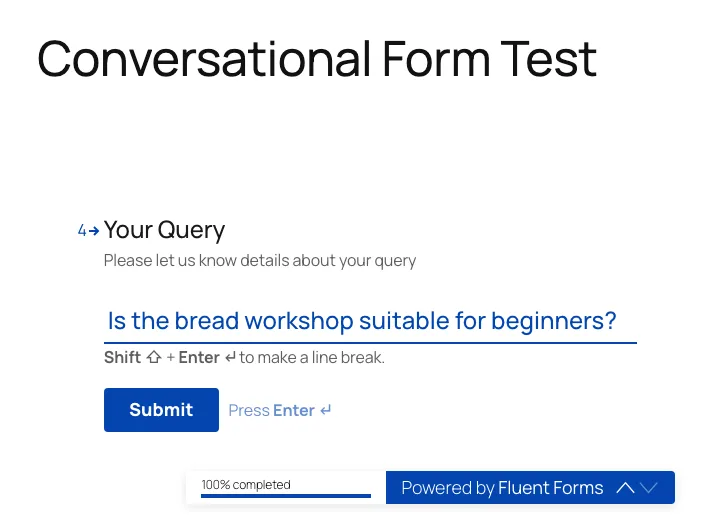
Our conversational test form on a page, at its last question, with the “Powered by Fluent Forms” badge.
The design is where Pro comes in. The Design tab has fonts, colors, a background image and layout switches, but on free it is only a preview. An orange bar says “Design Customization is only available on Pro Version of Fluent Forms”, and there is no save button. Switching on “Disable Branding” hid the badge in the preview, but the live form kept “Powered by Fluent Forms”. The Meta tab, with the page title, description and button texts, did save on free.
Free or Pro. Building, sharing by link, embedding and collecting entries are free. Every design setting and removing the badge need Pro. File Upload, Phone, Ratings, Net Promoter Score and Save & Resume stay greyed out, as in the normal builder.
Multi-column layouts and the mobile view
Free containers support up to six columns with adjustable widths and conditional rules. They have no separate settings for each device.
On a 1,440-pixel desktop screen, both rows sat on one line each. The narrow name boxes cut off their default placeholder text (“Enter Your First Nar”), so use short placeholders in tight columns. The test entry saved every field.
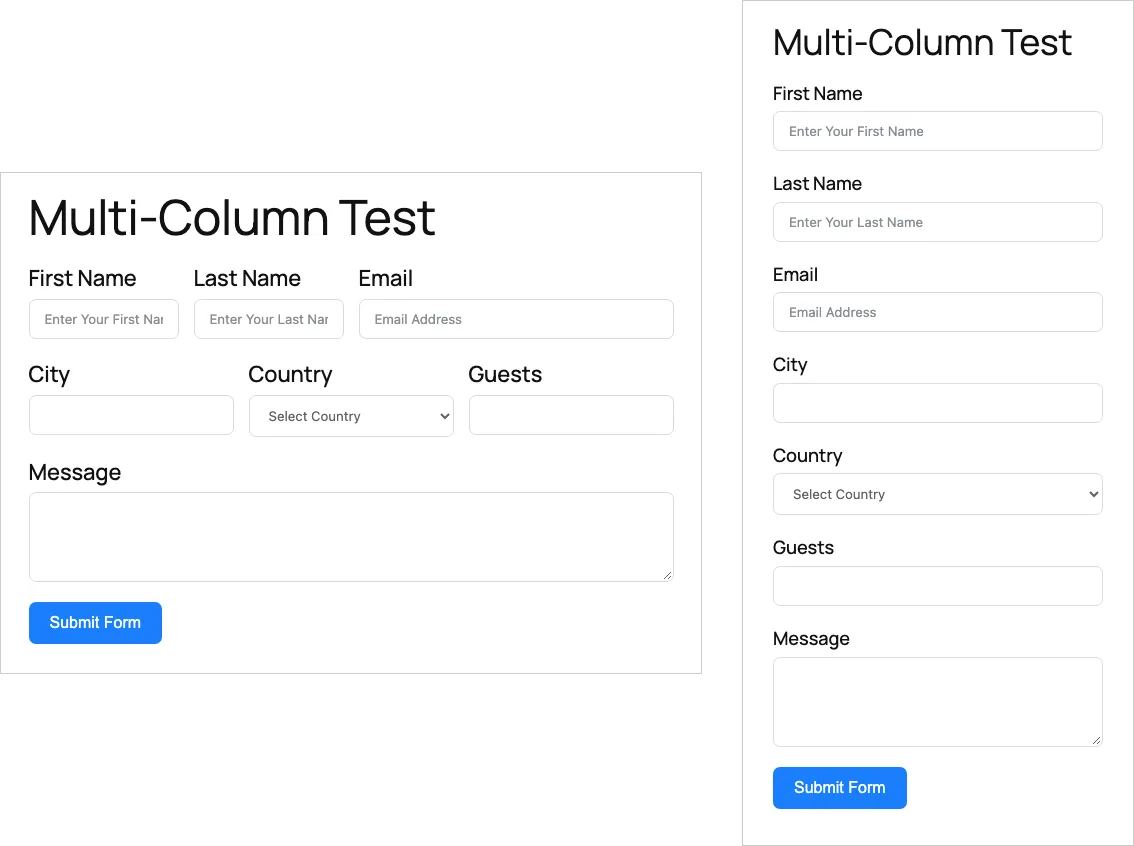
Left, our multi-column test form on a 1,440-pixel desktop. Right, the same form at a 390-pixel phone width.
Both our contact and multi-column forms stacked cleanly on an emulated phone, with working validation and conditional fields. Columns only sit side by side at tablet width and above, and there is no setting to change that breakpoint.
Two small problems showed up. Form text was 13.33 pixels, because neither Fluent Forms nor the theme sets a size for it, and iPhones usually zoom in when you tap a field with text under 16 pixels. We worked that out from the size and did not see it on a real iPhone. On conversational forms, tapping the OK button worked, but the previous and next arrows were 23 by 18 pixels, below the 24-pixel minimum in the WCAG 2.2 accessibility guidelines, and the “Press Enter” hint still showed on a touch screen.
Free or Pro. Columns, stacking on phones, and the desktop, tablet and mobile toggles and the Form Style Template dropdown in Preview & Design are free. Accordion and tab containers and multi-step forms are Pro. Styling each element yourself needs the Pro Advanced Form Styler, which we did not test.
Restrictions: entry limits, scheduling and login
Every form has a Scheduling & Restrictions panel under Settings & Integrations, with five switches. All were off on a new form, and none was locked on free.
- Entry limit. We set a maximum of 2 entries in total. You can also count per day, week, month or year, per IP address or per logged-in user. After two entries, the page showed only “Maximum number of entries exceeded.” For a second check we raised the limit to 3 and opened the form in two browsers. After the third entry came in from one, submitting the form still open in the other gave the same error, so the plugin checks the limit again on the server.
- Scheduling. A start date in the future replaced the form with “Form submission is not started yet.” A window in the past showed “Form submission is now closed.” Unticking today’s weekday showed that closed message too. The date picker uses your computer’s time zone, not the site’s, so check the times if the two differ.
- Login required. Logged-out visitors saw only “You must be logged in to submit the form.” There was no login link.
- Empty submissions. On a form with no required fields, clicking submit with nothing filled in saved a blank entry. With “Deny empty submission” on, the form showed “Sorry, you cannot submit an empty form. Let’s hear what you wanna say.” instead.
- Keyword blocking. The free “Restrict Form Submission” switch only offers blocking by keyword. We added “casino”, and messages containing it, in any letter case, were refused with “Sorry! Your submission contains some restricted keywords.”
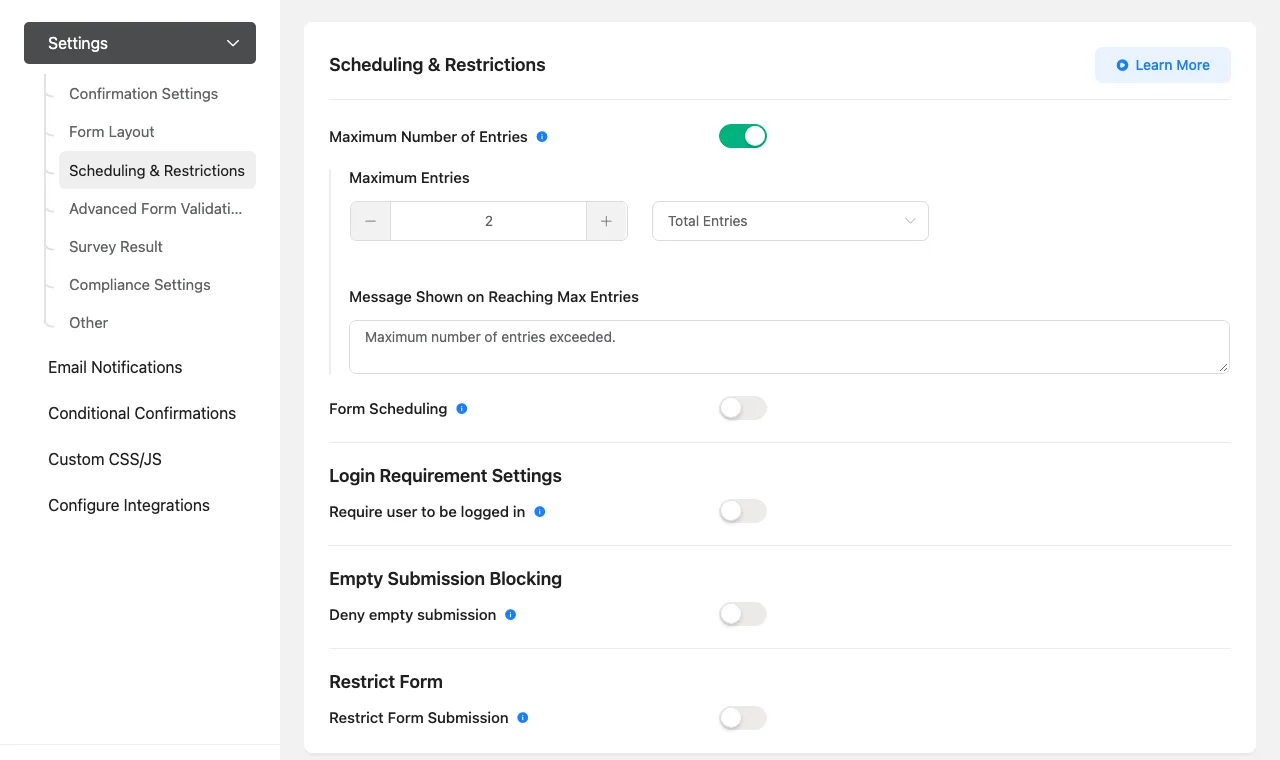
The free Scheduling & Restrictions panel with our 2-entry limit.
Free or Pro. All five restrictions are free. The Advanced Form Validation, Survey Result, Compliance Settings and extra CSS class panels below them are Pro. Blocking by IP address or country did not appear in the free panel.
Reports and form stats
We built a “Workshop Feedback” form with a dropdown, a radio question and checkboxes, then sent 10 different entries as a logged-out visitor.
Form analytics, which count views, are off on a new install: “Disable Form Analytics” is switched on under Global Settings, then Miscellaneous. Once we switched it off, the forms list gained Views and Conversion columns. Ours read 1 view and 1000% conversion, because a view counts once per visitor IP address and page, and all our entries came from one computer. On a real site, read Views as unique visitors per page.
The per-form Visual Report is free and useful. It shows a submissions chart, then a pie, bar or horizontal bar chart with a count and percent table for each choice question. Our numbers matched the entries exactly: for example, 4 of 10 people (40%) said they heard about the workshop from a search engine. It can also filter by entry status, show browsers and devices, and print. The Entries screen for all forms has a submissions chart, and the Reports menu adds summary cards for total, spam and unread submissions and a list of top forms by submissions or views.
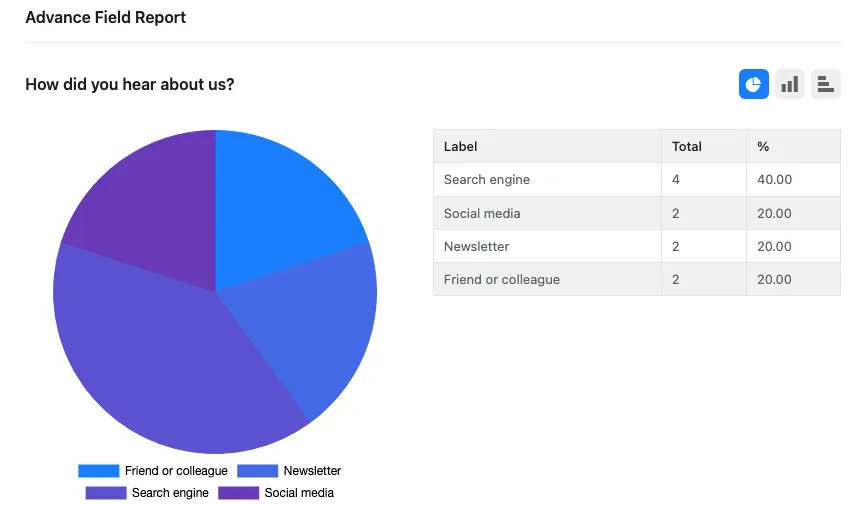
The free per-form Visual Report for our 10 test entries.
Two quirks. The date range comes from your browser’s clock, so with our site on UTC and the browser on US Pacific time, today’s entries were missing from the chart until we switched the browser to UTC. And the WordPress dashboard widget showed no stats for up to 10 minutes after the entries came in, because it caches its numbers.
Free or Pro. The charts, views and conversion, and the overview are free. Completion rates for partial entries, submissions by country, timeline patterns and the per-form submission analysis show “Please upgrade to pro to unlock this feature.”
Import, export and migrating from Contact Form 7 and WPForms Lite
Tools, then Export Forms, saved our feedback form as a JSON file with its fields, settings and notification, but no entries. Importing that file back made an exact copy with the same title, so you end up with two forms of the same name. The success message reads “You form has been successfully imported”, typo included.
The Migrator only works once another form plugin is installed. We installed the free Contact Form 7 (6.2.2) and WPForms Lite (2.0.2.2) from WordPress.org, built one form in each, and imported both. Fluent Forms reported success both times, and its reply listed no unsupported fields, but the results were very different:
- WPForms Lite came across cleanly: all six fields with their labels, choices and required settings, the email notification (switched on, with its subject) and the thank-you message. A test entry went straight through. There were no entries to bring over, because WPForms Lite does not store them.
- Contact Form 7 came across broken. The Phone field was dropped without a warning; Phone is a Pro field in Fluent Forms, but nothing said so. The required consent checkbox arrived labeled “checkbox” with nothing to tick, so the form could never be submitted. The name and email boxes opened with the words “name” and “email” already typed in. The notification turned into 10 empty, switched-off rows, and Contact Form 7’s own subject and thank-you message were lost.
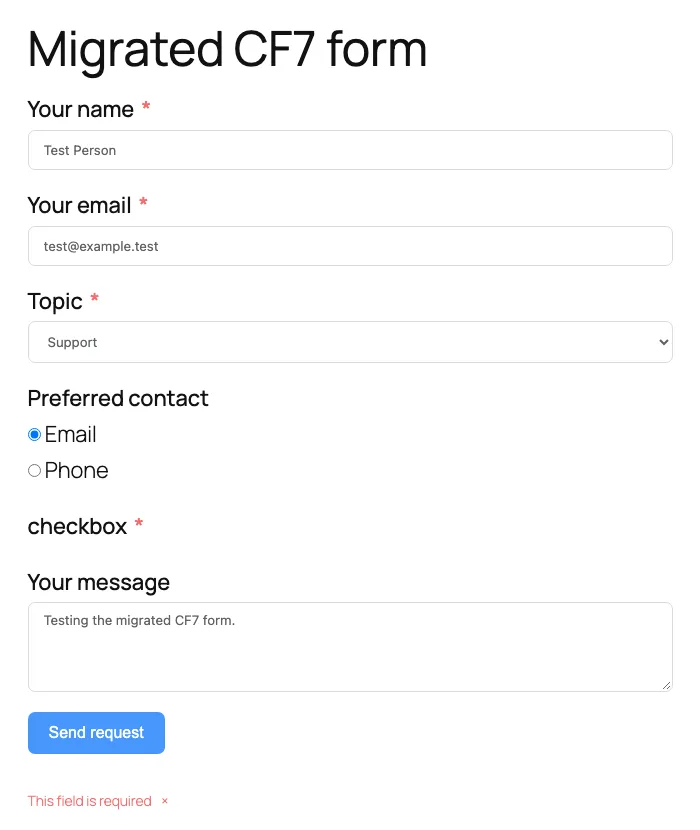
Our Contact Form 7 form after migration. The consent checkbox lost its option, so the form cannot be sent.
So the migrator saves time if you are leaving WPForms Lite, while a Contact Form 7 form needs checking and fixing by hand before it goes live. We did not test the 6.2.16 fix that stops a form import from giving a user a higher role, because it needs a non-admin user with import rights.
Free or Pro. Form export, form import and the migrator are free. Tools, then Import Entries, says “Upgrade to get access to import entries.”
FluentCRM: form entries become contacts
FluentCRM is the vendor’s email marketing plugin, and its core version is free on WordPress.org. We installed FluentCRM 3.2.6 on the test site, skipped its optional setup wizard, and made one list (“Website Leads”) and one tag (“Contact Form”). No account was needed.
Fluent Forms picked it up on its own. The Integrations page gained a FluentCRM module that was already switched on, and “FluentCRM Integration” was the only choice in a form’s Add New Integration menu on the free plugin. In the feed (Fluent Forms’ name for the rule that sends entries to FluentCRM) we chose the list, matched the email, first name and last name fields, and added the tag, with double opt-in (a confirmation email before someone is subscribed) left off.
We then submitted the sample contact form as a logged-out visitor. In the same second, FluentCRM showed a new subscribed contact with the right name, email, list and tag, and the source “FluentForms”. The entry’s log confirmed it, and the entry page gained a FluentCRM profile box.
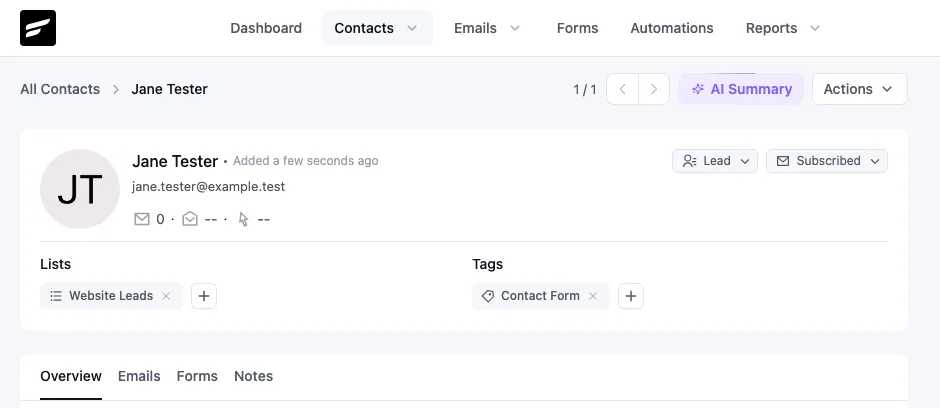
The contact FluentCRM created from our test entry, with the list and tag from the feed.
Free or Pro. Free on both sides. Only conditional logic on the feed needs Pro, and its lock message wrongly says “Upgrade to get access to import entries.”
PDF copies of entries
PDFs come from a separate free plugin, Fluent PDF Generator 2.2.0, by the same company. The Integrations page has a “Fluent Forms PDF” tab with an install button, which ran the normal WordPress installer from WordPress.org. Its environment check passed, and the default font worked without downloading the 68 extra fonts it offers for other languages.
Each form then gets PDF Feeds, with two templates: General and Certificate. We made a General feed with our own heading and the default body, which lists every answer. Paper size, fonts, colors, right-to-left text, a watermark and a PDF password were all unlocked. A “PDF Downloads” link appeared on each entry, and the file we downloaded was a plain one-page A4 PDF: a heading, a grey table of questions and answers, the date and page number, and a “Powered By Fluent Forms” line at the bottom.
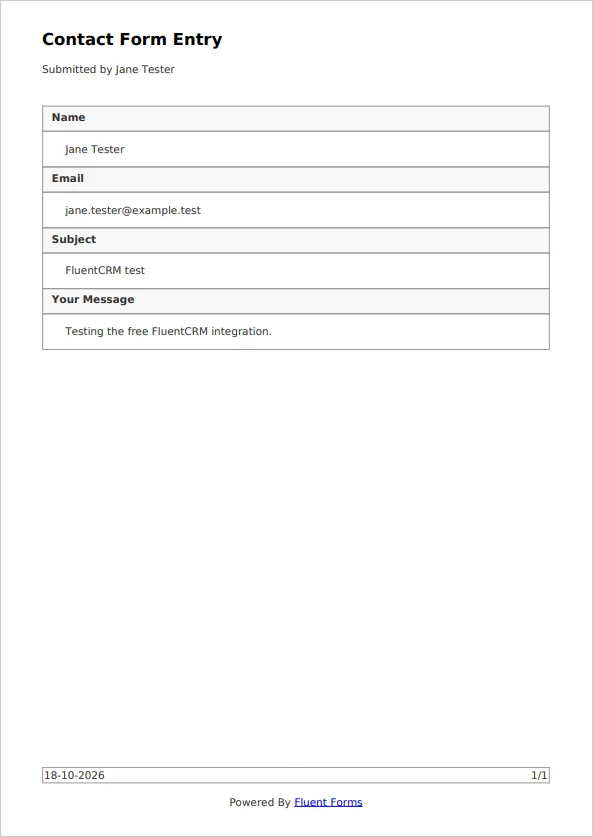
The PDF of our test entry from the free General template. The footer date is in UTC, our test site’s time zone.
Email notifications offer a free “PDF Attachments” checkbox to attach the PDF, with a note to use SMTP so the email does not land in spam. We did not save or send one.
Free or Pro. Templates, entry PDFs and the PDF attachment option are free. Conditional content in the PDF, attaching other files from the Media Library and removing the “Powered By Fluent Forms” line need Pro. The PDF plugin adds that line whenever Pro is not active.
The AI form builder
“Create Using AI” on the new form screen opens a box where you describe the form, with suggestion buttons such as Job Application and an optional box for questions to include. It asked for no account, key or upgrade. We typed “A simple job application form” and clicked Create. Twelve seconds later the editor opened with a “Simple Job Application Form”: first and last name, email and phone side by side, a “Position Applied For” dropdown, an optional LinkedIn or portfolio link with help text, an optional cover letter box and a submit button.
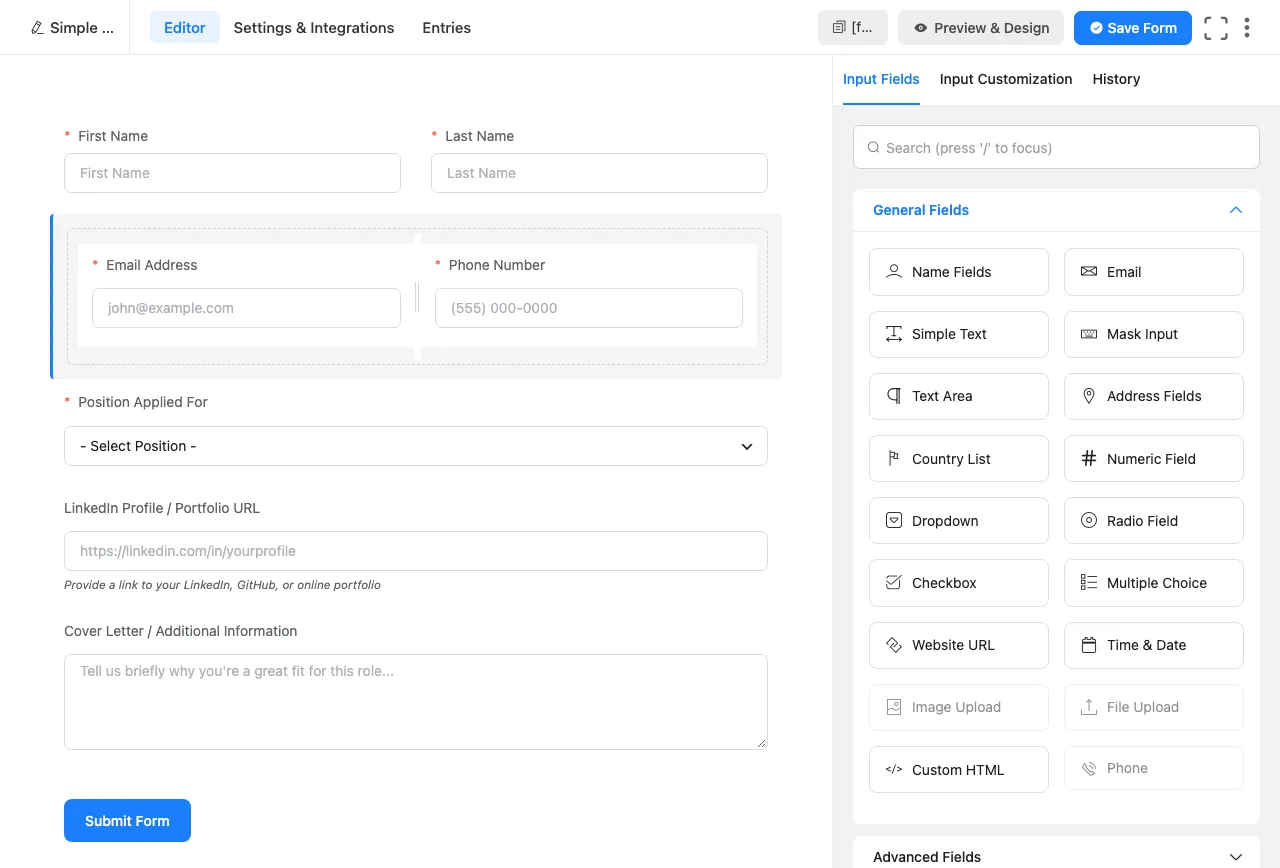
The form the free AI builder made from “A simple job application form”. File Upload and Phone are greyed out in the panel on the right.
It is a decent first draft with two limits. The job titles in the dropdown are made-up examples you need to replace. And there is no resume upload, because the free version leaves out Pro fields like File Upload and Phone; the phone box is a free text field with a phone number pattern instead. Also note where your words go. According to the plugin’s code, your site sends the description, the site address and the site title to Fluent’s own service at ai.fluentforms.com, and by default asks the service to save usage data. The WordPress.org listing discloses this under “Data & Privacy”, but the dialog itself does not. We read this in the code rather than watching the traffic.
Free or Pro. Free, with no account or key. It needs an internet connection.
Speed: What Fluent Forms Loads on Your Pages
Fluent Forms only loads its files on pages that contain a form. On our test site’s About page, it added nothing. On form pages, this is what loaded:
The simple contact form added about 110 KB of plugin files, or 29 KB compressed. Conditional logic added another script and raised that to 201 KB, or 57 KB compressed. The quote form with a date picker and input mask loaded about 184 KB of plugin files.
The WordPress.org listing says a standard form loads “less than 30KB of combined CSS and JS”. That held for the simple form (about 29 KB compressed) but not once conditional logic added a second script. Every form page also loaded WordPress’s copy of jQuery and jQuery Migrate (about 35 KB compressed), which our theme did not load on pages without a form. So Fluent Forms is light, but not jQuery-free. For a contact page, this is a small cost.
What Fluent Forms Pro Unlocks
We counted every lock in the free plugin on version 6.2.15, then checked the newly tested areas on 6.2.16:
- Fields: 21 of the 56 field and layout buttons in the builder were Pro-only, including Phone, File Upload, Image Upload, Form Step (multi-step), Save & Resume, Repeat Field, Ratings, Net Promoter Score, Quiz Score, Rich Text, Coupon and the Accordion/Tab container.
- Integrations: 42 of 44 modules said “Upgrade To Pro” on both versions. Mailchimp and Slack were the only free ones. Zapier, webhooks, Google Sheets, HubSpot, ActiveCampaign, PayPal, user registration and post creation are all Pro. A “Stripe” module card is locked too, but that is the Pro Stripe add-on; free Stripe payments are set up under Payment Settings. Installing the free FluentCRM plugin added its own module, already switched on.
- Form settings: conditional confirmations (different thank-you messages per answer), advanced form validation, survey results, compliance settings and an extra CSS class field were locked. Blocking by IP address or country was not in the free restriction panel.
- Conversational forms: every design setting and removing the “Powered by Fluent Forms” badge.
- Reports: completion rates for partial entries, submissions by country, timeline patterns and per-form submission analysis.
- Tools: importing entries.
- Global settings: integration failure alerts, the geolocation provider, file upload location and custom URL slugs for landing pages were locked.
- Templates: 41 of 71 were Pro.
- Payments: the Stripe platform fee disappears, and PayPal and coupons become available.
The upgrade prompts are steady but polite. Every Fluent Forms screen has a blue “Upgrade to Pro” button, each locked feature opens a pop-up when clicked, and the Integrations page has a “You are using the free version” banner. Later in our session, a request to leave a WordPress.org review appeared on some Fluent Forms screens, and it did again on 6.2.16. After we installed Contact Form 7 and WPForms Lite, a notice also offered to migrate their forms. The main WordPress dashboard had no notices; the only promotion there was a one-line FluentCRM install link inside the Fluent Forms dashboard widget.
Fluent Forms Pricing
Prices below are from the official pricing page as of October 2026, in US dollars. Every plan includes the same features; only the number of sites changes.
A one-site license costs $79 a year or $349 once. Five sites cost $159 a year or $599 once, while unlimited sites cost $299 a year or $899 once.
- First-year discount. When we checked, a coupon took 20% off: $63, $127 and $239 for the first year of the yearly plans, and $279, $479 and $719 for lifetime. The pricing page says the discount applies to the first year, so plan on renewing at the regular price.
- Yearly vs lifetime. A yearly license includes one year of updates and support and then renews. A lifetime license is one payment for updates and support for as long as you use the plugin. At the regular prices, the single-site lifetime license costs about as much as four and a half years of the yearly plan. The unlimited lifetime license can also be paid in eight monthly payments of $96.
- Refunds. The vendor offers a refund if you ask within 14 days of purchase. Gravity Forms gives 30 days.
For one site that needs conditional logic, Fluent Forms costs nothing, while WPForms starts at $49.50 for the first year and then $99/year, and Gravity Forms costs $59/year. If you need file uploads, Gravity Forms Basic ($59/year) is slightly cheaper than Fluent Forms Pro ($63 the first year, then $79/year), but Fluent Forms Pro includes fee-free Stripe and its full integration list, which Gravity Forms keeps for its $159 Pro license.
Fluent Forms Security History
Fluent Forms has a long public list of security fixes. Part of that reflects its size, since popular plugins attract more researchers, but it is a reason to keep it updated. When we checked on October 4, 2026, the Wordfence vulnerability database listed 41 Fluent Forms issues from 2021 to August 2026, all marked as patched. Seventeen of them were published in 2026, compared with four in 2025 and 15 in 2024. Patchstack’s database listed 43 patched issues; its two newest were published on October 2, 2026, and were fixed in version 6.2.15.
The most serious 2026 entries, with the version that fixed each:
The security history includes shortcode execution fixed in 6.1.12, authorization bypasses fixed in 6.2.0 and 6.2.1, and stored cross-site scripting fixed in 6.2.8 and 6.2.12. Patchstack also recorded cross-site scripting and broken access control fixed in 6.2.15. The authorization flaws were rated high severity; the shortcode issue was rated medium. Keep the plugin updated rather than treating an old installed copy as safe.
“Cross-site scripting” means an attacker could plant code that runs in someone else’s browser, and “unauthenticated” means no login was needed. The WordPress.org changelog shows the fixes landing in regular releases, along with many “hardens” notes. Version 6.2.15, for example, fixed payment forms that could accept a zero, negative or unlisted amount and skip payment.
The pattern held in 6.2.16. On our test site, the “View details” changelog for 6.2.16 (October 16, 2026) had 13 lines, and five were security or permission fixes, such as “Stops form import from granting a higher user role than the importer has” and “Restricts [ff_entry] to entry viewers and the submitter” ([ff_entry] is a shortcode that shows a form entry on a page). The Plugins screen showed an “Enable auto-updates” link next to Fluent Forms, which means automatic updates were off, as they are for every plugin on a new site. One click turned them on.
What to do: turn on automatic updates for Fluent Forms, or update within a few days of each release. If your forms take payments, test updates on a staging site first. Outdated plugins are a common way sites end up with problems like a spam link injection.
Fluent Forms vs WPForms vs Gravity Forms
WPForms and Gravity Forms are the two plugins people compare Fluent Forms with most. We checked Fluent Forms and WPForms Lite directly. Gravity Forms details come from its official pages, since it has no free version.
Fluent Forms is the strongest free choice here for conditional logic and saved entries. WPForms reserves both for paid plans, and Gravity Forms has no free edition. File uploads require a paid plan in all three. Free Stripe payments carry an extra platform fee in Fluent Forms and WPForms; Gravity Forms needs its $159 Pro license.
At the prices checked, Fluent Forms started at $63 for the first year and renewed at $79, against $49.50 then $99 for WPForms and $59 a year for Gravity Forms. Fluent Forms was also the only one offering a lifetime license, from $349. Gravity Forms had the longer refund window, thirty days rather than fourteen.
Prices and versions are as of October 2026.
Fluent Forms vs WPForms
WPForms has the bigger template library and a more guided builder, which suits beginners. But its free version neither hides conditional fields nor keeps entries, so a lost notification email means a lost lead. If you already use WPForms Lite, the free Fluent Forms migrator brought our test form over in one click, with its notification and thank-you message. Choose WPForms if you want the most hand-holding and plan to pay anyway, and Fluent Forms if you want the most from a free plugin or a cheaper long-term license.
Fluent Forms vs Gravity Forms
Gravity Forms has a longer track record, a larger market of third-party add-ons (front-end entry tables, approval workflows and more), a 30-day refund window and a slightly lower single-site price. Fluent Forms gives you a free tier that covers simple smart forms, a more modern builder, fee-free Stripe on every Pro plan and the option to pay once. Our list of Gravity Forms alternatives covers other options.
Which one should you pick?
- Conditional contact or quote form, no budget: Fluent Forms free.
- Payments on a tight budget: Fluent Forms free (a 1.9% or 2.5% fee, see above) or WPForms Lite (3% fee).
- Beginners who want the most templates: WPForms.
- Agencies that want a one-time cost: Fluent Forms Unlimited lifetime.
- Developers who depend on third-party add-ons: Gravity Forms.
For more options, see our guide to the best WordPress form plugins. The vendor says Fluent Forms has deep integrations with Elementor and Oxygen, and it also works in the block editor, so it fits most setups in our page builder comparison.