Oxygen 6 Review: Built for People Who Know CSS
Oxygen 6 is good value for designers who know HTML and CSS and want detailed control across many sites. Its pages were lean in our tests, and the lifetime price is attractive. It asks more of you than most builders: there are few ready-made elements, no built-in design library and extra work to build a store.
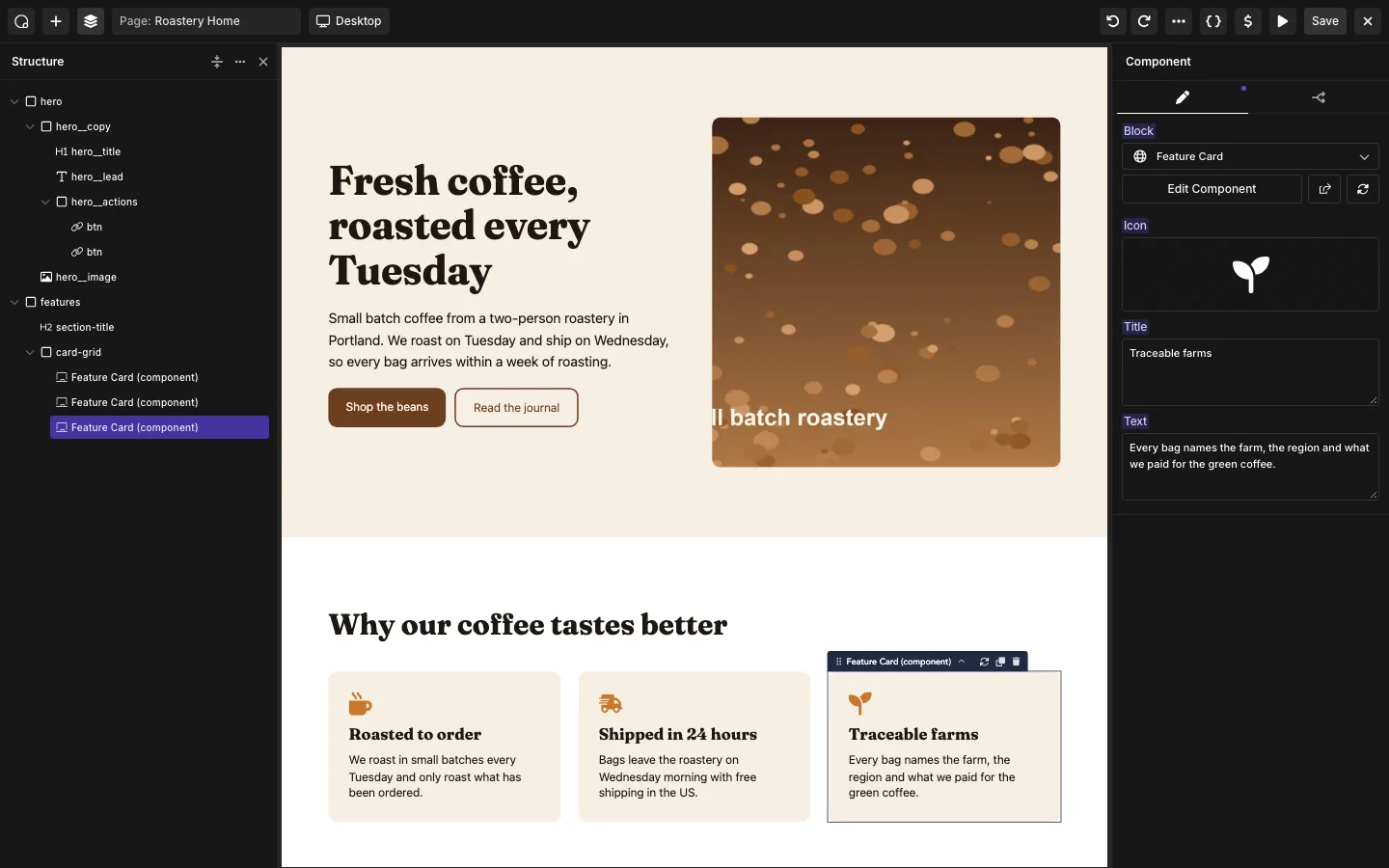
Our test landing page in the Oxygen editor, with one of three Feature Card component instances selected.
What Is Oxygen Builder?
Oxygen is a visual site builder for WordPress made by Soflyy. It launched in mid-2016 at $99 for a lifetime license, and it is still sold as a lifetime license today. The vendor says more than 30,000 customers have built over 100,000 websites with it.
Like Bricks and Breakdance, Oxygen is “themeless”. You design the header, footer, blog templates and every page in Oxygen, and your WordPress theme stops mattering. On our test installs, activating the plugin also switched the site to Oxygen Zero, a blank theme that exists only so WordPress has something to load.
What sets Oxygen apart is who it is for. Soflyy says it plainly on its own blog: Oxygen “is not suitable for those who don’t know HTML and CSS.” The controls map one-to-one to CSS properties, and you style elements through classes, the way a developer would in a code editor.
Oxygen 6: The Rebuild on Breakdance’s Engine
Soflyy rebuilt Oxygen 6 from scratch. The older builder is now called Oxygen Classic, and the two are separate products.
The big change is under the hood. Oxygen 6 and Breakdance now run on one shared builder engine. In February 2025, Soflyy said about 80 percent of the code was already shared. We compared the Oxygen 6 and Breakdance 3.0 RC 2 plugin files: they have the same layout and the same mode switch, set to “oxygen” in one and “breakdance” in the other. They are on different engine versions, though, and Oxygen mode switches off a lot of Breakdance. It turns off Breakdance’s global settings, design presets, WooCommerce integration, AI features and page view counting, and hides Breakdance’s own basic elements. In Breakdance mode, 3.0 RC 2 registers 192 elements by our count, while Oxygen offers 21 of its own.
What Oxygen 6 added over Classic, according to the vendor:
- CSS variables for colors, spacing and type, defined once and reused.
- A selectors system with nested selectors, so styles live on classes, not on single elements.
- Components, reusable blocks you update once and see change everywhere.
- Interactions and animations, including scroll-driven effects, without writing JavaScript.
- Element Studio, for building your own custom elements with HTML, CSS and JavaScript.
- A new interface, with keyboard shortcuts and a Structure panel.
Hands-On: Building a Site in Oxygen 6
Oxygen’s editor was responsive, but its small set of basic elements expects you to build your own designs. Headings are Text elements with a chosen HTML tag, and buttons are styled links.
Classes, variables and components
Styles live on CSS classes, with variables for shared colors, spacing, fonts and other values. This suits someone comfortable with CSS and makes consistent changes easier across a site.
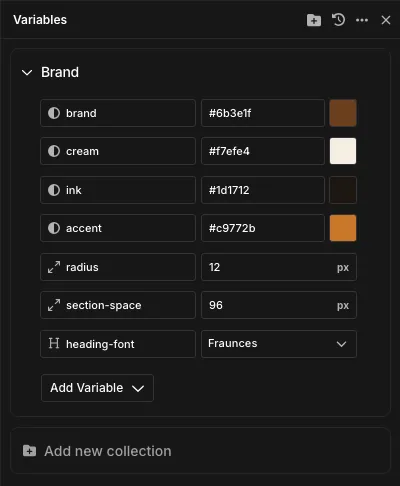
The variables behind our test site.
Reusable components also worked. We changed the base of our Feature Card and every instance updated on the live page, although the editor needed a reload to show all copies correctly.
Templates and dynamic content
Headers, footers and content templates use locations, conditions and priorities. Our site build exposed a few setup traps:
- There are no fallback layouts, and an empty Pages template leaves pages blank. Add a Template Content Area to display their content.
- The blog posts page needed Post Archives rather than All Archives. Its archive title still displayed the generic “Archives” label.
- A taxonomy template offered no term picker, so targeting one category required a custom condition.
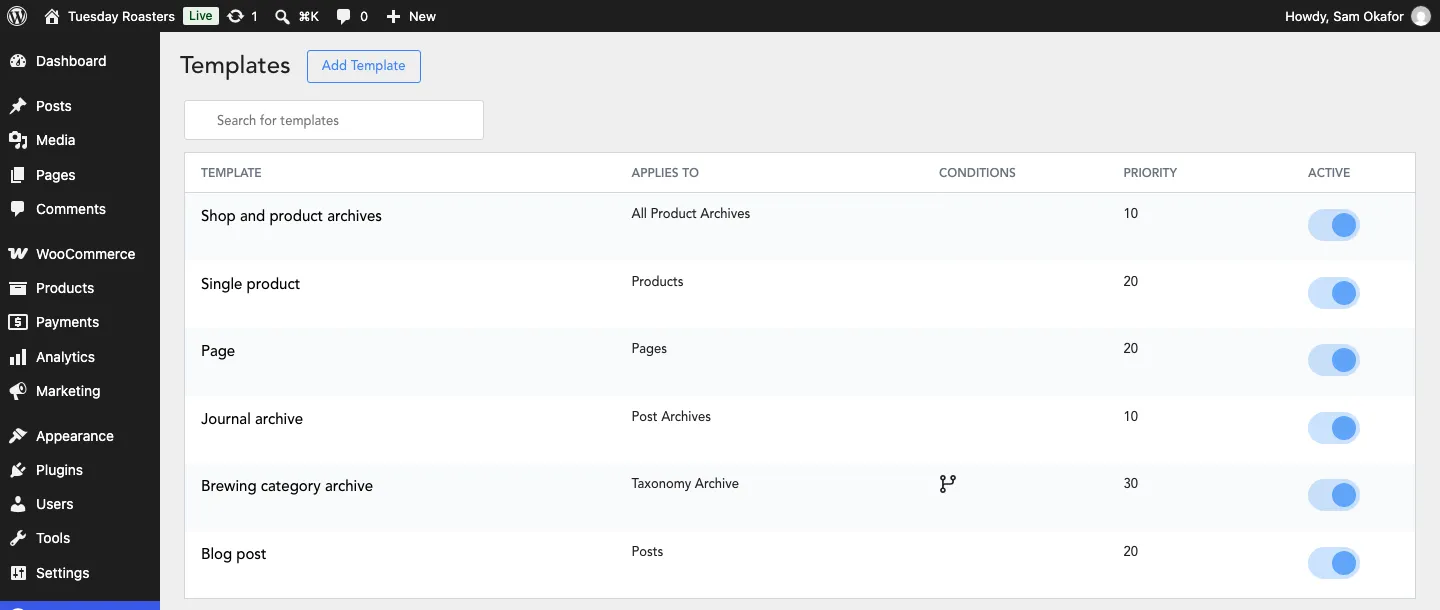
Our templates with their locations and priorities.
Dynamic content handled posts, terms, images and authors, but had no WooCommerce fields. Post Date defaulted to the modified date, and Post Terms printed a shortcode until a taxonomy was selected.
The Post Loop Builder required an existing component and custom CSS for our column layout. Pagination and excluding the current post worked.
Rough edges
A plain number entered over a size variable produced invalid CSS until we supplied a unit. “Hidden” preserved an element’s space, and an inherited color sometimes appeared as a raw variable identifier. Images also lazy-loaded by default, including the hero; turn that off for prominent images near the top.
Our sticky header worked, but loaded an outside animation library. We inspected the interaction controls without testing their full behavior.
WooCommerce Without the Add-On
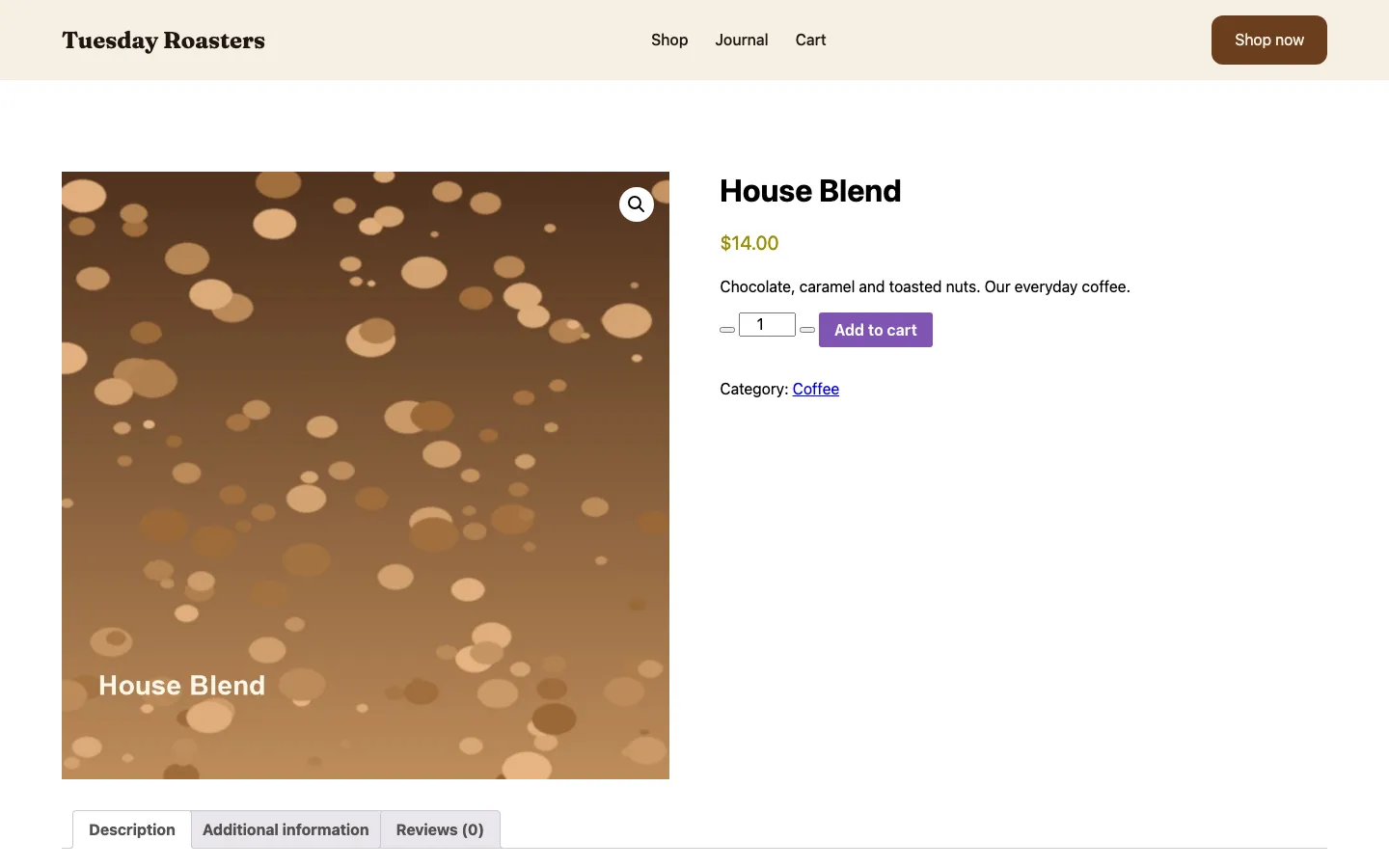
A product page in Oxygen without the Breakdance WooCommerce add-on, showing WooCommerce’s default styling.
Oxygen 6 on its own has no WooCommerce elements and no WooCommerce dynamic data. Breakdance’s WooCommerce code ships inside the Oxygen plugin, but Oxygen mode switches it off. Soflyy sells WooCommerce design for Oxygen as the Breakdance WooCommerce for Oxygen add-on, which we did not have. Oxygen does offer Product and product archive template locations.
To show products anyway, we put a PHP Code element with <?php woocommerce_content(); ?> in our product and shop templates. That worked, but the pages used WooCommerce’s default markup and styles, which clashed with our design: blue product links, grey and purple buttons, unstyled quantity buttons and an extra “Shop” heading under ours. Restyling those means writing CSS against WooCommerce’s own classes.
The cart and checkout were simpler. They are WooCommerce block pages, and our Page template’s Template Content Area displayed them. A logged-out Cash on Delivery test order went through: order 72, $14.00, processing, with free shipping. Two more things to know: WooCommerce’s 9 files (32.5 KB) loaded on every page, the landing page included, and the PHP Code element runs its code on every page view, so anyone you give Full Access to the builder can run PHP on your site (from the code).
If you build stores, budget for the Breakdance WooCommerce add-on or pick Breakdance itself, which has full WooCommerce templates. Our Breakdance review covers its shop, product, cart and checkout builders and a test order.
Design Library: Bring Your Own Designs
Oxygen’s Design Library starts empty. In Oxygen mode it fetches its official list of design sets from oxygenbuilder.com, and on October 17, 2026 that address returned a “not found” error, so there were no official sets to import. Breakdance’s own list, 37 complete websites plus UI kits and section sets, loaded normally at the same moment.
You can add design sets by URL, and you can turn your own site into a design set. Agencies can use that to reuse their own starter sites. We switched it on and added our site and Breakdance’s “Samba” kit as custom sets. Our site appeared in the admin Design Library, and both appeared in the builder’s library.
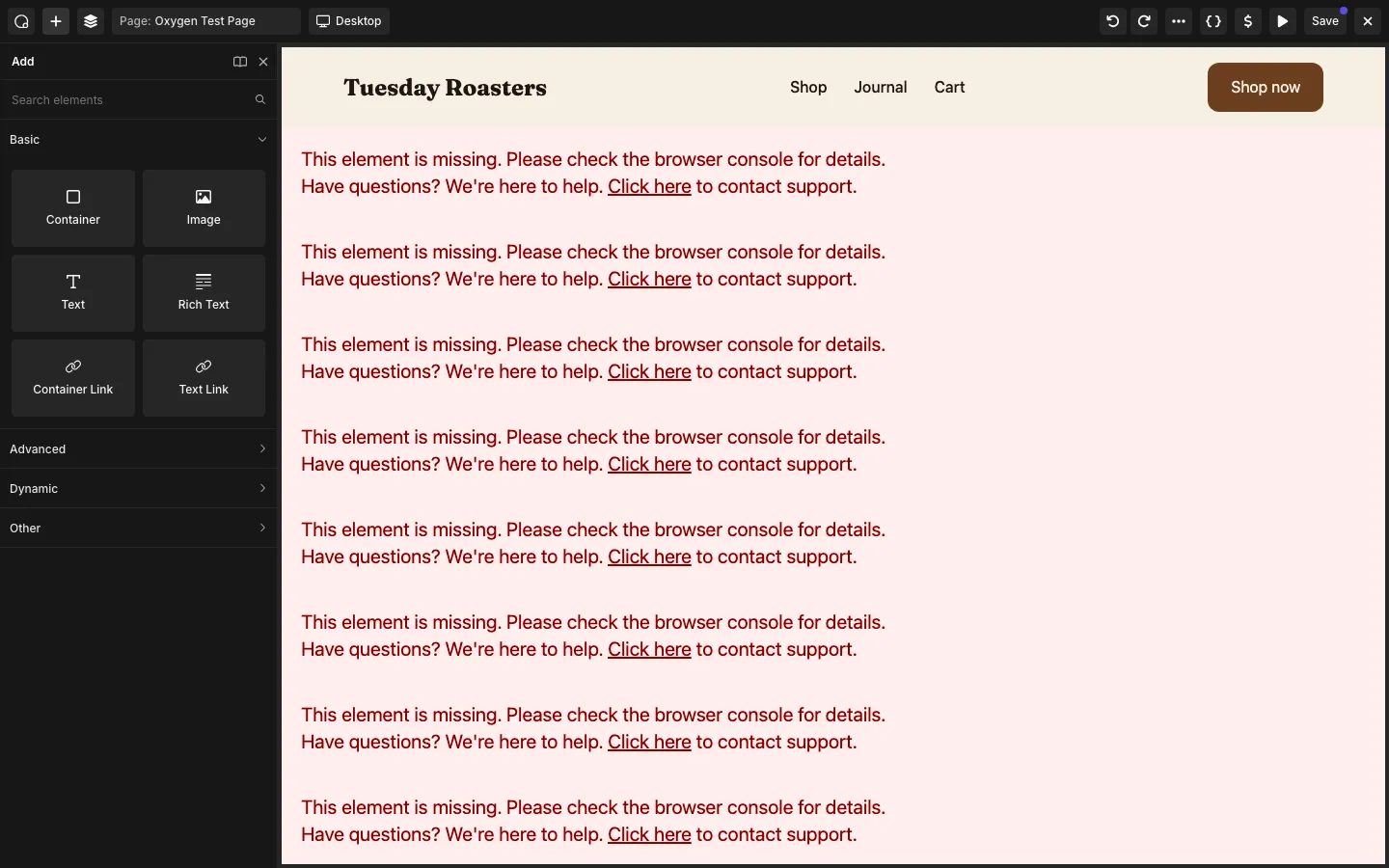
A page imported from Breakdance’s Samba kit into Oxygen without the Breakdance Elements add-on. We did not save it.
Breakdance designs do not work in plain Oxygen. Importing one Samba page gave us 28 “This element is missing” boxes, because it uses Breakdance elements that Oxygen’s core does not have. One more catch from reading the code: Oxygen drops the port number from a custom design set URL, so a set hosted on a non-standard port, such as a local test site, fails to load.
Page Weight: Local Lab Test
We measured our finished Oxygen 6 landing page (hero, three component cards, a three-post loop, a call-to-action band, sticky header and footer) with Playwright’s Chromium: logged out, cache off, throttled to 1.6 Mbps and 150 ms latency, median of three runs, on a 1,440 px desktop window and a 390 px phone screen. This is a local lab test, not field data from real visitors.
Our finished landing page transferred about 445 KB on desktop and 365 KB on the phone profile. With the default settings, the main content appeared after about 2.6 and 2.3 seconds respectively. Turning off lazy loading on the hero image improved those times to about 1.6 seconds without changing page weight.
LCP (Largest Contentful Paint) is when the biggest item on screen finished loading. Turning off Lazy Load on the hero image did not change the page size.
Oxygen’s own files were tiny: seven CSS files at 5.7 KB and two JavaScript files at 4.8 KB over the network, about 10 KB in all. Most of the weight came from elsewhere:
- Images, about 187 KB on desktop and 107 KB on the phone.
- One Google font, 118.6 KB. Oxygen requested every axis of the Fraunces variable font. We saw no setting to host Google Fonts locally.
- GSAP from unpkg.com, 44.9 KB. The Sticky option loads the GSAP animation library and its ScrollTrigger plugin from an outside site by default.
- WordPress and WooCommerce, 40.7 KB for jQuery, jQuery Migrate and the emoji script, and 32.5 KB for WooCommerce on a page with no shop content.
The lazy-loaded hero was the biggest speed problem. Turning Lazy Load off on that one image cut desktop LCP from 2.64 to 1.56 seconds.
We have no like-for-like Breakdance number, because we did not build the same page in both. For a rough sense of scale, Breakdance’s own files on a WooCommerce shop page were 48.9 KB, most of it its store stylesheet.
A simpler page in the preview build
We also measured a bare hero section in the free preview, with no header, footer or shop. It weighed 56 KB across five requests, falling to 26 KB after removing WordPress’s block styles and emoji script. These are uncompressed sizes from a local server.
The Twenty Twenty-Five comparison was 188 KB, but included navigation, a header, a footer and a web font that the Oxygen page did not have. It provides context, rather than a like-for-like speed comparison.
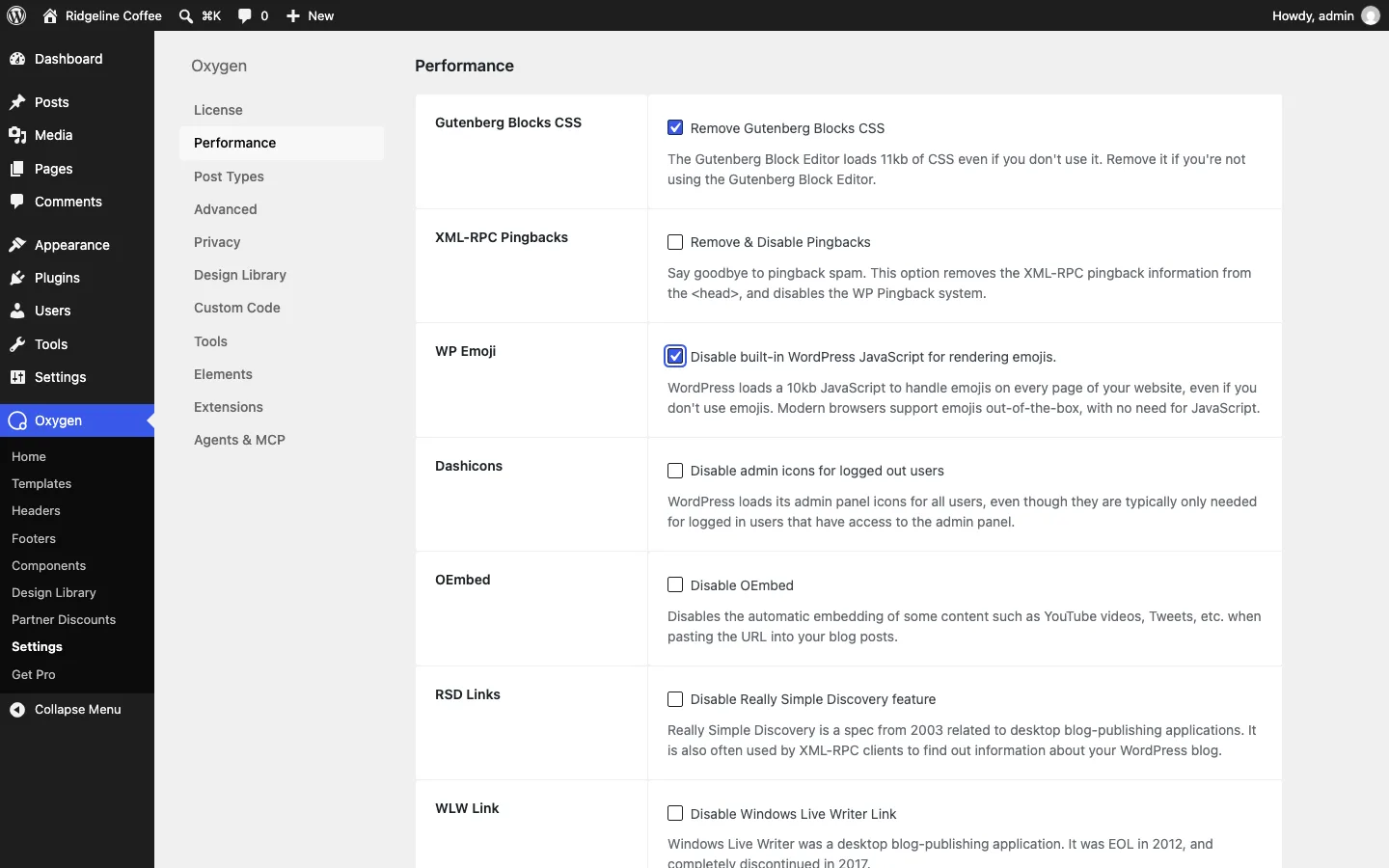
The Performance tab in Oxygen’s settings, with two options switched on for our second measurement.
That is what the Performance tab is for. It can strip WordPress extras you may not need, such as block editor CSS, the emoji script, pingbacks, admin icons for visitors and oEmbed. All of its options were off by default in the stable build too. Only remove the block CSS if you do not use the block editor for posts.
What a License Key Adds, and What Happened With Ours
In the stable Oxygen 6 build, a license key adds no features. The plugin’s code forces Pro mode whenever it runs as Oxygen, so with no key at all our site had every builder feature we tried, no badge on the front end and no upgrade prompts anywhere in the admin or the builder. What the key does is switch on Oxygen’s updater: update checks in the WordPress dashboard and a “Receive beta version updates” option. Without a key, Oxygen does not check for updates at all, so a future fix would never show up in your dashboard. That matters, because 6.1.2 was a security fix, so a valid license is still worth having on a live site.
The three Breakdance add-ons for Oxygen work differently. According to the code, each one registers its own license key field and store product, and its updater only runs when that key is set. We could not check whether the add-ons also need a key for their features, because we did not have them.
Our own key did not work. We entered it through Oxygen’s own license function. Soflyy’s license server answered that the key did not match any of the four products Oxygen 6 checks for, so Oxygen never activated it, and the License screen showed “Unknown” for the product, validity and expiry. If you buy Oxygen and see the same “Unknown” result, check in your account which product your key belongs to.
The License screen only shows the product, validity, activation status and expiry date. It does not show a plan name or a site count.
Is There a Free Version of Oxygen?
Yes, as of October 2026, but it is the 6.2 release candidate, with a catch. The download from the “Try Oxygen” page installs 6.2 RC 1 without a license key. On our October 4 test install, a site with no key showed:
- A “Built with Oxygen” badge in the lower right corner of every page, for every visitor, linking to oxygenbuilder.com.
- A “Get Pro” page in the Oxygen menu. It says going Pro removes the badge today.
- Zero admin notices. We saw no upgrade banners on the dashboard, the plugins screen or the pages list.
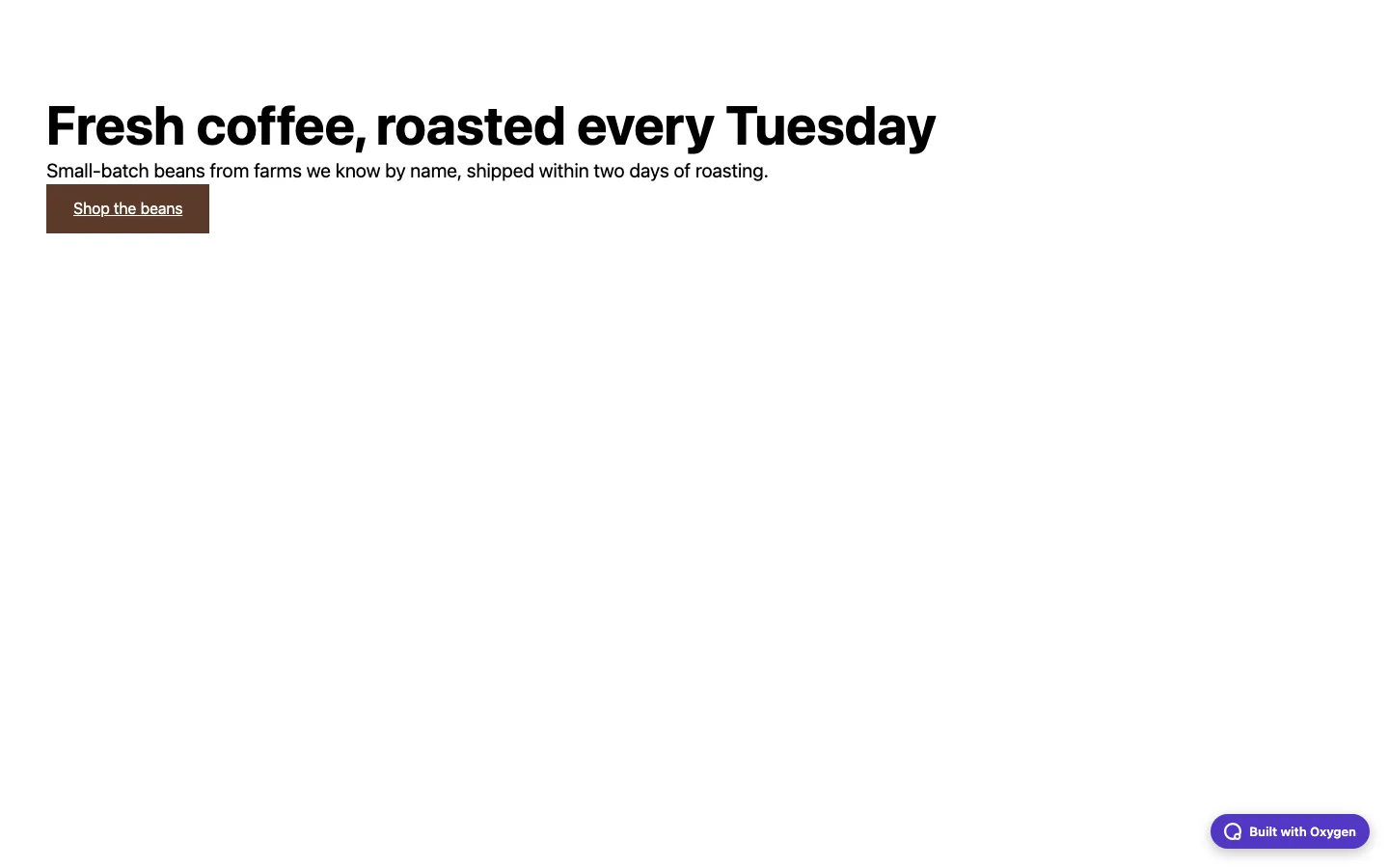
Our test page as a logged-out visitor sees it, using the free release candidate without a license key.
The bigger catch is in the small print on the Get Pro page: every feature is free “only during the beta”. The vendor says the final split between Free and Pro will be decided before 6.2 leaves beta, and some features that are free today will need Pro. That was still the wording on the RC 1 Get Pro page on October 4, although 6.2 had already moved from beta to release candidate.
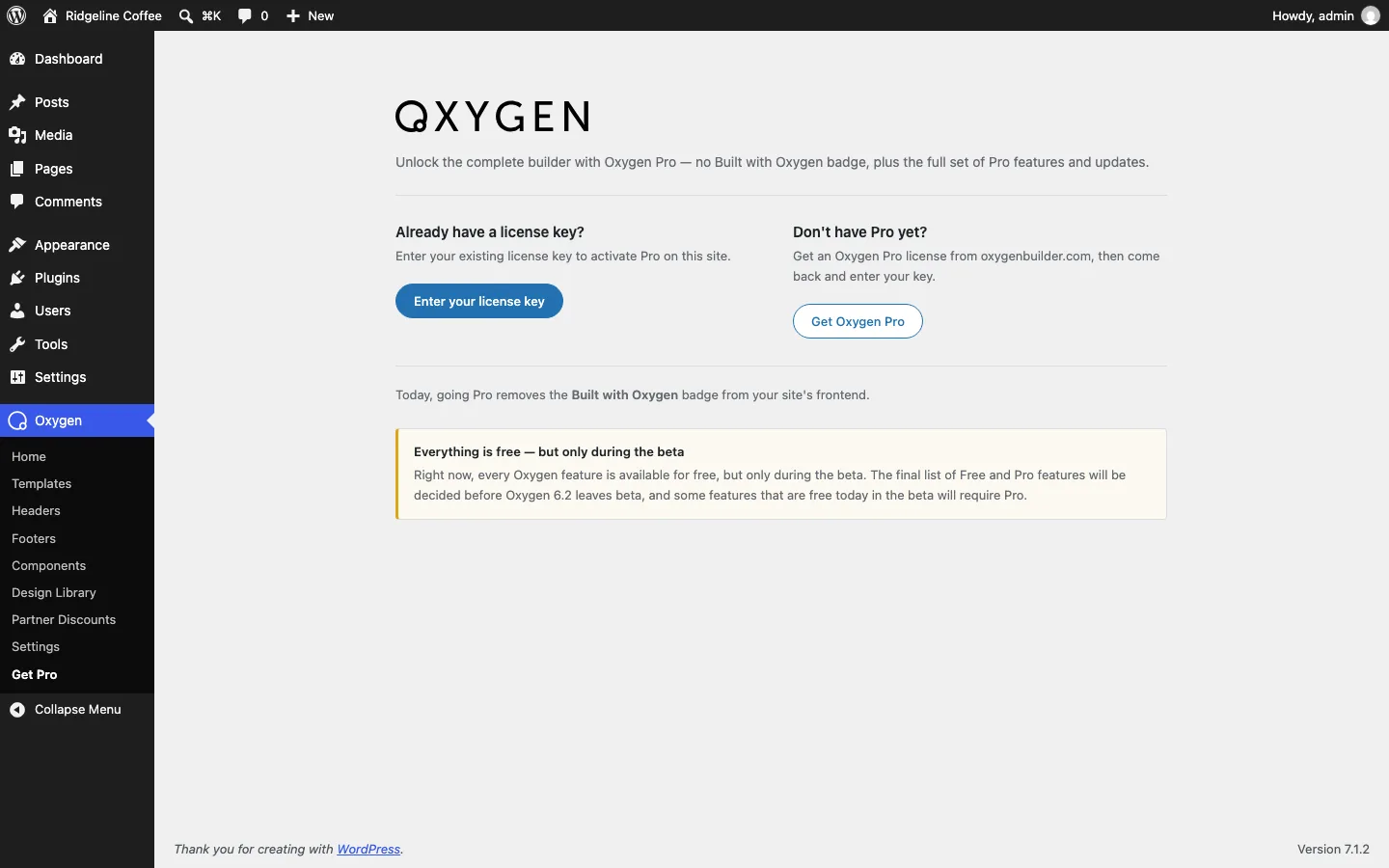
The Get Pro page on our free test install.
The stable build had none of this. It showed no badge and no Get Pro page without a key. But the stable build is the version in customer accounts, not the public download, and the vendor says the final Free and Pro split for 6.2 is still being decided. So treat the free download as a way to learn Oxygen and decide, not as a free builder for a client site. The vendor also offers a hosted demo site (through InstaWP, no signup, expires after four hours) and a one-line local install that needs Node.js and Docker.
Oxygen 6.2: Building With an AI Agent
The headline feature of 6.2 is AI, and none of it is in the stable build, where the engine’s AI features are switched off. In 6.2 you install the free Agent Connector plugin, switch on MCP access, and connect an AI agent such as Claude, Codex, Cursor, Windsurf, Cline or Gemini CLI. MCP is a standard way for AI tools to use other software. The vendor says the agent can then create pages, templates, headers, footers, classes, variables, dynamic data and interactions, and that everything it builds stays editable in the visual editor.
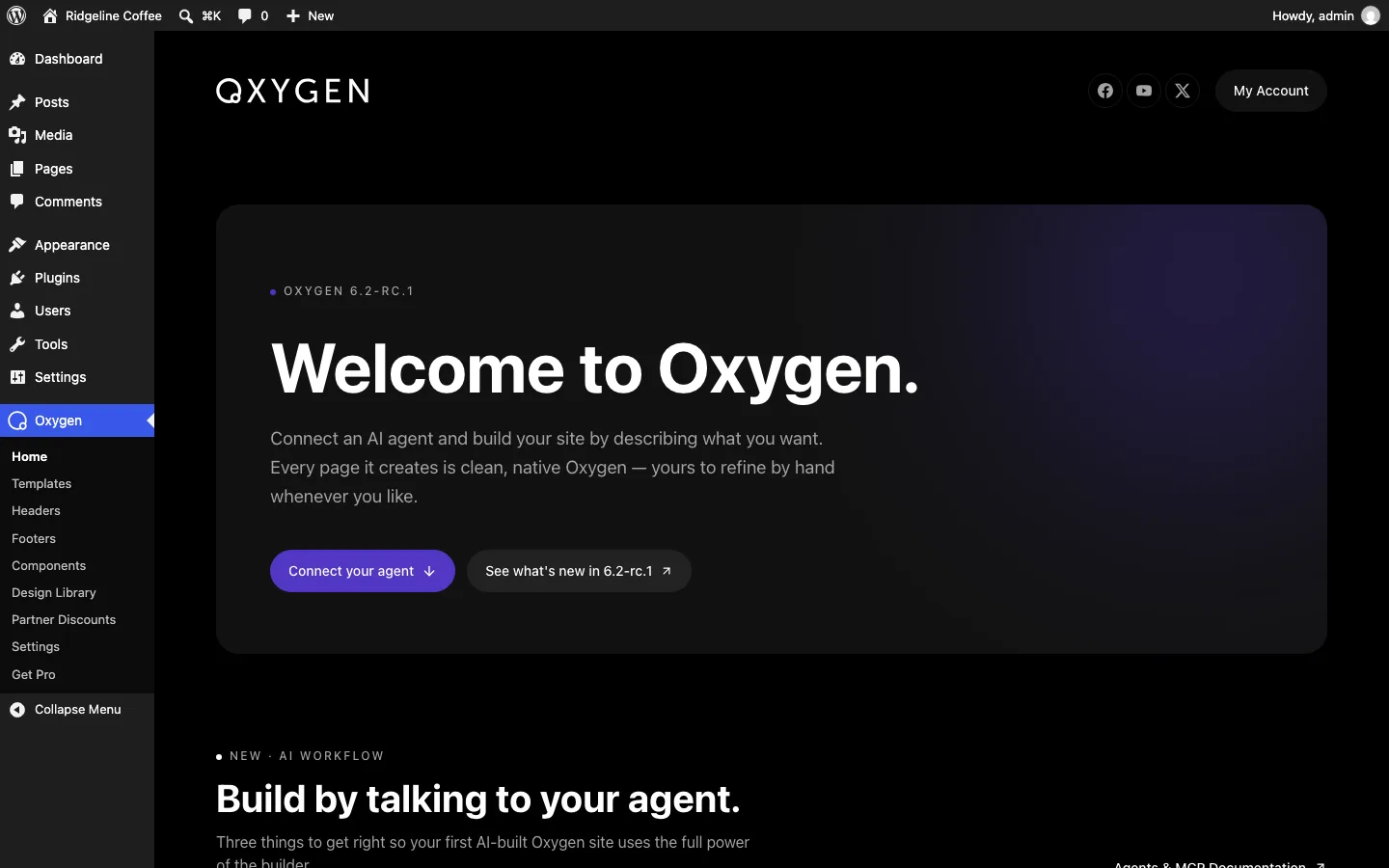
The Oxygen home screen on our test install.
Soflyy does not sell AI credits. You need your own subscription to whichever AI tool you use. We did not connect an agent, so we cannot say how well this works on a real site. On our 6.2 RC 1 install, the Agents & MCP settings tab offered three things: a one-click install of Agent Connector, a switch to allow MCP access (off by default), and a separate switch to let agents use the Design Library (also off by default).
Stable and Preview Builds
We used the stable Oxygen 6 release for the main site build. Its features worked without a key, while a key enabled updates. The preview download behaved differently: it displayed a badge and included AI connection tools absent from the stable build. Do not assume every preview feature or licensing behavior will carry into the final release.
The Breakdance Add-Ons
Breakdance sells three extensions for Oxygen: ready-made Elements, Forms and WooCommerce tools. Each extension page lists $49.99 a year for unlimited sites. Together they fill major gaps in the core builder, from menus and popups to form actions and store templates.
Soflyy’s own pages disagree about what these cost. The extensions pages list each at $49.99 a year. The February 2025 post on lifetime licenses says all three are included free with an Oxygen lifetime license, and the pricing page on October 17, 2026 promises “no add-ons to buy”. The terms page even says “Oxygen operates on a subscription model”. If you buy Oxygen for these add-ons, confirm they come with your license before the 60-day refund window closes.
The Templates page on oxygenbuilder.com shows finished sites from independent designers. The one we opened, a restaurant pack, links out to a separate seller’s site to buy it, so check each one’s price and license.
Pricing and the Lifetime License
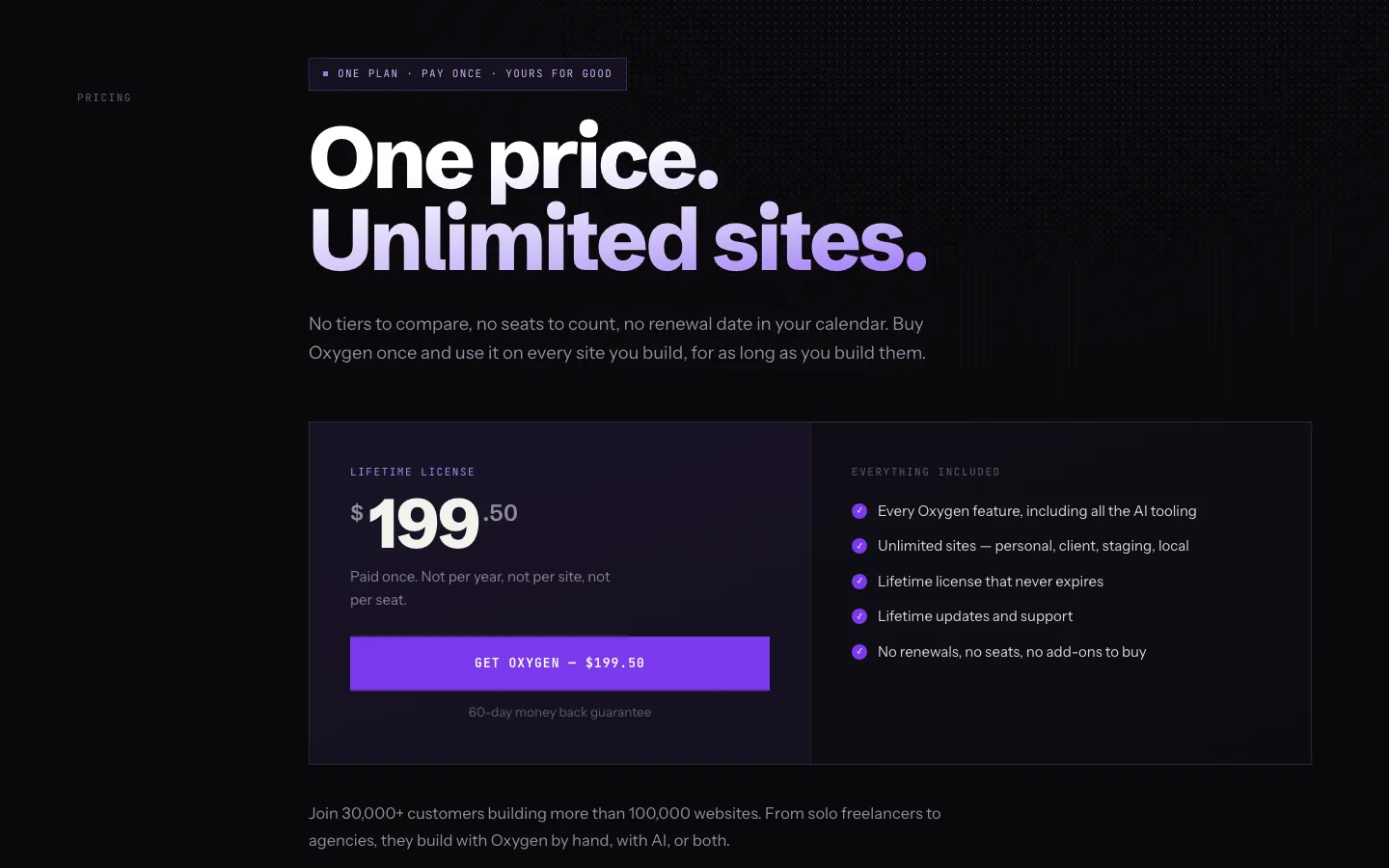
The Oxygen pricing page.
Oxygen has one plan, checked on oxygenbuilder.com on October 17, 2026: $199.50 once for unlimited sites, with lifetime updates and support and a 60-day money-back guarantee. There are no tiers, no per-site limits and no renewals. Client, staging and local sites are covered, so clients do not need their own license.
Two things to know:
- The price looks like a sale price. The buy button applies a code named “LIMITED_TIME_50OFF”, so the price may rise. The page does not say when.
- Soflyy has kept its lifetime promise so far. When it rebuilt Oxygen, every lifetime customer got Oxygen 6 at no extra cost, and the pricing page says updates are included for as long as Soflyy ships them. In 2025 the company said it was considering optional paid add-ons, such as an AI writing assistant, but would not lock core features behind them.
Here is how that compares with the two builders most buyers weigh against it, as of October 2026:
Oxygen’s $199.50 lifetime license covers unlimited sites. Breakdance Pro costs $199.99 a year for unlimited sites, while Bricks costs $249 a year or $599 once. All three listed a sixty-day refund window. Breakdance and Bricks also include design libraries that Oxygen lacked in our tests, so the cheapest license is not necessarily the cheapest finished project.
Pay-once pricing is Oxygen’s strongest argument. Over three years, Breakdance Pro for unlimited sites costs about $600 and Bricks about $750 on yearly plans, while Oxygen costs $199.50.
What Oxygen 6 Means for Oxygen 4 Users
If you run sites on Oxygen 4 (now Oxygen Classic), here is what the vendor’s pages say:
- You do not have to move. Classic is still supported, with bug fixes, security updates and compatibility updates. Version 4.9.8 shipped on September 14, 2026 to fix a WooCommerce 11 issue.
- Your lifetime license covers both. Lifetime holders got Oxygen 6 free and keep Classic.
- There is no upgrade button. Oxygen 6 is not backward compatible with Classic. Soflyy calls that “the hardest decision we’ve ever made”. Moving a Classic site to Oxygen 6 means rebuilding its designs.
- Classic has its own home. Docs and tutorials for version 4 live on a separate Classic site, and the main site now focuses on Oxygen 6.
Our advice: leave working Classic sites alone, start new projects on Oxygen 6, and move an old site only when it needs a redesign anyway. Test any move on a copy first; our guide to staging plugins for WordPress covers the easy ways to make one.
What We Could Not Test
These needed a key, a download or a setup we did not have:
- Anything that needs a valid Oxygen 6 key, such as the updates a licensed site is offered and the beta channel. Our key did not validate.
- The three Breakdance add-ons for Oxygen, so no Breakdance elements, forms or WooCommerce builder inside Oxygen. We did not have their downloads.
- The 6.2 features beyond our October 4 test, such as per-breakpoint variables, Raw Mode loops and a real AI agent build. Our main site build used the stable release, without connecting an AI tool.
- Google PageSpeed Insights or data from real visitors, which need a public site. Every speed number here is a local lab test.
- Importing a design set from one Oxygen site into another, because we built only one Oxygen 6 test site.
We ran out of test time for these:
- Building. A full interaction build such as a popup or a scroll animation, conditional classes, element conditions by role, login or dynamic data, per-copy visibility for components, a custom breakpoint, and the code editor’s extras (Emmet, linting and the WPCodeBox switch).
- Templates and data. Search and 404 templates, the Term Loop Builder, the Repeater, masonry loops, the filter bar, and ACF, Meta Box and ACPT fields.
- Site management. Revisions and history restore, Element Studio, limited builder access for clients, Components in the block editor, settings export and import, and SEO plugins.
- Speed. A WooCommerce product page, and the Performance tab options on the stable build.
Alternatives
Breakdance is the easier choice when you want ready-made headers, forms, popups and store tools. Bricks is worth comparing for a developer-oriented workflow with more conveniences than Oxygen’s basic elements. Oxygen makes most sense when you want to build the design yourself and value its lifetime license.