Ninja Forms Review: Start Free, Add What You Need
Ninja Forms is a capable free choice for contact and quote forms: it saves entries, exports them and handles calculations. Paid add-ons worked well together for a multi-step application. Costs can add up, though, and upload privacy, step validation and payment setup need attention before a form goes live.
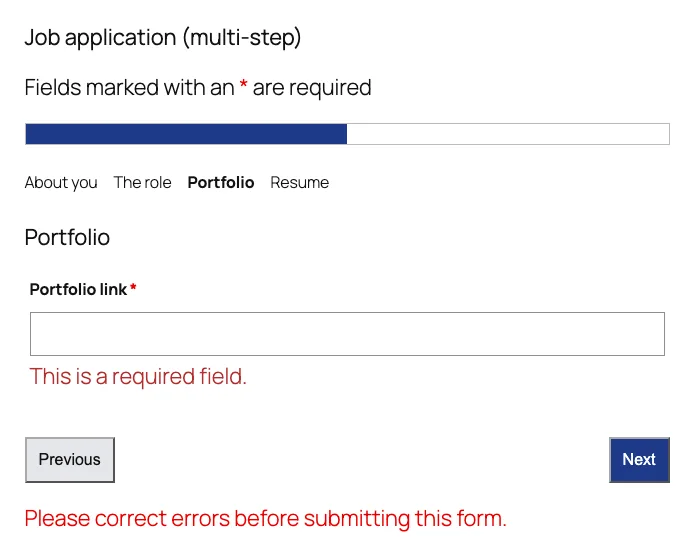
Our multi-step job application on the Portfolio step, which only designers see.
What Is Ninja Forms?
Ninja Forms is a drag-and-drop form builder for WordPress. The core plugin is free on WordPress.org and has been around since 2011. Its business model is different from most rivals: instead of a “Lite” version with a “Pro” version, you keep the same free plugin and add paid features as separate add-ons, either one at a time or in a yearly bundle. Each add-on is its own plugin that you upload and activate next to the free one.
That makes the free plugin unusually complete. What it leaves out are the features that make a form react to answers, collect files, split into steps, match your brand or take payments.
Setting Up and Building Forms
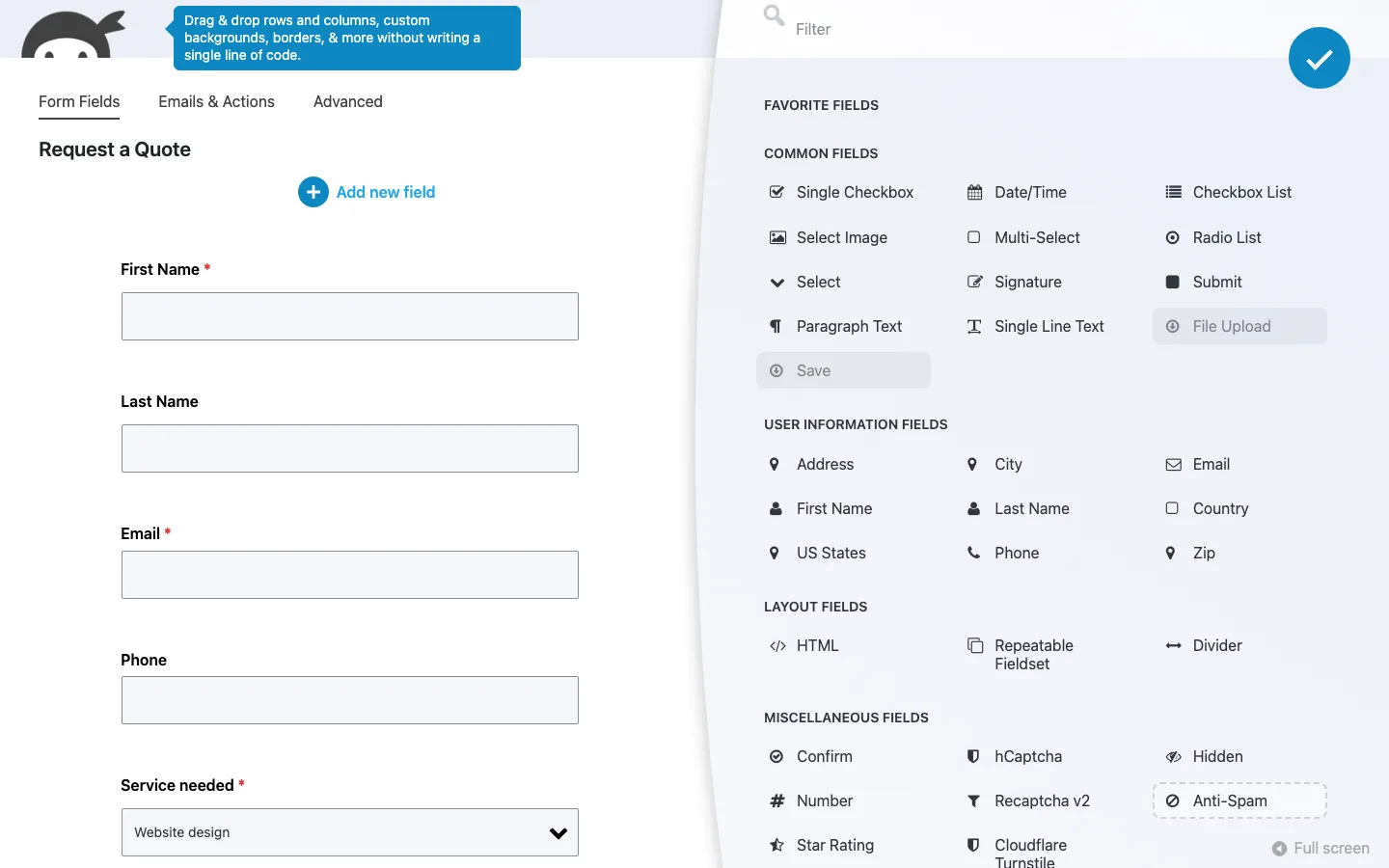
The builder in the free version, with the field panel open and File Upload and Save greyed out.
The builder is easy to learn and includes useful contact, quote and registration templates. New fields land below Submit, so arranging a long form takes extra dragging. A blank form also needs a Submit button added manually.
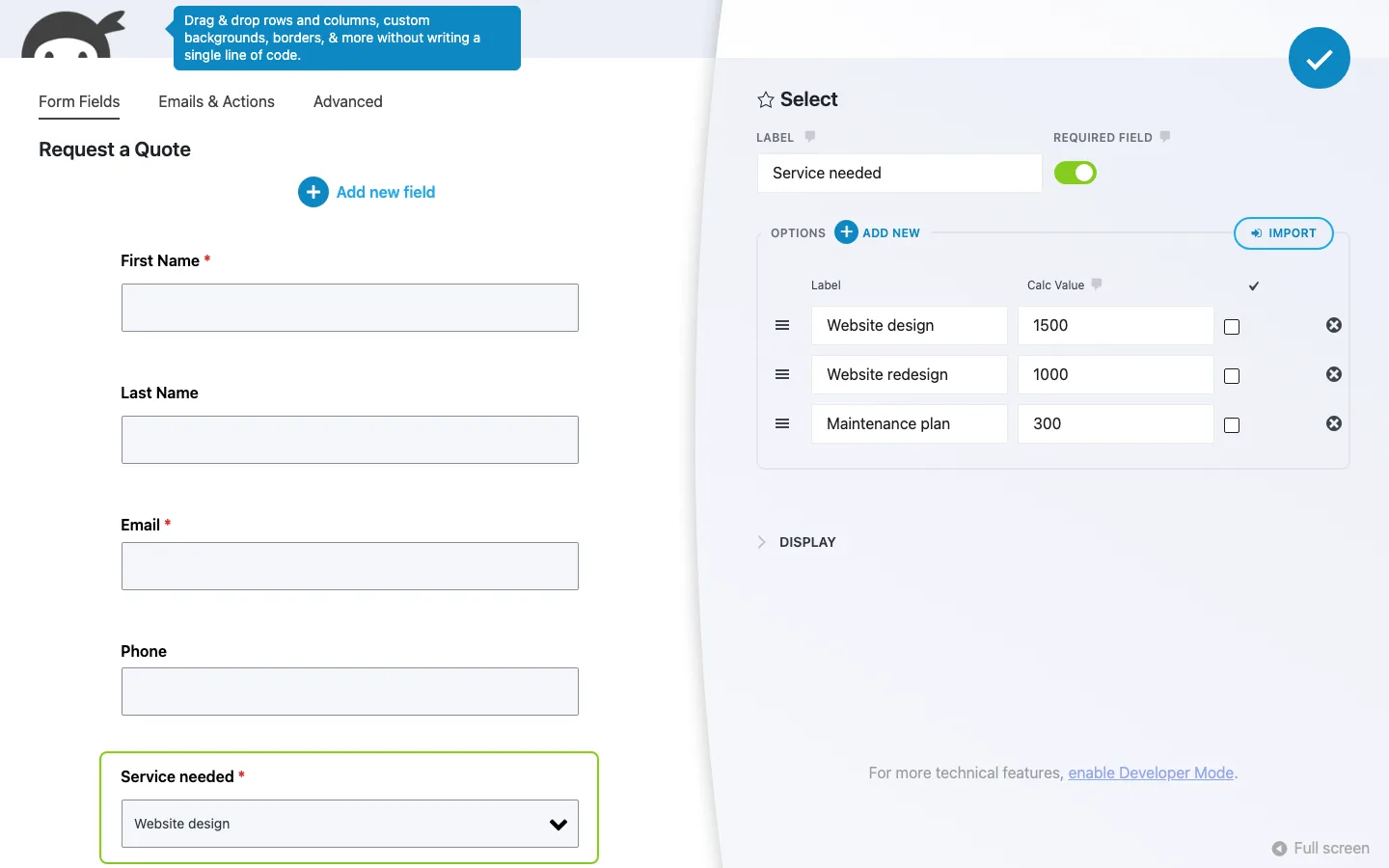
Editing a dropdown’s options and calc values in the quote form on our test install.
Free calculations were a highlight: our quote updated immediately as visitors changed services and extras. A registration form also blocked duplicate email addresses and capped entries correctly, but there was no date-based opening or closing schedule.
The optional AI builder needs your own provider connection. We did not connect one, and AI can be switched off entirely.
What the Free Version Includes, and Where It Stops
The free builder already includes most field types, calculations, saved submissions and basic email actions. Installing the six Plus add-ons adds uploads, conditional actions, multi-part forms, styling and conversational forms, alongside PayPal setup. It still leaves features such as saving progress, PDF submissions, Stripe and most service integrations behind other paid add-ons.
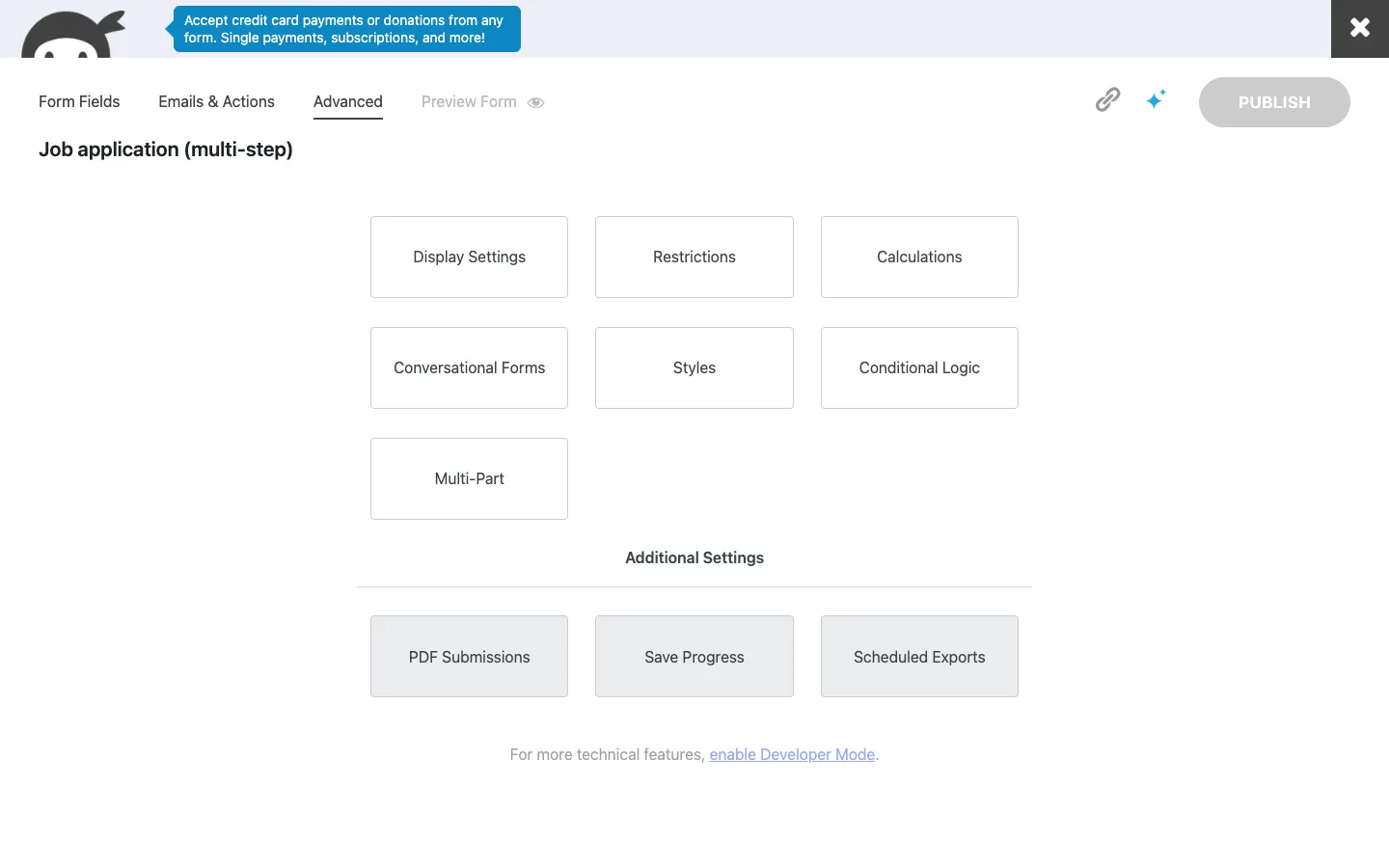
The Advanced tab with all six Plus add-ons licensed. PDF Submissions, Save Progress and Scheduled Exports stay locked, and the ad bubble at the top now promotes card payments (the Stripe add-on).
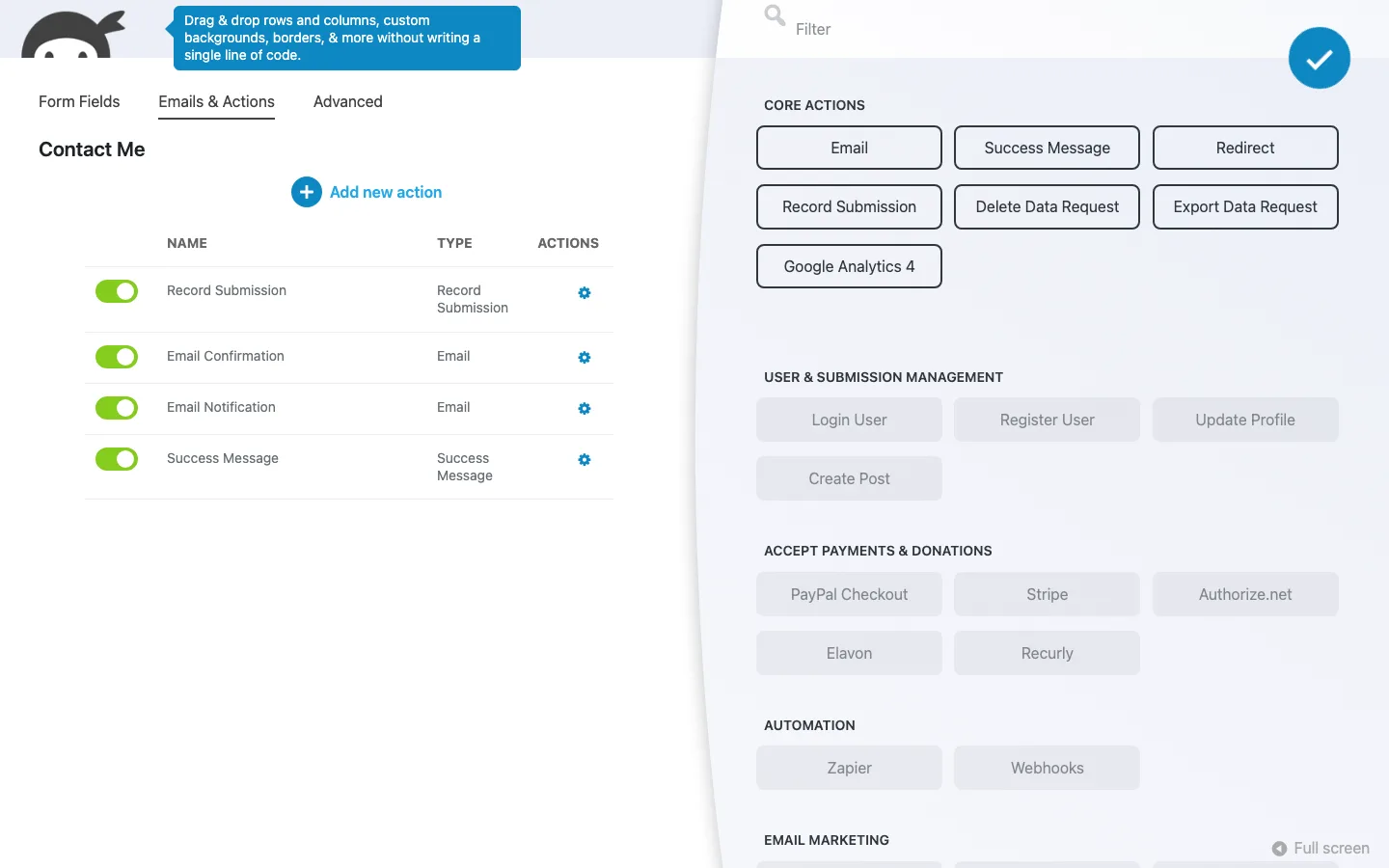
The action panel on our test install: seven core actions are free, the rest need add-ons.
The biggest gap in the free version is conditional logic. Without it, every visitor sees every field, so you cannot show an “Order number” box only to visitors who pick “Order support”. Our Gravity Forms review ran exactly that test and neither free plugin could do it. The registration form’s “steps” are also only visual: real one-page-at-a-time forms with a progress bar need the Multi Step Forms add-on, which we tested below.
File uploads are the other common blocker. Job applications, support forms with screenshots and photo contests all need the File Uploads add-on.
Styling is basic. Forms inherit your theme’s look. On Twenty Twenty-Five the inputs looked plain and small, and the form title appeared below the page title, so the same heading appeared twice. You can turn off the form title in Display Settings. Matching a brand closely means CSS or the $49 Layout & Styles add-on, which we also cover below.
Ninja Forms Plus: What We Tested
Conditional Logic, File Uploads, Multi Step Forms and Layout & Styles worked together in our application form. Columns stacked on a phone, conditional steps skipped correctly and uploaded files could be attached to notifications.
Conversational Forms also worked with a keyboard. PayPal testing stopped before account connection, so we did not verify a payment. Email marketing integrations were not tested.
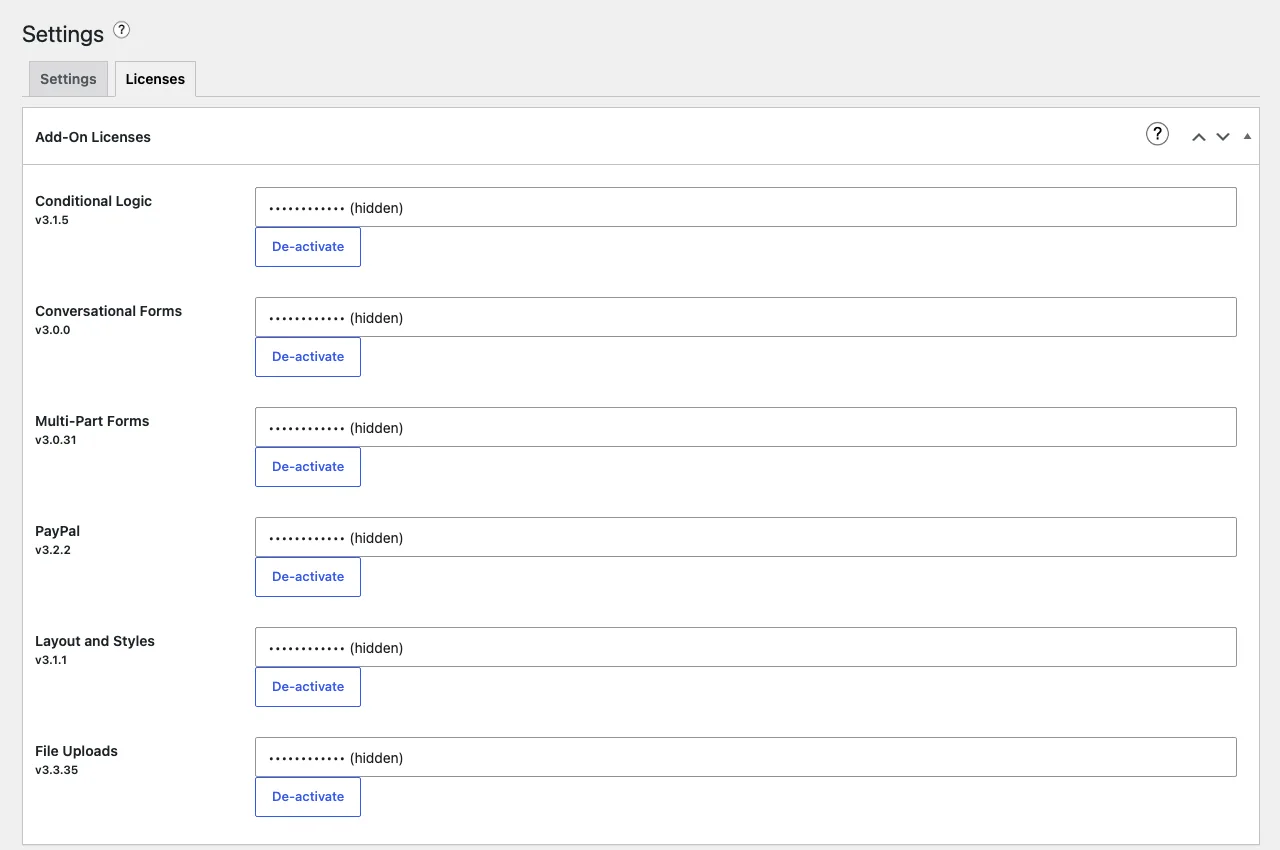
The Licenses tab with all six Plus add-ons activated, key hidden by us.
Each add-on installs separately and uses the Licenses tab for activation. Licensed update checks worked, but we did not install a pending update and saw no auto-update links for the add-ons. Check their updates separately from the free core plugin.
Conditional Logic
Conditional Logic can show or hide fields and steps, change values and make fields required according to previous answers. Rules support multiple conditions and outcomes.
The support form’s rule reads: When Topic has selected Order support, Do show Order number, otherwise hide it. On the live page it worked as expected:
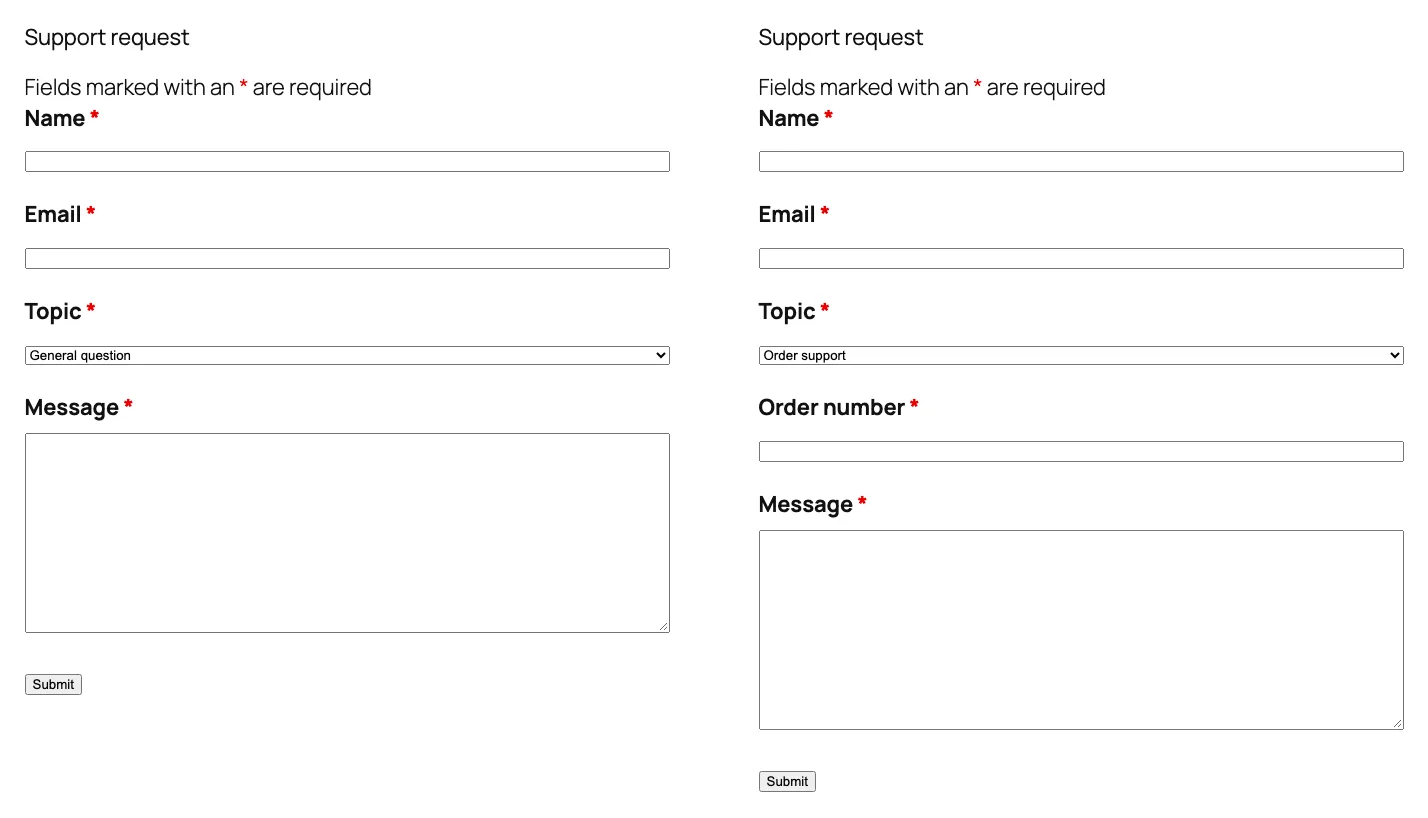
The same support form with “General question” picked (left) and “Order support” picked (right) on our test install.
- Show and hide. The Order number box was hidden when the page loaded, appeared the moment we picked “Order support”, and disappeared again when we switched to “Billing”.
- Hidden required fields. We made Order number required. A “General question” entry went through without it, because the field was hidden. An “Order support” entry with the box left empty was blocked with “This is a required field.” and the Submit button was disabled until we filled it in.
- The job application rule (show “Portfolio link” only for designers) worked the same way, including on a phone-sized screen.
Conditional emails. Every action on the Emails & Actions tab gains a Conditional Logic section: “Process This” or “Don’t Process This”, When “All” or “Any” of your conditions match. We added an “Orders team email” that only runs when Topic is Order support, and a “Billing team email” for Billing.
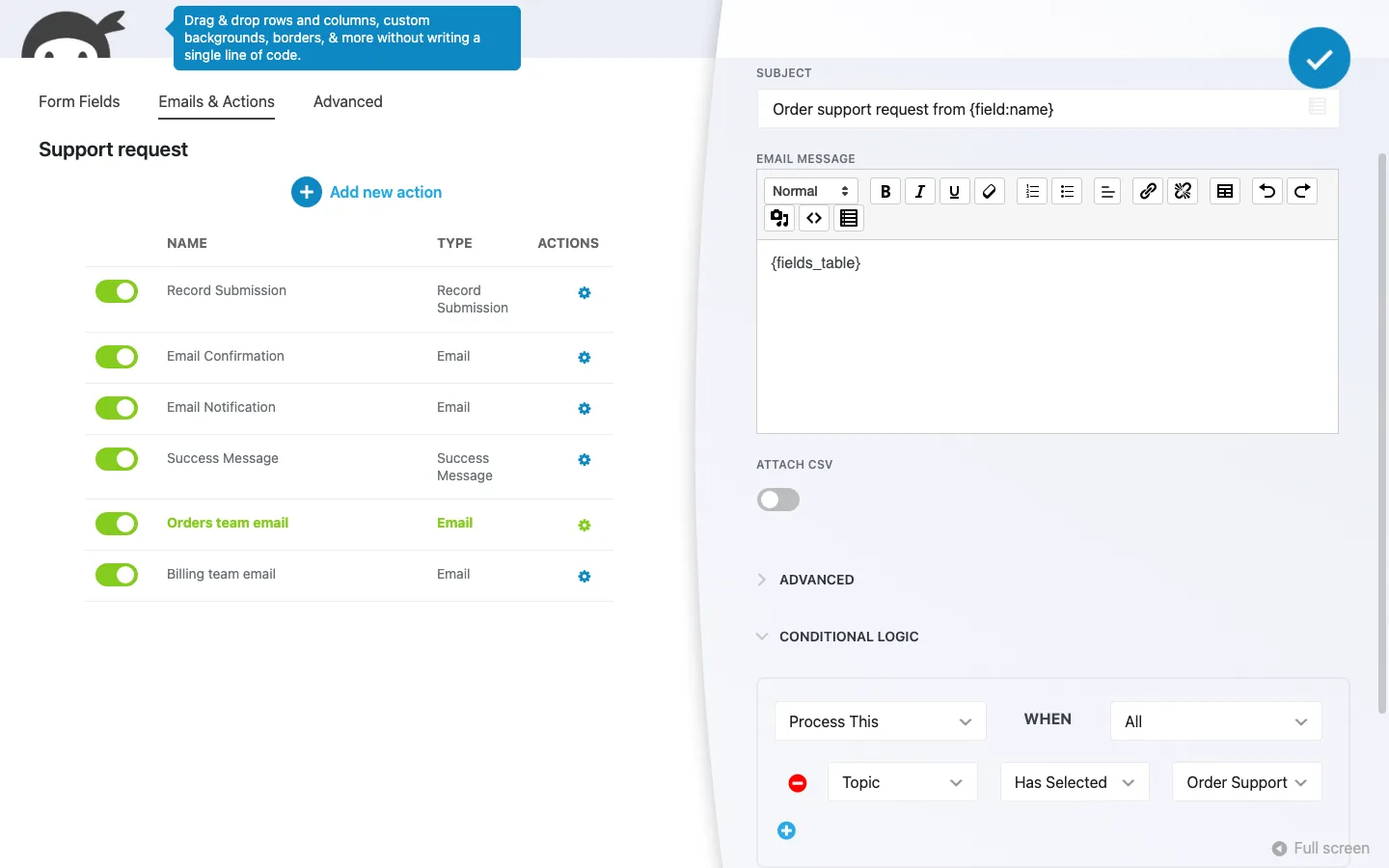
An email action that only runs for order support requests, on our test install.
Our email log confirmed the routing. A general question sent two emails (the visitor’s confirmation and the admin notification). An order support request sent those two plus one to the orders address, with “Order support request from Sam Lee” in the subject line. A billing question sent the two plus one to the billing address. Nothing went to the wrong team.
We also exported the support form from Import / Export and imported it back as a copy. The show/hide rule and both conditional emails came across intact. The copy’s title came back as “Contact Me” instead of “Support request”, so rename it after importing.
File Uploads
File Uploads controls allowed types, file size, naming and storage. Your server’s upload limit can be lower than the form’s limit, so check both before telling visitors which files they can send.
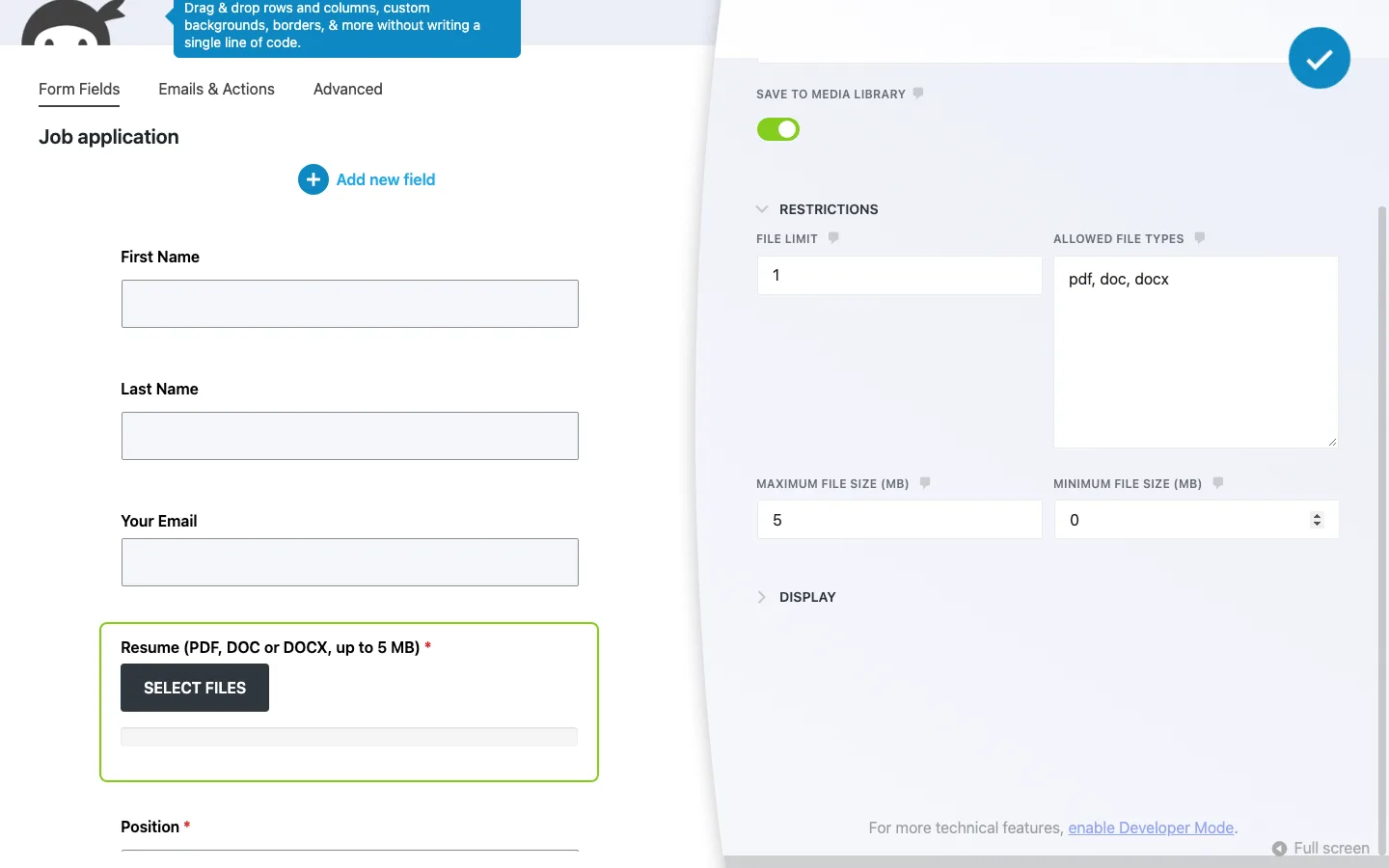
The resume field’s restrictions.
What we tested and what happened:
- Wrong file types. A .txt file and a .php file were both refused with “File extension not allowed”. The check happened on the server, not just in the browser.
- Too large. A 6 MB PDF was refused with “File exceeds maximum file size. File must be under: 5MB.”
- The server’s own limit wins. Our test server first had PHP’s common 2 MB upload limit. With it, even a 3 MB PDF was refused with “File must be under: 2MB”, although the field allowed 5 MB. The add-on uses the lower of the two limits and tells the visitor, which is honest, but our own field label still said “up to 5 MB”. Check your host’s upload limit before promising a size on the form. After we raised the server limit to 64 MB, the 3 MB PDF went through.
- Valid files. A small PDF uploaded as soon as we picked it, before submitting, and showed its name with a Delete link.
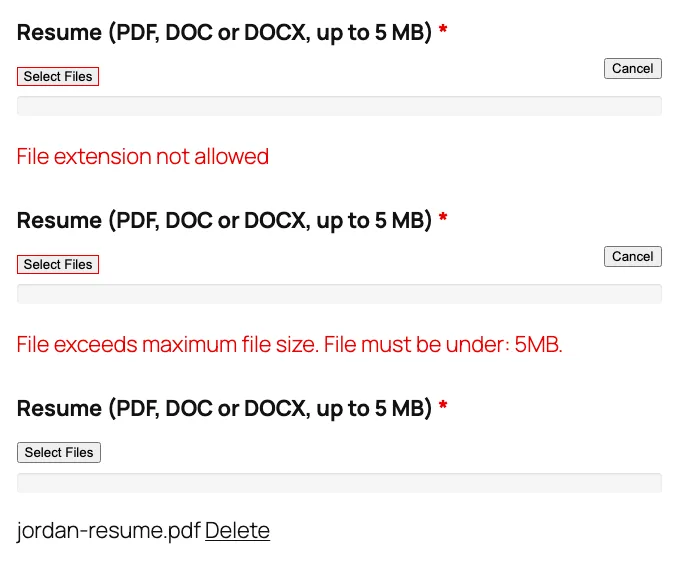
A text file, a 6 MB PDF and a valid PDF picked in the resume field on our test install.
Where the files go. Temporary uploads were protected and scheduled for cleanup. Submitted files moved into the site’s uploads folder and appeared on the File Uploads screen.
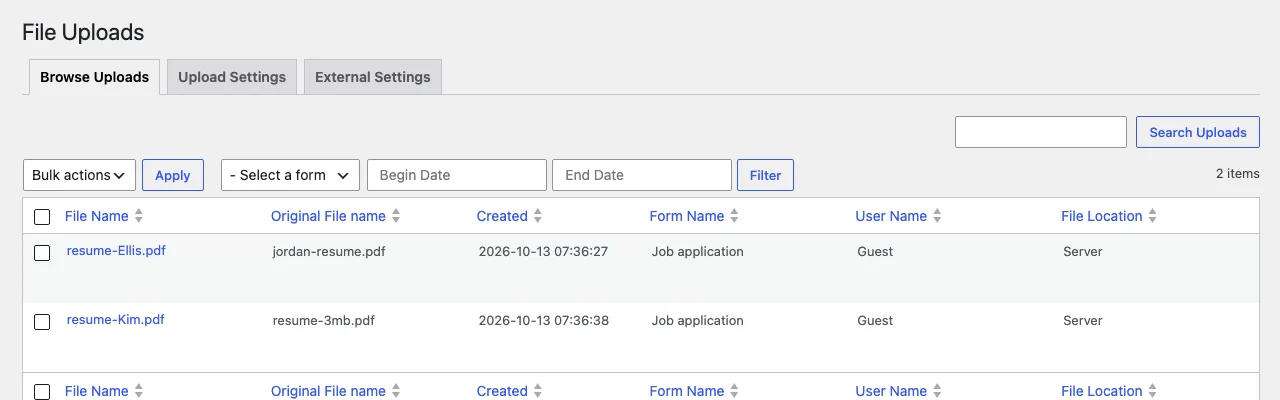
Uploaded resumes on the add-on’s Browse Uploads screen, on our test install.
Submitted uploads are public by link. Our resume downloaded without a login, and predictable file names made its address easy to guess. Do not treat default local uploads as private storage for sensitive documents. The vendor offers cloud storage alternatives, but we did not test their access controls.
Check Save to Media Library. The upload template enables it, creating public attachment pages and PDF previews. A manually added upload field leaves it off. Keep it off for job and support forms unless you need those public attachments.
Emails and entries. Notifications attached our PDFs correctly when file attachments were enabled. Entries and CSV exports also included links to the files.
On a phone-sized screen (390 pixels wide) the upload button, file name and conditional field all stacked neatly. With the keyboard, Tab moved from the email box to the Select Files button and Enter opened the file picker. Error messages sit in a region that screen readers announce.
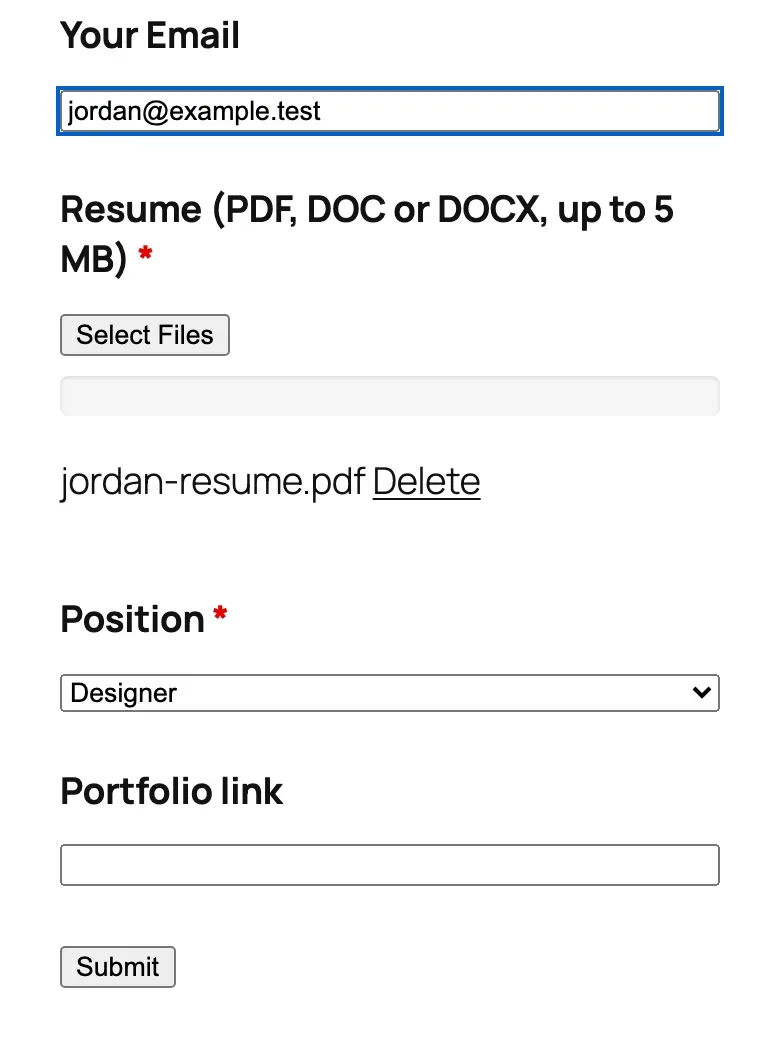
The job application form at phone width after picking Designer, on our test install.
Multi Step Forms
Multi Step Forms split our application into parts with breadcrumbs and a progress bar. Conditional Logic added a Portfolio step only for designers; hidden required fields did not block other applicants.
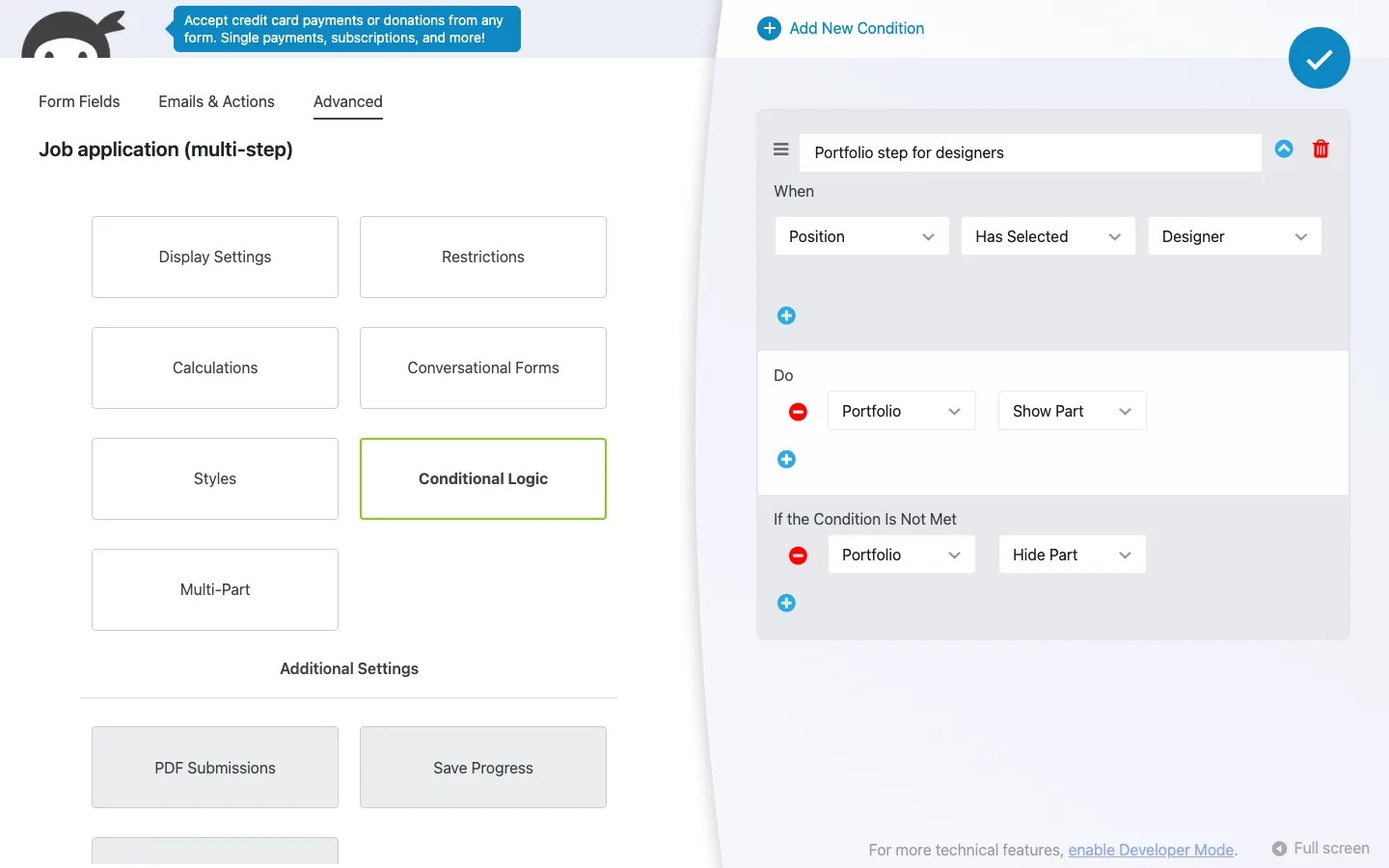
The rule that shows the Portfolio step only to designers.
Turn on Validate Each Part. It starts off, allowing visitors to move past empty required fields until final submission. With it on, the form stopped at the relevant error.
Going back preserved answers, and submissions arrived as a single entry with the uploaded resume. The entry did not record which steps a visitor had seen. On phones, columns stacked without sideways scrolling.
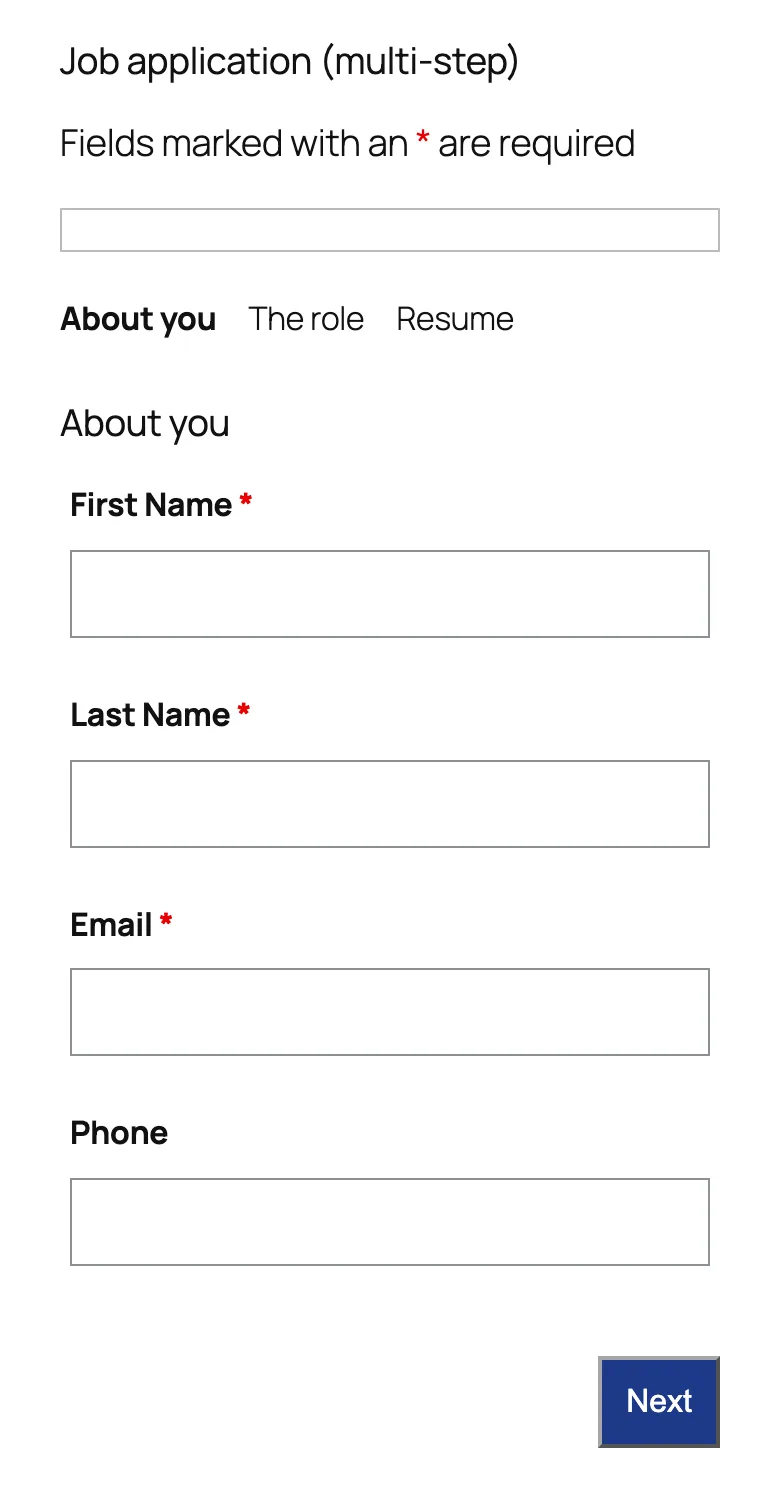
Step one at 390 pixels wide: the two-column rows stack into one column.
Keyboard focus did not move into the next step after navigation, and the progress bar had no screen-reader text. These need attention for an accessible form.
Layout & Styles
Layout & Styles does two jobs: columns in the builder and visual styling.
Columns. Fields can sit side by side with adjustable widths. Our name and contact fields kept their layout on desktop and stacked cleanly on a phone.
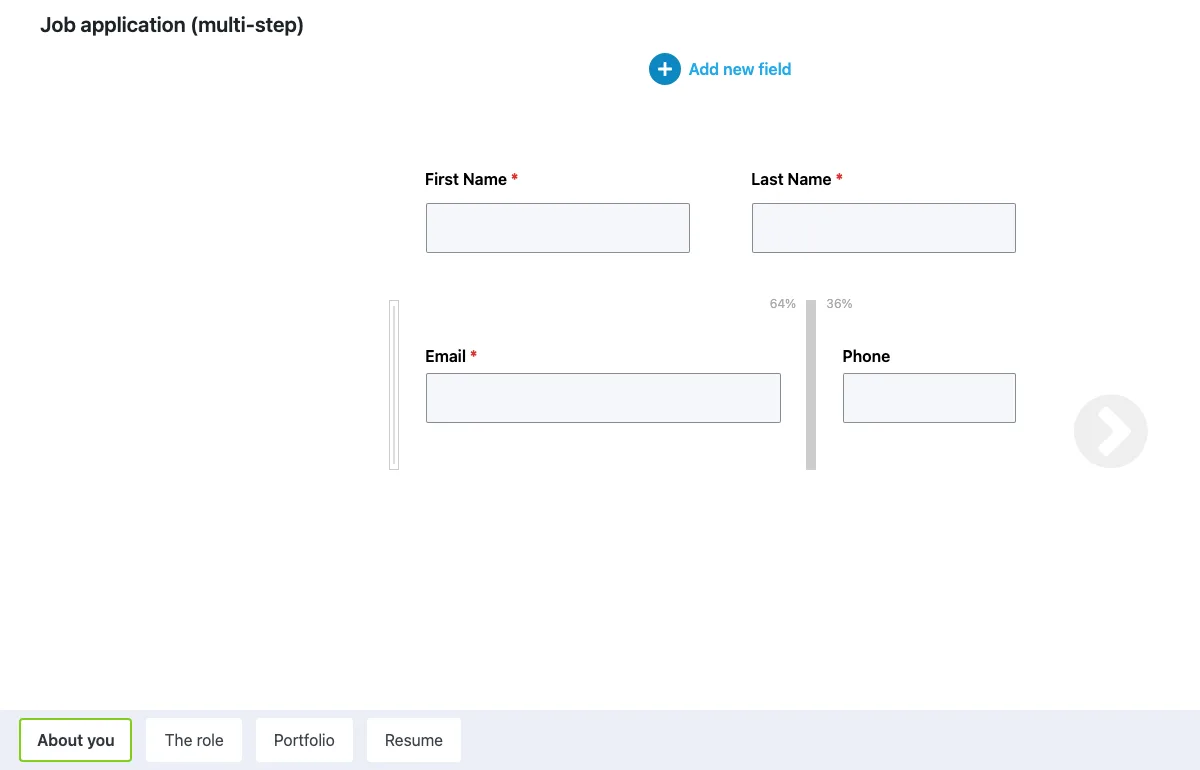
Resizing the Email and Phone columns in the builder (we settled on about 70/30); the multi-step part tabs run along the bottom.
Styling. Site-wide controls cover fields, labels, buttons, errors and multi-step forms, with per-form overrides and optional CSS.
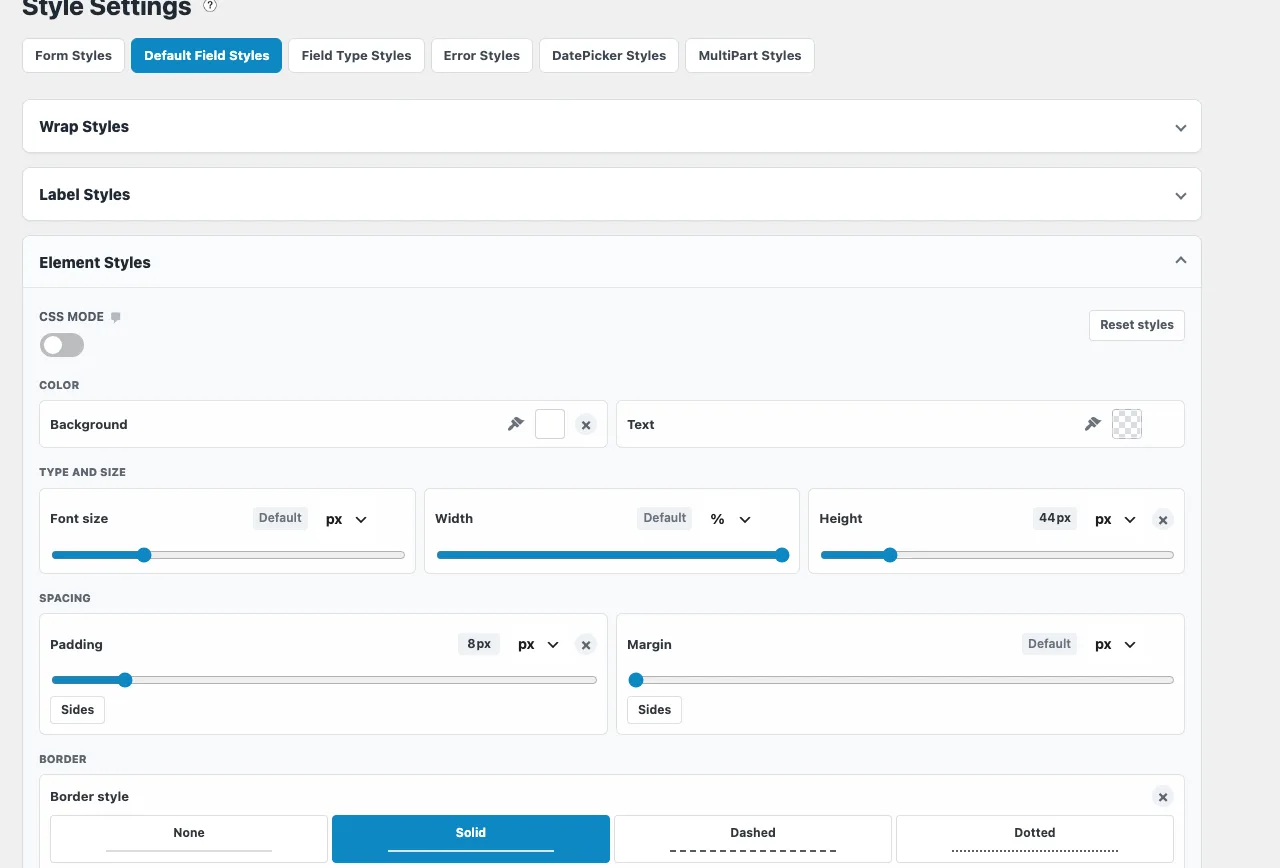
Element Styles on the Styling page with our 44 px height, 8 px padding and solid border.
We improved field sizing, spacing and button contrast across the site without writing CSS.
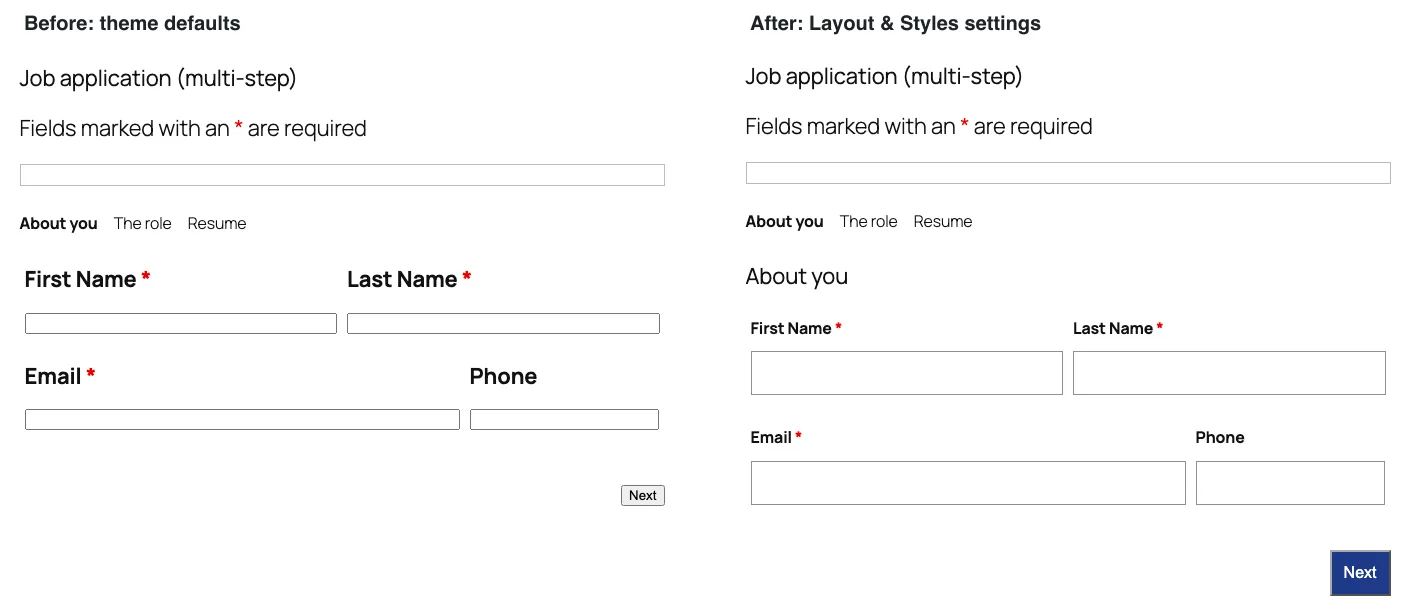
The first step before and after our Layout & Styles settings. We also switched on part titles in between, which is why “About you” appears on the right.
Builder ads remain. Installing an advertised add-on replaces its promotion with an ad for another add-on. With all six Plus add-ons active, the builder promoted Stripe.
Conversational Forms
Conversational Forms presents one question at a time, with optional full-screen mode, progress indicators, branding and design controls.
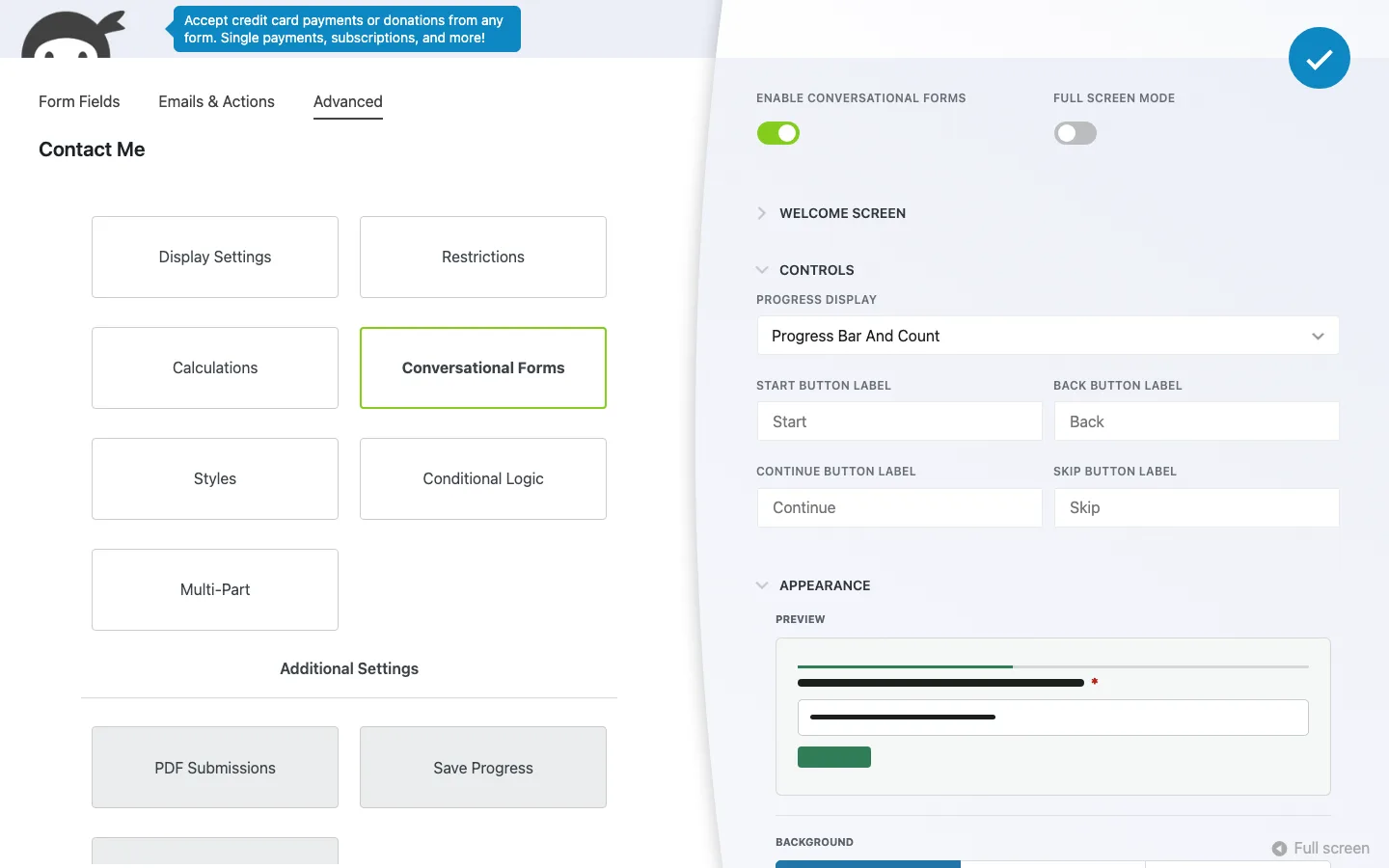
Turning the sample Contact Me form into a conversational form.
An existing contact form switched to one question per screen and kept its normal submission actions. One setting only appeared after reopening its panel.
- Keyboard. We used it without a mouse. Tab reached Start, and after typing an answer, Enter moved to the next question with the cursor already in its field. In the Message box, Enter added a new line instead, so you Tab to Submit and press Enter there.
- Validation. A bad email address showed “Please enter a valid email address!” under the field and kept us on that question.
- Back returned to the previous question with the answer still filled in.
- Submissions. Ninja Forms saved the entry as a normal submission and sent the form’s usual two emails, a confirmation to the visitor and the admin notification.
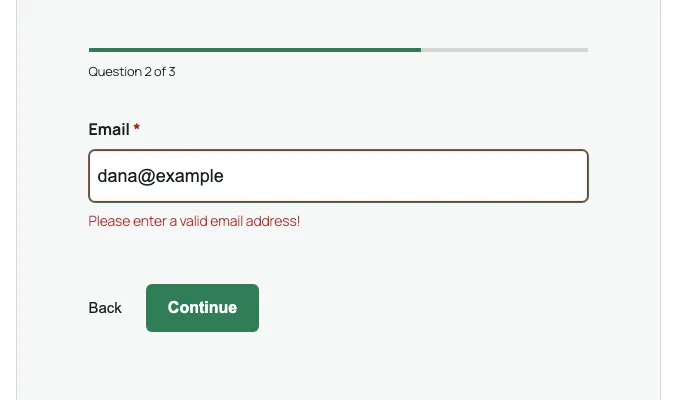
The conversational contact form catching a bad email address, on our test install.
The template and full-screen mode. The Conversational Form template starts with a short intro, then asks for a name, how you want to be contacted, an email address and a message. With Full Screen Mode on, pressing Start turned the whole browser window into the form, with a close button in the corner. Choices are labeled A, B and so on; pressing B on the keyboard picked “Phone” and moved to the next question by itself. On a 390-pixel phone screen it filled the screen with no sideways scrolling. The catch is that the template comes with only two actions, Record Submission and Success Message, so nobody gets an email about new entries until you add an email action.
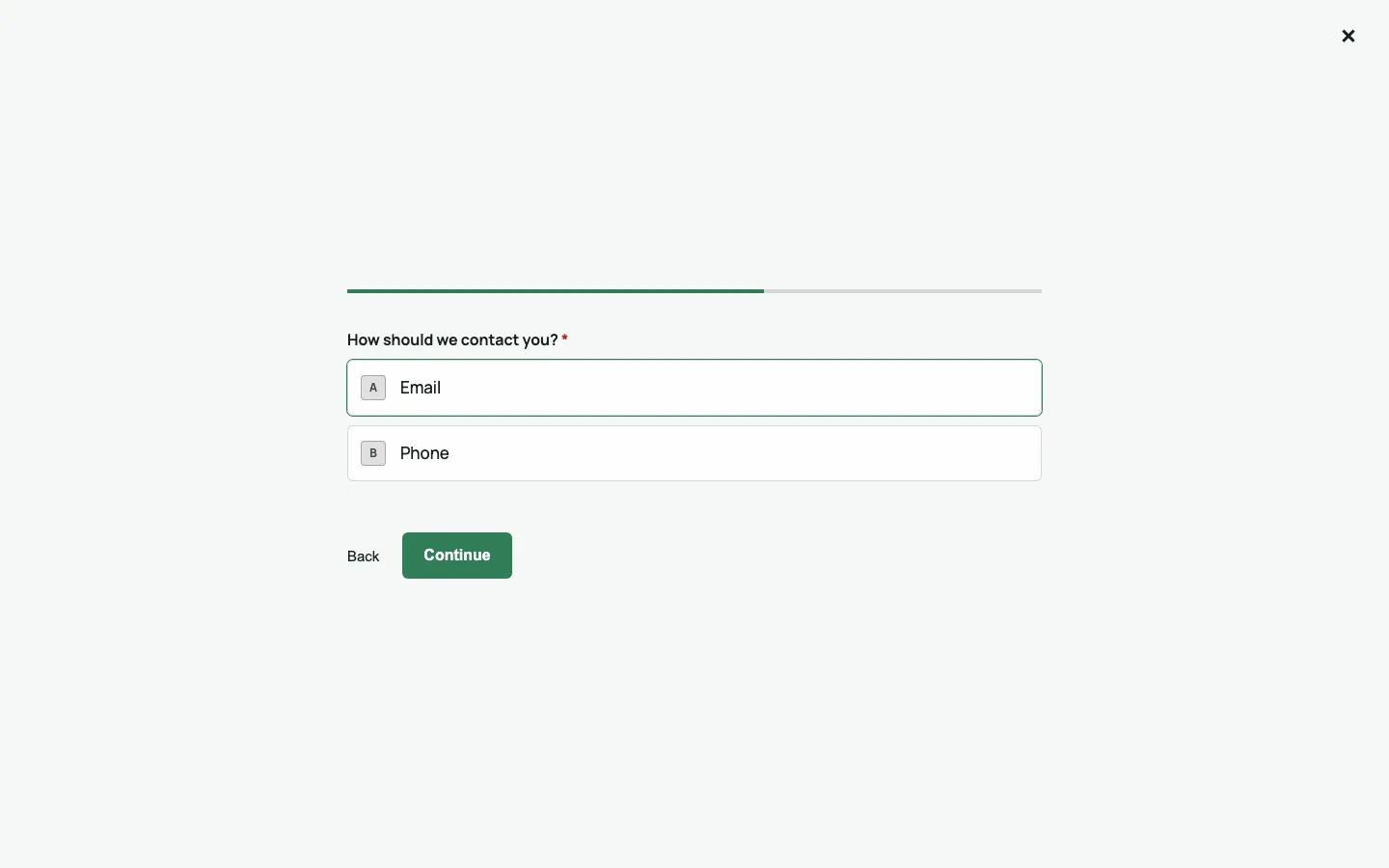
A multiple-choice question in full-screen mode, with A and B shortcut keys.
Forms it does not fully support. The add-on’s sales page says captchas, calculations, File Uploads, the rich text editor, Save Progress and repeater fields are not yet supported. As a test, we switched it on for our multi-step job application anyway. The builder showed no warning. On the page, each step became one screen (so the first screen had four fields), the Portfolio step still appeared only for designers, picking from the dropdown moved on by itself, and the resume upload and the submission worked. Given the vendor’s own warning, we would not rely on that for a live form, and we switched it back off.
PayPal Checkout
The add-on is sold as PayPal Checkout and installs as “Ninja Forms - PayPal”. We have no PayPal account, so we could only set it up as far as the connection step. We did not connect an account and did not try a live or sandbox payment.
Connecting PayPal. A new PayPal Onboarding page under Ninja Forms says you are not connected, with one button to begin live onboarding and one for sandbox (test) onboarding; both are spelled “authorizaton” on the buttons. Both link to PayPal’s business sign-up pages, and opening the page loads scripts from PayPal. Ninja Forms > Settings also gets a PayPal Checkout section with a link to the same page and a debug logger switch.
The action. The PayPal Checkout action takes its amount from a calculation, a field or a fixed amount. Below that are switches for payment options: PayPal Credit, Pay Later and Guest Checkout (on by default), plus Apple Pay, Google Pay, Venmo and ten local payment methods used in Europe and Latin America, such as iDEAL, Bancontact and SEPA direct debit. The advanced settings add an order description, a note to the buyer, a shipping address option and a Sandbox Mode switch. Like every action, it can also have conditional rules.
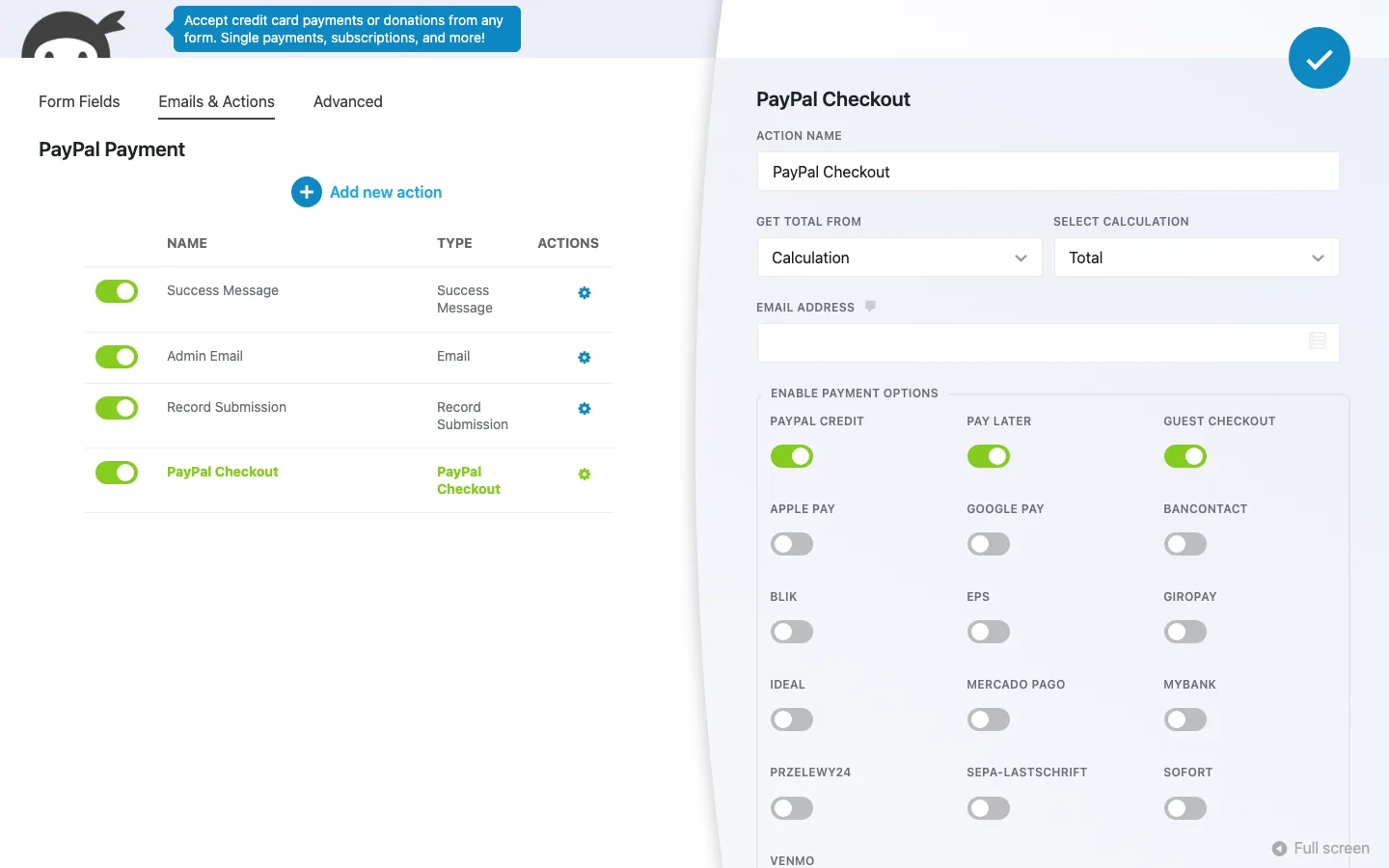
The PayPal Checkout action in the PayPal template, set to take its amount from the form’s calculated total.
Calculated totals. The PayPal template updated its total when quantity changed. Its setup note still referred to API keys and sandbox mode, although sandbox mode was off by default. Check the actual account and payment settings rather than relying on that note.
What happens without a PayPal account. We submitted the form as a visitor. Instead of a PayPal window, the form showed a developer error about a missing access token in red under the Submit button. Ninja Forms still saved the entry. On the Submissions screen it looked like any other entry, with no payment status, and the admin email did not go out. So if you add the PayPal action before your account is connected, visitors see an error and you collect unpaid entries that look normal. Connect PayPal and run a sandbox payment before you put the form live.
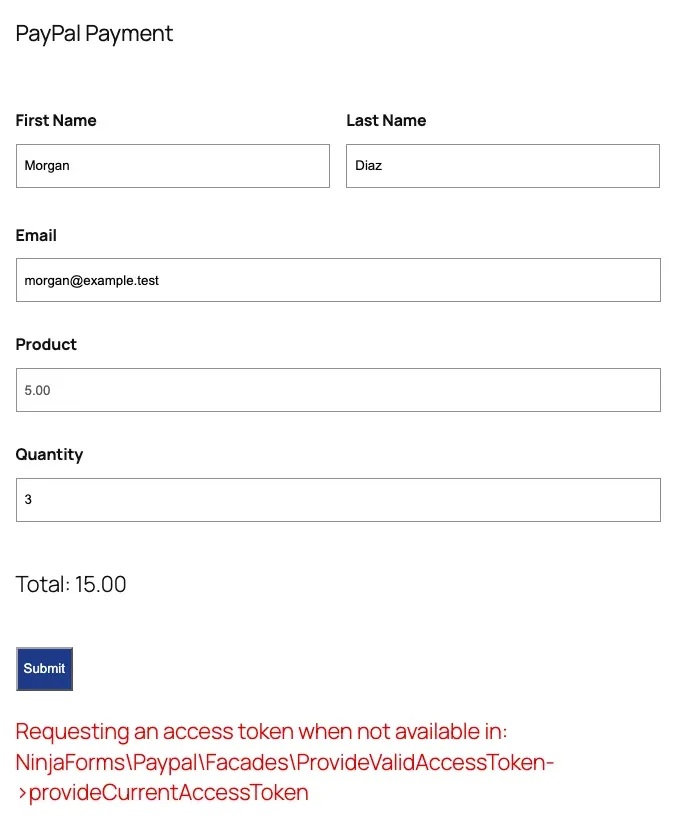
What a visitor saw after pressing Submit with no PayPal account connected, on our test install.
Stripe is not in Plus. It needs the Pro plan or a $29/year single add-on.
How the Plus Add-ons Work Together
Our job application used four of the six add-ons at once: Multi Step Forms for the steps, Conditional Logic for the designer-only step, File Uploads for the resume, and Layout & Styles for the columns and the site-wide styles. They did not get in each other’s way. The upload field worked on the last step, the rule kept working when we went back and changed the answer, and the styles applied to the step buttons and progress bar as well as the fields. All three test applications arrived as complete entries with working links to the resumes. The cost is page weight, which we measured below.
Actions, Submissions and CSV Export
Success messages, redirects, saved entries and notification emails worked. Replacing a template field silently removed it from the admin email, though, so check notification content after editing a form. We verified local email handling rather than delivery to real inboxes.
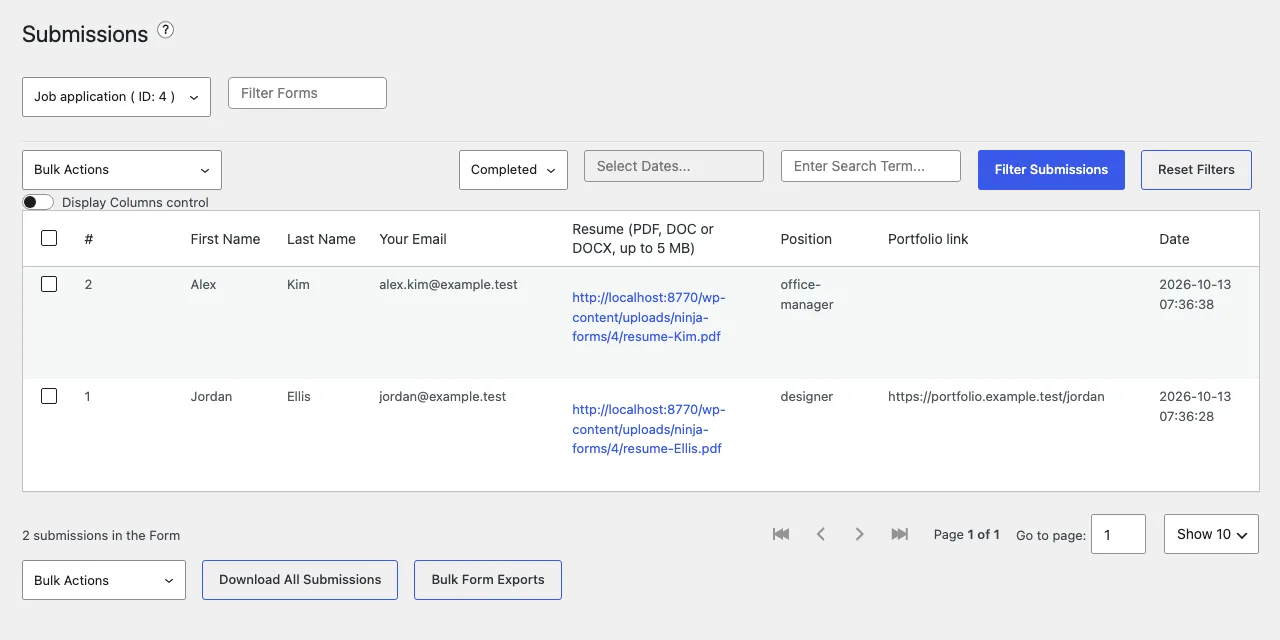
Job applications with links to the uploaded resumes on the Submissions screen of our test install.
CSV exports included every entry and links to uploaded files. Dropdowns exported their internal values rather than the labels visitors saw. Excel exports and scheduled exports need paid add-ons.
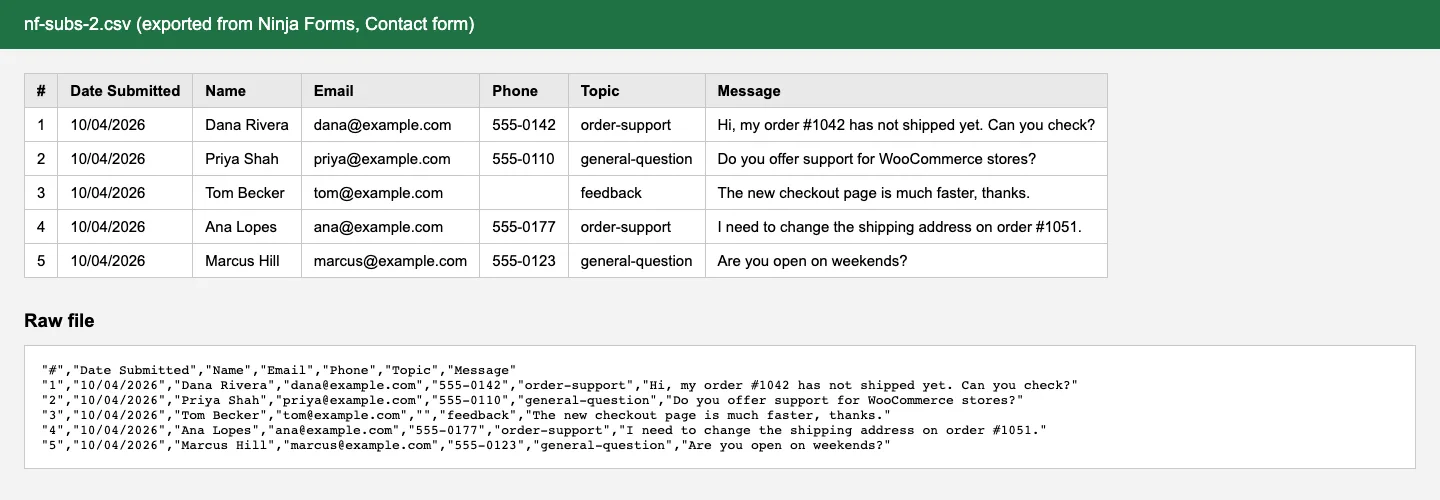
The contact form CSV export from our test install, viewed as a table and as raw text.
The bulk Trigger Email Action failed across our forms, including the untouched sample and with add-ons disabled. It reported “0 / 1 emails sent” and logged a PHP error, so we could not rely on it for resending notifications.
Spam Protection in the Free Version
Ninja Forms is generous here. The vendor calls it “multi-layer spam protection”, and on our test site it included:
- A honeypot on every form. This is a hidden field that people never see but bots fill in. It is added automatically. When we filled it in with a script and submitted, the form refused with “Honeypot Error”.
- reCAPTCHA v2 and v3, hCaptcha and Cloudflare Turnstile. Each has a field type and a settings section for your keys. We left the keys empty because getting them means signing up with each service.
- An Anti-Spam question field. You set a question and answer, such as “What is 2 + 3?”.
- Akismet. Ninja Forms includes an Akismet action, but it only appears when the Akismet plugin is active with a valid API key. We activated Akismet without a key and the action stayed hidden, so we could not test it.
- Restrictions. Unique fields, logged-in-only forms and submission limits help against duplicate entries.
Page Speed: What Ninja Forms Loads
The basic contact form loaded about 419 KB of CSS and JavaScript, or 122 KB compressed. A signature field made the registration form much heavier, at around 1.8 MB before compression. Leave signatures out unless you need them.
The free core only loaded its files on form pages, but File Uploads also added scripts to pages without a form. With all six Plus add-ons active, our application page grew from 577 KB to 825 KB in total, and the page without a form grew from 185 KB to 288 KB.
These are local measurements; full-page totals include theme files as well as the plugin. Forms also depend on JavaScript, so visitors with it disabled cannot use them.
Ninja Forms Pricing
You can pay in two ways: buy single add-ons, or buy a yearly plan that bundles them. Prices below are from the Ninja Forms pricing and add-on pages, rechecked in October 2026, in US dollars.
Plus covers three sites for $59.40 in the first year, then $99 a year. It bundles the six add-ons we tested, ten email marketing add-ons and a discount on other purchases. Pro covers twenty sites for $119.40 initially, then $199 a year, adding payment services, business integrations and tools such as Save Progress.
Elite covers unlimited sites for $299.40 initially, then $499 a year. It includes every add-on and future additions. The core plugin remains free on unlimited sites.
What to know before you buy:
- The discount is first-year only. The pricing page shows each plan at 40% off for the first year, then full price. Plans auto-renew yearly.
- Single add-ons are $29 or $49 a year for one site. Conditional Logic, File Uploads, Layout & Styles, PDF Form Submission and Webhooks are $49; most others, including Multi Step Forms, Conversational Forms, PayPal Checkout, Stripe and Mailchimp, are $29. Options for 5 and 20 sites are offered too.
- A single add-on can be the cheapest route. If all you need is conditional logic on one site, $49/year is less than Plus at renewal. Over two years that is $98, if the price stays the same, compared with $118 for Gravity Forms Basic and $158.40 for Ninja Forms Plus.
- If you need three or more add-ons, Plus is usually cheaper. The six main Plus add-ons we tested cost $234 a year for one site if you buy them separately ($49 each for Conditional Logic, File Uploads and Layout & Styles, $29 each for Multi Step Forms, Conversational Forms and PayPal Checkout). Plus costs $59.40 the first year and $99 a year after that, covers 3 sites, and adds the email marketing add-ons. It is cheaper in the first year once the add-ons you need cost more than $59.40 a year, and from the second year once they cost more than $99, for example Conditional Logic, File Uploads and Multi Step Forms ($127). Even two $49 add-ons, such as Conditional Logic and File Uploads ($98), cost more than Plus in the first year and about the same after that.
- Refunds. Every purchase has a 14-day money-back guarantee. There are no demos of the add-ons, and that is the only way to try them.
- If you cancel, add-ons keep working, but you stop getting updates and support. Given the security history below, running add-ons without updates is not a good idea.
- Support is open to free users too, on weekdays from 9am to 4pm Eastern.
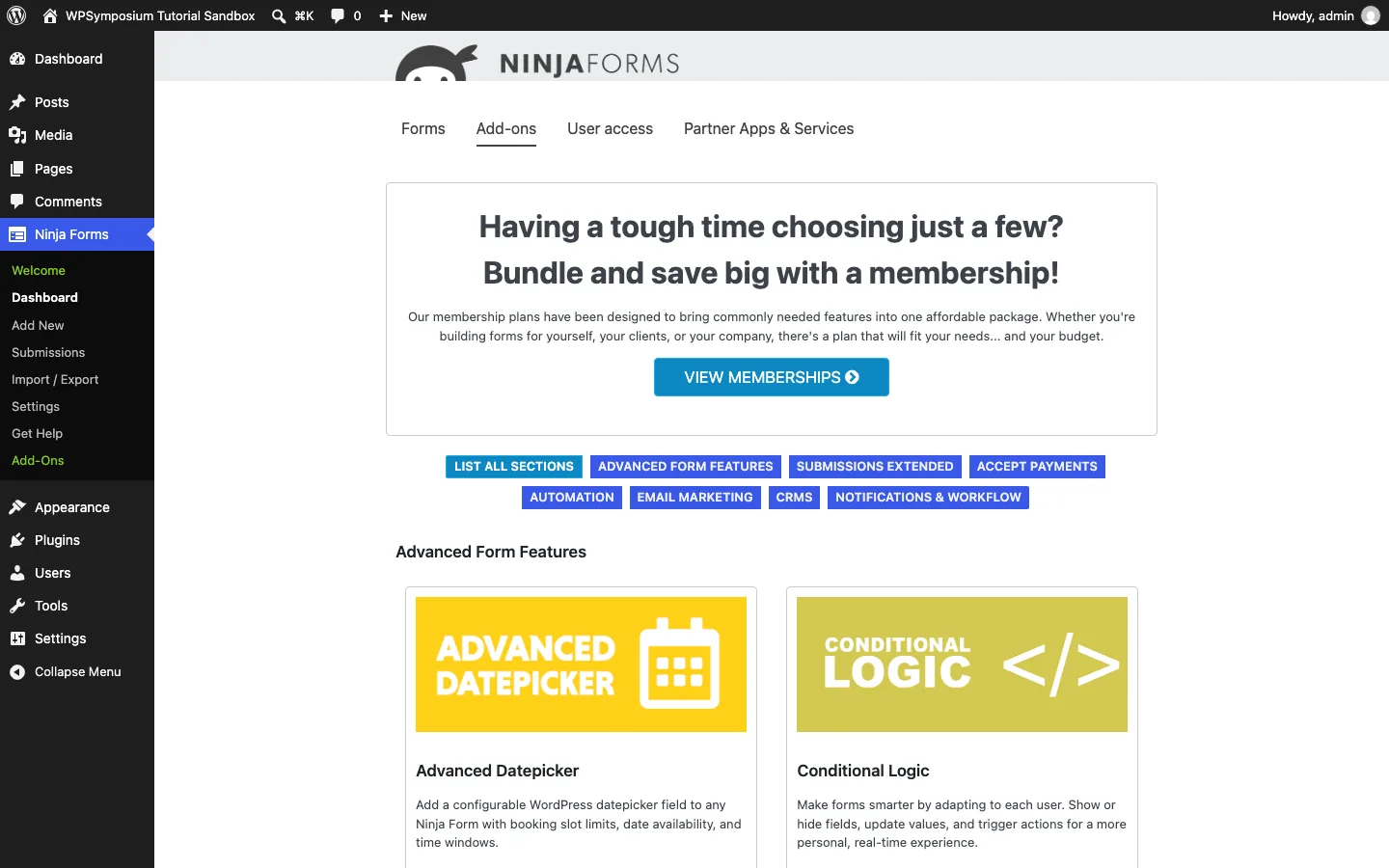
The Add-ons screen inside WordPress on our test install, listing 43 add-ons.
Upgrade prompts
The upsells add up. In the free version we saw the data-collection pop-up on first use, a large “How’s It Going?” notice on every admin screen (including the main dashboard) until dismissed, a builder tooltip advertising the Layout & Styles add-on on every form, the locked fields, actions and Advanced boxes above (clicking a locked action opened its sales page in a new tab), an Add-ons tab, and a “User access” tab that is an ad for the User Management add-on. A setting turns off all Ninja Forms admin notices.
A license only removes the locks for the add-ons you install. With all six Plus add-ons licensed, the builder bubble switched to an ad for Stripe, three Advanced tiles stayed locked (PDF Submissions, Save Progress and Scheduled Exports), and the locked actions and the “User access” tab were still there.
Ninja Forms Security History
Form plugins handle visitor input, which makes them a frequent target. Here is a summary from WPScan, Wordfence Intelligence, Patchstack and the official changelogs, as of October 2026:
- Overall: WPScan lists 81 vulnerabilities in the core plugin since 2014, and Patchstack lists 74 as patched. Every entry we checked had a fixed version.
- June 2022 (critical): An unauthenticated PHP object injection flaw (CVSS 9.8, near the top of the 10-point severity scale) was fixed in version 3.6.11, with fixes back-ported to older branches. Wordfence reported evidence that it was being exploited, and WordPress.org pushed a forced automatic update to affected sites.
- April 2026 (critical, paid add-on): The separate File Uploads add-on had an unauthenticated arbitrary file upload flaw (CVE-2026-0740, CVSS 9.8) in versions up to 3.3.26. According to Wordfence, the vendor released the fully patched version on March 19, 2026, attacks started on the day of public disclosure, April 6, and Wordfence blocked over 118,600 attempts. We tested File Uploads 3.3.35 (released October 5, 2026), which is well past the fix. Its changelog lists security fixes in 8 of its 12 releases in 2026.
- June to October 2026 (core plugin): WPScan published 11 issues in the core plugin, several exploitable without logging in: information disclosure through a REST endpoint (fixed in 3.14.2), shortcode execution (fixed in 3.14.10 and 3.15.2), stored cross-site scripting through repeater fields (3.15.2), stored cross-site scripting and PHP object injection through the CSV export (3.15.4), and stored cross-site scripting through the rich text Paragraph field (3.15.5, published October 1). WPScan rates five of them high severity and the rest medium.
The positives: fixes have shipped quickly, the changelog names the researchers who reported issues, and Saturday Drive publishes a responsible disclosure policy. On our test install, File Uploads blocked .php files and protected its temporary folder. The practical advice is simple. Turn on automatic updates for the core plugin, check for add-on updates yourself (our add-on rows had no auto-update link while no update was waiting), renew add-on licenses so you keep getting fixes, and test big updates on a staging site if your forms are business critical. Outdated plugins are one of the common ways sites end up with problems like a spam link injection.
Ninja Forms vs WPForms vs Gravity Forms
These are the three plugins people compare most. The Ninja Forms and WPForms details come from our test installs; Gravity Forms has no free version, so we use the vendor’s published details, as covered in our Gravity Forms review.
Ninja Forms gives free users saved entries and calculations. WPForms Lite is easier to approach and supports Stripe with a platform fee, but does not save entries locally or unlock conditional logic for free. Gravity Forms has no free version, but its $59 annual license includes conditional logic, multi-step forms and uploads on one site.
Ninja Forms Plus starts at $59.40 and renews at $99 for three sites; WPForms Basic starts at $49.50 and renews at $99 for one site. For Stripe, Ninja Forms needs another add-on or Pro, while Gravity Forms needs its $159 Pro license. Gravity Forms offers a thirty-day refund window, compared with fourteen days for the other two.
- Ninja Forms vs WPForms: Choose Ninja Forms for a free plugin that keeps entries and calculates totals. Choose WPForms if you want the friendlier builder, a far larger template library, or Stripe payments without buying anything. Both free versions have built-in spam protection and support reCAPTCHA, hCaptcha and Turnstile.
- Ninja Forms vs Gravity Forms: Choose Ninja Forms if the free version covers you, or you need just one paid feature. Choose Gravity Forms if you need conditional logic, file uploads and multi-page forms together on one site, since one $59 license includes them all and its price does not rise at renewal. If you run two or three sites, Ninja Forms Plus at $99 a year covers 3.
For more options, including Formidable Forms and Fluent Forms, see our guide to the best WordPress form plugins and our list of Gravity Forms alternatives.