Gravity Forms Review 2026: Pricing and Is It Worth It?

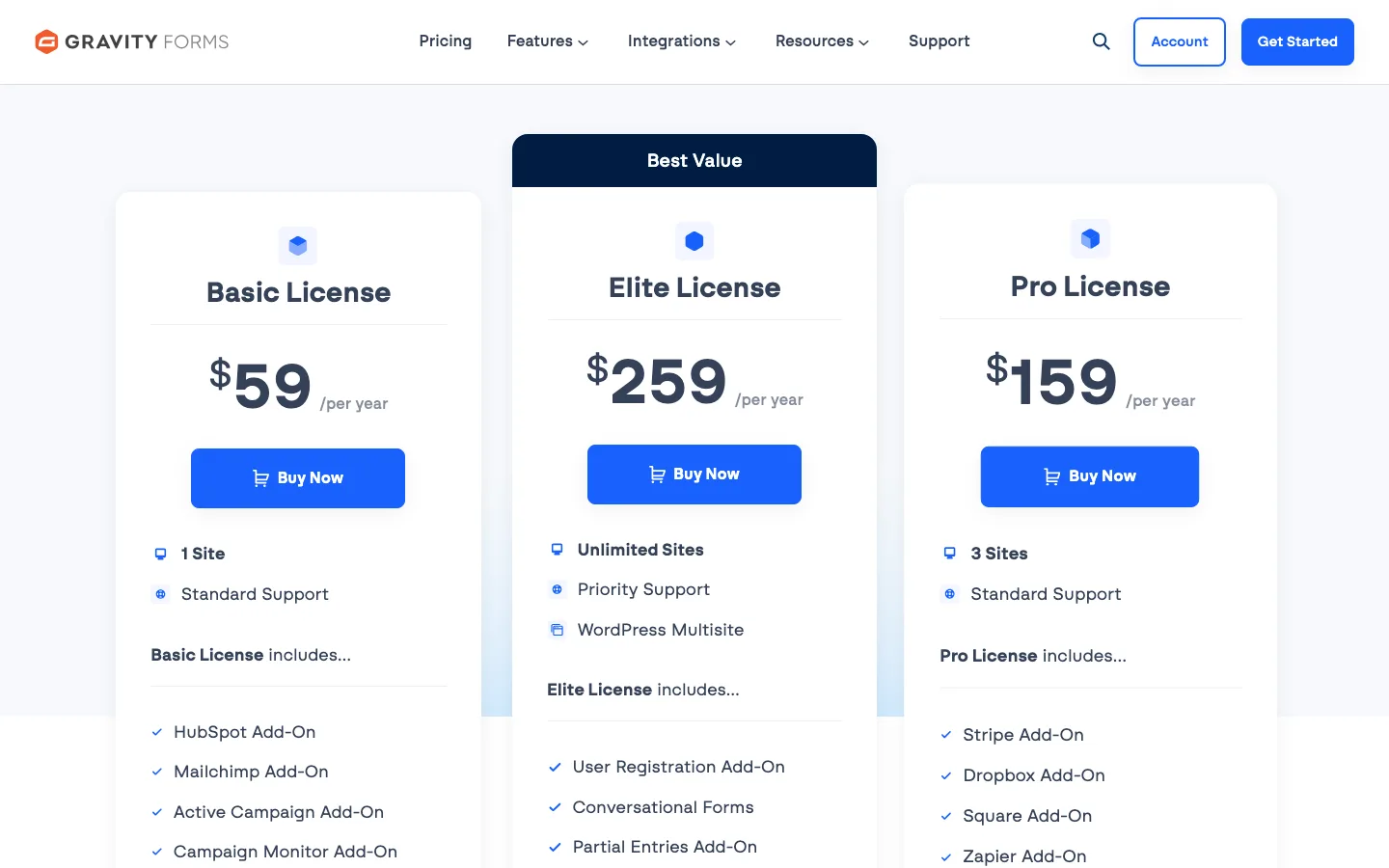
The Gravity Forms pricing page with its three licenses, October 2026.
Our verdict: Gravity Forms is worth paying for if your forms do real work: conditional fields, multi-page applications, calculations, saved entries you need to search and export, or data you send to a CRM. Every license includes conditional logic, multi-page forms, calculations and entry storage, and the $59/year Basic price has no first-year discount that doubles later. Skip it if you only need a simple contact form, because free plugins handle that, or if you want to take card payments on a budget, since Stripe and PayPal need the $159 Pro license.
This review covers what Gravity Forms includes as of October 2026, what each license costs, where it falls short, and how it compares with Ninja Forms and WPForms.
How we reviewed it: Gravity Forms has no free version, and its online demo asks for an email address before it starts, so we did not install it. Everything about Gravity Forms here comes from its official website, documentation, changelog and pricing page. For the comparison, we installed the free versions of Ninja Forms and WPForms on a test site and built the same contact form in each.
Gravity Forms Quick Facts
Facts below were checked on gravityforms.com and the Gravity Forms documentation in October 2026.
| Item | Details |
|---|---|
| Made by | Rocketgenius, Inc. |
| Latest version | 3.1.3 (released October 1, 2026) |
| Free version | None, and no trial. A demo is available after an email sign-up |
| Price | Basic $59/year (1 site), Pro $159/year (3 sites), Elite $259/year (unlimited sites) |
| Nonprofit license | $129/year for 3 sites, by application |
| Refund policy | 30 days on every purchase, renewal and upgrade |
| Core features on every license | Drag-and-drop builder, conditional logic, multi-page forms, save and continue, file uploads, calculations, entry storage, 30+ field types |
| Payments | Stripe, PayPal and Square add-ons need Pro or Elite |
| Requirements | WordPress 6.5 and PHP 7.4 at minimum; the vendor recommends WordPress 7.1, PHP 8.3 and MySQL 8.0 |
| If your license lapses | Forms keep working, but you lose updates, support and downloads |
| Best suited for | Agencies, developers, and businesses with forms that feed other systems |
What Is Gravity Forms?
Gravity Forms is a paid form builder plugin for WordPress made by Rocketgenius. It has been sold for well over a decade and is a common pick for agency and client sites. You use it for contact forms, quote requests, job applications, registrations, surveys and order forms.
There is no free version on WordPress.org. You buy a yearly license, and every license gets the full core plugin. The tiers only change how many sites you can use, which official add-ons you get, and the support level.
A large ecosystem surrounds it. Third-party companies sell add-ons for front-end entry tables, approval workflows and PDFs, and many themes and builders support it directly. Divi, for example, added a Gravity Forms module in 2026, as we noted in our Divi review.
What’s New in 2026
Version 3.0 came out on July 28, 2026, the first new major version since the 2.x series. According to the release notes, it added international phone number validation with a country picker, accessible settings turned on by default for new forms (aimed at WCAG 2.1 AA, a common accessibility standard), and a new accessible date picker. It also removed several old jQuery libraries.
Version 3.1 (August 25, 2026) added Gravity Forms MCP, built on the new WordPress Abilities API. You connect an AI assistant such as Claude or ChatGPT to your site and ask it to build forms, edit conditional logic or search entries in plain English. The vendor says this add-on is included with every license.
Major releases do not auto-update. The vendor warned that 3.0 may include breaking changes and recommends testing on a copy of your site first, so set up a staging site before you upgrade forms that matter.
Key Features

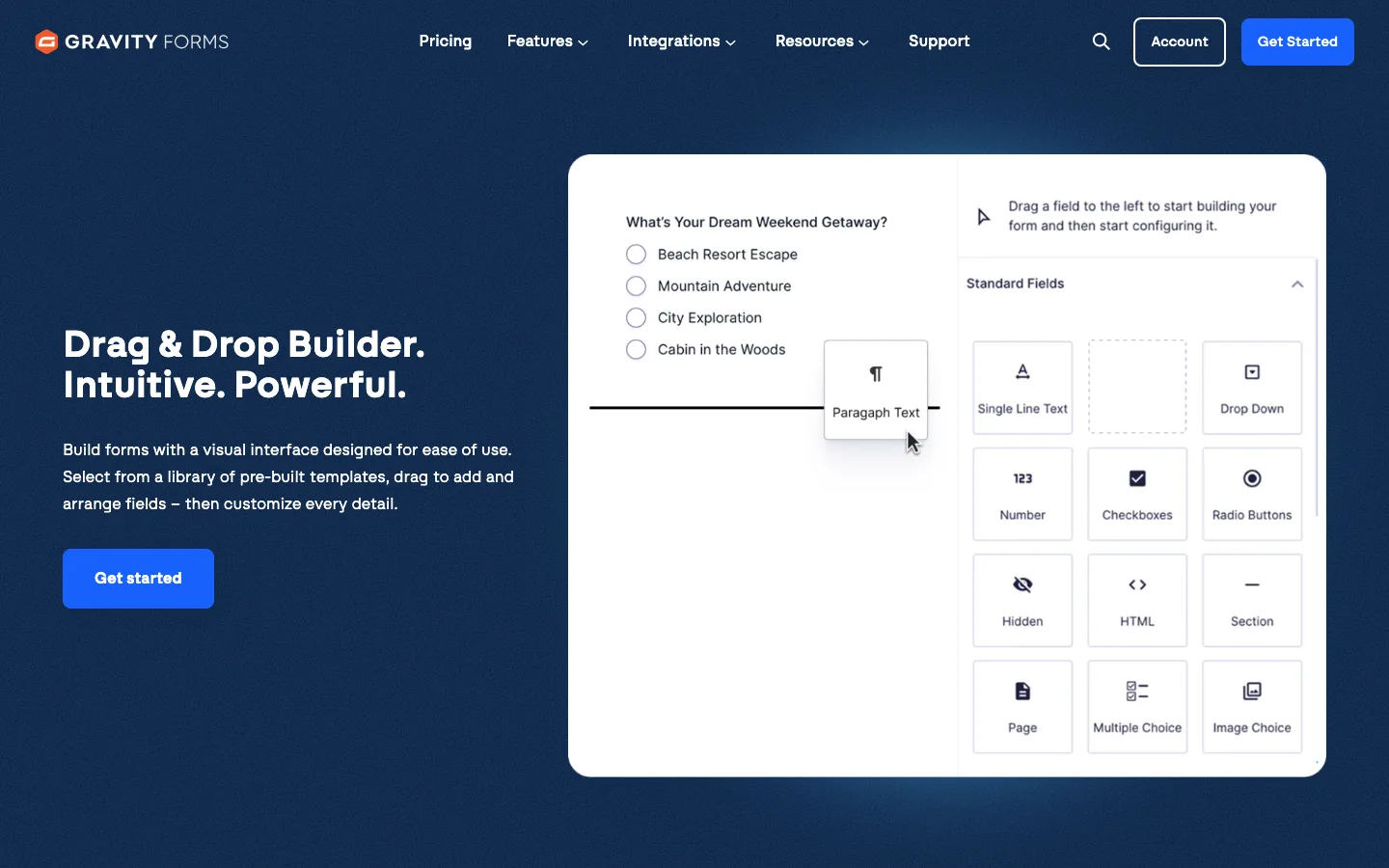
The Gravity Forms form builder as shown on the official drag-and-drop builder page, October 2026.
- Form builder. You drag fields from a panel into the form, then click a field to edit it. There are 30+ field types, multi-column layouts and a template library. Several reviewers who use it daily call the admin screens dated next to WPForms, which matters little once you know your way around.
- Conditional logic. Show or hide fields, sections and pages based on earlier answers, and send different notifications or confirmations depending on the choices. It is part of the core plugin, so even the $59 Basic license has it.
- Multi-page forms and save and continue. Split long forms into pages with a progress bar, and let visitors save and finish later. Both are core features, which suits applications and intake forms.
- Calculations and products. Number fields can run formulas, and product and total fields build simple order forms. Charging a card needs a payment add-on, which starts on Pro.
- Entries and notifications. Every submission is saved in WordPress, where you can search, edit, add notes and export to CSV. Notifications can go to different people based on the answers.
- Spam and privacy tools. A built-in honeypot (a hidden field that catches bots), plus reCAPTCHA, Cloudflare Turnstile and Akismet add-ons, and tools to export, erase or automatically delete personal data.
- Developer tools. Hundreds of hooks, a REST API and an add-on framework. This is why a large market of third-party add-ons exists.
Gravity Forms Pricing
Prices below are from the official pricing page as of October 2026, in US dollars, before tax.
| License | Price | Sites | Support | Add-ons included |
|---|---|---|---|---|
| Basic | $59/year | 1 | Standard | 20 Basic add-ons: email marketing (Mailchimp, HubSpot, ActiveCampaign, Kit and more), reCAPTCHA, Turnstile, Akismet, mail delivery |
| Pro | $159/year | 3 | Standard | Basic add-ons plus 15 Pro add-ons: Stripe, PayPal Checkout, Square, Mollie, Zapier, Slack, Trello, Dropbox, Zoho CRM and more |
| Elite | $259/year | Unlimited, plus WordPress Multisite | Priority | All add-ons, including User Registration, Survey, Quiz, Polls, Signature, Partial Entries, Conversational Forms, Salesforce and Webhooks |
| Nonprofit | $129/year | 3 | Standard | A set chosen for nonprofits; registered nonprofits apply for it |
A few details that matter when you budget:
- No intro discount. The pricing page shows one price per license with no “first year” offer, and licenses auto-renew every 12 months. WPForms and Ninja Forms both advertise first-year discounts that go back to full price at renewal.
- Upgrades are prorated. You can move up from Basic to Pro or Elite and pay the difference. You cannot downgrade.
- Refunds. There is a 30-day refund window on every payment, including renewals and upgrades. The license is deactivated as soon as you ask.
- Elite extras. Elite also includes the core version of Gravity SMTP, the company’s email delivery plugin, and is the only license allowed on a Multisite network.
- Some tools cost extra. Gravity Flow (approval workflows, from the same company) and third-party add-ons such as GravityView (front-end entry tables) are sold separately.
What happens if you stop paying
According to the Gravity Forms documentation, your forms and add-ons stay on your site and keep working after a license expires. You lose updates (including security fixes), support, downloads, and the ability to register the key on a new site. The vendor also warns that an outdated copy may stop working one day as WordPress changes. Running any plugin without security updates is a risk, and outdated plugins are a common way sites end up with problems like a spam link injection.
Which license should you buy?
- Basic ($59): One site that needs smart forms and an email marketing connection. Most small business sites can stop here.
- Pro ($159): You need to take payments with Stripe, PayPal or Square, connect to Zapier or Slack, or run up to three sites.
- Elite ($259): Agencies with many client sites, Multisite networks, or anyone who needs user registration, surveys, quizzes, polls or signatures. If you only want polls, see our roundup of WordPress voting plugins first.
Where Gravity Forms Falls Short
- You cannot try it for free. There is no free version and no trial. The demo exists, but it needs an email sign-up first. The 30-day refund is your real trial.
- Payments cost more. Stripe and PayPal need the $159 Pro license. WPForms lets you take Stripe payments in its free version (with a 3% fee), and some rivals include payments on their entry plan.
- Styling takes work. Forms inherit your theme’s look and there is a built-in “Orbital” style plus block editor color settings, but at least one agency that uses it daily reports that matching a brand closely still means writing CSS.
- Add-on quality varies. The core plugin is well maintained, with releases every two to three weeks in 2026. Third-party add-ons are on their own schedules, so check when one was last updated before you rely on it.
- Major updates need care. Version 3.0 had to be installed by hand and came with a warning about breaking changes.
Gravity Forms vs Ninja Forms vs WPForms
Ninja Forms and WPForms are the two rivals people compare Gravity Forms with most often. Both have free versions on WordPress.org, so we installed them on a test site (WordPress 7.1.2, Twenty Twenty-Five theme) in October 2026 and built the same simple contact form in each: name, email, a “Reason for contact” dropdown, a message box, and an “Order number” field that should only appear when someone picks “Order support”. Then we submitted a test entry.
The Gravity Forms column is based on the vendor’s documentation and public pages, not an install.
| Gravity Forms | Ninja Forms | WPForms | |
|---|---|---|---|
| Free version | No | Yes (3.15.5) | Yes, WPForms Lite (2.0.2.1) |
| Active installs on WordPress.org | Not listed there | 500,000+ | 5,000,000+ |
| Cheapest paid plan | $59/year, 1 site | $59.40 first year, then $99/year, 3 sites | $49.50 first year, then $99/year, 1 site |
| Conditional logic | Every license | Plus plan and up, not free | Basic plan and up, not in Lite |
| Entries saved in WordPress | Every license | Yes, even free | Paid plans only, not in Lite |
| File uploads | Every license | Plus plan and up | Basic plan and up |
| Stripe payments | Pro license ($159/year) | Pro plan ($119.40 first year, then $199) | Free with a 3% WPForms fee; Pro plan removes it |
| Top plan, unlimited sites | $259/year | $299.40 first year, then $499 | $299.50 first year, then $599 |
| Refund window | 30 days | 14 days | 14 days |
| On our test site | Not installed | Form built and submitted; conditional field could not be hidden | Form built and submitted; conditional field could not be hidden; entry not saved |
Prices and versions are as of October 2026.
Setup and ease of use
Ninja Forms installed in seconds. The first time we opened it, a pop-up asked to collect usage data (“Not Now” closes it). Building our form meant clicking field types in a slide-out panel and renaming each one in a settings panel you open and close per field. It took about five and a half minutes from a blank form to a published one.
WPForms opened its builder with a welcome tour and a “WPForms Challenge” that counts down five minutes while you build. Its template screen lists 2,179 templates, 72 of them available in the free version. The “Simple Contact Form” template gave us name, email and message fields right away, so the whole form took about three and a half minutes. It felt like the more polished, beginner-friendly builder of the two.

The WPForms Lite template picker on our test install, version 2.0.2.1, October 2026.
Gravity Forms, based on its documentation and builder images, works much like the other two: drag fields in, click to edit. Reviewers generally rate it as easy for basic forms but less modern looking than WPForms.
The conditional field: where the free versions stop
This was the clearest result. Neither free plugin could hide the “Order number” field.
In Ninja Forms, the Advanced tab has nine settings boxes. Three were usable (Display Settings, Restrictions and Calculations). The other six, including Conditional Logic, Multi-Part, Save Progress and Styles, were greyed out. Clicking Conditional Logic opened a box saying we needed the Conditional Logic add-on.

Ninja Forms asking for its paid Conditional Logic add-on on our test install, version 3.15.5, October 2026.
In WPForms Lite, the field’s “Smart Logic” tab opened a pop-up titled “Smart Conditional Logic is a Pro Feature”, with an offer of 50% off. According to the WPForms pricing page, conditional logic starts on the Basic plan.

WPForms Lite blocking conditional logic on our test install, version 2.0.2.1, October 2026.
In Gravity Forms, the vendor’s documentation lists conditional logic as a core feature on every license, including Basic.
Saving entries
Both test submissions went through and showed a success message, but what happened next was different.
Ninja Forms saved the entry in WordPress. The Submissions screen showed our test visitor, their reason and their message, with options to export to CSV. The empty “Order number” column is a reminder that, without conditional logic, every visitor saw that field.

The saved test entry in Ninja Forms on our test install, version 3.15.5, October 2026.
WPForms Lite did not save it. The Entries screen said “Form entries are not stored in WPForms Lite” over a blurred list of sample entries and an upgrade button. In Lite, a submission only reaches you by email notification. If your site’s email delivery fails, that message is gone. WPForms does offer a free “entry backup” switch, but the backups only become visible after you upgrade.

The WPForms Lite Entries screen after our test submission, version 2.0.2.1, October 2026.
Gravity Forms saves every entry in WordPress on every license, according to its documentation.
Upgrade prompts
Free plugins pay for themselves by selling upgrades, so some prompts are expected. Here is what we counted on the test site:
- Ninja Forms: a large red “How’s It Going?” notice on every admin screen (including the main dashboard) until dismissed, a builder tooltip advertising a paid layout add-on, two greyed-out field types (File Upload and Save), six locked Advanced boxes, and 33 of 40 form actions locked, including payments, Zapier, webhooks, and every email marketing service and CRM.
- WPForms Lite: a “You’re using WPForms Lite” bar offering 50% off, a green “Upgrade to Pro” menu item, an upgrade card in the template list, 26 of 44 field buttons locked (including Phone, Address, File Upload and Page Break), 21 of 26 settings panels locked, 21 of 23 marketing integrations locked (Constant Contact and Uncanny Automator were open), plus the conditional logic pop-up and the locked Entries screen.
Gravity Forms has no free version, so the only upsell is a higher license for more add-ons.
Price over two years
For one site that needs conditional logic, as of October 2026:
| Plugin and plan | Year 1 | Year 2 | Two-year total |
|---|---|---|---|
| Gravity Forms Basic (1 site) | $59 | $59 | $118 |
| WPForms Basic (1 site) | $49.50 | $99 | $148.50 |
| Ninja Forms Plus (3 sites) | $59.40 | $99 | $158.40 |
WPForms is cheapest in year one, but Gravity Forms costs less from year two, assuming its price stays flat. If you need payments, the picture changes: Gravity Forms Pro is $159/year, while WPForms lets you take Stripe payments for free with a 3% fee per transaction.
Which one should you pick?
Gravity Forms vs WPForms: choose WPForms if you are a beginner, want a large template library, or need the easiest paid builder. Choose Gravity Forms for conditional logic, saved entries and multi-page forms at a lower long-term price, or if you build forms for clients and want developer tools.
Gravity Forms vs Ninja Forms: choose Ninja Forms if you want a free plugin that keeps entries and does calculations, and you will buy add-ons only as you need them, or you need up to 20 sites on its mid-tier plan. Choose Gravity Forms if you would end up buying conditional logic, file uploads and multi-page forms anyway, since one $59 license includes them all.
- Simple contact form, no budget: Ninja Forms free, because it keeps entries in WordPress. WPForms Lite is easier to use but only emails you.
- Smart forms on one site, lowest cost over time: Gravity Forms Basic.
- Agencies and developers: Gravity Forms Elite, for unlimited sites, Multisite and every add-on at $259/year.
- Payments on a tight budget: WPForms Lite with its 3% Stripe fee, then upgrade when volume grows.
For more options, including Formidable Forms and Fluent Forms, see our guide to the best WordPress form plugins and our list of Gravity Forms alternatives.
Gravity Forms Pros and Cons
Pros
- Conditional logic, multi-page forms, file uploads, calculations and saved entries on every license.
- Flat pricing with no first-year discount that doubles at renewal.
- 30-day refund window, twice as long as WPForms and Ninja Forms.
- Deep developer tools and a large market of third-party add-ons.
- Frequent updates, with a big accessibility push in version 3.0.
- Works with page builders and themes such as Divi, Elementor, Avada and The7, which list support for it. Our page builder comparison covers those builders.
Cons
- No free version or trial, and the demo needs an email sign-up.
- Payments and Zapier need the $159 Pro license.
- Admin screens look dated next to WPForms.
- Matching your brand’s design often needs custom CSS.
- Major versions need a manual, careful upgrade.
Verdict: Is Gravity Forms Worth It in 2026?
Yes, if you need more than a basic contact form. Our hands-on build showed the limit of the free alternatives: neither Ninja Forms nor WPForms Lite could hide a single conditional field, and WPForms Lite did not even keep the entry. Gravity Forms includes both on its $59 Basic license, and from the second year it costs less than the cheapest WPForms or Ninja Forms plan with conditional logic. It suits businesses with quote, booking or application forms, agencies with many client sites, developers, and nonprofits through the $129 license.
If all you need is a contact form, start with a free plugin. If you know your forms will grow, Gravity Forms is a solid long-term choice.
FAQ
Is there a free version of Gravity Forms?
No. Gravity Forms is paid only, with no free version and no trial. The vendor offers an online demo after an email sign-up, and every purchase has a 30-day refund window.
How much does Gravity Forms cost?
As of October 2026, Gravity Forms costs $59/year for one site (Basic), $159/year for three sites (Pro), and $259/year for unlimited sites (Elite). Registered nonprofits can apply for a $129/year license for three sites.
Does Gravity Forms keep working if I don’t renew?
Yes. Your forms and add-ons keep working after the license expires, but you stop getting updates, security fixes and support, and you cannot download the plugin or use the key on a new site.
Which Gravity Forms license do I need for Stripe or PayPal?
The Pro license ($159/year) or Elite ($259/year). The Basic license includes product and total fields but not the payment add-ons that charge a card.
Is Gravity Forms better than WPForms?
For complex forms, yes: Gravity Forms includes conditional logic, file uploads and saved entries on its cheapest license, and it costs less from year two. WPForms is easier for beginners and has a free version for simple contact forms.
Is Gravity Forms better than Ninja Forms?
For most paid use, yes, because one Gravity Forms license includes features Ninja Forms sells as add-ons or on higher plans. Ninja Forms is the better free option, since its free version saves entries in WordPress.