SEOPress Review 2026: Cheaper Than Yoast, but Is It Better?
SEOPress is a good fit if you want a quieter SEO dashboard and straightforward pricing for client sites. The free version covers titles, social tags and sitemaps. Its Yoast importer worked in our test, although any migration still needs a check of important pages.
What Is SEOPress?
SEOPress is a WordPress SEO plugin, the same kind of tool as Yoast SEO and Rank Math. It writes the title and description that show in Google, adds the tags that control how links look on Facebook or X, builds XML sitemaps, and tells search engines which pages to skip.
It comes in three parts: SEOPress Free on WordPress.org; SEOPress PRO, a paid plugin you install on top of the free one; and SEOPress Insights, a separate paid plugin for rank and backlink tracking. Each main feature has an on/off switch, so you can turn off what you do not use.
Setup
SEOPress’ wizard covers title formats, site identity, indexing and optional imports without requiring an account. Promotions stayed within its own screens.
Check the public contact details afterwards. Our Organization schema exposed the logged-in administrator’s email even though the wizard had not asked for a contact email. Change or clear the Email field under Social Networks > Knowledge Graph if that address should stay private.
Importing from Yoast
The importer preserved our custom titles, descriptions, keyphrases, noindex setting, canonical and tested social fields. A title using Yoast’s separator and site-name variables rendered correctly. Less common variables can behave differently, so verify important pages rather than assuming every configuration transfers.
The import left Yoast’s data intact. Back up first, import, check the rendered metadata and sitemap, then deactivate the old plugin. Do not leave two SEO plugins generating tags. A staging copy is useful for a business site.
Titles, Meta Descriptions and the Editor Panel
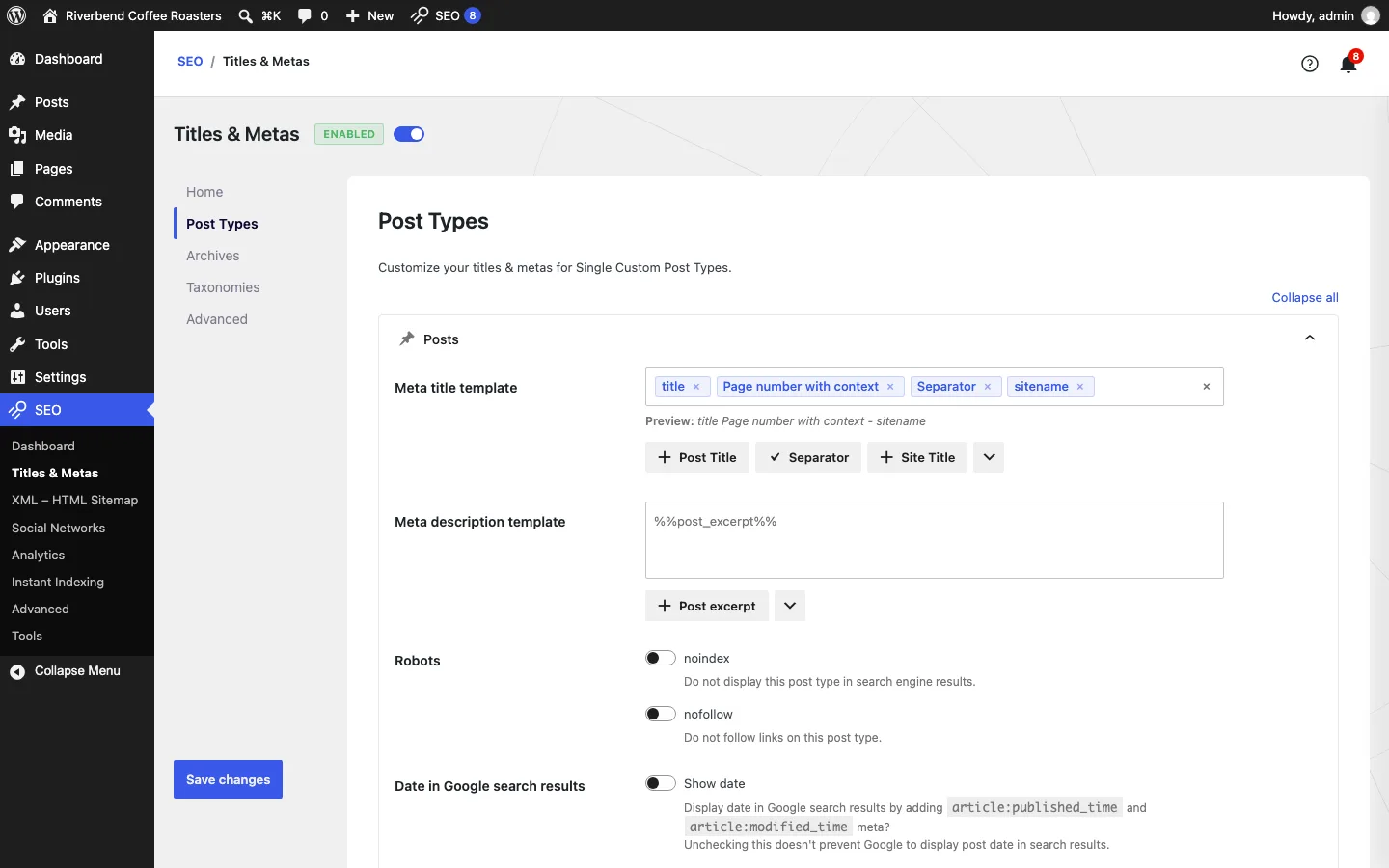
The Post Types tab of SEOPress Titles & Metas on our test install.
Titles & Metas sets the default title and description for your homepage, each post type, archives and taxonomies. Templates use variables shown as removable tags, so you rarely type %%variable%% codes yourself.
Two things we noticed on the defaults:
- Default descriptions come from your content. On one post without a custom description, it ran a heading straight into the paragraph (“notes.Step 1Ethiopia”) and stopped at about 300 characters, far past what Google shows. Write your own for pages that matter.
- A small spacing glitch. The default post title left a double space before the separator. It is cosmetic.
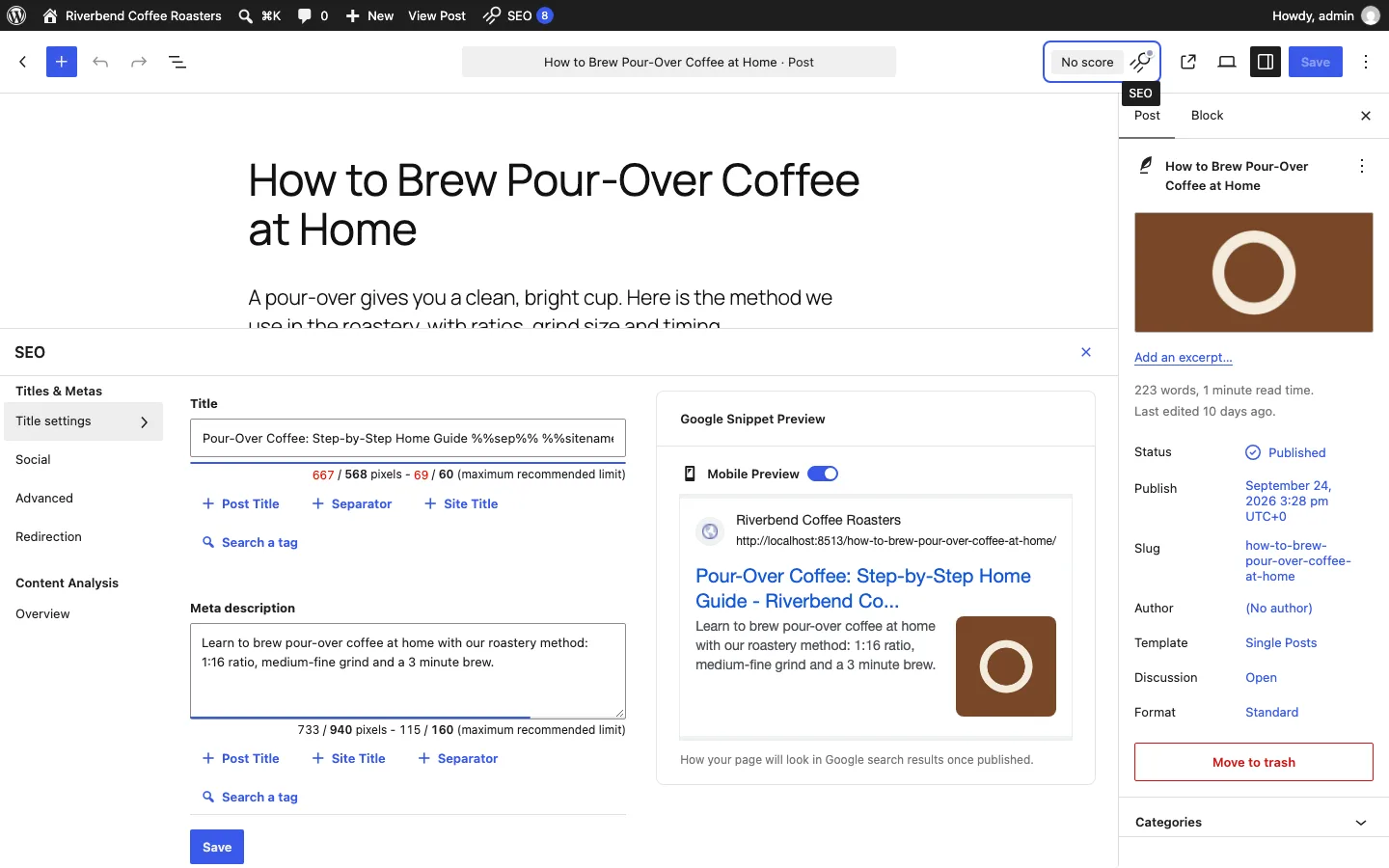
In the editor, an SEO button in the top bar opens a panel with title settings, social, advanced (noindex, nofollow, canonical, primary category, an option to freeze the last modified date), redirection and content analysis. Title and description fields show live pixel and character counts and a Google preview.
Content analysis accepts unlimited target keywords in the free version. Yoast’s free plan allows one and Rank Math’s allows five. On our imported post it listed 17 checks, from headings and alt text to internal links.
Per-post redirects are free. You can send a single post or page to another URL with a 301, 302 or 307 redirect. A central redirect manager with regex rules, CSV import and a 404 log needs PRO.
XML Sitemaps
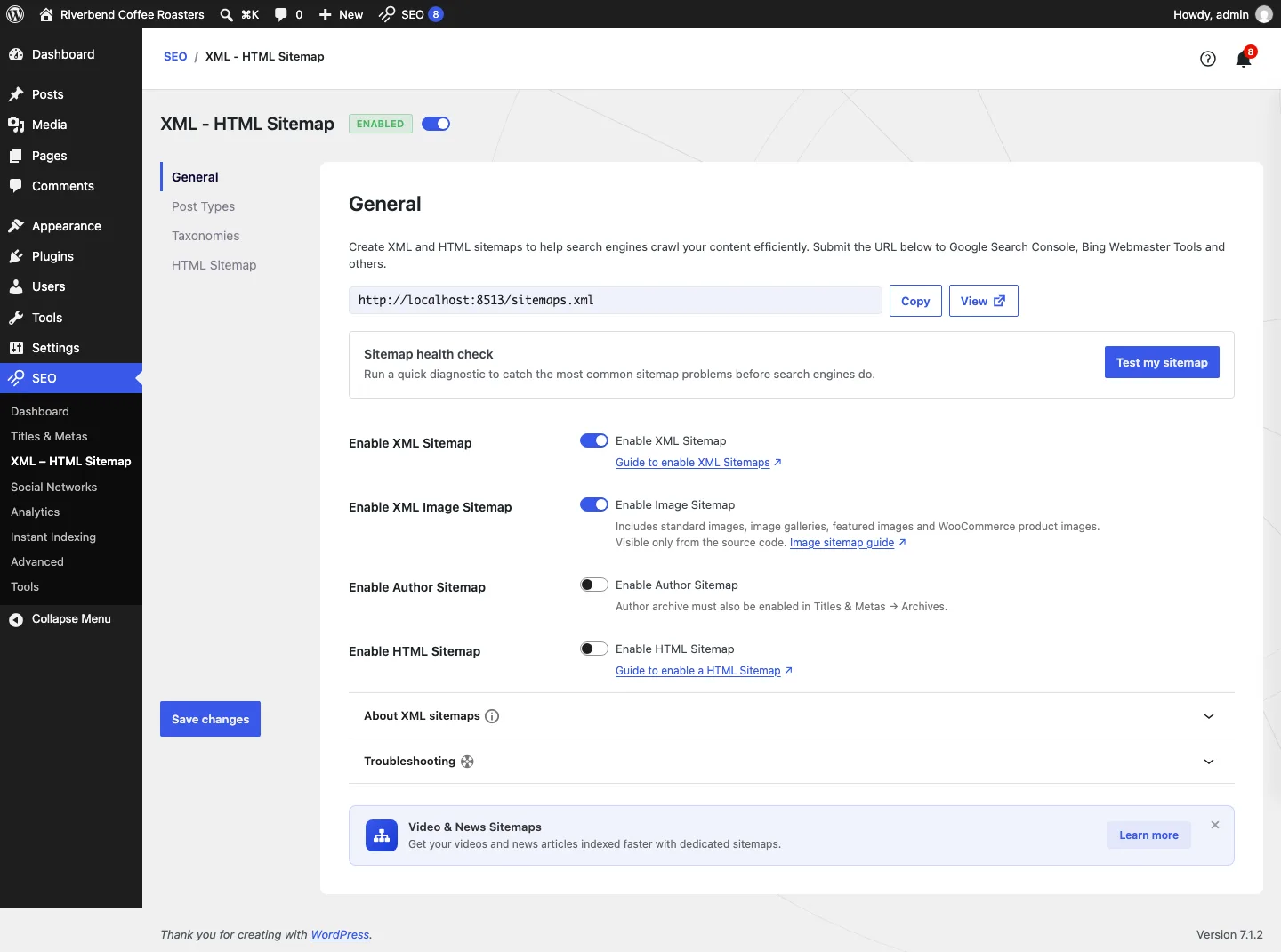
SEOPress XML and HTML sitemap settings on our test install.
The wizard switched on XML and image sitemaps. The settings screen shows your sitemap address, a “Test my sitemap” health check, and switches for author and HTML sitemaps.
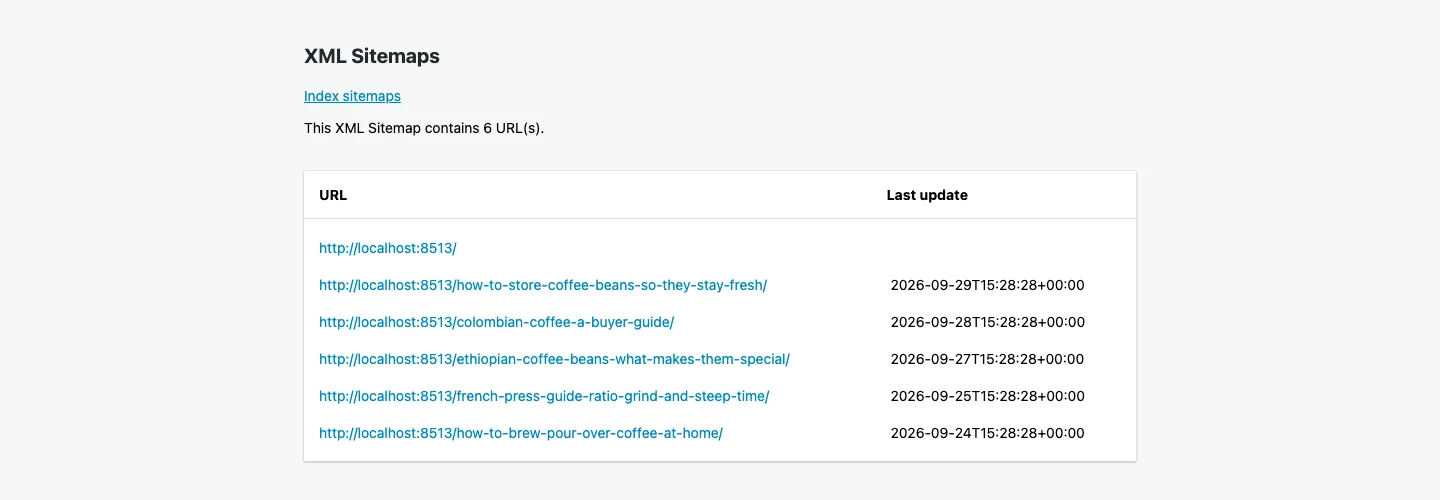
The post sitemap SEOPress generated for our test site.
The index at /sitemaps.xml listed three sitemaps: posts, pages and categories. The post sitemap held the homepage and five posts with their featured images. The sixth post, set to noindex in Yoast, was left out automatically. Google News and video sitemaps are PRO features.
Social Tags and What SEOPress Adds to Your Pages
Free SEOPress writes Open Graph tags (used by Facebook, LinkedIn, WhatsApp and others) and X card tags, with a per-post custom title, description, image and preview. X cards default to the small “summary” card. We switched to “Large (summary_large_image)” under Social Networks, then X (Twitter), which most sites will want.
These are the SEO tags SEOPress printed in the head of one imported post:
<title>,meta name="description",meta name="robots"andlink rel="canonical"- Open Graph:
og:url,og:site_name,og:locale,og:type,og:title,og:description,og:image,og:image:width,og:image:height fb:pagesandfb:app_id, both empty because we had not filled them in- X cards:
twitter:card,twitter:title,twitter:description,twitter:image
What it did not print on posts is any schema. The homepage got WebSite and Organization schema, but posts got no Article markup in the free version, while Yoast and Rank Math both add it for free. Google does not need article schema to rank a normal post. It matters more for rich results such as product stars, recipes or events, and those need PRO in SEOPress.
Dashboard and footprint
SEOPress was quieter than many freemium plugins. It still displayed Pro promotions and partner offers inside its own screens, despite the listing’s “no upsells in admin” wording. We saw no standard notices from it across unrelated dashboard pages.
It created fewer custom database tables than Yoast in our test, but we did not measure a resulting speed difference. Table counts and plugin folder sizes are not a page-speed benchmark. The free edition also includes analytics integrations, IndexNow, image-alt tools and role controls. Optional AI access is disabled until enabled.
What SEOPress PRO Adds
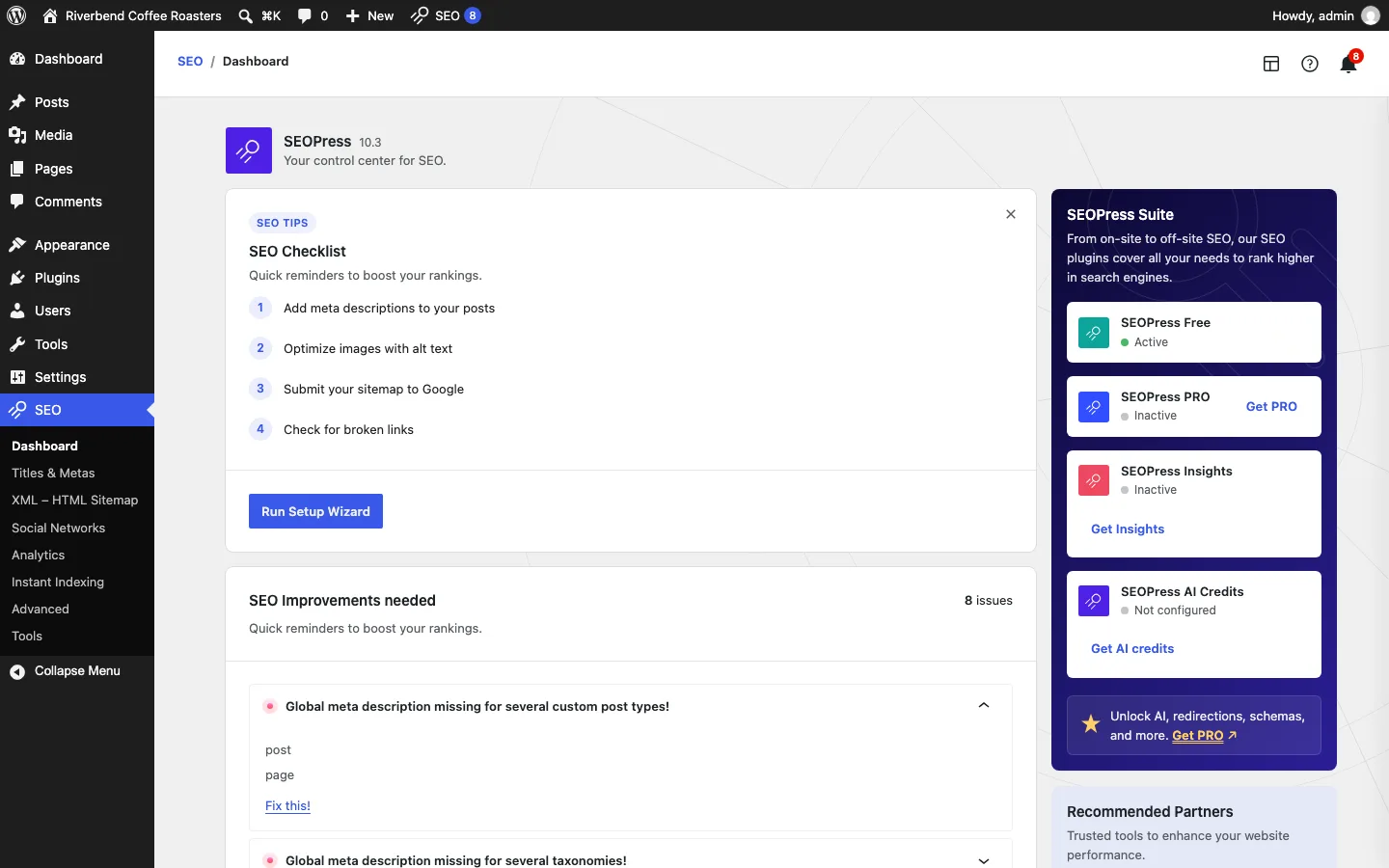
The SEOPress dashboard on our free install, with PRO, Insights and AI Credits shown as inactive.
According to the vendor’s pricing and feature pages, PRO adds:
- Schema for Article, Local Business, Product, FAQ, How-to, Recipe, Event, Course, Job Posting, Video, Review and more, set automatically or by hand.
- Redirect manager with 301, 302, 307, 410 and 451 rules, regex and CSV import, plus 404 monitoring with email alerts.
- Broken link checker that scans your content in the background.
- WooCommerce SEO (product schema with GTIN, MPN and brand) and Local SEO with opening hours.
- Google Analytics and Search Console data inside WordPress, a site audit, SEO alerts and AI tools (with your own OpenAI, Gemini, Claude, Mistral or DeepSeek key, or paid SEOPress AI Credits).
- Google News and video sitemaps, breadcrumbs, and a robots.txt and .htaccess editor.
- White label to replace the SEOPress name and logo on client sites.
SEOPress Pricing
Prices from seopress.org as of October 2026, billed yearly, before VAT:
The free edition can run on any number of sites. PRO costs $49 annually for one site, $59 for five or $149 for unlimited sites. Insights adds $99 per site annually. Optional AI-credit subscriptions cost $19, $29 or $49 monthly and can be used across unlimited sites.
Every PRO plan has the same features. The pricing page says plans renew at the same price, the terms say they renew automatically until you cancel from your account, and there is a 14-day refund window.
SEOPress changed its plans on August 1, 2025. Before that, $49 a year covered up to five sites, so reviews that still say so are out of date. Existing customers on auto-renewal kept their old plan and price, according to the vendor.
For one site, annual pricing is $49 for SEOPress PRO, $107.88 for Rank Math PRO and $118.80 for Yoast Premium. At five sites, it is $59, $107.88 and $594 respectively.
At ten sites, SEOPress needs its $149 unlimited plan, Rank Math remains $107.88 for your own sites, and Yoast totals $1,188. Licensing scope matters alongside the portfolio price.
Rank Math PRO covers unlimited sites you own but not client sites. Yoast Premium is priced per site, with bulk discounts. Rank Math and Yoast prices are from our Rank Math vs Yoast comparison, checked October 3, 2026.
Who Owns SEOPress?
SEOPress is made by a company of the same name registered in France and run by its founder, Benjamin Denis. The legal notice names him as legal representative and the terms name him as President. The about page says he had the idea in 2017 and founded the company in October 2018.
We found no sign of a sale. In its 2025 review, published in January 2026, the company calls itself “100% independent”, reports $3 million in total sales and more than 23,000 premium customers, and names a team of four, including CTO Rémi Corson, formerly of WooCommerce and Easy Digital Downloads. That stands out in this market: Yoast has been owned by Newfold Digital since August 2021, according to both companies.
SEOPress Security History
As of October 2026, the Wordfence vulnerability database lists 17 issues in free SEOPress from 2021 to October 2026, all marked as patched; eleven were published in 2024. Patchstack lists 16, also all patched. Wordfence lists one issue for SEOPress PRO.
The August 2021 stored-XSS issue affected versions 5.0.0 through 5.0.3, was rated 6.4 and was fixed in 5.0.4. The critical unauthenticated PHP object-injection issue published in June 2024 was rated 9.0 and fixed in 7.9. Three authorization flaws published in October 2024, rated up to 5.3, were fixed in 8.2.
In 2026, a contributor-level authorization issue in PRO, rated 4.3, was fixed in PRO 9.2. The contributor-level server-side request forgery issue published September 3, rated 6.4, was fixed in 10.2. The unauthenticated stored-XSS issue through author display names, published October 2 and rated 7.2, was fixed in 10.3. These exact fixed versions are important when checking an older installation.
“Cross-site scripting” means an attacker could plant code that runs in someone else’s browser, and “unauthenticated” means no login was needed. Wordfence notes the 2024 object injection flaw could only do harm together with another vulnerable plugin or theme. The October 2026 flaw only applied if “Track Authors” was set up in the Google Analytics or Matomo settings. Version 10.3 fixes both October 2026 issues.
Keep SEOPress on automatic updates, or update within a few days of each release. Outdated plugins are a common way sites end up with problems like a spam link injection.
SEOPress vs Yoast vs Rank Math
SEOPress has more than 300,000 installations, compared with Yoast’s ten million-plus and Rank Math’s four million-plus. It allows unlimited free target keywords, while Yoast allows one and Rank Math five. Free SEOPress does not add post schema, while the other two do.
SEOPress offers free per-post redirects, Yoast reserves redirects for Premium, and Rank Math includes a free full manager and 404 log. SEOPress and Yoast need no account; Rank Math’s account is optional overall but required for some features. Paid entry pricing is $49 annually for one SEOPress site, $118.80 for one Yoast site or $107.88 for Rank Math on sites you own.
SEOPress vs Yoast: SEOPress is cheaper past one site, quieter, and gives you unlimited keywords and per-post redirects for free. Yoast is easier for beginners, gives better writing feedback, adds article schema for free, and has far more tutorials. If Yoast Free works for you, there is no urgent reason to switch. If you are about to pay for Yoast Premium on several sites, SEOPress PRO costs much less.
SEOPress vs Rank Math: Rank Math’s free plan does more, including schema types, a redirect manager and a 404 monitor. SEOPress is simpler, needs no account, and every PRO plan includes white label for client sites. For a wider look, see our list of best SEO plugins for WordPress.