Cloudways vs SiteGround (2026): Real Costs and Which to Pick
Choose SiteGround for a small site if you want email, backups and phone support in one package. Choose Cloudways for more server control and pricing that stays the same at renewal. SiteGround is cheaper at first; the gap narrows sharply after its introductory term.
Pricing: year one vs year two
SiteGround: cheap first year, then standard rates
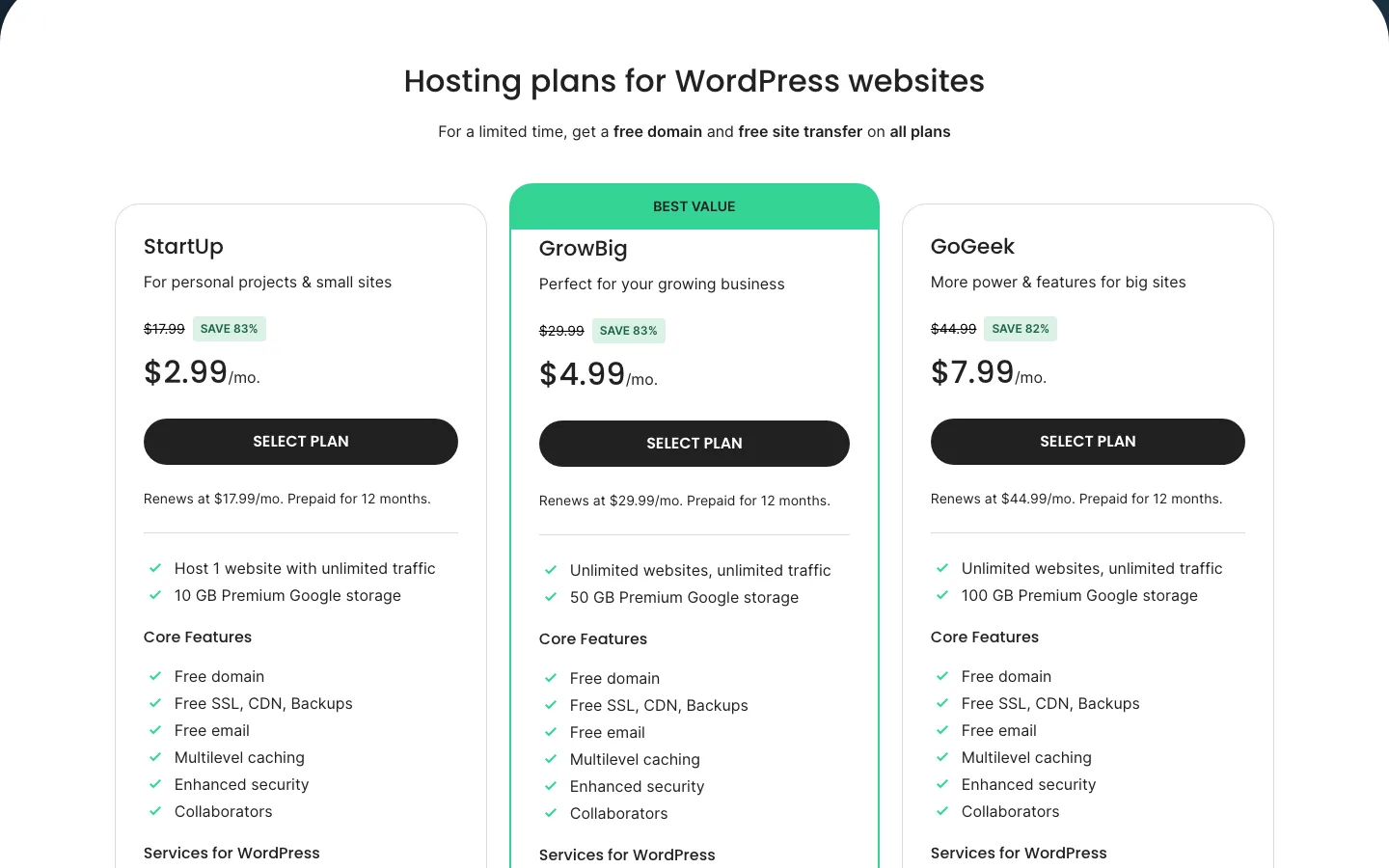
SiteGround’s WordPress hosting plans. Each card shows the renewal price and “Prepaid for 12 months.”
SiteGround’s intro prices need a 12-month prepay and apply to the first invoice only. After that you pay its standard rates, which it says have applied since September 7, 2023.
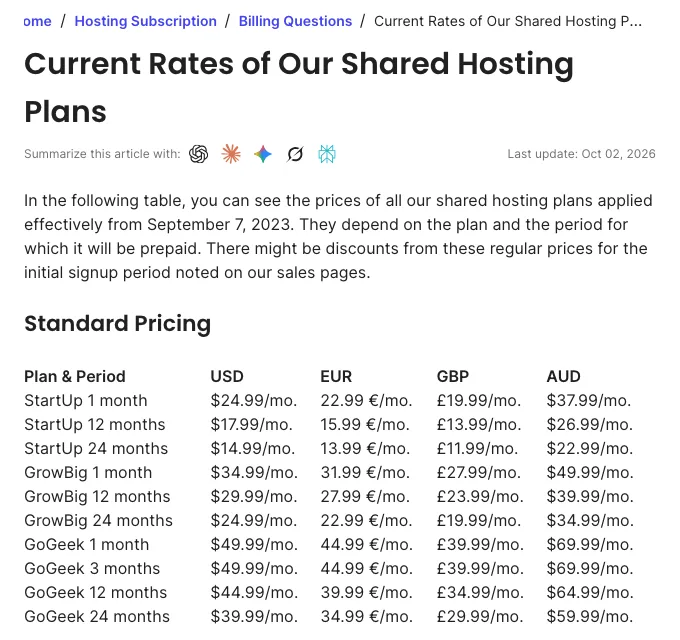
SiteGround’s standard rates for shared hosting, last updated. These are the prices after the first term.
SiteGround StartUp includes one site and 10 GB storage for $35.88 in the first year, equivalent to $2.99 a month. It renews at $17.99 a month for 12 months or $14.99 on a 24-month term.
GrowBig covers unlimited sites and 50 GB for $59.88 initially, or $4.99 a month, then $29.99 on a yearly renewal or $24.99 on a two-year renewal. GoGeek provides unlimited sites and 100 GB for $95.88 initially, or $7.99 a month, then $44.99 or $39.99 respectively.
SiteGround says StartUp suits about 10,000 visits a month, GrowBig about 100,000 and GoGeek about 400,000, but calls those figures a reference point, not a limit. The real limits are CPU seconds and file counts.
Cloudways: the same price every month
Cloudways has no intro price to lose. You pay for the server by the hour, with a monthly cap on DigitalOcean, Vultr and Linode, and one invoice at the start of each month for the month before.
Cloudways’ 1 GB, one-vCPU servers cost $11 monthly on DigitalOcean Standard, $14 on DigitalOcean Premium or Linode, and $16 on Vultr High Frequency. The 2 GB, one-vCPU options cost $24, $28, $28 and $30 respectively.
For 4 GB and two vCPUs, Standard costs $46, Premium $54, Linode $59 and Vultr High Frequency $60 a month. These are ongoing prices rather than discounted first terms.
AWS starts at $20.56 a month and Google Cloud at $37.33, with much less bandwidth included. Our Cloudways review lists every provider and size. Cloudways is also running a promo of 30% off the first 3 months, which would cut the first year on a $14 server to about $155.
What two years cost
Assuming you start on the term shown and renew yearly at the listed price:
At the yearly renewal rates used here, SiteGround StartUp costs $35.88 in year one and $215.88 in year two, totaling $251.76. GrowBig costs $59.88 then $359.88, totaling $419.76. GoGeek costs $95.88 then $539.88, totaling $635.76. Cloud Jump Start costs $1,200 each year, or $2,400 over two years.
Cloudways DigitalOcean Standard 1 GB costs $132 each year, totaling $264. Premium 1 GB costs $168 each year, totaling $336; Premium 2 GB costs $336 each year, totaling $672; and Premium 4 GB costs $648 each year, totaling $1,296.
SiteGround wins year one by a mile. From year two, Cloudways’ default 1 GB server ($168 a year) costs less than StartUp ($215.88), and a 2 GB server ($336) costs less than GrowBig ($359.88).
The table leaves out extras, and that matters on Cloudways. SiteGround includes email and a first-year domain. On Cloudways, a small business site with two mailboxes and offsite backups for 10 GB of files comes to about $17.33 a month, or $208 a year, plus a domain from a registrar. In year two that is almost exactly what SiteGround StartUp costs, so the choice comes down to features rather than price.
What you get on each host
Both hosts include SSL and WordPress migration options. Cloudways advertises unlimited free migrations by its engineers, while SiteGround provides a free self-service Migrator plugin and was advertising a limited free-transfer offer. Cloudways staging includes push and pull on every server; SiteGround reserves staging for GrowBig and GoGeek, with Git on GoGeek.
Cloudways backs up every 24 hours and keeps a week by default, with schedules from hourly to weekly and retention from one to four weeks; storage is billed separately. SiteGround includes daily backups in another location for 30 days, with on-demand backups from GrowBig.
Cloudways uses Varnish, Redis and Breeze, with Object Cache Pro free on servers of 4 GB or more. SiteGround uses its NGINX SuperCacher, Memcached and Speed Optimizer. Cloudways includes Imunify360 and bot protection but charges from $4 per app monthly for Malware Protection; SiteGround includes its web application firewall but sells Site Scanner separately.
SiteGround includes email and managed WordPress and plugin updates. Cloudways mailboxes cost $1.50 monthly; Site Manager has a free tier, while its $2-to-$3-per-site Pro tier adds scheduled updates, visual checks and rollback.
Two features have changed recently. Cloudways’ SafeUpdates add-on is being replaced by Site Manager, generally available since April 2026. And SiteGround’s “SG Optimizer” plugin is now called Speed Optimizer.
Caching tools
We tested Breeze and Speed Optimizer on the same separate WordPress server. Both produced working file caches, but this was not a comparison of hosting plans: we did not buy either service.
Breeze enabled page caching immediately, cleared the homepage after publication and deferred most featured images with its Standard preset. Speed Optimizer needed file caching enabled manually; its dashboard still reported caching disabled afterwards.
Speed Optimizer’s default lazy-load exclusions skipped featured images, so more images loaded immediately than with plain WordPress. Its automatic purge depended on scheduled tasks that could not run in our sandbox, leaving a stale page until we purged manually. That limitation does not establish a failure on SiteGround’s servers.
Both reserve important controls for their home environment: Breeze integrates with Varnish and object caching, while Speed Optimizer’s Dynamic Caching, Memcached and image services need SiteGround. Breeze removed server rules on deactivation; Speed Optimizer left compression and browser-caching rules behind. Use the plugin your host supports rather than choosing a host from these local timings.
Scaling up: Cloudways Autonomous vs SiteGround Cloud
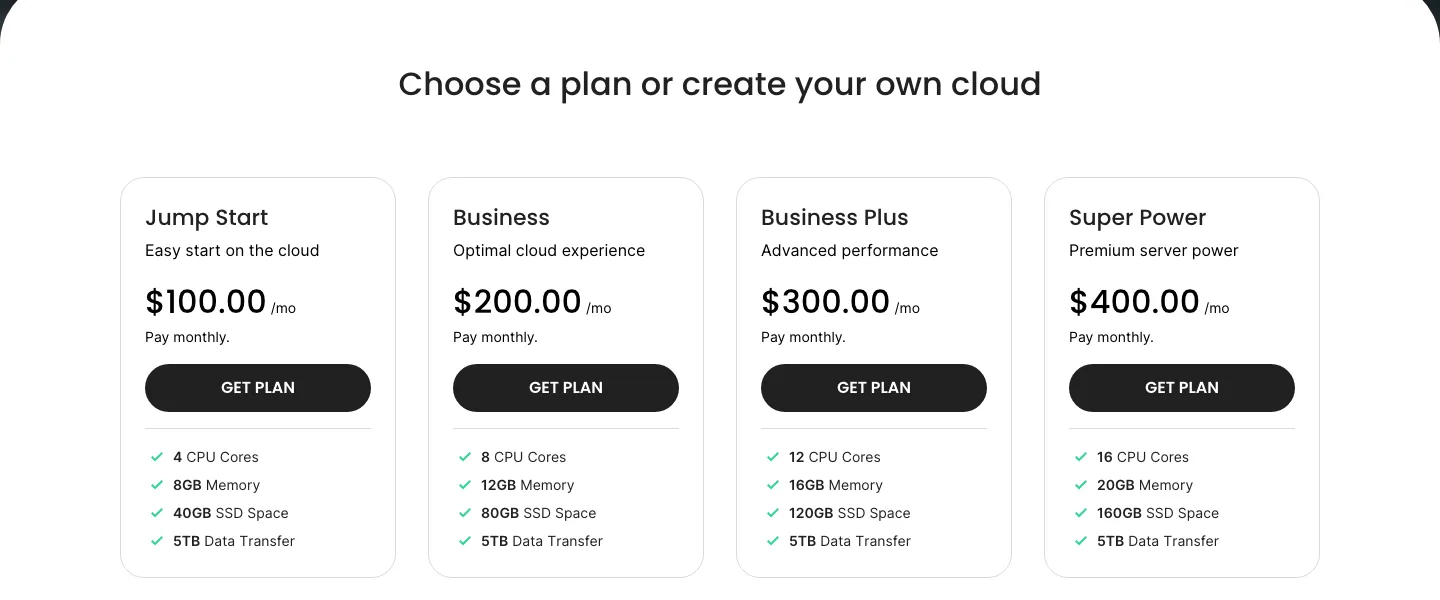
SiteGround’s Cloud plans, billed monthly.
SiteGround Cloud starts at $100 a month (Jump Start: 4 CPU cores, 8 GB of memory, 40 GB of SSD, 5 TB of transfer), with unlimited sites, a dedicated IP, free email and optional autoscaling. The refund window on Cloud is 14 days.
Cloudways’ closest match is Autonomous, a fully managed WordPress product that adds servers automatically during traffic spikes. It starts at $99 a month for one site on the Growth plan, with 150 GB of bandwidth and 20 GB of disk, and charges $0.07 an hour for extra server time when it scales. Cloudflare Enterprise, Object Cache Pro, staging and malware protection are included.
So for one busy site with big traffic spikes, Autonomous is the more hands-off option. For many sites that need fixed resources, plus email, SiteGround Cloud gives more for the money. Most readers do not need either: a Cloudways Flexible server sized at 2 to 4 GB costs $28 to $54 a month.
Control panel: Cloudways platform vs Site Tools
Neither host uses cPanel, and we could not log in to either without buying a plan, so this is based on each vendor’s published screens and docs.
Cloudways splits its panel into a server level (scaling, backups, cloning, Redis and Varnish) and an application level (domains, SSL, staging, cron jobs, Git and cache settings). It is clean but technical, with “PHP-FPM settings” sitting next to “SSL certificate.” There is no email or domain section because Cloudways does not sell either.
SiteGround Site Tools gives each site its own dashboard with a file manager, email, DNS, databases, backups, caching and the CDN. You can add collaborators, and GoGeek adds white-label access for clients. For a beginner, Site Tools is the easier of the two.
Support, uptime and refunds
Cloudways’ free 24/7 chat and tickets cover server and platform issues; theme and plugin conflicts need Advanced Support. Advanced lists at $100 a month or 10% of the bill, with a $25 promotion, and Premium at $500 with phone access. The vendor claims a 90-second average chat response. Its stated 99.9% SLA here applies to Autonomous.
SiteGround starts with an AI help center, then offers 24/7 phone, chat and tickets on every plan; GoGeek gets priority routing to experienced agents. It claims over 90% first-contact resolution and a 99.9% monthly uptime guarantee, with 5% of the month’s fee awarded as extra hosting time under its terms.
Cloudways offers a three-day trial and charges only for hours used, without a money-back guarantee. SiteGround’s refund windows are 30 days for shared plans and 14 days for Cloud.
SiteGround is the better choice if you want to reach a person quickly, including by phone. On Cloudways, help with plugin and theme conflicts is part of the paid Advanced add-on, so budget for it if you are not comfortable debugging WordPress yourself. Neither company’s uptime promise pays much if it is missed, so treat them as a sign of intent rather than insurance.
Ownership and recent changes
SiteGround was founded in 2004 and says it is still privately owned. It says it hosts about 3 million domains. In 2026 it launched an AI Agent for WordPress, made its AI Studio Essential tool free for customers and added Node.js hosting. Its standard renewal prices have not changed since September 2023. WordPress.org used to list SiteGround as a recommended host, but as of October 2026 its hosting page lists Bluehost, Hostinger and Pressable instead.
Cloudways was bought by DigitalOcean for $350 million in September 2022 and says it now has more than 100,000 customers. It raised prices in April 2023 for the first time since 2017 (the 1 GB DigitalOcean Premium server went from $12 to $14), released the Lightning Stack in November 2025 and repriced Autonomous at the same time.
Other hosts to compare
- Kinsta: premium managed WordPress with no renewal jump. See Kinsta vs SiteGround and our Kinsta review.
- WP Engine: another premium managed host. See WP Engine vs SiteGround.
- Hostinger: cheaper than both over several years. See Hostinger vs SiteGround and our Hostinger review.
For a wider shortlist, read our guide to the best managed WordPress hosting or browse all our WordPress hosting reviews.