Avada vs Enfold (2026): Which Multipurpose Theme Should You Buy?
Choose Avada if you want a visual front-end builder, a bigger design library and more control over a store. Choose Enfold for a simpler business or portfolio site with fewer settings to learn. Both sell single-site licenses, so check the cost before using either across client projects.
Price and License
Avada costs $69 and Enfold costs $59 on ThemeForest, according to the “Buy” buttons on avada.com and kriesi.at. Both prices are for a Regular License, which covers one website. Both include lifetime updates and 6 months of support, and you can pay extra to extend support. If you are building a product that you will sell to end users, ThemeForest sells a separate Extended License for each theme.
The $10 gap is small. What you get for it is mostly scale: Avada has nearly three times as many prebuilt websites, a larger set of design elements, two bundled premium slider plugins instead of one, and extra builders for forms, headers, footers and pop-up style “off-canvas” panels. Avada’s own FAQ says there are no recurring license fees.
What Avada One means for buyers
In May 2026, ThemeFusion announced Avada One, a new product that will be sold directly on avada.com as a subscription. Its beta opened in September 2026, and the company says pricing will be announced closer to launch. Avada One will include AI tools for images and text, a new dashboard, and a new color system.
The version you buy on ThemeForest today is now called Avada Classic. ThemeFusion says Classic stays a one-time purchase on ThemeForest and will keep getting updates, security fixes and smaller new features. It also says the two products will grow apart, and that moving an existing site to Avada One will need a migration plugin and some manual work.
In plain terms: buying Avada now is still a one-time purchase, but the newest features will land in a subscription product. Enfold has announced nothing similar. Kriesi still sells only Enfold, on ThemeForest, and is beta testing a separate AI translation plugin for it called Omnalingo.
Builder: Avada Builder vs Enfold’s Advanced Layout Builder
The builder is the part you will spend the most time in, and it is the biggest difference between the two themes.
Avada Builder and Avada Live

Vendor image: the Avada Live visual editor, from the Live Visual Builder page on avada.com.
Avada’s builder runs as two required plugins that install with the theme: Avada Core and Avada Builder. You can edit a page two ways:
- Avada Builder works in the WordPress admin. You stack containers, columns and elements as boxes and edit each one in a settings window.
- Avada Live works on the front end. You see the real page, click any element, and change it in a side panel while the page updates in place.
Both use the same 150+ elements, and you can switch between them. Avada also includes a Layout Builder for headers, footers, archives, search results, 404 pages and single post or product templates, plus a Form Builder, an Off-Canvas Builder for pop-ups and sliding panels, and a Mega Menu Builder. Avada Studio adds 639 ready-made sections and pages you can drop into a layout.
Enfold’s Advanced Layout Builder
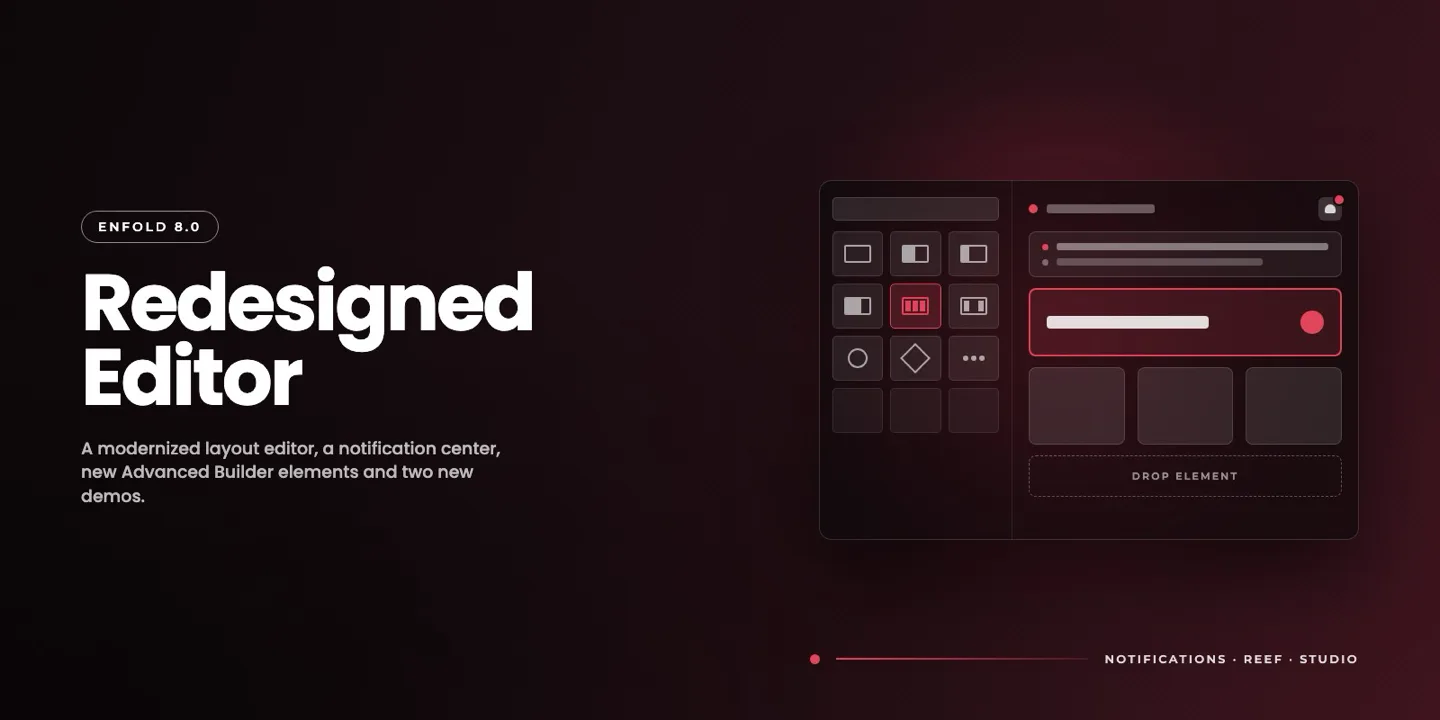
Vendor image: Kriesi’s illustration of the redesigned Enfold 8.0 Layout Builder, from its August 2026 release post.
Enfold’s builder is called the Advanced Layout Builder, or ALB. Many users still call it the Avia Layout Builder, after the Avia framework Enfold is built on. It is part of the theme, and Kriesi says it does not sell the builder as a separate plugin.
The ALB works in the WordPress admin, not on the live page. You drag element boxes (columns, sections, sliders, tabs, forms, maps, galleries and so on) onto a canvas and edit each one in a settings window. Kriesi does not advertise a front-end visual editor. Per page, you can choose the ALB or the WordPress block editor instead.
Enfold 8.0, released August 17, 2026, gave the ALB its biggest redesign in years. Elements now sit in a full-height sidebar with a search box, the panel can be resized, icons are sharper, and each element box on the canvas now shows what it holds, such as gallery thumbnails or the first lines of a code block.
Which builder is better?
Avada’s, for most people who build often. Front-end editing is faster for design work, and the Layout Builder lets you control parts of the site that Enfold handles mostly through theme options. Enfold’s ALB is simpler, and some people prefer a back-end builder because the page stays tidy while you work. If you are still choosing a builder in general, our guide to the best page builder for WordPress compares the main standalone options.
Demos and Design

The official Avada Business demo. The buttons on the right edge are part of the demo site, not the theme.
Avada lists 113 prebuilt websites. The biggest groups are Corporate (49), Shop / WooCommerce (29), Creative (25) and Portfolio (23). The library goes back to 2016, and ThemeFusion has added new ones regularly, most recently a Minimal Portfolio site in 2026.
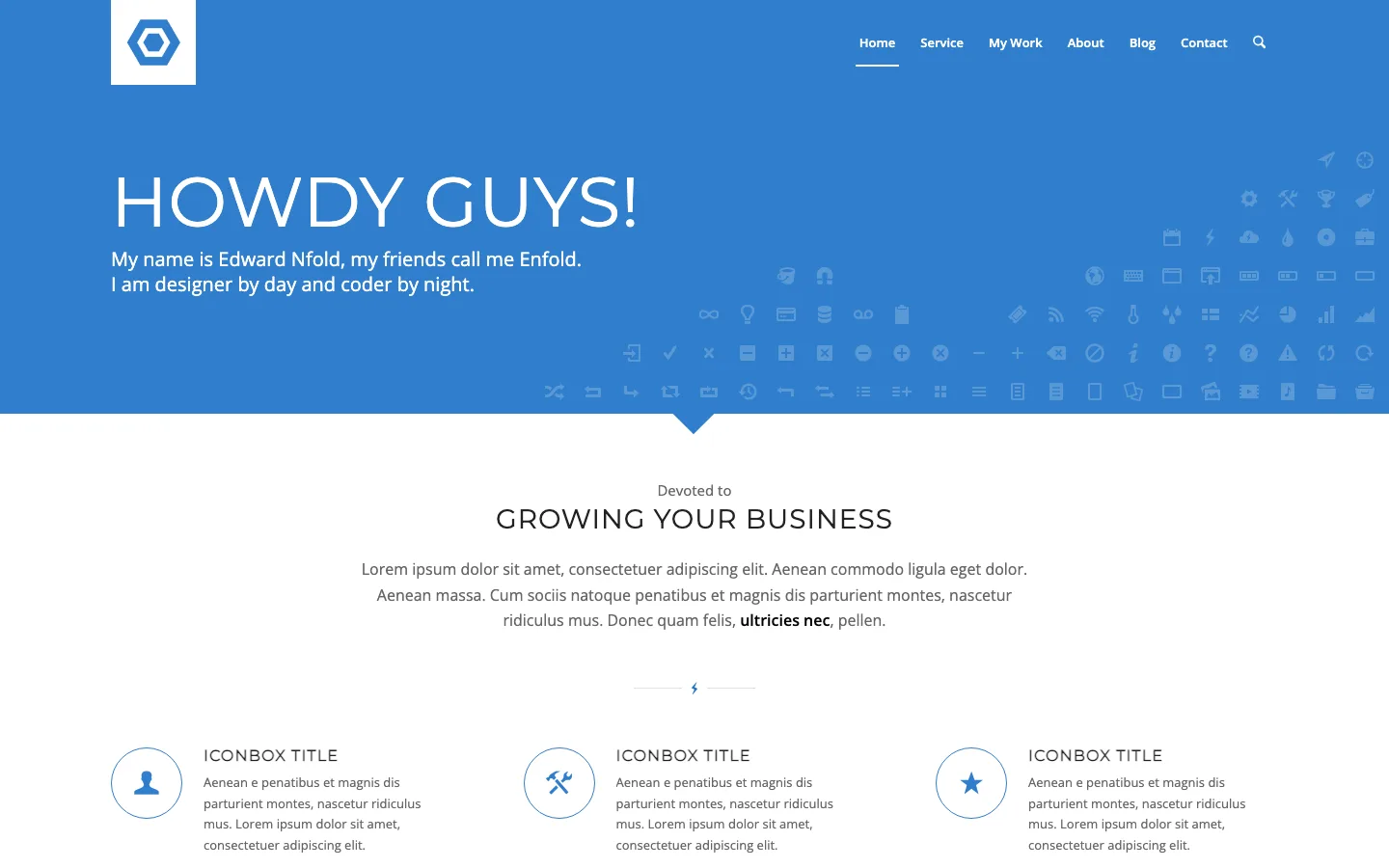
The official Enfold Flat Business demo.
Enfold’s demo overview lists 41 demos: two main demos (Modern and Classic) and 39 others. Kriesi groups them as Business (24), Creative (15), One Page (16), Portfolio (17) and E-Commerce (5), with many demos in more than one group. Two new demos, Enfold Studio and Enfold Reef, arrived with version 8.0. Some older Enfold demos, like Flat Business, have a dated 2014 look, but the newest ones look current.
Both themes import a demo with one click from the dashboard. Avada’s library is broader and more polished overall. Enfold’s is smaller, but a demo is only a starting point, and both themes let you change everything afterward.
WooCommerce
Avada has the stronger shop tools. Its WooCommerce Builder lets you design your own shop, product, cart, checkout and thank-you page layouts with builder elements. Recent releases added AJAX product filters and sorting that update without a page reload. The September 2026 release lists compatibility with WooCommerce 11.1.2.
Enfold supports WooCommerce with styled shop templates and ALB elements such as a Product Grid and product sliders. Its documentation says the ALB is turned off on the default WooCommerce shop page, so the easy route is to build a normal page with a Product Grid element instead. Enfold also integrates with WooCommerce Bookings for time and date appointments, and version 8.0 added the WooCommerce product gallery to its improved gallery elements.
For a small shop with a few products, Enfold is fine. For a store where you want custom product and checkout layouts, Avada is the better pick.
Performance
Both vendors say their themes can be fast once configured, and both include tools for it:
- Avada has a Performance Wizard that scans your site, turns off unused features, manages fonts and icons, generates critical CSS, and combines CSS and JavaScript files.
- Enfold has a Performance tab in theme options. Since version 4.3 it loads only the CSS and JavaScript for the elements you use, and it can merge and compress those files.
To see how the official demos behave, we ran Lighthouse 13.5 three times each, in mobile and desktop modes, on one comparable business homepage from each vendor: the Avada Business demo and the Enfold Flat Business demo. The figures are medians, measured October 4, 2026.
On the official business demos, Avada scored 75 on mobile and 98 on desktop; Enfold scored 81 and 97. Enfold showed its first content sooner on mobile, at 2.3 seconds versus Avada’s 3.0 seconds, and its largest content appeared at 3.7 seconds versus 4.8.
Avada’s demo nevertheless transferred less data and made fewer requests: 749 KB across 42 requests, compared with Enfold’s 1,035 KB across 147. Its server response was about 0.1 seconds versus 0.9 seconds. Total blocking time was 111 ms for Avada and 156 ms for Enfold, while layout shift was 0 and 0.002. These October 2026 demo measurements show different tradeoffs, rather than a universal speed winner.
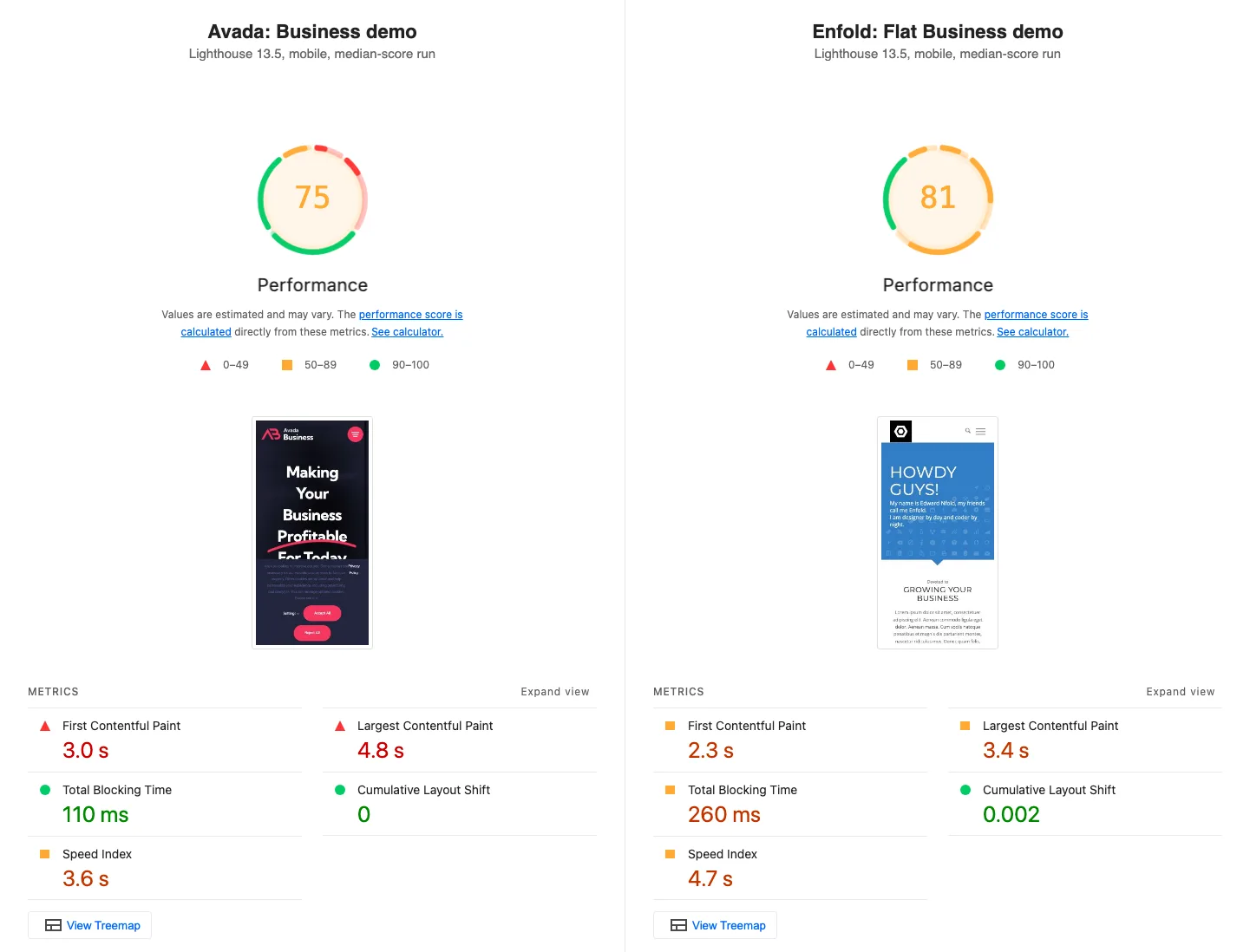
Lighthouse 13.5 mobile reports for the median-scoring run of each official demo.
What this shows:
- Both demos scored well on desktop (97 and 98) and in the 70s to 80s on Lighthouse’s tough mobile setting, which simulates a slow phone on a slow 4G connection.
- Enfold’s demo painted sooner on mobile, even though its server took about nine times longer to respond. Avada’s demo is lighter and makes far fewer requests, because it combines its files; Enfold’s demo loads many separate files and may not have file merging turned on.
- Neither demo is a fair stand-in for your site. These are different pages with different images, hosted on the vendors’ own servers, with their own analytics and cookie tools. Your hosting, images, plugins and settings will matter more than the theme.
For context, the free lightweight themes in our fastest WordPress theme test sent 47 to 182 KB on a simple test page. Big multipurpose themes like these start heavier, so if raw speed is your top goal, a light theme plus a page builder may suit you better.
Updates and Support
Update cadence. Avada has shipped 10 releases in 2026 so far, from 7.15 in March to 7.16.2 on September 30, roughly one every three to four weeks. Enfold has shipped 5: 7.1.4 in February, 7.1.5 in May, 7.1.6 in July, 8.0 in August and 8.1 in September. Both recent releases included security fixes: Avada 7.16.2 patched several cross-site scripting and data exposure issues, and Enfold 8.1 fixed issues reported by the Patchstack security team. Whichever you choose, keep it updated.
Support. Avada support runs through tickets in the My Avada account area, using an email-based ticket system. Enfold support runs through a public forum on kriesi.at, which held more than 103,000 topics in October 2026, so you can often find an existing answer before you ask. Kriesi’s homepage promises that every forum question gets an answer. Both include 6 months of support with a new license.
Documentation. Both have large knowledge bases and video tutorials. Avada’s help center has moved to classic.avada.com while avada.com is rebuilt for Avada One, though old links redirect.
Learning Curve
Enfold is easier to learn. It has fewer elements, fewer global settings, and one main way to build a page. Its Theme Options panel covers layout, colors, headers and performance in one place.
Avada asks more of you. Between Global Options, Page Options, the back-end and front-end builders, the Layout Builder, Avada Studio and 150+ elements, there is a lot to take in. The reward is more control once you know it. If you have never used a page builder, Enfold will feel less overwhelming. If you build sites for clients every month, Avada’s extra depth pays off.
Either way, installing the theme works the same as any premium theme: upload the zip file in WordPress. Our guide on how to install a WordPress theme walks through it.
Lock-in: What Happens If You Switch Themes Later
Both builders save your pages as shortcodes, which are bits of text in square brackets that the builder turns into layout. Avada uses tags such as [fusion_builder_container] and Enfold uses tags such as [av_section] and [av_one_half]. Avada’s changelog notes that its Live editor now copies and pastes using “shortcode data”.
If you later move to a different theme, the builder that reads those shortcodes goes away. Kriesi does not sell the ALB separately, and Avada’s builder ships as part of the Avada package. Your text and images stay in the database, but the layouts break into raw shortcode text. In practice, plan to rebuild your builder pages if you ever leave either theme.
This is the same trade-off you make with any theme that has its own builder, such as Divi or BeTheme. If you want an easy exit, use a light theme with the block editor or a standalone builder plugin instead.