Shapely Theme Review (2026): Is Colorlib's Free Theme Still Good?

Our verdict: Shapely is a fair choice for a simple one-page site in 2026, and it is better maintained than you might expect. Colorlib released version 1.3.7 on October 1, 2026, the theme says it is tested up to WordPress 7.1, and there is no paid version to upsell you. On our test install it was reasonably light (192 KB on the homepage) but still loads jQuery, and its demo import pulls images from Colorlib’s own server. If you want more than a one-page layout, a modern theme like GeneratePress, Kadence or Astra will serve you better.

This review covers what Shapely includes, how the demo import works, what our test install measured, and when to choose something else.

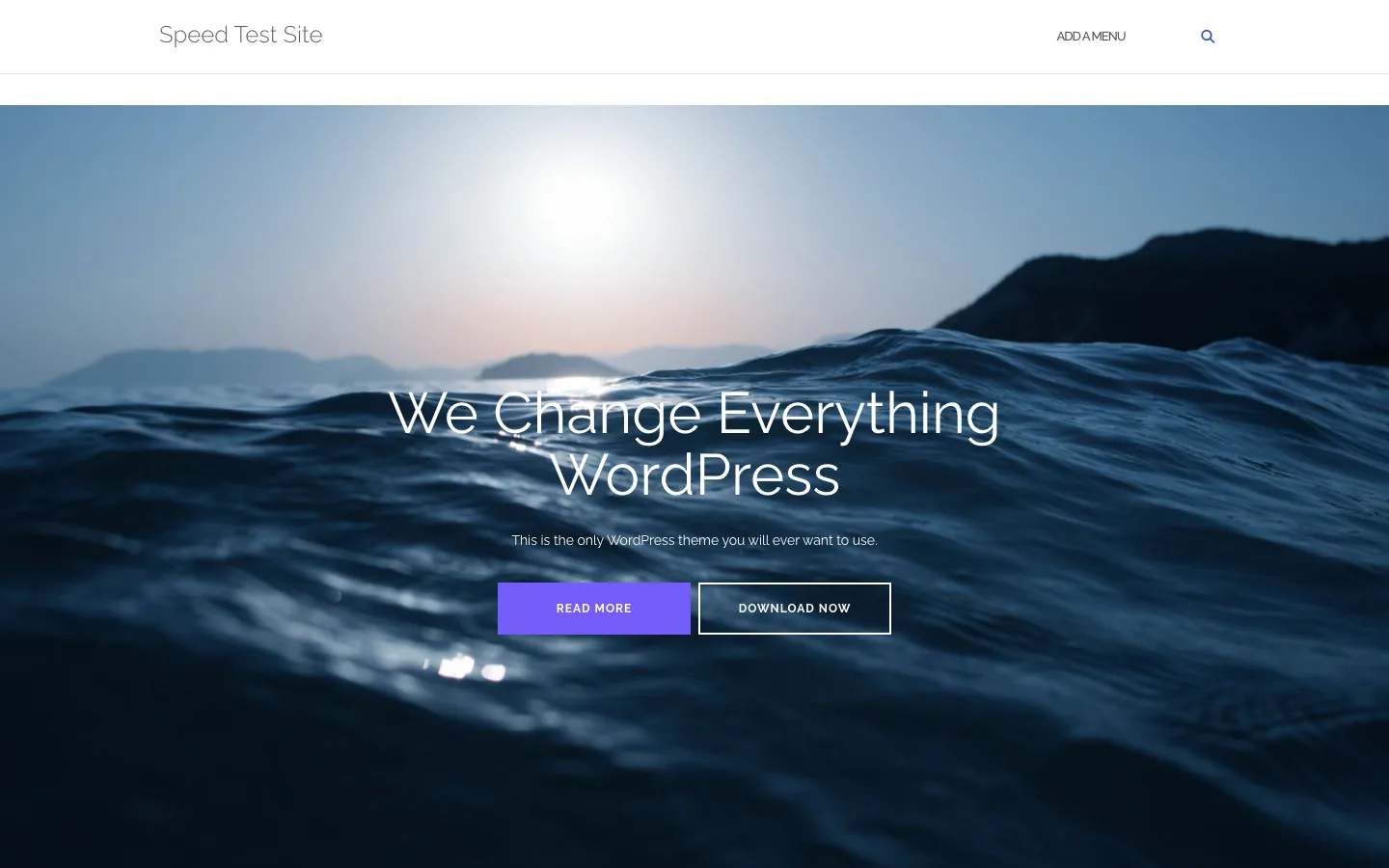
Shapely demo homepage with a full-width ocean photo, the headline We Change Everything WordPress and two buttons

Shapely’s homepage after importing its demo content on a test install, version 1.3.7, October 2026.

Shapely quick facts

Facts were checked on the WordPress.org listing and Colorlib’s site in October 2026.

Item Details
Developer Colorlib
Latest version 1.3.7, released October 1, 2026
Tested up to WordPress 7.1 (requires WordPress 6.4 and PHP 7.4)
Active installs 10,000+ on WordPress.org
Rating 4.6 out of 5 from 67 ratings
Price Free. There is no Pro version
Demo content Imported with the free Shapely Companion plugin
Theme type Classic theme with Customizer options, widget-based homepage and block patterns
Default homepage on our test site 192 KB, 19 requests, Lighthouse mobile score 97
Best for Simple one-page business, portfolio or landing sites

What is Shapely?

Shapely is a free one-page WordPress theme from Colorlib, which makes free WordPress themes. It first appeared on WordPress.org in 2017. Its look is clean and a little 2017: full-width photos with parallax scrolling, the Raleway font, thin headings and purple buttons.

The homepage is built from widgets, not from the block editor. You stack Shapely’s own homepage widgets (parallax sections, portfolio, testimonials, contact, client logos, call to action) in a “Homepage” widget area. Posts and pages use the normal block editor.

Is Shapely still maintained in 2026?

Yes, and more actively than most themes from its era. The 1.3 releases are a real cleanup rather than token version bumps. According to the changelog:

  • 1.3.0 removed the bundled Epsilon customizer framework, which Colorlib says was 1.3 MB and 52% of the theme, and added a theme.json file so the block editor uses Shapely’s colors and widths.
  • 1.3.2 updated Bootstrap to 3.4.1, the last version of Bootstrap 3.
  • 1.3.3 to 1.3.5 moved to a self-hosted Font Awesome 7 and cut it down to the icons the theme uses.
  • 1.3.7 (October 2026) serves the Raleway font from the theme instead of Google Fonts, fixes jQuery 4 compatibility, adds nine block patterns and says it was tested with WordPress 7.1 and PHP 8.5.

On our test install, Shapely 1.3.7 ran on WordPress 7.1.2 and PHP 8.3 with debug logging on, and the theme itself logged no PHP notices. The only warnings came from the companion plugin, covered below. Note the limits: one session, no real traffic, and no way to judge support response times.

Installing Shapely and importing the demo

Activating Shapely showed one dashboard notice: “Thanks for installing Shapely. Open the setup page to import the demo content.” The setup page lives at Appearance > About Shapely and has four tabs: Getting Started, Recommended Actions, Recommended Plugins and Support.

Shapely Recommended Actions tab with Import Demo Content and Advanced buttons, plus prompts to install Jetpack and Kali Forms

The Recommended Actions tab after installing Shapely Companion, version 1.3.7, October 2026.

The Recommended Actions tab listed four steps:

  1. Install Shapely Companion, the free plugin that holds the homepage widgets and the demo importer.
  2. Import Demo Content.
  3. Install Jetpack, needed for the Testimonials and Portfolio widgets.
  4. Install Kali Forms, needed for the Contact widget.

We installed Shapely Companion with one click from that page and ran the import with its default options (“Set Static FrontPage” and “Import HomePage Widgets”). It finished in a few seconds. It created a Front Page and a Blog page, set the front page, and added ten widgets to the homepage area. We skipped Jetpack and Kali Forms to see what the theme and its companion plugin do on their own.

Three things stood out in the result:

  • The images are not copied to your site. The demo homepage loaded its photos and logos directly from Colorlib’s demo server, colorlibhub.com. Two of them were requested over plain http. You will want to replace every image anyway, but until you do, your homepage depends on someone else’s server.
  • Some sections are incomplete without the extra plugins. The contact section showed “Contact form with ID 32 does not exist. Please update this widget with a valid form.” One parallax section showed only a “More Info” button with no image or text.
  • The companion plugin is noisier than the theme. During the import it logged a PHP “Deprecated” message, and its contact widget wrote two debug lines to the error log on every homepage view.

Shapely demo contact section showing phone, email and address, and a yellow notice that contact form ID 32 does not exist

The demo contact section without Kali Forms installed, Shapely 1.3.7, October 2026.

None of this is hard to fix. Swap the images, delete or edit the broken widgets, and install a form plugin if you need one. Just expect half an hour of cleanup, not a finished site.

Shapely settings and customization

Shapely’s options live in the Customizer under Theme Options, Blog Settings, Header Image, Background Image, Footer and Widgets.

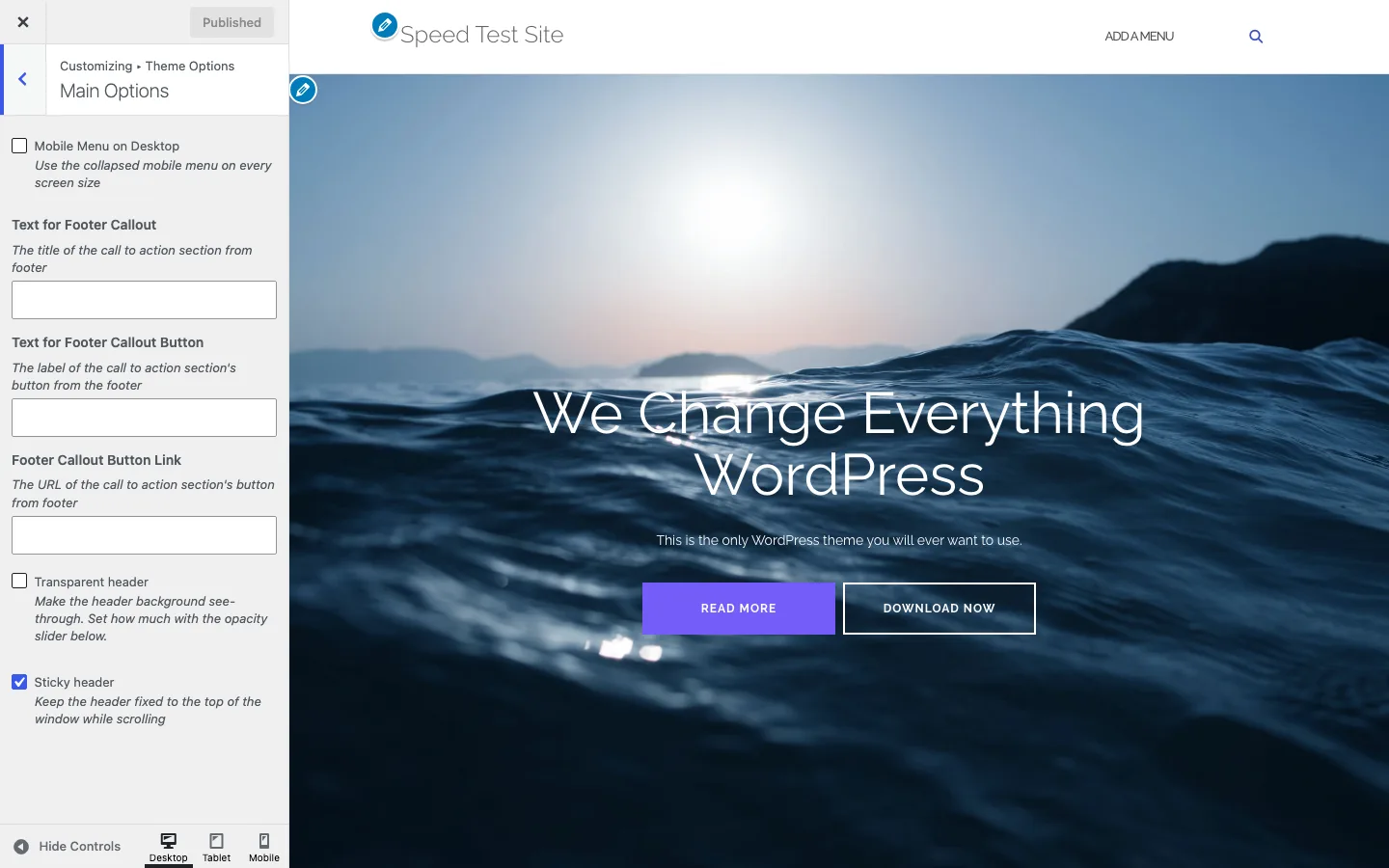
Shapely Customizer Main Options panel with mobile menu, footer callout, transparent header and sticky header settings

The Main Options panel in the Shapely Customizer, version 1.3.7, October 2026.

What you can change:

  • Main Options. Use the mobile menu on desktop, footer call-to-action text, button label and link, transparent header, and sticky header (on by default).
  • Colors. Header text, background, link, link hover, button and button hover colors.
  • Blog settings. The blog name in the top callout, the blog layout and template, plus settings for single posts.
  • Widget areas. A sidebar, the homepage area and four footer columns.
  • Block patterns. Nine Shapely patterns in the block editor, including Hero, Three features, Testimonials, Latest posts, Contact details and a full Home page pattern.

That is a short list. There are no typography controls, no header builder and no per-page layout settings beyond page templates. On the plus side, there is not a single upsell anywhere in the Customizer or the admin. The only promotion is the Recommended Plugins tab, which lists eight free Colorlib-related plugins such as Kali Forms and Modula.

The block patterns are the most useful recent addition. They let you build a Shapely-style homepage in the block editor instead of in widgets, which is easier to edit and does not need the companion plugin.

Shapely speed: page weight and requests

We measured Shapely with the method from our fastest WordPress theme test: WordPress 7.1.2, PHP 8.3, no plugins, no page cache, the same test homepage and blog post, default settings, and the median of three Lighthouse 13.5 runs. This is a local lab measurement. It shows how much code the theme sends, not how fast a live site will load.

Page (mobile) Requests Total weight Lighthouse score Layout shift (CLS)
Shapely default homepage 19 192 KB 97 0
Shapely blog post 26 214 KB 86 0.21
Shapely homepage after demo import 35 782 KB 87 0
GeneratePress homepage (from our test) 7 51 KB 100 0
OceanWP homepage (from our test) 22 182 KB 99 0

The homepage result is fine. It scored 97, and it sends no requests to Google Fonts now that Raleway is self-hosted. Its weight comes from jQuery and jQuery Migrate (36 KB), the Raleway font file (49 KB) and Bootstrap 3 CSS (20 KB). That puts it in the same range as OceanWP and nearly four times the weight of GeneratePress.

The blog post was weaker. It scored 86 because of a layout shift of 0.21. Google calls anything above 0.1 “needs improvement”. The post also loaded the Owl Carousel script for related posts and two Gravatar images from Gravatar’s servers for the author box. After the demo import, the homepage reached 782 KB, almost all of it demo images from Colorlib’s server.

Support and documentation

Colorlib offers free support on its own support forum and on the WordPress.org forum, and has a documentation page for Shapely linked from the theme’s Getting Started tab. We did not contact support, so we cannot say how fast it answers.

Shapely pros and cons

Pros

  • Completely free, with no Pro version and no upsells
  • Updated in October 2026 and tested up to WordPress 7.1
  • No PHP notices from the theme on WordPress 7.1.2 in our session
  • Self-hosted font, so no Google Fonts requests
  • Nine block patterns for building pages in the block editor
  • Light enough homepage (192 KB, Lighthouse 97 on our test site)

Cons

  • Still loads jQuery and Bootstrap 3
  • Blog post had a 0.21 layout shift on our test site
  • Demo import hotlinks images from Colorlib’s server
  • Contact, testimonials and portfolio widgets need extra plugins
  • Few design options: no typography controls or header builder
  • Small user base: 10,000+ installs and 67 ratings

Shapely alternatives

If you want a maintained theme with more control and a lighter footprint, start with these. All are free on WordPress.org, with paid upgrades.

Theme Our test homepage Why pick it
GeneratePress 51 KB, 7 requests Lightest full theme we measured
Astra 68 KB, 7 requests Free starter templates, including one-page designs
Kadence 70 KB, 10 requests Header builder and free starter templates
OceanWP 182 KB, 22 requests Many free extensions, similar weight to Shapely

The full measurements are in our fastest WordPress theme comparison.

Verdict: is Shapely worth using?

Shapely deserves more credit in 2026 than in 2020. Colorlib has stripped out a large bundled framework, self-hosted its fonts, added block patterns and kept it current with WordPress 7.1, all for free. On our test install it worked without theme errors and its homepage scored 97.

It is still an older one-page design built on Bootstrap 3 and jQuery. Its options are thin, the demo needs cleanup, and the blog post layout shifted on load. Use it if you like the look and need a simple one-page site with no budget. For anything bigger, or if you plan to grow the site, GeneratePress, Kadence or Astra will give you more room.

FAQ

Is the Shapely theme free?

Yes. Shapely is free on WordPress.org, and Colorlib does not sell a Pro version. The demo importer and homepage widgets come from the free Shapely Companion plugin.

Is Shapely still updated?

Yes. Version 1.3.7 was released on October 1, 2026, and the theme says it is tested up to WordPress 7.1. Colorlib released several updates in the 1.3 series that removed old code and fixed bugs.

How do I import the Shapely demo?

Go to Appearance > About Shapely > Recommended Actions, install Shapely Companion, then click Import Demo Content. On our test install it took a few seconds. The contact, testimonials and portfolio sections also need Kali Forms and Jetpack, and the demo images load from Colorlib’s server until you replace them.

Is Shapely fast?

Its homepage is reasonably light. On our test site it weighed 192 KB in 19 requests and scored 97 in Lighthouse on mobile. It still loads jQuery, and the blog post scored 86 because of layout shift. GeneratePress sent about a quarter of that on the same test.

Does Shapely work with Elementor?

Colorlib says Shapely works with Elementor, WooCommerce, Contact Form 7, Yoast SEO and other popular plugins. We did not install Elementor on our test site.