WP Courseware Review (2026): Is It Still Worth It?
Our verdict: WP Courseware is still worth it if you want one paid plugin that builds courses, takes payments and protects members-only content, and you are happy with a plain, WordPress-style admin. At $159 a year for 2 sites as of October 2026, it is one of the cheapest paid LMS plugins that includes PayPal and Stripe checkout out of the box. Skip it if you want a free plan to start with, a modern-looking admin, or LearnDash’s group and reporting tools.
WP Courseware is sold only as a paid plugin, so this review of WP Courseware itself is based on the vendor’s published pricing, feature pages, terms and change log. To give you a first-hand comparison point, we installed the free versions of Tutor LMS and LifterLMS on a test site, built the same small course in each, enrolled a test student, completed a lesson and passed a quiz.
WP Courseware Quick Facts
| Item | Details |
|---|---|
| Developer | Fly Plugins (first launched in 2012) |
| Latest version | 4.18.3, released July 27, 2026 |
| Price | $159/year (2 sites), $199/year (10 sites), $279/year (25 sites) |
| Free version or trial | No free version; Fly Plugins offers an online test drive and a 30-day money-back guarantee |
| Payments | PayPal and Stripe built in: one-time payments, subscriptions, installments, bundles |
| Quizzes | 7 question types, blocking and non-blocking quizzes, surveys, grade book |
| Other built-in tools | Drip content, PDF certificates, memberships, notes, points, badges and leaderboard, instructor role |
| Integrations | WooCommerce, MemberPress, Paid Memberships Pro, Easy Digital Downloads and more than 20 others |
| Refund policy | Requests considered within 30 days; terms exclude “buyer’s remorse” cases |
| Best suited for | Solo course creators and small businesses who want courses and payments in one plugin |
What Is WP Courseware?
WP Courseware is a learning management system (LMS) plugin for WordPress. An LMS lets you build courses out of lessons and quizzes, enroll students, track their progress and, in most cases, sell access. Fly Plugins first released WP Courseware in 2012, which makes it one of the oldest WordPress LMS plugins still in active development.
Courses in WP Courseware are built from three layers: a course holds modules, and modules hold units (WP Courseware’s name for lessons). Quizzes attach to units. Because it all runs on your own WordPress site, you keep your student list and your revenue, apart from normal payment processor fees. If you are still weighing a hosted funnel tool against WordPress for selling courses, our ClickFunnels vs WordPress comparison covers that choice.
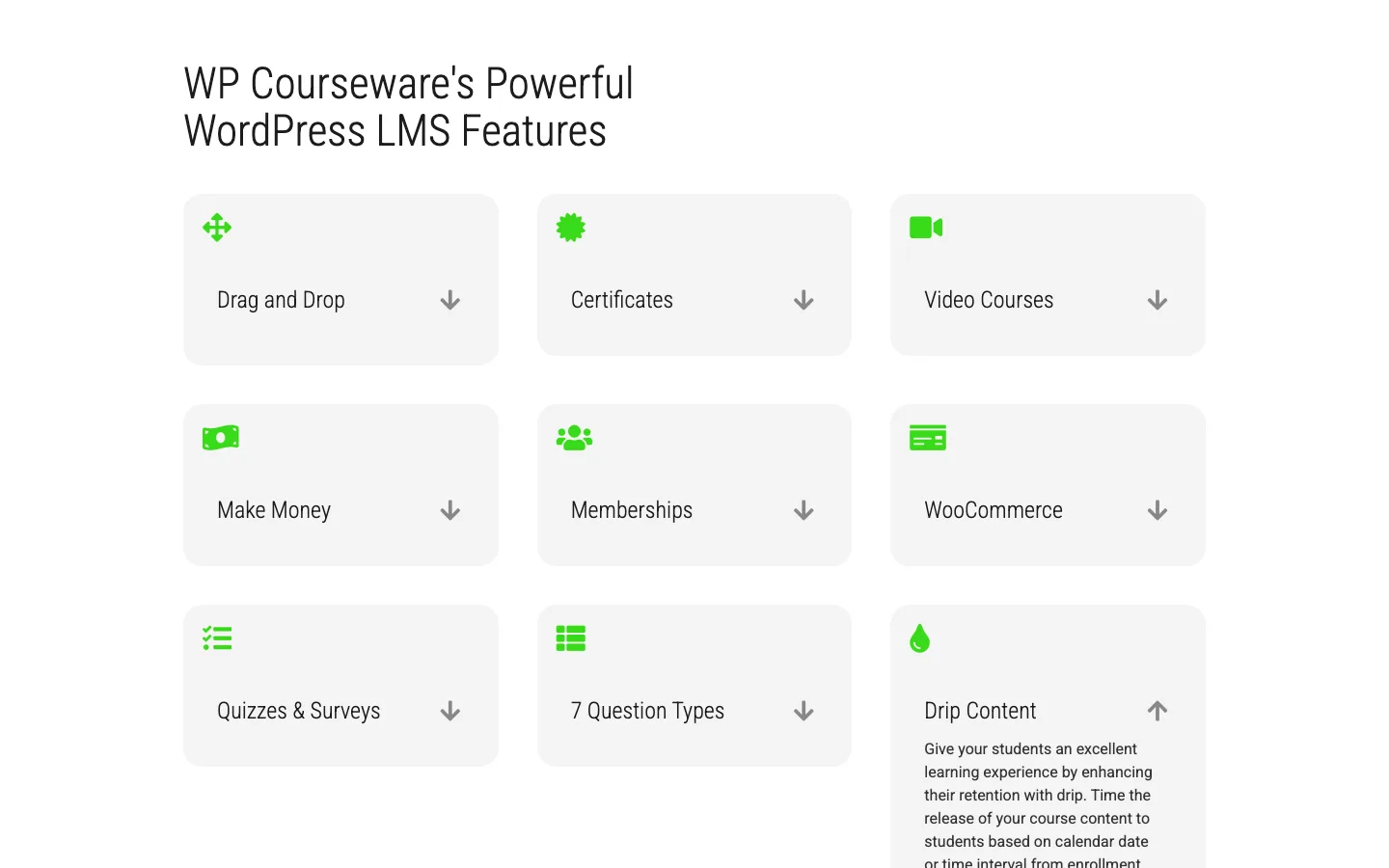
The WP Courseware feature list on the Fly Plugins product page, October 2026.
Key Features
Course Builder
You create a course, add modules, then add units and quizzes and drag them into order. Units can be set as teaser (preview) units so visitors can sample a course before buying. The change log also lists support for Divi Theme Builder, Beaver Themer, Enfold and Thrive Architect layouts. Our Divi review and Beaver Builder review cover two of those builders.
Quizzes, Surveys and Grading
WP Courseware has three quiz modes:
- Blocking quizzes require a passing grade before the student can move on.
- Non-blocking quizzes record a score but let the student continue.
- Surveys collect answers without grading.
It offers 7 question types: multiple choice, true/false, open ended, file upload, sorting, matrix sorting and fill-in-the-blank. Open ended and file upload answers are graded by hand in the built-in grade book. Sorting, matrix sorting and fill-in-the-blank arrived in version 4.11.1, according to the change log.
Drip Content
You can release units on a calendar date or a number of days after enrollment, and require students to finish a unit before the next one opens. Every plan includes this; on Tutor LMS it is a Pro feature.
Payments, Memberships and Coupons
This is WP Courseware’s main selling point. PayPal and Stripe are built in, and the vendor says you can sell one-time payments, subscriptions, installment plans and course bundles without extra plugins. Coupons are managed from their own admin page. You can also protect ordinary pages and posts based on course enrollment, which turns a course into a simple membership site.
The pricing page compares one $159 license with “$1,600+/year in stacked WordPress plugins”. That figure is the vendor’s own, but the point holds: you do not need a separate checkout or membership plugin to start selling. For a standalone cart with order bumps and upsells, see our ThriveCart review.
Certificates, Gamification and Instructors
Students can download PDF certificates when they finish a course, and since version 4.8 certificates are built with the block editor. Version 4.9 added points, badges and a leaderboard, and 4.9.4 added student notes. Any WordPress user can be made an instructor who manages their own courses and students, and the vendor says notifications and emails go out to students automatically.
Integrations
The integrations page lists add-ons for WooCommerce (including Subscriptions and Memberships), MemberPress, Paid Memberships Pro, Restrict Content Pro, Easy Digital Downloads, WishList Member, ConvertKit, Uncanny Automator and others. The MemberPress add-on is free on WordPress.org (version 2.4, updated July 2026). WP Courseware has no forum or community feature of its own; see our list of BuddyPress alternatives for community and membership plugins that can sit next to it.
Recent Changes
Prices have dropped a lot since 2020, and the top plan now has a site cap:
- Lower prices. Teacher dropped from $250/year in 2020 to $159/year, Professor from $299/year to $199/year and Guru from $399/year to $279/year.
- Guru is capped at 25 sites. It used to be sold simply as the plan for more than 10 sites.
- Lifetime licenses are gone. The terms of service say lifetime licenses are no longer sold or supported, and older lifetime keys no longer get updates, support or new activations.
- New question types (sorting, matrix sorting, fill-in-the-blank), plus achievements, student notes and a built-in translation downloader.
- A “modern styling” toggle that the vendor says gives course pages a more current look with one switch.
- Steady maintenance. Recent releases are mostly fixes (PHP 8 warnings, page builder conflicts, course builder sorting). Version 4.18.3 came out on July 27, 2026.
The change log does not date most releases, so we cannot say which of these landed in 2024, 2025 or 2026.
WP Courseware Pricing
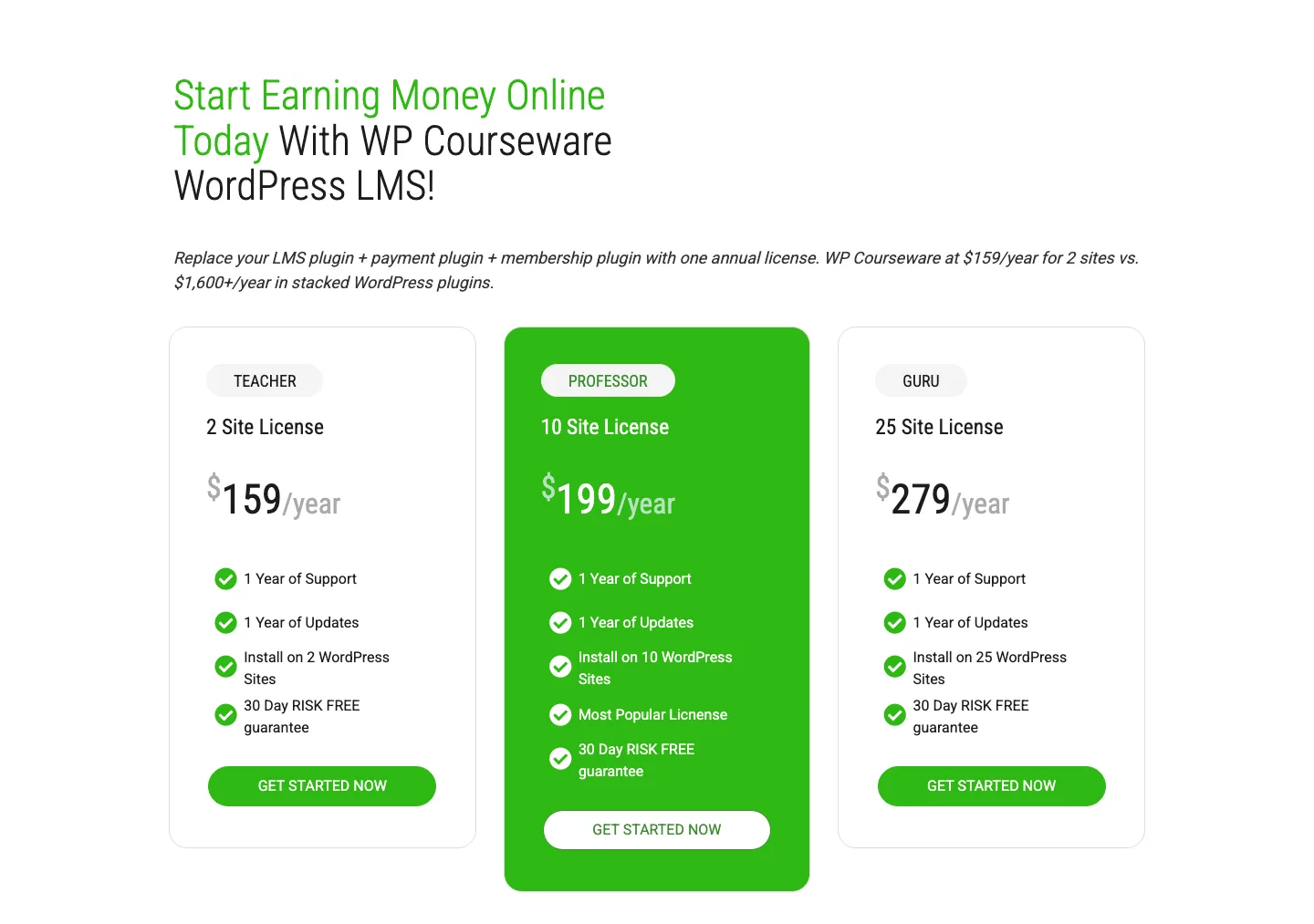
WP Courseware’s three annual licenses on the Fly Plugins pricing page, October 2026.
All three plans include every feature. The only difference is how many sites you can activate.
| Plan | Price | Sites | Includes |
|---|---|---|---|
| Teacher | $159/year | 2 | 1 year of support and updates |
| Professor | $199/year | 10 | 1 year of support and updates |
| Guru | $279/year | 25 | 1 year of support and updates |
A few license details from the vendor’s FAQ and terms:
- There is no single-site plan. The vendor says the 2-site minimum exists so you can use one activation on a staging or test site.
- The plugin keeps working if you stop renewing, but you lose updates and support.
- You can upgrade to a bigger plan by paying the difference.
- Refunds are not automatic. Fly Plugins considers requests for 30 days. The terms say “buyer’s remorse” cases (wrong product, change of mind) are generally not eligible, you should contact support first, and refunds are at Fly Plugins’ discretion. Ask pre-sale questions first.
There is no free version, but the product page offers a free online test drive (no credit card) where the vendor says you can build a course and view it as a student. We did not sign up for it.
Hands-On: Building the Same Course in Tutor LMS and LifterLMS
Because WP Courseware cannot be installed without buying it, we used two popular free LMS plugins as a reference point. On a fresh WordPress 7.1.2 test site, we built the same course in each: one section, three lessons on starting a blog, and a three-question true/false quiz. Then we logged in as a test student, enrolled, completed the first lesson and took the quiz.
Tutor LMS 4.1.0 (free)
Activating Tutor LMS opened a full-screen “Tutor LMS 4.0” welcome page, and an orange “Upgrade to Pro” item stayed in the admin menu. A notice warned that students could not sign up because WordPress registration was turned off, with a one-click “Enable” button.
The course builder splits the work into three steps: Basics, Curriculum and Additional. Adding a topic, three lessons and a quiz took a few clicks each.
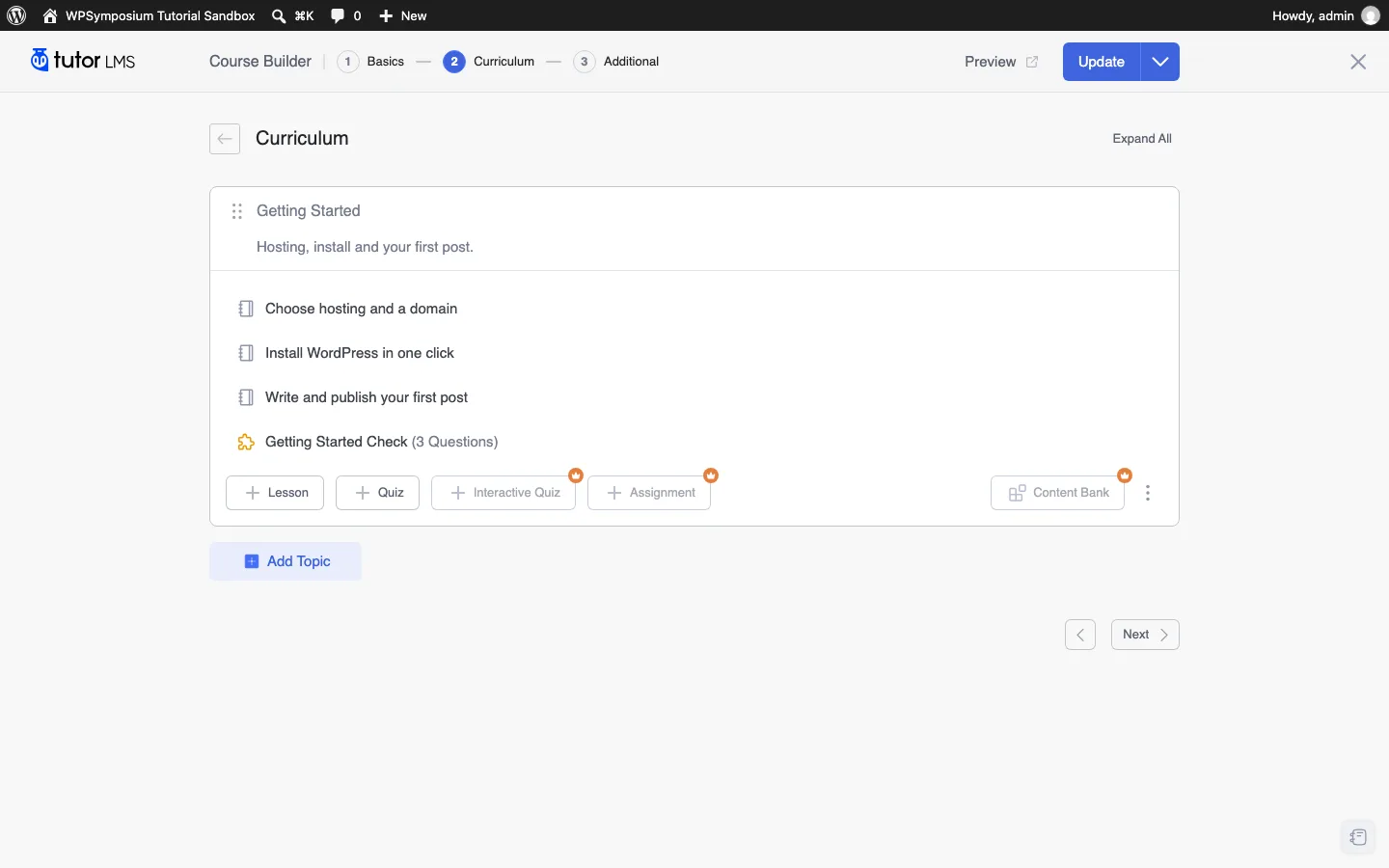
The Tutor LMS course builder on our test install, with Pro badges on Interactive Quiz, Assignment and Content Bank. Tutor LMS 4.1.0, October 2026.
The free version’s limits showed up fast:
- Question types. The quiz menu listed 13 types, but only 4 were free (true/false, multiple choice, open ended/essay and fill in the blanks). The other 9, including short answer, matching and ordering, carried a Pro badge.
- Content drip. The Content Drip tab in course options showed “Content Drip is a pro feature”.
- Add-ons. Every add-on we saw on the Addons screen was locked behind Pro, including course bundles, subscriptions, multi-instructor, assignments and course preview.
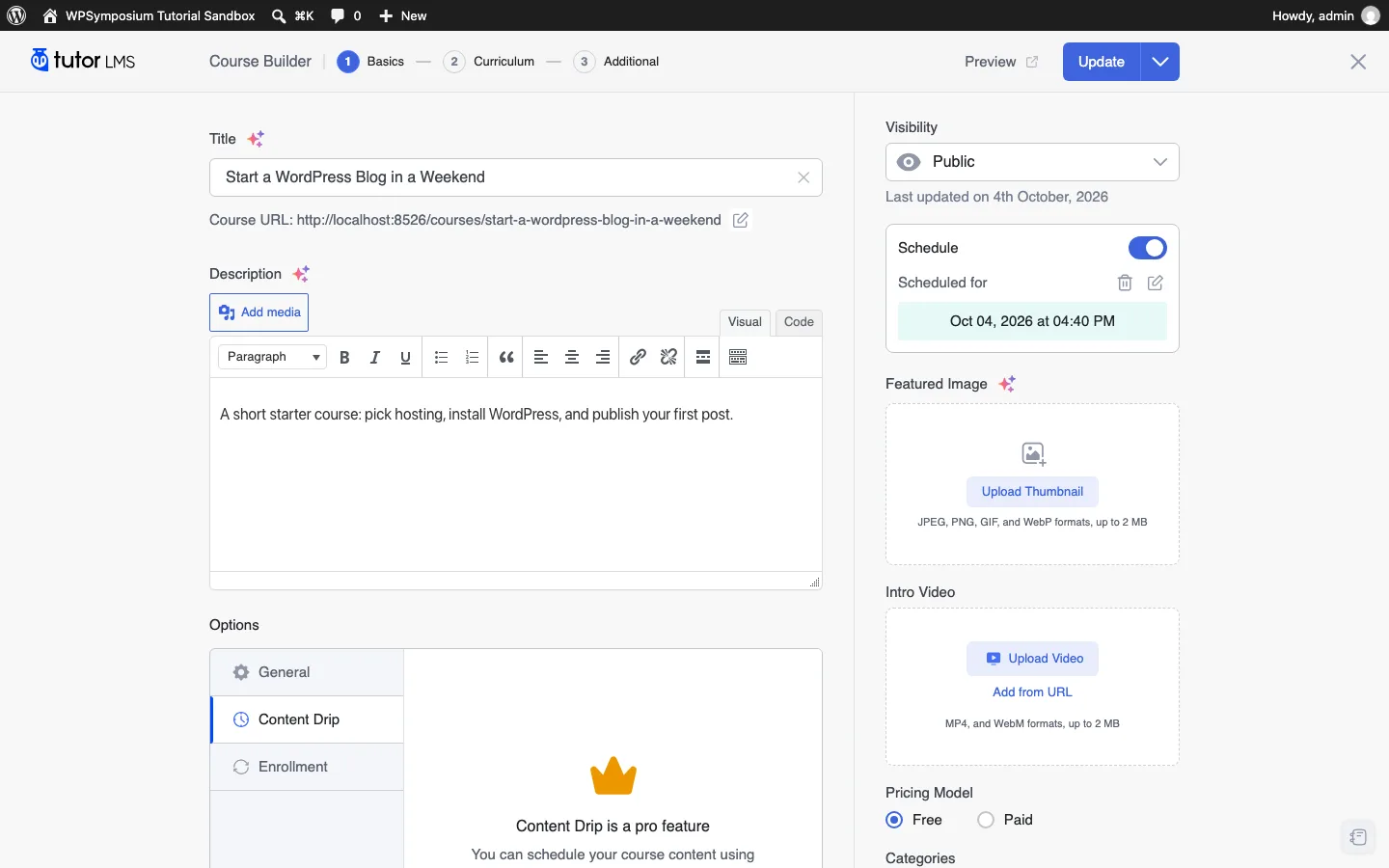
On our test install, Tutor LMS free locks content drip behind Pro. WP Courseware includes drip in every plan. Tutor LMS 4.1.0, October 2026.
On the plus side, the free version includes a native checkout with cart and checkout pages, currency settings and a free/paid pricing switch on each course. As a student, marking the first lesson complete moved the progress bar to 25% (the quiz counts as the fourth item). The quiz ran as one question per screen, and the results page showed 3 out of 3 correct, a pass against the default 80% passing grade, and a time of 8 seconds.
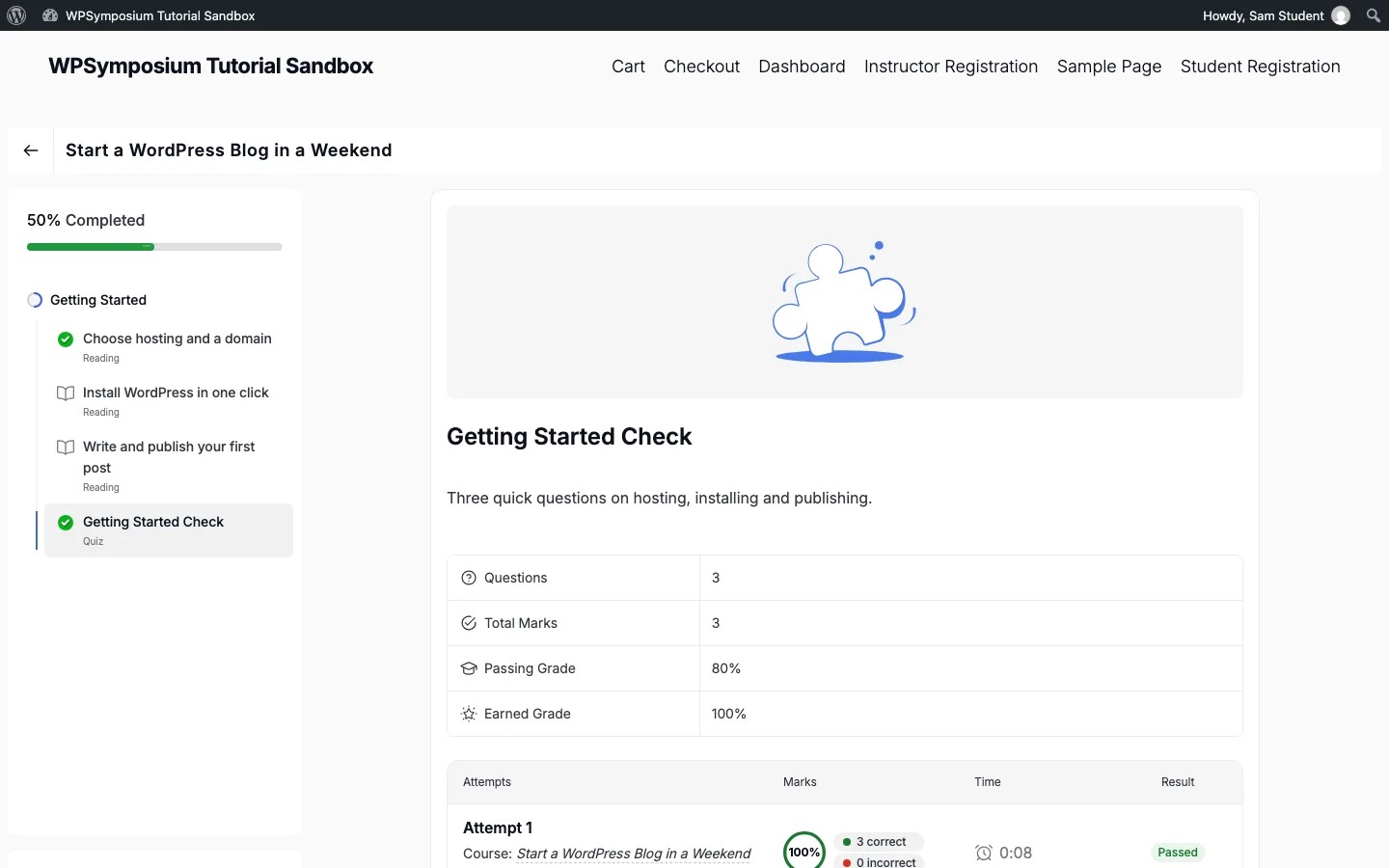
The student view after passing the quiz on our test install, with course progress at 50%. Tutor LMS 4.1.0, October 2026.
LifterLMS 10.2.1 (free)
LifterLMS opens a five-step setup wizard. It created four pages (Course Catalog, Membership Catalog, Checkout and Student Dashboard), asked for a country and currency, and then offered a coupon in exchange for usage data. We clicked “No thanks”. The Payments step says you need a payment gateway add-on to accept online payments; the free core has an offline payments option.
You create the course in the block editor, then add sections, lessons and quizzes in a separate Course Builder screen. Lesson settings in the free version include drip, prerequisites and free preview lessons.
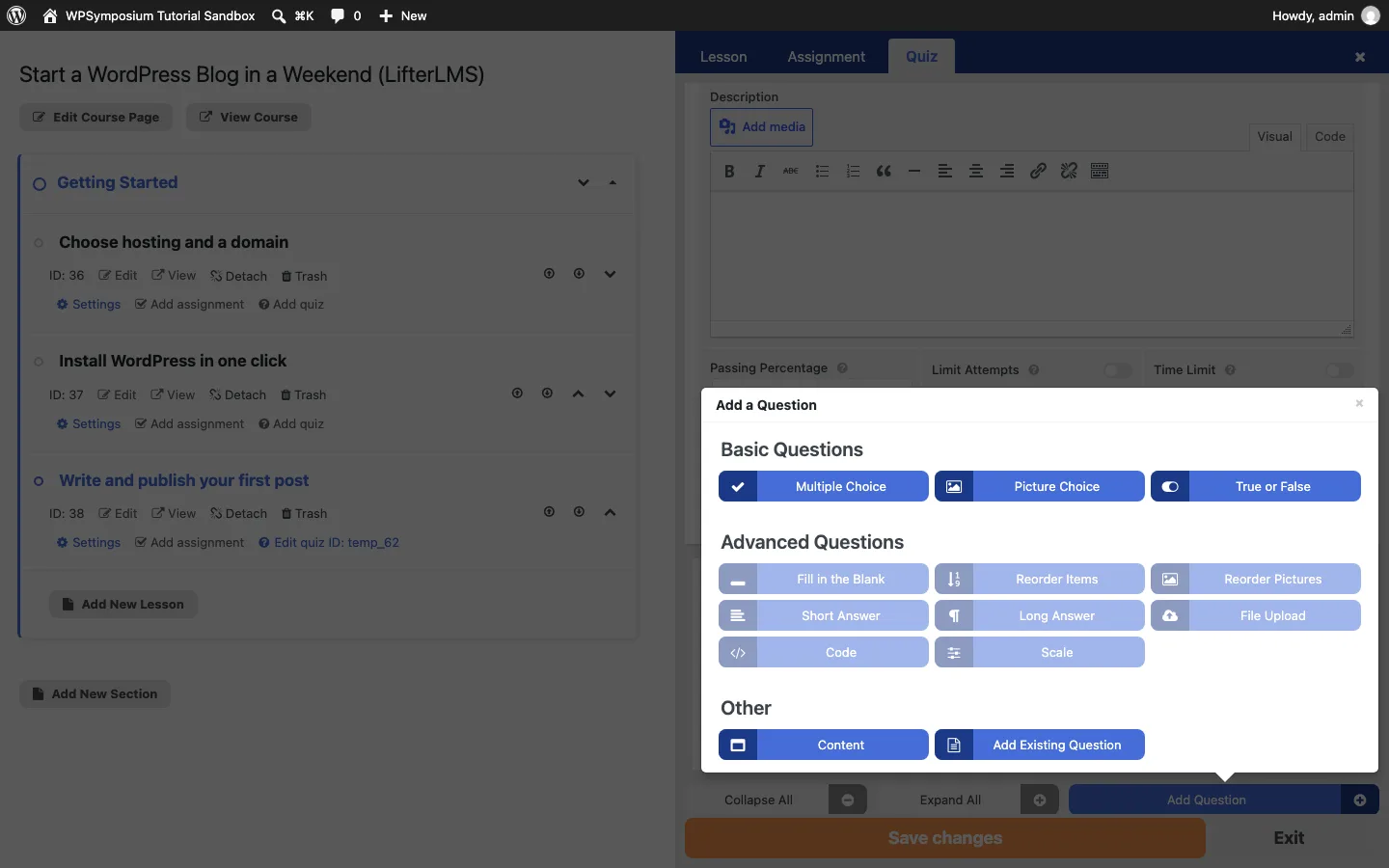
Adding a quiz question in LifterLMS on our test install: 3 basic types are free, and the 8 advanced types need a paid add-on. LifterLMS 10.2.1, October 2026.
Things that tripped us up:
- Marking correct answers. You set the right answer by clicking the small letter next to a choice. It is easy to miss: our first save had two questions marked with the wrong answer, and we only spotted it by checking again.
- No enroll button at first. A new course shows “No access plans found” until you add one. The access plan dialog offers 12 types (free, monthly, annual, one-time, lifetime, paid trial, hidden, pre-sale and others), three of them marked as add-ons.
- Free still means checkout. With a free plan, the student was sent to a checkout page that required first and last name, street address, city, state and ZIP code before enrolling.
After enrolling, “Mark Complete” on the first lesson jumped straight to the next lesson. Passing the quiz (3 of 3, 8 seconds, against a default 65% passing grade) also marked its lesson complete, and two pop-up notices congratulated the student.
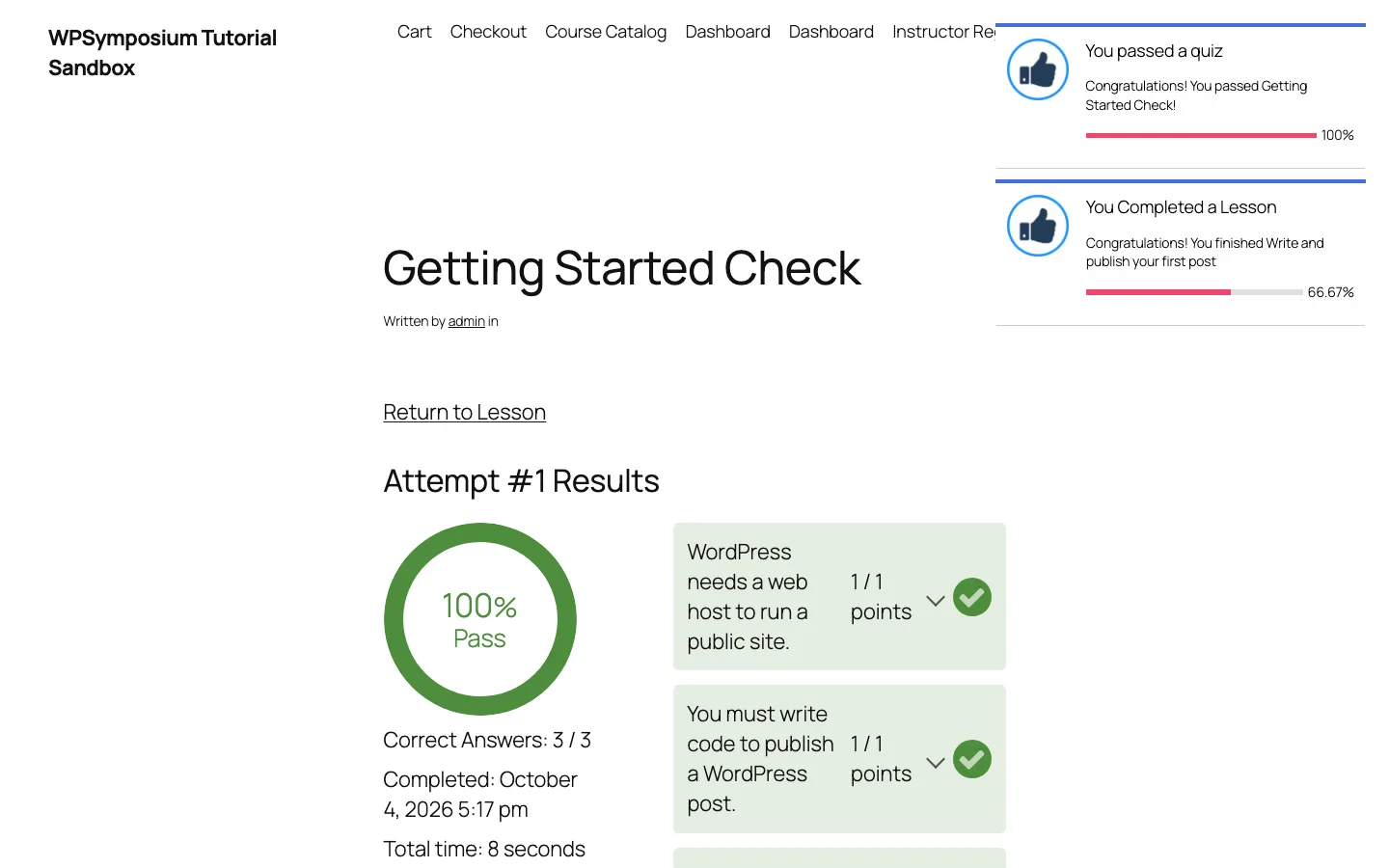
The LifterLMS quiz results page with its achievement pop-ups, seen by our test student. LifterLMS 10.2.1, October 2026.
What This Means for WP Courseware
Both free plugins can build and run a basic course. The features that matter once you start selling sit behind paid plans: drip, extra question types, bundles and subscriptions on Tutor LMS, and extra question types and online card payments on LifterLMS. WP Courseware includes all of those in its $159 license, based on the vendor’s feature list. The trade-off is that you pay from day one, and its admin screens use the standard WordPress look rather than the newer interfaces we saw in Tutor LMS.
WP Courseware vs LearnDash, Tutor LMS, LifterLMS, Sensei and MemberPress
Prices below are the vendors’ own listed prices as of October 2026, for the lowest paid plan.
| Plugin | Free version | Lowest paid plan | Sites on that plan | Refund window |
|---|---|---|---|---|
| WP Courseware | No | $159/year | 2 | 30 days (conditions apply) |
| LearnDash | No | $259/year (Essentials) | Not listed on pricing page | Not listed on pricing page |
| Tutor LMS | Yes (100,000+ active installs) | $199/year (Individual) | 1 | 30 days |
| LifterLMS | Yes (10,000+ active installs) | $199 first year (Earth), normally $398 | 1 | 30 days |
| Sensei LMS | Yes (9,000+ active installs) | $179/year (Sensei Pro) | 1 | 14 days |
| MemberPress | No | $199.50 first year (Launch), normally $399, plus a 4.9% transaction fee | Not listed on pricing page | 14 days |
LearnDash is now sold through Liquid Web’s software store, with Essentials at $259/year, Pro at $399/year and Elite at $599/year. Its plans include focus mode for learners, and the higher tiers add an AI course outline and quiz builder, advanced reporting and group leader tools. The entry plan costs $100 more than WP Courseware’s. Our Liquid Web review covers the company’s hosting, and our best managed WordPress hosting guide lists other hosts for a busy course site.
Tutor LMS has a capable free version with its own checkout, as described above. Pro costs $199/year for 1 site, $399/year for 10 sites or $799/year for unlimited sites, with lifetime options from $499.
LifterLMS has a free core, but Stripe and PayPal come with the paid bundles. Earth is $199 for the first year (normally $398, 1 site), Universe $299 (normally $598, 5 sites) and Infinity $799 (normally $1,598, unlimited sites).
Sensei LMS, made by Automattic, has a free core. An Interactive Blocks add-on costs $60/year, Sensei Pro is $179/year for 1 site, and an agency plan at $360/year covers up to 20 sites.
MemberPress is a membership plugin with a built-in course module. Launch is $199.50 for the first year plus a 4.9% fee on each payment; Growth ($349.50 first year) and Scale ($499.50 first year) remove the fee. It suits sites where memberships come first and courses second.
WP Courseware Pros and Cons
Pros
- Payments, memberships, coupons, drip and certificates are all in the base plan
- Lower entry price than LearnDash, Tutor LMS Pro, LifterLMS, Sensei Pro or MemberPress, and the 2-site minimum covers a staging site
- 7 question types, blocking quizzes, surveys and a grade book
- Long history (since 2012), with a maintenance release as recent as July 2026
- Plugin keeps working if you stop renewing
Cons
- No free version to try on your own site
- Refund terms exclude change-of-mind requests
- No WordPress.org listing, so there are no public install counts or user reviews there to judge it by
- Standard WordPress admin look; no flashy student dashboard
- No built-in forums or community features
Support and Documentation
Support runs through tickets in the Fly Plugins member portal (the vendor asks customers not to email support directly), backed by documentation and a YouTube tutorial channel. We did not open a ticket, so we cannot comment on response times.
Final Verdict
WP Courseware remains a sensible, low-cost choice in 2026 for course creators who want one paid plugin to build courses, take payments and protect content. Prices are lower than they were in 2020, every feature is in every plan, and it is still maintained, with the latest release in July 2026. Choose Tutor LMS if you want to start free, LearnDash if you need the biggest ecosystem and group tools, and MemberPress if your business is a membership first.
FAQ
How much does WP Courseware cost?
As of October 2026, WP Courseware costs $159/year for 2 sites, $199/year for 10 sites or $279/year for 25 sites. Every plan includes all features plus 1 year of updates and support.
Is there a free version of WP Courseware?
No. Fly Plugins does not offer a free plugin or a free trial download. It does offer a free online test drive with no credit card required, and a 30-day money-back guarantee with conditions.
Does WP Courseware take payments without WooCommerce?
Yes. PayPal and Stripe are built in, and the vendor says you can sell one-time payments, subscriptions, installments and bundles without another plugin. WooCommerce is supported if you prefer it.
Is WP Courseware better than LearnDash?
It is cheaper ($159/year vs $259/year for the entry plans) and includes payments and memberships in its base plan. LearnDash offers focus mode for learners, and its higher plans add AI course building, advanced reporting and group leader tools. For a solo creator selling a few courses, WP Courseware’s feature set is usually enough.
Can I get a refund on WP Courseware?
Refund requests are considered within 30 days of purchase. The terms say change-of-mind requests are generally not eligible, you should contact support first, and approval is at Fly Plugins’ discretion.