Best BuddyPress Alternatives (2026): BuddyBoss, PeepSo and More
BuddyBoss is the strongest starting point for a new community with groups, forums and messaging. PeepSo is better suited to adding a social feed to an existing site, while Ultimate Member focuses on profiles and directories. Existing BuddyPress users should test a switch on a copy of the site first.
Is BuddyPress Still Worth Using in 2026?
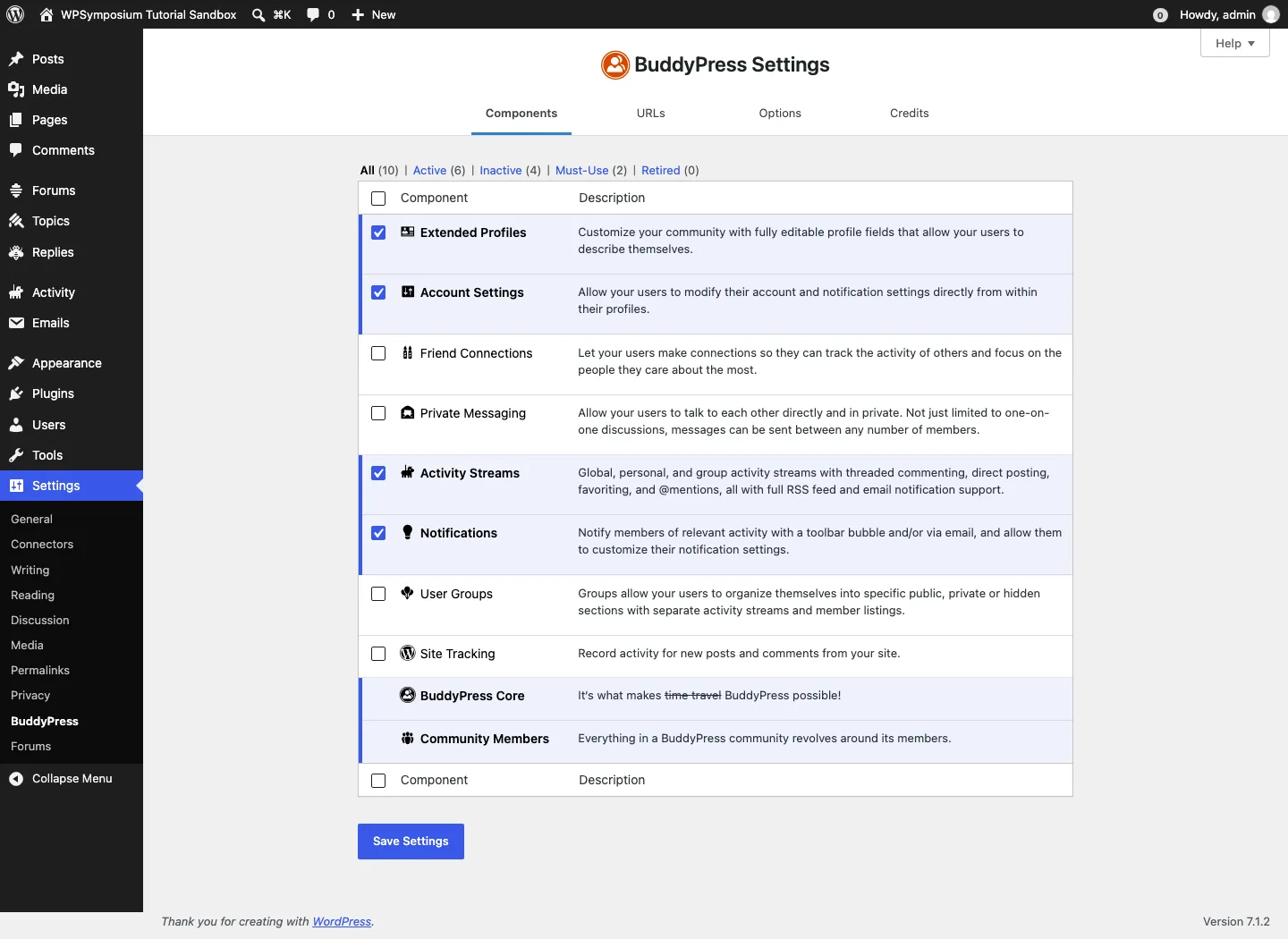
The BuddyPress Components screen on a fresh install.
BuddyPress is still alive. Version 14.5.2 shipped in July 2026, it is volunteer-run and completely free. But its WordPress.org active installs now read 90,000+, down from 200,000+ in 2020, so a lot of sites have moved on.
On our test install, BuddyPress switched on six of its ten components by default: Members, Extended Profiles, Account Settings, Activity Streams, Notifications and the core. Groups, Friend Connections and Private Messaging start switched off, which surprises people who expect a social network out of the box. Ticking three boxes fixes that.
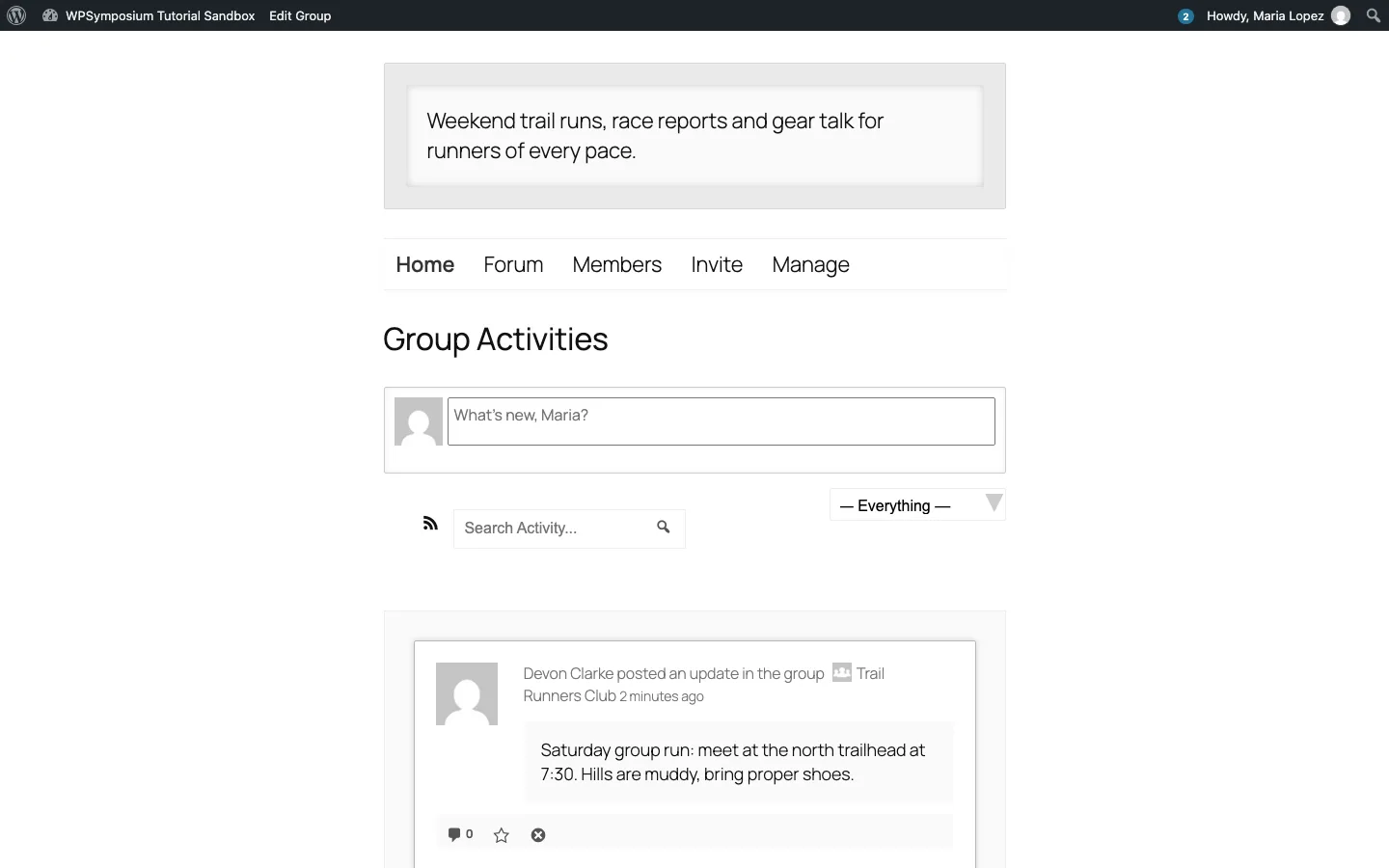
A BuddyPress group page with bbPress group forums enabled, BuddyPress on Twenty Twenty-Five.
It worked with the block theme, but the result looks plain: gray placeholder covers, wide empty space and basic buttons. That is the main reason people look for alternatives. If you want to keep BuddyPress and extend it, a few actively maintained add-ons on WordPress.org as of October 2026 (we did not install these) are Better Messages for real-time chat (10,000+ installs), BP Profile Search for member search (5,000+) and BuddyPress Docs for shared documents (6,000+).
We tried the free community tools with sample members, groups, posts, messages and forums, checking setup and common interactions. This was a short functional test, without traffic or support testing.
1. BuddyBoss: Best Overall BuddyPress Alternative
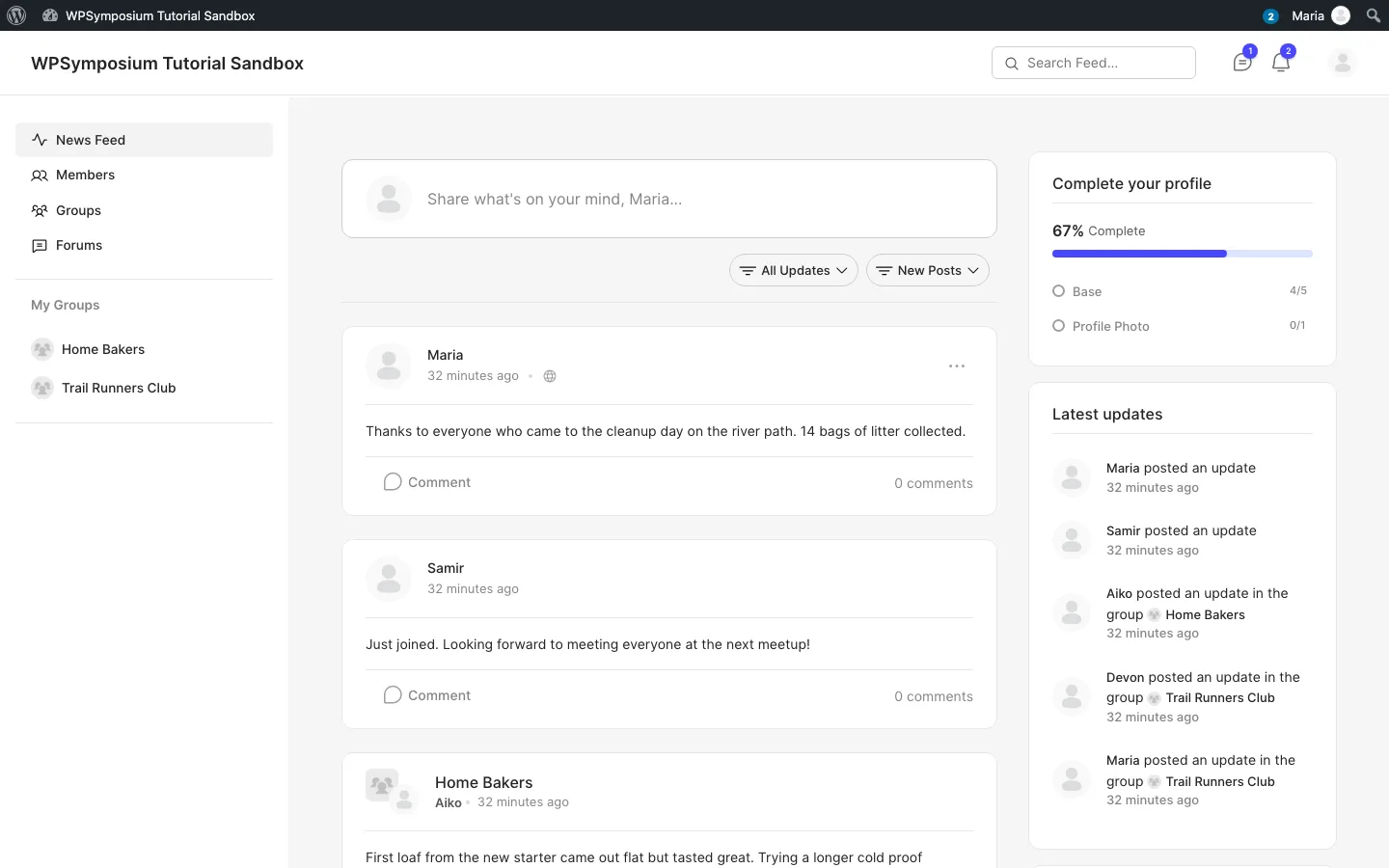
The BuddyBoss ReadyLaunch news feed on our test install, BuddyBoss Platform.
BuddyBoss says it has built products around BuddyPress and bbPress since 2011. It later forked BuddyPress and bbPress into its own plugin, BuddyBoss Platform, and now develops it on its own schedule. The vendor describes BuddyBoss as a set of plugins and a theme you install on your own WordPress site.
Is the BuddyBoss Platform plugin free? Yes. The vendor’s site offers the free Platform behind a download form, and the same free zip is published on BuddyBoss’s official GitHub releases page, where we got version 3.5.1 without signing up for anything. The paid plans add the BuddyBoss Theme, integrations and extra features.
What we found on the test install
- Do not activate it next to BuddyPress. With BuddyPress still active, activating BuddyBoss Platform took the whole site down with a PHP fatal error (“Cannot redeclare” a BuddyPress function). We had to deactivate BuddyPress and bbPress from the command line to get the site back. Deactivate both first, and try the switch on a copy of your site with one of the WordPress staging plugins before touching a live community.
- Your BuddyPress data carries over. Once BuddyPress was off, our three groups, their members and every activity post showed up in BuddyBoss with no import step, because the fork uses the same database tables.
- ReadyLaunch is not on by default. BuddyBoss first rendered pages through the WordPress theme, which looked about as plain as BuddyPress. One click on “Use ReadyLaunch” in Settings, Appearance switched to a full community layout with a left menu, a profile completion widget, a latest updates sidebar and group pages with member cards, as in the screenshot above. This was the most finished-looking free result of anything we installed.
- Expect some nudges. The dashboard showed a telemetry notice (usage data collection is on unless you change it under the advanced settings), a “Register your email” promo for the Memberships and Courses feature, and a notice asking us to repair a missing Forums page. Gamification and member blogging are listed in settings with an “Upgrade Scale” label.
BuddyBoss pricing (October 2026)
The BuddyBoss pricing page lists three web plans, each with a 50% discount in the first year and a 14-day money-back guarantee:
BuddyBoss Start costs $99 in year one and renews at $199 a year. It adds Memberships and Courses with a 2.9% fee, ReadyLaunch, reactions, polls and media uploads. Launch costs $199 initially and $399 at renewal, adding BuddyBoss Theme, integrations with LearnDash, MemberPress, Tutor LMS and LifterLMS, real-time messaging and removal of that fee.
Scale costs $349 in year one and $699 at renewal. It adds points, badges, leaderboards, Cloudflare media offload and member blogs. Budget against the renewal price rather than the introductory discount.
One license covers one production site, and extra site licenses are $99 each. The branded iOS and Android app is a separate subscription, starting at $499 for the first year on one store (renews at $999). The vendor recommends a managed host with dedicated resources rather than shared hosting; our managed WordPress hosting guide covers options.
BuddyPress vs BuddyBoss
The short version, from our test install and the vendors’ documentation:
BuddyPress is maintained by volunteer contributors and is fully free, with a large free and paid add-on ecosystem. Forums need the separate bbPress plugin, while media uploads, reactions and moderation generally need add-ons. Its appearance depends on your theme.
BuddyBoss is commercial, with a free Platform edition and paid plans from $99 for the first year. It bundles a bbPress-derived forum, media, reactions and moderation, and offers ReadyLaunch or BuddyBoss Theme for presentation. The vendor says most BuddyPress plugins are compatible. Our existing BuddyPress groups and posts appeared after switching, but activating both platforms at once crashed the test site.
Choose BuddyPress if budget is zero and you are happy assembling add-ons. Choose BuddyBoss for a polished community quickly, with the option to pay for the theme, courses or an app later.
2. PeepSo: Best Facebook-Style Feed
PeepSo is a standalone community plugin with a modern feed that fitted our existing theme. Members could post updates with polls, GIFs, moods and reactions. Its WordPress.org listing closed at the author’s request; downloads and updates now come directly from PeepSo.
The free core needs its separate Free Bundle for groups, friends, photos and chat. Those features worked in our test without payment, but accepting the bundle also accepts sharing administrator email addresses for marketing, visible branding and the possibility of feed ads. We saw no ads during the session. Free users get documentation rather than technical support.
Friend requests, private-group approvals and photo uploads worked. Chat usually updated promptly, but one message was delayed and the full Messages page sometimes needed a reload. On a second install, activation required changing away from plain permalinks.
Community costs $149 a year and adds features including white labeling and social login. Ultimate costs $249 and adds the mobile app and further integrations; lifetime options are also listed. The free bundle is generous, provided its terms and support limits suit your community.
3. Ultimate Member: Best for Profiles and Member Directories
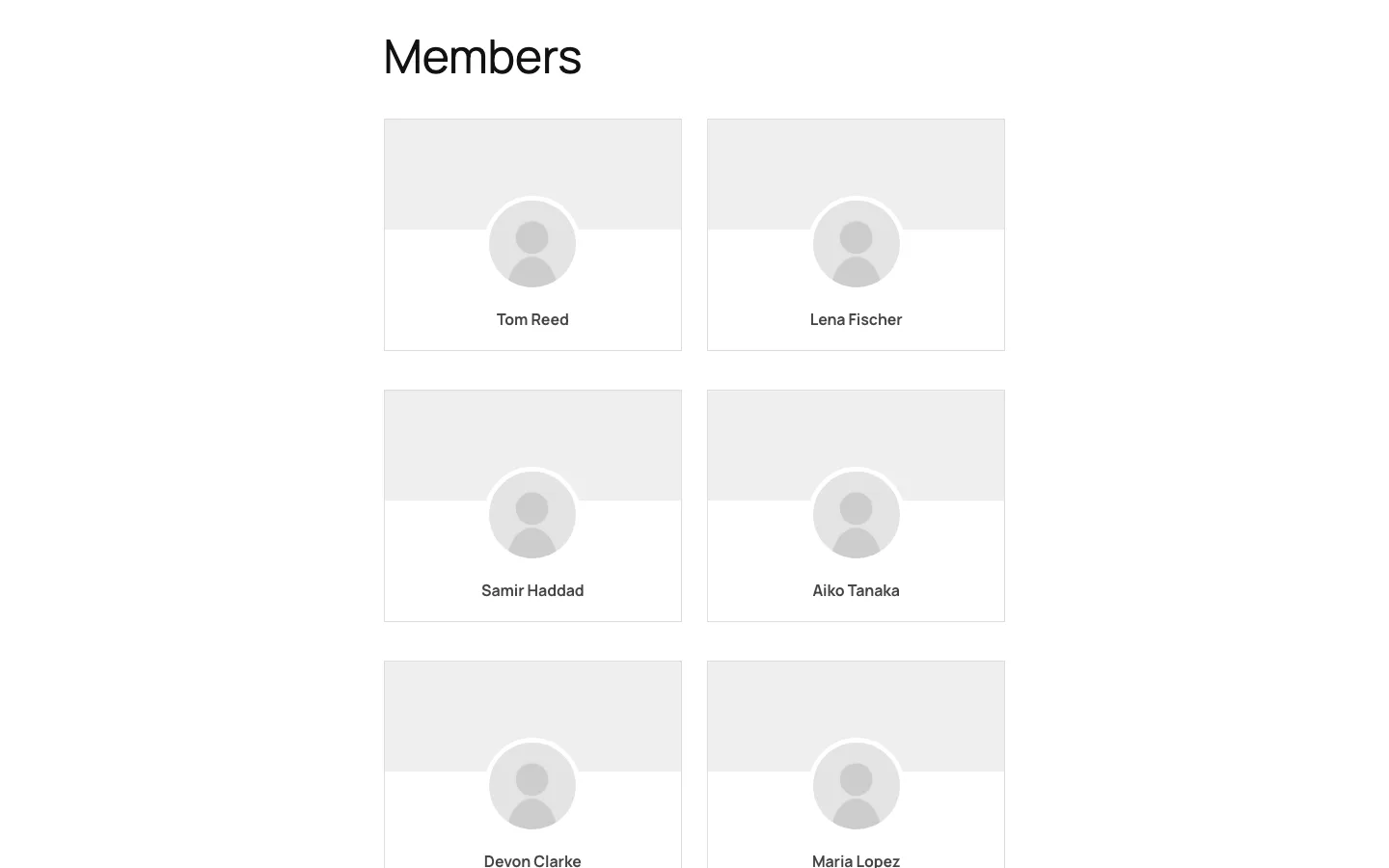
The Ultimate Member directory after we enabled the Subscriber role.
Ultimate Member is the most installed plugin in this list, with 200,000+ active installs as of October 2026. It is not a social network. The free plugin covers front-end registration and login forms, user profiles, account pages, member directories and content restriction. There is no activity feed or groups in the free core.
What we found on the test install
- One-click page setup. After activation, a notice offered to create seven pages (profile, account, registration, login, password reset, logout, members). Clicking “Create Pages” took about two seconds.
- Registration works out of the box. We registered a new member through the front-end form. The account was approved automatically and landed on its new profile page.
- The default directory needed a tweak. The Members page first showed no one, even when logged in as admin. The default directory is set to logged-in visitors only. After we opened it in the admin, ticked the Subscriber role and saved, all six members appeared.
Ultimate Member pricing (October 2026)
The core plugin is free. The Standard plan is $276 a year (21 extensions, one site), and Pro is $348 a year (adds Stripe and Zapier integrations, two sites and the Ultimate Member theme). Both come with a 30-day money-back guarantee.
4. Youzify: Best Way to Make BuddyPress Look Better
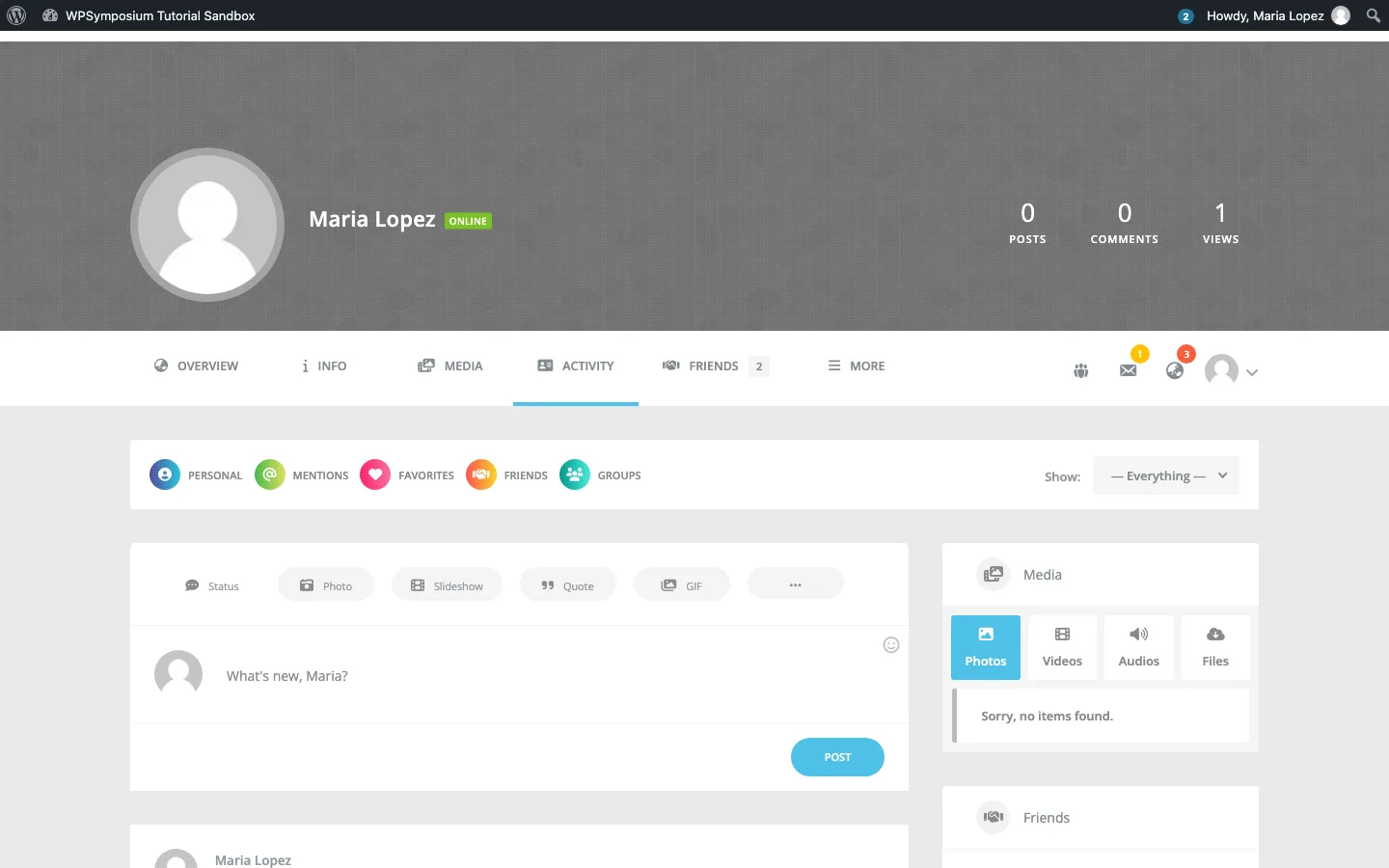
A member profile after installing Youzify on top of BuddyPress, Youzify.
Youzify is not a replacement for BuddyPress. It is a free BuddyPress plugin that restyles profiles, groups and activity (the vendor says it adds more than 700 options), which fixes BuddyPress’s biggest weakness: the plain look.
What we found on the test install
- Instant visual upgrade. With BuddyPress already set up, activating Youzify turned profiles and groups into cover-style pages with stats, tabbed navigation and a richer post box (status, photo, slideshow, quote, GIF).
- Heavy upsell banner. A full-width “price increase” banner for Youzify Pro took over the WordPress dashboard and the Youzify settings page. Closing it did not stick; it came back on the next page load. The banner quoted $62 one-time for Pro, while the WordPress.org listing quoted $49.
- Maintenance is slowing. The last update was March 15, 2026, and WordPress.org marks it as tested up to 6.9.9 while WordPress is now on 7.1. It ran on our 7.1.2 site, but that gap is worth watching.
5. MemberPress: Best for Paid Memberships With a Community
MemberPress is a paid-only membership plugin, so this section is based on the vendor’s published details, not our test install. Its pricing page in October 2026 lists Launch at $199.50 for the first year (normally $399, with a 4.9% transaction fee), Growth at $349.50 (normally $699) and Scale at $499.50 (normally $999), with renewals at full price. Growth adds community forums (ClubCircles) and Scale adds direct messaging (ClubConnect). It also includes a course builder; if courses are your main product, our WP Courseware review looks at a plugin built just for that.
6. UserPro: Budget Profiles and Social Login
UserPro is a paid plugin sold on CodeCanyon for $39, with 20,900+ sales as of October 2026. This section is based on its CodeCanyon listing, since there is no free version to install. It focuses on custom registration forms, profiles, social login and badges, and its changelog shows regular updates through version 5.1.15 on October 2, 2026. It suits sites that want nicer profiles and social login, not a full social network.
Also Worth a Look: FluentCommunity
FluentCommunity is a newer free plugin on WordPress.org (8,000+ active installs, updated September 18, 2026). On our test install it installed and activated in under 20 seconds and served a full-screen community “portal” at /portal/ with a feed, spaces and members, separate from the theme. It did not pick up our BuddyPress data. Paid plans start at $199 a year for one site, with a first-year discount running when we checked. It is a good fit for a fresh community that does not need BuddyPress compatibility.
When bbPress Is the Right Choice
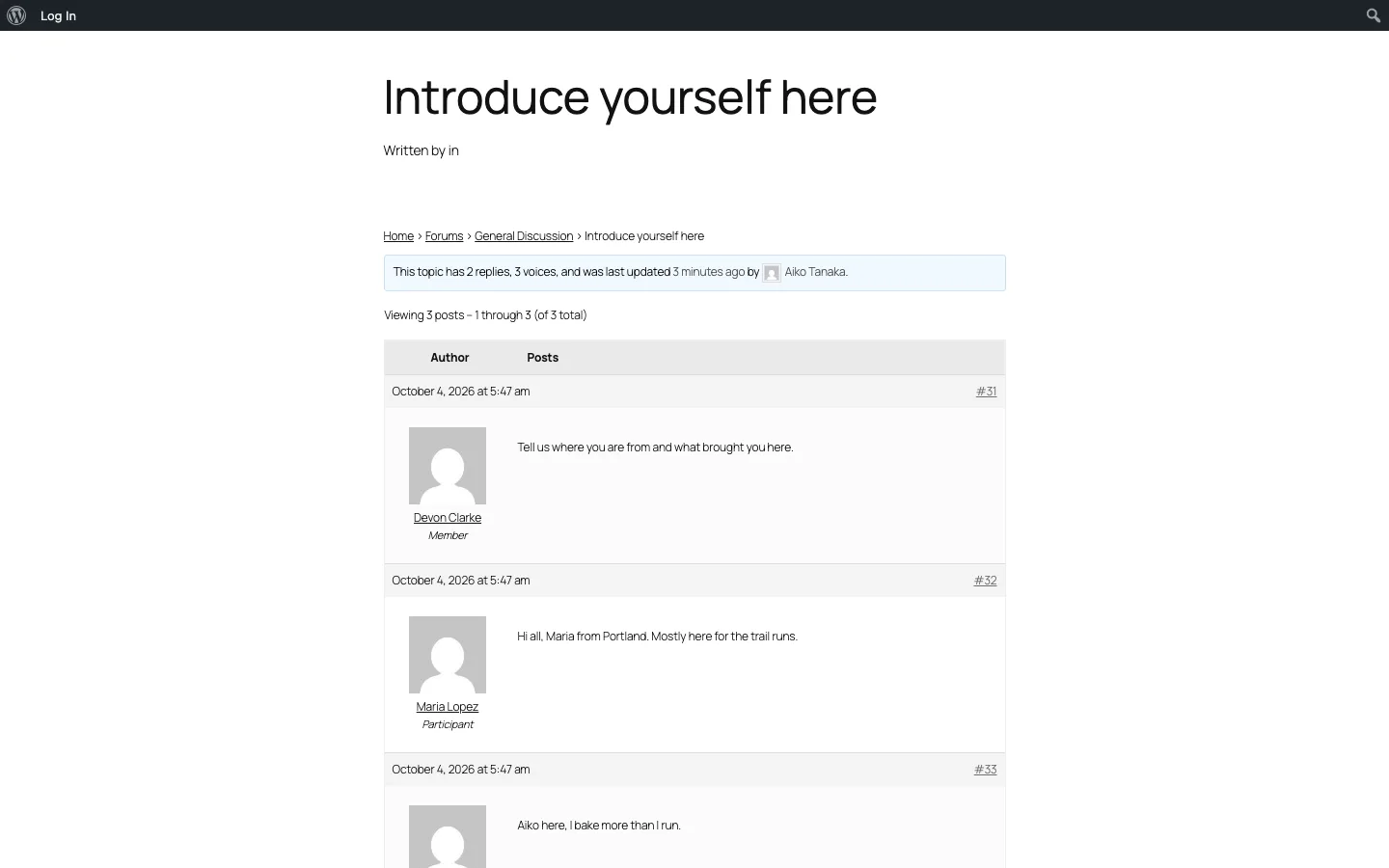
A bbPress topic on our test site, bbPress on Twenty Twenty-Five.
bbPress is free forum software built by WordPress contributors, like BuddyPress. It has 100,000+ active installs and was updated on September 29, 2026. It does one thing: threaded discussion boards with forums, topics and replies.
Choose bbPress instead of a social plugin when:
- You want a support forum or Q&A board, not profiles and feeds.
- Members come to read and answer questions, not to follow each other.
Choose BuddyPress plus bbPress when you want both: on our test install, enabling both added a Forum tab to every BuddyPress group. Two things we noticed: with debugging switched on, bbPress pages showed a notice about a BuddyPress function deprecated since BuddyPress 12, and on the block theme the topic template printed a stray “Written by in” line. Neither breaks anything, but the combination is not as polished as BuddyBoss, which has forums built in.